odometer GMC ACADIA 2022 Owners Manual
[x] Cancel search | Manufacturer: GMC, Model Year: 2022, Model line: ACADIA, Model: GMC ACADIA 2022Pages: 397, PDF Size: 6.98 MB
Page 91 of 397

GMC Acadia/Acadia Denali Owner Manual (GMNA-Localizing-U.S./Canada/
Mexico-15170041) - 2022 - CRC - 10/6/21
90 Instruments and Controls
Instruments and Controls
Controls
Steering Wheel Adjustment . . . . . . . . . . . . . 91
Steering Wheel Controls . . . . . . . . . . . . . . . . 91
Heated Steering Wheel . . . . . . . . . . . . . . . . . 91
Horn . . . . . . . . . . . . . . . . . . . . . . . . . . . . . . . . . . . 92
Windshield Wiper/Washer . . . . . . . . . . . . . . 92
Rear Window Wiper/Washer . . . . . . . . . . . 93
Compass . . . . . . . . . . . . . . . . . . . . . . . . . . . . . . . 94
Clock . . . . . . . . . . . . . . . . . . . . . . . . . . . . . . . . . . . 94
Power Outlets . . . . . . . . . . . . . . . . . . . . . . . . . . 94
Wireless Charging . . . . . . . . . . . . . . . . . . . . . . 95
Warning Lights, Gauges, and Indicators
Warning Lights, Gauges, andIndicators . . . . . . . . . . . . . . . . . . . . . . . . . . . . . 97
Instrument Cluster (Base and Midlevel) . . . . . . . . . . . . . . . . . . . . . . . . . . . . . 98
Instrument Cluster (Uplevel) . . . . . . . . . . . 101
Speedometer . . . . . . . . . . . . . . . . . . . . . . . . . . 103
Odometer . . . . . . . . . . . . . . . . . . . . . . . . . . . . . 103
Trip Odometer . . . . . . . . . . . . . . . . . . . . . . . . . 103
Tachometer . . . . . . . . . . . . . . . . . . . . . . . . . . . . 103
Fuel Gauge . . . . . . . . . . . . . . . . . . . . . . . . . . . . 103
Engine Oil Temperature Gauge (Uplevel only) . . . . . . . . . . . . . . . . . . . . . . . 104
Engine Coolant Temperature Gauge . . . 105
Voltmeter Gauge (Uplevel only) . . . . . . . 105
Seat Belt Reminders . . . . . . . . . . . . . . . . . . . 106 Airbag Readiness Light . . . . . . . . . . . . . . . . 106
Passenger Airbag Status Indicator . . . . . 107
Charging System Light . . . . . . . . . . . . . . . . 108
Malfunction Indicator Lamp (Check
Engine Light) . . . . . . . . . . . . . . . . . . . . . . . . 108
Brake System Warning Light . . . . . . . . . . 109
Electric Parking Brake Light . . . . . . . . . . . . 110
Service Electric Parking Brake Light (Uplevel and Midlevel
Cluster Only) . . . . . . . . . . . . . . . . . . . . . . . . . 110
Antilock Brake System (ABS) Warning Light . . . . . . . . . . . . . . . . . . . . . . . . . . . . . . . . . . 111
Gear Shifting Light . . . . . . . . . . . . . . . . . . . . . 111
Hill Descent Control Light . . . . . . . . . . . . . . 111
Lane Keep Assist (LKA) Light . . . . . . . . . . . . 111
Vehicle Ahead Indicator . . . . . . . . . . . . . . . . 112
Pedestrian Ahead Indicator . . . . . . . . . . . . . 112
Traction Off Light . . . . . . . . . . . . . . . . . . . . . . 112
StabiliTrak OFF Light . . . . . . . . . . . . . . . . . . . 112
Traction Control System (TCS)/ StabiliTrak Light . . . . . . . . . . . . . . . . . . . . . . 113
Engine Coolant Temperature Warning Light . . . . . . . . . . . . . . . . . . . . . . . . . . . . . . . . . 113
Driver Mode Control Light . . . . . . . . . . . . . 113
Tire Pressure Light . . . . . . . . . . . . . . . . . . . . . 114
Engine Oil Pressure Light . . . . . . . . . . . . . . 114
Low Fuel Warning Light . . . . . . . . . . . . . . . . 115
Security Light . . . . . . . . . . . . . . . . . . . . . . . . . . 115
High-Beam On Light . . . . . . . . . . . . . . . . . . . . 115
Front Fog Lamp Light . . . . . . . . . . . . . . . . . . 115 Lamps On Reminder . . . . . . . . . . . . . . . . . . . . 115
Cruise Control Light . . . . . . . . . . . . . . . . . . . . 116
Door Ajar Light . . . . . . . . . . . . . . . . . . . . . . . . 116
Information Displays
Driver Information Center (DIC) (Base
Level) . . . . . . . . . . . . . . . . . . . . . . . . . . . . . . . . 116
Driver Information Center (DIC) (Midlevel and Uplevel) . . . . . . . . . . . . . . . 118
Head-Up Display (HUD) . . . . . . . . . . . . . . . . 120
Vehicle Messages
Vehicle Messages . . . . . . . . . . . . . . . . . . . . . . 123
Engine Power Messages . . . . . . . . . . . . . . . 124
Vehicle Speed Messages . . . . . . . . . . . . . . . 124
Vehicle Personalization
Vehicle Personalization . . . . . . . . . . . . . . . . 124
Universal Remote System
Universal Remote System . . . . . . . . . . . . . . 128
Universal Remote System Programming . . . . . . . . . . . . . . . . . . . . . . . . 128
Universal Remote System Operation . . . 130
Page 104 of 397
GMC Acadia/Acadia Denali Owner Manual (GMNA-Localizing-U.S./Canada/
Mexico-15170041) - 2022 - CRC - 10/6/21
Instruments and Controls 103
Speedometer
The speedometer shows the vehicle speed in
either kilometers per hour (km/h) or miles
per hour (mph).
Odometer
The odometer shows how far the vehicle has
been driven, in either kilometers or miles.
Trip Odometer
The trip odometer shows how far the
vehicle has been driven since the trip
odometer was last reset.
The trip odometer is accessed and reset
through the Driver Information Center (DIC).
SeeDriver Information Center (DIC) (Base
Level) 0116 or
Driver Information Center (DIC) (Midlevel and
Uplevel) 0118.
Tachometer
The tachometer displays the engine speed in
revolutions per minute (rpm).
For vehicles with the Stop/Start system,
when the ignition is on, the tachometer
indicates the vehicle status. When pointing
to AUTO STOP, the engine is off but the vehicle is on and can move. The engine
could auto start at any time. When the
indicator points to OFF, the vehicle is off.
When the engine is on, the tachometer will
indicate the engine’s revolutions per minute
(rpm). The tachometer may vary by several
hundred rpm, during Auto Stop mode, when
the engine is shutting off and restarting.
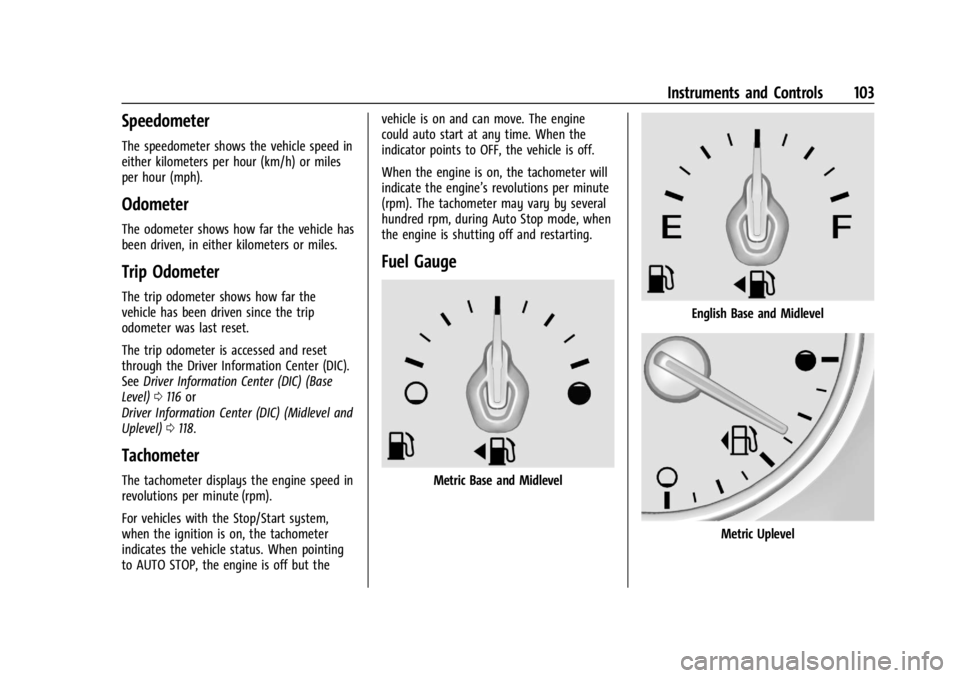
Fuel Gauge
Metric Base and Midlevel
English Base and Midlevel
Metric Uplevel
Page 118 of 397
GMC Acadia/Acadia Denali Owner Manual (GMNA-Localizing-U.S./Canada/
Mexico-15170041) - 2022 - CRC - 10/6/21
Instruments and Controls 117
3. PressVto enter the Options menu.
4. Scroll to Info Pages and press
p.
5. Press
worxto move through the list
of possible information displays.
6. Press
Vwhile an item is highlighted to
select or deselect that item. When an
item is selected, a checkmark will appear
next to it.
DIC Info Pages
The following is the list of all possible DIC
info page displays. Some may not be
available for your particular vehicle. Some
items may not be turned on by default but
can be turned on through the Options app.
See “DIC Info Page Options” earlier in this
section.
Speed : Shows the vehicle speed in either
kilometers per hour (km/h) or miles per
hour (mph). A speed limit sign can also be
shown, if equipped.
Trip A or Trip B : Shows the current distance
traveled, in either kilometers (km) or
miles (mi), since the trip odometer was last
reset. This also shows the approximate average
liters per 100 kilometers (L/100 km) or miles
per gallon (mpg). This number is calculated
based on the number of L/100 km (mpg)
recorded since the last time this menu item
was reset. This number reflects only the
approximate average fuel economy that the
vehicle has right now, and will change as
driving conditions change.
Press and hold
Vwhile this display is active
to reset the trip odometer and the average
fuel economy. Trip A and Trip B can also be
reset by pressing
pand choosing reset.
Fuel Range : Shows the approximate
distance the vehicle can be driven without
refueling. LOW will be displayed when the
vehicle is low on fuel. The fuel range
estimate is based on an average of the
vehicle's fuel economy over recent driving
history and the amount of fuel remaining in
the fuel tank.
Remaining Oil Life : Shows an estimate of
the oil's remaining useful life. If REMAINING
OIL LIFE 99% is displayed, that means 99%
of the current oil life remains.
When the remaining oil life is low, the
CHANGE ENGINE OIL SOON message will
appear on the display. The oil should be changed as soon as possible. See
Engine Oil
0 275. In addition to the engine oil life
system monitoring the oil life, additional
maintenance is recommended in the
Maintenance Schedule. See Maintenance
Schedule 0348.
The Oil Life display must be reset after each
oil change. It will not reset itself. Do not to
reset the Oil Life display at any time other
than when the oil has just been changed.
It cannot be reset accurately until the next
oil change. To reset, see Engine Oil Life
System 0277.
Tire Pressure : Shows the approximate
pressures of all four tires. Tire pressure is
displayed in either kilopascal (kPa) or in
pounds per square inch (psi). If the pressure
is low, the value for that tire is shown in
amber. See Tire Pressure Monitor System
0 309 and
Tire Pressure Monitor Operation 0310.
Average Vehicle Speed : Displays the
average vehicle speed of the vehicle in
kilometers per hour (km/h) or miles per
hour (mph). This average is based on the
various vehicle speeds recorded since the
last reset. Reset the average speed by
pressing
Vwhen it is displayed.
Page 120 of 397
GMC Acadia/Acadia Denali Owner Manual (GMNA-Localizing-U.S./Canada/
Mexico-15170041) - 2022 - CRC - 10/6/21
Instruments and Controls 119
worx:Press to move up or down in
a list.
oorp: Press to move between the
interactive display zones in the cluster.
V: Press to open a menu or select a menu
item. Press and hold to reset values on
certain screens.
DIC Info Page Options
The info pages on the DIC can be turned on
or off through the Options menu.
1. Press
pto go to the Options
application.
2. Press
Vto enter the Options menu.
3. Press
worxto move through the list
of possible information displays.
4. Press
Vwhile an item is highlighted to
select or deselect that item. When an
item is selected, a checkmark will appear
next to it.
DIC Info Pages
The following is the list of all possible DIC
info page displays. Some may not be
available for your particular vehicle. Some
items may not be turned on by default but can be turned on through the Options app.
See
“DIC Info Page Options” earlier in this
section.
Speed : Shows the vehicle speed in either
kilometers per hour (km/h) or miles per
hour (mph). The vehicle odometer is also
shown on this page.
Trip A or Trip B, Average Fuel Economy, and
Average Speed : Shows the current distance
traveled, in either kilometers (km) or
miles (mi), since the trip odometer was last
reset.
The Average Fuel Economy display shows
the approximate average liters per
100 kilometers (L/100 km) or miles per
gallon (mpg). This number is calculated
based on the number of L/100 km (mpg)
recorded since the last time this menu item
was reset. This number reflects only the
approximate average fuel economy that the
vehicle has right now, and will change as
driving conditions change.
The Average Speed display shows the
average speed of the vehicle in kilometers
per hour (km/h) or miles per hour (mph).
This average is calculated based on the
various vehicle speeds recorded since the
last reset of this value. Press and hold
Vwhile this display is active
to reset the trip odometer, the average fuel
economy, and the average speed. Or press
pand select reset in the menu.
Fuel Range and Instantaneous Fuel
Economy : Shows the approximate distance
the vehicle can be driven without refueling.
LOW will be displayed when the vehicle is
low on fuel. The fuel range estimate is
based on an average of the vehicle's fuel
economy over recent driving history and the
amount of fuel remaining in the fuel tank.
The Instantaneous Fuel Economy display
shows the current fuel economy in either
liters per 100 kilometers (L/100 km) or miles
per gallon (mpg). This number reflects only
the approximate fuel economy that the
vehicle has right now and changes
frequently as driving conditions change.
Timer : Can be used as a timer. To start the
timer, press
Vwhile this display is active.
The display will show the amount of time
that has passed since the timer was last
reset. To stop the timer, press
Vbriefly
while this display is active and the timer is
running. To reset the timer to zero, press
and hold
Vwhile this display is active.
Page 319 of 397
GMC Acadia/Acadia Denali Owner Manual (GMNA-Localizing-U.S./Canada/
Mexico-15170041) - 2022 - CRC - 10/6/21
318 Vehicle Care
corresponds to a level of performance
which all passenger car tires must meet
under the Federal Motor Safety
Standard No. 109. Grades B and A
represent higher levels of performance
on the laboratory test wheel than the
minimum required by law. Warning:
The temperature grade for this tire is
established for a tire that is properly
inflated and not overloaded. Excessive
speed, underinflation, or excessive
loading, either separately or in
combination, can cause heat buildup
and possible tire failure.
Wheel Alignment and Tire
Balance
The tires and wheels were aligned and
balanced at the factory to provide the
longest tire life and best overall
performance. Adjustments to wheel
alignment and tire balancing are not
necessary on a regular basis. Consider an
alignment check if there is unusual tire wear
or the vehicle is significantly pulling to one
side or the other. Some slight pull to the
left or right, depending on the crown of the
road and/or other road surface variationssuch as troughs or ruts, is normal. If the
vehicle is vibrating when driving on a
smooth road, the tires and wheels may
need to be rebalanced. See your dealer for
proper diagnosis.
Wheel Replacement
Replace any wheel that is bent, cracked,
or badly rusted or corroded. If wheel nuts
keep coming loose, the wheel, wheel bolts,
and wheel nuts should be replaced. If the
wheel leaks air, replace it. Some aluminum
wheels can be repaired. See your dealer if
any of these conditions exist.
Your dealer will know the kind of wheel that
is needed.
Each new wheel should have the same
load-carrying capacity, diameter, width,
offset, and be mounted the same way as
the one it replaces.
Replace wheels, wheel bolts, wheel nuts,
or Tire Pressure Monitor System (TPMS)
sensors with new GM original equipment
parts.
{Warning
Using the wrong replacement wheels,
wheel bolts, or wheel nuts can be
dangerous. It could affect the braking and
handling of the vehicle. Tires can lose air,
and cause loss of control, causing a crash.
Always use the correct wheel, wheel
bolts, and wheel nuts for replacement.
Caution
The wrong wheel can also cause
problems with bearing life, brake cooling,
speedometer or odometer calibration,
headlamp aim, bumper height, vehicle
ground clearance, and tire or tire chain
clearance to the body and chassis.
Used Replacement Wheels
{Warning
Replacing a wheel with a used one is
dangerous. How it has been used or how
far it has been driven may be unknown.
It could fail suddenly and cause a crash.
When replacing wheels, use a new GM
original equipment wheel.
Page 360 of 397
GMC Acadia/Acadia Denali Owner Manual (GMNA-Localizing-U.S./Canada/
Mexico-15170041) - 2022 - CRC - 10/6/21
Service and Maintenance 359
Maintenance Records
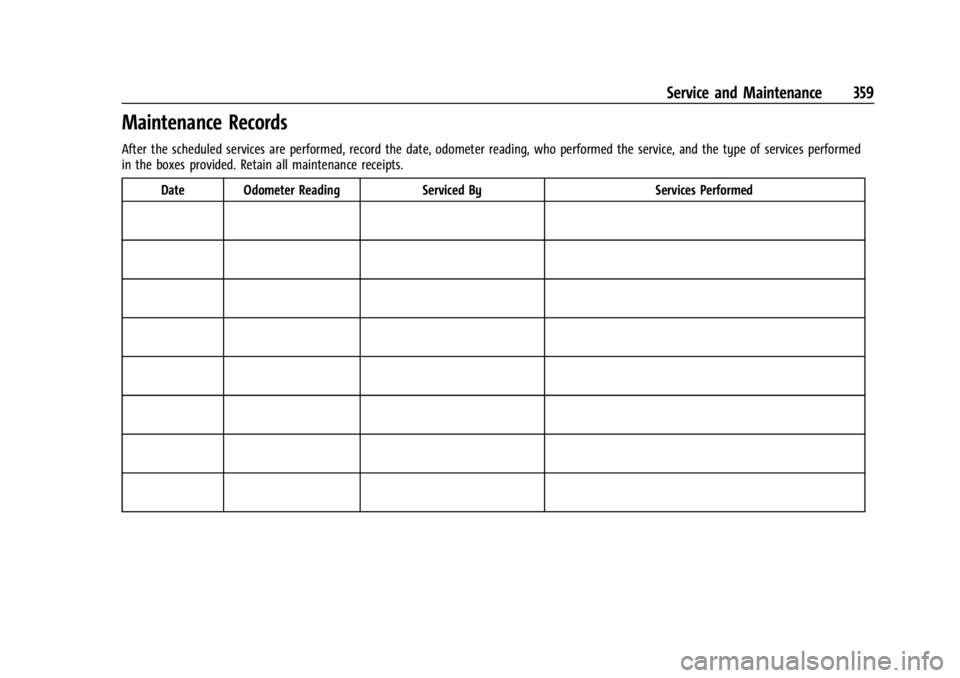
After the scheduled services are performed, record the date, odometer reading, who performed the service, and the type of services performed
in the boxes provided. Retain all maintenance receipts.Date Odometer Reading Serviced By Services Performed
Page 369 of 397
GMC Acadia/Acadia Denali Owner Manual (GMNA-Localizing-U.S./Canada/
Mexico-15170041) - 2022 - CRC - 10/6/21
368 Customer Information
J:View active recalls by Vehicle
Identification Number (VIN). See Vehicle
Identification Number (VIN) 0360.
H:Manage your profile and payment
information. View your GM Rewards Card
earnings and My GMC Rewards points.
F: Chat live with online help
representatives.
Visit my.gmc.com and create an account
today.
GMC Owner Centre (Canada)
mygmccanada.ca
Visit the GMC Owner Centre at
mygmccanada.ca (English) or
my.gmccanada.ca (French) to access similar
benefits to the U.S. site.
GM Mobility Reimbursement
Program
This program is available to qualified
applicants for cost reimbursement, up to
certain limits, of eligible aftermarket
adaptive equipment required for the vehicle,
such as hand controls or a wheelchair/
scooter lift for the vehicle.
To learn about the GM Mobility program,
see www.gmmobility.com or call the GM
Mobility Assistance Center at 1-800-323-9935.
Text Telephone (TTY) users, call
1-800-833-9935.
General Motors of Canada also has a
Mobility program. See www.gm.ca, or call
1-800-GM-DRIVE (800-463-7483) for details.
TTY users call 1-800-263-3830.
Roadside Assistance Program
For U.S.-purchased vehicles, call
1-888-881-3302; (Text Telephone (TTY):
1-888-889-2438).
For Canadian-purchased vehicles, call
1-800-268-6800.
Service is available 24 hours a day, 365 days
a year.
Calling for Assistance
When calling Roadside Assistance, have the
following information ready:
.Your name, home address, and home
telephone number
.Telephone number of your location
.Location of the vehicle
.Model, year, color, and license plate
number of the vehicle
.Odometer reading, Vehicle Identification
Number (VIN), and delivery date of the
vehicle
.Description of the problem
Coverage
Services are provided for the duration of the
vehicle's powertrain warranty.
In the U.S., anyone driving the vehicle is
covered. In Canada, a person driving the
vehicle without permission from the owner
is not covered.
Roadside Assistance is not a part of the New
Vehicle Limited Warranty. General Motors
North America and GMC reserve the right to
make any changes or discontinue the
Roadside Assistance program at any time
without notification.
Page 390 of 397

GMC Acadia/Acadia Denali Owner Manual (GMNA-Localizing-U.S./Canada/-
Mexico-15170041) - 2022 - CRC - 10/6/21
Index 389
Fuel (cont'd)Filling the Tank . . . . . . . . . . . . . . . . . . . . . . . . 256
Foreign Countries . . . . . . . . . . . . . . . . . . . . . . 256
Gauge . . . . . . . . . . . . . . . . . . . . . . . . . . . . . . . . . 103
Low Fuel Warning Light . . . . . . . . . . . . . . . . 115
Management, Active . . . . . . . . . . . . . . . . . . . 219
Prohibited Fuels . . . . . . . . . . . . . . . . . . . . . . . 255
Recommended . . . . . . . . . . . . . . . . . . . . . . . . . 255
Top Tier . . . . . . . . . . . . . . . . . . . . . . . . . . . . . . . 255
Fuses Engine Compartment Fuse Block . . . . . . . 293
Fuses and Circuit Breakers . . . . . . . . . . . . . 292
Instrument Panel Fuse Block . . . . . . . . . . . 296
Rear Compartment Fuse Block . . . . . . . . . 298
G
Garage Door Opener . . . . . . . . . . . . . . . . . . . . . .128Programming . . . . . . . . . . . . . . . . . . . . . . . . . . 128
Gas Strut(s) . . . . . . . . . . . . . . . . . . . . . . . . . . . . . . 289
Gauges Engine Coolant Temperature . . . . . . . . . . . 105
Engine Oil Temperature . . . . . . . . . . . . . . . . 104
Fuel . . . . . . . . . . . . . . . . . . . . . . . . . . . . . . . . . . . . 103
Odometer . . . . . . . . . . . . . . . . . . . . . . . . . . . . . 103
Speedometer . . . . . . . . . . . . . . . . . . . . . . . . . . 103
Tachometer . . . . . . . . . . . . . . . . . . . . . . . . . . . . 103
Trip Odometer . . . . . . . . . . . . . . . . . . . . . . . . . 103
Voltmeter . . . . . . . . . . . . . . . . . . . . . . . . . . . . . . 105 Gauges (cont'd)
Warning Lights and Indicators . . . . . . . . . . 97
Gear Shifting Light . . . . . . . . . . . . . . . . . . . . . . . . 111
General Information Service and Maintenance . . . . . . . . . . . . . . 347
Towing . . . . . . . . . . . . . . . . . . . . . . . . . . . . . . . . 258
Vehicle Care . . . . . . . . . . . . . . . . . . . . . . . . . . . 270
Global Positioning System (GPS) . . . . . . . . . . 161
Glove Box . . . . . . . . . . . . . . . . . . . . . . . . . . . . . . . . 84
GM Mobility Reimbursement Program . . . . . . . . . . . . . . . . . . . . . . . . . . . . . . . 368
Guidance
Problems with the Route . . . . . . . . . . . . . . 162
H
Halogen Bulbs . . . . . . . . . . . . . . . . . . . . . . . . . . . 290
Hazard Warning Flashers . . . . . . . . . . . . . . . . . 135
HD Radio Technology . . . . . . . . . . . . . . . . . . . . 146
Head Restraints . . . . . . . . . . . . . . . . . . . . . . . . . . . .35
Head-up Display . . . . . . . . . . . . . . . . . . . . . . . . . 120
HeadlampsAiming . . . . . . . . . . . . . . . . . . . . . . . . . . . . . . . . 290
Automatic . . . . . . . . . . . . . . . . . . . . . . . . . . . . . 134
Bulb Replacement . . . . . . . . . . . . . . . . . . . . . . 290
Daytime Running Lamps (DRL) . . . . . . . . . 134
Flash-to-Pass . . . . . . . . . . . . . . . . . . . . . . . . . . . 133
High-Beam On Light . . . . . . . . . . . . . . . . . . . . 115
High/Low Beam Changer . . . . . . . . . . . . . . 133 Headlamps (cont'd)
Lamps On Reminder . . . . . . . . . . . . . . . . . . . . 115
Heated Rear Seats . . . . . . . . . . . . . . . . . . . . . . . . . . . . . . 46
Steering Wheel . . . . . . . . . . . . . . . . . . . . . . . . . 91
Heated and Ventilated Front Seats . . . . . . . 42
Heated Mirrors . . . . . . . . . . . . . . . . . . . . . . . . . . . 28
Heater Engine . . . . . . . . . . . . . . . . . . . . . . . . . . . . . . . . . 216
Heating . . . . . . . . . . . . . . . . . . . . . . . . . . . . . .192, 196
High-Beam On Light . . . . . . . . . . . . . . . . . . . . . . 115
High-Speed Operation . . . . . . . . . . . . . . . . . . . 308
Hill and Mountain Roads . . . . . . . . . . . . . . . . 207
Hill Descent Control (HDC) . . . . . . . . . . . . . . . 228
Hill Descent Control Light . . . . . . . . . . . . . . . . . 111
Hill Start Assist (HSA) . . . . . . . . . . . . . . . . . . . . 226
Hood . . . . . . . . . . . . . . . . . . . . . . . . . . . . . . . . . . . . . 271
Horn . . . . . . . . . . . . . . . . . . . . . . . . . . . . . . . . . . . . . . 92
How to Wear Seat Belts Properly . . . . . . . . . 49
HVAC . . . . . . . . . . . . . . . . . . . . . . . . . . . . . . . .192, 196
I
If the System Needs Service . . . . . . . . . . . . . 162
Ignition Positions . . . . . . . . . . . . . . . . . . . . . . . . . 213
Immobilizer . . . . . . . . . . . . . . . . . . . . . . . . . . . . . . . 26
Indicator Pedestrian Ahead . . . . . . . . . . . . . . . . . . . . . . . 112
Vehicle Ahead . . . . . . . . . . . . . . . . . . . . . . . . . . 112
Page 392 of 397

GMC Acadia/Acadia Denali Owner Manual (GMNA-Localizing-U.S./Canada/-
Mexico-15170041) - 2022 - CRC - 10/6/21
Index 391
Loss of Control . . . . . . . . . . . . . . . . . . . . . . . . . . 203
Low Fuel Warning Light . . . . . . . . . . . . . . . . . . 115
Lower Anchors and Tethers forChildren (LATCH System) . . . . . . . . . . . . . . . . .72
Lumbar Adjustment . . . . . . . . . . . . . . . . . . . . . . . 39 Front Seats . . . . . . . . . . . . . . . . . . . . . . . . . . . . . 39
M
MaintenanceRecords . . . . . . . . . . . . . . . . . . . . . . . . . . . . . . . . 359
Maintenance and Care Additional . . . . . . . . . . . . . . . . . . . . . . . . . . . . . 353
Maintenance Schedule . . . . . . . . . . . . . . . . . . . 348 Recommended Fluids andLubricants . . . . . . . . . . . . . . . . . . . . . . . . . . . . 356
Malfunction Indicator Lamp . . . . . . . . . . . . . . 108
Manual Mode . . . . . . . . . . . . . . . . . . . . . . . . . . . 223
Map Data Updates . . . . . . . . . . . . . . . . . . . . . . . 163
Maps . . . . . . . . . . . . . . . . . . . . . . . . . . . . . . . . . . . . . 155
Media Avoiding Untrusted Devices . . . . . . . . . . . . 148
Memory Seats . . . . . . . . . . . . . . . . . . . . . . . . . . . . 39
Messages Engine Power . . . . . . . . . . . . . . . . . . . . . . . . . . 124
Vehicle . . . . . . . . . . . . . . . . . . . . . . . . . . . . . . . . 123
Vehicle Speed . . . . . . . . . . . . . . . . . . . . . . . . . . 124
Mirror Rear Camera . . . . . . . . . . . . . . . . . . . . . . . . . . . . 29 Mirrors
Automatic Dimming . . . . . . . . . . . . . . . . . . . . 28
Automatic Dimming Rearview . . . . . . . . . . 29
Convex . . . . . . . . . . . . . . . . . . . . . . . . . . . . . . . . . 27
Folding . . . . . . . . . . . . . . . . . . . . . . . . . . . . . . . . . 27
Heated . . . . . . . . . . . . . . . . . . . . . . . . . . . . . . . . . 28
Manual Rearview . . . . . . . . . . . . . . . . . . . . . . . 29
Power . . . . . . . . . . . . . . . . . . . . . . . . . . . . . . . . . . 27
Tilt in Reverse . . . . . . . . . . . . . . . . . . . . . . . . . . 28
Mirrors, Interior Rearview . . . . . . . . . . . . . . . . . 28
Mode . . . . . . . . . . . . . . . . . . . . . . . . . . . . . . . . . . . . 229 Driver Control . . . . . . . . . . . . . . . . . . . . . . . . . 229
Monitor System, Tire Pressure . . . . . . . . . . . 309
Multi-band Antenna . . . . . . . . . . . . . . . . . . . . . 148
N
Navigation Connected Services . . . . . . . . . . . . . . . . . . . . 382
Destination . . . . . . . . . . . . . . . . . . . . . . . . . . . . 156
Using the System . . . . . . . . . . . . . . . . . . . . . . 152
Navigation Symbols . . . . . . . . . . . . . . . . . . . . . . 155
New Vehicle Break-In . . . . . . . . . . . . . . . . . . . . . 212
O
Odometer . . . . . . . . . . . . . . . . . . . . . . . . . . . . . . . 103
Trip . . . . . . . . . . . . . . . . . . . . . . . . . . . . . . . . . . . . 103
Off-Road . . . . . . . . . . . . . . . . . . . . . . . . . . . . . . . . . 203
Driving . . . . . . . . . . . . . . . . . . . . . . . . . . . . . . . . 203
Recovery . . . . . . . . . . . . . . . . . . . . . . . . . . . . . . . 203 Oil
Engine . . . . . . . . . . . . . . . . . . . . . . . . . . . . . . . . . 275
Engine Oil Life System . . . . . . . . . . . . . . . . . 277
Pressure Light . . . . . . . . . . . . . . . . . . . . . . . . . . 114
Older Children, Restraints . . . . . . . . . . . . . . . . . 65
Online Owner Center . . . . . . . . . . . . . . . . . . . . 367
OnStar . . . . . . . . . . . . . . . . . . . . . . . . . . . . . . . . . . . 376
OnStar Additional Information . . . . . . . . . . . 379
OnStar Emergency . . . . . . . . . . . . . . . . . . . . . . . 378
OnStar Overview . . . . . . . . . . . . . . . . . . . . . . . . . 377
OnStar Security . . . . . . . . . . . . . . . . . . . . . . . . . . 378
Operation Fog Lamps . . . . . . . . . . . . . . . . . . . . . . . . . . . . . 135
Outlets Power . . . . . . . . . . . . . . . . . . . . . . . . . . . . . . . . . . 94
Overheating, Engine . . . . . . . . . . . . . . . . . . . . . 284
Overview . . . . . . . . . . . . . . . . . . . . . . . . . . . . . . . . 140
Instrument Panel . . . . . . . . . . . . . . . . . . . . . . . . 4
P
ParkShifting Into . . . . . . . . . . . . . . . . . . . . . . . . . . . 218
Shifting Out of . . . . . . . . . . . . . . . . . . . . . . . . 219
Park Assist . . . . . . . . . . . . . . . . . . . . . . . . . . .241, 244
Parking Brake and P (Park) Mechanism
Check . . . . . . . . . . . . . . . . . . . . . . . . . . . . . . . . 288
Extended . . . . . . . . . . . . . . . . . . . . . . . . . . . . . . 219
Page 396 of 397

GMC Acadia/Acadia Denali Owner Manual (GMNA-Localizing-U.S./Canada/-
Mexico-15170041) - 2022 - CRC - 10/6/21
Index 395
Traction Control/Electronic StabilityControl . . . . . . . . . . . . . . . . . . . . . . . . . . . . . . . . . 227
Trademarks and License Agreements . . . . . .183
Trailer Sway Control (TSC) . . . . . . . . . . . . . . . . . . . . 267
Towing . . . . . . . . . . . . . . . . . . . . . . . . . . . . . . . . 261
Transmission
Automatic . . . . . . . . . . . . . . . . . . . . . . . . . . . . . 220
Fluid, Automatic . . . . . . . . . . . . . . . . . . . . . . . 278
Transportation Program, Courtesy . . . . . . . 370
Trip Odometer . . . . . . . . . . . . . . . . . . . . . . . . . . . 103
Turn and Lane-Change Signals . . . . . . . . . . . . 135
U
Uniform Tire Quality Grading . . . . . . . . . . . . . 317
Universal Remote System . . . . . . . . . . . . . . . . .128 Operation . . . . . . . . . . . . . . . . . . . . . . . . . . . . . . 130
Programming . . . . . . . . . . . . . . . . . . . . . . . . . . 128
Updates Map Data . . . . . . . . . . . . . . . . . . . . . . . . . . . . . . 163
Software . . . . . . . . . . . . . . . . . . . . . . . . . . . . . . . 145
USB Port . . . . . . . . . . . . . . . . . . . . . . . . . . . . . . . . . 148
Using the Navigation System . . . . . . . . . . . . . 152
Using the System . . . . . . . . . . . . . . . . . . . . . . . . .142
Using This Manual . . . . . . . . . . . . . . . . . . . . . . . . . .2
V
Vehicle Alarm System . . . . . . . . . . . . . . . . . . . . . . . . . . 25 Vehicle (cont'd)
Canadian Owners . . . . . . . . . . . . . . . . . . . . . . . . . 1
Control . . . . . . . . . . . . . . . . . . . . . . . . . . . . . . . . 201
Identification Number (VIN) . . . . . . . . . . . . 360
Load Limits . . . . . . . . . . . . . . . . . . . . . . . . . . . . 209
Messages . . . . . . . . . . . . . . . . . . . . . . . . . . . . . . 123
Personalization . . . . . . . . . . . . . . . . . . . . . . . . 124
Remote Start . . . . . . . . . . . . . . . . . . . . . . . . . . . 14
Security . . . . . . . . . . . . . . . . . . . . . . . . . . . . . . . . . 25
Speed Messages . . . . . . . . . . . . . . . . . . . . . . . 124
Towing . . . . . . . . . . . . . . . . . . . . . . . . . . . . . . . . 334
Vehicle Ahead Indicator . . . . . . . . . . . . . . . . . . . 112
Vehicle Care
Storing the Tire Sealant andCompressor Kit . . . . . . . . . . . . . . . . . . . . . . . 326
Tire Pressure . . . . . . . . . . . . . . . . . . . . . . . . . . . 307
Vehicle Data Recording and Privacy . . . . . . 374
Vehicle Positioning . . . . . . . . . . . . . . . . . . . . . . 162
Ventilation, Air . . . . . . . . . . . . . . . . . . . . . . . . . . 197
Visors . . . . . . . . . . . . . . . . . . . . . . . . . . . . . . . . . . . . . .33
Voice Recognition . . . . . . . . . . . . . . . . . . . . . . . . 163
Voltmeter Gauge . . . . . . . . . . . . . . . . . . . . . . . . 105
W
Warning Brake System Light . . . . . . . . . . . . . . . . . . . . 109 Warning (cont'd)
Caution and Danger . . . . . . . . . . . . . . . . . . . . . 2
Warning Lights, Gauges, and Indicators . . . . . . . . . . . . . . . . . . . . . . . . . . . . . . . 97
Warnings Hazard Flashers . . . . . . . . . . . . . . . . . . . . . . . . 135
Washer Fluid . . . . . . . . . . . . . . . . . . . . . . . . . . . . 285
Wheels
Alignment and Tire Balance . . . . . . . . . . . . 318
Different Size . . . . . . . . . . . . . . . . . . . . . . . . . . 316
Replacement . . . . . . . . . . . . . . . . . . . . . . . . . . . 318
When It Is Time for New Tires . . . . . . . . . . . .314
Where to Put the Restraint . . . . . . . . . . . . . . . . 71
Windows . . . . . . . . . . . . . . . . . . . . . . . . . . . . . . . . . . 31
Power . . . . . . . . . . . . . . . . . . . . . . . . . . . . . . . . . . . 31
Windshield
Replacement . . . . . . . . . . . . . . . . . . . . . . . . . . . 289
Wiper/Washer . . . . . . . . . . . . . . . . . . . . . . . . . . 92
Winter Driving . . . . . . . . . . . . . . . . . . . . . . . . . . . . . . . . 208
Winter Tires . . . . . . . . . . . . . . . . . . . . . . . . . . . . . 301
Wiper Blade Replacement . . . . . . . . . . . . . . . . 288
Wipers
Rear Washer . . . . . . . . . . . . . . . . . . . . . . . . . . . . 93
Wireless Charging . . . . . . . . . . . . . . . . . . . . . . . . 95