seat adjustment GMC ACADIA 2022 Owners Manual
[x] Cancel search | Manufacturer: GMC, Model Year: 2022, Model line: ACADIA, Model: GMC ACADIA 2022Pages: 397, PDF Size: 6.98 MB
Page 6 of 397

GMC Acadia/Acadia Denali Owner Manual (GMNA-Localizing-U.S./Canada/
Mexico-15170041) - 2022 - CRC - 10/6/21
Introduction 5
1.Air Vents 0197.
2. Exterior Lamp Controls 0132.
Turn Signal Lever. See Turn and
Lane-Change Signals 0135.
3. Instrument Cluster (Base and Midlevel)
098 or
Instrument Cluster (Uplevel) 0101.
4. Windshield Wiper/Washer 092.
Rear Window Wiper/Washer 093.
5. Light Sensor. See Automatic Headlamp
System 0134.
6. Infotainment. See Overview0140.
7. Dual Automatic Climate Control System
0192.
8. USB Port 0148 (If Equipped).
9. Wireless Charging 095 (If Equipped).
10. Heated and Ventilated Front Seats 042
(If Equipped).
11.
|Hazard Warning Flashers 0135.
gTraction Control/Electronic Stability
Control 0227.
XPark Assist Switch. See Assistance
Systems for Parking or Backing 0241 (If
Equipped). 12.
Driver Mode Control 0229.
13.
ALane Keep Assist (LKA) 0253 (If
Equipped).
5Hill Descent Control (HDC) 0228 (If
Equipped).
14.
hAuto Stop Disable Button. See Stop/
Start System 0215 (If Equipped).
15. Power Outlets 094.
16. Shift Switches. See Automatic
Transmission 0220.
17. ENGINE START/STOP Button. See Starting
the Engine 0214.
18. Steering Wheel Controls 091 (If
Equipped).
Driver Information Center (DIC) Buttons.
See Driver Information Center (DIC) (Base
Level) 0116 or
Driver Information Center (DIC) (Midlevel
and Uplevel) 0118.
19. Horn 092.
20. Steering Wheel Adjustment 091. 21.
Cruise Control 0230.
Adaptive Cruise Control (Advanced) 0232
(If Equipped).
Forward Collision Alert (FCA) System
0 246 (If Equipped).
Heated Steering Wheel 091 (If
Equipped).
22. Hood Release. See Hood0271.
23. Instrument Panel Illumination Control
0136 (Out of View).
Head-Up Display (HUD) 0120 (If
Equipped).
24. Data Link Connector (DLC) (Out of View). SeeMalfunction Indicator Lamp (Check
Engine Light) 0108.
25. Electric Parking Brake 0225.
Page 36 of 397
GMC Acadia/Acadia Denali Owner Manual (GMNA-Localizing-U.S./Canada/
Mexico-15170041) - 2022 - CRC - 10/6/21
Seats and Restraints 35
Seats and Restraints
Head Restraints
Head Restraints . . . . . . . . . . . . . . . . . . . . . . . . . 35
Front Seats
Seat Adjustment . . . . . . . . . . . . . . . . . . . . . . . . 37
Power Seat Adjustment . . . . . . . . . . . . . . . . . 37
Reclining Seatbacks . . . . . . . . . . . . . . . . . . . . . 38
Lumbar Adjustment . . . . . . . . . . . . . . . . . . . . 39
Memory Seats . . . . . . . . . . . . . . . . . . . . . . . . . . 39
Heated and Ventilated Front Seats . . . . . 42
Rear Seats
Rear Seats . . . . . . . . . . . . . . . . . . . . . . . . . . . . . . 43
Heated Rear Seats . . . . . . . . . . . . . . . . . . . . . . 46
Third Row Seats . . . . . . . . . . . . . . . . . . . . . . . . 47
Seat Belts
Seat Belts . . . . . . . . . . . . . . . . . . . . . . . . . . . . . . 48
How to Wear Seat Belts Properly . . . . . . 49
Lap-Shoulder Belt . . . . . . . . . . . . . . . . . . . . . . . 51
Seat Belt Use During Pregnancy . . . . . . . . 53
Seat Belt Extender . . . . . . . . . . . . . . . . . . . . . . 54
Safety System Check . . . . . . . . . . . . . . . . . . . 54
Seat Belt Care . . . . . . . . . . . . . . . . . . . . . . . . . . 54
Replacing Seat Belt System Parts after aCrash . . . . . . . . . . . . . . . . . . . . . . . . . . . . . . . . . 54
Airbag System
Airbag System . . . . . . . . . . . . . . . . . . . . . . . . . . 55
Where Are the Airbags? . . . . . . . . . . . . . . . . 56
When Should an Airbag Inflate? . . . . . . . . 58
What Makes an Airbag Inflate? . . . . . . . . . 59
How Does an Airbag Restrain? . . . . . . . . . 59
What Will You See after an AirbagInflates? . . . . . . . . . . . . . . . . . . . . . . . . . . . . . . 59
Passenger Sensing System . . . . . . . . . . . . . 60
Servicing the Airbag-Equipped Vehicle . . . . . . . . . . . . . . . . . . . . . . . . . . . . . . . 64
Adding Equipment to the Airbag-Equipped Vehicle . . . . . . . . . . . . . . 64
Airbag System Check . . . . . . . . . . . . . . . . . . . 65
Replacing Airbag System Parts after a Crash . . . . . . . . . . . . . . . . . . . . . . . . . . . . . . . . . 65
Child Restraints
Older Children . . . . . . . . . . . . . . . . . . . . . . . . . . 65
Infants and Young Children . . . . . . . . . . . . . 67
Child Restraint Systems . . . . . . . . . . . . . . . . 69
Where to Put the Restraint . . . . . . . . . . . . . 71
Lower Anchors and Tethers for Children(LATCH System) . . . . . . . . . . . . . . . . . . . . . . . 72
Replacing LATCH System Parts After a Crash . . . . . . . . . . . . . . . . . . . . . . . . . . . . . . . . . 79
Securing Child Restraints (With the Seat Belt in the Rear Seat) . . . . . . . . . . . . . . . . . 79
Securing Child Restraints (With the Seat Belt in the Front Seat) . . . . . . . . . . . . . . . . 81
Head Restraints
Front Seats
{Warning
With head restraints that are not
installed and adjusted properly, there is a
greater chance that occupants will suffer
a neck/spinal injury in a crash. Do not
drive until the head restraints for all
occupants are installed and adjusted
properly.
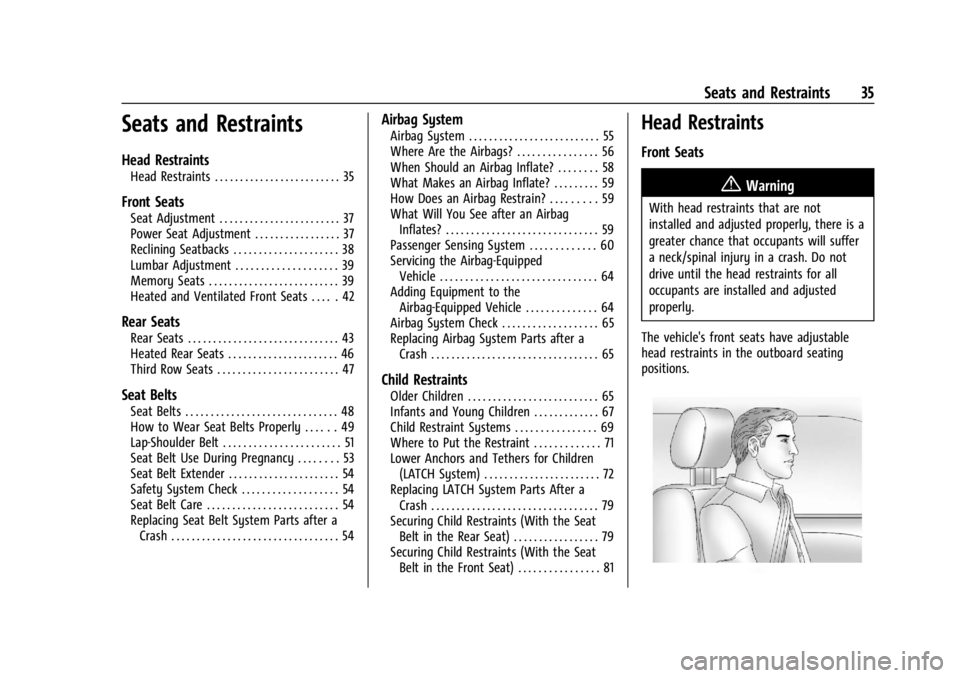
The vehicle's front seats have adjustable
head restraints in the outboard seating
positions.
Page 38 of 397
GMC Acadia/Acadia Denali Owner Manual (GMNA-Localizing-U.S./Canada/
Mexico-15170041) - 2022 - CRC - 10/6/21
Seats and Restraints 37
Front Seats
Seat Adjustment
{Warning
You can lose control of the vehicle if you
try to adjust a driver seat while the
vehicle is moving. Adjust the driver seat
only when the vehicle is not moving.
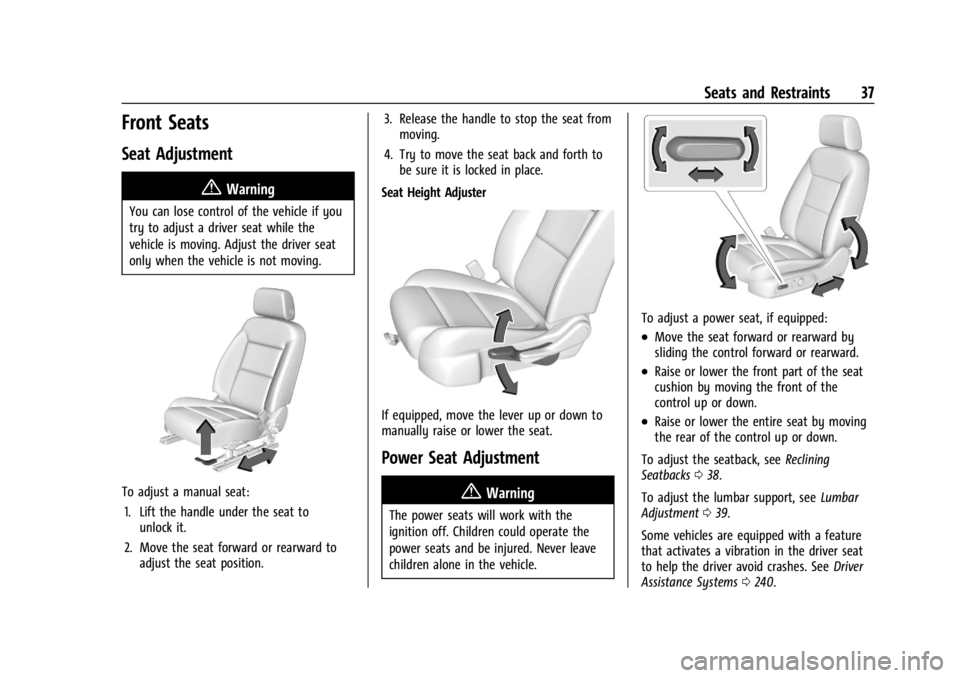
To adjust a manual seat:1. Lift the handle under the seat to unlock it.
2. Move the seat forward or rearward to adjust the seat position. 3. Release the handle to stop the seat from
moving.
4. Try to move the seat back and forth to be sure it is locked in place.
Seat Height Adjuster
If equipped, move the lever up or down to
manually raise or lower the seat.
Power Seat Adjustment
{Warning
The power seats will work with the
ignition off. Children could operate the
power seats and be injured. Never leave
children alone in the vehicle.
To adjust a power seat, if equipped:
.Move the seat forward or rearward by
sliding the control forward or rearward.
.Raise or lower the front part of the seat
cushion by moving the front of the
control up or down.
.Raise or lower the entire seat by moving
the rear of the control up or down.
To adjust the seatback, see Reclining
Seatbacks 038.
To adjust the lumbar support, see Lumbar
Adjustment 039.
Some vehicles are equipped with a feature
that activates a vibration in the driver seat
to help the driver avoid crashes. See Driver
Assistance Systems 0240.
Page 40 of 397
GMC Acadia/Acadia Denali Owner Manual (GMNA-Localizing-U.S./Canada/
Mexico-15170041) - 2022 - CRC - 10/6/21
Seats and Restraints 39
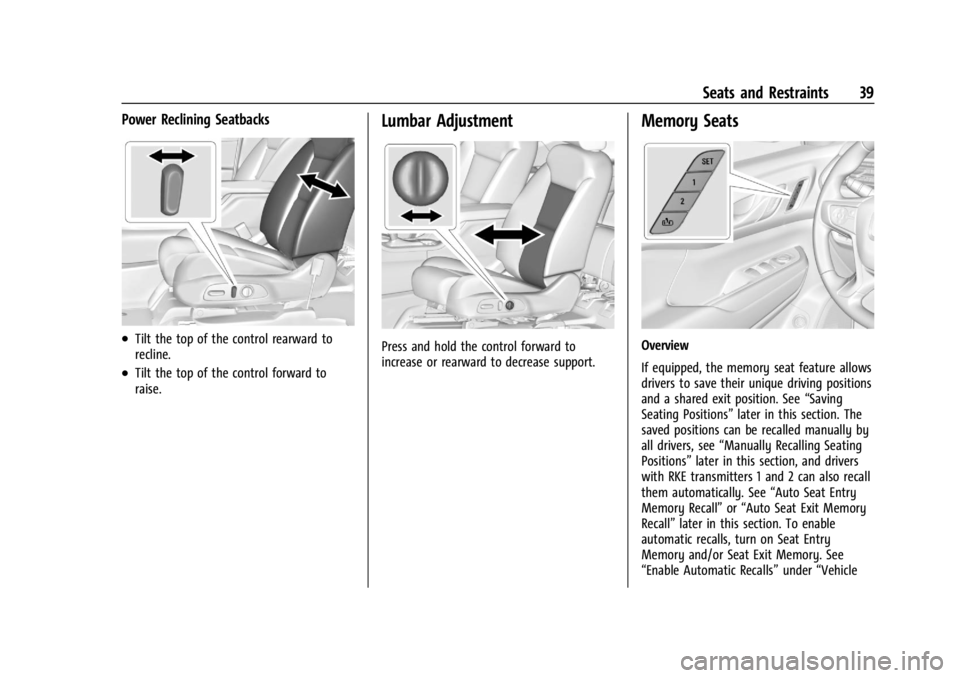
Power Reclining Seatbacks
.Tilt the top of the control rearward to
recline.
.Tilt the top of the control forward to
raise.
Lumbar Adjustment
Press and hold the control forward to
increase or rearward to decrease support.
Memory Seats
Overview
If equipped, the memory seat feature allows
drivers to save their unique driving positions
and a shared exit position. See“Saving
Seating Positions” later in this section. The
saved positions can be recalled manually by
all drivers, see “Manually Recalling Seating
Positions” later in this section, and drivers
with RKE transmitters 1 and 2 can also recall
them automatically. See “Auto Seat Entry
Memory Recall” or“Auto Seat Exit Memory
Recall” later in this section. To enable
automatic recalls, turn on Seat Entry
Memory and/or Seat Exit Memory. See
“Enable Automatic Recalls” under“Vehicle
Page 45 of 397
GMC Acadia/Acadia Denali Owner Manual (GMNA-Localizing-U.S./Canada/
Mexico-15170041) - 2022 - CRC - 10/6/21
44 Seats and Restraints
The feature is active only once each time
the vehicle is turned on and off, and will
require reactivation by opening and closing
the second row doors. There may be an
alert even when there is nothing in the rear
seat; for example, if a child entered the
vehicle through the rear door and left the
vehicle without the vehicle being shut off.
The feature can be turned on or off. See
Vehicle Personalization0124.
Rear Seat Adjustment
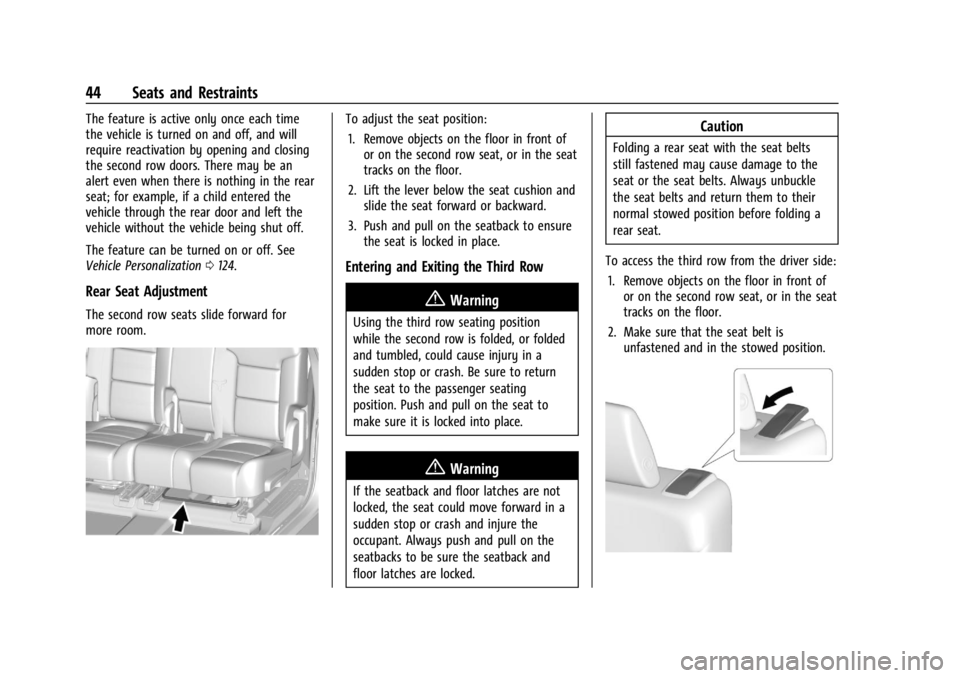
The second row seats slide forward for
more room.
To adjust the seat position:
1. Remove objects on the floor in front of or on the second row seat, or in the seat
tracks on the floor.
2. Lift the lever below the seat cushion and slide the seat forward or backward.
3. Push and pull on the seatback to ensure the seat is locked in place.
Entering and Exiting the Third Row
{Warning
Using the third row seating position
while the second row is folded, or folded
and tumbled, could cause injury in a
sudden stop or crash. Be sure to return
the seat to the passenger seating
position. Push and pull on the seat to
make sure it is locked into place.
{Warning
If the seatback and floor latches are not
locked, the seat could move forward in a
sudden stop or crash and injure the
occupant. Always push and pull on the
seatbacks to be sure the seatback and
floor latches are locked.
Caution
Folding a rear seat with the seat belts
still fastened may cause damage to the
seat or the seat belts. Always unbuckle
the seat belts and return them to their
normal stowed position before folding a
rear seat.
To access the third row from the driver side: 1. Remove objects on the floor in front of or on the second row seat, or in the seat
tracks on the floor.
2. Make sure that the seat belt is unfastened and in the stowed position.
Page 53 of 397

GMC Acadia/Acadia Denali Owner Manual (GMNA-Localizing-U.S./Canada/
Mexico-15170041) - 2022 - CRC - 10/6/21
52 Seats and Restraints
3. Push the latch plate into the buckle untilit clicks.
Pull up on the latch plate to make sure
it is secure. If the belt is not long
enough, see Seat Belt Extender 054.
Position the release button on the buckle
so that the seat belt could be quickly
unbuckled if necessary.
4. If equipped with a shoulder belt height adjuster, move it to the height that is
right for you. See “Shoulder Belt Height
Adjuster” later in this section for
instructions on use and important safety
information.5. To make the lap part tight, pull up on the shoulder belt.
To unlatch the belt, push the button on the
buckle. The belt should return to its stowed
position.
Always stow the seat belt slowly. If the seat
belt webbing returns quickly to the stowed
position, the retractor may lock and cannot
be pulled out. If this happens, pull the seat
belt straight out firmly to unlock the
webbing, and then release it. If the webbing
is still locked in the retractor, see your
dealer.
Before a door is closed, be sure the seat belt
is out of the way. If a door is slammed
against a seat belt, damage can occur to
both the seat belt and the vehicle.
Shoulder Belt Height Adjuster
The vehicle has a shoulder belt height
adjuster for the driver and front outboard
passenger seating positions.
Adjust the height so that the shoulder
portion of the belt is on the shoulder and
not falling off of it. The belt should be close
to, but not contacting, the neck. Improper
shoulder belt height adjustment could
reduce the effectiveness of the seat belt in a
crash. See How to Wear Seat Belts Properly
0 49.
Page 91 of 397

GMC Acadia/Acadia Denali Owner Manual (GMNA-Localizing-U.S./Canada/
Mexico-15170041) - 2022 - CRC - 10/6/21
90 Instruments and Controls
Instruments and Controls
Controls
Steering Wheel Adjustment . . . . . . . . . . . . . 91
Steering Wheel Controls . . . . . . . . . . . . . . . . 91
Heated Steering Wheel . . . . . . . . . . . . . . . . . 91
Horn . . . . . . . . . . . . . . . . . . . . . . . . . . . . . . . . . . . 92
Windshield Wiper/Washer . . . . . . . . . . . . . . 92
Rear Window Wiper/Washer . . . . . . . . . . . 93
Compass . . . . . . . . . . . . . . . . . . . . . . . . . . . . . . . 94
Clock . . . . . . . . . . . . . . . . . . . . . . . . . . . . . . . . . . . 94
Power Outlets . . . . . . . . . . . . . . . . . . . . . . . . . . 94
Wireless Charging . . . . . . . . . . . . . . . . . . . . . . 95
Warning Lights, Gauges, and Indicators
Warning Lights, Gauges, andIndicators . . . . . . . . . . . . . . . . . . . . . . . . . . . . . 97
Instrument Cluster (Base and Midlevel) . . . . . . . . . . . . . . . . . . . . . . . . . . . . . 98
Instrument Cluster (Uplevel) . . . . . . . . . . . 101
Speedometer . . . . . . . . . . . . . . . . . . . . . . . . . . 103
Odometer . . . . . . . . . . . . . . . . . . . . . . . . . . . . . 103
Trip Odometer . . . . . . . . . . . . . . . . . . . . . . . . . 103
Tachometer . . . . . . . . . . . . . . . . . . . . . . . . . . . . 103
Fuel Gauge . . . . . . . . . . . . . . . . . . . . . . . . . . . . 103
Engine Oil Temperature Gauge (Uplevel only) . . . . . . . . . . . . . . . . . . . . . . . 104
Engine Coolant Temperature Gauge . . . 105
Voltmeter Gauge (Uplevel only) . . . . . . . 105
Seat Belt Reminders . . . . . . . . . . . . . . . . . . . 106 Airbag Readiness Light . . . . . . . . . . . . . . . . 106
Passenger Airbag Status Indicator . . . . . 107
Charging System Light . . . . . . . . . . . . . . . . 108
Malfunction Indicator Lamp (Check
Engine Light) . . . . . . . . . . . . . . . . . . . . . . . . 108
Brake System Warning Light . . . . . . . . . . 109
Electric Parking Brake Light . . . . . . . . . . . . 110
Service Electric Parking Brake Light (Uplevel and Midlevel
Cluster Only) . . . . . . . . . . . . . . . . . . . . . . . . . 110
Antilock Brake System (ABS) Warning Light . . . . . . . . . . . . . . . . . . . . . . . . . . . . . . . . . . 111
Gear Shifting Light . . . . . . . . . . . . . . . . . . . . . 111
Hill Descent Control Light . . . . . . . . . . . . . . 111
Lane Keep Assist (LKA) Light . . . . . . . . . . . . 111
Vehicle Ahead Indicator . . . . . . . . . . . . . . . . 112
Pedestrian Ahead Indicator . . . . . . . . . . . . . 112
Traction Off Light . . . . . . . . . . . . . . . . . . . . . . 112
StabiliTrak OFF Light . . . . . . . . . . . . . . . . . . . 112
Traction Control System (TCS)/ StabiliTrak Light . . . . . . . . . . . . . . . . . . . . . . 113
Engine Coolant Temperature Warning Light . . . . . . . . . . . . . . . . . . . . . . . . . . . . . . . . . 113
Driver Mode Control Light . . . . . . . . . . . . . 113
Tire Pressure Light . . . . . . . . . . . . . . . . . . . . . 114
Engine Oil Pressure Light . . . . . . . . . . . . . . 114
Low Fuel Warning Light . . . . . . . . . . . . . . . . 115
Security Light . . . . . . . . . . . . . . . . . . . . . . . . . . 115
High-Beam On Light . . . . . . . . . . . . . . . . . . . . 115
Front Fog Lamp Light . . . . . . . . . . . . . . . . . . 115 Lamps On Reminder . . . . . . . . . . . . . . . . . . . . 115
Cruise Control Light . . . . . . . . . . . . . . . . . . . . 116
Door Ajar Light . . . . . . . . . . . . . . . . . . . . . . . . 116
Information Displays
Driver Information Center (DIC) (Base
Level) . . . . . . . . . . . . . . . . . . . . . . . . . . . . . . . . 116
Driver Information Center (DIC) (Midlevel and Uplevel) . . . . . . . . . . . . . . . 118
Head-Up Display (HUD) . . . . . . . . . . . . . . . . 120
Vehicle Messages
Vehicle Messages . . . . . . . . . . . . . . . . . . . . . . 123
Engine Power Messages . . . . . . . . . . . . . . . 124
Vehicle Speed Messages . . . . . . . . . . . . . . . 124
Vehicle Personalization
Vehicle Personalization . . . . . . . . . . . . . . . . 124
Universal Remote System
Universal Remote System . . . . . . . . . . . . . . 128
Universal Remote System Programming . . . . . . . . . . . . . . . . . . . . . . . . 128
Universal Remote System Operation . . . 130
Page 92 of 397
GMC Acadia/Acadia Denali Owner Manual (GMNA-Localizing-U.S./Canada/
Mexico-15170041) - 2022 - CRC - 10/6/21
Instruments and Controls 91
Controls
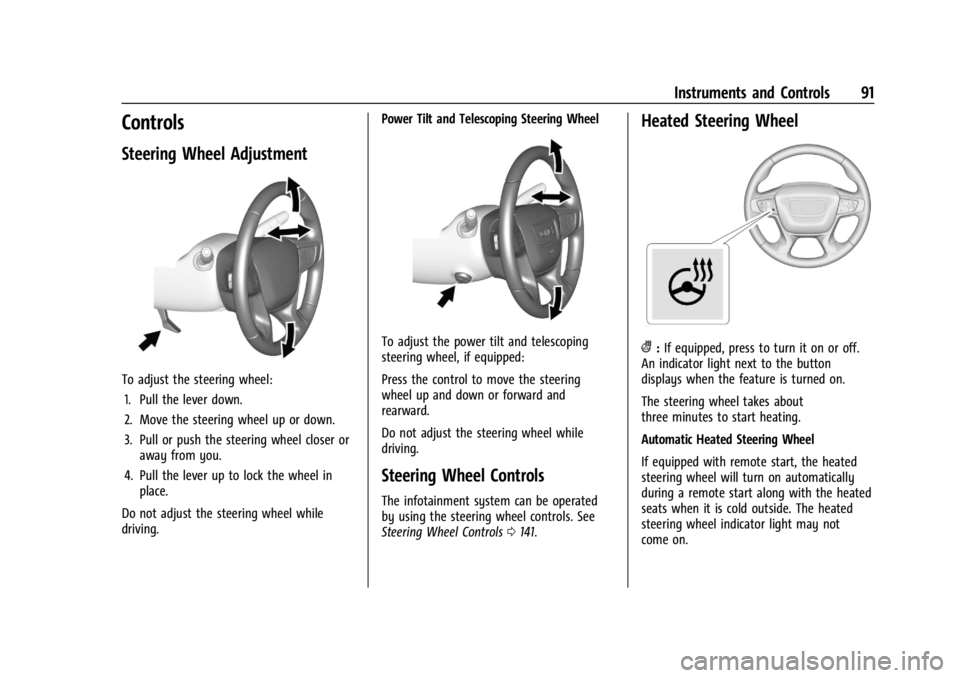
Steering Wheel Adjustment
To adjust the steering wheel:1. Pull the lever down.
2. Move the steering wheel up or down.
3. Pull or push the steering wheel closer or away from you.
4. Pull the lever up to lock the wheel in place.
Do not adjust the steering wheel while
driving. Power Tilt and Telescoping Steering Wheel
To adjust the power tilt and telescoping
steering wheel, if equipped:
Press the control to move the steering
wheel up and down or forward and
rearward.
Do not adjust the steering wheel while
driving.
Steering Wheel Controls
The infotainment system can be operated
by using the steering wheel controls. See
Steering Wheel Controls
0141.
Heated Steering Wheel
(:If equipped, press to turn it on or off.
An indicator light next to the button
displays when the feature is turned on.
The steering wheel takes about
three minutes to start heating.
Automatic Heated Steering Wheel
If equipped with remote start, the heated
steering wheel will turn on automatically
during a remote start along with the heated
seats when it is cold outside. The heated
steering wheel indicator light may not
come on.
Page 180 of 397
GMC Acadia/Acadia Denali Owner Manual (GMNA-Localizing-U.S./Canada/
Mexico-15170041) - 2022 - CRC - 10/6/21
Infotainment System 179
Climate
Touch and the following may display:
.Auto Fan Speed: This setting specifies the
amount of airflow when the climate
control fan setting is Auto Fan.
Touch Low, Medium, or High.
.Air Quality Sensor: This setting switches
the system into Recirculation Mode based
on the quality of the outside air.
Touch Off, Low Sensitivity, or High
Sensitivity.
.Auto Cooled Seats: This setting
automatically turns on and regulates the
ventilated seats when the cabin
temperature is warm.
Touch the controls on the infotainment
display to disable or enable.
.Auto Heated Seats: This setting
automatically turns on and regulates the
heated seats when the cabin temperature
is cool. The auto heated seats can be
turned off by using the heated seat
controls on the center stack.
Touch the controls on the infotainment
display to disable or enable.
.Auto Defog: This setting automatically
turns the front defogger on when the
vehicle engine is started.Touch the controls on the infotainment
display to disable or enable.
.Auto Rear Defog: This setting
automatically turns the rear window
defogger on when the vehicle engine is
started.
Touch the controls on the infotainment
display to disable or enable.
Navigation
Touch and the following may display:
.Destination Card Preferences
.Map Preferences
.Route Preferences
.Navigation Voice Control
.Traffic Preferences
.Alert Preferences
.Fuel Grade Preferences
.Manage History
.Predictive Navigation
.About
See Using the Navigation System 0152.
Phone
Touch and the following may display:
.My Number: Displays the cell phone
number of the Bluetooth connected
device.
.Active Call View: Shows active call display
when answering a call.
Touch the controls on the infotainment
display to disable or enable.
.Privacy: Only show call alerts in the
instrument cluster.
Touch Off or On.
.Sort Contacts: Touch to sort by first or
last name.
.Re-sync Device Contacts:
This allows the device contacts to re-sync
if you are having difficulty accessing all of
the contacts on your cell phone.
.Delete All Vehicle Contacts: Touch to
delete all vehicle stored contacts.
.OnStar Phone TTY Mode: This enables
OnStar cell phone TTY mode.
Touch Disable or Enable.
Vehicle
This menu allows adjustment of different
vehicle features. See Vehicle Personalization
0 124.
Page 299 of 397

GMC Acadia/Acadia Denali Owner Manual (GMNA-Localizing-U.S./Canada/
Mexico-15170041) - 2022 - CRC - 10/6/21
298 Vehicle Care
FusesUsage
F30 Steering Wheel Adjustment Controls
F31 Electronic Brake Control Module Electric Brake
Booster
F32 DC AC Inverter
F33 Driver Power Seat
F34 Passenger Power Seat F35 Battery IEC 1 Feed
F36 Electric Power Steering F37 Rear Seat Entertainment/USB
Charge/Wireless
Charging Module
F38 Body Control Module 8
F39 –
Circuit Breakers/ Minifuse Usage
F40 –
F41 –
F42 Auxiliary Power Outlet (CB)/Lighter (Minifuse)Rear Compartment Fuse Block
The rear compartment fuse block is behind a
trim panel on the driver side of the rear
storage compartment.
Remove the side bin, load floor, and foam.
SeeCargo Management System 086.
Remove the trim plate to access the fuse
block.
The label for this fuse block is in the spare
tire area, on the foam under the cargo floor.
See your dealer for additional assistance.