suspension GMC ACADIA 2022 Owners Manual
[x] Cancel search | Manufacturer: GMC, Model Year: 2022, Model line: ACADIA, Model: GMC ACADIA 2022Pages: 397, PDF Size: 6.98 MB
Page 125 of 397
GMC Acadia/Acadia Denali Owner Manual (GMNA-Localizing-U.S./Canada/
Mexico-15170041) - 2022 - CRC - 10/6/21
124 Instruments and Controls
All messages should be taken seriously;
clearing the message does not correct the
problem.
If a SERVICE message appears, see your
dealer.
Follow the instructions given in the
messages. The system displays messages
regarding the following topics:
.Service Messages
.Fluid Levels
.Vehicle Security
.Brakes
.Steering
.Ride Control Systems
.Driver Assistance Systems
.Cruise Control
.Lighting and Bulb Replacement
.Wiper/Washer Systems
.Doors and Windows
.Seat Belts
.Airbag Systems
.Engine and Transmission
.Tire Pressure
.Battery
Engine Power Messages
ENGINE POWER IS REDUCED
This message displays when the vehicle's
propulsion power is reduced. A reduction in
propulsion power can affect the vehicle's
ability to accelerate. If this message is on,
but there is no observed reduction in
performance, proceed to your destination.
Under certain conditions the performance
may be reduced the next time the vehicle is
driven. The vehicle may be driven while this
message is on, but maximum acceleration
and speed may be reduced. Anytime this
message stays on, or displays repeatedly,
the vehicle should be taken to your dealer
for service as soon as possible.
Under certain operating conditions,
propulsion will be disabled. Try restarting
after the ignition has been off for
30 seconds.
Vehicle Speed Messages
SPEED LIMITED TO XXX KM/H (MPH)
This message shows that the vehicle speed
has been limited to the speed displayed. The
limited speed is a protection for variouspropulsion and vehicle systems, such as
lubrication, thermal, brakes, suspension,
Teen Driver if equipped, or tires.
Vehicle Personalization
The following are all possible vehicle
personalization features. Depending on the
vehicle, some may not be available.
For System, Apps, and Personal features and
functions, see
Settings0174.
To access the vehicle personalization menu: 1. Touch the Settings icon on the Home Page of the infotainment display.
2. Touch Vehicle to display a list of available options.
3. Touch to select the desired feature setting.
4. Touch
9orRto turn a feature off or on.
5. Touch
zto go to the top level of the
Settings menu.
The menu may contain the following:
Rear Seat Reminder
This allows for a chime and a message when
the rear door has been opened before or
during operation of the vehicle.
Page 207 of 397
GMC Acadia/Acadia Denali Owner Manual (GMNA-Localizing-U.S./Canada/
Mexico-15170041) - 2022 - CRC - 10/6/21
206 Driving and Operating
.Hidden obstacles can make the steepness
of the incline more severe. If a rock is
driven across with the uphill wheels, or if
the downhill wheels drop into a rut or
depression, the vehicle can tilt even more.
.If an incline must be driven across, and
the vehicle starts to slide, turn downhill.
This should help straighten out the
vehicle and prevent the side slipping.
{Warning
Getting out of the vehicle on the
downhill side when stopped across an
incline is dangerous. If the vehicle rolls
over, you could be crushed or killed.
Always get out on the uphill side of the
vehicle and stay well clear of the
rollover path.
Driving in Mud, Sand, Snow, or Ice
Use a low gear when driving in mud—the
deeper the mud, the lower the gear. Keep
the vehicle moving to avoid getting stuck.
Traction changes when driving on sand. On
loose sand, such as on beaches or sand
dunes, the tires tend to sink into the sand. This affects steering, accelerating, and
braking. Drive at a reduced speed and avoid
sharp turns or abrupt maneuvers.
Traction is reduced on hard packed snow
and ice and it is easy to lose control. Reduce
vehicle speed when driving on hard packed
snow and ice.
{Warning
Driving on frozen lakes, ponds, or rivers
can be dangerous. Ice conditions vary
greatly and the vehicle could fall through
the ice; you and your passengers could
drown. Drive your vehicle on safe
surfaces only.
Driving in Water
{Warning
Driving through rushing water can be
dangerous. Deep water can sweep your
vehicle downstream and you and your
passengers could drown. If it is only
shallow water, it can still wash away the
ground from under your tires. Traction
could be lost, and the vehicle could roll
over. Do not drive through rushing water.
Caution
Do not drive through standing water if it
is deep enough to cover the wheel hubs,
axles, or exhaust pipe. Deep water can
damage the axle and other vehicle parts.
If the standing water is not too deep, drive
through it slowly. At faster speeds, water
can get into the engine and cause it to stall.
Stalling can occur if the exhaust pipe is
under water. Do not turn off the ignition
when driving through water. If the exhaust
pipe is under water, the engine will not
start. When going through water, the brakes
get wet, and it might take longer to stop.
See Driving on Wet Roads 0207.
After Off-Road Driving
Remove any brush or debris that has
collected on the underbody or chassis,
or under the hood. These accumulations can
be a fire hazard.
After operation in mud or sand, have the
brake linings cleaned and checked. These
substances can cause glazing and uneven
braking. Check the body structure, steering,
suspension, wheels, tires, and exhaust
system for damage and check the fuel lines
and cooling system for any leakage.
Page 230 of 397
GMC Acadia/Acadia Denali Owner Manual (GMNA-Localizing-U.S./Canada/
Mexico-15170041) - 2022 - CRC - 10/6/21
Driving and Operating 229
Driver Mode Control
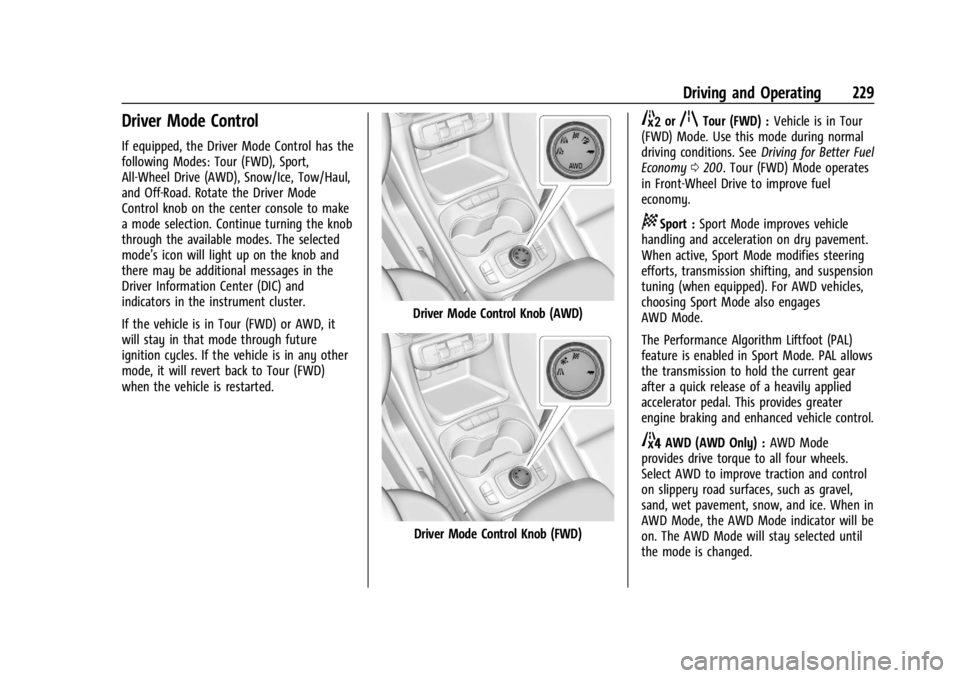
If equipped, the Driver Mode Control has the
following Modes: Tour (FWD), Sport,
All-Wheel Drive (AWD), Snow/Ice, Tow/Haul,
and Off-Road. Rotate the Driver Mode
Control knob on the center console to make
a mode selection. Continue turning the knob
through the available modes. The selected
mode’s icon will light up on the knob and
there may be additional messages in the
Driver Information Center (DIC) and
indicators in the instrument cluster.
If the vehicle is in Tour (FWD) or AWD, it
will stay in that mode through future
ignition cycles. If the vehicle is in any other
mode, it will revert back to Tour (FWD)
when the vehicle is restarted.
Driver Mode Control Knob (AWD)
Driver Mode Control Knob (FWD)
5orqTour (FWD) :Vehicle is in Tour
(FWD) Mode. Use this mode during normal
driving conditions. See Driving for Better Fuel
Economy 0200. Tour (FWD) Mode operates
in Front-Wheel Drive to improve fuel
economy.
8Sport : Sport Mode improves vehicle
handling and acceleration on dry pavement.
When active, Sport Mode modifies steering
efforts, transmission shifting, and suspension
tuning (when equipped). For AWD vehicles,
choosing Sport Mode also engages
AWD Mode.
The Performance Algorithm Liftfoot (PAL)
feature is enabled in Sport Mode. PAL allows
the transmission to hold the current gear
after a quick release of a heavily applied
accelerator pedal. This provides greater
engine braking and enhanced vehicle control.
4AWD (AWD Only) : AWD Mode
provides drive torque to all four wheels.
Select AWD to improve traction and control
on slippery road surfaces, such as gravel,
sand, wet pavement, snow, and ice. When in
AWD Mode, the AWD Mode indicator will be
on. The AWD Mode will stay selected until
the mode is changed.
Page 231 of 397
GMC Acadia/Acadia Denali Owner Manual (GMNA-Localizing-U.S./Canada/
Mexico-15170041) - 2022 - CRC - 10/6/21
230 Driving and Operating
AWD is active in AWD, Sport, and Off-Road
Modes.
Sport, Tow/Haul, and Off-Road Modes are
cancelled with each ignition cycle and will
return to Tour (FWD) Mode.
6Snow/Ice (FWD Only) :Snow/Ice Mode
improves vehicle acceleration on snow and
ice covered roads.
_Tow/Haul : This feature can assist
when towing a heavy load. Use this mode
to assist in maintaining desired vehicle
speeds when driving on downhill grades by
using the engine and transmission. When
active, Tow/Haul Mode modifies
transmission shifting, suspension tuning,
steering effort, and Trailer Sway Control. For
AWD vehicles, choosing Tow/Haul Mode also
engages AWD Mode. See Driving
Characteristics and Towing Tips 0258.
Automatic Engine Grade Braking
Automatic Engine Grade Braking assists
when driving downhill. It maintains vehicle
speed by automatically implementing a shift
pattern that uses the engine and the
transmission to slow the vehicle. The system
will automatically command downshifts to
reduce vehicle speed. The normal shift pattern will return once the vehicle is on a
low grade or when the accelerator pedal is
pressed.
While in the Electronic Range Select (ERS)
mode, grade braking is deactivated, allowing
the driver to select a range and limiting the
highest gear available. Grade braking is
available for normal driving and in
Tow/Haul Mode.
See
Automatic Transmission 0220.
7Off-Road (AWD Only) : Use this mode
for off-road recreational driving. When
active, Off-Road Mode modifies accelerator
pedal response, ABS, TCS, steering effort,
suspension tuning, and the StabiliTrak/ESC
system. Choosing Off-Road Mode also
engages AWD Mode. For more information
on Off-Road Mode, see Off-Road Driving
0 203.
Cruise Control
{
Warning
Cruise control can be dangerous where
you cannot drive safely at a steady
speed. Do not use cruise control on
winding roads or in heavy traffic. (Continued)
Warning (Continued)
Cruise control can be dangerous on
slippery roads. On such roads, fast
changes in tire traction can cause
excessive wheel slip, and you could lose
control. Do not use cruise control on
slippery roads.
With cruise control, a speed of about
40 km/h (25 mph) or more can be
maintained without keeping your foot on
the accelerator. Cruise control does not work
at speeds below about 40 km/h (25 mph).
If the StabiliTrak/Electronic Stability Control
(ESC) system begins to limit wheel spin
while using cruise control, the cruise control
automatically disengages. See Traction
Control/Electronic Stability Control 0227. If a
collision alert occurs when cruise control is
activated, cruise control is disengaged. See
Forward Collision Alert (FCA) System 0246.
When road conditions allow the cruise
control to be safely used, cruise control can
be turned back on.
Turning off the TCS or StabiliTrak/ESC
system will disengage the cruise control.
If the brakes are applied, cruise control
disengages.
Page 271 of 397
GMC Acadia/Acadia Denali Owner Manual (GMNA-Localizing-U.S./Canada/
Mexico-15170041) - 2022 - CRC - 10/6/21
270 Vehicle Care
General Information
For service and parts needs, visit your
dealer. You will receive genuine GM parts
and GM-trained and supported service
people.
Genuine GM parts have one of these marks:
California Perchlorate Materials
Requirements
Certain types of automotive applications,
such as airbag initiators, seat belt
pretensioners, and lithium batteries
contained in electronic keys, may containperchlorate materials. Perchlorate Material
–
special handling may apply. See
www.dtsc.ca.gov/hazardouswaste/
perchlorate.
Accessories and Modifications
Adding non-dealer accessories or making
modifications to the vehicle can affect
vehicle performance and safety, including
such things as airbags, braking, stability,
ride and handling, emissions systems,
aerodynamics, durability, and electronic
systems like antilock brakes, traction control,
and stability control. These accessories or
modifications could even cause malfunction
or damage not covered by the vehicle
warranty.
Damage to suspension components caused
by modifying vehicle height outside of
factory settings will not be covered by the
vehicle warranty.
Damage to vehicle components resulting
from modifications or the installation or use
of non-GM certified parts, including control
module or software modifications, is not
covered under the terms of the vehicle
warranty and may affect remaining
warranty coverage for affected parts. GM Accessories are designed to complement
and function with other systems on the
vehicle. See your dealer to accessorize the
vehicle using genuine GM Accessories
installed by a dealer technician.
Also, see
Adding Equipment to the
Airbag-Equipped Vehicle 064.
Vehicle Checks
Doing Your Own Service Work
{Warning
It can be dangerous to work on your
vehicle if you do not have the proper
knowledge, service manual, tools,
or parts. Always follow owner’s manual
procedures and consult the service
manual for your vehicle before doing any
service work.
If doing some of your own service work, use
the proper service manual. It tells you much
more about how to service the vehicle than
this manual can. To order the proper service
manual, see Publication Ordering
Information 0372.
Page 320 of 397
GMC Acadia/Acadia Denali Owner Manual (GMNA-Localizing-U.S./Canada/
Mexico-15170041) - 2022 - CRC - 10/6/21
Vehicle Care 319
Tire Chains
{Warning
If the vehicle has 235/55R20, 245/65R17,
or 255/65R17 size tires, do not use tire
chains. There is not enough clearance.
Tire chains used on a vehicle without the
proper amount of clearance can cause
damage to the brakes, suspension,
or other vehicle parts. The area damaged
by the tire chains could cause loss of
control and a crash. Use another type of
traction device only if its manufacturer
recommends it for the vehicle's tire size
combination and road conditions. Follow
that manufacturer's instructions. To avoid
vehicle damage, drive slow and readjust
or remove the traction device if it
contacts the vehicle. Do not spin the
wheels. If traction devices are used,
install them on the front tires.
Caution
If the vehicle is equipped with a tire size
other than 235/55R20, 245/65R17,
or 255/65R17 use tire chains only where
legal and only when necessary. Use low
profile chains that add no more than
12 mm thickness to the tire tread and
inner sidewall. Use chains that are the
proper size for the tires. Install them on
the tires of the front axle. Do not use
chains on the tires of the rear axle.
Tighten them as tightly as possible with
the ends securely fastened. Drive slowly
and follow the chain manufacturer's
instructions. If the chains contact the
vehicle, stop and retighten them. If the
contact continues, slow down until it
stops. Driving too fast or spinning the
wheels with chains on will damage the
vehicle.
If a Tire Goes Flat
It is unusual for a tire to blow out while
driving, especially if the tires are maintained
properly. SeeTires0300. If air goes out of
a tire, it is much more likely to leak out slowly. But if there is ever a blowout, here
are a few tips about what to expect and
what to do:
If a front tire fails, the flat tire creates a
drag that pulls the vehicle toward that side.
Take your foot off the accelerator pedal and
grip the steering wheel firmly. Steer to
maintain lane position, and then gently
brake to a stop, well off the road,
if possible.
A rear blowout, particularly on a curve, acts
much like a skid and may require the same
correction as used in a skid. Stop pressing
the accelerator pedal and steer to straighten
the vehicle. It may be very bumpy and
noisy. Gently brake to a stop, well off the
road, if possible.
{Warning
Driving on a flat tire will cause
permanent damage to the tire.
Re-inflating a tire after it has been driven
on while severely underinflated or flat
may cause a blowout and a serious crash.
Never attempt to re-inflate a tire that has
been driven on while severely
(Continued)
Page 335 of 397
GMC Acadia/Acadia Denali Owner Manual (GMNA-Localizing-U.S./Canada/
Mexico-15170041) - 2022 - CRC - 10/6/21
334 Vehicle Care
{Warning
An electric fan can start up even when
the engine is not running and can injure
you. Keep hands, clothing, and tools
away from any underhood electric fan.
{Warning
Using a match near a battery can cause
battery gas to explode. People have been
hurt doing this, and some have been
blinded. Use a flashlight if you need
more light.
Battery fluid contains acid that can burn
you. Do not get it on you. If you
accidentally get it in your eyes or on
your skin, flush the place with water and
get medical help immediately.
{Warning
Fans or other moving engine parts can
injure you badly. Keep your hands away
from moving parts once the engine is
running.5. Connect one end of the red positive (+)
cable to the positive (+) terminal on the
discharged battery.
6. Connect the other end of the red positive (+) cable to the positive (+)
terminal of the good battery.
7. Connect one end of the black negative (–) cable to the negative (–)
terminal of the good battery.
8. Connect the other end of the black negative (–) cable to the remote
negative (–) terminal on the driver side
shock tower for the discharged battery.
9. Start the engine in the vehicle with the good battery and run the engine at idle
speed for at least four minutes.
10. Try to start the vehicle that had the dead battery. If it will not start after a
few tries, it probably needs service.
Caution
If the jumper cables are connected or
removed in the wrong order, electrical
shorting may occur and damage the
vehicle. The repairs would not be covered
by the vehicle warranty. Always connect
(Continued)
Caution (Continued)
and remove the jumper cables in the
correct order, making sure that the cables
do not touch each other or other metal.
Jumper Cable Removal
Reverse the sequence exactly when
removing the jumper cables.
After starting the disabled vehicle and
removing the jumper cables, allow it to idle
for several minutes.
Towing the Vehicle
Caution
Incorrectly transporting a disabled vehicle
may cause damage to the vehicle. Use
proper tire straps to secure the vehicle to
the flatbed tow truck. Do not strap or
hook to any frame, underbody,
or suspension component not specified
below. Do not move vehicles with drive
axle tires on the ground. Damage is not
covered by the vehicle warranty.
Page 342 of 397
GMC Acadia/Acadia Denali Owner Manual (GMNA-Localizing-U.S./Canada/
Mexico-15170041) - 2022 - CRC - 10/6/21
Vehicle Care 341
Tires
Use a stiff brush with tire cleaner to clean
the tires.
Caution
Using petroleum-based tire dressing
products on the vehicle may damage the
paint finish and/or tires. When applying a
tire dressing, always wipe off any
overspray from all painted surfaces on
the vehicle.
Wheels and Wheel Trim
Use a soft, clean cloth with mild soap and
water to clean the wheels. After rinsing
thoroughly with clean water, dry with a
soft, clean towel. A wax may then be
applied.
Caution
Chrome wheels and chrome wheel trim
may be damaged if the vehicle is not
washed after driving on roads that have
been sprayed with magnesium chloride or
calcium chloride. These are used on roads
for conditions such as dust and ice.
Always wash the chrome with soap and
water after exposure.
Caution
To avoid surface damage on wheels and
wheel trim, do not use strong soaps,
chemicals, abrasive polishes, cleaners,
or brushes. Use only GM approved
cleaners. Do not drive the vehicle through
an automatic car wash that uses silicon
carbide tire/wheel cleaning brushes.
Damage could occur and the repairs
would not be covered by the vehicle
warranty.
Brake System
Visually inspect brake lines and hoses for
proper hook-up, binding, leaks, cracks,
chafing, etc. Inspect disc brake pads for wear
and rotors for surface condition. Inspect all
other brake parts.
Steering, Suspension, and Chassis
Components
Visually inspect steering, suspension, and
chassis components for damaged, loose,
or missing parts or signs of wear at least
once a year.Inspect power steering for proper electrical
connections, binding, cracks, chafing, etc.
Visually check constant velocity joint boots
and axle seals for leaks.
Body Component Lubrication
Lubricate all key lock cylinders, hood hinges,
liftgate hinges, and the steel fuel door
hinges, unless the components are plastic.
Applying silicone grease on weatherstrips
with a clean cloth will make them last
longer, seal better, and not stick or squeak.
Underbody Maintenance
At least twice a year, spring and fall, use
plain water to flush any corrosive materials
from the underbody. Take care to
thoroughly clean any areas where mud and
other debris can collect.
Do not directly power wash the transfer
case and/or front/rear axle output seals.
High pressure water can overcome the seals
and contaminate the fluid. Contaminated
fluid will decrease the life of the transfer
case and/or axles and should be replaced.
Page 350 of 397
GMC Acadia/Acadia Denali Owner Manual (GMNA-Localizing-U.S./Canada/
Mexico-15170041) - 2022 - CRC - 10/6/21
Service and Maintenance 349
Air Conditioning Desiccant (Replace Every
Seven Years)
The air conditioning system requires
maintenance every seven years. This service
requires replacement of the desiccant to
help the longevity and efficient operation of
the air conditioning system. This service can
be complex. See your dealer.
Tire Rotation and Required Services
Every 12 000 km (7,500 mi)
Rotate the tires, if recommended for the
vehicle, and perform the following services.
SeeTire Rotation 0313.
.Check engine oil level and oil
life percentage. If needed, change engine
oil and filter, and reset oil life system.
See Engine Oil 0275 and
Engine Oil Life System 0277.
.Check the air filter life percentage.
If necessary, replace the engine air filter
and reset the engine air filter life system.
See Engine Air Filter Life System 0278.
.Check engine coolant level. See Cooling
System 0280.
.Check windshield washer fluid level. See
Washer Fluid 0285.
.Check tire inflation pressures. See Tire
Pressure 0307.
.Inspect tire wear. See Tire Inspection
0 313.
.Visually check for fluid leaks.
.Inspect brake system. See Exterior Care
0 338.
.Visually inspect steering, suspension, and
chassis components for damage, including
cracks or tears in the rubber boots, loose
or missing parts, or signs of wear at least
once a year. See Exterior Care0338.
.Inspect power steering for proper
electrical connections, binding, cracks,
chafing, etc.
.Visually inspect halfshafts and driveshafts
for excessive wear, lubricant leaks, and/or
damage including: tube dents or cracks,
constant velocity joint or universal joint
looseness, cracked or missing boots, loose
or missing boot clamps, center bearing
excessive looseness, loose or missing
fasteners, and axle seal leaks.
.Check restraint system components. See
Safety System Check 054.
.Visually inspect the fuel system, including
the evaporative (EVAP) system, for
damage or leaks. Visually check all fuel pipes, vapor lines, and hoses for proper
attachment, connection, routing, and
condition.
.Visually inspect exhaust system and
nearby heat shields for loose or damaged
parts.
.Lubricate body components. See
Exterior
Care 0338.
.Check parking brake and automatic
transmission park mechanism. See Park
Brake and P (Park) Mechanism Check
0 288.
.Check accelerator pedal for damage, high
effort, or binding. Replace if needed.
.Visually inspect gas strut for signs of
wear, cracks, or other damage. Check the
hold open ability of the strut. If the hold
open ability is low, service the gas strut.
See Gas Strut(s) 0289.
.Check tire sealant expiration date,
if equipped. See Tire Sealant and
Compressor Kit 0321.
.Inspect sunroof track and seal,
if equipped. See Sunroof033.
Page 373 of 397
GMC Acadia/Acadia Denali Owner Manual (GMNA-Localizing-U.S./Canada/
Mexico-15170041) - 2022 - CRC - 10/6/21
372 Customer Information
Read the lease carefully, as you may be
charged at the end of the lease for poor
quality repairs.
If a Crash Occurs
If there has been an injury, call emergency
services for help. Do not leave the scene of
a crash until all matters have been taken
care of. Move the vehicle only if its position
puts you in danger, or you are instructed to
move it by a police officer.
Give only the necessary information to
police and other parties involved in the
crash.
For emergency towing seeRoadside
Assistance Program 0368.
Gather the following information:
.Driver name, address, and telephone
number
.Driver license number
.Owner name, address, and telephone
number
.Vehicle license plate number
.Vehicle make, model, and model year
.Vehicle Identification Number (VIN)
.Insurance company and policy number
.General description of the damage to the
other vehicle
Choose a reputable repair facility that uses
quality replacement parts. See “Collision
Parts” earlier in this section.
If the airbag has inflated, see What Will You
See after an Airbag Inflates? 059.
Managing the Vehicle Damage Repair
Process
In the event that the vehicle requires
damage repairs, GM recommends that you
take an active role in its repair. If you have
a pre-determined repair facility of choice,
take the vehicle there, or have it towed
there. Specify to the facility that any
required replacement collision parts be
original equipment parts, either new
Genuine GM parts or recycled original GM
parts. Remember, recycled parts will not be
covered by the GM vehicle warranty.
Insurance pays the bill for the repair, but
you must live with the repair. Depending on
your policy limits, your insurance company
may initially value the repair using
aftermarket parts. Discuss this with the
repair professional, and insist on Genuine
GM parts. Remember, if the vehicle is
leased, you may be obligated to have the vehicle repaired with Genuine GM parts,
even if your insurance coverage does not
pay the full cost.
If another party's insurance company is
paying for the repairs, you are not obligated
to accept a repair valuation based on that
insurance company's collision policy repair
limits, as you have no contractual limits
with that company. In such cases, you can
have control of the repair and parts choices
as long as the cost stays within reasonable
limits.
Publication Ordering Information
Service Manuals
Service manuals have the diagnosis and
repair information on the engine,
transmission, axle, suspension, brakes,
electrical system, steering system, body, etc.
Customer Literature
Owner’s manuals are written specifically for
owners and are intended to provide basic
operational information about the vehicle.
The owner’s manual includes the
Maintenance Schedule for all models.