ABS GMC ACADIA 2023 User Guide
[x] Cancel search | Manufacturer: GMC, Model Year: 2023, Model line: ACADIA, Model: GMC ACADIA 2023Pages: 384, PDF Size: 17.04 MB
Page 219 of 384
GMC Acadia/Acadia Denali Owner Manual (GMNA-Localizing-U.S./Canada/
Mexico-16402009) - 2023 - CRC - 3/29/22
218 Driving and Operating
accelerator pedal apply. The brakes release
when the accelerator pedal is applied. If the
accelerator pedal is not applied within a few
minutes, the Electric Parking Brake will
apply. The brakes may also release under
other conditions. Do not rely on HSA to hold
the vehicle.
HSA is available when the vehicle is facing
uphill in a forward gear, or when facing
downhill in R (Reverse). The vehicle must
come to a complete stop on a grade for HSA
to activate.
Ride Control Systems
Traction Control/Electronic
Stability Control
System Operation
The vehicle has a Traction Control System
(TCS) and StabiliTrak/Electronic Stability
Control (ESC), an electronic stability control
system. These systems help limit wheel spin
and assist the driver in maintaining control,
especially on slippery road conditions.
TCS activates if it senses that any of the
drive wheels are spinning or beginning to
lose traction. When this happens, TCSapplies the brakes to the spinning wheels
and reduces engine power to limit
wheel spin.
StabiliTrak/ESC activates when the vehicle
senses a difference between the intended
path and the direction the vehicle is actually
traveling. StabiliTrak/ESC selectively applies
braking pressure to any one of the vehicle
wheel brakes to assist the driver in keeping
the vehicle on the intended path.
If cruise control is being used and TCS or
StabiliTrak/ESC begins to limit wheel spin,
cruise control will disengage. Cruise control
may be turned back on when road
conditions allow. TCS and StabiliTrak/ESC will
automatically turn on when cruise control
is set.
Both systems come on automatically when
the vehicle is started and begins to move.
The systems may be heard or felt while
they are operating or while performing
diagnostic checks. This is normal and does
not mean there is a problem with the
vehicle.
It is recommended to leave both systems on
for normal driving conditions, but it may be
necessary to turn TCS off if the vehicle gets
stuck in sand, mud, ice, or snow. See
If the
Vehicle Is Stuck 0200 and“Turning the
Systems Off and On” later in this section.
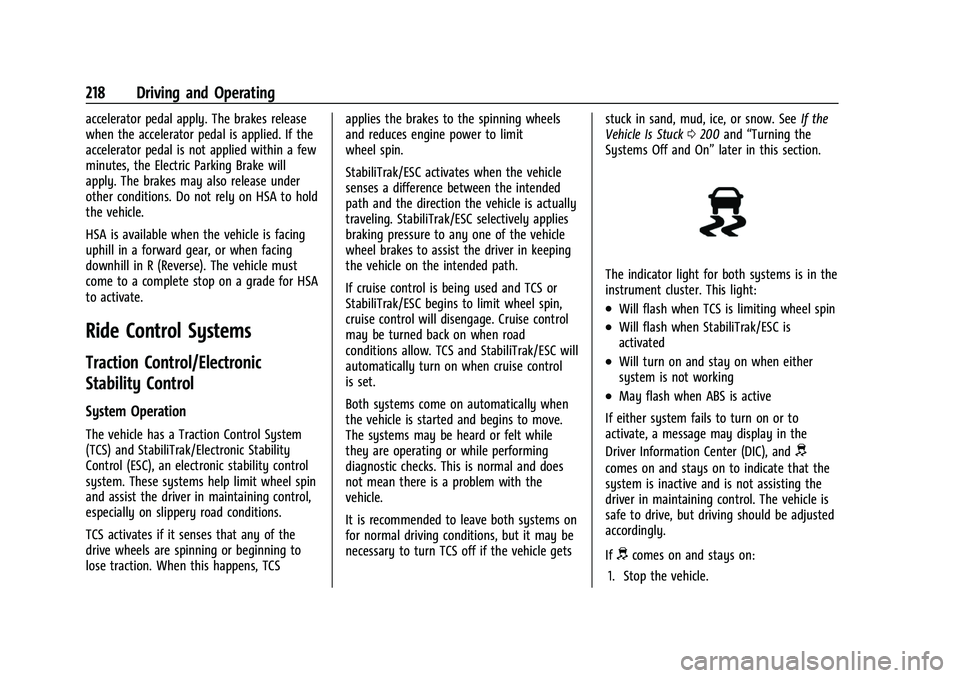
The indicator light for both systems is in the
instrument cluster. This light:
.Will flash when TCS is limiting wheel spin
.Will flash when StabiliTrak/ESC is
activated
.Will turn on and stay on when either
system is not working
.May flash when ABS is active
If either system fails to turn on or to
activate, a message may display in the
Driver Information Center (DIC), and
d
comes on and stays on to indicate that the
system is inactive and is not assisting the
driver in maintaining control. The vehicle is
safe to drive, but driving should be adjusted
accordingly.
If
dcomes on and stays on:
1. Stop the vehicle.
Page 222 of 384
GMC Acadia/Acadia Denali Owner Manual (GMNA-Localizing-U.S./Canada/
Mexico-16402009) - 2023 - CRC - 3/29/22
Driving and Operating 221
AWD is active in AWD, Sport and Off-Road
Modes.
6Snow/Ice (FWD Only) :Snow/Ice mode
improves vehicle acceleration on snow and
ice covered roads.
_Tow/Haul : This feature can assist
when towing a heavy load. Use this mode
to assist in maintaining desired vehicle
speeds when driving on downhill grades by
using the engine and transmission. When
active, Tow/Haul mode modifies
transmission shifting, suspension tuning,
steering effort, and Trailer Sway Control. For
AWD vehicles, choosing Tow/Haul mode also
engages AWD. See Driving Characteristics
and Towing Tips 0249.
Automatic Engine Grade Braking
Automatic Engine Grade Braking assists
when driving downhill. It maintains vehicle
speed by automatically implementing a shift
pattern that uses the engine and the
transmission to slow the vehicle. The system
will automatically command downshifts to
reduce vehicle speed. The normal shift
pattern will return once the vehicle is on a
low grade or when the accelerator pedal is
pressed. While in the Electronic Range Select (ERS)
mode, grade braking is deactivated, allowing
the driver to select a range and limiting the
highest gear available. Grade braking is
available for normal driving and in Tow/
Haul mode.
See
Automatic Transmission 0211.
7Off-Road (AWD Only) : Use this mode
for off-road recreational driving. When
active, Off-Road mode modifies accelerator
pedal response, ABS, TCS, steering effort,
suspension tuning, and the StabiliTrak/ESC
system. Choosing Off-Road mode also
engages AWD mode. For more information
on Off-Road mode, see Off-Road Driving
0 194.
Cruise Control
{
Warning
Cruise control can be dangerous where
you cannot drive safely at a steady
speed. Do not use cruise control on
winding roads or in heavy traffic. (Continued)
Warning (Continued)
Cruise control can be dangerous on
slippery roads. On such roads, fast
changes in tire traction can cause
excessive wheel slip, and you could lose
control. Do not use cruise control on
slippery roads.
With cruise control, a speed of about
40 km/h (25 mph) or more can be
maintained without keeping your foot on
the accelerator. Cruise control does not work
at speeds below about 40 km/h (25 mph).
If the StabiliTrak/Electronic Stability Control
(ESC) system begins to limit wheel spin
while using cruise control, the cruise control
automatically disengages. See Traction
Control/Electronic Stability Control 0218. If a
collision alert occurs when cruise control is
activated, cruise control is disengaged. See
Forward Collision Alert (FCA) System 0237.
When road conditions allow the cruise
control to be safely used, cruise control can
be turned back on.
Turning off the TCS or StabiliTrak/ESC
system will disengage the cruise control.
If the brakes are applied, cruise control
disengages.
Page 253 of 384
GMC Acadia/Acadia Denali Owner Manual (GMNA-Localizing-U.S./Canada/
Mexico-16402009) - 2023 - CRC - 3/29/22
252 Driving and Operating
Parking on Hills
{Warning
To prevent serious injury or death,
always park your vehicle and trailer on a
level surface when possible.
When parking your vehicle and your trailer
on a hill: 1. Press the brake pedal, but do not shift into P (Park) yet. Turn the wheels into
the curb if facing downhill or into traffic
if facing uphill.
2. Have someone place chocks under the trailer wheels.
3. When the wheel chocks are in place, gradually release the brake pedal to
allow the chocks to absorb the load of
the trailer.
4. Reapply the brake pedal. Then apply the parking brake and shift into P (Park).
5. Release the brake pedal.
Leaving After Parking on a Hill
1. Apply and hold the brake pedal:
.Start the engine.
.Shift into the desired gear.
.Release the parking brake.
2. Let up on the brake pedal.
3. Drive slowly until the trailer is clear of the chocks.
4. Stop and have someone pick up and store the chocks.
Maintenance When Trailer Towing
The vehicle needs service more often when
used to tow trailers. See Maintenance
Schedule 0339. It is especially important to
check the engine oil, axle lubricant, belts,
cooling system, and brake system before
and during each trip.
Check periodically that all nuts and bolts on
the trailer hitch are tight.
Engine Cooling When Trailer Towing
The cooling system may temporarily
overheat during severe operating conditions.
See Engine Overheating 0276.
Trailer Towing
Caution
Towing a trailer improperly can damage
the vehicle and result in costly repairs
not covered by the vehicle warranty. To
tow a trailer correctly, follow the
directions in this section and see your
dealer for important information about
towing a trailer with the vehicle.
Trailer Weight
{Warning
Never exceed the towing capacity for
your vehicle.
Safe trailering requires monitoring the
weight, speed, altitude, road grades, outside
temperature, dimensions of the front of the
trailer, and how frequently the vehicle is
used to tow a trailer.
Page 257 of 384
GMC Acadia/Acadia Denali Owner Manual (GMNA-Localizing-U.S./Canada/
Mexico-16402009) - 2023 - CRC - 3/29/22
256 Driving and Operating
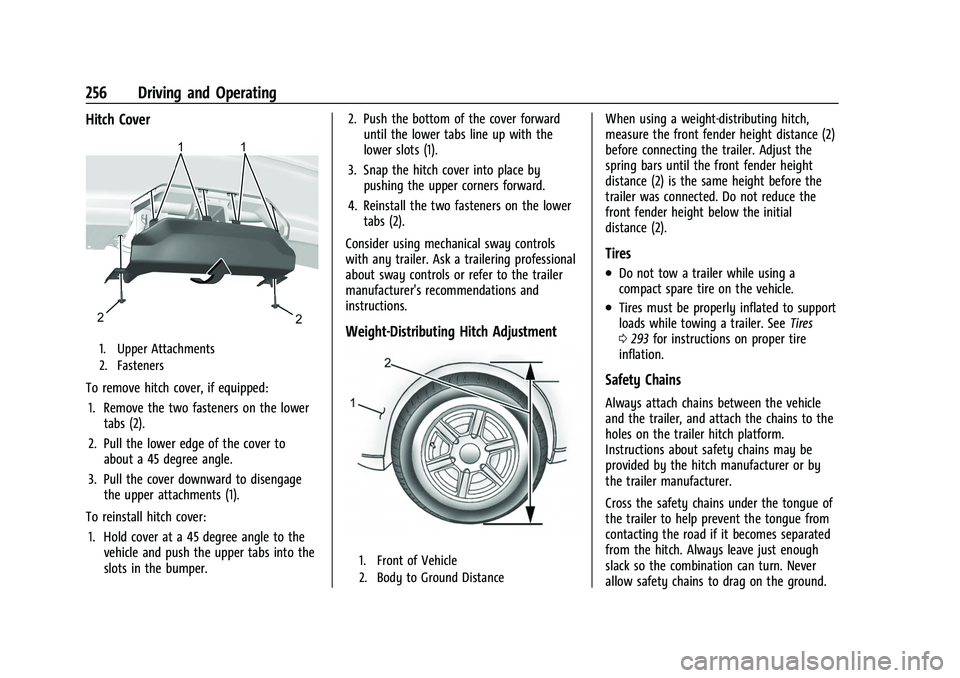
Hitch Cover
1. Upper Attachments
2. Fasteners
To remove hitch cover, if equipped:1. Remove the two fasteners on the lower tabs (2).
2. Pull the lower edge of the cover to about a 45 degree angle.
3. Pull the cover downward to disengage the upper attachments (1).
To reinstall hitch cover: 1. Hold cover at a 45 degree angle to the vehicle and push the upper tabs into the
slots in the bumper. 2. Push the bottom of the cover forward
until the lower tabs line up with the
lower slots (1).
3. Snap the hitch cover into place by pushing the upper corners forward.
4. Reinstall the two fasteners on the lower tabs (2).
Consider using mechanical sway controls
with any trailer. Ask a trailering professional
about sway controls or refer to the trailer
manufacturer's recommendations and
instructions.
Weight-Distributing Hitch Adjustment
1. Front of Vehicle
2. Body to Ground Distance
When using a weight-distributing hitch,
measure the front fender height distance (2)
before connecting the trailer. Adjust the
spring bars until the front fender height
distance (2) is the same height before the
trailer was connected. Do not reduce the
front fender height below the initial
distance (2).
Tires
.Do not tow a trailer while using a
compact spare tire on the vehicle.
.Tires must be properly inflated to support
loads while towing a trailer. See Tires
0 293 for instructions on proper tire
inflation.
Safety Chains
Always attach chains between the vehicle
and the trailer, and attach the chains to the
holes on the trailer hitch platform.
Instructions about safety chains may be
provided by the hitch manufacturer or by
the trailer manufacturer.
Cross the safety chains under the tongue of
the trailer to help prevent the tongue from
contacting the road if it becomes separated
from the hitch. Always leave just enough
slack so the combination can turn. Never
allow safety chains to drag on the ground.
Page 280 of 384
GMC Acadia/Acadia Denali Owner Manual (GMNA-Localizing-U.S./Canada/
Mexico-16402009) - 2023 - CRC - 3/28/22
Vehicle Care 279
Checking Brake Fluid
With the vehicle in P (Park) on a level
surface, the brake fluid level should be
between the minimum and maximum marks
on the brake fluid reservoir.
There are only two reasons why the brake
fluid level in the reservoir may go down:
.Normal brake lining wear. When new
linings are installed, the fluid level goes
back up.
.A fluid leak in the brake hydraulic system.
Have the brake hydraulic system fixed.
With a leak, the brakes will not
work well.
Always clean the brake fluid reservoir cap
and the area around the cap before
removing it.
Do not top off the brake fluid. Adding fluid
does not correct a leak. If fluid is added
when the linings are worn, there will be too
much fluid when new brake linings are
installed. Add or remove fluid, as necessary,
only when work is done on the brake
hydraulic system.
{Warning
If too much brake fluid is added, it can
spill on the engine and burn, if the
engine is hot enough. You or others could
be burned, and the vehicle could be
damaged. Add brake fluid only when
work is done on the brake hydraulic
system.
When the brake fluid falls to a low level,
the brake warning light comes on. See Brake
System Warning Light 0107.
Brake fluid absorbs water over time which
degrades the effectiveness of the brake fluid.
Replace brake fluid at the specified intervals
to prevent increased stopping distance. See
Maintenance Schedule 0339.
What to Add
Use only GM approved DOT 4 brake fluid
from a clean, sealed container. See
Recommended Fluids and Lubricants 0343.
{Warning
The wrong or contaminated brake fluid
could result in damage to the brake
system. This could result in the loss of
(Continued)
Warning (Continued)
braking leading to a possible injury.
Always use the proper GM approved
brake fluid.
Caution
If brake fluid is spilled on the vehicle's
painted surfaces, the paint finish can be
damaged. Immediately wash off any
painted surface.
Battery - North America
The original equipment battery is
maintenance free. Do not remove the cap
and do not add fluid.
Refer to the replacement number shown on
the original battery label when a new
battery is needed. SeeEngine Compartment
Overview 0265 for battery location.
For replacement of the battery, see your
dealer.
The vehicle has an Absorbed Glass Mat
(AGM) 12-volt battery. Installation of a
standard 12-volt battery will result in
reduced 12-volt battery life.
Page 325 of 384
GMC Acadia/Acadia Denali Owner Manual (GMNA-Localizing-U.S./Canada/
Mexico-16402009) - 2023 - CRC - 3/28/22
324 Vehicle Care
vehicle will perform differently with the
spare tire installed and it is recommended
that the vehicle speed be limited to 80 km/h
(50 mph). To conserve the tread of the spare
tire, have the standard tire repaired or
replaced as soon as convenient and return
the spare tire to the storage area.
When using a compact spare tire, the AWD
(if equipped), ABS, and Traction Control
systems may engage until the spare tire is
recognized by the vehicle, especially on
slippery roads. Adjust driving to reduce
possible wheel slip.
Caution
When the compact spare is installed, do
not take the vehicle through an
automatic car wash with guide rails. The
compact spare can get caught on the rails
which can damage the tire, wheel, and
other parts of the vehicle.
Do not use the compact spare on other
vehicles.
Do not mix the compact spare tire or wheel
with other wheels or tires. They will not fit.
Keep the spare tire and its wheel together.
Caution
Tire chains will not fit the compact spare.
Using them can damage the vehicle and
the chains. Do not use tire chains on the
compact spare.
Jump Starting
Jump Starting - North America
For more information about the vehicle
battery, see Battery - North America 0279.
If the battery has run down, try to use
another vehicle and some jumper cables to
start your vehicle. Be sure to use the
following steps to do it safely.
{Warning
WARNING: Battery posts, terminals and
related accessories can expose you to
chemicals including lead and lead
compounds, which are known to the
State of California to cause cancer and
birth defects or other reproductive harm.
Wash hands after handling. For more
information go to
www.P65Warnings.ca.gov. See
California Proposition 65 Warning 01.
{Warning
Batteries can hurt you. They can be
dangerous because:
.They contain acid that can burn you.
.They contain gas that can explode or
ignite.
.They contain enough electricity to
burn you.
If you do not follow these steps exactly,
some or all of these things can hurt you.
Caution
Ignoring these steps could result in costly
damage to the vehicle that would not be
covered by the vehicle warranty. Trying
to start the vehicle by pushing or pulling
it will not work, and it could damage the
vehicle.
Page 330 of 384
GMC Acadia/Acadia Denali Owner Manual (GMNA-Localizing-U.S./Canada/
Mexico-16402009) - 2023 - CRC - 3/28/22
Vehicle Care 329
2. Open the door and open the hood of thevehicle.
3. Connect the negative (–) terminal connector from the 12-volt battery.
4. Press and hold ENGINE START/STOP with your foot off the brake for five seconds.
5. Hold the brake pedal and press the parking brake switch for five seconds
until the parking brake light flashes.
6. Turn the vehicle off.
7. Unsecure the vehicle and remove it from the dolly.
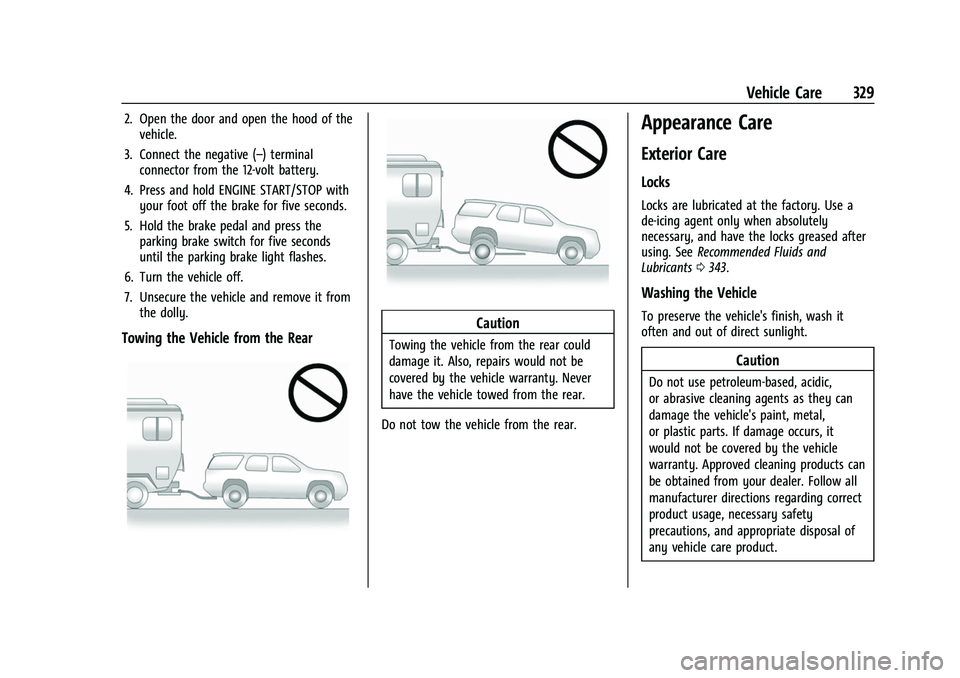
Towing the Vehicle from the RearCaution
Towing the vehicle from the rear could
damage it. Also, repairs would not be
covered by the vehicle warranty. Never
have the vehicle towed from the rear.
Do not tow the vehicle from the rear.
Appearance Care
Exterior Care
Locks
Locks are lubricated at the factory. Use a
de-icing agent only when absolutely
necessary, and have the locks greased after
using. See Recommended Fluids and
Lubricants 0343.
Washing the Vehicle
To preserve the vehicle's finish, wash it
often and out of direct sunlight.
Caution
Do not use petroleum-based, acidic,
or abrasive cleaning agents as they can
damage the vehicle's paint, metal,
or plastic parts. If damage occurs, it
would not be covered by the vehicle
warranty. Approved cleaning products can
be obtained from your dealer. Follow all
manufacturer directions regarding correct
product usage, necessary safety
precautions, and appropriate disposal of
any vehicle care product.
Page 372 of 384

GMC Acadia/Acadia Denali Owner Manual (GMNA-Localizing-U.S./Canada/-
Mexico-16402009) - 2023 - CRC - 3/28/22
Index 371
IndexA
Accessories and Modifications . . . . . . . . . . . 262
Accessory Power . . . . . . . . . . . . . . . . . . . . . . . . . 208
ActiveFuel Management . . . . . . . . . . . . . . . . . . . . . 210
Adaptive Cruise Control . . . . . . . . . . . . . . . . . . . . . . . . . 223
Add-On Electrical Equipment . . . . . . . . . . . . . 259
Additional OnStar Information . . . . . . . . . . . . . . . . . . . . 365
Adjustments Lumbar, Front Seats . . . . . . . . . . . . . . . . . . . . 39
Agreements Trademarks and License . . . . . . . . . . . . . . . 176
Air Cleaner/Filter, Engine . . . . . . . . . . . . . . . . . . . 271
Conditioning . . . . . . . . . . . . . . . . . . . . . . . 183, 187
Filter Life System . . . . . . . . . . . . . . . . . . . . . . . 271
Filter, Passenger Compartment . . . . . . . . 188
Vents . . . . . . . . . . . . . . . . . . . . . . . . . . . . . . . . . . 188
Airbag System . . . . . . . . . . . . . . . . . . . . . . . . . . . . 54 Check . . . . . . . . . . . . . . . . . . . . . . . . . . . . . . . . . . . 64
How Does an Airbag Restrain? . . . . . . . . . . 58
Passenger Sensing System . . . . . . . . . . . . . . 59
What Makes an Airbag Inflate? . . . . . . . . . 58
What Will You See after an AirbagInflates? . . . . . . . . . . . . . . . . . . . . . . . . . . . . . . 58
When Should an Airbag Inflate? . . . . . . . . 57 Airbag System (cont'd)
Where Are the Airbags? . . . . . . . . . . . . . . . . 55
Airbags Adding Equipment to the Vehicle . . . . . . . 63
Passenger Status Indicator . . . . . . . . . . . . . 105
Readiness Light . . . . . . . . . . . . . . . . . . . . . . . . 104
Replacing System Parts after aCrash . . . . . . . . . . . . . . . . . . . . . . . . . . . . . . . . . 64
Servicing Airbag-Equipped Vehicles . . . . . . 63
Alarm Vehicle Security . . . . . . . . . . . . . . . . . . . . . . . . 25
Alert
Lane Change . . . . . . . . . . . . . . . . . . . . . . . . . . . 243
Rear Cross Traffic . . . . . . . . . . . . . . . . . . . . . . 237
Side Blind Zone (SBZA) . . . . . . . . . . . . . . . . . 243
All-Season Tires . . . . . . . . . . . . . . . . . . . . . . . . . . 293
All-Terrain Tires . . . . . . . . . . . . . . . . . . . . . . . . . . 294
All-Wheel Drive . . . . . . . . . . . . . . . . . . . . . .215, 280
AM-FM Radio . . . . . . . . . . . . . . . . . . . . . . . . . . . . . 141
Antenna Multi-band . . . . . . . . . . . . . . . . . . . . . . . . . . . . . 144
Antilock Brake System (ABS) . . . . . . . . . . . . . . 215 Warning Light . . . . . . . . . . . . . . . . . . . . . . . . . 109
Appearance Care Exterior . . . . . . . . . . . . . . . . . . . . . . . . . . . . . . . . 329
Interior . . . . . . . . . . . . . . . . . . . . . . . . . . . . . . . . 333
Apple CarPlay and Android Auto . . . . . . . . . 168
Page 377 of 384
GMC Acadia/Acadia Denali Owner Manual (GMNA-Localizing-U.S./Canada/-
Mexico-16402009) - 2023 - CRC - 3/28/22
376 Index
I
If the System Needs Service . . . . . . . . . . . . . .158
Ignition Positions . . . . . . . . . . . . . . . . . . . . . . . . 204
Immobilizer . . . . . . . . . . . . . . . . . . . . . . . . . . . . . . . 26
IndicatorPedestrian Ahead . . . . . . . . . . . . . . . . . . . . . . 110
Vehicle Ahead . . . . . . . . . . . . . . . . . . . . . . . . . 110
Indicators Warning Lights and Gauges . . . . . . . . . . . . . 95
Infants and Young Children, Restraints . . . . 66
Information
Publication Ordering . . . . . . . . . . . . . . . . . . . 358
Infotainment Using the System . . . . . . . . . . . . . . . . . . . . . . 138
Infotainment System . . . . . . . . . . . . . . . . . . . . 362
Inspection Multi-Point Vehicle . . . . . . . . . . . . . . . . . . . . 341
Instrument Cluster . . . . . . . . . . . . . . . . . . . . 96, 99
Instrument Panel Overview . . . . . . . . . . . . . . . . 4
Interior Rearview Mirrors . . . . . . . . . . . . . . . . . 28
Introduction . . . . . . . . . . . . . . . . . . . . . . . . . . . 2, 135
J
Jack Auxiliary . . . . . . . . . . . . . . . . . . . . . . . . . . . . . . . 147
Jump Starting - North America . . . . . . . . . . . . . . . 324
K
Keys . . . . . . . . . . . . . . . . . . . . . . . . . . . . . . . . . . . . . . . 6Remote . . . . . . . . . . . . . . . . . . . . . . . . . . . . . . . . . . 7
Remote Operation . . . . . . . . . . . . . . . . . . . . . . . 7
L
Labeling, Tire Sidewall . . . . . . . . . . . . . . . . . . . 294
LampsCourtesy . . . . . . . . . . . . . . . . . . . . . . . . . . . . . . . 132
Daytime Running (DRL) . . . . . . . . . . . . . . . . 130
Dome . . . . . . . . . . . . . . . . . . . . . . . . . . . . . . . . . . 132
Exterior Controls . . . . . . . . . . . . . . . . . . . . . . . 128
Exterior Lamps Off Reminder . . . . . . . . . . 129
Exterior Lighting Battery Saver . . . . . . . . 134
Flash-to-Pass . . . . . . . . . . . . . . . . . . . . . . . . . . . 129
Fog . . . . . . . . . . . . . . . . . . . . . . . . . . . . . . . . . . . . . 131
High/Low Beam Changer . . . . . . . . . . . . . . 129
Malfunction Indicator (CheckEngine) . . . . . . . . . . . . . . . . . . . . . . . . . . . . . . 106
On Reminder . . . . . . . . . . . . . . . . . . . . . . . . . . . 114
Reading . . . . . . . . . . . . . . . . . . . . . . . . . . . . . . . . 132
Lane Change Alert (LCA) . . . . . . . . . . . . . . . . . . . . . 243
Keep Assist (LKA) . . . . . . . . . . . . . . . . . . . . . . 244
Keep Assist Light . . . . . . . . . . . . . . . . . . . . . . 109
Lap-Shoulder Belt . . . . . . . . . . . . . . . . . . . . . . . . . 50
LATCH System Replacing Parts after a Crash . . . . . . . . . . . 78 LATCH, Lower Anchors and Tethers for
Children . . . . . . . . . . . . . . . . . . . . . . . . . . . . . . . . . . 71
LED Lighting . . . . . . . . . . . . . . . . . . . . . . . . . . . . . 283
Liftgate . . . . . . . . . . . . . . . . . . . . . . . . . . . . . . . . . . . .18
Lighting Entry . . . . . . . . . . . . . . . . . . . . . . . . . . . . . . . . . . 133
Exit . . . . . . . . . . . . . . . . . . . . . . . . . . . . . . . . . . . . 133
Illumination Control . . . . . . . . . . . . . . . . . . . 132
LED . . . . . . . . . . . . . . . . . . . . . . . . . . . . . . . . . . . . 283
Lights Airbag Readiness . . . . . . . . . . . . . . . . . . . . . . 104
Antilock Brake System (ABS)
Warning . . . . . . . . . . . . . . . . . . . . . . . . . . . . . 109
Brake System Warning . . . . . . . . . . . . . . . . 107
Charging System . . . . . . . . . . . . . . . . . . . . . . 106
Check Engine (Malfunction Indicator) . . . . . . . . . . . . . . . . . . . . . . . . . . . . 106
Cruise Control Light . . . . . . . . . . . . . . . . . . . . . 114
Door Ajar . . . . . . . . . . . . . . . . . . . . . . . . . . . . . . . 114
Driver Mode Control . . . . . . . . . . . . . . . . . . . . 111
Electric Parking Brake . . . . . . . . . . . . . . . . . . 108
Engine Coolant Temperature Warning . . . . . . . . . . . . . . . . . . . . . . . . . . . . . . 111
Engine Oil Pressure . . . . . . . . . . . . . . . . . . . . . 112
Front Fog Lamp . . . . . . . . . . . . . . . . . . . . . . . . . 113
Gauges and Indicators . . . . . . . . . . . . . . . . . . 95
Gear Shifting . . . . . . . . . . . . . . . . . . . . . . . . . . 109
High-Beam On . . . . . . . . . . . . . . . . . . . . . . . . . . 113