audio GMC ACADIA 2023 Owner's Guide
[x] Cancel search | Manufacturer: GMC, Model Year: 2023, Model line: ACADIA, Model: GMC ACADIA 2023Pages: 384, PDF Size: 17.04 MB
Page 206 of 384
GMC Acadia/Acadia Denali Owner Manual (GMNA-Localizing-U.S./Canada/
Mexico-16402009) - 2023 - CRC - 3/29/22
Driving and Operating 205
2. Shift the vehicle to N (Neutral). This canbe done while the vehicle is moving.
After shifting to N (Neutral), firmly apply
the brakes and steer the vehicle to a
safe location.
3. Come to a complete stop and shift to P (Park).
4. Set the parking brake. See Electric
Parking Brake 0216. And press ENGINE
START/STOP to turn the vehicle off.
{Warning
Turning off the vehicle while moving may
cause loss of power assist in the brake
and steering systems and disable the
airbags. While driving, only shut the
vehicle off in an emergency.
If the vehicle cannot be pulled over, and
must be shut off while driving, press and
hold ENGINE START/STOP for longer than
two seconds, or press twice in five seconds.
Accessory Mode (Amber Indicator Light) :
This mode allows some electrical accessories
to be used when the engine is off. With the ignition off, pressing the button
one time without the brake pedal applied
will place the ignition system in
accessory mode.
The ignition will switch from accessory
mode to off after five minutes to prevent
battery rundown.
ON/RUN/START (Green Indicator Light) :
This
mode is for driving and starting. With the
ignition off, and the brake pedal applied,
pressing the button once will place the
ignition system in ON/RUN/START. Once
engine cranking begins, release the button.
Engine cranking will continue until the
engine starts. See Starting the Engine 0205.
The ignition will then remain in ON/RUN.
Service Mode
This power mode is available for service and
diagnostics, and to verify the proper
operation of the malfunction indicator lamp
as may be required for emission inspection
purposes. With the vehicle off, and the
brake pedal not applied, pressing and
holding the button for more than
five seconds will place the vehicle in Service
Mode. The instruments and audio systems
will operate as they do in ON/RUN, but the vehicle will not be able to be driven. The
engine will not start in Service Mode. Press
the button again to turn the vehicle off.
Starting the Engine
Shift the vehicle into P (Park) or N (Neutral).
To restart the engine when the vehicle is
already moving, use N (Neutral) only.
Caution
Do not try to shift to P (Park) if the
vehicle is moving. If you do, you could
damage the transmission. Shift to P (Park)
only when the vehicle is stopped.
Caution
If you add electrical parts or accessories,
you could change the way the engine
operates. Any resulting damage would
not be covered by the vehicle warranty.
See
Add-On Electrical Equipment 0259.
Starting Procedure
1. With the Keyless Access system, the
remote key must be in the vehicle. Press
ENGINE START/STOP with the brake pedal
applied. When the engine begins
cranking, let go of the button.
Page 209 of 384
GMC Acadia/Acadia Denali Owner Manual (GMNA-Localizing-U.S./Canada/
Mexico-16402009) - 2023 - CRC - 3/29/22
208 Driving and Operating
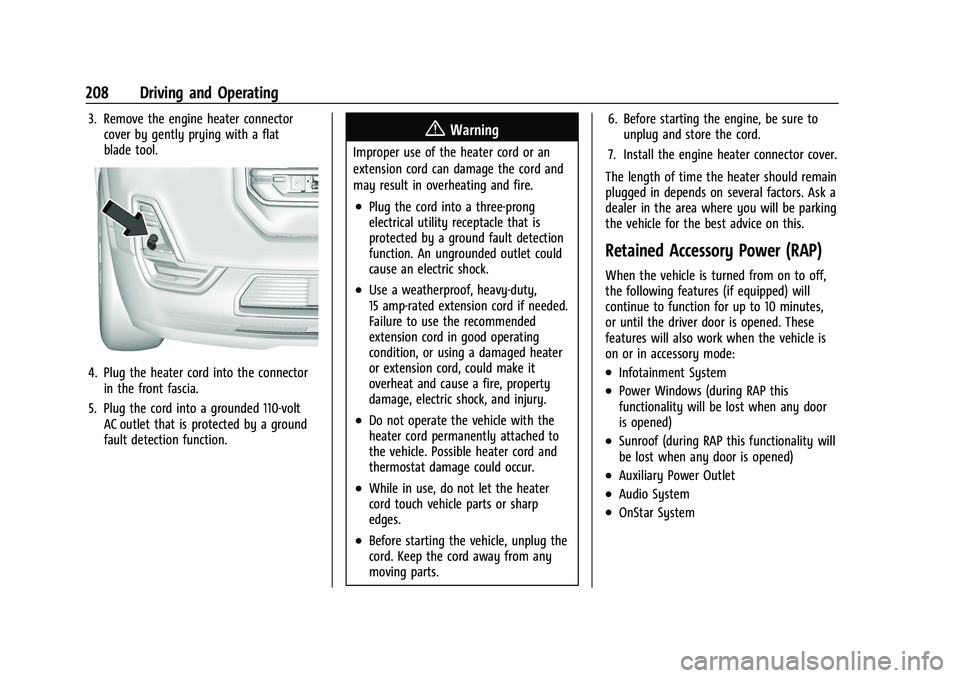
3. Remove the engine heater connectorcover by gently prying with a flat
blade tool.
4. Plug the heater cord into the connectorin the front fascia.
5. Plug the cord into a grounded 110-volt AC outlet that is protected by a ground
fault detection function.
{Warning
Improper use of the heater cord or an
extension cord can damage the cord and
may result in overheating and fire.
.Plug the cord into a three-prong
electrical utility receptacle that is
protected by a ground fault detection
function. An ungrounded outlet could
cause an electric shock.
.Use a weatherproof, heavy-duty,
15 amp-rated extension cord if needed.
Failure to use the recommended
extension cord in good operating
condition, or using a damaged heater
or extension cord, could make it
overheat and cause a fire, property
damage, electric shock, and injury.
.Do not operate the vehicle with the
heater cord permanently attached to
the vehicle. Possible heater cord and
thermostat damage could occur.
.While in use, do not let the heater
cord touch vehicle parts or sharp
edges.
.Before starting the vehicle, unplug the
cord. Keep the cord away from any
moving parts. 6. Before starting the engine, be sure to
unplug and store the cord.
7. Install the engine heater connector cover.
The length of time the heater should remain
plugged in depends on several factors. Ask a
dealer in the area where you will be parking
the vehicle for the best advice on this.
Retained Accessory Power (RAP)
When the vehicle is turned from on to off,
the following features (if equipped) will
continue to function for up to 10 minutes,
or until the driver door is opened. These
features will also work when the vehicle is
on or in accessory mode:
.Infotainment System
.Power Windows (during RAP this
functionality will be lost when any door
is opened)
.Sunroof (during RAP this functionality will
be lost when any door is opened)
.Auxiliary Power Outlet
.Audio System
.OnStar System
Page 366 of 384
GMC Acadia/Acadia Denali Owner Manual (GMNA-Localizing-U.S./Canada/
Mexico-16402009) - 2023 - CRC - 3/28/22
OnStar 365
OnStar Additional
Information
In-Vehicle Audio Messages
Audio messages may play important
information at the following times:
.Prior to vehicle purchase. PressQto set
up an account.
.After change in ownership and at
90 days.
Transferring Service
PressQto request account transfer
eligibility information. The Advisor can
cancel or change account information.
Selling/Transferring the Vehicle
Call 1-888-4ONSTAR (1-888-466-7827)
immediately to terminate your OnStar or
connected services if the vehicle is disposed
of, sold, transferred, or if the lease ends.
Reactivation for Subsequent Owners
PressQand follow the prompts to speak to
an Advisor as soon as possible. The Advisor
will update vehicle records and explain
OnStar or connected service options.
How OnStar Service Works
Automatic Crash Response, Emergency
Services, Crisis Assist, Stolen Vehicle
Assistance, Remote Services, and Roadside
Assistance are available on most vehicles.
Not all OnStar services are available
everywhere or on all vehicles. For more
information, a full description of OnStar
services, system limitations, and OnStar User
Terms, Privacy Statement, and Software
Terms:
.Call 1-888-4ONSTAR (1-888-466-7827).
.See www.onstar.com (U.S.).
.See www.onstar.ca (Canada).
.Call TTY 1-877-248-2080.
.PressQto speak with an Advisor.
OnStar or connected services cannot work
unless the vehicle is in a place where OnStar
has an agreement with a wireless service
provider for service in that area. The
wireless service provider must also have
coverage, network capacity, reception, and
technology compatible with OnStar or
connected services. Service involving location
information about the vehicle cannot work
unless GPS signals are available,
unobstructed, and compatible with the
OnStar hardware. OnStar or connected services may not work if the OnStar
equipment is not properly installed or it has
not been properly maintained. If equipment
or software is added, connected,
or modified, OnStar or connected services
may not work. Other problems beyond the
control of OnStar
—such as hills, tall
buildings, tunnels, weather, electrical system
design and architecture of the vehicle,
damage to the vehicle in a crash, or wireless
phone network congestion or jamming —
may prevent service.
See Radio Frequency Statement 0359 or
Radio Frequency Statement 0359.
Services for People with Disabilities
Advisors provide services to help with
physical disabilities and medical conditions.
Press
Qto help:
.Locate a gas station with an attendant to
pump gas.
.Find a hotel, restaurant, etc., that meets
accessibility needs.
.Provide directions to the closest hospital
or pharmacy in urgent situations.
Page 373 of 384

GMC Acadia/Acadia Denali Owner Manual (GMNA-Localizing-U.S./Canada/-
Mexico-16402009) - 2023 - CRC - 3/28/22
372 Index
ArmrestStorage . . . . . . . . . . . . . . . . . . . . . . . . . . . . . . . . . 83
Assistance Program, Roadside . . . . . . . . . . . . 354
Assistance Systems Driving . . . . . . . . . . . . . . . . . . . . . . . . . . . . . . . . 237
Parking and Backing . . . . . . . . . . . . . . . . . . . 232
Audio
Bluetooth . . . . . . . . . . . . . . . . . . . . . . . . . . . . . . 147
Automatic Dimming Mirrors . . . . . . . . . . . . . . . . . . . . . . . 28
Door Locks . . . . . . . . . . . . . . . . . . . . . . . . . . . . . . . 17
Emergency Braking (AEB) . . . . . . . . . . . . . . 239
Headlamp System . . . . . . . . . . . . . . . . . . . . . 130
Transmission . . . . . . . . . . . . . . . . . . . . . . . . . . . . 211
Transmission Fluid . . . . . . . . . . . . . . . . . . . . . 270
Automatic Transmission
Manual Mode . . . . . . . . . . . . . . . . . . . . . . . . . 214
Auxiliary Jack . . . . . . . . . . . . . . . . . . . . . . . . . . . . . . . . . . . . 147
Avoiding Untrusted Media Devices . . . . . . . 144
B
Battery Exterior Lighting Battery Saver . . . . . . . . 134
Load Management . . . . . . . . . . . . . . . . . . . . . 133
Power Protection . . . . . . . . . . . . . . . . . . . . . . 134
Battery - North America . . . . . . . . . . . . 279, 324
Blade Replacement, Wiper . . . . . . . . . . . . . . . .281 Bluetooth
Audio . . . . . . . . . . . . . . . . . . . . . . . . . . . . . . . . . . 147
Overview . . . . . . . . . . . . . . . . . . . . . . . . . 164, 165
Brake Fluid . . . . . . . . . . . . . . . . . . . . . . . . . . . . . . . . . . . 278
System Warning Light . . . . . . . . . . . . . . . . . 107
Brakes . . . . . . . . . . . . . . . . . . . . . . . . . . . . . . . . . . . 278
Antilock . . . . . . . . . . . . . . . . . . . . . . . . . . . . . . . . 215
Brake Assist . . . . . . . . . . . . . . . . . . . . . . . . . . . . 217
Electric Brake Boost . . . . . . . . . . . . . . . . . . . . 215
Electric Parking Brake . . . . . . . . . . . . . . . . . . 216
Braking . . . . . . . . . . . . . . . . . . . . . . . . . . . . . . . . . . 192 Automatic Emergency (AEB) . . . . . . . . . . . 239
Braking System Front Pedestrian (FPB) . . . . . . . . . . . . . . . . . 241
Break-In, New Vehicle . . . . . . . . . . . . . . . . . . . . 203
Bulb Replacement . . . . . . . . . . . . . . . . . . . . . . . . 283
Halogen Bulbs . . . . . . . . . . . . . . . . . . . . . . . . . 283
Headlamp Aiming . . . . . . . . . . . . . . . . . . . . . . 283
Buying New Tires . . . . . . . . . . . . . . . . . . . . . . . . 307
C
Calibration Compass . . . . . . . . . . . . . . . . . . . . . . . . . . . . . . . . 92
California Perchlorate Materials
Requirements . . . . . . . . . . . . . . . . . . . . . . . . 262
California Proposition 65 Warning . . . . . 1, 324 Camera
Rear Vision (RVC) . . . . . . . . . . . . . . . . . . . . . . 232
Canadian Vehicle Owners . . . . . . . . . . . . . . . . . . .2
Capacities and Specifications . . . . . . . . . . . . . 348
Carbon Monoxide Engine Exhaust . . . . . . . . . . . . . . . . . . . . . . . . 210
Liftgate . . . . . . . . . . . . . . . . . . . . . . . . . . . . . . . . . 18
Winter Driving . . . . . . . . . . . . . . . . . . . . . . . . . 199
Cargo Management System . . . . . . . . . . . . . . . . . . . 85
Tie-Downs . . . . . . . . . . . . . . . . . . . . . . . . . . . . . . 85
Caution, Danger, and Warning . . . . . . . . . . . . . .2
Center Console Storage . . . . . . . . . . . . . . . . . . . . . . . . . . . . . . . . . 84
Chains, Tire . . . . . . . . . . . . . . . . . . . . . . . . . . . . . . 310
Charging System Light . . . . . . . . . . . . . . . . . . . . . . . . . . 106
Wireless . . . . . . . . . . . . . . . . . . . . . . . . . . . . . . . . 93
Check Engine Light (Malfunction Indicator) . . . . . . . . . . . . . . . . . . . . . . . . . . . . . . 106
Child Restraints
Infants and Young Children . . . . . . . . . . . . . 66
Lower Anchors and Tethers forChildren . . . . . . . . . . . . . . . . . . . . . . . . . . . . . . . . 71
Older Children . . . . . . . . . . . . . . . . . . . . . . . . . . 64
Securing . . . . . . . . . . . . . . . . . . . . . . . . . . . . 78, 80
Systems . . . . . . . . . . . . . . . . . . . . . . . . . . . . . . . . 68
Child Safety Locks . . . . . . . . . . . . . . . . . . . . . . . . .18