clock GMC ACADIA LIMITED 2017 User Guide
[x] Cancel search | Manufacturer: GMC, Model Year: 2017, Model line: ACADIA LIMITED, Model: GMC ACADIA LIMITED 2017Pages: 339, PDF Size: 4.75 MB
Page 233 of 339
GMC Acadia Limited Owner Manual (GMNA-Localizing-U.S.-10283134) -
2017 - crc - 3/30/16
232 Vehicle Care
3. Turn the bulb socketcounterclockwise and pull the
bulb straight out of the socket.
4. Install the new bulb.
5. Reverse Steps 1–3 to reinstall the license plate lamp.
Replacement Bulbs
Exterior Lamp Bulb
Number
License Plate Lamp 194LL
For replacement bulbs not listed
here, contact your dealer.
Electrical System
High Voltage Devices and
Wiring
{Warning
Exposure to high voltage can
cause shock, burns, and even
death. The high voltage
components in the vehicle can
only be serviced by technicians
with special training.
High voltage components are
identified by labels. Do not
remove, open, take apart,
or modify these components.
High voltage cable or wiring has
orange covering or labels. Do not
probe, tamper with, cut, or modify
high voltage cable or wiring.
Electrical System
Overload
The vehicle has fuses and circuit
breakers to protect against an
electrical system overload. When the current electrical load is
too heavy, the circuit breaker opens
and closes, protecting the circuit
until the current load returns to
normal or the problem is fixed. This
greatly reduces the chance of circuit
overload and fire caused by
electrical problems.
Fuses and circuit breakers protect
power devices in the vehicle.
Replace a bad fuse with a new one
of the identical size and rating.
If there is a problem on the road and
a fuse needs to be replaced, the
same amperage fuse can be
borrowed. Choose some feature of
the vehicle that is not needed to use
and replace it as soon as possible.
Headlamp Wiring
An electrical overload may cause
the lamps to go on and off, or in
some cases to remain off. Have the
headlamp wiring checked right away
if the lamps go on and off or
remain off.
Page 264 of 339
GMC Acadia Limited Owner Manual (GMNA-Localizing-U.S.-10283134) -
2017 - crc - 3/30/16
Vehicle Care 263
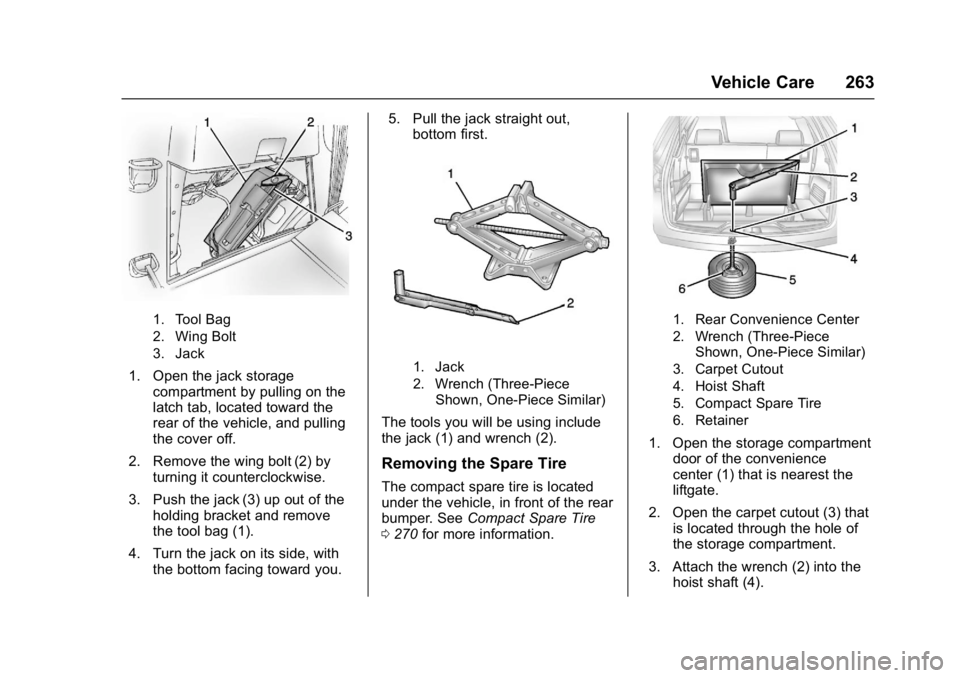
1. Tool Bag
2. Wing Bolt
3. Jack
1. Open the jack storagecompartment by pulling on the
latch tab, located toward the
rear of the vehicle, and pulling
the cover off.
2. Remove the wing bolt (2) by turning it counterclockwise.
3. Push the jack (3) up out of the holding bracket and remove
the tool bag (1).
4. Turn the jack on its side, with the bottom facing toward you. 5. Pull the jack straight out,
bottom first.1. Jack
2. Wrench (Three-Piece
Shown, One-Piece Similar)
The tools you will be using include
the jack (1) and wrench (2).
Removing the Spare Tire
The compact spare tire is located
under the vehicle, in front of the rear
bumper. See Compact Spare Tire
0 270 for more information.
1. Rear Convenience Center
2. Wrench (Three-Piece
Shown, One-Piece Similar)
3. Carpet Cutout
4. Hoist Shaft
5. Compact Spare Tire
6. Retainer
1. Open the storage compartment door of the convenience
center (1) that is nearest the
liftgate.
2. Open the carpet cutout (3) that is located through the hole of
the storage compartment.
3. Attach the wrench (2) into the hoist shaft (4).
Page 265 of 339
GMC Acadia Limited Owner Manual (GMNA-Localizing-U.S.-10283134) -
2017 - crc - 3/30/16
264 Vehicle Care
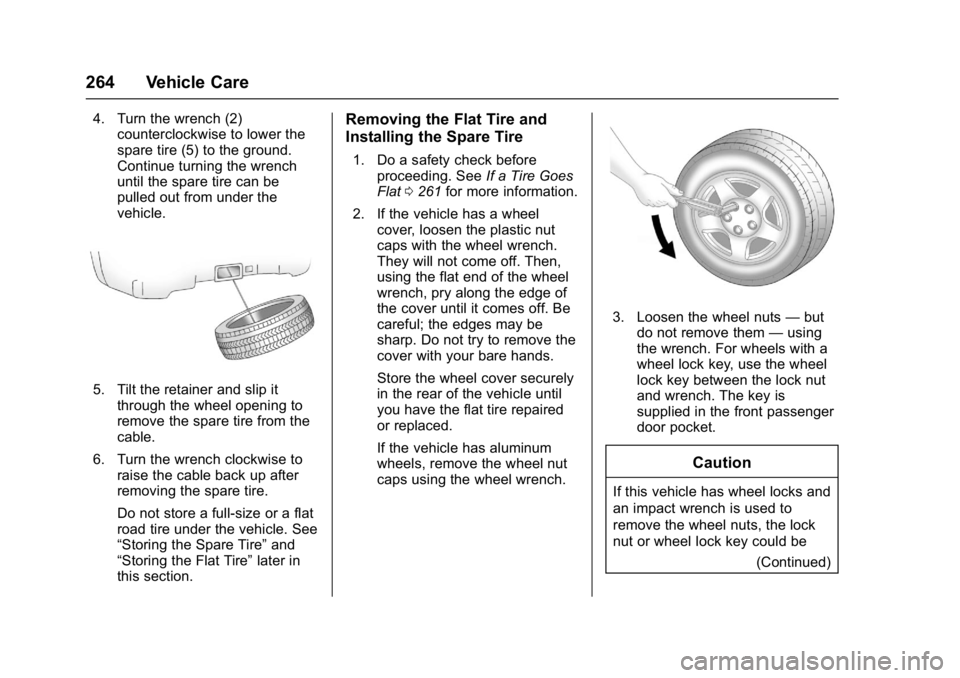
4. Turn the wrench (2)counterclockwise to lower the
spare tire (5) to the ground.
Continue turning the wrench
until the spare tire can be
pulled out from under the
vehicle.
5. Tilt the retainer and slip it
through the wheel opening to
remove the spare tire from the
cable.
6. Turn the wrench clockwise to raise the cable back up after
removing the spare tire.
Do not store a full-size or a flat
road tire under the vehicle. See
“Storing the Spare Tire” and
“Storing the Flat Tire” later in
this section.
Removing the Flat Tire and
Installing the Spare Tire
1. Do a safety check before
proceeding. See If a Tire Goes
Flat 0261 for more information.
2. If the vehicle has a wheel cover, loosen the plastic nut
caps with the wheel wrench.
They will not come off. Then,
using the flat end of the wheel
wrench, pry along the edge of
the cover until it comes off. Be
careful; the edges may be
sharp. Do not try to remove the
cover with your bare hands.
Store the wheel cover securely
in the rear of the vehicle until
you have the flat tire repaired
or replaced.
If the vehicle has aluminum
wheels, remove the wheel nut
caps using the wheel wrench.
3. Loosen the wheel nuts —but
do not remove them —using
the wrench. For wheels with a
wheel lock key, use the wheel
lock key between the lock nut
and wrench. The key is
supplied in the front passenger
door pocket.
Caution
If this vehicle has wheel locks and
an impact wrench is used to
remove the wheel nuts, the lock
nut or wheel lock key could be
(Continued)
Page 266 of 339
GMC Acadia Limited Owner Manual (GMNA-Localizing-U.S.-10283134) -
2017 - crc - 3/30/16
Vehicle Care 265
Caution (Continued)
damaged. Do not use an impact
wrench to remove the wheel nuts
if this vehicle has wheel locks.
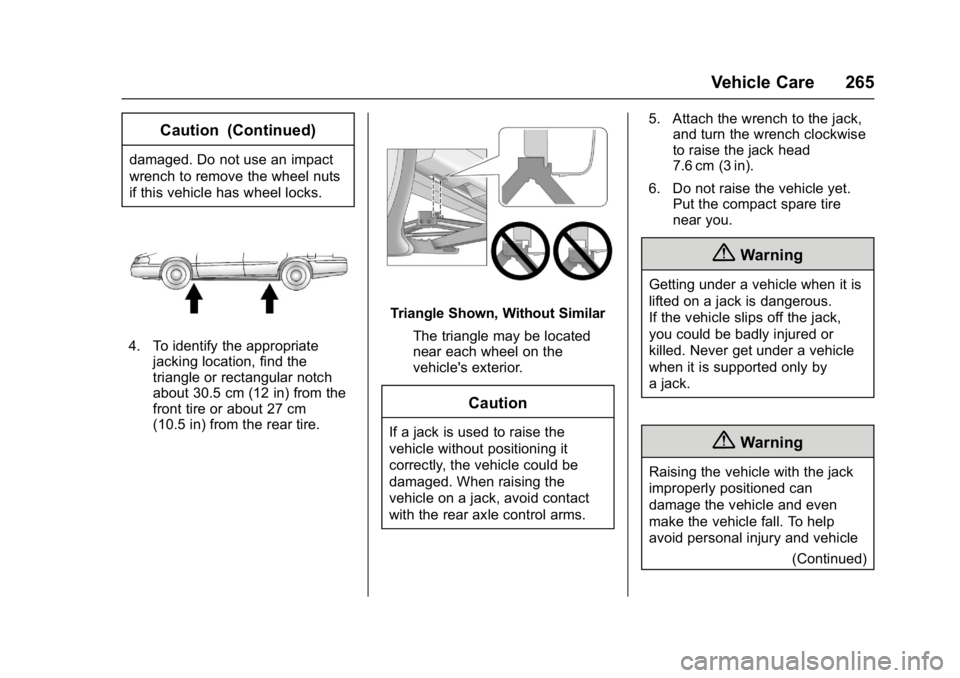
4. To identify the appropriatejacking location, find the
triangle or rectangular notch
about 30.5 cm (12 in) from the
front tire or about 27 cm
(10.5 in) from the rear tire.
Triangle Shown, Without Similar
The triangle may be located
near each wheel on the
vehicle's exterior.
Caution
If a jack is used to raise the
vehicle without positioning it
correctly, the vehicle could be
damaged. When raising the
vehicle on a jack, avoid contact
with the rear axle control arms. 5. Attach the wrench to the jack,
and turn the wrench clockwise
to raise the jack head
7.6 cm (3 in).
6. Do not raise the vehicle yet. Put the compact spare tire
near you.
{Warning
Getting under a vehicle when it is
lifted on a jack is dangerous.
If the vehicle slips off the jack,
you could be badly injured or
killed. Never get under a vehicle
when it is supported only by
a jack.
{Warning
Raising the vehicle with the jack
improperly positioned can
damage the vehicle and even
make the vehicle fall. To help
avoid personal injury and vehicle
(Continued)
Page 267 of 339
GMC Acadia Limited Owner Manual (GMNA-Localizing-U.S.-10283134) -
2017 - crc - 3/30/16
266 Vehicle Care
Warning (Continued)
damage, be sure to fit the jack lift
head into the proper location
before raising the vehicle.
7. Raise the vehicle by turning the wrench clockwise in the jack.
Raise the vehicle far enough
off the ground so that there is
enough room for the spare tire
to fit under the wheel well.
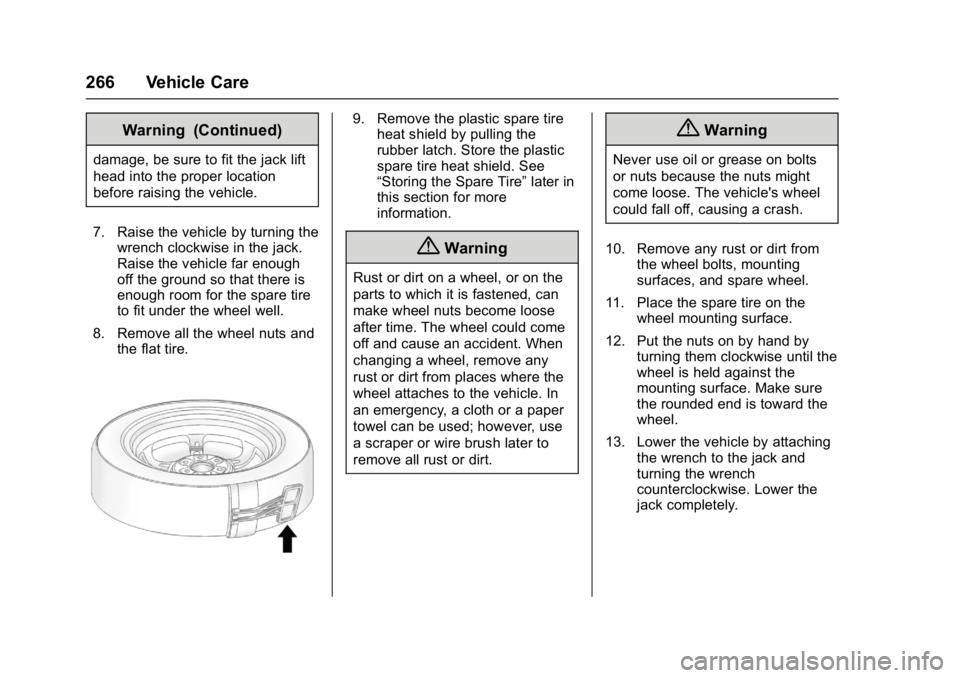
8. Remove all the wheel nuts and the flat tire.
9. Remove the plastic spare tireheat shield by pulling the
rubber latch. Store the plastic
spare tire heat shield. See
“Storing the Spare Tire” later in
this section for more
information.
{Warning
Rust or dirt on a wheel, or on the
parts to which it is fastened, can
make wheel nuts become loose
after time. The wheel could come
off and cause an accident. When
changing a wheel, remove any
rust or dirt from places where the
wheel attaches to the vehicle. In
an emergency, a cloth or a paper
towel can be used; however, use
a scraper or wire brush later to
remove all rust or dirt.
{Warning
Never use oil or grease on bolts
or nuts because the nuts might
come loose. The vehicle's wheel
could fall off, causing a crash.
10. Remove any rust or dirt from the wheel bolts, mounting
surfaces, and spare wheel.
11. Place the spare tire on the wheel mounting surface.
12. Put the nuts on by hand by turning them clockwise until the
wheel is held against the
mounting surface. Make sure
the rounded end is toward the
wheel.
13. Lower the vehicle by attaching the wrench to the jack and
turning the wrench
counterclockwise. Lower the
jack completely.
Page 271 of 339

GMC Acadia Limited Owner Manual (GMNA-Localizing-U.S.-10283134) -
2017 - crc - 3/30/16
270 Vehicle Care
4. Reinstall the wing bolt (2) byturning clockwise.
5. To replace the cover, line up the tab at the front of the cover
with the notch in the cover
opening. Push the cover in
place and make sure that the
rear clips are in the slots and
push the cover closed.
Store the center cap or the plastic
bolt-on wheel covers until a full size
tire is put back on the vehicle. When
you replace the compact spare with
a full-size tire, reinstall the bolt-on
wheel covers or the center cap.
Hand-tighten them over the wheel
nuts, using the wrench.
Compact Spare Tire
{Warning
Driving with more than one
compact spare tire at a time could
result in loss of braking and
handling. This could lead to a
crash and you or others could be
injured. Use only one compact
spare tire at a time. If this vehicle has a compact spare
tire, it was fully inflated when new;
however, it can lose air over time.
Check the inflation pressure
regularly. It should be 420 kPa
(60 psi).
Stop as soon as possible and check
that the spare tire is correctly
inflated after being installed on the
vehicle. The compact spare tire is
designed for temporary use only.
The vehicle will perform differently
with the spare tire installed and it is
recommended that the vehicle
speed be limited to 80 km/h (50
mph). To conserve the tread of the
spare tire, have the standard tire
repaired or replaced as soon as
convenient and return the spare tire
to the storage area.
When using a compact spare tire,
the ABS and Traction Control
systems may engage until the spare
tire is recognized by the vehicle,
especially on slippery roads. Adjust
driving to reduce possible
wheel slip.
Performance of the All-Wheel
Drive (AWD) system will be
automatically reduced to protect the
system when using the compact
spare. To restore the AWD and
prevent excessive wear on the
clutch in the AWD, replace the
compact spare tire with a full-size
tire as soon as possible.
Caution
When the compact spare is
installed, do not take the vehicle
through an automatic car wash
with guide rails. The compact
spare can get caught on the rails
which can damage the tire, wheel,
and other parts of the vehicle.
Do not use the compact spare on
other vehicles.
Do not mix the compact spare tire or
wheel with other wheels or tires.
They will not fit. Keep the spare tire
and its wheel together.
Page 330 of 339

GMC Acadia Limited Owner Manual (GMNA-Localizing-U.S.-10283134) -
2017 - crc - 3/30/16
Index 329
Automatic TransmissionManual Mode . . . . . . . . . . . . . . . . . 180
Shift Lock Control Function
Check . . . . . . . . . . . . . . . . . . . . . . . 228
B
BatteryLoad Management . . . . . . . . . . . . 148
Power Protection . . . . . . . . . . . . . 149
Voltage and ChargingMessages . . . . . . . . . . . . . . . . . . . 124
Battery - North America . . . . 227, 271
Blade Replacement, Wiper . . . . . 229
Brake
System Warning Light . . . . . . . . . 111
Brakes . . . . . . . . . . . . . . . . . . . . . . . . . . 225 Antilock . . . . . . . . . . . . . . . . . . . . . . . 182
Assist . . . . . . . . . . . . . . . . . . . . . . . . . 184
Fluid . . . . . . . . . . . . . . . . . . . . . . . . . . 226
Parking . . . . . . . . . . . . . . . . . . . . . . . 183
System Messages . . . . . . . . . . . . 124
Braking . . . . . . . . . . . . . . . . . . . . . . . . . 162
Break-In, New Vehicle . . . . . . . . . . 171
Bulb Replacement . . . . . . . . . . . . . . 232 Headlamp Aiming . . . . . . . . . . . . . 231
Headlamps . . . . . . . . . . . . . . . . . . . 231
High Intensity Discharge(HID) Lighting . . . . . . . . . . . . . . . 231 Bulb Replacement (cont'd)
License Plate Lamps . . . . . . . . . 231
Buying New Tires . . . . . . . . . . . . . . . 256
C
Calibration . . . . . . . . . . . . . . . . . . . . . . . 99
California Fuel Requirements . . . . . . . . . . . 197
Perchlorate MaterialsRequirements . . . . . . . . . . . . . . . 209
California Proposition
65 Warning . . . . . . . . . .209, 227, 271
Camera
Rear Vision (RVC) . . . . . . . . . . . . 188
Canadian Vehicle Owners . . . . . . . . 2
Capacities and Specifications . . . . . . . . . . . . . . . . . 302
Carbon Monoxide
Engine Exhaust . . . . . . . . . . . . . . . 178
Liftgate . . . . . . . . . . . . . . . . . . . . . . . . . 31
Winter Driving . . . . . . . . . . . . . . . . 165
Cargo Cover . . . . . . . . . . . . . . . . . . . . . . . . . . . 94
Management System . . . . . . . . . . . 94
Tie-Downs . . . . . . . . . . . . . . . . . . . . . . 94
Caution, Danger, and Warning . . . . 2
Center Console Storage . . . . . . . . . 93
Chains, Tire . . . . . . . . . . . . . . . . . . . . 261 Charging System Light . . . . . . . . . 109
Check
Ignition Transmission Lock . . . 229
Malfunction IndicatorEngine Light . . . . . . . . . . . . . . . . 109
Child Restraints Infants and Young Children . . . . . 75
Lower Anchors and Tethers
for Children . . . . . . . . . . . . . . . . . . . 80
Older Children . . . . . . . . . . . . . . . . . . 73
Securing . . . . . . . . . . . . . . . . . . . . 87, 89
Systems . . . . . . . . . . . . . . . . . . . . . . . . 77
Circuit Breakers . . . . . . . . . . . . . . . . 233
Cleaning Exterior Care . . . . . . . . . . . . . . . . . 278
Interior Care . . . . . . . . . . . . . . . . . . 283
Climate Control Systems Dual Automatic . . . . . . . . . . . . . . . 151
Rear . . . . . . . . . . . . . . . . . . . . . 156, 157
Clock . . . . . . . . . . . . . . . . . . . . . . . . . . . 101
Cluster, Instrument . . . . . . . . . . . . . 104
Collision Damage Repair . . . . . . . 311
Compact Spare Tire . . . . . . . . . . . . 270
Compartments Storage . . . . . . . . . . . . . . . . . . . . . . . . . 92
Compass . . . . . . . . . . . . . . . . . . . . . . . . 99
Connections OnStar
®. . . . . . . . . . . . . . . . . . . . . . 320