keyless GMC ACADIA LIMITED 2017 User Guide
[x] Cancel search | Manufacturer: GMC, Model Year: 2017, Model line: ACADIA LIMITED, Model: GMC ACADIA LIMITED 2017Pages: 339, PDF Size: 4.75 MB
Page 128 of 339
GMC Acadia Limited Owner Manual (GMNA-Localizing-U.S.-10283134) -
2017 - crc - 3/30/16
Instruments and Controls 127
fuel cap is not tightened properly.
SeeMalfunction Indicator Lamp
(Check Engine Light) 0109.
Reinstall the fuel cap fully. See
Filling the Tank 0198. The
diagnostic system can determine if
the fuel cap has been left off or
improperly installed. A loose or
missing fuel cap allows fuel to
evaporate into the atmosphere.
A few driving trips with the cap
properly installed should turn this
light and message off.
Key and Lock Messages
REPLACE BATTERY IN
REMOTE KEY
This message displays if a Remote
Keyless Entry (RKE) transmitter
battery is low. The battery needs to
be replaced in the transmitter. See
“Battery Replacement” under
Remote Keyless Entry (RKE)
System Operation 025.
Lamp Messages
AUTOMATIC LIGHT
CONTROL OFF
This message displays when the
automatic headlamps are turned off.
This message clears itself after
10 seconds.
AUTOMATIC LIGHT
CONTROL ON
This message displays when the
automatic headlamps are turned on.
This message clears itself after
10 seconds.
TURN SIGNAL ON
This message displays and a chime
sounds if a turn signal is left on for
1.2 km (0.75 mi). Move the turn
signal lever to the off position.
Object Detection System
Messages
FORWARD COLLISION ALERT
UNAVAILABLE
This message displays when
attempting to activate the Forward
Collision Alert (FCA) system when it
is temporarily unavailable. The FCA
system does not need service.
This message could be due to the
camera being blocked. Cleaning the
outside of the windshield behind the
rearview mirror may correct the
issue.
FRT CAMERA BLOCKED
CLEAN WINDSHIELD
This message displays when the
camera is blocked. Cleaning the
outside of the windshield behind the
rearview mirror may correct the
issue. The Lane Departure Warning
system will not operate. Forward
Collision Alert (FCA) may not work
or may not work as well.
Page 135 of 339
GMC Acadia Limited Owner Manual (GMNA-Localizing-U.S.-10283134) -
2017 - crc - 3/30/16
134 Instruments and Controls
To select a setting, press the set/
reset button while the desired
setting is displayed on the DIC.
AUTO DOOR UNLOCK
This feature allows you to select
whether or not to turn off the
automatic door unlocking feature.
It also allows you to select which
doors and when the doors will
automatically unlock. SeeAutomatic
Door Locks 030.
Press the customization button until
AUTO DOOR UNLOCK appears on
the DIC display. Press the set/reset
button once to access the settings
for this feature. Then press the
customization button to scroll
through the following settings:
OFF : None of the doors will
automatically unlock.
DRIVER AT KEY OUT : Only the
driver door will unlock when the key
is taken out of the ignition.
DRIVER IN PARK : Only the driver
door will unlock when the vehicle is
shifted into P (Park). ALL AT KEY OUT :
All of the doors
will unlock when the key is taken
out of the ignition.
ALL IN PARK (default) : All of the
doors will unlock when the vehicle is
shifted into P (Park).
NO CHANGE : No change will be
made to this feature. The current
setting will remain.
To select a setting, press the set/
reset button while the desired
setting is displayed on the DIC.
REMOTE DOOR LOCK
This feature allows you to select the
type of feedback you will receive
when locking the vehicle with the
Remote Keyless Entry (RKE)
transmitter. You will not receive
feedback when locking the vehicle
with the RKE transmitter if the doors
are open. See Remote Keyless
Entry (RKE) System Operation 025.
Press the customization button until
REMOTE DOOR LOCK appears on
the DIC display. Press the set/reset
button once to access the settings for this feature. Then press the
customization button to scroll
through the following settings:
OFF :
There will be no feedback
when you press the lock button on
the RKE transmitter.
LIGHTS ONLY : The exterior lamps
will flash when you press the lock
button on the RKE transmitter.
HORN ONLY : The horn will sound
on the second press of the lock
button on the RKE transmitter.
HORN & LIGHTS (default) : The
exterior lamps will flash when you
press the lock button on the RKE
transmitter, and the horn will sound
when the lock button is pressed
again within five seconds of the
previous command.
NO CHANGE : No change will be
made to this feature. The current
setting will remain.
To select a setting, press the set/
reset button while the desired
setting is displayed on the DIC.
Page 136 of 339
GMC Acadia Limited Owner Manual (GMNA-Localizing-U.S.-10283134) -
2017 - crc - 3/30/16
Instruments and Controls 135
REMOTE DOOR UNLOCK
This feature allows you to select the
type of feedback you will receive
when unlocking the vehicle with the
Remote Keyless Entry (RKE)
transmitter. You will not receive
feedback when unlocking the
vehicle with the RKE transmitter if
the doors are open. SeeRemote
Keyless Entry (RKE) System
Operation 025.
Press the customization button until
REMOTE DOOR UNLOCK appears
on the DIC display. Press the set/
reset button once to access the
settings for this feature. Then press
the customization button to scroll
through the following settings:
LIGHTS OFF : The exterior lamps
will not flash when you press the
unlock button on the RKE
transmitter.
LIGHTS ON (default) : The exterior
lamps will flash when you press the
unlock button on the RKE
transmitter. NO CHANGE :
No change will be
made to this feature. The current
setting will remain.
To select a setting, press the set/
reset button while the desired
setting is displayed on the DIC.
DELAY DOOR LOCK
This feature allows you to select
whether or not the locking of the
vehicle's doors and liftgate will be
delayed. When locking the doors
and liftgate with the power door lock
switch and a door or the liftgate is
open, this feature will delay locking
the doors and liftgate until
five seconds after the last door is
closed. You will hear three chimes
to signal that the delayed locking
feature is in use. The key must be
out of the ignition for this feature to
work. You can temporarily override
delayed locking by pressing the
power door lock switch twice or the
lock button on the RKE transmitter
twice. See Delayed Locking 029.
Press the customization button until
DELAY DOOR LOCK appears on
the DIC display. Press the set/reset
button once to access the settings for this feature. Then press the
customization button to scroll
through the following settings:
OFF :
There will be no delayed
locking of the vehicle's doors.
ON (default) : The doors will not
lock until five seconds after the last
door or the liftgate is closed.
NO CHANGE : No change will be
made to this feature. The current
setting will remain.
To select a setting, press the set/
reset button while the desired
setting is displayed on the DIC.
EXIT LIGHTING
This feature allows you to select the
amount of time you want the
exterior lamps to remain on when it
is dark enough outside. This
happens after the key is turned from
ON/RUN to LOCK/OFF.
Press the customization button until
EXIT LIGHTING appears on the DIC
display. Press the set/reset button
once to access the settings for this
Page 137 of 339
GMC Acadia Limited Owner Manual (GMNA-Localizing-U.S.-10283134) -
2017 - crc - 3/30/16
136 Instruments and Controls
feature. Then press the
customization button to scroll
through the following settings:
OFF :The exterior lamps will not
turn on.
30 SECONDS (default) : The
exterior lamps will stay on for
30 seconds.
1 MINUTE : The exterior lamps will
stay on for one minute.
2 MINUTES : The exterior lamps will
stay on for two minutes.
NO CHANGE : No change will be
made to this feature. The current
setting will remain.
To select a setting, press the set/
reset button while the desired
setting is displayed on the DIC.
APPROACH LIGHTING
This feature allows you to select
whether or not to have the exterior
lights turn on briefly during low light
periods after unlocking the vehicle
using the Remote Keyless Entry
(RKE) transmitter. Press the customization button until
APPROACH LIGHTING appears on
the DIC display. Press the set/reset
button once to access the settings
for this feature. Then press the
customization button to scroll
through the following settings:
OFF :
The exterior lights will not
turn on when you unlock the vehicle
with the RKE transmitter.
ON (default) : If it is dark enough
outside, the exterior lights will turn
on briefly when you unlock the
vehicle with the RKE transmitter.
The lights will remain on for
20 seconds or until the lock button
on the RKE transmitter is pressed,
or the vehicle is no longer off. See
Remote Keyless Entry (RKE)
System Operation 025.
NO CHANGE : No change will be
made to this feature. The current
setting will remain.
To select a setting, press the set/
reset button while the desired
setting is displayed on the DIC. CHIME VOLUME
This feature allows you to select the
volume level of the chime.
Press the customization button until
CHIME VOLUME appears on the
DIC display. Press the set/reset
button once to access the settings
for this feature. Then press the
customization button to scroll
through the following settings:
NORMAL :
The chime volume will
be set to a normal level.
LOUD : The chime volume will be
set to a loud level.
NO CHANGE : No change will be
made to this feature. The current
setting will remain.
There is no default for chime
volume. The volume will stay at the
last known setting.
To select a setting, press the set/
reset button while the desired
setting is displayed on the DIC.
PARK TILT MIRRORS
If your vehicle has this feature, it
allows you to select whether or not
the outside mirror(s) will
Page 139 of 339
GMC Acadia Limited Owner Manual (GMNA-Localizing-U.S.-10283134) -
2017 - crc - 3/30/16
138 Instruments and Controls
ON :The driver seat and outside
mirrors will automatically move to
the stored driving position when the
unlock button on the Remote
Keyless Entry (RKE) transmitter is
pressed. The steering column will
also move on vehicles with the
power tilt and telescopic steering
wheel feature. See Steering Wheel
Adjustment 098. See “Memory
Remote Recall” underMemory
Seats 047 for information on
matching transmitters to driver
positions.
NO CHANGE : No change will be
made to this feature. The current
setting will remain.
To select a setting, press the set/
reset button while the desired
setting is displayed on the DIC.
REMOTE START
If your vehicle has this feature, it
allows you to turn the remote start
off or on. The remote start feature
allows you to start the engine from
outside of the vehicle using the
Remote Keyless Entry (RKE)
transmitter. See Remote Vehicle
Start 027. Press the customization button until
REMOTE START appears on the
DIC display. Press the set/reset
button once to access the settings
for this feature. Then press the
customization button to scroll
through the following settings:
OFF :
The remote start feature will
be disabled.
ON (default) : The remote start
feature will be enabled.
NO CHANGE : No change will be
made to this feature. The current
setting will remain.
To select a setting, press the set/
reset button while the desired
setting is displayed on the DIC.
FACTORY SETTINGS
This feature allows you to set all of
the customization features back to
their factory default settings.
Press the customization button until
FACTORY SETTINGS appears on
the DIC display. Press the set/reset
button once to access the settings for this feature. Then press the
customization button to scroll
through the following settings:
RESTORE ALL (default) :
The
customization features will be set to
their factory default settings.
DO NOT RESTORE : The
customization features will not be
set to their factory default settings.
To select a setting, press the set/
reset button while the desired
setting is displayed on the DIC.
EXIT FEATURE SETTINGS
This feature allows you to exit the
feature settings menu.
Press the customization button until
FEATURE SETTINGS PRESS
V
TO EXIT appears in the DIC display.
Press the set/reset button once to
exit the menu.
If you do not exit, pressing the
customization button again will
return you to the beginning of the
feature settings menu.
Page 148 of 339
GMC Acadia Limited Owner Manual (GMNA-Localizing-U.S.-10283134) -
2017 - crc - 3/30/16
Lighting 147
Dome Lamp Override
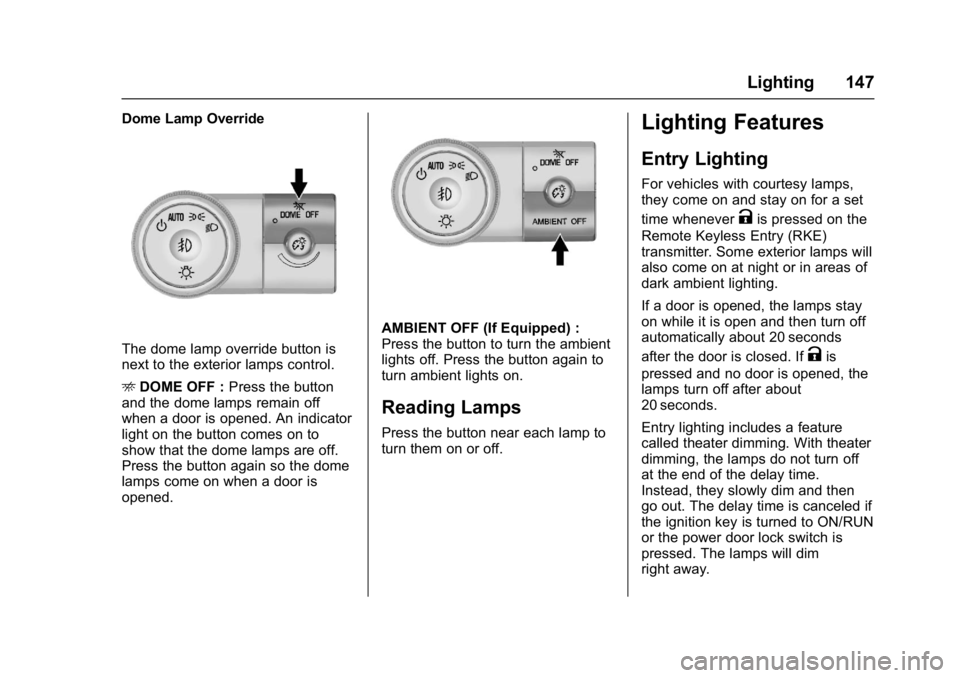
The dome lamp override button is
next to the exterior lamps control.
EDOME OFF : Press the button
and the dome lamps remain off
when a door is opened. An indicator
light on the button comes on to
show that the dome lamps are off.
Press the button again so the dome
lamps come on when a door is
opened.
AMBIENT OFF (If Equipped) :
Press the button to turn the ambient
lights off. Press the button again to
turn ambient lights on.
Reading Lamps
Press the button near each lamp to
turn them on or off.
Lighting Features
Entry Lighting
For vehicles with courtesy lamps,
they come on and stay on for a set
time whenever
Kis pressed on the
Remote Keyless Entry (RKE)
transmitter. Some exterior lamps will
also come on at night or in areas of
dark ambient lighting.
If a door is opened, the lamps stay
on while it is open and then turn off
automatically about 20 seconds
after the door is closed. If
Kis
pressed and no door is opened, the
lamps turn off after about
20 seconds.
Entry lighting includes a feature
called theater dimming. With theater
dimming, the lamps do not turn off
at the end of the delay time.
Instead, they slowly dim and then
go out. The delay time is canceled if
the ignition key is turned to ON/RUN
or the power door lock switch is
pressed. The lamps will dim
right away.
Page 210 of 339
GMC Acadia Limited Owner Manual (GMNA-Localizing-U.S.-10283134) -
2017 - crc - 3/30/16
Vehicle Care 209
Tire Chains . . . . . . . . . . . . . . . . . . . 261
If a Tire Goes Flat . . . . . . . . . . . . 261
Tire Changing . . . . . . . . . . . . . . . . 262
Compact Spare Tire . . . . . . . . . . 270
Jump Starting
Jump Starting - NorthAmerica . . . . . . . . . . . . . . . . . . . . . 271
Towing the Vehicle
Towing the Vehicle . . . . . . . . . . . 274
Recreational VehicleTowing . . . . . . . . . . . . . . . . . . . . . . 275
Appearance Care
Exterior Care . . . . . . . . . . . . . . . . . 278
Interior Care . . . . . . . . . . . . . . . . . . 283
Floor Mats . . . . . . . . . . . . . . . . . . . . 286
General Information
For service and parts needs, visit
your dealer. You will receive
genuine GM parts and GM-trained
and supported service people.
Genuine GM parts have one of
these marks:
California Proposition
65 Warning
WARNING: Most motor vehicles,
including this one, as well as many
of its service parts and fluids,
contain and/or emit chemicals
known to the State of California to cause cancer and birth defects or
other reproductive harm. Engine
exhaust, many parts and systems,
many fluids, and some component
wear by-products contain and/or
emit these chemicals.
See
Battery - North America 0227
and Jump Starting - North
America 0271.
California Perchlorate
Materials Requirements
Certain types of automotive
applications, such as airbag
initiators, safety belt pretensioners,
and lithium batteries contained in
Remote Keyless Entry transmitters,
may contain perchlorate materials.
Special handling may be necessary.
For additional information, see
www.dtsc.ca.gov/hazardouswaste/
perchlorate.
Accessories and
Modifications
Adding non-dealer accessories or
making modifications to the vehicle
can affect vehicle performance and
Page 255 of 339
GMC Acadia Limited Owner Manual (GMNA-Localizing-U.S.-10283134) -
2017 - crc - 3/30/16
254 Vehicle Care
The TPMS sensor matching process
is outlined below:1. Set the parking brake.
2. Turn the ignition to ON/RUN with the engine off.
3. Press the Remote Keyless Entry (RKE) transmitter's
Q
andKbuttons at the same
time for approximately
five seconds. The horn sounds
twice to signal the receiver is in
relearn mode and TIRE
LEARNING ACTIVE message
displays on the DIC screen.
4. Start with the driver side front tire.
5. Place the relearn tool against the tire sidewall, near the valve
stem. Then press the button to
activate the TPMS sensor.
A horn chirp confirms that the
sensor identification code has
been matched to this tire and
wheel position. 6. Proceed to the passenger side
front tire, and repeat the
procedure in Step 5.
7. Proceed to the passenger side rear tire, and repeat the
procedure in Step 5.
8. Proceed to the driver side rear tire, and repeat the procedure
in Step 5. The horn sounds two
times to indicate the sensor
identification code has been
matched to the driver side rear
tire, and the TPMS sensor
matching process is no longer
active. The TIRE LEARNING
ACTIVE message on the DIC
display screen goes off.
9. Turn the ignition to LOCK/OFF.
10. Set all four tires to the recommended air pressure
level as indicated on the Tire
and Loading Information label.
11. Put the valve caps back on the valve stems.
Tire Inspection
We recommend that the tires,
including the spare tire, if the
vehicle has one, be inspected
for signs of wear or damage at
least once a month.
Replace the tire if:
.The indicators at three or
more places around the tire
can be seen.
.There is cord or fabric
showing through the tire's
rubber.
.The tread or sidewall is
cracked, cut, or snagged
deep enough to show cord or
fabric.
.The tire has a bump, bulge,
or split.
.The tire has a puncture, cut,
or other damage that cannot
be repaired well because of
the size or location of the
damage.
Page 333 of 339

GMC Acadia Limited Owner Manual (GMNA-Localizing-U.S.-10283134) -
2017 - crc - 3/30/16
332 Index
G
Garage Door Opener . . . . . . . . . . . 139Programming . . . . . . . . . . . . . . . . . 139
Gauges Engine Coolant
Temperature . . . . . . . . . . . . . . . . 106
Fuel . . . . . . . . . . . . . . . . . . . . . . . . . . 105
Odometer . . . . . . . . . . . . . . . . . . . . . 105
Speedometer . . . . . . . . . . . . . . . . . 105
Tachometer . . . . . . . . . . . . . . . . . . . 105
Voltmeter . . . . . . . . . . . . . . . . . . . . . 107
Warning Lights and Indicators . . . . . . . . . . . . . . . . . . . 103
General Information
Service and Maintenance . . . . . 288
Towing . . . . . . . . . . . . . . . . . . . . . . . . 200
Vehicle Care . . . . . . . . . . . . . . . . . . 209
Glove Box . . . . . . . . . . . . . . . . . . . . . . . 92
GM Mobility Reimbursement Program . . . . . . . . . . . . . . . . . . . . . . . 308
H
Hazard Warning Flashers . . . . . . . 144
Head Restraints . . . . . . . . . . . . . . . . . 44
Head-up Display . . . . . . . . . . . . . . . . 120
HeadlampsAiming . . . . . . . . . . . . . . . . . . . . . . . . 231
Bulb Replacement . . . . . . . . . . . . 231 Headlamps (cont'd)
Daytime Running Lamps/
Automatic Headlamp
System . . . . . . . . . . . . . . . . . . . . . . 144
Delayed . . . . . . . . . . . . . . . . . . . . . . 144
Flash-to-Pass . . . . . . . . . . . . . . . . . 144
High Intensity Discharge (HID) Lighting . . . . . . . . . . . . . . . 231
High-Beam On Light . . . . . . . . . . .115
High/Low Beam Changer . . . . . 143
Heated and Cooled Front Seats . . . . . . . . . . . . . . . . . . . . . . . . . . 48
Heated Mirrors . . . . . . . . . . . . . . . . . . . 37
Heater Engine . . . . . . . . . . . . . . . . . . . . . . . . 174
High Voltage Devices and Wiring . . . . . . . . . . . . . . . . . . . . . . . . . 232
High-Beam On Light . . . . . . . . . . . . 115
Hill and Mountain Roads . . . . . . . . 165
Hill Start Assist (HSA) . . . . . . . . . . 184
Hood . . . . . . . . . . . . . . . . . . . . . . . . . . . 211
Horn . . . . . . . . . . . . . . . . . . . . . . . . . . . . . 98
How to Wear Safety Belts
Properly . . . . . . . . . . . . . . . . . . . . . . . . 54
I
Ignition Positions . . . . . . . . . . . . . . . 171
Ignition Transmission LockCheck . . . . . . . . . . . . . . . . . . . . . . . . . 229
Immobilizer . . . . . . . . . . . . . . . . . . . . . . 35
Indicator
Vehicle Ahead . . . . . . . . . . . . . . . . .113
Infants and Young Children, Restraints . . . . . . . . . . . . . . . . . . . . . . 75
Infotainment . . . . . . . . . . . . . . . . . . . . 150
Infotainment System . . . . . . . . . . . . 317
Instrument Cluster . . . . . . . . . . . . . . 104
Instrument Panel Storage Area . . . . . . . . . . . . . . . . . . . 92
Interior Rearview Mirrors . . . . . . . . . 38
Introduction . . . . . . . . . . . . . . . . . . . . . . . 2
J
Jump Starting - North America . . . . . . . . . . . . . . . . . . . . . . . 271
K
Key and Lock Messages . . . . . . . . 127
Keyless EntryRemote (RKE) System . . . . . . . . . 25
Keys . . . . . . . . . . . . . . . . . . . . . . . . . . . . . 23
Page 336 of 339

GMC Acadia Limited Owner Manual (GMNA-Localizing-U.S.-10283134) -
2017 - crc - 3/30/16
Index 335
Passenger Sensing System . . . . . 68
Perchlorate MaterialsRequirements, California . . . . . . 209
Personalization Vehicle . . . . . . . . . . . . . . . . . . . . . . . 132
Power Door Locks . . . . . . . . . . . . . . . . . . . . . 29
Mirrors . . . . . . . . . . . . . . . . . . . . . . . . . . 37
Outlets . . . . . . . . . . . . . . . . . . . . . . . 101
Protection, Battery . . . . . . . . . . . . 149
Retained Accessory (RAP) . . . 175
Seat Adjustment . . . . . . . . . . . . . . . . 45
Steering Fluid . . . . . . . . . . . . . . . . . 224
Windows . . . . . . . . . . . . . . . . . . . . . . . 39
Pregnancy, Using Safety Belts . . . 59
Privacy Vehicle Data Recording . . . . . . . 316
Program Courtesy Transportation . . . . . . 310
Proposition 65 Warning,
California . . . . . . . . . . . .209, 227, 271
R
Radio Frequency Statement . . . . 314
Reading Lamps . . . . . . . . . . . . . . . . . 147
Rear Climate Control
System . . . . . . . . . . . . . . . . . . . 156, 157
Rear Seats . . . . . . . . . . . . . . . . . . . . . . 49 Rear Vision Camera (RVC) . . . . . 188
Rear Window Washer/Wiper . . . . . 99
Rearview Mirrors
Automatic Dimming . . . . . . . . . . . . . 38
Reclining Seatbacks . . . . . . . . . . . . . 46
Recommended Fluids and Lubricants . . . . . . . . . . . . . . . . . . . . . 298
Records Maintenance . . . . . . . . . . . . . . . . . . 300
Recreational Vehicle Towing . . . . 275
Reimbursement Program, GM Mobility . . . . . . . . . . . . . . . . . . . 308
Remote Keyless Entry (RKE) System . . . . . . . . . . . . . . . . . . . . . . . . . 25
Remote Vehicle Start . . . . . . . . . . . . 27
Replacement Bulbs . . . . . . . . . . . . . 232
Replacement Parts Airbags . . . . . . . . . . . . . . . . . . . . . . . . . 73
Maintenance . . . . . . . . . . . . . . . . . . 299
Replacing Airbag System . . . . . . . . 73
Replacing LATCH System Parts after a Crash . . . . . . . . . . . . . 87
Replacing Safety Belt System Parts after a Crash . . . . . . . . . . . . . 61
Reporting Safety Defects
Canadian Government . . . . . . . . 315
General Motors . . . . . . . . . . . . . . . 315
U.S. Government . . . . . . . . . . . . . 315 Restraints
Where to Put . . . . . . . . . . . . . . . . . . . 79
Retained Accessory Power (RAP) . . . . . . . . . . . . . . . . . . 175
Ride Control Systems Messages . . . . . . . . . . . . . . . . . . . . 129
Roads
Driving, Wet . . . . . . . . . . . . . . . . . . 164
Roadside Assistance Program . . . . . . . . . . . . . . . . . . . . . . . 308
Roof
Sunroof . . . . . . . . . . . . . . . . . . . . . . . . . 41
Roof Rack System . . . . . . . . . . . . . . . 95
Rotation, Tires . . . . . . . . . . . . . . . . . . 255
Routing, Engine Drive Belt . . . . . . 303
Running the Vehicle While Parked . . . . . . . . . . . . . . . . . . . . . . . . 178
S
Safety Belts . . . . . . . . . . . . . . . . . . . . . 53Care . . . . . . . . . . . . . . . . . . . . . . . . . . . . 60
Extender . . . . . . . . . . . . . . . . . . . . . . . . 60
How to Wear Safety Belts
Properly . . . . . . . . . . . . . . . . . . . . . . . 54
Lap-Shoulder Belt . . . . . . . . . . . . . . 55
Reminders . . . . . . . . . . . . . . . . . . . . 107
Replacing after a Crash . . . . . . . . 61
Use During Pregnancy . . . . . . . . . . 59