key GMC ACADIA LIMITED 2017 Owner's Guide
[x] Cancel search | Manufacturer: GMC, Model Year: 2017, Model line: ACADIA LIMITED, Model: GMC ACADIA LIMITED 2017Pages: 339, PDF Size: 4.75 MB
Page 38 of 339
GMC Acadia Limited Owner Manual (GMNA-Localizing-U.S.-10283134) -
2017 - crc - 3/30/16
Keys, Doors, and Windows 37
Power Mirrors
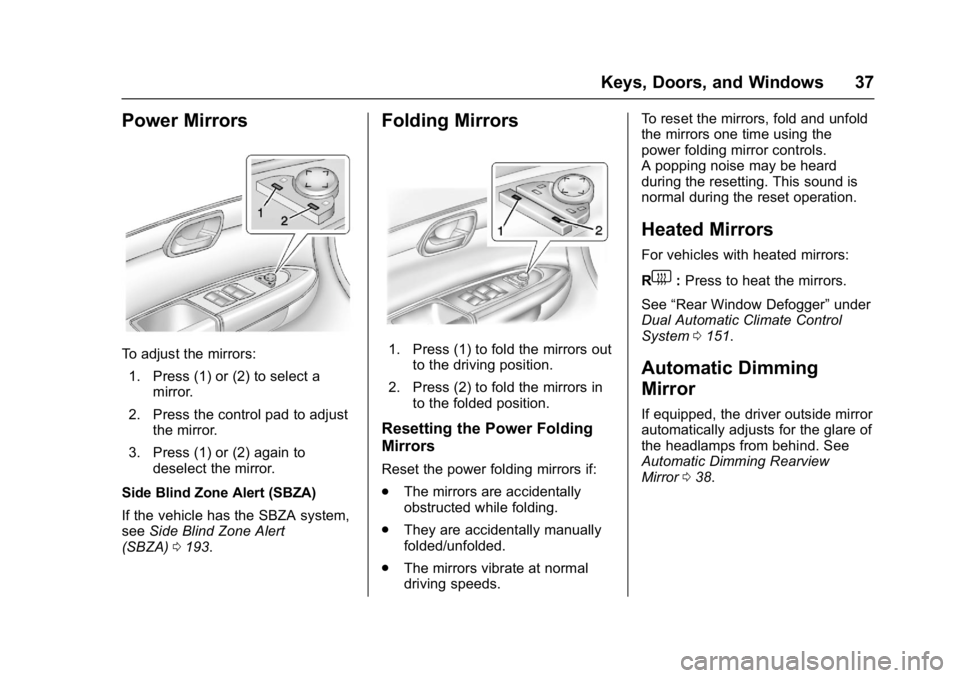
To adjust the mirrors:1. Press (1) or (2) to select a mirror.
2. Press the control pad to adjust the mirror.
3. Press (1) or (2) again to deselect the mirror.
Side Blind Zone Alert (SBZA)
If the vehicle has the SBZA system,
see Side Blind Zone Alert
(SBZA) 0193.
Folding Mirrors
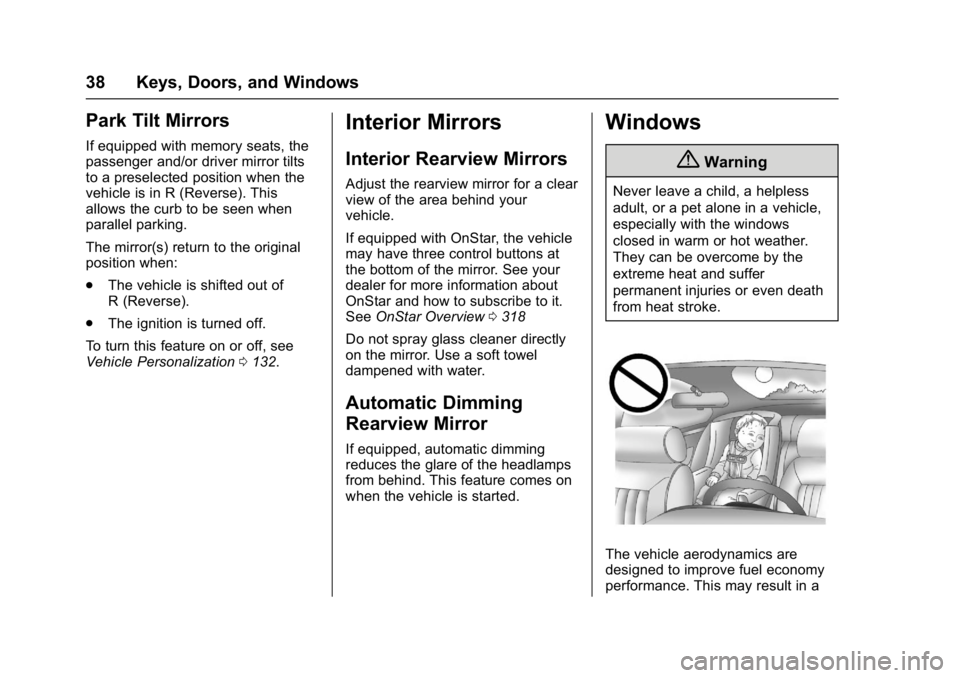
1. Press (1) to fold the mirrors out
to the driving position.
2. Press (2) to fold the mirrors in to the folded position.
Resetting the Power Folding
Mirrors
Reset the power folding mirrors if:
.The mirrors are accidentally
obstructed while folding.
. They are accidentally manually
folded/unfolded.
. The mirrors vibrate at normal
driving speeds. To reset the mirrors, fold and unfold
the mirrors one time using the
power folding mirror controls.
A popping noise may be heard
during the resetting. This sound is
normal during the reset operation.
Heated Mirrors
For vehicles with heated mirrors:
R
1:
Press to heat the mirrors.
See “Rear Window Defogger” under
Dual Automatic Climate Control
System 0151.
Automatic Dimming
Mirror
If equipped, the driver outside mirror
automatically adjusts for the glare of
the headlamps from behind. See
Automatic Dimming Rearview
Mirror 038.
Page 39 of 339
GMC Acadia Limited Owner Manual (GMNA-Localizing-U.S.-10283134) -
2017 - crc - 3/30/16
38 Keys, Doors, and Windows
Park Tilt Mirrors
If equipped with memory seats, the
passenger and/or driver mirror tilts
to a preselected position when the
vehicle is in R (Reverse). This
allows the curb to be seen when
parallel parking.
The mirror(s) return to the original
position when:
.The vehicle is shifted out of
R (Reverse).
. The ignition is turned off.
To turn this feature on or off, see
Vehicle Personalization 0132.
Interior Mirrors
Interior Rearview Mirrors
Adjust the rearview mirror for a clear
view of the area behind your
vehicle.
If equipped with OnStar, the vehicle
may have three control buttons at
the bottom of the mirror. See your
dealer for more information about
OnStar and how to subscribe to it.
See OnStar Overview 0318
Do not spray glass cleaner directly
on the mirror. Use a soft towel
dampened with water.
Automatic Dimming
Rearview Mirror
If equipped, automatic dimming
reduces the glare of the headlamps
from behind. This feature comes on
when the vehicle is started.
Windows
{Warning
Never leave a child, a helpless
adult, or a pet alone in a vehicle,
especially with the windows
closed in warm or hot weather.
They can be overcome by the
extreme heat and suffer
permanent injuries or even death
from heat stroke.
The vehicle aerodynamics are
designed to improve fuel economy
performance. This may result in a
Page 40 of 339
GMC Acadia Limited Owner Manual (GMNA-Localizing-U.S.-10283134) -
2017 - crc - 3/30/16
Keys, Doors, and Windows 39
pulsing sound when either rear
window is down and the front
windows are up. To reduce the
sound, open either a front window
or the sunroof, if equipped.
Power Windows
{Warning
Children could be seriously
injured or killed if caught in the
path of a closing window. Never
leave keys in a vehicle with
children. When there are children
in the rear seat, use the window
lockout button to prevent
operation of the windows. See
Keys023.
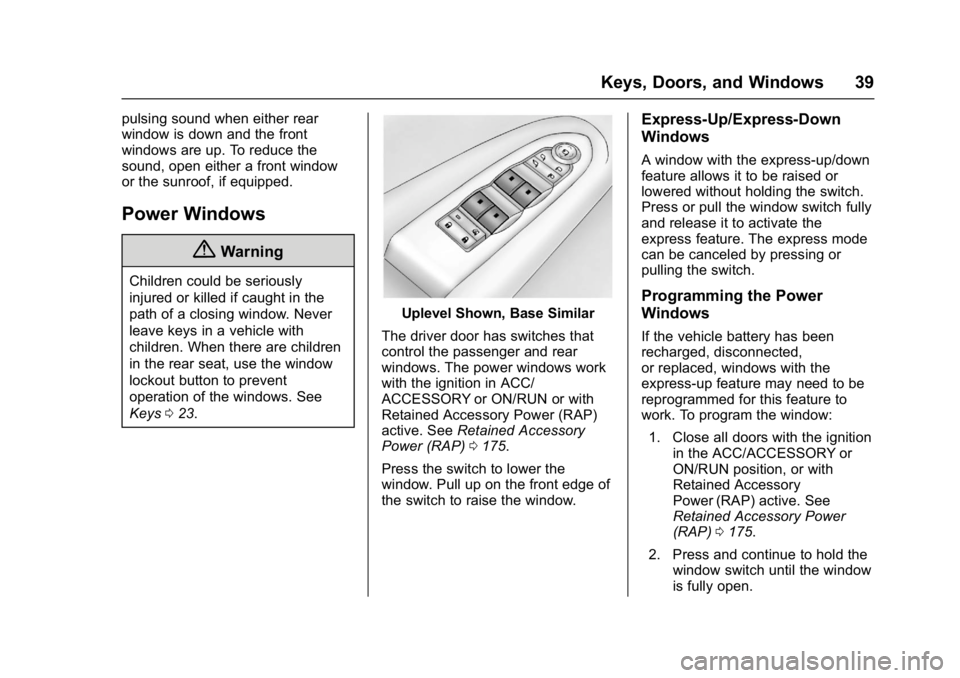
Uplevel Shown, Base Similar
The driver door has switches that
control the passenger and rear
windows. The power windows work
with the ignition in ACC/
ACCESSORY or ON/RUN or with
Retained Accessory Power (RAP)
active. See Retained Accessory
Power (RAP) 0175.
Press the switch to lower the
window. Pull up on the front edge of
the switch to raise the window.
Express-Up/Express-Down
Windows
A window with the express-up/down
feature allows it to be raised or
lowered without holding the switch.
Press or pull the window switch fully
and release it to activate the
express feature. The express mode
can be canceled by pressing or
pulling the switch.
Programming the Power
Windows
If the vehicle battery has been
recharged, disconnected,
or replaced, windows with the
express-up feature may need to be
reprogrammed for this feature to
work. To program the window: 1. Close all doors with the ignition in the ACC/ACCESSORY or
ON/RUN position, or with
Retained Accessory
Power (RAP) active. See
Retained Accessory Power
(RAP) 0175.
2. Press and continue to hold the window switch until the window
is fully open.
Page 41 of 339
GMC Acadia Limited Owner Manual (GMNA-Localizing-U.S.-10283134) -
2017 - crc - 3/30/16
40 Keys, Doors, and Windows
3. Pull up and hold the windowswitch to close the window.
Continue to hold it briefly after
the window is fully closed.
4. Repeat for each window that has the express-up feature.
Anti-Pinch Feature
The anti-pinch feature is on
windows with the express-up
feature. If an object is in the way of
the window as it is express-closing,
or in certain weather conditions like
severe icing, the window will stop
and open to a factory preset
position. The window functions
normally once the obstruction is
removed.
Rear Window Lockout
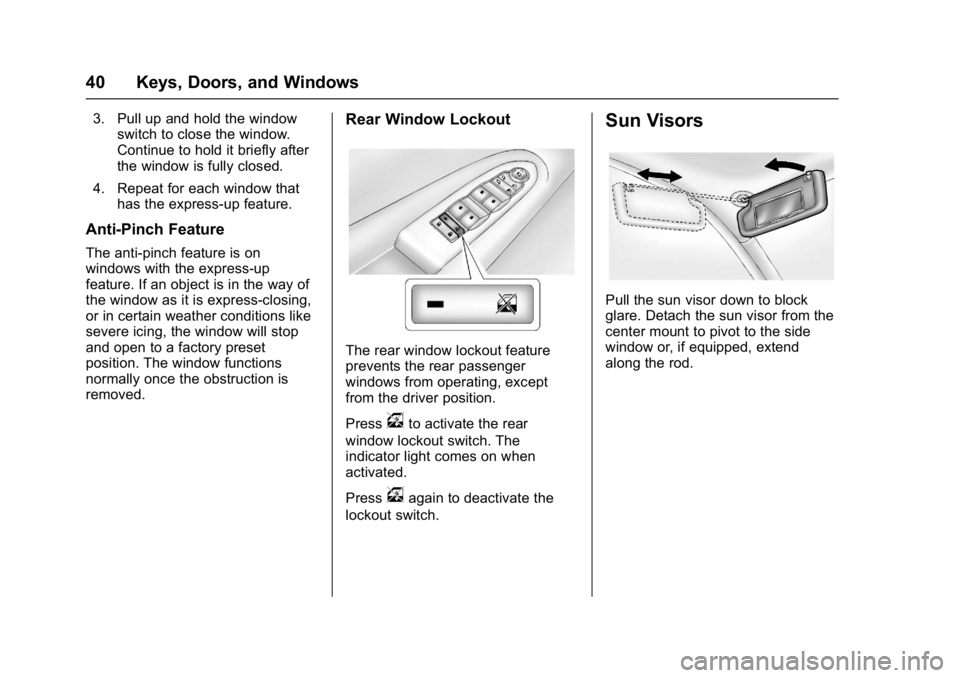
The rear window lockout feature
prevents the rear passenger
windows from operating, except
from the driver position.
Press
vto activate the rear
window lockout switch. The
indicator light comes on when
activated.
Press
vagain to deactivate the
lockout switch.
Sun Visors
Pull the sun visor down to block
glare. Detach the sun visor from the
center mount to pivot to the side
window or, if equipped, extend
along the rod.
Page 42 of 339
GMC Acadia Limited Owner Manual (GMNA-Localizing-U.S.-10283134) -
2017 - crc - 3/30/16
Keys, Doors, and Windows 41
Roof
Sunroof
On vehicles with a sunroof, the
sunroof only operates when the
ignition is in ON/RUN or ACC/
ACCESSORY, or when Retained
Accessory Power (RAP) is active.
SeeRetained Accessory Power
(RAP) 0175.
If equipped, there may be a rear
sunroof over the second row seats.
The rear sunroof does not open.
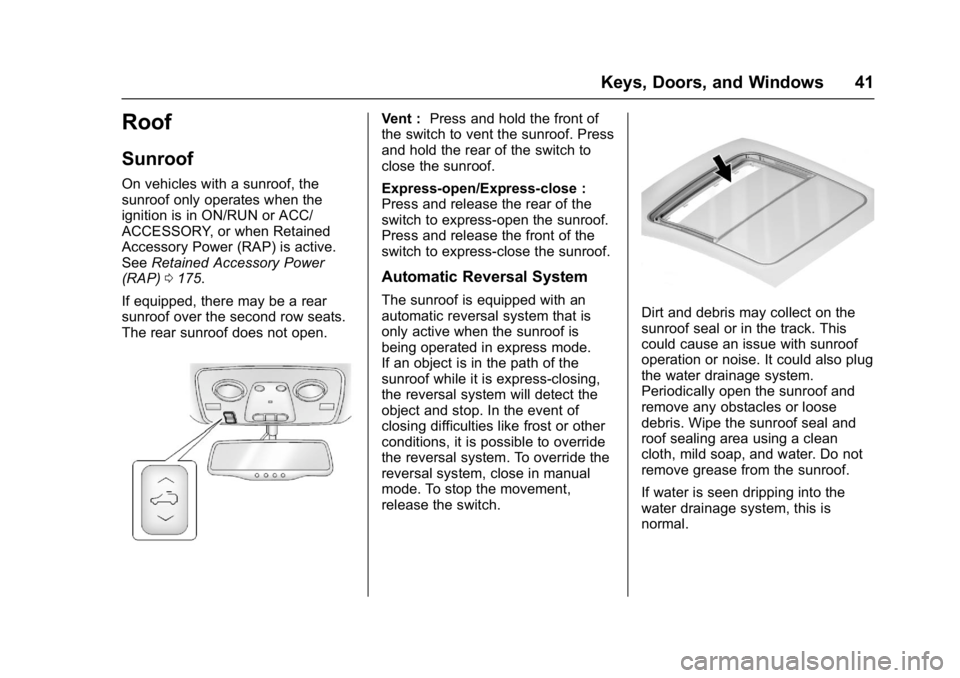
Vent : Press and hold the front of
the switch to vent the sunroof. Press
and hold the rear of the switch to
close the sunroof.
Express-open/Express-close :
Press and release the rear of the
switch to express-open the sunroof.
Press and release the front of the
switch to express-close the sunroof.
Automatic Reversal System
The sunroof is equipped with an
automatic reversal system that is
only active when the sunroof is
being operated in express mode.
If an object is in the path of the
sunroof while it is express-closing,
the reversal system will detect the
object and stop. In the event of
closing difficulties like frost or other
conditions, it is possible to override
the reversal system. To override the
reversal system, close in manual
mode. To stop the movement,
release the switch.Dirt and debris may collect on the
sunroof seal or in the track. This
could cause an issue with sunroof
operation or noise. It could also plug
the water drainage system.
Periodically open the sunroof and
remove any obstacles or loose
debris. Wipe the sunroof seal and
roof sealing area using a clean
cloth, mild soap, and water. Do not
remove grease from the sunroof.
If water is seen dripping into the
water drainage system, this is
normal.
Page 43 of 339
GMC Acadia Limited Owner Manual (GMNA-Localizing-U.S.-10283134) -
2017 - crc - 3/30/16
42 Keys, Doors, and Windows
Manual Sunshade
The sunshades must be opened
and closed manually. To open the
sunshade, press the button on the
sunshade handle to release it and
guide it back. To close the
sunshade, pull the sunshade
forward until it latches.
Page 48 of 339
GMC Acadia Limited Owner Manual (GMNA-Localizing-U.S.-10283134) -
2017 - crc - 3/30/16
Seats and Restraints 47
Memory Seats
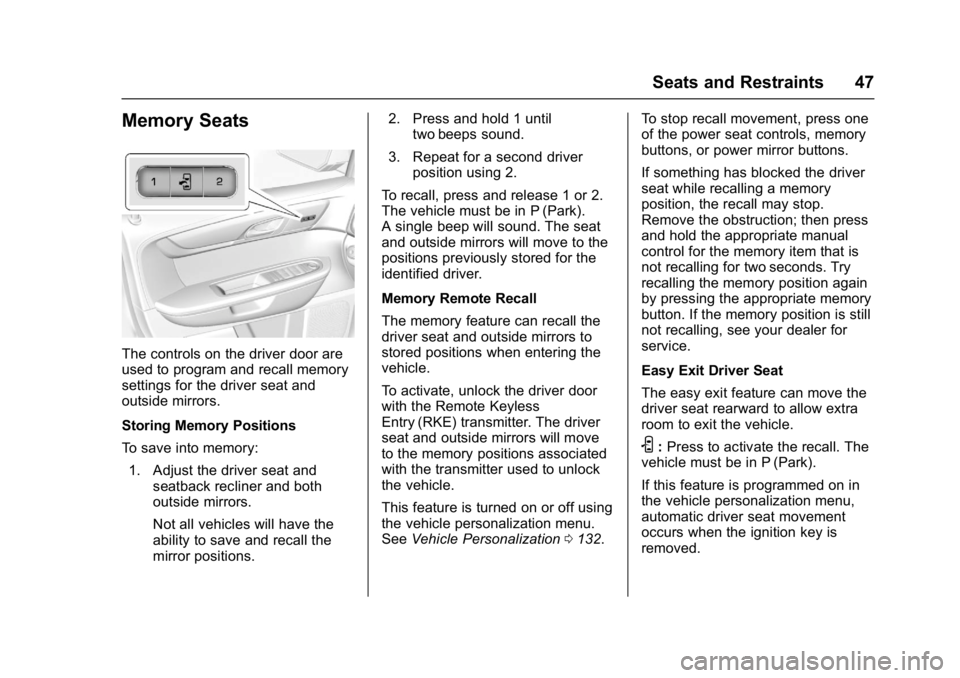
The controls on the driver door are
used to program and recall memory
settings for the driver seat and
outside mirrors.
Storing Memory Positions
To save into memory:1. Adjust the driver seat and seatback recliner and both
outside mirrors.
Not all vehicles will have the
ability to save and recall the
mirror positions. 2. Press and hold 1 until
two beeps sound.
3. Repeat for a second driver position using 2.
To recall, press and release 1 or 2.
The vehicle must be in P (Park).
A single beep will sound. The seat
and outside mirrors will move to the
positions previously stored for the
identified driver.
Memory Remote Recall
The memory feature can recall the
driver seat and outside mirrors to
stored positions when entering the
vehicle.
To activate, unlock the driver door
with the Remote Keyless
Entry (RKE) transmitter. The driver
seat and outside mirrors will move
to the memory positions associated
with the transmitter used to unlock
the vehicle.
This feature is turned on or off using
the vehicle personalization menu.
See Vehicle Personalization 0132. To stop recall movement, press one
of the power seat controls, memory
buttons, or power mirror buttons.
If something has blocked the driver
seat while recalling a memory
position, the recall may stop.
Remove the obstruction; then press
and hold the appropriate manual
control for the memory item that is
not recalling for two seconds. Try
recalling the memory position again
by pressing the appropriate memory
button. If the memory position is still
not recalling, see your dealer for
service.
Easy Exit Driver Seat
The easy exit feature can move the
driver seat rearward to allow extra
room to exit the vehicle.
S:
Press to activate the recall. The
vehicle must be in P (Park).
If this feature is programmed on in
the vehicle personalization menu,
automatic driver seat movement
occurs when the ignition key is
removed.
Page 52 of 339
GMC Acadia Limited Owner Manual (GMNA-Localizing-U.S.-10283134) -
2017 - crc - 3/30/16
Seats and Restraints 51
To return the seatback to the
seating position, lift the seatback
and push it rearward until it locks
into place. Push and pull on the
seatback to make sure it is locked.
Pull up on the head restraint to
return it to the upright, locked
position.
Adjusting the Seats
To adjust the second row seats, pull
outward on the seat adjustment
handle (1). Slide the seat forward or
rearward to the desired position.
Release the handle (1), and push
and pull on the seat to make sure it
is locked.
Third Row Seats
{Warning
Using the third row seating
position while the second row is
folded, or pushed forward in the
entry position, could cause injury
in a sudden stop or crash. Be
sure to return the seat to the(Continued)
Warning (Continued)
passenger seating position. Push
and pull on the seat to make sure
it is locked into place.
Folding the Seatback
Caution
Folding a rear seat with the safety
belts still fastened may cause
damage to the seat or the safety
belts. Always unbuckle the safety
belts and return them to their
normal stowed position before
folding a rear seat.
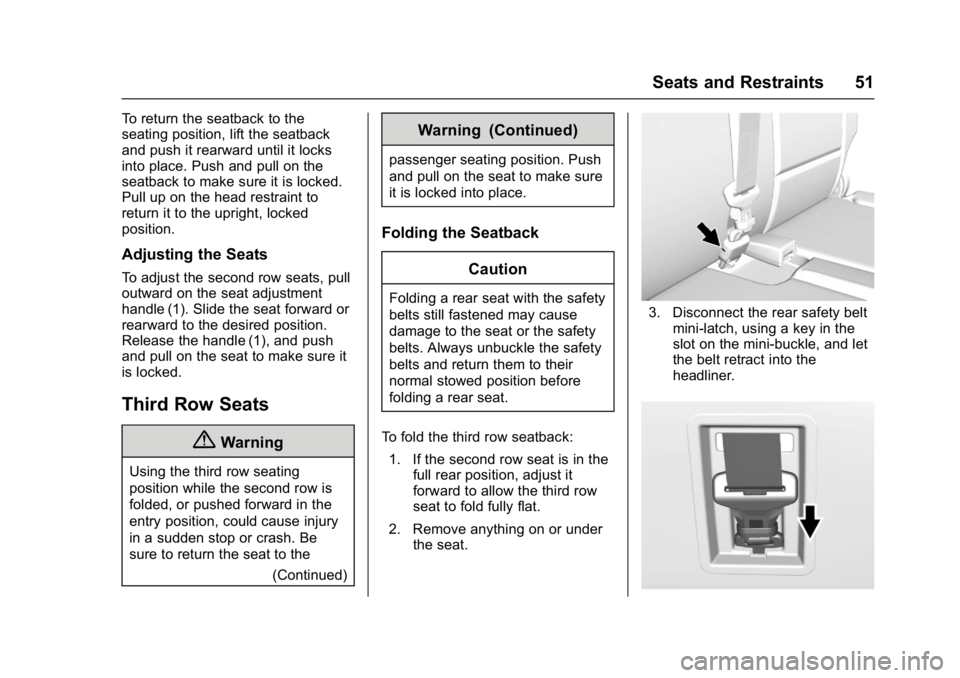
To fold the third row seatback: 1. If the second row seat is in the full rear position, adjust it
forward to allow the third row
seat to fold fully flat.
2. Remove anything on or under the seat.3. Disconnect the rear safety belt
mini-latch, using a key in the
slot on the mini-buckle, and let
the belt retract into the
headliner.
Page 61 of 339
GMC Acadia Limited Owner Manual (GMNA-Localizing-U.S.-10283134) -
2017 - crc - 3/30/16
60 Seats and Restraints
A pregnant woman should wear a
lap-shoulder belt, and the lap
portion should be worn as low as
possible, below the rounding,
throughout the pregnancy.
The best way to protect the fetus is
to protect the mother. When a safety
belt is worn properly, it is more likely
that the fetus will not be hurt in a
crash. For pregnant women, as for
anyone, the key to making safety
belts effective is wearing them
properly.
Safety Belt Extender
If the vehicle's safety belt will fasten
around you, you should use it.
But if a safety belt is not long
enough, your dealer will order you
an extender. When you go in to
order it, take the heaviest coat you
will wear, so the extender will be
long enough for you. To help avoid
personal injury, do not let someone
else use it, and use it only for the
seat it is made to fit. The extender
has been designed for adults. Never
use it for securing child restraints.
To wear it, attach it to the regularsafety belt. For more information,
see the instruction sheet that comes
with the extender.
Safety System Check
Check that the safety belt reminder,
safety belts, buckles, latch plates,
and retractors, are all working
properly. Look for any other loose or
damaged safety belt system parts
that might keep a safety belt system
from performing properly. See your
dealer to have it repaired. Torn or
frayed safety belts may not protect
you in a crash. They can rip apart
under impact forces. If a belt is torn
or frayed, have it replaced
immediately.
Make sure the safety belt reminder
light is working. See
Safety Belt
Reminders 0107.
Keep safety belts clean and dry.
See Safety Belt Care 060.
Safety Belt Care
Keep belts clean and dry.
{Warning
Do not bleach or dye safety belt
webbing. It may severely weaken
the webbing. In a crash, they
might not be able to provide
adequate protection. Clean and
rinse safety belt webbing only
with mild soap and lukewarm
water. Allow the webbing to dry.
Safety belts should be properly
cared for and maintained.
Safety belt hardware should be kept
dry and free of dust or debris. As
necessary exterior hard surfaces
and safety belt webbing may be
lightly cleaned with mild soap and
water. Ensure there is not excessive
dust or debris in the mechanism.
If dust or debris exists in the system
please see the dealer. Parts may
need to be replaced to ensure
proper functionality of the system.
Page 93 of 339
GMC Acadia Limited Owner Manual (GMNA-Localizing-U.S.-10283134) -
2017 - crc - 3/30/16
92 Storage
Storage
Storage Compartments
Storage Compartments . . . . . . . . 92
Instrument Panel Storage . . . . . . 92
Glove Box . . . . . . . . . . . . . . . . . . . . . 92
Cupholders . . . . . . . . . . . . . . . . . . . . 92
Armrest Storage . . . . . . . . . . . . . . . 93
Center Console Storage . . . . . . . 93
Additional Storage Features
Cargo Cover . . . . . . . . . . . . . . . . . . . 94
Cargo Tie-Downs . . . . . . . . . . . . . . 94
Cargo Management System . . . 94
Convenience Net . . . . . . . . . . . . . . 95
Roof Rack System
Roof Rack System . . . . . . . . . . . . . 95
Storage
Compartments
{Warning
Do not store heavy or sharp
objects in storage compartments.
In a crash, these objects may
cause the cover to open and
could result in injury.
Instrument Panel Storage
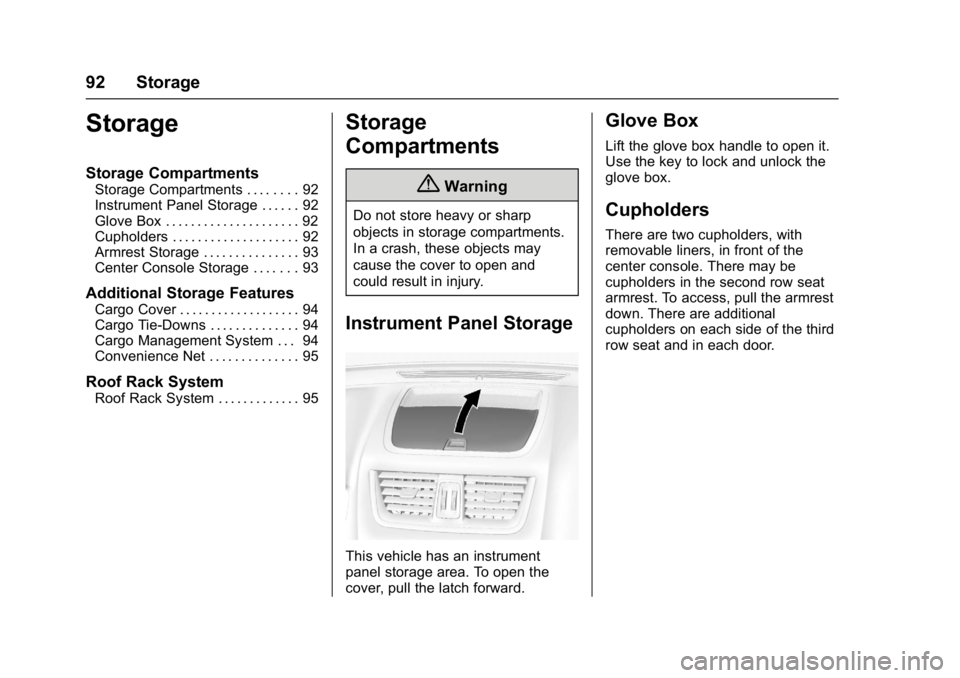
This vehicle has an instrument
panel storage area. To open the
cover, pull the latch forward.
Glove Box
Lift the glove box handle to open it.
Use the key to lock and unlock the
glove box.
Cupholders
There are two cupholders, with
removable liners, in front of the
center console. There may be
cupholders in the second row seat
armrest. To access, pull the armrest
down. There are additional
cupholders on each side of the third
row seat and in each door.