heat GMC ACADIA LIMITED 2017 Owner's Manual
[x] Cancel search | Manufacturer: GMC, Model Year: 2017, Model line: ACADIA LIMITED, Model: GMC ACADIA LIMITED 2017Pages: 339, PDF Size: 4.75 MB
Page 6 of 339
GMC Acadia Limited Owner Manual (GMNA-Localizing-U.S.-10283134) -
2017 - crc - 3/30/16
In Brief 5
In Brief
Instrument Panel
Instrument Panel . . . . . . . . . . . . . . . . 6
Initial Drive Information
Initial Drive Information . . . . . . . . . . 8
Remote Keyless Entry (RKE)System . . . . . . . . . . . . . . . . . . . . . . . . 8
Remote Vehicle Start . . . . . . . . . . . 8
Door Locks . . . . . . . . . . . . . . . . . . . . . 9
Liftgate . . . . . . . . . . . . . . . . . . . . . . . . . . 9
Windows . . . . . . . . . . . . . . . . . . . . . . . 10
Seat Adjustment . . . . . . . . . . . . . . . 10
Memory Features . . . . . . . . . . . . . . 11
Second Row Seats . . . . . . . . . . . . 11
Third Row Seats . . . . . . . . . . . . . . . 11
Heated and Cooled Front Seats . . . . . . . . . . . . . . . . . . . . . . . . . 12
Head Restraint Adjustment . . . . 12
Safety Belts . . . . . . . . . . . . . . . . . . . . 13
Passenger Sensing System . . . 13
Mirror Adjustment . . . . . . . . . . . . . . 13
Steering Wheel Adjustment . . . . 14
Interior Lighting . . . . . . . . . . . . . . . . 15
Exterior Lighting . . . . . . . . . . . . . . . 16
Windshield Wiper/Washer . . . . . . 16
Climate Controls . . . . . . . . . . . . . . . 17
Transmission . . . . . . . . . . . . . . . . . . 17
Vehicle Features
Infotainment System . . . . . . . . . . . 18
Steering Wheel Controls . . . . . . . 18
Cruise Control . . . . . . . . . . . . . . . . . 18
Forward Collision Alert (FCA) System . . . . . . . . . . . . . . . . . . . . . . . 18
Lane Departure Warning (LDW) . . . . . . . . . . . . . . . 19
Side Blind Zone Alert (SBZA) . . . . . . . . . . . . . . . . . . 19
Rear Vision Camera (RVC) . . . . 19
Rear Cross Traffic Alert (RCTA) System . . . . . . . . . . . . . . . . . . . . . . . 19
Parking Assist . . . . . . . . . . . . . . . . . 19
Power Outlets . . . . . . . . . . . . . . . . . 19
Universal Remote System . . . . . 20
Sunroof . . . . . . . . . . . . . . . . . . . . . . . . 20
Performance and Maintenance
Traction Control/Electronic Stability Control . . . . . . . . . . . . . . 21
Tire Pressure Monitor . . . . . . . . . . 21
Fuel . . . . . . . . . . . . . . . . . . . . . . . . . . . 21
E85 or FlexFuel . . . . . . . . . . . . . . . . 22
Engine Oil Life System . . . . . . . . 22
Driving for Better Fuel Economy . . . . . . . . . . . . . . . . . . . . . 22
Roadside Assistance Program . . . . . . . . . . . . . . . . . . . . . . 22
Page 8 of 339

GMC Acadia Limited Owner Manual (GMNA-Localizing-U.S.-10283134) -
2017 - crc - 3/30/16
In Brief 7
1.Air Vents 0158.
2. Windshield Wiper/Washer 098
(Out of View).
Turn Signal Lever. See Turn
and Lane-Change
Signals 0145.
3. Instrument Cluster 0104.
4. Head-Up Display (HUD) 0120
(If Equipped).
5. Instrument Panel Storage 092.
6. Infotainment 0150.
7. Passenger Airbag Status Indicator. See Passenger
Sensing System 068.
8. Hazard Warning
Flashers 0144.
9. Heated and Cooled Front
Seats 048 (If Equipped).
10. Rear Window Wiper/
Washer 099.
Traction Control/Electronic
Stability Control 0184.
Forward Collision Alert (FCA)
System 0192 (If Equipped). Lane Departure Warning
(LDW)
0195 (If Equipped).
Tow/Haul Button (If Equipped).
See Tow/Haul Mode 0181.
Power Liftgate Button (If
Equipped). See Liftgate031.
11. Power Outlets 0101.
12. USB Port. See the infotainment manual.
13. Shift Lever. See Automatic
Transmission 0179.
14. Dual Automatic Climate Control
System 0151.
15. Driver Information Center (DIC) Buttons. See Driver Information
Center (DIC) 0116.
16. Steering Wheel Controls 098
(If Equipped).
17. Horn 098.
18. Steering Wheel
Adjustment 098.
19. Cruise Control 0186.
20. Dome Lamp Override. See Dome Lamps 0146. Instrument Panel Illumination
Control
0146.
21. Data Link Connector (DLC) (Out of View). See Malfunction
Indicator Lamp (Check Engine
Light) 0109.
22. Parking Brake 0183.
23. Hood Release. See Hood 0211.
24. Exterior Lamp Controls 0143.
Page 13 of 339
GMC Acadia Limited Owner Manual (GMNA-Localizing-U.S.-10283134) -
2017 - crc - 3/30/16
12 In Brief
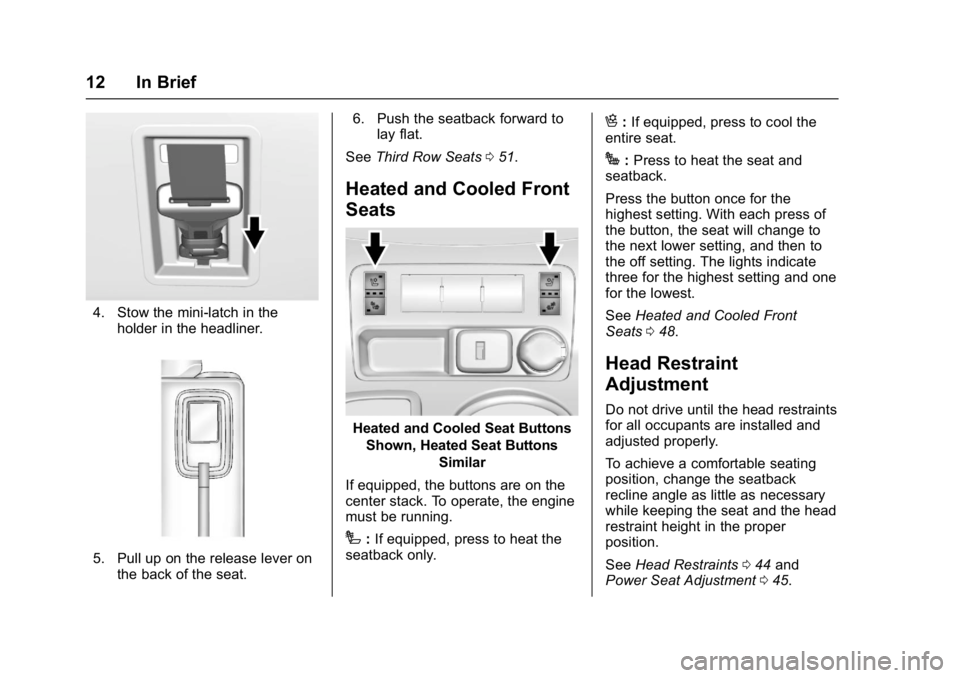
4. Stow the mini-latch in theholder in the headliner.
5. Pull up on the release lever onthe back of the seat. 6. Push the seatback forward to
lay flat.
See Third Row Seats 051.
Heated and Cooled Front
Seats
Heated and Cooled Seat Buttons
Shown, Heated Seat Buttons Similar
If equipped, the buttons are on the
center stack. To operate, the engine
must be running.
I: If equipped, press to heat the
seatback only.
H: If equipped, press to cool the
entire seat.
J: Press to heat the seat and
seatback.
Press the button once for the
highest setting. With each press of
the button, the seat will change to
the next lower setting, and then to
the off setting. The lights indicate
three for the highest setting and one
for the lowest.
See Heated and Cooled Front
Seats 048.
Head Restraint
Adjustment
Do not drive until the head restraints
for all occupants are installed and
adjusted properly.
To achieve a comfortable seating
position, change the seatback
recline angle as little as necessary
while keeping the seat and the head
restraint height in the proper
position.
See Head Restraints 044 and
Power Seat Adjustment 045.
Page 24 of 339
GMC Acadia Limited Owner Manual (GMNA-Localizing-U.S.-10283134) -
2017 - crc - 3/30/16
Keys, Doors, and Windows 23
Keys, Doors, and
Windows
Keys and Locks
Keys . . . . . . . . . . . . . . . . . . . . . . . . . . . 23
Remote Keyless Entry (RKE)System . . . . . . . . . . . . . . . . . . . . . . . 25
Remote Keyless Entry (RKE) System Operation . . . . . . . . . . . . 25
Remote Vehicle Start . . . . . . . . . . 27
Door Locks . . . . . . . . . . . . . . . . . . . . 28
Power Door Locks . . . . . . . . . . . . . 29
Delayed Locking . . . . . . . . . . . . . . . 29
Automatic Door Locks . . . . . . . . . 30
Lockout Protection . . . . . . . . . . . . . 30
Safety Locks . . . . . . . . . . . . . . . . . . . 30
Doors
Liftgate . . . . . . . . . . . . . . . . . . . . . . . . 31
Vehicle Security
Vehicle Security . . . . . . . . . . . . . . . . 34
Vehicle Alarm System . . . . . . . . . 34
Immobilizer . . . . . . . . . . . . . . . . . . . . 35
Immobilizer Operation . . . . . . . . . 35
Exterior Mirrors
Convex Mirrors . . . . . . . . . . . . . . . . 36
Power Mirrors . . . . . . . . . . . . . . . . . . 37 Folding Mirrors . . . . . . . . . . . . . . . . . 37
Heated Mirrors . . . . . . . . . . . . . . . . . 37
Automatic Dimming Mirror . . . . . 37
Park Tilt Mirrors . . . . . . . . . . . . . . . . 38
Interior Mirrors
Interior Rearview Mirrors . . . . . . . 38
Automatic Dimming Rearview
Mirror . . . . . . . . . . . . . . . . . . . . . . . . . 38
Windows
Windows . . . . . . . . . . . . . . . . . . . . . . . 38
Power Windows . . . . . . . . . . . . . . . 39
Sun Visors . . . . . . . . . . . . . . . . . . . . . 40
Roof
Sunroof . . . . . . . . . . . . . . . . . . . . . . . . 41
Keys and Locks
Keys
{Warning
Leaving children in a vehicle with
the ignition key is dangerous and
children or others could be
seriously injured or killed. They
could operate the power windows
or other controls or make the
vehicle move. The windows will
function with the keys in the
ignition, and children or others
could be caught in the path of a
closing window. Do not leave
children in a vehicle with the
ignition key.
Page 28 of 339
GMC Acadia Limited Owner Manual (GMNA-Localizing-U.S.-10283134) -
2017 - crc - 3/30/16
Keys, Doors, and Windows 27
transmitter. Do not insert
the tool too far. Stop as
soon as resistance is felt.
. Twist the tool until the
transmitter is separated.
2. Remove the old battery. Do not use a metal object.
3. Insert the new battery, positive side facing down. Replace with
a CR2032 or equivalent
battery.
4. Snap the transmitter back together.
Remote Vehicle Start
This vehicle may have a remote
starting feature that starts the
engine from outside of the vehicle.
/:This button is on the RKE
transmitter if the vehicle has remote
start.
Laws in some communities may
restrict the use of remote starters.
For example, some laws may
require a person using the remote
start to have the vehicle in view when doing so. Check local
regulations for any requirements on
remote starting of vehicles.
Do not use the remote start feature
if the vehicle is low on fuel. The
vehicle could run out of fuel.
If the vehicle has the remote start
feature, the RKE transmitter range
may be less while the vehicle is
running.
Other conditions can affect the
performance of the transmitter. See
Remote Keyless Entry (RKE)
System
025.
Starting the Engine Using
Remote Start
To start the vehicle:
1. Press and release
Qon the
RKE transmitter.
2. Immediately after completing Step 1, press and hold
/until
the parking lamps flash. If the
vehicle's lights cannot be seen,
press and hold
/for at least
four seconds. When the vehicle starts, the parking
lamps will turn on and remain on as
long as the engine is running. The
doors will be locked and the climate
control system will operate
automatically if the vehicle has the
automatic system, or at the same
setting as when the vehicle was last
turned off.
If the vehicle has an automatic
climate control system and heated
seats, the heated seats turn on
during colder outside temperatures
and shut off when the key is turned
to ON/RUN. See
Heated and
Cooled Front Seats 048.
The rear window defogger and
heated mirrors, if the vehicle has
them, turn on during colder outside
temperatures and turn off when the
key is turned to ON/RUN.
After entering the vehicle during a
remote start, insert and turn the key
to the ON/RUN position to drive the
vehicle.
If the vehicle is left running it
automatically shuts off after
10 minutes unless a time extension
has been done.
Page 29 of 339
GMC Acadia Limited Owner Manual (GMNA-Localizing-U.S.-10283134) -
2017 - crc - 3/30/16
28 Keys, Doors, and Windows
Extending Engine Run Time
To extend the engine run time by
10 minutes, repeat Steps 1 and 2
while the engine is still running. An
extension can be requested
30 seconds after starting. The
engine run time can only be
extended if it is the first remote start
since the vehicle has been driven.
Remote start can be extended
one time.
If the remote start procedure is used
again before the first 10-minute time
frame has ended, the first
10 minutes will immediately expire
and the second 10-minute time
frame will start.
For example, if
Qand then/are
pressed again after the vehicle has
been running for five minutes,
10 minutes are added, allowing the
engine to run for a total of
15 minutes.
A maximum of two remote starts or
a remote start with an extension are
allowed between ignition cycles. After the vehicle's engine has been
started two times using the remote
start button or a start with an
extension, the ignition must be
turned on and then back off before
the remote start procedure can be
used again.
Canceling a Remote Start
To manually shut off a remote start:
.
Press and hold
/until the
parking lamps turn off.
. Turn on the hazard warning
flashers.
. Turn the ignition switch on and
then off.
Conditions in Which the
Remote Start Will Not Work
The vehicle cannot be started using
the remote start feature if the key is
in the ignition, the hood is open,
or there is an emission control
system malfunction.
The engine turns off during a remote
start if the coolant temperature gets
too high or if the oil pressure
gets low.
Door Locks
{Warning
Unlocked doors can be
dangerous.
. Passengers, especially
children, can easily open
the doors and fall out of a
moving vehicle. When a
door is locked, the handle
will not open it. The chance
of being thrown out of the
vehicle in a crash is
increased if the doors are
not locked. So, all
passengers should wear
safety belts properly and the
doors should be locked
whenever the vehicle is
driven.
. Young children who get into
unlocked vehicles may be
unable to get out. A child
can be overcome by
extreme heat and can suffer
permanent injuries or even
(Continued)
Page 30 of 339
GMC Acadia Limited Owner Manual (GMNA-Localizing-U.S.-10283134) -
2017 - crc - 3/30/16
Keys, Doors, and Windows 29
Warning (Continued)
death from heat stroke.
Always lock the vehicle
whenever leaving it.
. Outsiders can easily enter
through an unlocked door
when you slow down or stop
the vehicle. Locking the
doors can help prevent this
from happening.
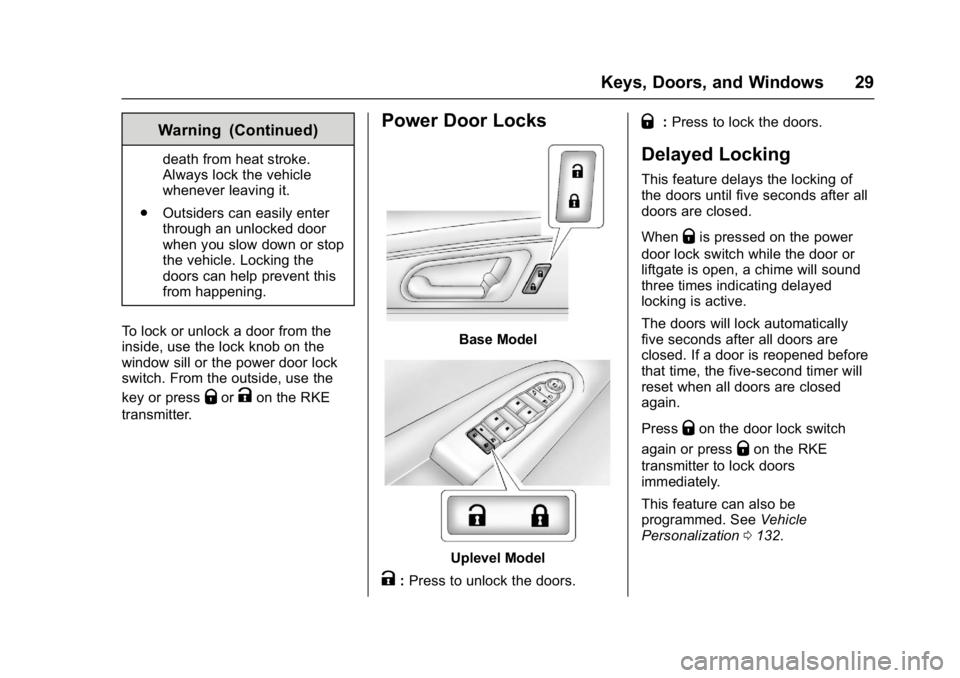
To lock or unlock a door from the
inside, use the lock knob on the
window sill or the power door lock
switch. From the outside, use the
key or press
QorKon the RKE
transmitter.
Power Door Locks
Base Model
Uplevel Model
K: Press to unlock the doors.
Q:Press to lock the doors.
Delayed Locking
This feature delays the locking of
the doors until five seconds after all
doors are closed.
When
Qis pressed on the power
door lock switch while the door or
liftgate is open, a chime will sound
three times indicating delayed
locking is active.
The doors will lock automatically
five seconds after all doors are
closed. If a door is reopened before
that time, the five-second timer will
reset when all doors are closed
again.
Press
Qon the door lock switch
again or press
Qon the RKE
transmitter to lock doors
immediately.
This feature can also be
programmed. See Vehicle
Personalization 0132.
Page 38 of 339
GMC Acadia Limited Owner Manual (GMNA-Localizing-U.S.-10283134) -
2017 - crc - 3/30/16
Keys, Doors, and Windows 37
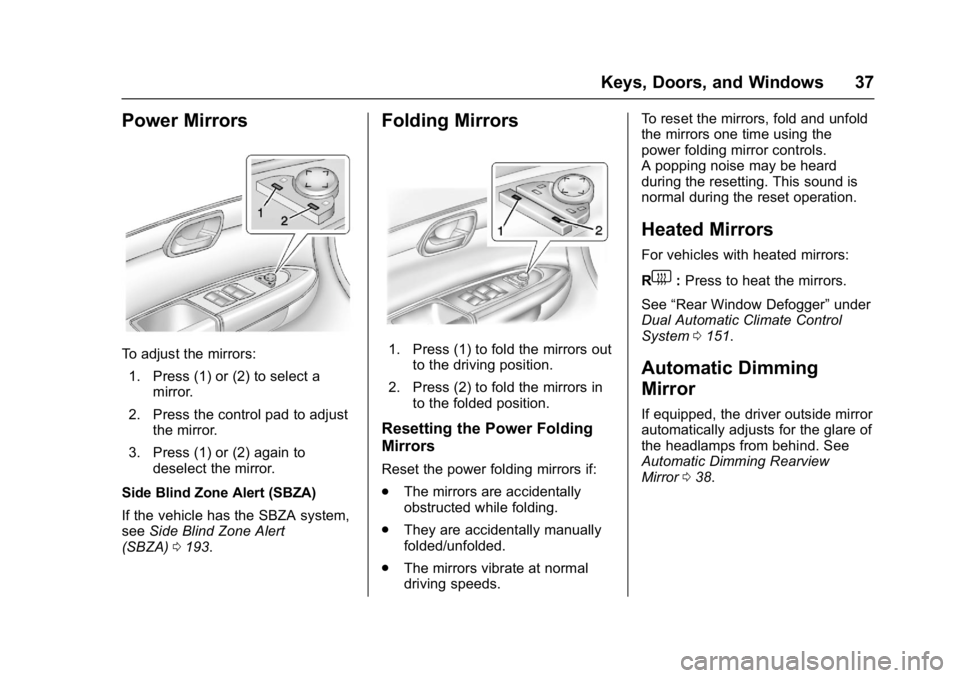
Power Mirrors
To adjust the mirrors:1. Press (1) or (2) to select a mirror.
2. Press the control pad to adjust the mirror.
3. Press (1) or (2) again to deselect the mirror.
Side Blind Zone Alert (SBZA)
If the vehicle has the SBZA system,
see Side Blind Zone Alert
(SBZA) 0193.
Folding Mirrors
1. Press (1) to fold the mirrors out
to the driving position.
2. Press (2) to fold the mirrors in to the folded position.
Resetting the Power Folding
Mirrors
Reset the power folding mirrors if:
.The mirrors are accidentally
obstructed while folding.
. They are accidentally manually
folded/unfolded.
. The mirrors vibrate at normal
driving speeds. To reset the mirrors, fold and unfold
the mirrors one time using the
power folding mirror controls.
A popping noise may be heard
during the resetting. This sound is
normal during the reset operation.
Heated Mirrors
For vehicles with heated mirrors:
R
1:
Press to heat the mirrors.
See “Rear Window Defogger” under
Dual Automatic Climate Control
System 0151.
Automatic Dimming
Mirror
If equipped, the driver outside mirror
automatically adjusts for the glare of
the headlamps from behind. See
Automatic Dimming Rearview
Mirror 038.
Page 39 of 339
GMC Acadia Limited Owner Manual (GMNA-Localizing-U.S.-10283134) -
2017 - crc - 3/30/16
38 Keys, Doors, and Windows
Park Tilt Mirrors
If equipped with memory seats, the
passenger and/or driver mirror tilts
to a preselected position when the
vehicle is in R (Reverse). This
allows the curb to be seen when
parallel parking.
The mirror(s) return to the original
position when:
.The vehicle is shifted out of
R (Reverse).
. The ignition is turned off.
To turn this feature on or off, see
Vehicle Personalization 0132.
Interior Mirrors
Interior Rearview Mirrors
Adjust the rearview mirror for a clear
view of the area behind your
vehicle.
If equipped with OnStar, the vehicle
may have three control buttons at
the bottom of the mirror. See your
dealer for more information about
OnStar and how to subscribe to it.
See OnStar Overview 0318
Do not spray glass cleaner directly
on the mirror. Use a soft towel
dampened with water.
Automatic Dimming
Rearview Mirror
If equipped, automatic dimming
reduces the glare of the headlamps
from behind. This feature comes on
when the vehicle is started.
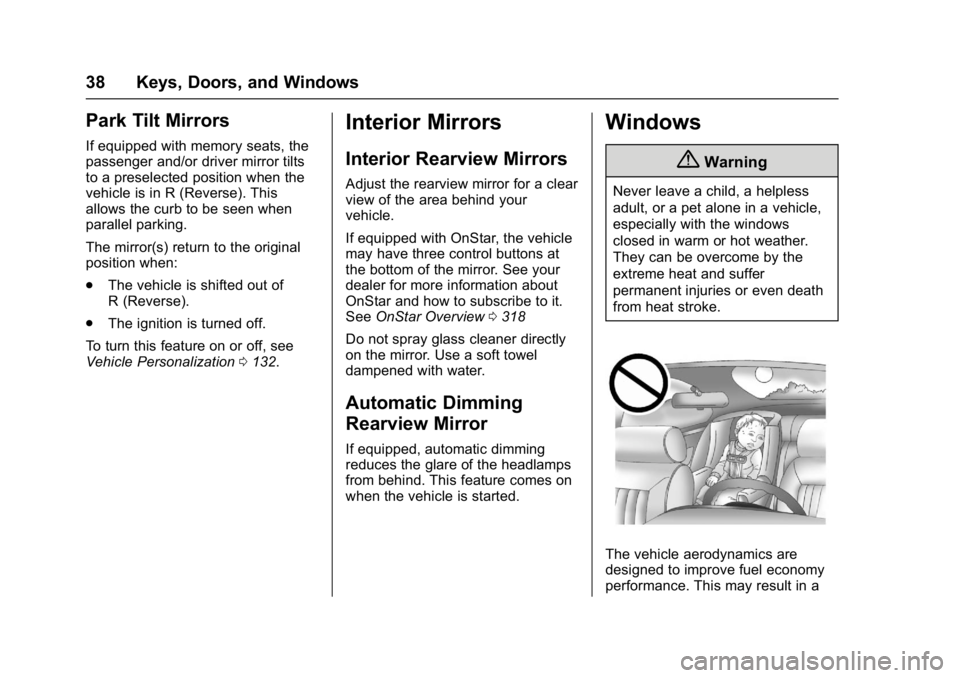
Windows
{Warning
Never leave a child, a helpless
adult, or a pet alone in a vehicle,
especially with the windows
closed in warm or hot weather.
They can be overcome by the
extreme heat and suffer
permanent injuries or even death
from heat stroke.
The vehicle aerodynamics are
designed to improve fuel economy
performance. This may result in a
Page 44 of 339
GMC Acadia Limited Owner Manual (GMNA-Localizing-U.S.-10283134) -
2017 - crc - 3/30/16
Seats and Restraints 43
Seats and
Restraints
Head Restraints
Head Restraints . . . . . . . . . . . . . . . 44
Front Seats
Power Seat Adjustment . . . . . . . . 45
Lumbar Adjustment . . . . . . . . . . . . 45
Reclining Seatbacks . . . . . . . . . . . 46
Memory Seats . . . . . . . . . . . . . . . . . 47
Heated and Cooled FrontSeats . . . . . . . . . . . . . . . . . . . . . . . . . 48
Rear Seats
Rear Seats . . . . . . . . . . . . . . . . . . . . 49
Third Row Seats . . . . . . . . . . . . . . . 51
Safety Belts
Safety Belts . . . . . . . . . . . . . . . . . . . . 53
How to Wear Safety BeltsProperly . . . . . . . . . . . . . . . . . . . . . . 54
Lap-Shoulder Belt . . . . . . . . . . . . . 55
Safety Belt Use During Pregnancy . . . . . . . . . . . . . . . . . . . . 59
Safety Belt Extender . . . . . . . . . . . 60
Safety System Check . . . . . . . . . . 60
Safety Belt Care . . . . . . . . . . . . . . . 60 Replacing Safety Belt System
Parts after a Crash . . . . . . . . . . . 61
Airbag System
Airbag System . . . . . . . . . . . . . . . . . 61
Where Are the Airbags? . . . . . . . 63
When Should an AirbagInflate? . . . . . . . . . . . . . . . . . . . . . . . 65
What Makes an Airbag Inflate? . . . . . . . . . . . . . . . . . . . . . . . 66
How Does an Airbag Restrain? . . . . . . . . . . . . . . . . . . . . . 66
What Will You See after an Airbag Inflates? . . . . . . . . . . . . . . 66
Passenger Sensing System . . . 68
Servicing the Airbag-Equipped Vehicle . . . . . . . . . . . . . . . . . . . . . . . 72
Adding Equipment to the Airbag-Equipped Vehicle . . . . . 72
Airbag System Check . . . . . . . . . . 73
Replacing Airbag System Parts after a Crash . . . . . . . . . . . . . . . . . 73
Child Restraints
Older Children . . . . . . . . . . . . . . . . . 73
Infants and Young Children . . . . 75
Child Restraint Systems . . . . . . . 77
Where to Put the Restraint . . . . . 79
Lower Anchors and Tethers forChildren (LATCH System) . . . . 80 Replacing LATCH System Parts
After a Crash . . . . . . . . . . . . . . . . . 87
Securing Child Restraints (With the Safety Belt in the
Rear Seat) . . . . . . . . . . . . . . . . . . . 87
Securing Child Restraints (With the Safety Belt in the
Front Seat) . . . . . . . . . . . . . . . . . . . 89