key battery GMC ACADIA LIMITED 2017 Owner's Manual
[x] Cancel search | Manufacturer: GMC, Model Year: 2017, Model line: ACADIA LIMITED, Model: GMC ACADIA LIMITED 2017Pages: 339, PDF Size: 4.75 MB
Page 26 of 339
GMC Acadia Limited Owner Manual (GMNA-Localizing-U.S.-10283134) -
2017 - crc - 3/30/16
Keys, Doors, and Windows 25
If locked out of the vehicle, call
Roadside Assistance. SeeRoadside
Assistance Program 0308.
If equipped with an active OnStar
subscription, an OnStar Advisor
may remotely unlock the vehicle.
See OnStar Overview 0318.
Remote Keyless Entry
(RKE) System
See Radio Frequency
Statement 0314.
If there is a decrease in the Remote
Keyless Entry (RKE) operating
range:
. Check the distance. The
transmitter may be too far from
the vehicle.
. Check the location. Other
vehicles or objects may be
blocking the signal.
. Check the transmitter's battery.
See “Battery Replacement” later
in this section. .
If the transmitter is still not
working correctly, see your
dealer or a qualified technician
for service.
Remote Keyless Entry
(RKE) System Operation
The RKE transmitter functions work
up to 60 m (195 ft) away from the
vehicle.
Other conditions can affect the
performance of the transmitter. See
Remote Keyless Entry (RKE)
System 025.
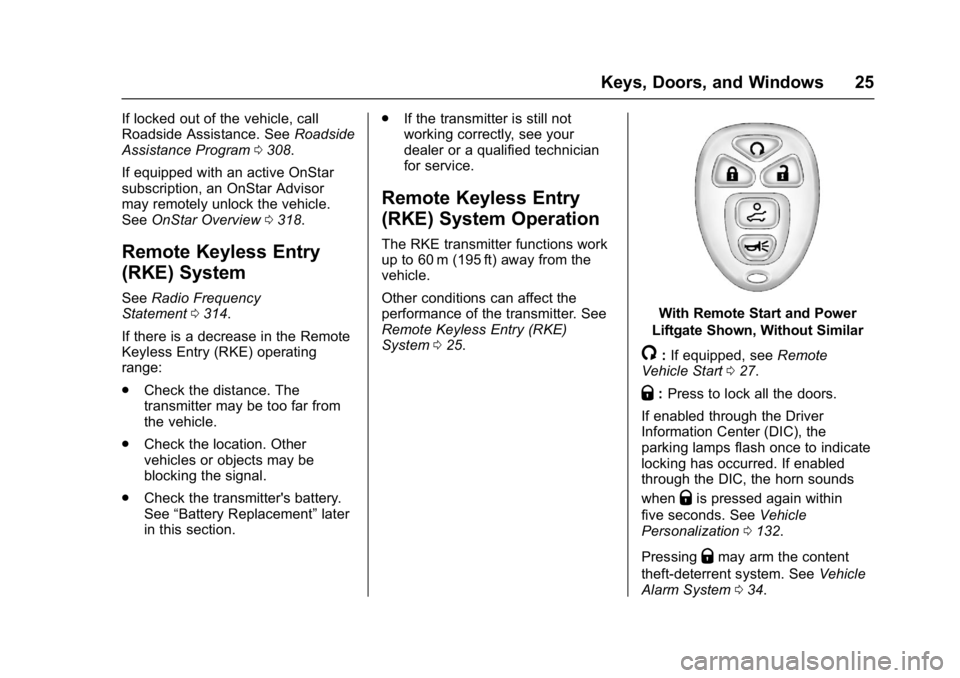
With Remote Start and Power
Liftgate Shown, Without Similar
/: If equipped, see Remote
Vehicle Start 027.
Q:Press to lock all the doors.
If enabled through the Driver
Information Center (DIC), the
parking lamps flash once to indicate
locking has occurred. If enabled
through the DIC, the horn sounds
when
Qis pressed again within
five seconds. See Vehicle
Personalization 0132.
Pressing
Qmay arm the content
theft-deterrent system. See Vehicle
Alarm System 034.
Page 27 of 339
GMC Acadia Limited Owner Manual (GMNA-Localizing-U.S.-10283134) -
2017 - crc - 3/30/16
26 Keys, Doors, and Windows
K:Press once to unlock only the
driver door. If
Kis pressed again
within five seconds, all remaining
doors unlock. The interior lamps
come on and stay on for 20 seconds
or until the ignition is turned on.
If enabled through the DIC, the
parking lamps flash twice to indicate
unlocking has occurred. See Vehicle
Personalization 0132.
Pressing
Kon the RKE transmitter
disarms the content theft-deterrent
system. See Vehicle Alarm
System 034.
8:Press and hold until the
liftgate begins to move to open or
close the liftgate. The taillamps flash
and a chime sounds to indicate
when the liftgate is opening or
closing.
L: Press and release to locate
the vehicle. The parking lamps flash
and the horn sounds three times.
Press and hold
Lfor more than
two seconds to activate the panic
alarm. The parking lamps flash and
the horn sounds repeatedly for 30 seconds. The alarm turns off
when the ignition is moved to ON/
RUN or
Lis pressed again. The
ignition must be in LOCK/OFF for
the panic alarm to work.
Programming Transmitters to
the Vehicle
Only RKE transmitters programmed
to this vehicle will work. If a
transmitter is lost or stolen, a
replacement can be purchased and
programmed through your dealer.
When the replacement transmitter is
programmed to this vehicle, all
remaining transmitters must also be
reprogrammed. Any lost or stolen
transmitters will no longer work
once the new transmitter is
programmed. Each vehicle can
have up to eight transmitters
programmed to it. See your dealer
to program transmitters to this
vehicle.
Battery Replacement
Replace the battery if the REPLACE
BATTERY IN REMOTE KEY
message displays in the DIC.
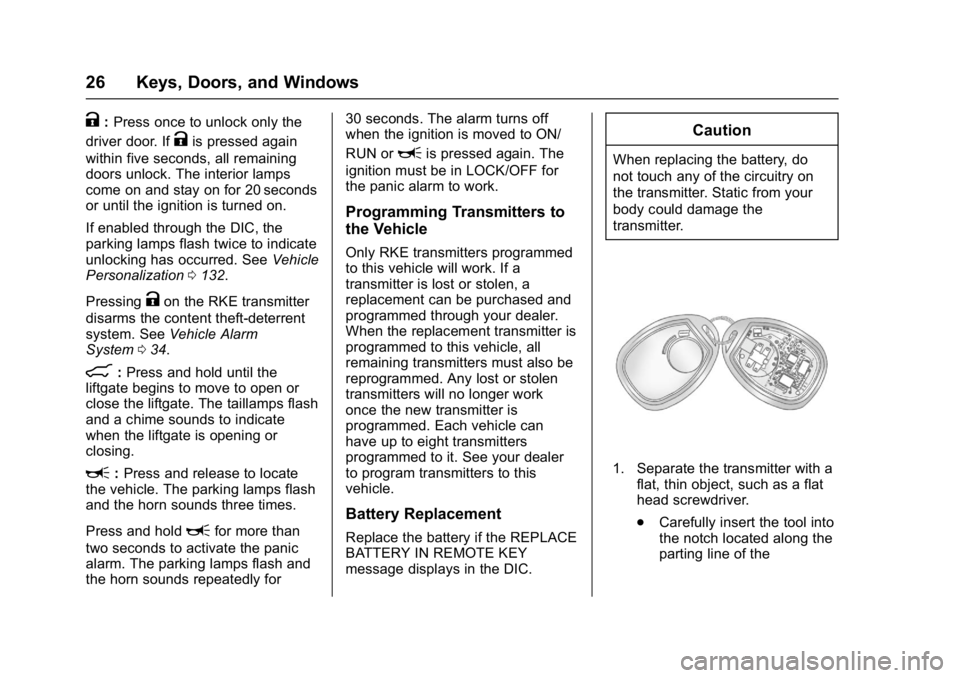
Caution
When replacing the battery, do
not touch any of the circuitry on
the transmitter. Static from your
body could damage the
transmitter.
1. Separate the transmitter with a flat, thin object, such as a flat
head screwdriver.
.Carefully insert the tool into
the notch located along the
parting line of the
Page 28 of 339
GMC Acadia Limited Owner Manual (GMNA-Localizing-U.S.-10283134) -
2017 - crc - 3/30/16
Keys, Doors, and Windows 27
transmitter. Do not insert
the tool too far. Stop as
soon as resistance is felt.
. Twist the tool until the
transmitter is separated.
2. Remove the old battery. Do not use a metal object.
3. Insert the new battery, positive side facing down. Replace with
a CR2032 or equivalent
battery.
4. Snap the transmitter back together.
Remote Vehicle Start
This vehicle may have a remote
starting feature that starts the
engine from outside of the vehicle.
/:This button is on the RKE
transmitter if the vehicle has remote
start.
Laws in some communities may
restrict the use of remote starters.
For example, some laws may
require a person using the remote
start to have the vehicle in view when doing so. Check local
regulations for any requirements on
remote starting of vehicles.
Do not use the remote start feature
if the vehicle is low on fuel. The
vehicle could run out of fuel.
If the vehicle has the remote start
feature, the RKE transmitter range
may be less while the vehicle is
running.
Other conditions can affect the
performance of the transmitter. See
Remote Keyless Entry (RKE)
System
025.
Starting the Engine Using
Remote Start
To start the vehicle:
1. Press and release
Qon the
RKE transmitter.
2. Immediately after completing Step 1, press and hold
/until
the parking lamps flash. If the
vehicle's lights cannot be seen,
press and hold
/for at least
four seconds. When the vehicle starts, the parking
lamps will turn on and remain on as
long as the engine is running. The
doors will be locked and the climate
control system will operate
automatically if the vehicle has the
automatic system, or at the same
setting as when the vehicle was last
turned off.
If the vehicle has an automatic
climate control system and heated
seats, the heated seats turn on
during colder outside temperatures
and shut off when the key is turned
to ON/RUN. See
Heated and
Cooled Front Seats 048.
The rear window defogger and
heated mirrors, if the vehicle has
them, turn on during colder outside
temperatures and turn off when the
key is turned to ON/RUN.
After entering the vehicle during a
remote start, insert and turn the key
to the ON/RUN position to drive the
vehicle.
If the vehicle is left running it
automatically shuts off after
10 minutes unless a time extension
has been done.
Page 33 of 339
GMC Acadia Limited Owner Manual (GMNA-Localizing-U.S.-10283134) -
2017 - crc - 3/30/16
32 Keys, Doors, and Windows
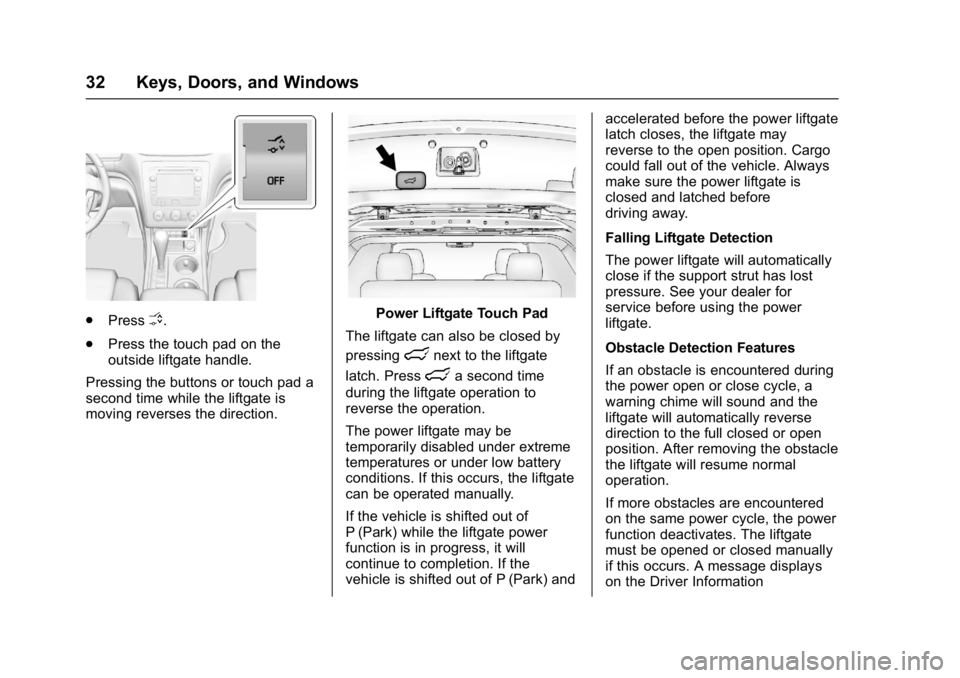
.PressO.
. Press the touch pad on the
outside liftgate handle.
Pressing the buttons or touch pad a
second time while the liftgate is
moving reverses the direction.Power Liftgate Touch Pad
The liftgate can also be closed by
pressing
lnext to the liftgate
latch. Press
la second time
during the liftgate operation to
reverse the operation.
The power liftgate may be
temporarily disabled under extreme
temperatures or under low battery
conditions. If this occurs, the liftgate
can be operated manually.
If the vehicle is shifted out of
P (Park) while the liftgate power
function is in progress, it will
continue to completion. If the
vehicle is shifted out of P (Park) and accelerated before the power liftgate
latch closes, the liftgate may
reverse to the open position. Cargo
could fall out of the vehicle. Always
make sure the power liftgate is
closed and latched before
driving away.
Falling Liftgate Detection
The power liftgate will automatically
close if the support strut has lost
pressure. See your dealer for
service before using the power
liftgate.
Obstacle Detection Features
If an obstacle is encountered during
the power open or close cycle, a
warning chime will sound and the
liftgate will automatically reverse
direction to the full closed or open
position. After removing the obstacle
the liftgate will resume normal
operation.
If more obstacles are encountered
on the same power cycle, the power
function deactivates. The liftgate
must be opened or closed manually
if this occurs. A message displays
on the Driver Information
Page 40 of 339
GMC Acadia Limited Owner Manual (GMNA-Localizing-U.S.-10283134) -
2017 - crc - 3/30/16
Keys, Doors, and Windows 39
pulsing sound when either rear
window is down and the front
windows are up. To reduce the
sound, open either a front window
or the sunroof, if equipped.
Power Windows
{Warning
Children could be seriously
injured or killed if caught in the
path of a closing window. Never
leave keys in a vehicle with
children. When there are children
in the rear seat, use the window
lockout button to prevent
operation of the windows. See
Keys023.
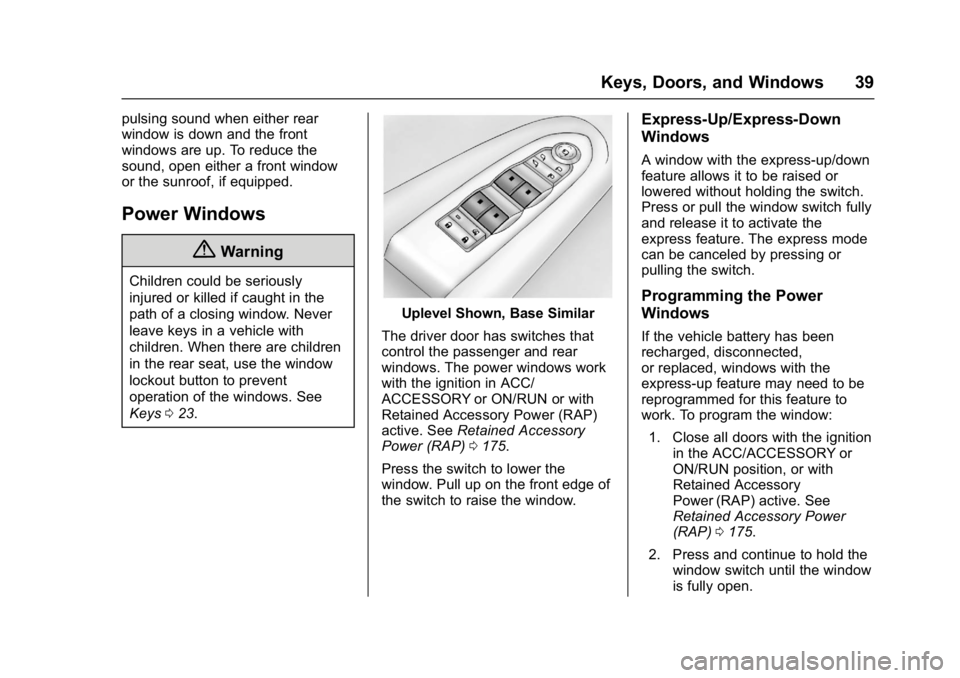
Uplevel Shown, Base Similar
The driver door has switches that
control the passenger and rear
windows. The power windows work
with the ignition in ACC/
ACCESSORY or ON/RUN or with
Retained Accessory Power (RAP)
active. See Retained Accessory
Power (RAP) 0175.
Press the switch to lower the
window. Pull up on the front edge of
the switch to raise the window.
Express-Up/Express-Down
Windows
A window with the express-up/down
feature allows it to be raised or
lowered without holding the switch.
Press or pull the window switch fully
and release it to activate the
express feature. The express mode
can be canceled by pressing or
pulling the switch.
Programming the Power
Windows
If the vehicle battery has been
recharged, disconnected,
or replaced, windows with the
express-up feature may need to be
reprogrammed for this feature to
work. To program the window: 1. Close all doors with the ignition in the ACC/ACCESSORY or
ON/RUN position, or with
Retained Accessory
Power (RAP) active. See
Retained Accessory Power
(RAP) 0175.
2. Press and continue to hold the window switch until the window
is fully open.
Page 98 of 339
GMC Acadia Limited Owner Manual (GMNA-Localizing-U.S.-10283134) -
2017 - crc - 3/30/16
Instruments and Controls 97
Instruments and
Controls
Controls
Steering Wheel Adjustment . . . . 98
Steering Wheel Controls . . . . . . . 98
Horn . . . . . . . . . . . . . . . . . . . . . . . . . . . 98
Windshield Wiper/Washer . . . . . . 98
Rear Window Wiper/Washer . . . 99
Compass . . . . . . . . . . . . . . . . . . . . . . 99
Clock . . . . . . . . . . . . . . . . . . . . . . . . . 101
Power Outlets . . . . . . . . . . . . . . . . 101
Warning Lights, Gauges, and
Indicators
Warning Lights, Gauges, andIndicators . . . . . . . . . . . . . . . . . . . 103
Instrument Cluster . . . . . . . . . . . . 104
Speedometer . . . . . . . . . . . . . . . . . 105
Odometer . . . . . . . . . . . . . . . . . . . . . 105
Tachometer . . . . . . . . . . . . . . . . . . . 105
Fuel Gauge . . . . . . . . . . . . . . . . . . . 105
Engine Coolant Temperature Gauge . . . . . . . . . . . . . . . . . . . . . . 106
Voltmeter Gauge . . . . . . . . . . . . . 107 Safety Belt Reminders . . . . . . . . 107
Airbag Readiness Light . . . . . . . 108
Passenger Airbag Status
Indicator . . . . . . . . . . . . . . . . . . . . 108
Charging System Light . . . . . . . 109
Malfunction Indicator Lamp
(Check Engine Light) . . . . . . . . 109
Brake System Warning Light . . . . . . . . . . . . . . . . . . . . . . . . . 111
Antilock Brake System (ABS) Warning Light . . . . . . . . . . . . . . . 112
Tow/Haul Mode Light . . . . . . . . . 112
Lane Departure Warning (LDW) Light . . . . . . . . . . . . . . . . . 113
Vehicle Ahead Indicator . . . . . . . 113
StabiliTrak
®Indicator Light . . . 113
Engine Coolant Temperature Warning Light . . . . . . . . . . . . . . . 113
Tire Pressure Light . . . . . . . . . . . 114
Engine Oil Pressure Light . . . . . 114
Security Light . . . . . . . . . . . . . . . . . 115
High-Beam On Light . . . . . . . . . . 115
Front Fog Lamp Light . . . . . . . . . 115
Cruise Control Light . . . . . . . . . . 115
Information Displays
Driver Information Center (DIC) . . . . . . . . . . . . . . . . 116
Head-Up Display (HUD) . . . . . . 120
Vehicle Messages
Vehicle Messages . . . . . . . . . . . . 123
Battery Voltage and Charging Messages . . . . . . . . . . . . . . . . . . . 124
Brake System Messages . . . . . 124
Cruise Control Messages . . . . . 124
Door Ajar Messages . . . . . . . . . . 124
Engine Cooling System Messages . . . . . . . . . . . . . . . . . . . 125
Engine Oil Messages . . . . . . . . . 126
Engine Power Messages . . . . . 126
Fuel System Messages . . . . . . . 126
Key and Lock Messages . . . . . 127
Lamp Messages . . . . . . . . . . . . . . 127
Object Detection System Messages . . . . . . . . . . . . . . . . . . . 127
Ride Control System Messages . . . . . . . . . . . . . . . . . . . 129
Airbag System Messages . . . . 129
Security Messages . . . . . . . . . . . 129
Service Vehicle Messages . . . . 130
Tire Messages . . . . . . . . . . . . . . . . 130
Transmission Messages . . . . . . 131
Vehicle Reminder Messages . . . . . . . . . . . . . . . . . . . 132
Vehicle Speed Messages . . . . . 132
Washer Fluid Messages . . . . . . 132
Page 128 of 339
GMC Acadia Limited Owner Manual (GMNA-Localizing-U.S.-10283134) -
2017 - crc - 3/30/16
Instruments and Controls 127
fuel cap is not tightened properly.
SeeMalfunction Indicator Lamp
(Check Engine Light) 0109.
Reinstall the fuel cap fully. See
Filling the Tank 0198. The
diagnostic system can determine if
the fuel cap has been left off or
improperly installed. A loose or
missing fuel cap allows fuel to
evaporate into the atmosphere.
A few driving trips with the cap
properly installed should turn this
light and message off.
Key and Lock Messages
REPLACE BATTERY IN
REMOTE KEY
This message displays if a Remote
Keyless Entry (RKE) transmitter
battery is low. The battery needs to
be replaced in the transmitter. See
“Battery Replacement” under
Remote Keyless Entry (RKE)
System Operation 025.
Lamp Messages
AUTOMATIC LIGHT
CONTROL OFF
This message displays when the
automatic headlamps are turned off.
This message clears itself after
10 seconds.
AUTOMATIC LIGHT
CONTROL ON
This message displays when the
automatic headlamps are turned on.
This message clears itself after
10 seconds.
TURN SIGNAL ON
This message displays and a chime
sounds if a turn signal is left on for
1.2 km (0.75 mi). Move the turn
signal lever to the off position.
Object Detection System
Messages
FORWARD COLLISION ALERT
UNAVAILABLE
This message displays when
attempting to activate the Forward
Collision Alert (FCA) system when it
is temporarily unavailable. The FCA
system does not need service.
This message could be due to the
camera being blocked. Cleaning the
outside of the windshield behind the
rearview mirror may correct the
issue.
FRT CAMERA BLOCKED
CLEAN WINDSHIELD
This message displays when the
camera is blocked. Cleaning the
outside of the windshield behind the
rearview mirror may correct the
issue. The Lane Departure Warning
system will not operate. Forward
Collision Alert (FCA) may not work
or may not work as well.
Page 149 of 339
GMC Acadia Limited Owner Manual (GMNA-Localizing-U.S.-10283134) -
2017 - crc - 3/30/16
148 Lighting
When the ignition is on, illuminated
entry is inactive, which means the
courtesy lamps will not come on
unless a door is opened.
Delayed Entry Lighting
Delayed entry lighting illuminates
the interior for a period of time after
all the doors have been closed.
The ignition must be off for delayed
entry lighting to work. Immediately
after all the doors have been closed,
the delayed entry lighting feature
continues to work until one of the
following occurs:
.The ignition is in ON/RUN.
. The doors are locked.
. An illumination period of about
25 seconds has elapsed.
If during the illumination period a
door is opened, the timed
illumination period is canceled and
the interior lamps remain on.
Delayed Exit Lighting
Delayed exit lighting illuminates the
interior for a period of time after the
key is removed from the ignition.
The ignition must be off for delayed
exit lighting to work. When the key
is removed, interior illumination
activates and remains on until one
of the following occurs:
. The ignition is in ON/RUN.
. The power door locks are
activated.
. An illumination period of
20 seconds has elapsed.
If during the illumination period a
door is opened, the timed
illumination period will be canceled
and the interior lamps will remain on
because a door is open.
Parade Dimming
This feature automatically prohibits
the dimming of the instrument panel
displays in daylight while the
headlamps are on so that the
displays are still able to be seen.
Battery Load
Management
The vehicle has Electric Power
Management (EPM) that estimates
the battery's temperature and state
of charge. It then adjusts the voltage
for best performance and extended
life of the battery.
When the battery's state of charge
is low, the voltage is raised slightly
to quickly bring the charge back up.
When the state of charge is high,
the voltage is lowered slightly to
prevent overcharging. If the vehicle
has a voltmeter gauge or a voltage
display on the Driver Information
Center (DIC), you may see the
voltage move up or down. This is
normal. If there is a problem, an
alert will be displayed.
The battery can be discharged at
idle if the electrical loads are very
high. This is true for all vehicles.
This is because the generator
(alternator) may not be spinning fast
enough at idle to produce all of the
power needed for very high
electrical loads.
Page 174 of 339
GMC Acadia Limited Owner Manual (GMNA-Localizing-U.S.-10283134) -
2017 - crc - 3/31/16
Driving and Operating 173
R(ON/RUN) :This position can be
used to operate the electrical
accessories and to display some
instrument panel warning and
indicator lights. This position can
also be used for service and
diagnostics, and to verify the proper
operation of the malfunction
indicator lamp as may be required
for emission inspection purposes.
The switch stays in this position
when the engine is running. The
transmission is also unlocked in this
position. If you leave the key in the
ACC/ACCESSORY or ON/RUN
position with the engine off, the
battery could be drained. You may
not be able to start the vehicle if the
battery is allowed to drain for an
extended period of time.
/(START) : This is the position
that starts the engine. When the
engine starts, release the key. The
ignition switch will return to ON/RUN
for driving.
Key Lock Release
The vehicle has an electronic key
lock release system. This system is
to prevent ignition key removal
unless the shift lever is in P (Park).
The key lock release will not work if
the battery is charged less than
9-volts, or uncharged. Try charging
or jump starting the battery. See
Jump Starting - North
America 0271
Starting the Engine
Move the shift lever to P (Park) or
N (Neutral). The engine will not start
in any other position. To restart the
engine when the vehicle is already
moving, use N (Neutral) only.
Caution
Do not try to shift to P (Park) if the
vehicle is moving. If you do, you
could damage the transmission.
Shift to P (Park) only when the
vehicle is stopped.
Caution
If you add electrical parts or
accessories, you could change
the way the engine operates. Any
resulting damage would not be
covered by the vehicle warranty.
See Add-On Electrical
Equipment 0207.
Caution
If the steering wheel is turned
until it reaches the end of its
travel, and is held in that position
while starting the vehicle, damage
may occur to the hydraulic power
steering system and there may be
loss of power steering assist.
Starting Procedure 1. With your foot off the accelerator pedal, turn the
ignition to START. When the
engine starts, let go of the key.
The idle speed will slow down
as the engine warms. Do not
Page 175 of 339
GMC Acadia Limited Owner Manual (GMNA-Localizing-U.S.-10283134) -
2017 - crc - 3/31/16
174 Driving and Operating
race the engine immediately
after starting it. Operate the
engine and transmission gently
to allow the oil to warm up and
lubricate all moving parts.
Caution
Cranking the engine for long
periods of time, by returning the
ignition to the START position
immediately after cranking has
ended, can overheat and damage
the cranking motor, and drain the
battery. Wait at least 15 seconds
between each try, to let the
cranking motor cool down.
2. If the engine does not start after five to 10 seconds,
especially in very cold weather
(below −18 °C or 0 °F), it could
be flooded with too much
gasoline. Try pushing the
accelerator pedal all the way to
the floor and holding it there as
you hold the key in START for
up to a maximum of
15 seconds. Wait at least
15 seconds between each try, to allow the cranking motor to
cool down. When the engine
starts, let go of the key and
accelerator. If the vehicle starts
briefly but then stops again,
repeat these steps. This clears
the extra gasoline from the
engine. Do not race the engine
immediately after starting it.
Operate the engine and
transmission gently until the oil
warms up and lubricates all
moving parts.
Engine Heater
The engine coolant heater can
provide easier starting and better
fuel economy during engine
warm-up in cold weather conditions
at or below 0 °F (−18 °C). Vehicles
with an engine coolant heater
should be plugged in at least four
hours before starting. Some models
may have an internal thermostat in
the cord which will prevent engine
coolant heater operation at
temperatures above 0 °F (−18 °C).
To Use the Engine Coolant
Heater
1. Turn off the engine.
2. Open the hood and unwrap the
electrical cord. The bundled
cord is located on the driver
side of the engine
compartment, between the
engine air cleaner and the
windshield washer fluid
reservoir. See Engine
Compartment Overview 0212.
Check the heater cord for
damage. If it is damaged, do
not use it. See your dealer for
a replacement. Inspect the
cord for damage yearly.
3. Plug the cord into a normal, grounded 110-volt AC outlet.