fuel cap GMC CANYON 2004 User Guide
[x] Cancel search | Manufacturer: GMC, Model Year: 2004, Model line: CANYON, Model: GMC CANYON 2004Pages: 420, PDF Size: 2.84 MB
Page 299 of 420
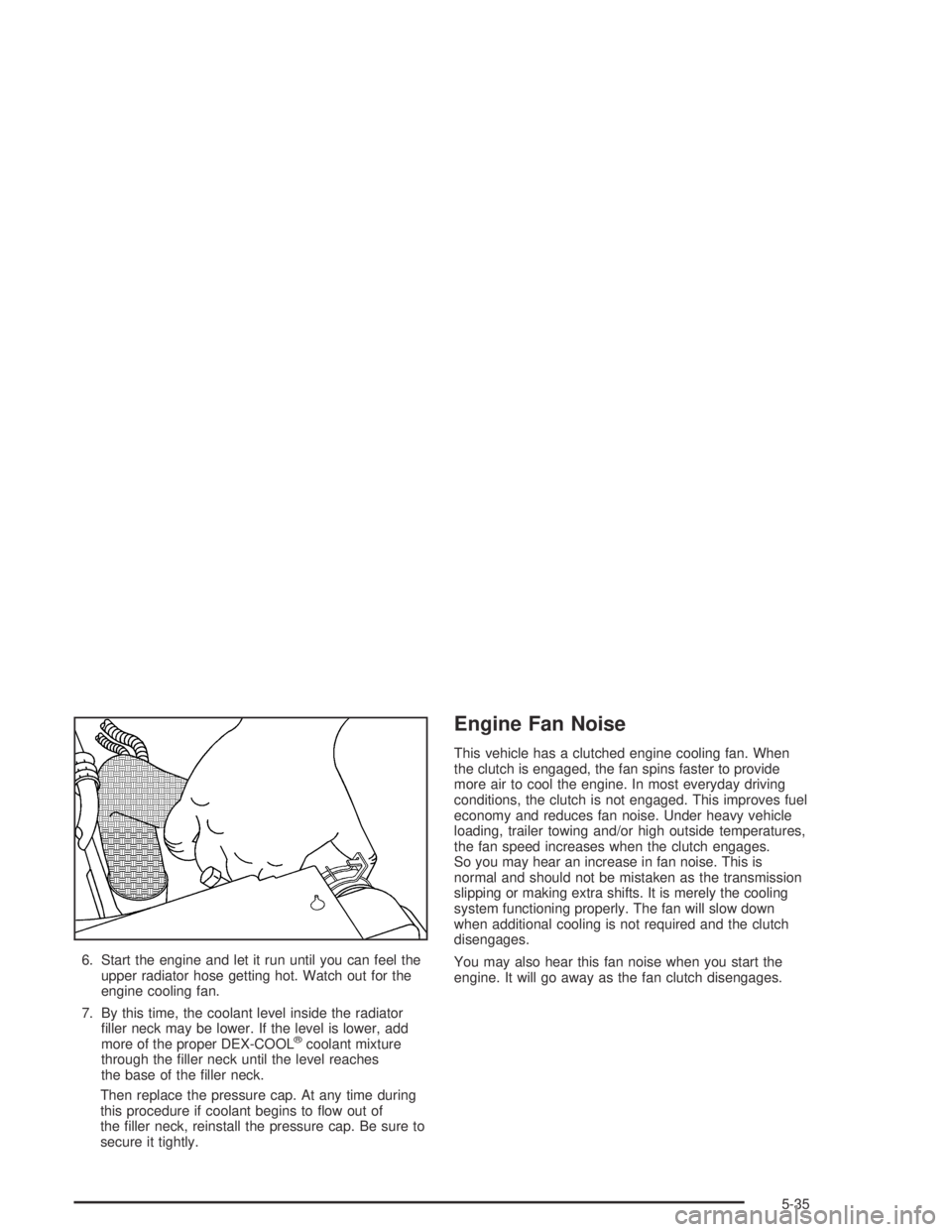
6. Start the engine and let it run until you can feel the
upper radiator hose getting hot. Watch out for the
engine cooling fan.
7. By this time, the coolant level inside the radiator
ller neck may be lower. If the level is lower, add
more of the proper DEX-COOL
®coolant mixture
through the ller neck until the level reaches
the base of the ller neck.
Then replace the pressure cap. At any time during
this procedure if coolant begins to ow out of
the ller neck, reinstall the pressure cap. Be sure to
secure it tightly.
Engine Fan Noise
This vehicle has a clutched engine cooling fan. When
the clutch is engaged, the fan spins faster to provide
more air to cool the engine. In most everyday driving
conditions, the clutch is not engaged. This improves fuel
economy and reduces fan noise. Under heavy vehicle
loading, trailer towing and/or high outside temperatures,
the fan speed increases when the clutch engages.
So you may hear an increase in fan noise. This is
normal and should not be mistaken as the transmission
slipping or making extra shifts. It is merely the cooling
system functioning properly. The fan will slow down
when additional cooling is not required and the clutch
disengages.
You may also hear this fan noise when you start the
engine. It will go away as the fan clutch disengages.
5-35
Page 326 of 420
Tire Terminology and Denitions
Air Pressure:The amount of air inside the tire pressing
outward on each square inch of the tire. Air pressure
is expressed in pounds per square inch (psi) or
kilopascal (kPa).
Accessory Weight:This means the combined weight
of optional accessories. Some examples of optional
accessories are, automatic transmission, power steering,
power brakes, power windows, power seats, and air
conditioning.
Aspect Ratio:The relationship of a tire’s height to
its width.
Belt:A rubber coated layer of cords that is located
between the plies and the tread. Cords may be made
from steel or other reinforcing materials.
Bead:The tire bead contains steel wires wrapped by
steel cords that hold the tire onto the rim.
Bias Ply Tire:A pneumatic tire in which the plies are
laid at alternate angles less than 90 degrees to the
centerline of the tread.Cold Ination Pressure:The amount of air pressure in
a tire, measured in pounds per square inch (psi) or
kilopascals (kPa) before a tire has built up heat
from driving. SeeInation - Tire Pressure on page 5-64.
Curb Weight:This means the weight of a motor
vehicle with standard and optional equipment including
the maximum capacity of fuel, oil and coolant, but
without passengers and cargo.
DOT Markings:A code molded into the sidewall of a
tire signifying that the tire is in compliance with the
U.S. Department of Transportation motor vehicle safety
standards. The DOT code includes the Tire Identication
Number (TIN), an alphanumeric designator which can
also identify the tire manufacturer, production plant,
brand and date of production.
GVWR:Gross Vehicle Weight Rating, seeLoading
Your Vehicle on page 4-52.
GAWR FRT:Gross Axle Weight Rating for the front
axle, seeLoading Your Vehicle on page 4-52.
GAWR RR:Gross Axle Weight Rating for the rear axle,
seeLoading Your Vehicle on page 4-52.
5-62
Page 328 of 420
Traction:The friction between the tire and the road
surface. The amount of grip provided.
Tread:The portion of a tire that comes into contact
with the road.
Treadwear Indicators:Narrow bands, sometimes
called “wear bars,” that show across the tread of a
tire when only 1/16 inch (1.6 mm) of tread remains.
SeeWhen It Is Time for New Tires on page 5-67.
UTQGS:Uniform Tire Quality Grading Standards,
a tire information system that provides consumers with
ratings for a tire’s traction, temperature and treadwear.
Ratings are determined by tire manufacturers using
government testing procedures. The ratings are molded
into the sidewall of the tire. SeeUniform Tire Quality
Grading on page 5-69.
Vehicle Capacity Weight:The number of designated
seating positions multiplied by 150 lbs. (68 kg) plus the
rated cargo load. SeeLoading Your Vehicle on page 4-52.
Vehicle Maximum Load on the Tire:Load on an
individual tire due to curb weight, accessory weight,
occupant weight and cargo weight.
Vehicle Placard:A label permanently attached to a
vehicle showing the original equipment tire size and
recommended ination pressure. SeeLoading
Your Vehicle on page 4-52.
Ination - Tire Pressure
The tire and loading information label, shows the correct
ination pressures for your tires when they’re cold.
“Cold” means your vehicle has been sitting for at least
three hours or driven no more than 1 mile (1.6 km).
SeeLoading Your Vehicle on page 4-52, for the location
of your vehicle’s tire and loading information label.
Notice:Don’t let anyone tell you that underination
or overination is all right. It’s not. If your tires
don’t have enough air (underination), you can get
the following:
Too much exing
Too much heat
Tire overloading
Bad wear
Bad handling
Bad fuel economy
If your tires have too much air (overination),
you can get the following:
Unusual wear
Bad handling
Rough ride
Needless damage from road hazards
5-64
Page 372 of 420
Capacities and Specications
The following approximate conversion capacities are given in English and metric conversions. SeeRecommended
Fluids and Lubricants on page 6-13for more information.
Capacities and Specications
ApplicationCapacities
English Metric
Air Conditioning Capacity
Refrigerant R-134a1.6 lbs 1.73 kg
Cooling System
2.8 L Engine
3.5 L Engine10.4 quarts
10.6 quarts9.8 L
10.0 L
Differential Fluid
Rear Axle
Front Axle3.4-3.8 pints
3.2 pints1.6-1.8 L
1.5 L
Engine Oil with Filter
2.8L
3.5L5 quarts
6 quarts4.7 L
5.6 L
Fuel Tank 19.5 gallons 76 L
5-108
Page 382 of 420
(f)Lubricate all key lock cylinders, body door and fuel
door hinges, latches and locks (including glove box
and console doors), hood latch assembly, secondary
latch, pivots, spring anchor, release pawl and any
moving seat hardware. Lubricate hood safety lever
pivot and prop rod pivot and tailgate latch bolt, handle
assembly pivot points and hinges. More frequent
lubrication may be required when exposed to a corrosive
environment. Applying silicone grease on weatherstrips
with a clean cloth will make them last longer, seal
better and not stick or squeak.
(g)A uid loss in any vehicle system could indicate a
problem. Have the system inspected and repaired
and the uid level checked. Add uid if needed.(h)Change automatic transmission uid and lter if the
vehicle is mainly driven under one or more of these
conditions:
In heavy city traffic where the outside temperature
regularly reaches 90°F (32°C) or higher.
In hilly or mountainous terrain.
When doing frequent trailer towing.
Uses such as found in taxi, police or delivery
service.
(i)Drain, ush and rell cooling system. See Engine
Coolant on page 5-25for what to use. Inspect hoses.
Clean radiator, condenser, pressure cap and ller neck.
Pressure test the cooling system and pressure cap.
6-8
Page 398 of 420
Roadside Assistance Program
Security While You Travel
1-800-GMC-8782 (1-800-462-8782, Roadside Assistance
prompt)
As the proud owner of a new GMC vehicle, you are
automatically enrolled in the GMC Roadside Assistance
program. This value-added service is intended to
provide you with peace of mind as you drive in the city
or travel the open road. GMC’s Roadside Assistance
toll-free number is staffed by courteous and capable
Roadside Assistance Representatives who are available
24 hours a day, 365 days a year.
We will provide the following services during the
Bumper-to-Bumper warranty period, at no expense
to you:
Fuel Delivery:Delivery of enough fuel
($5 maximum) for the customer to get to the
nearest service station.
Lock-out Service (identication required):
Replacement keys or locksmith service will
be covered at no charge if you are unable to gain
entry into your vehicle. Delivery of the replacement
key will be covered within 10 miles.
Emergency Tow:Tow to the nearest dealership
for warranty service or in the event of a
vehicle-disabling accident. Assistance when the
vehicle is mired in sand, mud or snow.
Flat Tire Change:Installation of a spare tire will be
covered at no charge. (The customer is responsible
for the repair or replacement of the tire if not
covered by a warrantable failure.)
Jump Start:No-start occurrences which require a
battery jump start will be covered at no charge.
Dealer Locator Service
Trip Routing:Your Roadside Assistance
Representative can provide you with specic
information regarding this feature.
Trip Interruption Expense Benets:Your
Roadside Assistance Representative can provide
you with specic information regarding this feature.
In many instances, mechanical failures are covered
under GMC’s Bumper-to-Bumper warranty. However,
when other services are utilized, our Roadside
Assistance Representatives will explain any payment
obligations you might incur.
7-6
Page 406 of 420
Audio System(s) (cont.)
Setting the Time for Radios with
Radio Data Systems (RDS).......................3-43
Setting the Time for Radios without
Radio Data Systems (RDS).......................3-43
Theft-Deterrent Feature................................3-67
Understanding Radio Reception.....................3-68
Automatic Door Locks.....................................3-38
Automatic Headlamp System............................3-13
Automatic Transmission...................................2-18
Fluid..........................................................5-19
Operation...................................................2-21
B
Backing Up....................................................4-70
BATTERY......................................................3-39
Battery..........................................................5-41
Battery Replacement......................................... 2-6
Battery Run-Down Protection............................3-16
Battery Warning Light......................................3-27
Bed Rails......................................................2-43
Before Leaving on a Long Trip.........................4-36
Before You Go Off-Roading..............................4-16
Brake
Parking......................................................2-29
System Warning Light..................................3-28
Brake Adjustment............................................5-40Brake Fluid....................................................5-38
Brake Pedal Travel.........................................5-40
Brake Wear...................................................5-40
BRAKES.......................................................3-40
Brakes..........................................................5-38
Braking........................................................... 4-6
Braking in Emergencies..................................... 4-9
Break-In, New Vehicle.....................................2-16
Bulb Replacement...........................................5-50
Center High-Mounted Stoplamp (CHMSL)........5-53
Front Turn Signal, Sidemarker and
Daytime Running Lamps...........................5-52
Halogen Bulbs............................................5-50
Headlamps.................................................5-50
Replacement Bulbs......................................5-54
Taillamps, Turn Signal, Stoplamps and
Back-up Lamps........................................5-53
Buying New Tires...........................................5-68
C
California Fuel.................................................. 5-6
Canada........................................................... 7-4
Canadian Owners................................................ ii
Canadian Roadside Assistance........................... 7-7
Capacities and Specications..........................5-108
Carbon Monoxide...................4-40, 4-60, 2-10, 2-34
2
Page 410 of 420
Event Data Recorders (EDR)............................. 7-9
Exit Lighting...................................................3-16
Express Down Windows..................................2-13
Extender, Safety Belt.......................................1-30
Exterior Lamps...............................................3-12
F
Fan Knob......................................................3-18
Filter
Engine Air Cleaner......................................5-18
Finding a Program Type (PTY) Station.........3-50, 3-59
Finding a Station............................3-44, 3-48, 3-57
Finish Care....................................................5-98
Finish Damage.............................................5-100
Five-Speed....................................................2-24
Fixed Mast Antenna........................................3-68
Flash-to-Pass................................................... 3-7
Flat Tire........................................................5-73
Flat Tire, Changing.........................................5-74
FLUID...........................................................3-40
Fluid
Automatic Transmission................................5-19
Manual Transmission....................................5-22
Power Steering...........................................5-36
Windshield Washer......................................5-37
FM ...............................................................3-68
Fog Lamps....................................................3-14Following Distance..........................................4-70
Four-Wheel Drive....................................2-26, 5-48
Front Armrest Storage Area..............................2-43
Front Axle......................................................5-49
Fuel............................................................... 5-5
Additives...................................................... 5-6
California Fuel.............................................. 5-6
Filling a Portable Fuel Container....................5-10
Filling Your Tank........................................... 5-7
Fuels in Foreign Countries.............................. 5-7
Gage.........................................................3-36
Gasoline Octane........................................... 5-5
Gasoline Specications.................................. 5-5
FUEL CAP.....................................................3-40
Fuses
Fuses and Circuit Breakers.........................5-104
Windshield Wiper.......................................5-104
G
Gage
Engine Coolant Temperature.........................3-30
Fuel..........................................................3-36
Speedometer..............................................3-24
Tachometer.................................................3-24
Gasoline
Octane........................................................ 5-5
Specications............................................... 5-5
6