clock GMC CANYON 2004 Owner's Guide
[x] Cancel search | Manufacturer: GMC, Model Year: 2004, Model line: CANYON, Model: GMC CANYON 2004Pages: 420, PDF Size: 2.84 MB
Page 349 of 420
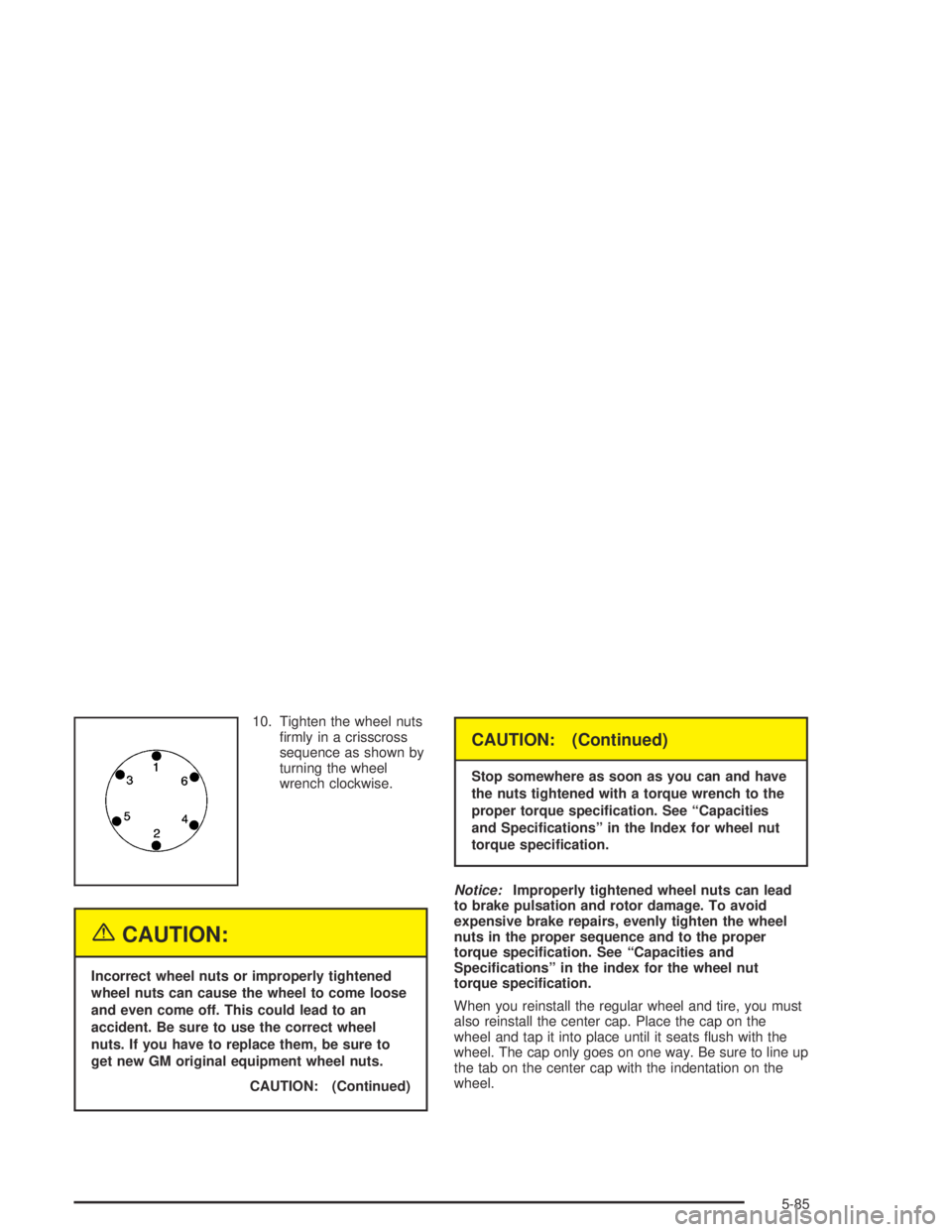
10. Tighten the wheel nuts
rmly in a crisscross
sequence as shown by
turning the wheel
wrench clockwise.
{CAUTION:
Incorrect wheel nuts or improperly tightened
wheel nuts can cause the wheel to come loose
and even come off. This could lead to an
accident. Be sure to use the correct wheel
nuts. If you have to replace them, be sure to
get new GM original equipment wheel nuts.
CAUTION: (Continued)
CAUTION: (Continued)
Stop somewhere as soon as you can and have
the nuts tightened with a torque wrench to the
proper torque specication. See “Capacities
and Specications” in the Index for wheel nut
torque specication.
Notice:Improperly tightened wheel nuts can lead
to brake pulsation and rotor damage. To avoid
expensive brake repairs, evenly tighten the wheel
nuts in the proper sequence and to the proper
torque specication. See “Capacities and
Specications” in the index for the wheel nut
torque specication.
When you reinstall the regular wheel and tire, you must
also reinstall the center cap. Place the cap on the
wheel and tap it into place until it seats ush with the
wheel. The cap only goes on one way. Be sure to line up
the tab on the center cap with the indentation on the
wheel.
5-85
Page 352 of 420

4. Insert the hoist end through the hole in the rear
bumper and into the funnel-shaped guide.
5. Turn the wheel wrench clockwise to raise the tire part
way up. Make sure the retainer is seated in the wheel
opening and the valve stem is pointed down.
6. Raise the tire fully against the underside of the
vehicle by turning the wheel wrench clockwise
until you feel it skip twice. You cannot overtighten
the cable.A. Push and Pull on Tire
B. Turn Tire
7. Make sure the tire is stored securely. Push, pull,
and then try to turn the tire. If the tire moves,
check to make sure the tire valve stem is pointing
down, then use the wheel wrench to loosen
and then tighten the cable.
5-88
Page 354 of 420
Secondary Latch System
Your vehicle has an underbody mounted tire hoist
assembly equipped with a secondary latch system. It is
designed to stop the spare tire from suddenly falling
off your vehicle. For the secondary latch to work,
the spare must be installed with the valve stem pointing
down. See “Storing a Flat or Spare Tire, Jack and
Tools” earlier in this section.
{CAUTION:
Before beginning this procedure read all the
instructions. Failure to read and follow the
instructions could damage the hoist assembly
and you and others could get hurt. Read and
follow the instructions listed below.To release the spare tire from the secondary latch
do the following:
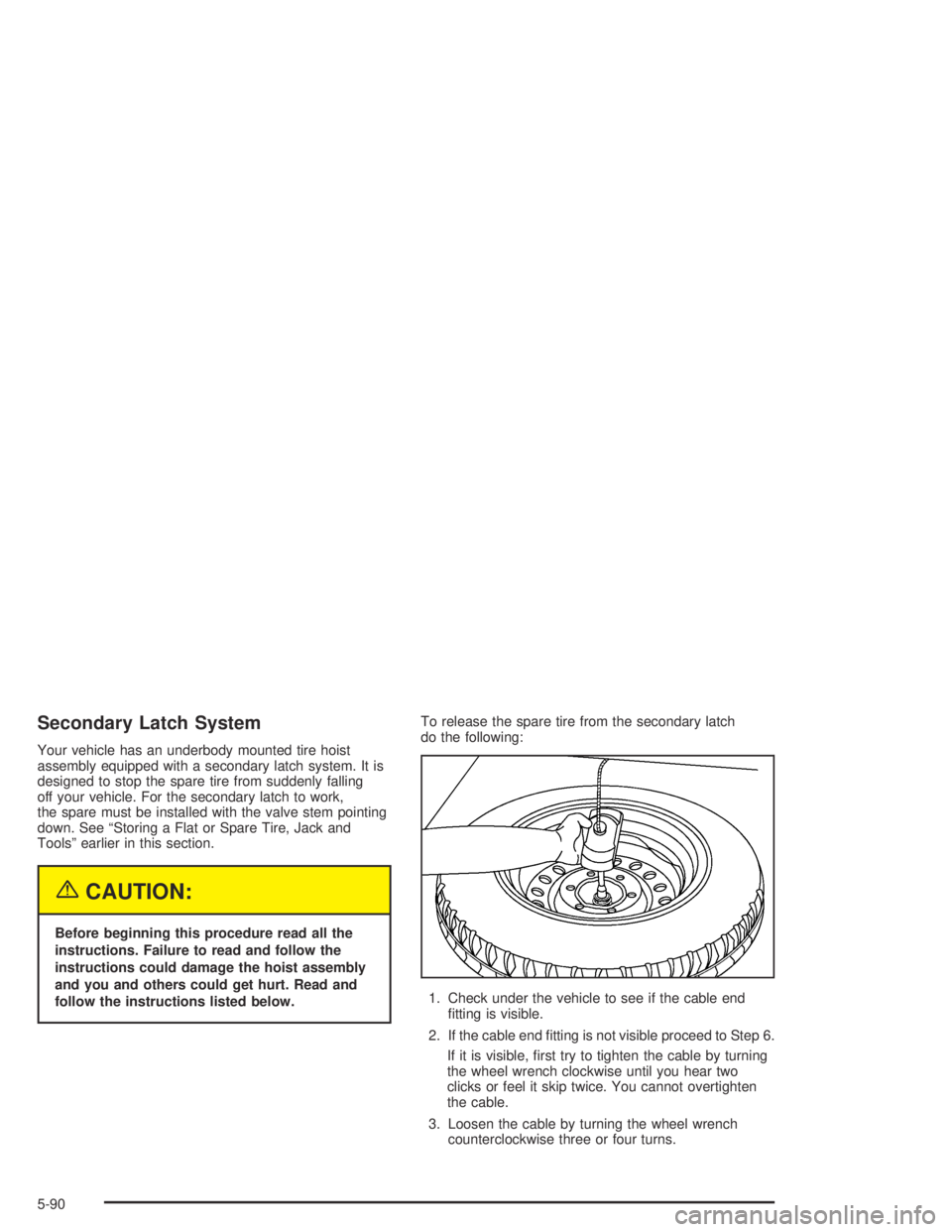
1. Check under the vehicle to see if the cable end
tting is visible.
2. If the cable end tting is not visible proceed to Step 6.
If it is visible, rst try to tighten the cable by turning
the wheel wrench clockwise until you hear two
clicks or feel it skip twice. You cannot overtighten
the cable.
3. Loosen the cable by turning the wheel wrench
counterclockwise three or four turns.
5-90
Page 355 of 420
4. Repeat this procedure at least two times. If the
spare tire lowers to the ground, continue with
Step 5 of “Removing the Spare Tire and Tools”
earlier in this section.
5. Turn the wrench counterclockwise until
approximately six inches (15 cm) of cable is
exposed.
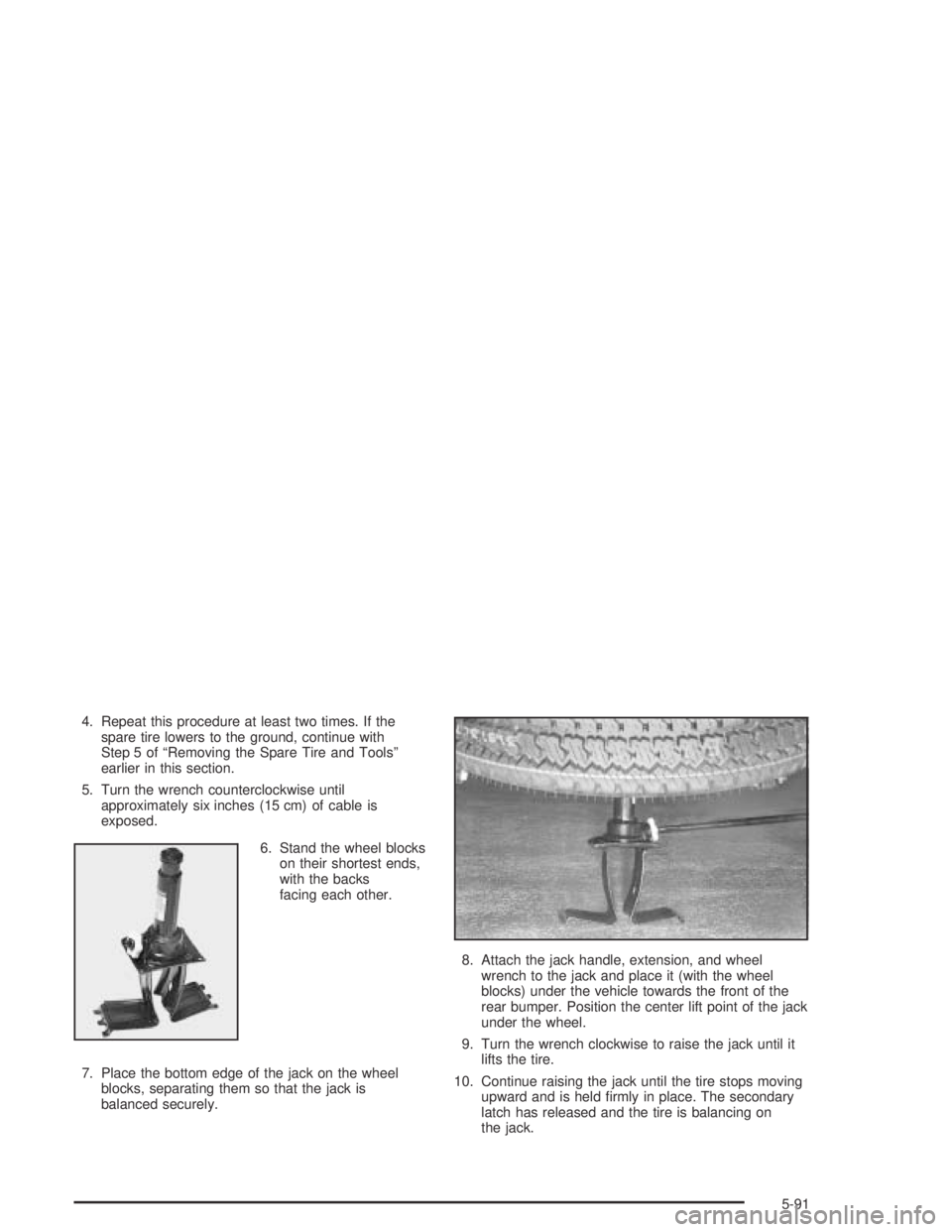
6. Stand the wheel blocks
on their shortest ends,
with the backs
facing each other.
7. Place the bottom edge of the jack on the wheel
blocks, separating them so that the jack is
balanced securely.8. Attach the jack handle, extension, and wheel
wrench to the jack and place it (with the wheel
blocks) under the vehicle towards the front of the
rear bumper. Position the center lift point of the jack
under the wheel.
9. Turn the wrench clockwise to raise the jack until it
lifts the tire.
10. Continue raising the jack until the tire stops moving
upward and is held rmly in place. The secondary
latch has released and the tire is balancing on
the jack.
5-91
Page 356 of 420
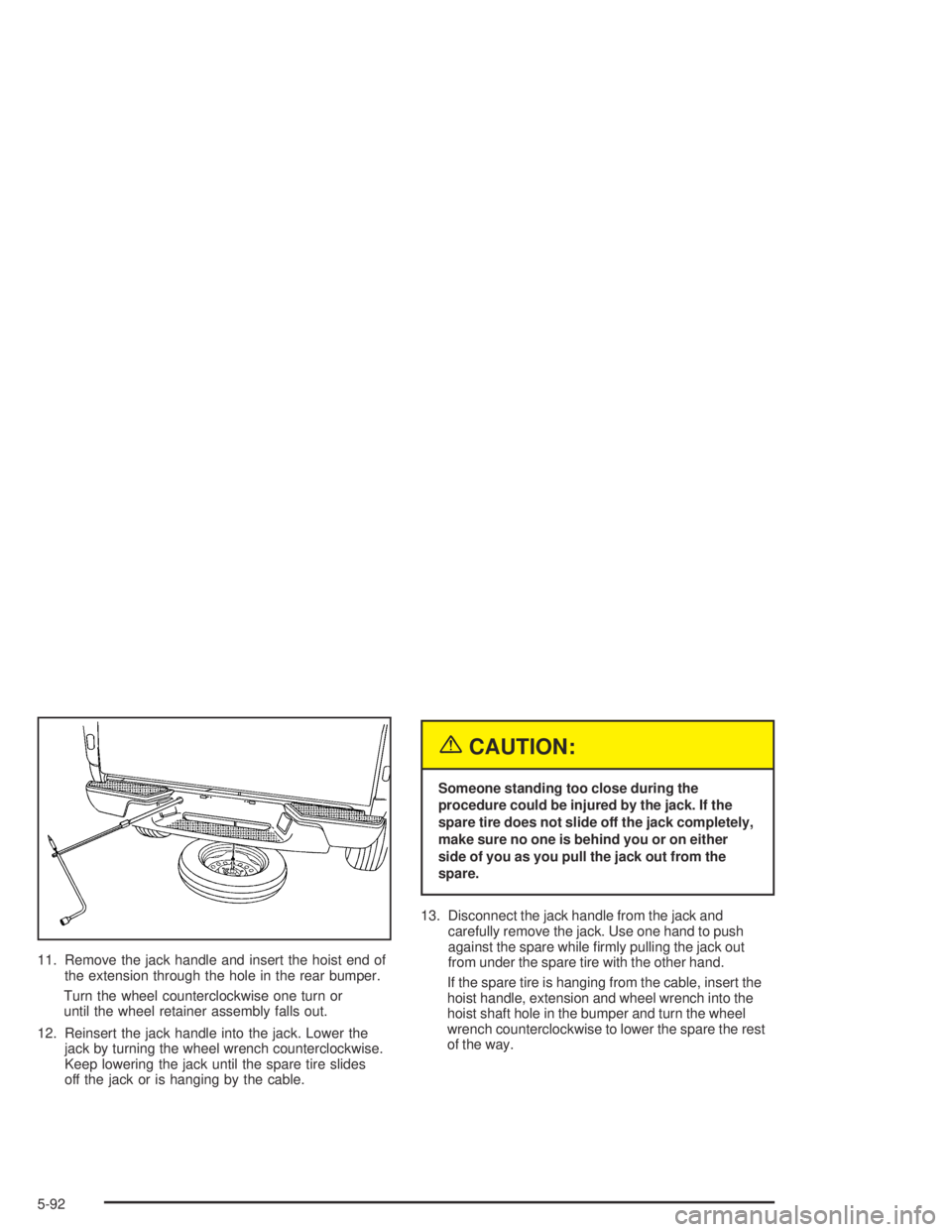
11. Remove the jack handle and insert the hoist end of
the extension through the hole in the rear bumper.
Turn the wheel counterclockwise one turn or
until the wheel retainer assembly falls out.
12. Reinsert the jack handle into the jack. Lower the
jack by turning the wheel wrench counterclockwise.
Keep lowering the jack until the spare tire slides
off the jack or is hanging by the cable.
{CAUTION:
Someone standing too close during the
procedure could be injured by the jack. If the
spare tire does not slide off the jack completely,
make sure no one is behind you or on either
side of you as you pull the jack out from the
spare.
13. Disconnect the jack handle from the jack and
carefully remove the jack. Use one hand to push
against the spare while rmly pulling the jack out
from under the spare tire with the other hand.
If the spare tire is hanging from the cable, insert the
hoist handle, extension and wheel wrench into the
hoist shaft hole in the bumper and turn the wheel
wrench counterclockwise to lower the spare the rest
of the way.
5-92
Page 357 of 420

14. Tilt the tire retainer at the end of the cable and pull
it through the wheel opening. Pull the tire out from
under the vehicle.
15. If the cable is hanging under the vehicle, turn the
wheel wrench clockwise to raise the cable back up.
Have the hoist assembly inspected as soon as you can.
You will not be able to store a spare or at tire using
the hoist assembly until it has been replaced.
To continue changing the at tire, see “Removing the
Flat Tire and Installing the Spare Tire” earlier in
this section.
Spare Tire
Compact Spare Tire
Your vehicle may be equipped with a compact spare
tire. Although the compact spare tire was fully inated
when your vehicle was new, it can lose air after a time.
Check the ination pressure regularly. It should be
60 psi (420 kPa).
After installing the compact spare on your vehicle,
you should stop as soon as possible and make sure
your spare tire is correctly inated. The compact spare
is made to perform well at speeds up to 65 mph
(105 km/h) for distances up to 3,000 miles (5 000 km),
so you can nish your trip and have your full-size
tire repaired or replaced where you want. For heavy
payloads or towing, and for low traction or
four-wheel-drive conditions, repair or replace the
full-size tire, and reinstall for best performance.
Of course, it’s best to replace your spare with a full-size
tire as soon as you can. Your spare will last longer
and be in good shape in case you need it again.
Notice:When the compact spare is installed, don’t
take your vehicle through an automatic car wash
with guide rails. The compact spare can get caught
on the rails. That can damage the tire and wheel,
and maybe other parts of your vehicle.
5-93