AUX GMC CANYON 2005 Owner's Manual
[x] Cancel search | Manufacturer: GMC, Model Year: 2005, Model line: CANYON, Model: GMC CANYON 2005Pages: 420, PDF Size: 2.73 MB
Page 144 of 420
Exit Lighting
With exit lighting, the interior lamps will come on when
you remove the key from the ignition. The lamps will
not come on if the dome override button is pressed in.
Battery Run-Down Protection
This feature shuts off the dome lamp if it is left on for
more than 20 minutes when the ignition is in LOCK.
This will keep your battery from running down.
Accessory Power Outlets
Your vehicle may have accessory power outlets.
With accessory power outlets you can plug in auxiliary
electrical equipment such as a cellular telephone or
CB radio.
Your vehicle may have two accessory power outlets
located on the lower part of the instrument panel below
the climate control system and there may be one
located on the rear of the center console. A small cap
must be pulled down to access an accessory power
outlet. When not using an outlet be sure to cover it with
the protective cap.Notice:Leaving electrical equipment on for
extended periods will drain the battery. Always turn
off electrical equipment when not in use and do
not plug in equipment that exceeds the maximum
amperage rating.
Certain electrical accessories may not be compatible
with the accessory power outlet and could result
in blown vehicle or adapter fuses. If you experience a
problem, see your dealer for additional information
on accessory power outlets.
Notice:Adding any electrical equipment to your
vehicle may damage it or keep other components
from working as they should. The repairs would not
be covered by your warranty. Check with your
dealer before adding electrical equipment.
When adding electrical equipment, be sure to follow the
proper installation instructions included with the
equipment.
Notice:Improper use of the power outlet can cause
damage not covered by your warranty. Do not
hang any type of accessory or accessory bracket
from the plug because the power outlets are
designed for accessory power plugs only.
3-18
Page 183 of 420

4 FWD (Forward):Press and hold this pushbutton to
advance quickly within a track. Press and hold this
pushbutton for less than two seconds to advance at six
times the normal playing speed. Press and hold it for
more than two seconds to advance at 17 times the
normal playing speed. Release this pushbutton to play
the passage. ET and the elapsed time of the track
will appear on the display.
6 RDM (Random):Press this pushbutton to hear the
tracks in random, rather than sequential, order. RDM ON
will appear on the display. RDM T and the track
number will appear on the display when each track
starts to play. Press RDM again to turn off random play.
RDM OFF will appear on the display.
oSEEKp:Press the left arrow to go to the start
of the current or the previous track. Press the right
arrow to go to the start of the next track. Pressing
either arrow for more than two seconds will search the
previous or next tracks at two tracks per second.
Release the button to stop searching and to play
the track.
oTUNEp:Turning the TUNE knob will fast track
reverse or advance through tracks. The track number
will appear on the display for each track.
DISPL (Display):Press this knob to see how long the
current track has been playing. ET and the elapsed
time of the track will appear on the display. To change
the default on the display, track or elapsed time,
press this knob until you see the display you want, then
hold the knob for two seconds. The radio will produce
one beep and the selected display will now be the
default.
BAND:Press this button to listen to the radio when
a CD is playing. The inactive CD will remain safely
inside the radio for future listening.
CD AUX (Auxiliary):Press this button to play a CD
when listening to the radio. The CD symbol will appear
on the display when a CD is loaded.
ZEJT (Eject):Press this button to eject a CD.
Eject may be activated with either the ignition or radio
off. CDs may be loaded with the ignition and radio
off if this button is pressed rst.
3-57
Page 188 of 420
To change the default on the display, press the DISPL
knob until you see the display you want, then hold
this knob for two seconds. The radio will produce one
beep and the selected display will now be the default.
INFO (Information):INFO will appear on the display
whenever a current track has ID3 tag information. Press
this button to display the artist name and album
contained in the tag. INFO will disappear from the
display when the information in the ID3 tag has nished.
BAND:Press this button to listen to the radio when a
CD is playing. The inactive CD will remain safely
inside the radio for future listening.
CD AUX (Auxiliary):Press this button to play a CD
when listening to the radio. The CD symbol will appear
on the display when a CD is loaded.
ZEJT (Eject):Press this button to eject a CD. Eject
may be activated with either the ignition or radio off.
CDs may be loaded with the ignition and radio off if this
button is pressed rst.
CD Messages
CHECK CD:If this message appears on the display
and/or the CD comes out, it could be for one of the
following reasons:
It is very hot. When the temperature returns to
normal, the CD should play.
You are driving on a very rough road. When the
road becomes smoother, the CD should play.
The CD is dirty, scratched, wet, or upside down.
The air is very humid. If so, wait about an hour
and try again.
The format of the CD may not be compatible.
See “MP3 Format” earlier in this section.
There may have been a problem while burning
the CD.
The label may be caught in the CD player.
If the CD is not playing correctly, for any other reason,
try a known good CD.
If any error occurs repeatedly or if an error cannot be
corrected, contact your GM dealer. If the radio displays
an error message, write it down and provide it to
your GM dealer when reporting the problem.
3-62
Page 195 of 420
LOAD:Press this button to load CDs into the
CD player. This CD player will hold up to six CDs.
To insert one CD, do the following:
1. Turn the ignition on.
2. Press and release the LOAD button.
3. Wait for the indicator light, located to the right of
the slot, to turn green.
4. Load a CD. Insert the CD partway into the slot,
label side up. The player will pull the CD in.
To insert multiple CDs, do the following:
1. Turn the ignition on.
2. Press and hold the LOAD button for two seconds.
You will hear a beep and the indicator light, located
to the right of the slot, will begin to ash and
MULTI LOAD # will appear on the display.
3. Once the light stops ashing and turns green,
INSERT CD # will appear on the display, load
a CD. Insert the CD partway into the slot, label
side up. The player will pull the CD in.
Once the CD is loaded, the indicator light will
begin ashing again. Once the light stops ashing
and turns green, you can load another CD.
The CD player takes up to six CDs. Do not try to
load more than six.To load more than one CD but less than six, complete
Steps 1 through 3. When nished loading CDs,
press the LOAD button to cancel the loading function.
The radio will begin to play the last CD loaded.
If more than one CD has been loaded, a number for
each CD will appear on the display.
Playing a Specic Loaded CD
For every CD loaded, a number will appear on the
display. To play a specic CD, rst press the CD AUX
button, then press the numbered pushbutton that
corresponds to the CD. A small bar will appear under
the CD number that is playing and the track number will
appear on the display.
If an error appears on the display, see “CD Messages”
later in this section.
CD
Z(Eject): Press this button to eject CD(s).
To eject the CD that is currently playing, press and
release this button.
3-69
Page 372 of 420
Engine Compartment Fuse Block
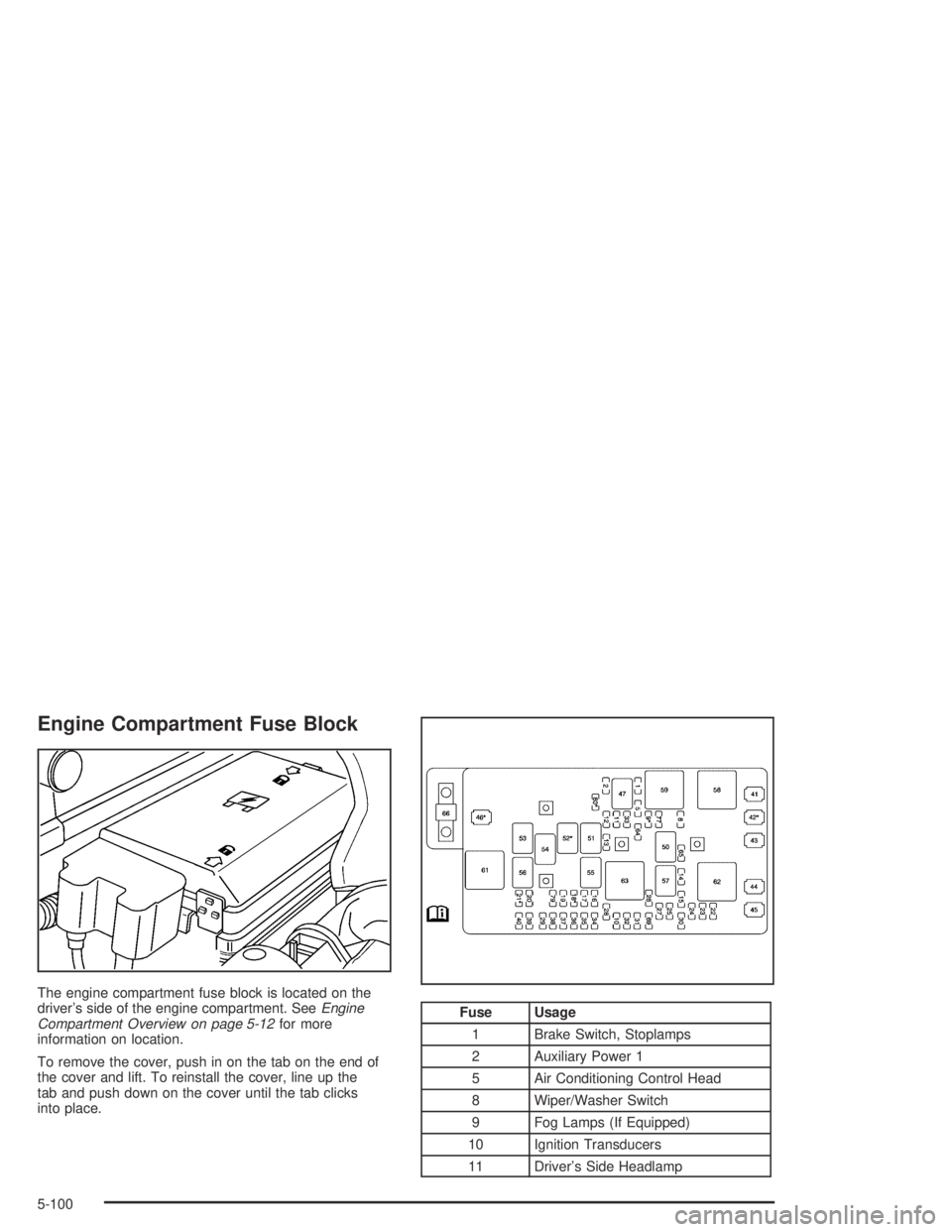
The engine compartment fuse block is located on the
driver’s side of the engine compartment. SeeEngine
Compartment Overview on page 5-12for more
information on location.
To remove the cover, push in on the tab on the end of
the cover and lift. To reinstall the cover, line up the
tab and push down on the cover until the tab clicks
into place.
Fuse Usage
1 Brake Switch, Stoplamps
2 Auxiliary Power 1
5 Air Conditioning Control Head
8 Wiper/Washer Switch
9 Fog Lamps (If Equipped)
10 Ignition Transducers
11 Driver’s Side Headlamp
5-100
Page 373 of 420
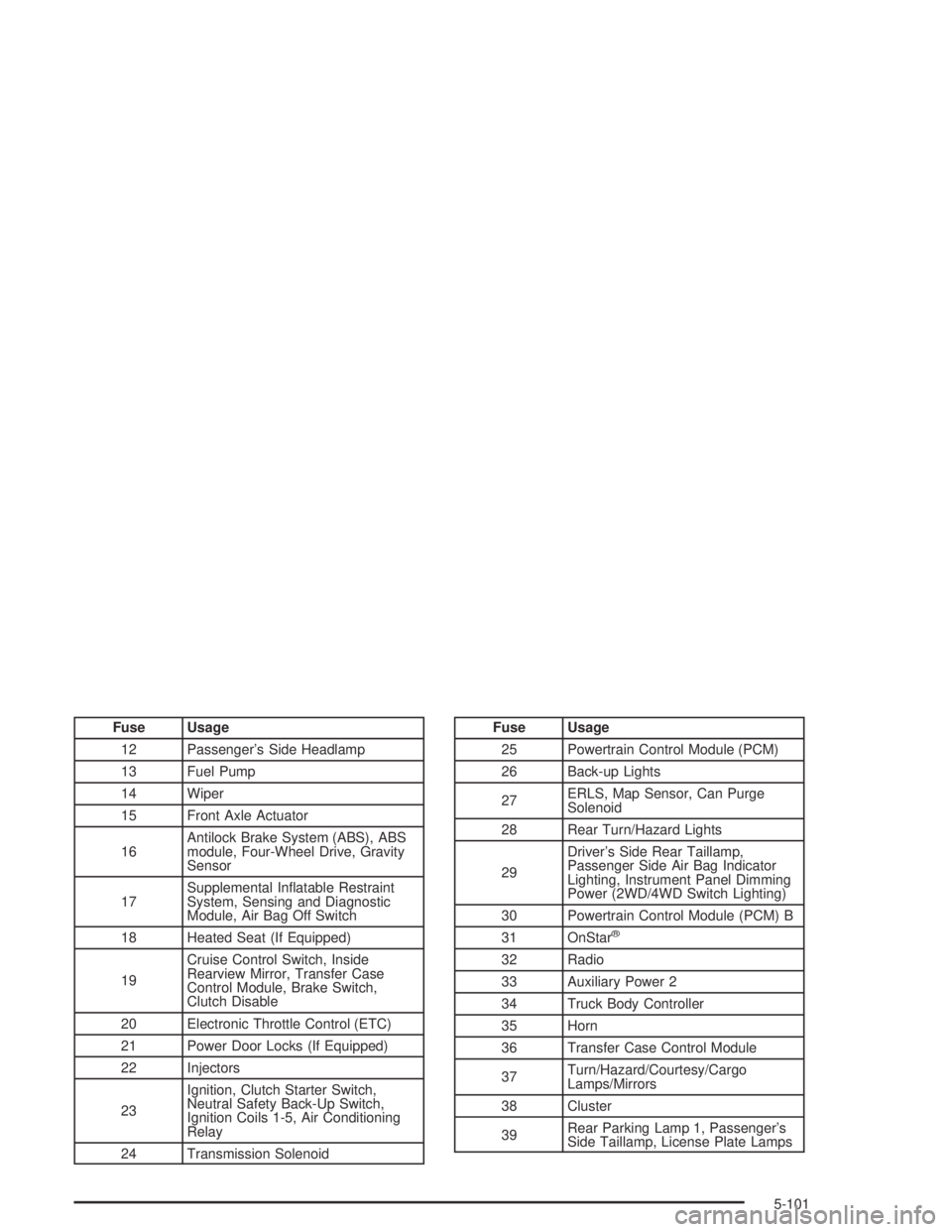
Fuse Usage
12 Passenger’s Side Headlamp
13 Fuel Pump
14 Wiper
15 Front Axle Actuator
16Antilock Brake System (ABS), ABS
module, Four-Wheel Drive, Gravity
Sensor
17Supplemental Inatable Restraint
System, Sensing and Diagnostic
Module, Air Bag Off Switch
18 Heated Seat (If Equipped)
19Cruise Control Switch, Inside
Rearview Mirror, Transfer Case
Control Module, Brake Switch,
Clutch Disable
20 Electronic Throttle Control (ETC)
21 Power Door Locks (If Equipped)
22 Injectors
23Ignition, Clutch Starter Switch,
Neutral Safety Back-Up Switch,
Ignition Coils 1-5, Air Conditioning
Relay
24 Transmission SolenoidFuse Usage
25 Powertrain Control Module (PCM)
26 Back-up Lights
27ERLS, Map Sensor, Can Purge
Solenoid
28 Rear Turn/Hazard Lights
29Driver’s Side Rear Taillamp,
Passenger Side Air Bag Indicator
Lighting, Instrument Panel Dimming
Power (2WD/4WD Switch Lighting)
30 Powertrain Control Module (PCM) B
31 OnStar
®
32 Radio
33 Auxiliary Power 2
34 Truck Body Controller
35 Horn
36 Transfer Case Control Module
37Turn/Hazard/Courtesy/Cargo
Lamps/Mirrors
38 Cluster
39Rear Parking Lamp 1, Passenger’s
Side Taillamp, License Plate Lamps
5-101