door lock GMC CANYON 2006 Owner's Guide
[x] Cancel search | Manufacturer: GMC, Model Year: 2006, Model line: CANYON, Model: GMC CANYON 2006Pages: 434, PDF Size: 2.64 MB
Page 169 of 434
The following are the available modes:
Lock 1 (default):On vehicles with an automatic
transmission, this mode locks all of the doors when the
vehicle is shifted out of PARK (P) and unlocks all of
the doors when the vehicle is shifted into PARK (P).
On vehicles with a manual transmission, this mode locks
all of the doors when the vehicle speed is greater
than 15 mph (24 km/h) and unlocks all of the doors
when the key is removed from the ignition.
Lock 2:On vehicles with an automatic transmission,
this mode locks all of the doors when the vehicle
is shifted out of PARK (P) and unlocks the driver’s door
when the vehicle is shifted into PARK (P).
On vehicles with a manual transmission, this mode
locks all of the doors when the vehicle speed is greater
than 15 mph (24 km/h) and unlocks the driver’s door
when the key is removed from the ignition.
Lock 3:On vehicles with an automatic transmission,
this mode locks all of the doors when the vehicle
is shifted out of PARK (P). The doors will not
automatically unlock.
On vehicles with a manual transmission, this mode
locks all of the doors when the vehicle speed is greater
than 15 mph (24 km/h). The doors will not automatically
unlock.Remote Keyless Entry Feedback
This feature allows you to program your remote keyless
entry feedback to a preferred setting.
To set your choice for this feature, perform the following
steps:
1. With the engine off, turn the key to LOCK. Do not
remove the key from the ignition.
2. Press and hold the lock and unlock buttons on the
remote keyless entry transmitter at the same time.
Hold both buttons until the DIC display shows
the current remote keyless entry feedback mode.
3. To view the next available mode, press and hold
the reset stem for approximately two seconds.
Release the reset stem and press and hold again to
view each mode.
4. Once the desired mode is shown on the DIC
display, briey press the reset stem to set your
choice. The DIC display will then clear.
3-41
Page 171 of 434
AC (Air Conditioning) OFF
This message will be displayed when the engine coolant
temperature is too high and the air conditioning in
your vehicle needs to be turned off. SeeEngine
Overheating on page 5-28andClimate Control System
on page 3-19for more information. It will be displayed
along with the ENG HOT message.
ABS (Anti-Lock Brake System)
This message will be displayed if there is a problem
with your anti-lock brake system. Check your anti-lock
brake system as soon as possible and have your vehicle
serviced by your GM dealer. SeeBrakes on page 5-37
andAnti-Lock Brake System Warning Light on
page 3-31for more information. Press and release the
reset stem to acknowledge the message and clear
it from the DIC display.
BATTERY
This message will be displayed when there is a problem
with your vehicle’s battery. SeeBattery on page 5-41
andBattery Warning Light on page 3-29for more
information.
BRAKES
This message will be displayed if there is a problem
with your brakes. Check your brakes as soon as
possible and have your vehicle serviced by your
GM dealer. SeeBrakes on page 5-37andBrake System
Warning Light on page 3-30for more information.
Press and release the reset stem to acknowledge the
message and clear it from the DIC display.
CHANGE OIL
This message will be displayed when the oil needs to
be changed. Check the oil in your vehicle as soon
as possible and have your vehicle serviced by your
GM dealer. SeeEngine Oil on page 5-13andScheduled
Maintenance on page 6-4for more information. Press
the reset stem to acknowledge the message and clear it
from the display.
DOORS
This message will be displayed on your DIC when one
or more of your doors is ajar. You should check all
the doors on your vehicle to make sure they are closed.
The message will clear from the display after all of
the doors are closed.
3-43
Page 284 of 434
Filling the Tank
{CAUTION:
Fuel vapor burns violently and a fuel re can
cause bad injuries. To help avoid injuries to
you and others, read and follow all the
instructions on the pump island. Turn off your
engine when you are refueling. Do not smoke
if you are near fuel or refueling your vehicle.
Keep sparks, ames, and smoking materials
away from fuel. Do not leave the fuel pump
unattended when refueling your vehicle — this
is against the law in some places. Keep
children away from the fuel pump; never let
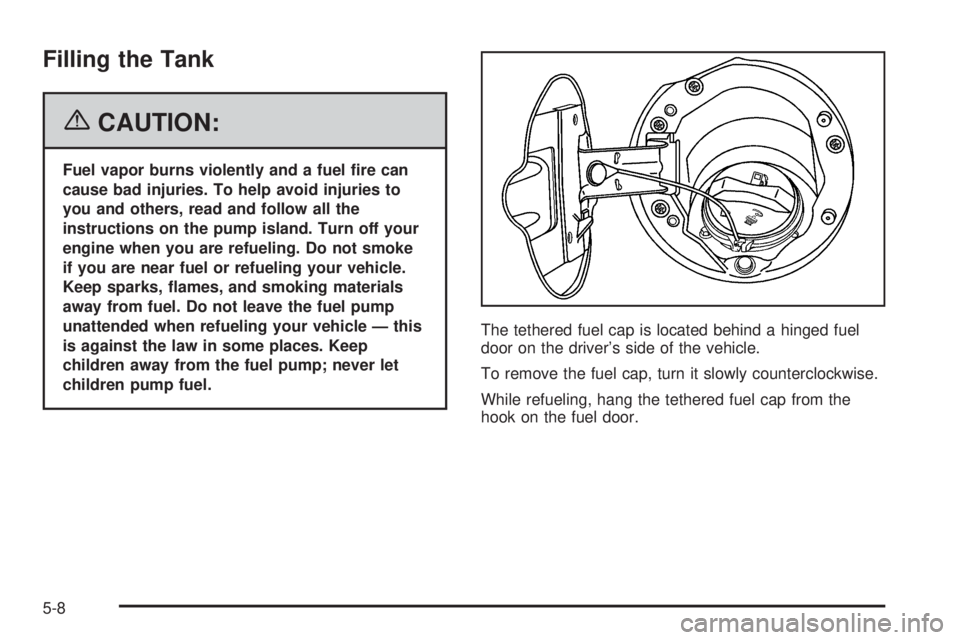
children pump fuel.The tethered fuel cap is located behind a hinged fuel
door on the driver’s side of the vehicle.
To remove the fuel cap, turn it slowly counterclockwise.
While refueling, hang the tethered fuel cap from the
hook on the fuel door.
5-8
Page 381 of 434
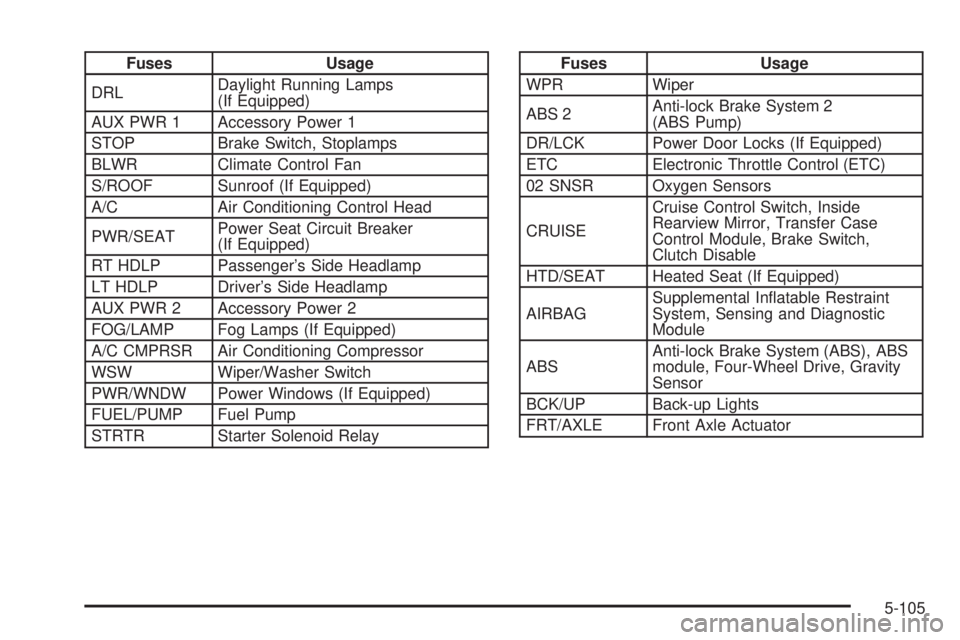
Fuses Usage
DRLDaylight Running Lamps
(If Equipped)
AUX PWR 1 Accessory Power 1
STOP Brake Switch, Stoplamps
BLWR Climate Control Fan
S/ROOF Sunroof (If Equipped)
A/C Air Conditioning Control Head
PWR/SEATPower Seat Circuit Breaker
(If Equipped)
RT HDLP Passenger’s Side Headlamp
LT HDLP Driver’s Side Headlamp
AUX PWR 2 Accessory Power 2
FOG/LAMP Fog Lamps (If Equipped)
A/C CMPRSR Air Conditioning Compressor
WSW Wiper/Washer Switch
PWR/WNDW Power Windows (If Equipped)
FUEL/PUMP Fuel Pump
STRTR Starter Solenoid RelayFuses Usage
WPR Wiper
ABS 2Anti-lock Brake System 2
(ABS Pump)
DR/LCK Power Door Locks (If Equipped)
ETC Electronic Throttle Control (ETC)
02 SNSR Oxygen Sensors
CRUISECruise Control Switch, Inside
Rearview Mirror, Transfer Case
Control Module, Brake Switch,
Clutch Disable
HTD/SEAT Heated Seat (If Equipped)
AIRBAGSupplemental Inatable Restraint
System, Sensing and Diagnostic
Module
ABSAnti-lock Brake System (ABS), ABS
module, Four-Wheel Drive, Gravity
Sensor
BCK/UP Back-up Lights
FRT/AXLE Front Axle Actuator
5-105
Page 394 of 434
(f)Lubricate all key lock cylinders, body door and fuel
door hinges, latches and locks (including glove box and
console doors), hood latch assembly, secondary
latch, pivots, spring anchor, release pawl, and any
moving seat hardware. Lubricate hood safety lever pivot
and prop rod pivot and tailgate latch bolt, handle
assembly pivot points, and hinges. More frequent
lubrication may be required when exposed to a corrosive
environment. Applying silicone grease on weatherstrips
with a clean cloth will make them last longer, seal
better, and not stick or squeak.
(g)A uid loss in any vehicle system could indicate a
problem. Have the system inspected and repaired
and the uid level checked. Add uid if needed.
(h)Change automatic transmission uid and lter if the
vehicle is mainly driven under one or more of these
conditions:
In heavy city traffic where the outside temperature
regularly reaches 90°F (32°C) or higher.
In hilly or mountainous terrain.
When doing frequent trailer towing.
Uses such as found in taxi, police, or delivery
service.(i)Drain, ush, and rell cooling system. This service
can be complex; you should have your dealer perform
this service. See Engine Coolant on page 5-25 for
what to use. Inspect hoses. Clean radiator, condenser,
pressure cap, and ller neck. Pressure test the
cooling system and pressure cap.
(j)If you drive regularly under dusty conditions, inspect
the lter at each engine oil change.
(k)Visually inspect belt for fraying, excessive cracks, or
obvious damage. Replace belt if necessary.
Owner Checks and Services
These owner checks and services should be performed
at the intervals specied to help ensure the safety,
dependability and emission control performance of your
vehicle. Your GM Goodwrench
®dealer can assist
you with these checks and services.
Be sure any necessary repairs are completed at once.
Whenever any uids or lubricants are added to your
vehicle, make sure they are the proper ones, as shown
inRecommended Fluids and Lubricants on page 6-13.
6-8
Page 424 of 434
Customer Assistance Information (cont.)
Reporting Safety Defects to General Motors....7-15
Reporting Safety Defects to the Canadian
Government............................................7-14
Reporting Safety Defects to the United
States Government...................................7-14
Roadside Assistance Program......................... 7-6
Service Publications Ordering Information........7-15
D
Daytime Running Lamps..................................3-15
Daytime Running Lamps Indicator Light.............3-38
Defensive Driving............................................. 4-2
Doing Your Own Service Work........................... 5-4
Dome Lamp...................................................3-17
Dome Lamp Override......................................3-17
Door
Locks.......................................................... 2-7
Power Door Locks......................................... 2-8
Rear Door Security Locks............................... 2-8
Rear Doors.................................................. 2-9
Driver
Position, Safety Belt.....................................1-18
Driver Information Center (DIC).........................3-39
DIC Controls and Displays............................3-39
DIC Warnings and Messages........................3-42Driving
At Night.....................................................4-28
City...........................................................4-32
Defensive..................................................... 4-2
Drunken....................................................... 4-3
Freeway.....................................................4-33
Hill and Mountain Roads..............................4-36
In Rain and on Wet Roads...........................4-29
Off-Road....................................................4-15
Recovery Hooks..........................................4-43
Rocking Your Vehicle to Get it Out.................4-42
Winter........................................................4-38
E
Electrical System
Add-On Equipment.....................................5-101
Engine Compartment Fuse Block.................5-103
Fuses and Circuit Breakers.........................5-102
Power Windows and Other Power Options....5-102
Windshield Wiper Fuses.............................5-102
Engine
Air Cleaner/Filter.........................................5-18
Battery.......................................................5-41
Check and Service Engine Soon Light............3-32
Coolant......................................................5-25
Coolant Heater............................................2-19
4
Page 427 of 434
J
Jump Starting.................................................5-42
K
Keyless Entry System....................................... 2-3
Keys............................................................... 2-2
L
Labeling, Tire Sidewall.....................................5-56
Lamps
Battery Run-Down Protection.........................3-18
Dome........................................................3-17
Dome Lamp Override...................................3-17
Exterior......................................................3-14
Exterior Cargo.............................................3-17
Fog ...........................................................3-16
Interior.......................................................3-17
LATCH System
Child Restraints...........................................1-46
Latches, Seatback............................................ 1-9
Light
Airbag Readiness........................................3-26
Anti-Lock Brake System Warning...................3-31Light (cont.)
Battery Warning..........................................3-29
Brake System Warning.................................3-30
Cruise Control.............................................3-37
Daytime Running Lamps Indicator..................3-38
Highbeam On.............................................3-37
Malfunction Indicator....................................3-32
Oil Pressure...............................................3-36
Passenger Airbag Status Indicator..................3-27
Passenger Safety Belt Reminder....................3-25
Safety Belt Reminder...................................3-25
Security.....................................................3-37
Up-Shift.....................................................3-30
Lighting
Exit...........................................................3-18
Loading Your Vehicle.......................................4-44
Lockout Protection............................................ 2-9
Locks
Door........................................................... 2-7
Lockout Protection......................................... 2-9
Power Door.................................................. 2-8
Rear Door Security Locks............................... 2-8
Loss of Control...............................................4-14
Lumbar
Manual Controls............................................ 1-3
Power Controls............................................. 1-4
7
Page 429 of 434
Oil, Engine Oil Life System..............................5-16
Older Children, Restraints................................1-34
Online Owner Center........................................ 7-4
OnStar
®System, see OnStar®Manual...............2-38
Other Warning Devices...................................... 3-6
Outlet Adjustment............................................3-21
Outside
Convex Mirror.............................................2-38
Manual Mirrors............................................2-37
Power Mirrors.............................................2-37
Owner Checks and Services.............................. 6-8
Owners, Canadian............................................... ii
P
Park (P)
Shifting Into................................................2-29
Shifting Out of............................................2-30
Parking
Brake........................................................2-28
Over Things That Burn.................................2-31
Parking Your Vehicle.......................................2-31
Passenger Airbag Status Indicator.....................3-27
Passenger Sensing System..............................1-72
Passing.........................................................4-12Passlock
®......................................................2-15
Pickup Conversion to Chassis Cab....................4-49
Power
Accessory Outlet(s)......................................3-18
Door Locks.................................................. 2-8
Electrical System.......................................5-102
Lumbar Controls........................................... 1-4
Retained Accessory (RAP)............................2-17
Seat............................................................ 1-3
Steering Fluid.............................................5-35
Windows....................................................2-12
Pretensioners, Safety Belt................................1-33
Q
Questions and Answers About Safety Belts.........1-17
R
Radiator Pressure Cap....................................5-28
Radios..........................................................3-46
AM-FM Radio.............................................3-48
Care of Your CD Player...............................3-79
Care of Your CDs........................................3-78
9
Page 430 of 434
Radios (cont.)
Radio with CD............................................3-51
Radio with Six-Disc CD................................3-66
Setting the Time for Radios with Radio
Data Systems (RDS)................................3-48
Setting the Time for Radios without Radio
Data Systems (RDS)................................3-47
Theft-Deterrent............................................3-77
Understanding Reception..............................3-78
Rear Axle......................................................5-46
Rear Door Security Locks.................................. 2-8
Rear Doors...................................................... 2-9
Rear Safety Belt Comfort Guides......................1-31
Rear Seat Operation...............................1-10, 1-12
Rear Seat Passengers, Safety Belts..................1-28
Rear Storage Area..........................................2-41
Rearview Mirror, Automatic Dimming with
Compass and Temperature Display................2-35
Rearview Mirror with OnStar
®...........................2-34
Rearview Mirrors.............................................2-34
Reclining Seatbacks.......................................... 1-5
Recommended Fluids and Lubricants.................6-13
Recovery Hooks.............................................4-43Recreational Vehicle Towing.............................4-50
Remote Keyless Entry System............................ 2-3
Remote Keyless Entry System, Operation............ 2-4
Removing the Flat Tire and Installing the
Spare Tire..................................................5-77
Removing the Spare Tire and Tools...................5-73
Replacement Bulbs.........................................5-52
Reporting Safety Defects
Canadian Government..................................7-14
General Motors...........................................7-15
United States Government............................7-14
Restraint System Check
Checking the Restraint Systems....................1-79
Replacing Restraint System Parts After a
Crash.....................................................1-80
Retained Accessory Power (RAP)......................2-17
Right Front Passenger Position, Safety Belts......1-26
Roadside
Assistance Program....................................... 7-6
Rocking Your Vehicle to Get it Out....................4-42
Running the Engine While Parked.....................2-32
10