instrument panel GMC CANYON 2007 User Guide
[x] Cancel search | Manufacturer: GMC, Model Year: 2007, Model line: CANYON, Model: GMC CANYON 2007Pages: 492, PDF Size: 2.79 MB
Page 91 of 492
{CAUTION:
If the airbag readiness light in the
instrument panel cluster ever comes on
and stays on, it means that something
may be wrong with the airbag system.
If this ever happens, have the vehicle
serviced promptly, because an adult-size
person sitting in the right front
passenger’s seat may not have the
protection of the frontal airbag. See
Airbag Readiness Light on page 181for
more on this, including important safety
information.Aftermarket equipment, such as seat covers, can
affect how well the passenger sensing system
operates. You may want to consider not using
seat covers or other aftermarket equipment if
your vehicle has the passenger sensing system.
SeeAdding Equipment to Your Airbag-Equipped
Vehicle on page 93for more information about
modications that can affect how the system
operates.
{CAUTION:
Stowing of articles under the passenger’s
seat or between the passenger’s seat
cushion and seatback may interfere with
the proper operation of the passenger
sensing system.
91
Page 93 of 492
Adding Equipment to Your
Airbag-Equipped Vehicle
Q:Is there anything I might add to the front
or sides of the vehicle that could keep
the airbags from working properly?
A:Yes. If you add things that change your
vehicle’s frame, bumper system, height,
front end or side sheet metal, they may keep
the airbag system from working properly.
Also, the airbag system may not work properly
if you relocate any of the airbag sensors.
If you have any questions about this,
you should contact Customer Assistance
before you modify your vehicle. The phone
numbers and addresses for Customer
Assistance are in Step Two of the Customer
Satisfaction Procedure in this manual.
SeeCustomer Satisfaction Procedure
on page 456.
Q:Because I have a disability, I have to get
my vehicle modied. How can I nd out
whether this will affect my airbag system?
A:Changing or moving any parts of the
front seats, safety belts, the airbag sensing
and diagnostic module, steering wheel,
instrument panel, ceiling headliner, ceiling
and pillar garnish trim, roof-mounted airbag
modules, or airbag wiring can affect the
operation of the airbag system. If you
have questions, call Customer Assistance.
The phone numbers and addresses for
Customer Assistance are in Step Two of
the Customer Satisfaction Procedure in
this manual. SeeCustomer Satisfaction
Procedure on page 456.
93
Page 94 of 492
Restraint System Check
Checking the Restraint Systems
Now and then, make sure the safety belt reminder
light and all your belts, buckles, latch plates,
retractors and anchorages are working properly.
Look for any other loose or damaged safety
belt system parts. If you see anything that might
keep a safety belt system from doing its job,
have it repaired. SeeCare of Safety Belts
on page 418for more information.
Torn or frayed safety belts may not protect you in
a crash. They can rip apart under impact forces.
If a belt is torn or frayed, get a new one right away.
Also look for any opened or broken airbag
covers, and have them repaired or replaced. The
airbag system does not need regular maintenance.Notice:If you damage the covering for the
driver’s or the right front passenger’s airbag, or
the side impact airbag covering (if equipped)
on the ceiling near the side windows, the airbag
may not work properly. You may have to replace
the airbag module in the steering wheel, both
the airbag module and the instrument panel
for the right front passenger’s airbag, or side
impact airbag module and ceiling covering for
roof-mounted side impact airbags (if equipped.)
Do not open or break the airbag coverings.
94
Page 113 of 492
To activate the content theft-deterrent system,
do the following:
1. Close all the doors.
2. Lock the doors with the remote keyless entry
transmitter. The security light, located on the
instrument panel cluster, will ash.
If the lock button on the remote keyless entry
transmitter is pressed, but a door is open, the horn
will chirp six times. Press the lock button again,
within three seconds, and the doors will lock. Close
the open door and the system will be activated.
If a locked door is not opened using the remote
keyless entry transmitter, or by OnStar
®, the
pre-alarm will go off. If the engine is not started or
unlock not pressed within 10 seconds, the front
turn signal lamps will ash for two minutes, and the
horn will sound for two minutes, then will turn off
to save the battery power.
Remember, the theft-deterrent system will not
activate if you lock the doors with a key, the manual
door lock, or power door lock switch. The system
can only be activated using the remote keyless
entry transmitter, or by OnStar
®. SeeOnStar®
System on page 146for additional information.You should also remember that you can start your
vehicle with the correct ignition key if the alarm has
been set off.
Here is how to avoid setting off the alarm by
accident:
If you do not want to activate the theft-deterrent
system, the vehicle should be locked with the
door key after the doors are closed.
Always unlock a door with the remote keyless
entry transmitter. Unlocking a door any other
way will set off the alarm.
If you set off the alarm by accident, you can turn
off the alarm by pressing unlock on the remote
keyless entry transmitter. The alarm will not stop if
you try to unlock a door any other way.
Testing the Alarm
The alarm can be tested by following these steps:
1. From inside the vehicle, activate the system
by locking the doors with the remote keyless
entry transmitter.
2. Unlock the door with the manual door lock and
open the door. This should set off the alarm.
3. To turn the alarm off, press the unlock button
on the remote keyless entry transmitter or
start the engine.
113
Page 116 of 492
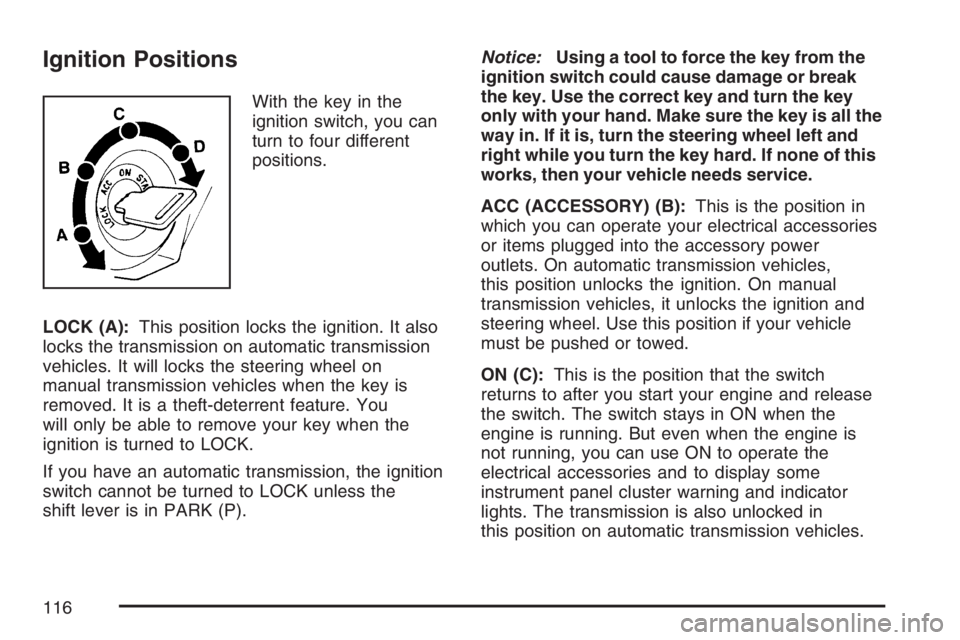
Ignition Positions
With the key in the
ignition switch, you can
turn to four different
positions.
LOCK (A):This position locks the ignition. It also
locks the transmission on automatic transmission
vehicles. It will locks the steering wheel on
manual transmission vehicles when the key is
removed. It is a theft-deterrent feature. You
will only be able to remove your key when the
ignition is turned to LOCK.
If you have an automatic transmission, the ignition
switch cannot be turned to LOCK unless the
shift lever is in PARK (P).Notice:Using a tool to force the key from the
ignition switch could cause damage or break
the key. Use the correct key and turn the key
only with your hand. Make sure the key is all the
way in. If it is, turn the steering wheel left and
right while you turn the key hard. If none of this
works, then your vehicle needs service.
ACC (ACCESSORY) (B):This is the position in
which you can operate your electrical accessories
or items plugged into the accessory power
outlets. On automatic transmission vehicles,
this position unlocks the ignition. On manual
transmission vehicles, it unlocks the ignition and
steering wheel. Use this position if your vehicle
must be pushed or towed.
ON (C):This is the position that the switch
returns to after you start your engine and release
the switch. The switch stays in ON when the
engine is running. But even when the engine is
not running, you can use ON to operate the
electrical accessories and to display some
instrument panel cluster warning and indicator
lights. The transmission is also unlocked in
this position on automatic transmission vehicles.
116
Page 126 of 492
Four-Wheel Drive
If your vehicle has four-wheel drive, you can send
your engine’s driving power to all four wheels
for extra traction. To get the best performance
out of four-wheel drive, you must be familiar
with its operation. Read the part that follows
before using four-wheel drive. You should use
two-wheel-drive high for most normal driving
conditions.
Notice:Driving on clean, dry pavement in
four-wheel drive for an extended period of time
can cause premature wear on your vehicle’s
powertrain. Do not drive on clean, dry pavement
in four-wheel drive for extended periods of time.
Notice:If your vehicle has four-wheel drive
and the compact spare tire is installed on your
vehicle, do not drive in four-wheel drive until
you can have your at tire repaired and/or
replaced. You could damage your vehicle, and
the repair costs would not be covered by your
warranty. Never use four-wheel drive when the
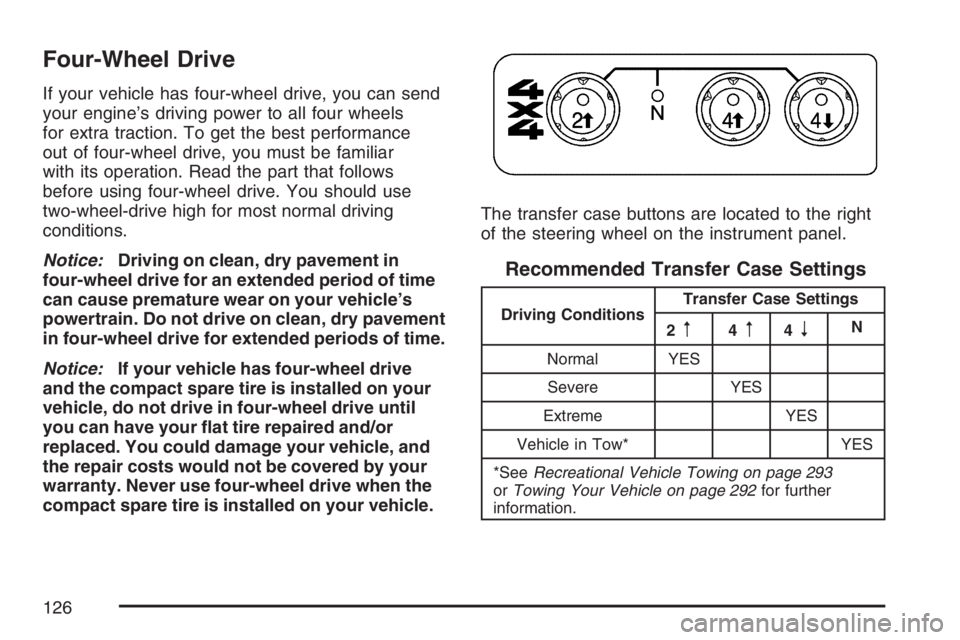
compact spare tire is installed on your vehicle.The transfer case buttons are located to the right
of the steering wheel on the instrument panel.
Recommended Transfer Case Settings
Driving ConditionsTransfer Case Settings
2m4m4nN
Normal YES
Severe YES
Extreme YES
Vehicle in Tow* YES
*SeeRecreational Vehicle Towing on page 293
orTowing Your Vehicle on page 292for further
information.
126
Page 130 of 492
7. Turn the engine off by turning the key
to ACC (Accessory).
8. Place the transmission shift lever in
PARK (P), or FIRST (1) for vehicles that
have a manual transmission.
9. Turn the ignition to LOCK.
Shifting Out of NEUTRAL
After towing your vehicle, you will have to shift out
of NEUTRAL in order to drive. To shift out of
NEUTRAL, do the following:
1. Set the parking brake and apply the regular
brake pedal.
2. Start a vehicle with an automatic transmission
in PARK (P). Use FIRST (1) for vehicles with
a manual transmission.
3. Shift the transmission to NEUTRAL (N), or
press the clutch pedal for vehicles with a
manual transmission.
4. Press the button for the desired transfer case
shift position (Two-Wheel High, Four-Wheel
High, or Four-Wheel Low).
5. After the transfer case has shifted out of
NEUTRAL, the indicator light will go out.
6. Release the parking brake.
7. Shift the transmission to the desired position.
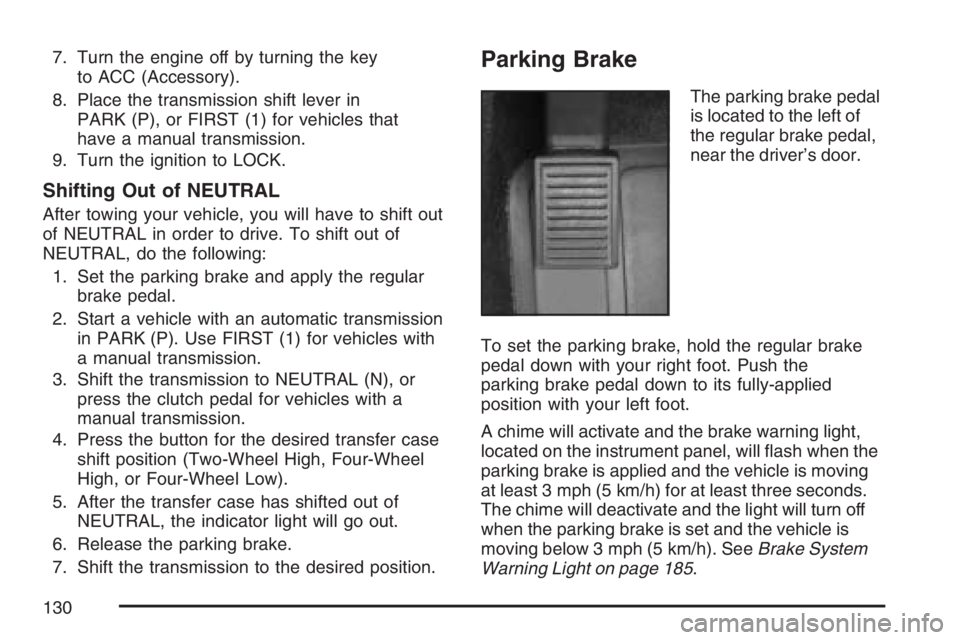
Parking Brake
The parking brake pedal
is located to the left of
the regular brake pedal,
near the driver’s door.
To set the parking brake, hold the regular brake
pedal down with your right foot. Push the
parking brake pedal down to its fully-applied
position with your left foot.
A chime will activate and the brake warning light,
located on the instrument panel, will ash when the
parking brake is applied and the vehicle is moving
at least 3 mph (5 km/h) for at least three seconds.
The chime will deactivate and the light will turn off
when the parking brake is set and the vehicle is
moving below 3 mph (5 km/h). SeeBrake System
Warning Light on page 185.
130
Page 153 of 492
Instrument Panel Overview........................ 156
Hazard Warning Flashers.......................... 158
Other Warning Devices............................. 158
Horn.......................................................... 158
Tilt Wheel.................................................. 158
Turn Signal/Multifunction Lever.................. 159
Turn and Lane-Change Signals................. 160
Headlamp High/Low-Beam Changer.......... 161
Flash-to-Pass............................................ 161
Windshield Wipers..................................... 161
Windshield Washer.................................... 162
Cruise Control........................................... 163
Exterior Lamps.......................................... 166
Headlamps on Reminder........................... 167
Daytime Running Lamps (DRL)................. 167
Automatic Headlamp System..................... 168
Fog Lamps................................................ 169
Exterior Cargo Lamps................................ 169
Interior Lamps........................................... 170
Instrument Panel Brightness...................... 170
Dome Lamp.............................................. 170
Dome Lamp Override................................ 170
Exit Lighting.............................................. 171
Electric Power Management...................... 171
Battery Run-Down Protection..................... 171Accessory Power Outlet(s)........................ 172
Ashtray(s) and Cigarette Lighter................ 173
Climate Controls......................................... 173
Climate Control System............................. 173
Outlet Adjustment...................................... 176
Warning Lights, Gages, and Indicators..... 177
Instrument Panel Cluster........................... 178
Speedometer and Odometer...................... 179
Trip Odometer........................................... 179
Tachometer............................................... 179
Safety Belt Reminder Light........................ 180
Passenger Safety Belt Reminder Light....... 180
Airbag Readiness Light............................. 181
Passenger Airbag Status Indicator............. 182
Battery Warning Light................................ 184
Up-Shift Light (Manual Transmission)........ 185
Brake System Warning Light..................... 185
Anti-Lock Brake System Warning Light...... 186
Engine Coolant Temperature Gage............ 187
Tire Pressure Light.................................... 187
Malfunction Indicator Lamp........................ 188
Oil Pressure Light..................................... 191
Security Light............................................ 192
Cruise Control Light.................................. 192
Section 3 Instrument Panel
153
Page 154 of 492
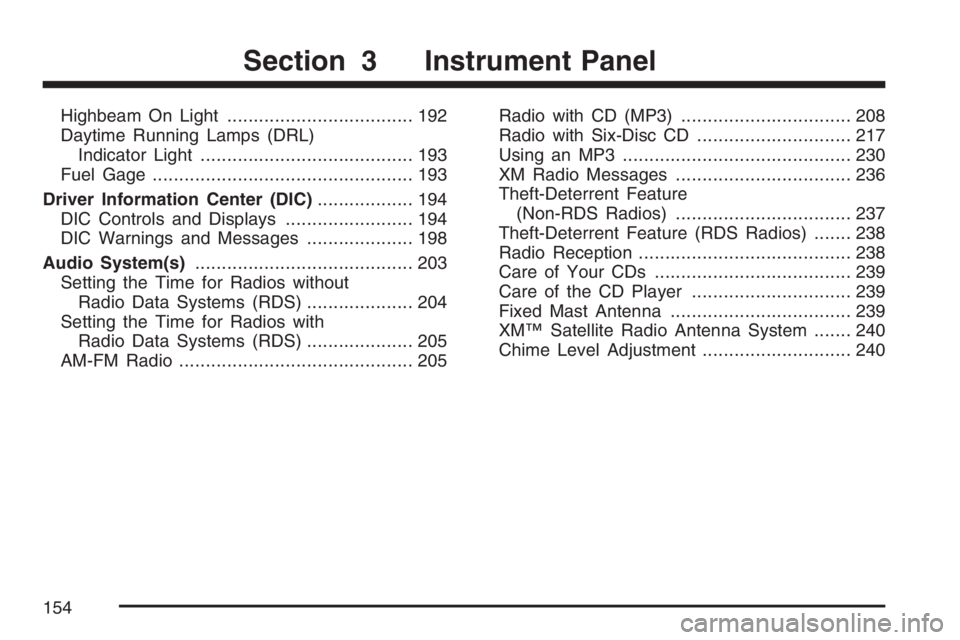
Highbeam On Light................................... 192
Daytime Running Lamps (DRL)
Indicator Light........................................ 193
Fuel Gage................................................. 193
Driver Information Center (DIC).................. 194
DIC Controls and Displays........................ 194
DIC Warnings and Messages.................... 198
Audio System(s)......................................... 203
Setting the Time for Radios without
Radio Data Systems (RDS).................... 204
Setting the Time for Radios with
Radio Data Systems (RDS).................... 205
AM-FM Radio............................................ 205Radio with CD (MP3)................................ 208
Radio with Six-Disc CD............................. 217
Using an MP3........................................... 230
XM Radio Messages................................. 236
Theft-Deterrent Feature
(Non-RDS Radios)................................. 237
Theft-Deterrent Feature (RDS Radios)....... 238
Radio Reception........................................ 238
Care of Your CDs..................................... 239
Care of the CD Player.............................. 239
Fixed Mast Antenna.................................. 239
XM™ Satellite Radio Antenna System....... 240
Chime Level Adjustment............................ 240
Section 3 Instrument Panel
154
Page 156 of 492

Instrument Panel Overview
Manual Transmission shown, Automatic Transmission similar
156