light GMC CANYON 2007 Owner's Guide
[x] Cancel search | Manufacturer: GMC, Model Year: 2007, Model line: CANYON, Model: GMC CANYON 2007Pages: 492, PDF Size: 2.79 MB
Page 128 of 492
Shifting from Two-Wheel High to
Four-Wheel High
Press and release the Four-Wheel High button.
This can be done at any speed, and the front
axle will lock automatically.
Shifting from Four-Wheel High to
Two-Wheel High
Press and release the Two-Wheel High button.
This can be done at any speed, and the front axle
will unlock automatically.
It is normal to hear and feel your vehicle’s transfer
case shift into Four-Wheel High. If you shift with
the vehicle stopped, the indicator light may
still ash slowly. It may be necessary to shift the
transmission momentarily into REVERSE (R)
and DRIVE (D), for an automatic transmission,
or REVERSE (R) and FIRST (1) for a manual
transmission to have the light stop ashing.
Shifting from Two-Wheel High or
Four-Wheel High to Four-Wheel Low
To shift from Two-Wheel High or Four-Wheel High
to Four-Wheel Low, the vehicle must be stopped
or moving less than 3 mph (5 km/h) with the
transmission in NEUTRAL (N) for an automatic
transmission or the clutch pedal pressed for
a manual transmission. The preferred method for
shifting into Four-Wheel Low is to have your
vehicle moving 1 to 2 mph (1.6 to 3.2 km/h).
Press and release the Four-Wheel Low button.
You must wait for the Four-Wheel Low indicator
light to stop ashing and stay on before shifting
the transmission into gear or releasing the
clutch pedal.
If the Four-Wheel Low button is pressed when
your vehicle is in gear and/or moving faster
than 3 mph (5 km/h), the four-wheel low indicator
light will ash for 30 seconds and not complete
the shift.
128
Page 129 of 492
Shifting from Four-Wheel Low to
Two-Wheel High or Four-Wheel High
To shift from Four-Wheel Low to Two-Wheel
High or Four-Wheel High, your vehicle must be
stopped or moving less than 3 mph (5 km/h)
with the transmission in NEUTRAL (N) for
an automatic transmission or the clutch pedal
engaged for a manual transmission. The preferred
method for shifting out of four-wheel low is to
have your vehicle moving 1 to 2 mph
(1.6 to 3.2 km/h).
Press and release the Four-Wheel High or
Two-Wheel High button. You must wait for the
Four-Wheel High or Two-Wheel High indicator
light to stop ashing and stay on before shifting
the transmission into gear or releasing the
clutch pedal.
If the Four-Wheel High or Two-Wheel High button
is pressed when your vehicle is in gear and/or
moving faster than 3 mph (5km/h), the Four-Wheel
High or Two Wheel High indicator light will ash
for 30 seconds but not complete the shift.
Shifting to NEUTRAL
Use NEUTRAL when you plan to tow your vehicle.
SeeRecreational Vehicle Towing on page 293
for towing instructions. To shift the transfer case
into NEUTRAL do the following:
1. Set the parking brake.
2. Start the vehicle.
3. Press the regular brake pedal and shift the
transmission in NEUTRAL (N), or press in
the clutch for vehicles with a manual
transmission.
4. Shift the transfer case to Two-Wheel High.
5. Press and hold the Two-Wheel High and
Four-Wheel Low buttons at the same time
for 10 seconds. The NEUTRAL (N) light
will come on when the transfer case shift to
NEUTRAL (N) is complete.
6. Press and hold the regular brake pedal and
shift the transmission to REVERSE (R) for
one second, then shift the transmission
to DRIVE (D) for one second, or FIRST (1) for
vehicles with manual transmissions, and let
out the clutch to insure the transfer case is in
NEUTRAL. If the vehicle is not in NEUTRAL,
repeat this procedure starting at Step 3.
129
Page 130 of 492
7. Turn the engine off by turning the key
to ACC (Accessory).
8. Place the transmission shift lever in
PARK (P), or FIRST (1) for vehicles that
have a manual transmission.
9. Turn the ignition to LOCK.
Shifting Out of NEUTRAL
After towing your vehicle, you will have to shift out
of NEUTRAL in order to drive. To shift out of
NEUTRAL, do the following:
1. Set the parking brake and apply the regular
brake pedal.
2. Start a vehicle with an automatic transmission
in PARK (P). Use FIRST (1) for vehicles with
a manual transmission.
3. Shift the transmission to NEUTRAL (N), or
press the clutch pedal for vehicles with a
manual transmission.
4. Press the button for the desired transfer case
shift position (Two-Wheel High, Four-Wheel
High, or Four-Wheel Low).
5. After the transfer case has shifted out of
NEUTRAL, the indicator light will go out.
6. Release the parking brake.
7. Shift the transmission to the desired position.
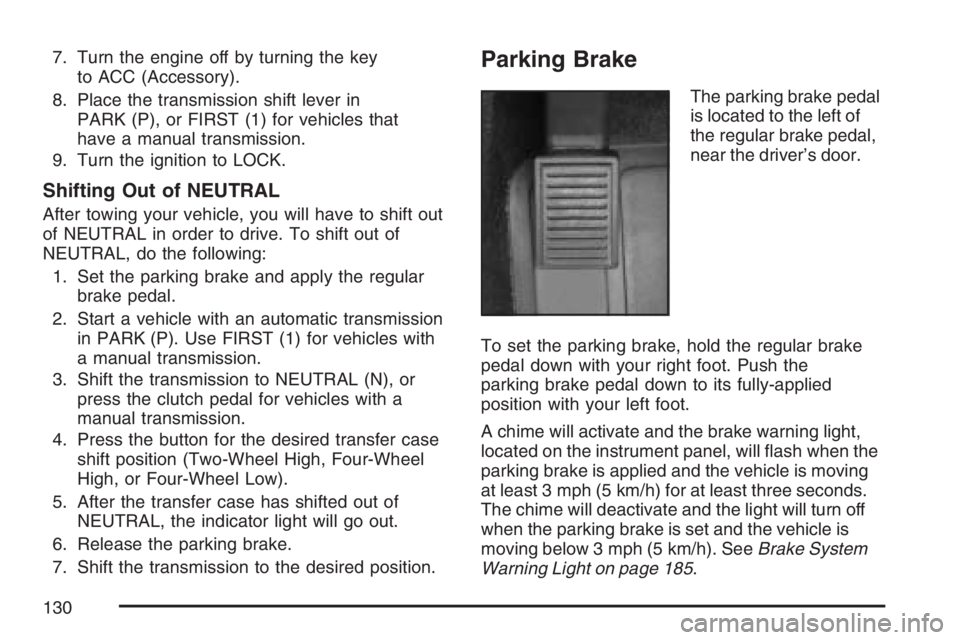
Parking Brake
The parking brake pedal
is located to the left of
the regular brake pedal,
near the driver’s door.
To set the parking brake, hold the regular brake
pedal down with your right foot. Push the
parking brake pedal down to its fully-applied
position with your left foot.
A chime will activate and the brake warning light,
located on the instrument panel, will ash when the
parking brake is applied and the vehicle is moving
at least 3 mph (5 km/h) for at least three seconds.
The chime will deactivate and the light will turn off
when the parking brake is set and the vehicle is
moving below 3 mph (5 km/h). SeeBrake System
Warning Light on page 185.
130
Page 131 of 492
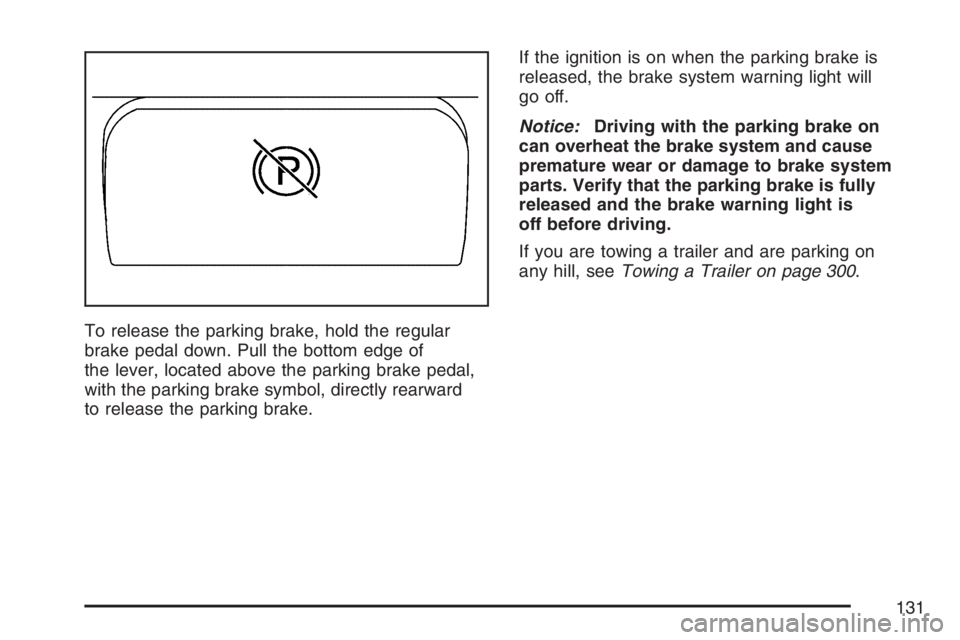
To release the parking brake, hold the regular
brake pedal down. Pull the bottom edge of
the lever, located above the parking brake pedal,
with the parking brake symbol, directly rearward
to release the parking brake.If the ignition is on when the parking brake is
released, the brake system warning light will
go off.
Notice:Driving with the parking brake on
can overheat the brake system and cause
premature wear or damage to brake system
parts. Verify that the parking brake is fully
released and the brake warning light is
off before driving.
If you are towing a trailer and are parking on
any hill, seeTowing a Trailer on page 300.
131
Page 139 of 492
There are also three OnStar®buttons located at
the bottom of the mirror. See your dealer for more
information on the system and how to subscribe
to OnStar
®. SeeOnStar®System on page 146
for more information about the services OnStar®
provides.
Cleaning the Mirror
When cleaning the mirror, use a paper towel or
similar material dampened with glass cleaner.
Do not spray glass cleaner directly on the mirror
housing.
Automatic Dimming Rearview Mirror
with OnStar
®, Compass and
Temperature Display
Your vehicle may have this feature. When on,
the automatic dimming mirror dims to the proper
level to minimize glare from lights behind you
after dark.
The mirror has a dual display in the upper right
corner of the mirror face that shows the compass
reading and the outside temperature.Control buttons for the OnStar
®system are at
the bottom of the mirror. SeeOnStar®System
on page 146for more information about the
services OnStar
®provides.
P(On/Off):This is the on/off button.
Temperature and Compass Display
Press the on/off button, located to the far
left, briey to turn the compass/temperature
display on or off.
If the display reads CAL, the compass needs
to be calibrated. For more information, see
“Compass Calibration” following.
To adjust between Fahrenheit and Celsius,
do the following:
1. Press and hold the on/off button for
approximately four seconds until either a
ashing F or C appears.
2. Press the button again to change the display
to the desired unit of measurement. After
approximately four seconds of inactivity,
the new unit will be locked in and the
compass/temperature display will return.
139
Page 140 of 492
If an abnormal temperature reading is displayed
for an extended period of time, see your
dealer. Under certain circumstances, a delay
in updating the temperature is normal.
Automatic Dimming Mirror Operation
The automatic dimming mirror function is turned
on automatically each time the ignition is started.
To operate the automatic dimming mirror, do
the following:
1. Make sure the green indicator light, located
to the left of the on/off button, is lit. If it is
not, press and hold the on/off button for
approximately six seconds until the green light
comes on, indicating that the mirror is in
automatic dimming mode.
2. Turn off the automatic dimming mirror function
by pressing and holding the on/off button for
approximately six seconds, until the green
indicator light turns off.
Compass Calibration
The compass may need calibration if one of the
following occurs:
After approximately ve seconds, the display
does not show a compass heading, N for
North, for example, there may be a strong
magnetic eld interfering with the compass.
Such interference may be caused by a
magnetic antenna mount, magnetic note pad
holder, or a similar magnetic item.
The compass does not display the correct
heading and the compass zone variance
is set correctly.
In order to calibrate, CAL must be displayed in the
mirror compass windows. If CAL is not displayed,
push the on/off button for approximately
12 seconds or until CAL is displayed.
The compass can be calibrated by driving the
vehicle in circles at 5 mph (8 km/h) or less until
the display reads a direction.
140
Page 142 of 492
Cleaning the Mirror
When cleaning the mirror, use a paper towel or
similar material dampened with glass cleaner.
Do not spray glass cleaner directly on the mirror
as that may cause the liquid cleaner to enter
the mirror housing.
Automatic Dimming Rearview Mirror
with Compass and Temperature
Display
Your vehicle may have this mirror. When on, an
automatic dimming mirror will dim to the proper
level to minimize glare from lights behind you
after dark.
The mirror also includes a dual display in the
upper right corner of the mirror with the compass
reading and the outside temperature.
Yb:Briey press this button to turn the display
on or off.
Temperature Display
The temperature can be displayed by pressing the
compass/temperature button. Pressing the
compass/temperature button once briey, will
toggle the display reading on and off. To alternate
the temperature reading between Fahrenheit and
Celsius, press and hold the compass/temperature
button for approximately three seconds until the
display blinks F and C. After approximately ve
seconds of inactivity, the display will stop blinking
and display the last selection made.
If an abnormal reading is displayed, see your
dealer.
142
Page 143 of 492
Automatic Dimming Mirror Operation
O
:Press this button to turn the automatic
dimming feature on or off. The indicator light to
the left of the button will turn on to indicate when
the feature is on. Once the mirror is turned off,
it will remain off until it is turned back on, or until
the vehicle is restarted.
Compass Operation
Press the compass/temperature button once
briey to turn the display on or off.
Compass Calibration
The compass may need calibration if one of the
following occurs:
If CAL is displayed while driving in the vehicle.
After approximately ve seconds, the display
does not show a compass heading, N for
North, for example, there may be a strong
magnetic eld interfering with the compass.
Such interference may be caused by a
magnetic antenna mount, magnetic note pad
holder, or a similar magnetic item.
The compass does not display the correct
heading and the compass zone variance
is set correctly.
In order to calibrate, CAL must be displayed in the
mirror compass windows. If CAL is not displayed,
push in the compass/temperature button for
approximately nine seconds or until CAL is
displayed.
The compass can be calibrated by driving the
vehicle in circles at 5 mph (8 km/h) or less until the
display reads a direction.
143
Page 149 of 492
How OnStar®Service Works
In order to provide you with OnStar®services, your
vehicle’s OnStar®system has the capability of
recording and transmitting vehicle information.
This information is automatically sent to an OnStar
®
Call Center at the time of an OnStar®button press,
Emergency button press or if your airbags or AACN
system deploys. The vehicle information usually
includes your GPS location and, in the event of a
crash, additional information regarding the accident
that your vehicle has been involved in (e.g. the
direction from which your vehicle was hit). When
you use the Virtual Advisor feature of OnStar
®
Hands-Free Calling, your vehicle also sends
OnStar®your GPS location so that we can provide
you with location-based services.
OnStar
®service cannot work unless your vehicle
is in a place where OnStar®has an agreement
with a wireless service provider for service in that
area. OnStar
®service also cannot work unless
you are in a place where the wireless service
provider OnStar
®has hired for that area
has coverage, network capacity and reception
when the service is needed, and technology that
is compatible with the OnStar
®service. Not all
services are available everywhere, particularly in
remote or enclosed areas, or at all times.OnStar
®service that involves location information
about your vehicle cannot work unless GPS
satellite signals are unobstructed and available in
that place as well.
Your vehicle must have a working electrical
system (including adequate battery power) for the
OnStar
®equipment to operate. There are other
problems OnStar®cannot control that may prevent
OnStar®from providing OnStar®service to you
at any particular time or place. Some examples are
damage to important parts of your vehicle in an
accident, hills, tall buildings, tunnels, weather
or wireless phone network congestion.
Your Responsibility
You may need to increase the volume of your
radio to hear the OnStar®advisor. If the light next
to the OnStar®buttons is red, this means that
your system is not functioning properly and should
be checked by a dealer. If the light appears
clear (no light is appearing), your OnStar
®
subscription has expired. You can always press
the blue OnStar®button to conrm that your
OnStar®equipment is active.
149
Page 153 of 492
Instrument Panel Overview........................ 156
Hazard Warning Flashers.......................... 158
Other Warning Devices............................. 158
Horn.......................................................... 158
Tilt Wheel.................................................. 158
Turn Signal/Multifunction Lever.................. 159
Turn and Lane-Change Signals................. 160
Headlamp High/Low-Beam Changer.......... 161
Flash-to-Pass............................................ 161
Windshield Wipers..................................... 161
Windshield Washer.................................... 162
Cruise Control........................................... 163
Exterior Lamps.......................................... 166
Headlamps on Reminder........................... 167
Daytime Running Lamps (DRL)................. 167
Automatic Headlamp System..................... 168
Fog Lamps................................................ 169
Exterior Cargo Lamps................................ 169
Interior Lamps........................................... 170
Instrument Panel Brightness...................... 170
Dome Lamp.............................................. 170
Dome Lamp Override................................ 170
Exit Lighting.............................................. 171
Electric Power Management...................... 171
Battery Run-Down Protection..................... 171Accessory Power Outlet(s)........................ 172
Ashtray(s) and Cigarette Lighter................ 173
Climate Controls......................................... 173
Climate Control System............................. 173
Outlet Adjustment...................................... 176
Warning Lights, Gages, and Indicators..... 177
Instrument Panel Cluster........................... 178
Speedometer and Odometer...................... 179
Trip Odometer........................................... 179
Tachometer............................................... 179
Safety Belt Reminder Light........................ 180
Passenger Safety Belt Reminder Light....... 180
Airbag Readiness Light............................. 181
Passenger Airbag Status Indicator............. 182
Battery Warning Light................................ 184
Up-Shift Light (Manual Transmission)........ 185
Brake System Warning Light..................... 185
Anti-Lock Brake System Warning Light...... 186
Engine Coolant Temperature Gage............ 187
Tire Pressure Light.................................... 187
Malfunction Indicator Lamp........................ 188
Oil Pressure Light..................................... 191
Security Light............................................ 192
Cruise Control Light.................................. 192
Section 3 Instrument Panel
153