roof GMC CANYON 2009 User Guide
[x] Cancel search | Manufacturer: GMC, Model Year: 2009, Model line: CANYON, Model: GMC CANYON 2009Pages: 414, PDF Size: 2.48 MB
Page 142 of 414
When the DRL are on, only the parking lamps or
reduced intensity low beam headlamps will be on.
The taillamps, sidemarkers, and other lamps will not be
on. The instrument panel will not be lit up either.
When it begins to get dark, the headlamps will
automatically switch from DRL to the regular headlamps.
The regular headlamp system should be turned on
when needed.
Automatic Headlamp System
When it is dark enough outside, the automatic headlamp
system will turn on after the transmission has been
shifted from P (Park) to D (Drive). The headlamps,
taillamps, sidemarker, parking lamps, roof marker lamps,
and the instrument panel lights turn on at normal
brightness. The radio lights will become more dim when
the headlights are off compared to when the headlights
are on.
The vehicle has a light sensor located on the top of
the instrument panel. Do not cover the sensor, or the
system will be on whenever the ignition is on.
The system may also turn on the headlamps when
driving through a parking garage, heavy overcast
weather, or a tunnel. This is normal.There is a delay in the transition between the daytime
and nighttime operation of the Daytime Running
Lamps (DRL) and the automatic headlamp system so
that driving under bridges or bright overhead street lights
does not affect the system. The DRL and automatic
headlamp system will only be affected when the
light sensor detects a change in lighting lasting longer
than the delay.
If the vehicle is started in a dark garage, the automatic
headlamp system will come on immediately. Once
the vehicle leaves the garage, it will take about
one minute for the automatic headlamp system to
change to DRL if it is light outside. During that delay,
the instrument panel cluster may not be as bright
as usual. Make sure the instrument panel brightness
control is in the full bright position. SeeInstrument Panel
Brightness on page 3-15.
Fog Lamps
The fog lamp button is located near the exterior lamps
control.
#:For vehicles with fog lamps, press to turn the fog
lamps on or off. An indicator light will turn on in the
button when the fog lamps are on.
3-14
Page 189 of 414
XM Satellite Radio Service
XM Satellite Radio Service gives digital radio reception
from coast-to-coast in the 48 contiguous United States,
and in Canada. Just as with FM, tall buildings or hills can
interfere with satellite radio signals, causing the sound to
fade in and out. In addition, traveling or standing under
heavy foliage, bridges, garages, or tunnels may cause
loss of the XM signal for a period of time.
Cellular Phone Usage
Cellular phone usage may cause interference with the
vehicle’s radio. This interference may occur when
making or receiving phone calls, charging the phone’s
battery, or simply having the phone on. This interference
causes an increased level of static while listening to
the radio. If static is received while listening to the radio,
unplug the cellular phone and turn it off.
Fixed Mast Antenna
The xed mast antenna can withstand most car washes
without being damaged as long as it is securely attached
to the base. If the mast becomes slightly bent, straighten
it out by hand. If the mast is badly bent, replace it.
Occasionally check to make sure the antenna is
tightened to its base. If tightening is required, tighten by
hand until fully seated plus one quarter turn.
XM™ Satellite Radio Antenna
System
The XM Satellite Radio antenna is located on the roof
of the vehicle. Keep the antenna clear of obstructions
for clear radio reception.
If the vehicle has a sunroof, the performance of the
XM system may be affected if the sunroof is open.
Chime Level Adjustment
The radio is used to adjust the vehicle’s chime level.
To change the volume level of the chime, press and hold
pushbutton 6 with the ignition on and the radio power
off. The volume level will change from the normal
level to loud, and LOUD will appear on the radio display.
To change back to the default or normal setting,
press and hold pushbutton 6 again. The volume level
will change from the loud level to normal, and NORMAL
will appear on the radio display. Each time the chime
volume is changed, three chimes will sound to indicate
the new volume selected. Removing the radio and
not replacing it with a factory radio or chime module will
disable vehicle chimes.
3-61
Page 204 of 414
Loading Your Vehicle for Off-Road
Driving
{CAUTION:
Cargo on the load oor piled higher than the
seatbacks can be thrown forward during a
sudden stop. You or your passengers could
be injured. Keep cargo below the top of the
seatbacks.
Unsecured cargo on the load oor can be
tossed about when driving over rough terrain.
You or your passengers can be struck by
ying objects. Secure the cargo properly.
CAUTION: (Continued)
CAUTION: (Continued)
Heavy loads on the roof raise the vehicle’s
center of gravity, making it more likely to roll
over. You can be seriously or fatally injured if
the vehicle rolls over. Put heavy loads inside
the cargo area, not on the roof. Keep cargo in
the cargo area as far forward and low as
possible.
There are some important things to remember about
how to load your vehicle.
The heaviest things should be on the oor, forward
of the rear axle. Put heavier items as far forward
as you can.
Be sure the load is properly secured, so things are
not tossed around.
You will nd other important information underLoading
the Vehicle on page 4-33andTires on page 5-54.
4-14
Page 360 of 414
Fuses Usage
ETC Electronic Throttle Control (ETC)
FOG/LAMP Fog Lamps (If Equipped)
FRT PRK
LAMPFront Park/Turn Lamps, Driver and
Passenger Side Power Window
Switches Lighting
FRT/AXLE Front Axle Actuator
FSCM Fuel System Control Module
BACKUP LAMP Back Up Lamp
HORN Horn
HTD/SEAT Heated Seat (If Equipped)
IGNIgnition, Clutch Starter Switch,
Neutral Safety Back-Up Switch,
Ignition Coils 1-5, Air Conditioning
Relay
INJ Injectors
LT HDLP Driver Side Headlamp
PCM B Power Control Module (PCM) B
PCMI Power Control Module (PCM)
PWR/SEATPower Seat Circuit Breaker
(If Equipped)Fuses Usage
PWR/WNDW Power Windows (If Equipped)
RDO Radio
REAR PRK
LAMPRear Parking Lamp 1, Passenger
Side Taillamp, License Plate Lamps
REAR PRK
LAMP2Driver Side Rear Taillamp,
Passenger Side Airbag Indicator
Lighting, Instrument Panel Dimming
Power (2WD/4WD switch lighting)
RT HDLP Passenger Side Headlamp
RVC Regulated Voltage Control
S/ROOF Sunroof (If Equipped)
STOP Stop Lamps
STRTR Starter Solenoid Relay
TBC Truck Body Controller
TCM Transmission Control Module
TCCM Transfer Case Control Module
TRAILER
BRAKETrailer Brake
TRANS Transmission Solenoid
5-112
Page 361 of 414
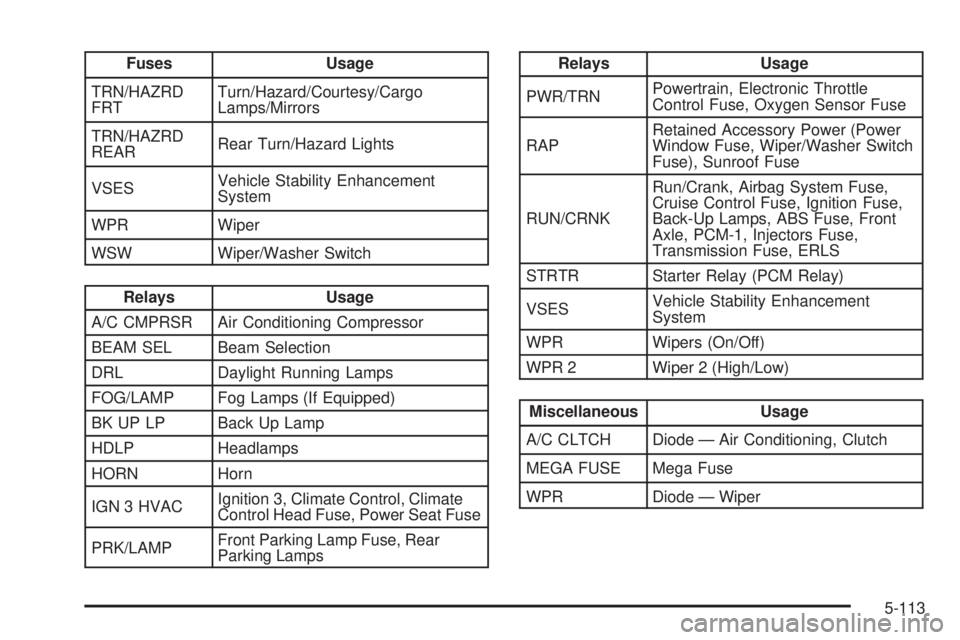
Fuses Usage
TRN/HAZRD
FRTTurn/Hazard/Courtesy/Cargo
Lamps/Mirrors
TRN/HAZRD
REARRear Turn/Hazard Lights
VSESVehicle Stability Enhancement
System
WPR Wiper
WSW Wiper/Washer Switch
Relays Usage
A/C CMPRSR Air Conditioning Compressor
BEAM SEL Beam Selection
DRL Daylight Running Lamps
FOG/LAMP Fog Lamps (If Equipped)
BK UP LP Back Up Lamp
HDLP Headlamps
HORN Horn
IGN 3 HVACIgnition 3, Climate Control, Climate
Control Head Fuse, Power Seat Fuse
PRK/LAMPFront Parking Lamp Fuse, Rear
Parking Lamps
Relays Usage
PWR/TRNPowertrain, Electronic Throttle
Control Fuse, Oxygen Sensor Fuse
RAPRetained Accessory Power (Power
Window Fuse, Wiper/Washer Switch
Fuse), Sunroof Fuse
RUN/CRNKRun/Crank, Airbag System Fuse,
Cruise Control Fuse, Ignition Fuse,
Back-Up Lamps, ABS Fuse, Front
Axle, PCM-1, Injectors Fuse,
Transmission Fuse, ERLS
STRTR Starter Relay (PCM Relay)
VSESVehicle Stability Enhancement
System
WPR Wipers (On/Off)
WPR 2 Wiper 2 (High/Low)
Miscellaneous Usage
A/C CLTCH Diode — Air Conditioning, Clutch
MEGA FUSE Mega Fuse
WPR Diode — Wiper
5-113
Page 412 of 414
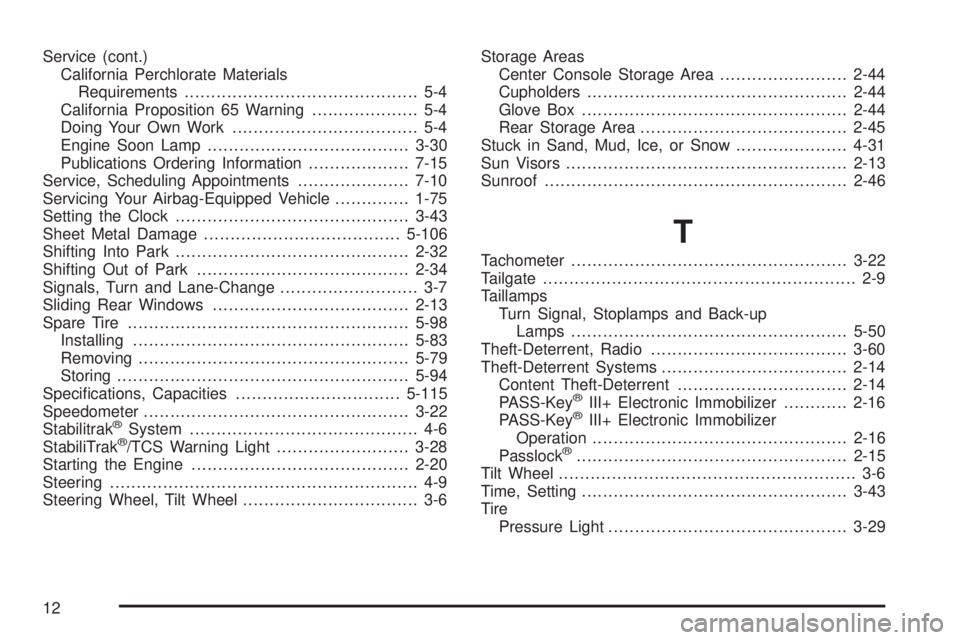
Service (cont.)
California Perchlorate Materials
Requirements............................................ 5-4
California Proposition 65 Warning.................... 5-4
Doing Your Own Work................................... 5-4
Engine Soon Lamp......................................3-30
Publications Ordering Information...................7-15
Service, Scheduling Appointments.....................7-10
Servicing Your Airbag-Equipped Vehicle..............1-75
Setting the Clock............................................3-43
Sheet Metal Damage.....................................5-106
Shifting Into Park............................................2-32
Shifting Out of Park........................................2-34
Signals, Turn and Lane-Change.......................... 3-7
Sliding Rear Windows.....................................2-13
Spare Tire.....................................................5-98
Installing....................................................5-83
Removing...................................................5-79
Storing.......................................................5-94
Specications, Capacities...............................5-115
Speedometer..................................................3-22
Stabilitrak
®System........................................... 4-6
StabiliTrak®/TCS Warning Light.........................3-28
Starting the Engine.........................................2-20
Steering.......................................................... 4-9
Steering Wheel, Tilt Wheel................................. 3-6Storage Areas
Center Console Storage Area........................2-44
Cupholders.................................................2-44
Glove Box..................................................2-44
Rear Storage Area.......................................2-45
Stuck in Sand, Mud, Ice, or Snow.....................4-31
Sun Visors.....................................................2-13
Sunroof.........................................................2-46
T
Tachometer....................................................3-22
Tailgate........................................................... 2-9
Taillamps
Turn Signal, Stoplamps and Back-up
Lamps ....................................................5-50
Theft-Deterrent, Radio.....................................3-60
Theft-Deterrent Systems...................................2-14
Content Theft-Deterrent................................2-14
PASS-Key
®III+ Electronic Immobilizer............2-16
PASS-Key®III+ Electronic Immobilizer
Operation................................................2-16
Passlock
®...................................................2-15
Tilt Wheel........................................................ 3-6
Time, Setting..................................................3-43
Tire
Pressure Light.............................................3-29
12