lock GMC CANYON 2009 Service Manual
[x] Cancel search | Manufacturer: GMC, Model Year: 2009, Model line: CANYON, Model: GMC CANYON 2009Pages: 414, PDF Size: 2.48 MB
Page 117 of 414
Parking Over Things That Burn
{CAUTION:
Things that can burn could touch hot exhaust
parts under the vehicle and ignite. Do not park
over papers, leaves, dry grass, or other things that
can burn.
Engine Exhaust
{CAUTION:
Engine exhaust contains Carbon Monoxide (CO)
which cannot be seen or smelled. Exposure to CO
can cause unconsciousness and even death.
Exhaust may enter the vehicle if:
The vehicle idles in areas with poor ventilation
(parking garages, tunnels, deep snow that
may block underbody airow or tail pipes).
The exhaust smells or sounds strange or
different.
CAUTION: (Continued)
CAUTION: (Continued)
The exhaust system leaks due to corrosion or
damage.
The vehicle’s exhaust system has been
modied, damaged or improperly repaired.
There are holes or openings in the vehicle
body from damage or after-market
modications that are not completely sealed.
If unusual fumes are detected or if it is suspected
that exhaust is coming into the vehicle:
Drive it only with the windows
completely down.
Have the vehicle repaired immediately.
Never park the vehicle with the engine running in
an enclosed area such as a garage or a building
that has no fresh air ventilation.
2-35
Page 119 of 414
Mirrors
Manual Rearview Mirror
Hold the inside rearview mirror in the center to move it
for a clearer view behind your vehicle. Adjust the
mirror to avoid glare from the headlamps behind you.
Push the tab forward for daytime use and pull it for
nighttime use.
For vehicles with OnStar
®:
Vehicles with this feature have three control buttons
located at the bottom of the mirror. See your
dealer/retailer for more information on the system and
how to subscribe to OnStar
®. SeeOnStar®System
on page 2-41for more information about the services
OnStar
®provides.
Adjust this type of mirror to avoid glare from the
headlamps behind you by turning the knob
counterclockwise for nighttime driving and clockwise
for daytime driving.
Cleaning the Mirror
Do not spray glass cleaner directly on the mirror.
Use a soft towel dampened with water.
Automatic Dimming Rearview Mirror
The vehicle may have an automatic dimming rearview
mirror. Automatic dimming reduces the glare of lights
from behind the vehicle.
The mirror may also have OnStar
®and/or a compass
and outside temperature display.
Control buttons for the OnStar
®system are at the
bottom of the mirror. SeeOnStar®System on
page 2-41for more information about the services
OnStar
®provides. SeeCompass on page 2-38for
more information about the compass display.
See “Temperature Display” after, for more information
about the outside temperature display.
AUTO/
(/O(On/Off):Press and hold AUTO /(
for about three seconds or depending on the mirror,
press
Oto turn automatic dimming on or off.
The automatic dimming feature comes on and the
indicator light illuminates each time the vehicle is
started.
2-37
Page 123 of 414
OnStar®System
OnStar uses several innovative technologies and live
advisors to provide a wide range of safety, security,
information, and convenience services. If the airbags
deploy, the system is designed to make an automatic
call to OnStar Emergency advisors who can request
emergency services be sent to your location.
If the keys are locked in the vehicle, call OnStar at
1-888-4-ONSTAR to have a signal sent to unlock the
doors. OnStar Hands-Free Calling, including 30 trial
minutes good for 60 days, is available on most vehicles.
OnStar Turn-by-Turn Navigation service, with one trial
route, is available on most vehicles. Press the
OnStar button to have an OnStar advisor contact
Roadside Service.OnStar service is provided subject to the OnStar Terms
and Conditions included in the OnStar Subscriber
glove box literature.
Some services such as Remote Door Unlock or Stolen
Vehicle Location Assistance may not be available
until the owner of the vehicle registers with OnStar.
After the rst prepaid year, contact OnStar to select a
monthly or annual subscription payment plan. If a
payment plan is not selected, the OnStar system and all
services, including airbag notication and emergency
services, may be deactivated and no longer available.
For more information visit onstar.com (U.S.) or onstar.ca
(Canada), or press the OnStar button to speak with
an advisor.
Not all OnStar services are available on all vehicles.
To check if this vehicle is able to provide the services
described below, or for a full description of OnStar
services and system limitations, see the OnStar Owner’s
Guide in the glove box or visit onstar.com (U.S.) or
onstar.ca (Canada), contact OnStar at 1-888-4-ONSTAR
(1-888-466-7827) or TTY 1-877-248-2080, or press
the OnStar button to speak with an OnStar advisor
24 hours a day, 7 days a week.
2-41
Page 124 of 414
OnStar Services Available with the
Safe & Sound Plan
Automatic Notication of Airbag Deployment
Advanced Automatic Crash Notication (AACN)
(If equipped)
Link to Emergency Services
Roadside Assistance
Stolen Vehicle Location Assistance
Remote Door Unlock/Vehicle Alert
OnStar Vehicle Diagnostic Email
GM Goodwrench On Demand Diagnostics
OnStar Hands-Free Calling with 30 trial minutes
OnStar Virtual Advisor (U.S. Only)
OnStar Services Included with
Directions & Connections Plan
All Safe and Sound Plan Services
OnStar Turn-by-Turn Navigation (If equipped) or
Driving Directions - Advisor delivered
RideAssist
Information and Convenience Services
OnStar Hands-Free Calling
OnStar Hands-Free Calling allows eligible OnStar
subscribers to make and receive calls using voice
commands. Hands-Free Calling is fully integrated into
the vehicle, and can be used with OnStar Pre-Paid
Minute Packages. Most vehicles include 30 trial minutes
good for 60 days. Hands-Free Calling can also be
linked to a Verizon Wireless service plan in the U.S. or
a Bell Mobility service plan in Canada, depending
on eligibility. To nd out more, refer to the OnStar
Owner’s Guide in the vehicle’s glove box, visit
onstar.com or onstar.ca, or speak with an OnStar
advisor by pressing the OnStar button or calling
1-888-4-ONSTAR (1-888-466-7827).
OnStar Turn-by-Turn Navigation
Vehicles with the OnStar Turn-by-Turn Navigation
system can provide voice-guided driving directions.
Press the OnStar button to have an OnStar advisor
locate a business or address and download driving
directions to the vehicle. Voice-guided directions to the
desired destination will play through the audio system
speakers. See the OnStar Owner’s Guide for more
information.
2-42
Page 129 of 414
Instrument Panel Overview...............................3-4
Hazard Warning Flashers................................3-6
Horn .............................................................3-6
Tilt Wheel.....................................................3-6
Turn Signal/Multifunction Lever.........................3-7
Turn and Lane-Change Signals........................3-7
Headlamp High/Low-Beam Changer..................3-8
Flash-to-Pass.................................................3-8
Windshield Wipers..........................................3-8
Windshield Washer.........................................3-9
Cruise Control..............................................3-10
Exterior Lamps.............................................3-12
Headlamps on Reminder................................3-13
Daytime Running Lamps (DRL).......................3-13
Automatic Headlamp System..........................3-14
Fog Lamps ..................................................3-14
Exterior Cargo Lamps....................................3-15
Instrument Panel Brightness...........................3-15
Dome Lamp .................................................3-15
Dome Lamp Override....................................3-16
Exit Lighting.................................................3-16
Electric Power Management...........................3-16Battery Run-Down Protection..........................3-17
Accessory Power Outlet(s).............................3-17
Ashtray(s) and Cigarette Lighter......................3-18
Climate Controls............................................3-18
Climate Control System.................................3-18
Outlet Adjustment.........................................3-20
Warning Lights, Gages, and Indicators............3-20
Instrument Panel Cluster................................3-21
Speedometer and Odometer...........................3-22
Trip Odometer..............................................3-22
Tachometer.................................................3-22
Safety Belt Reminders...................................3-23
Airbag Readiness Light.................................
.3-24
Passenger Airbag Status Indicator...................3-25
Charging System Light..................................3-26
Up-Shift Light...............................................3-26
Brake System Warning Light..........................3-27
Antilock Brake System (ABS)
Warning Light...........................................3-28
StabiliTrak
®/Traction Control System
(TCS) Warning Light..................................3-28
Section 3 Instrument Panel
3-1
Page 130 of 414
Engine Coolant Temperature Gage..................3-29
Tire Pressure Light.......................................3-29
Malfunction Indicator Lamp.............................3-30
Oil Pressure Light.........................................3-32
Security Light...............................................3-33
Cruise Control Light......................................3-33
Highbeam On Light.......................................3-33
Fuel Gage...................................................3-34
Driver Information Center (DIC).......................3-35
DIC Operation and Displays...........................3-35
DIC Warnings and Messages.........................3-38Audio System(s).............................................3-42
Setting the Clock..........................................3-43
Radio(s)......................................................3-44
Using an MP3..............................................3-54
XM Radio Messages.....................................3-59
Theft-Deterrent Feature..................................3-60
Radio Reception...........................................3-60
Fixed Mast Antenna......................................3-61
XM™ Satellite Radio Antenna System.............3-61
Chime Level Adjustment................................3-61
Section 3 Instrument Panel
3-2
Page 134 of 414
Hazard Warning Flashers
|(Hazard Warning Flasher):Press this button
located on the instrument panel, to make the front and
rear turn signal lamps ash on and off. This warns
others that you are having trouble.
Press
|again to turn the ashers off.
The turn signals do not work while the hazard warning
ashers are on.
Horn
To sound the horn, press the horn symbol on the
steering wheel pad.
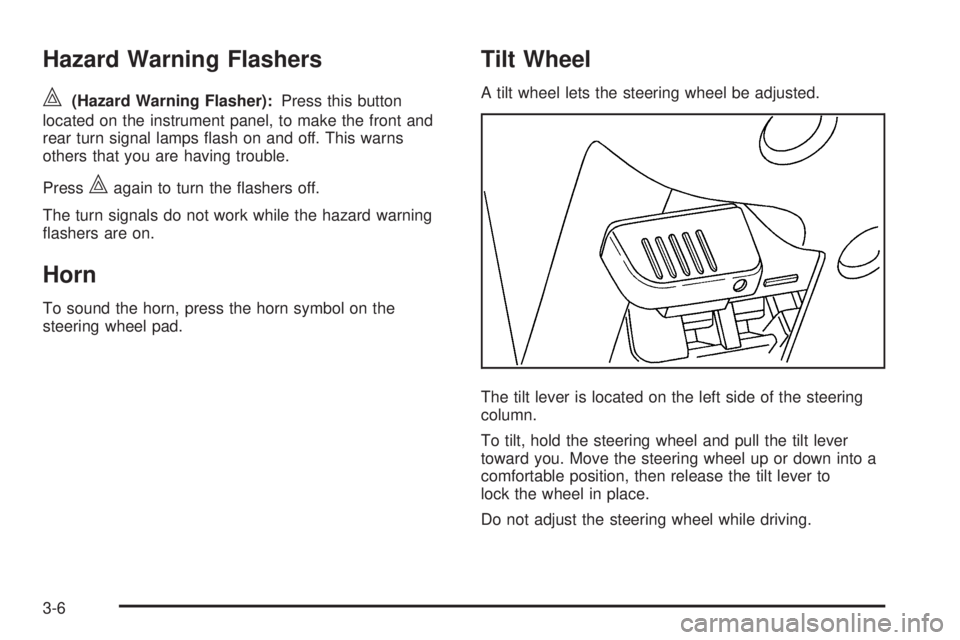
Tilt Wheel
A tilt wheel lets the steering wheel be adjusted.
The tilt lever is located on the left side of the steering
column.
To tilt, hold the steering wheel and pull the tilt lever
toward you. Move the steering wheel up or down into a
comfortable position, then release the tilt lever to
lock the wheel in place.
Do not adjust the steering wheel while driving.
3-6
Page 137 of 414
Move the band to one of the following positions:
8(Mist):Move the band to mist, for a single wiping
cycle and then release it. The wipers will stop after one
wipe. Hold the band in this position for continuous
wiping cycles.
N(Delay):For a delayed wiping cycle. Turn the band
to set the length of the delay between wipes. The
closer to the top of the lever, the shorter the delay.
6(Low Speed):For slow, steady wiping cycles,
turn the band away from you to the rst solid position
past the delay settings.
1(High Speed):For rapid wiping cycles, turn the
band to the second solid position past the delay settings.
9(Off):Turns off the wipers.
Clear snow and ice from the wiper blades before using
them. If the blades are frozen to the windshield,
gently loosen or thaw them. If they become worn or
damaged, get new blades or blade inserts.
Windshield Washer
{CAUTION:
In freezing weather, do not use your washer until
the windshield is warmed. Otherwise the washer
uid can form ice on the windshield, blocking your
vision.
QL(Washer Fluid):There is a paddle marked
with the windshield washer symbol at the top of
the multifunction lever. To spray washer uid on the
windshield, push the paddle. The wipers will clear the
window and then either stop or return to your preset
speed.
3-9
Page 141 of 414
O(Exterior Lamps):Turn the knob, located to the
right of this symbol, to choose one of the four exterior
lamp positions.
O(Off):Turns off all exterior lamps including the
Daytime Running Lamps (DRL).
AUTO:Turns the headlamps on automatically at
normal brightness, together with the following:
Sidemarker Lamps
Taillamps
Parking Lamps
Instrument Panel Lights
SeeAutomatic Headlamp System on page 3-14for
more information.
;(Parking Lamps):Turns on the parking lamps,
together with the following:
Sidemarker Lamps
Taillamps
License Plate Lamps
Instrument Panel Lights
2(Headlamps):Turns on the headlamps, together
with the previously listed lamps and lights.
Headlamps on Reminder
If a door is open, a reminder chime sounds when the
headlamps or parking lamps are manually turned on and
the key is out of the ignition. To turn off the chime,
turn the headlamp switch to off and then back on. In the
automatic mode, the headlamps turn off once the
ignition is in LOCK/OFF.
For vehicles rst sold in Canada, if the parking lamps
are turned on manually, the Daytime Running Lamps
(DRL) will stay on.
Daytime Running Lamps (DRL)
Daytime Running Lamps (DRL) can make it easier for
others to see the front of your vehicle during the
day. Fully functional daytime running lamps are required
on all vehicles rst sold in Canada.
The DRL system will come on when the following
conditions are met:
The ignition is on.
The exterior lamps control is in AUTO.
The transmission is not in P (Park) if you have an
automatic transmission.
The light sensor determines it is daytime.
3-13
Page 145 of 414
LOW BATTERY. If this message is displayed, it is
recommended that the driver reduce the electrical loads
as much as possible. SeeDIC Warnings and Messages
on page 3-38.
Battery Run-Down Protection
This feature shuts off the dome lamp if it is left on for
more than 20 minutes when the ignition is in LOCK/OFF.
This helps to prevent the battery from running down.
Accessory Power Outlet(s)
The accessory power outlets can be used to connect
electrical equipment such as a cellular phone.
The vehicle may have an accessory power outlet
located below the climate control system and on the
rear of the center console. A small cap must be
pulled down to access an accessory power outlet.
When not using an outlet be sure to cover it with the
protective cap.
Notice:Leaving electrical equipment on for
extended periods will drain the battery. Always
unplug electrical equipment when not in use and
do not plug in equipment that exceeds the
maximum amperage rating of 20 amperes.Certain electrical accessories may not be compatible
with the accessory power outlet and could result
in blown vehicle or adapter fuses. If you experience a
problem, see your dealer/retailer for additional
information on accessory power outlets.
Notice:Adding any electrical equipment to the
vehicle can damage it or keep other components
from working as they should. The repairs would not
be covered by the vehicle warranty. Do not use
equipment exceeding maximum amperage rating of
20 amperes. Check with your dealer/retailer before
adding electrical equipment.
When adding electrical equipment, be sure to follow
the proper installation instructions included with
the equipment.
Notice:Improper use of the power outlet can cause
damage not covered by the warranty. Do not hang
any type of accessory or accessory bracket from the
plug because the power outlets are designed for
accessory power plugs only.
3-17