climate control GMC CANYON 2010 Owner's Manual
[x] Cancel search | Manufacturer: GMC, Model Year: 2010, Model line: CANYON, Model: GMC CANYON 2010Pages: 448, PDF Size: 2.62 MB
Page 1 of 448
In Brief........................................................... 1-1
Instrument Panel
........................................ 1-2
Initial Drive Information
............................... 1-3
Vehicle Features
......................................1-15
Performance and Maintenance
...................1-17
Seats and Restraint System............................. 2-1
Front Seats
............................................... 2-2
Rear Seats
..............................................2-10
Safety Belts
.............................................2-13
Child Restraints
.......................................2-35
Airbag System
.........................................2-64
Restraint System Check
............................2-81
Features and Controls..................................... 3-1
Keys
........................................................ 3-2
Doors and Locks
....................................... 3-5
Windows
.................................................3-10
Theft-Deterrent Systems
............................3-13
Starting and Operating Your Vehicle
...........3-16
Mirrors
....................................................3-36
Storage Areas
.........................................3-40
Sunroof
..................................................3-42Instrument Panel............................................. 4-1
Instrument Panel Overview
.......................... 4-3
Climate Controls
......................................4-16
Warning Lights, Gages, and Indicators
........4-18
Driver Information Center (DIC)
..................4-33
Audio System(s)
.......................................4-42
Driving Your Vehicle....................................... 5-1
Your Driving, the Road, and the Vehicle
....... 5-2
Towing
...................................................5-41
Service and Appearance Care.......................... 6-1
Service
..................................................... 6-3
Fuel
......................................................... 6-5
Checking Things Under the Hood
...............6-10
Rear Axle
...............................................6-47
Four-Wheel Drive
.....................................6-48
Front Axle
...............................................6-49
Headlamp Aiming
.....................................6-50
Bulb Replacement
....................................
6-50
Windshield Wiper Blade Replacement
.........6-55
Tires
......................................................6-57
2010 GMC Canyon Owner ManualM
Page 7 of 448
Instrument Panel..............................................1-2
Initial Drive Information....................................1-3
Remote Keyless Entry (RKE) System................1-4
Door Locks....................................................1-4
Tailgate........................................................1-5
Windows.......................................................1-6
Seat Adjustment.............................................1-7
Heated Seats.................................................1-9
Head Restraint Adjustment...............................1-9
Safety Belt...................................................1-10
Sensing System for Passenger Airbag.............1-10
Mirror Adjustment.........................................1-11
Steering Wheel Adjustment............................1-12
Interior Lighting............................................1-12
Exterior Lighting...........................................1-13
Windshield Wiper/Washer...............................1-14
Climate Controls...........................................1-14Vehicle Features.............................................1-15
Radio(s)......................................................1-15
Satellite Radio..............................................1-16
Driver Information Center (DIC).......................1-16
Cruise Control..............................................1-17
Power Outlets..............................................1-17
Performance and Maintenance.........................1-17
Traction Control System (TCS).......................1-17
StabiliTrak
®..................................................1-18
Tire Pressure Monitor....................................1-18
Engine Oil Life System..................................1-19
Driving for Better Fuel Economy.....................1-19
Roadside Assistance Program........................1-20
OnStar
®......................................................1-20
Section 1 In Brief
1-1
Page 9 of 448
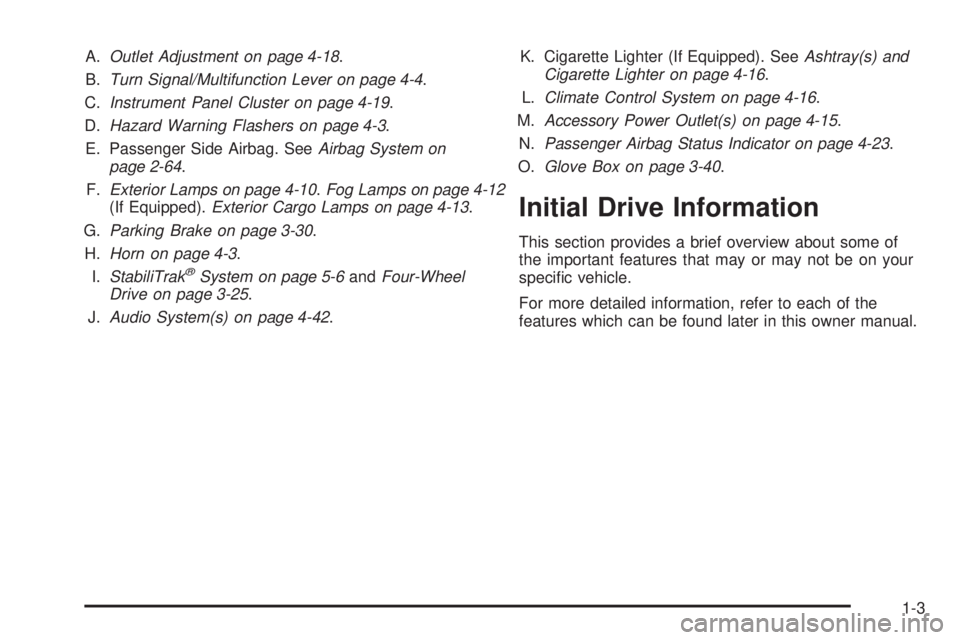
A.Outlet Adjustment on page 4-18.
B.Turn Signal/Multifunction Lever on page 4-4.
C.Instrument Panel Cluster on page 4-19.
D.Hazard Warning Flashers on page 4-3.
E. Passenger Side Airbag. SeeAirbag System on
page 2-64.
F.Exterior Lamps on page 4-10.Fog Lamps on page 4-12
(If Equipped).Exterior Cargo Lamps on page 4-13.
G.Parking Brake on page 3-30.
H.Horn on page 4-3.
I.StabiliTrak
®System on page 5-6andFour-Wheel
Drive on page 3-25.
J.Audio System(s) on page 4-42.K. Cigarette Lighter (If Equipped). SeeAshtray(s) and
Cigarette Lighter on page 4-16.
L.Climate Control System on page 4-16.
M.Accessory Power Outlet(s) on page 4-15.
N.Passenger Airbag Status Indicator on page 4-23.
O.Glove Box on page 3-40.
Initial Drive Information
This section provides a brief overview about some of
the important features that may or may not be on your
specific vehicle.
For more detailed information, refer to each of the
features which can be found later in this owner manual.
1-3
Page 20 of 448
Windshield Wiper/Washer
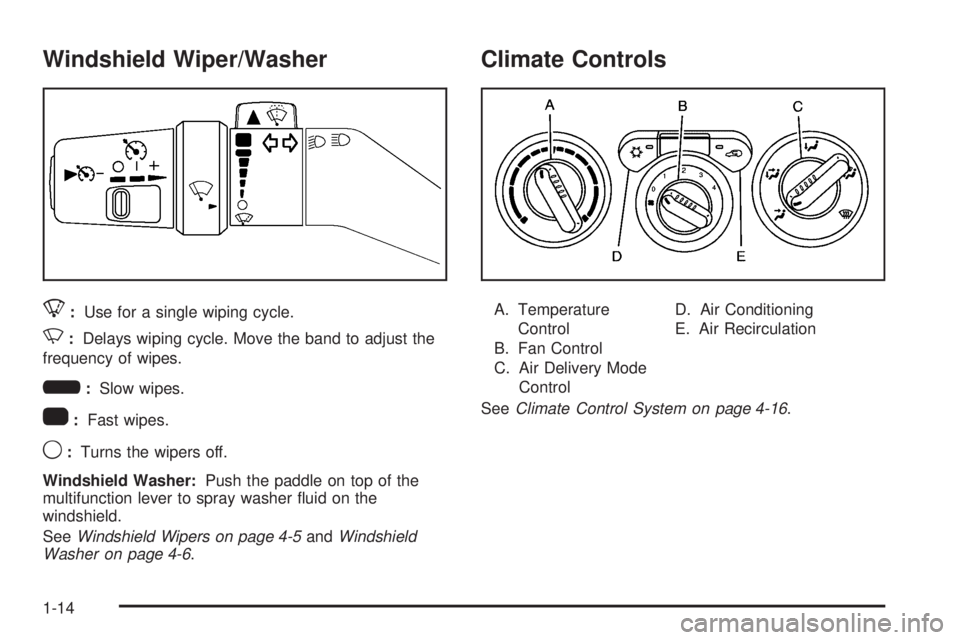
8:Use for a single wiping cycle.
N:Delays wiping cycle. Move the band to adjust the
frequency of wipes.
6:Slow wipes.
1:Fast wipes.
9:Turns the wipers off.
Windshield Washer:Push the paddle on top of the
multifunction lever to spray washer fluid on the
windshield.
SeeWindshield Wipers on page 4-5andWindshield
Washer on page 4-6.
Climate Controls
A. Temperature
Control
B. Fan Control
C. Air Delivery Mode
ControlD. Air Conditioning
E. Air Recirculation
SeeClimate Control System on page 4-16.
1-14
Page 23 of 448
Cruise Control
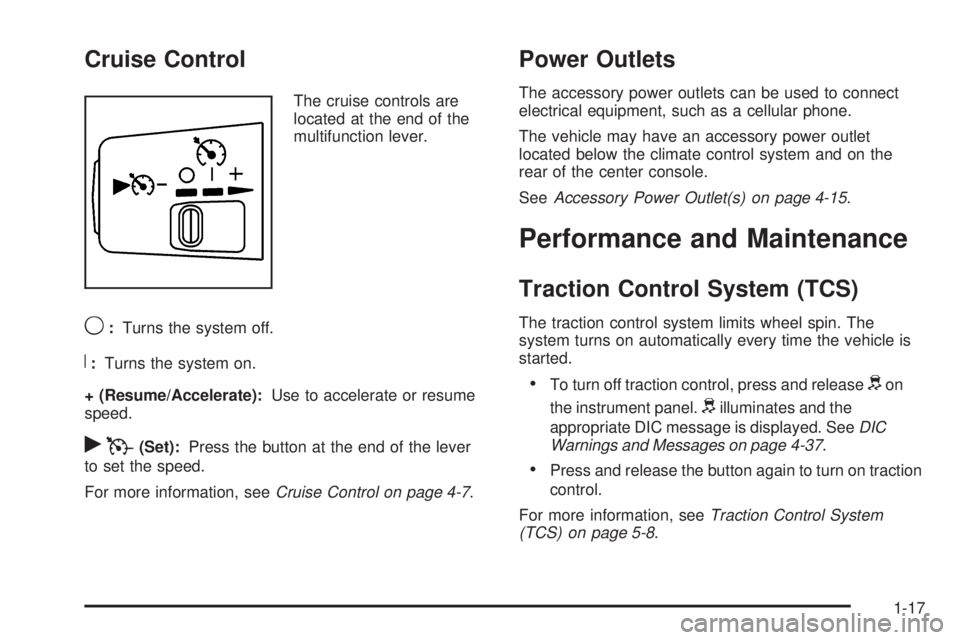
The cruise controls are
located at the end of the
multifunction lever.
9:Turns the system off.
R:Turns the system on.
+ (Resume/Accelerate):Use to accelerate or resume
speed.
rT(Set):Press the button at the end of the lever
to set the speed.
For more information, seeCruise Control on page 4-7.
Power Outlets
The accessory power outlets can be used to connect
electrical equipment, such as a cellular phone.
The vehicle may have an accessory power outlet
located below the climate control system and on the
rear of the center console.
SeeAccessory Power Outlet(s) on page 4-15.
Performance and Maintenance
Traction Control System (TCS)
The traction control system limits wheel spin. The
system turns on automatically every time the vehicle is
started.
•To turn off traction control, press and releasedon
the instrument panel.
dilluminates and the
appropriate DIC message is displayed. SeeDIC
Warnings and Messages on page 4-37.
•Press and release the button again to turn on traction
control.
For more information, seeTraction Control System
(TCS) on page 5-8.
1-17
Page 153 of 448
Instrument Panel Overview...............................4-3
Hazard Warning Flashers................................4-3
Horn .............................................................4-3
Tilt Wheel.....................................................4-3
Turn Signal/Multifunction Lever.........................4-4
Turn and Lane-Change Signals........................4-4
Headlamp High/Low-Beam Changer..................4-5
Flash-to-Pass.................................................4-5
Windshield Wipers..........................................4-5
Windshield Washer.........................................4-6
Cruise Control................................................4-7
Exterior Lamps.............................................4-10
Headlamps on Reminder................................4-11
Daytime Running Lamps (DRL).......................4-11
Automatic Headlamp System..........................4-12
Fog Lamps ..................................................4-12
Exterior Cargo Lamps....................................4-13
Instrument Panel Brightness...........................4-13
Dome Lamp .................................................4-13
Dome Lamp Override....................................4-14
Exit Lighting.................................................4-14
Electric Power Management...........................4-14
Battery Run-Down Protection..........................4-15
Accessory Power Outlet(s).............................4-15
Ashtray(s) and Cigarette Lighter......................4-16Climate Controls............................................4-16
Climate Control System.................................4-16
Outlet Adjustment.........................................4-18
Warning Lights, Gages, and Indicators............4-18
Instrument Panel Cluster................................4-19
Speedometer and Odometer...........................4-20
Trip Odometer..............................................4-20
Tachometer.................................................4-20
Safety Belt Reminders...................................4-21
Airbag Readiness Light.................................
.4-22
Passenger Airbag Status Indicator...................4-23
Charging System Light..................................4-24
Up-Shift Light...............................................4-24
Brake System Warning Light..........................4-25
Antilock Brake System (ABS) Warning Light.....4-26
StabiliTrak
®/Traction Control System (TCS)
Warning Light...........................................4-26
Engine Coolant Temperature Gage..................4-27
Tire Pressure Light.......................................4-28
Malfunction Indicator Lamp.............................4-28
Oil Pressure Light.........................................4-31
Security Light...............................................4-32
Cruise Control Light......................................4-32
Highbeam On Light.......................................4-32
Fuel Gage...................................................4-32
Section 4 Instrument Panel
4-1
Page 166 of 448
Dome Lamp Override
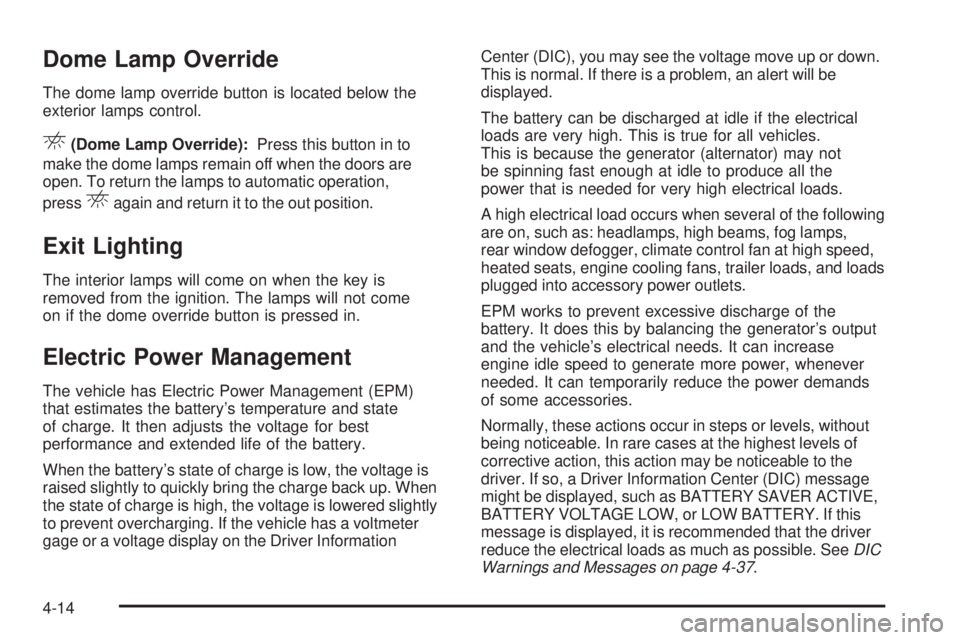
The dome lamp override button is located below the
exterior lamps control.
E(Dome Lamp Override):Press this button in to
make the dome lamps remain off when the doors are
open. To return the lamps to automatic operation,
press
Eagain and return it to the out position.
Exit Lighting
The interior lamps will come on when the key is
removed from the ignition. The lamps will not come
on if the dome override button is pressed in.
Electric Power Management
The vehicle has Electric Power Management (EPM)
that estimates the battery’s temperature and state
of charge. It then adjusts the voltage for best
performance and extended life of the battery.
When the battery’s state of charge is low, the voltage is
raised slightly to quickly bring the charge back up. When
the state of charge is high, the voltage is lowered slightly
to prevent overcharging. If the vehicle has a voltmeter
gage or a voltage display on the Driver InformationCenter (DIC), you may see the voltage move up or down.
This is normal. If there is a problem, an alert will be
displayed.
The battery can be discharged at idle if the electrical
loads are very high. This is true for all vehicles.
This is because the generator (alternator) may not
be spinning fast enough at idle to produce all the
power that is needed for very high electrical loads.
A high electrical load occurs when several of the following
are on, such as: headlamps, high beams, fog lamps,
rear window defogger, climate control fan at high speed,
heated seats, engine cooling fans, trailer loads, and loads
plugged into accessory power outlets.
EPM works to prevent excessive discharge of the
battery. It does this by balancing the generator’s output
and the vehicle’s electrical needs. It can increase
engine idle speed to generate more power, whenever
needed. It can temporarily reduce the power demands
of some accessories.
Normally, these actions occur in steps or levels, without
being noticeable. In rare cases at the highest levels of
corrective action, this action may be noticeable to the
driver. If so, a Driver Information Center (DIC) message
might be displayed, such as BATTERY SAVER ACTIVE,
BATTERY VOLTAGE LOW, or LOW BATTERY. If this
message is displayed, it is recommended that the driver
reduce the electrical loads as much as possible. SeeDIC
Warnings and Messages on page 4-37.
4-14
Page 167 of 448
Battery Run-Down Protection
This feature shuts off the dome lamp if it is left on for
more than 20 minutes when the ignition is in LOCK/OFF.
This helps to prevent the battery from running down.
Accessory Power Outlet(s)
The accessory power outlets can be used to connect
electrical equipment such as a cellular phone.
The vehicle may have an accessory power outlet located
below the climate control system and on the rear of the
center console. A small cap must be pulled down to
access an accessory power outlet. When not using
an outlet be sure to cover it with the protective cap.
Notice:Leaving electrical equipment on for
extended periods will drain the battery. Always
unplug electrical equipment when not in use and do
not plug in equipment that exceeds the maximum
amperage rating of 20 amperes.Certain electrical accessories may not be compatible with
the accessory power outlet and could result in blown
vehicle or adapter fuses. If you experience a problem,
see your dealer/retailer for additional information on
accessory power outlets.
Notice:Adding any electrical equipment to the
vehicle can damage it or keep other components
from working as they should. The repairs would not
be covered by the vehicle warranty. Do not use
equipment exceeding maximum amperage rating of
20 amperes. Check with your dealer/retailer before
adding electrical equipment.
When adding electrical equipment, be sure to follow
the proper installation instructions included with
the equipment.
Notice:Improper use of the power outlet can
cause damage not covered by the vehicle warranty.
Do not hang any type of accessory or accessory
bracket from the plug because the power outlets
are designed for accessory power plugs only.
4-15
Page 168 of 448
Ashtray(s) and Cigarette Lighter
The vehicle may have a removable ashtray and cigarette
lighter.
The ashtray is located in the center console area.
The ashtray can be removed for cleaning. When the
ashtray is removed, this area can also be used as
a cupholder.
Notice:If papers, pins, or other ammable items
are put in the ashtray, hot cigarettes or other
smoking materials could ignite them and possibly
damage the vehicle. Never put ammable items
in the ashtray.
To use the lighter, press it in all the way, and let go.
When it is ready, it will pop back out by itself.
Notice:Holding a cigarette lighter in while it is
heating does not let the lighter back away from
the heating element when it is hot. Damage from
overheating can occur to the lighter or heating
element, or a fuse could be blown. Do not hold
a cigarette lighter in while it is heating.
Climate Controls
Climate Control System
The heating, cooling, and ventilation for the vehicle can
be controlled with this system.
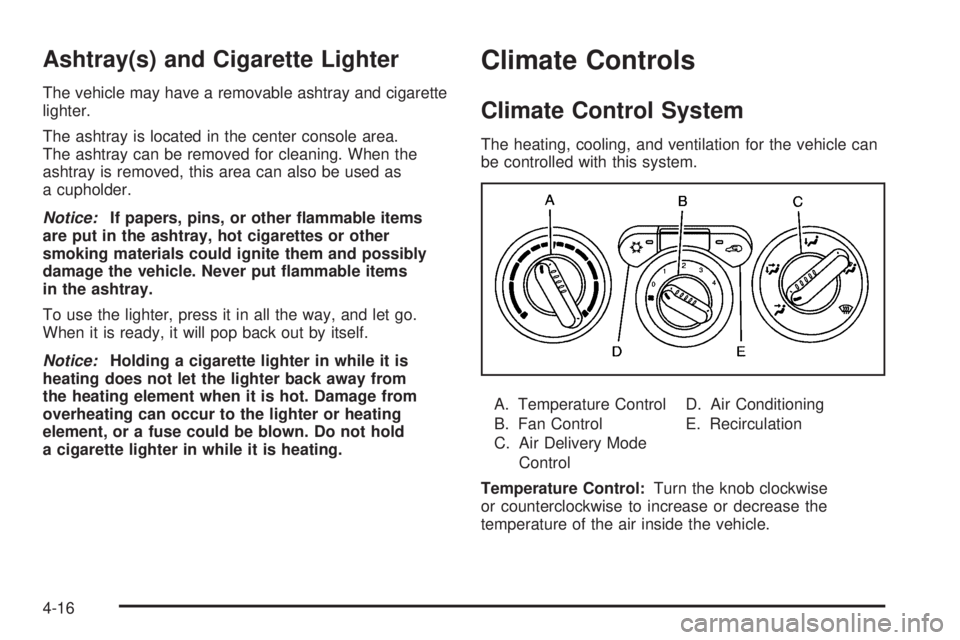
A. Temperature Control
B. Fan Control
C. Air Delivery Mode
ControlD. Air Conditioning
E. Recirculation
Temperature Control:Turn the knob clockwise
or counterclockwise to increase or decrease the
temperature of the air inside the vehicle.
4-16
Page 189 of 448
DIC Warnings and Messages
Messages are displayed on the DIC to notify the driver
that the status of the vehicle has changed and that some
action may be needed by the driver to correct the
condition. Multiple messages may appear one after
another. The messages are displayed for several
seconds each.
Some messages may not require immediate action, but
you should press and release the trip odometer reset
stem to acknowledge that you received the messages
and to clear them from the display. Each message must
be acknowledged individually.
Some messages cannot be cleared from the DIC
display because they are more urgent. These messages
require action before they can be cleared. You should
take any messages that appear on the display seriously
and remember that clearing the messages only makes
the messages disappear, not correct the problem.
The following are the possible messages that can be
displayed and some information about them.
AC (Air Conditioning) OFF
This message displays when the engine coolant
temperature is too high and the air conditioning in your
vehicle needs to be turned off. SeeEngine Overheating
on page 6-35andClimate Control System on page 4-16
for more information. This message displays along with
the ENG HOT message.
ABS (Antilock Brake System) FAULT
This message displays if there is a problem with the
Antilock Brake System (ABS). Check the ABS as soon as
possible and have your vehicle serviced by your dealer/
retailer. SeeBrakes on page 6-39andAntilock Brake
System (ABS) Warning Light on page 4-26for more
information. Press and release the reset stem to
acknowledge the message and clear it from the display.
4-37