lock GMC CANYON 2012 Owners Manual
[x] Cancel search | Manufacturer: GMC, Model Year: 2012, Model line: CANYON, Model: GMC CANYON 2012Pages: 404, PDF Size: 5.25 MB
Page 281 of 404
Black plate (37,1)GMC Canyon Owner Manual - 2012
Vehicle Care 10-37
Bulb Replacement
For the proper type of replacement
bulbs, seeReplacement Bulbs on
page 10‑39.
For any bulb‐changing procedure
not listed in this section, contact
your dealer.
Halogen Bulbs
{WARNING
Halogen bulbs have pressurized
gas inside and can burst if you
drop or scratch the bulb. You or
others could be injured. Be sure
to read and follow the instructions
on the bulb package.
Headlamps
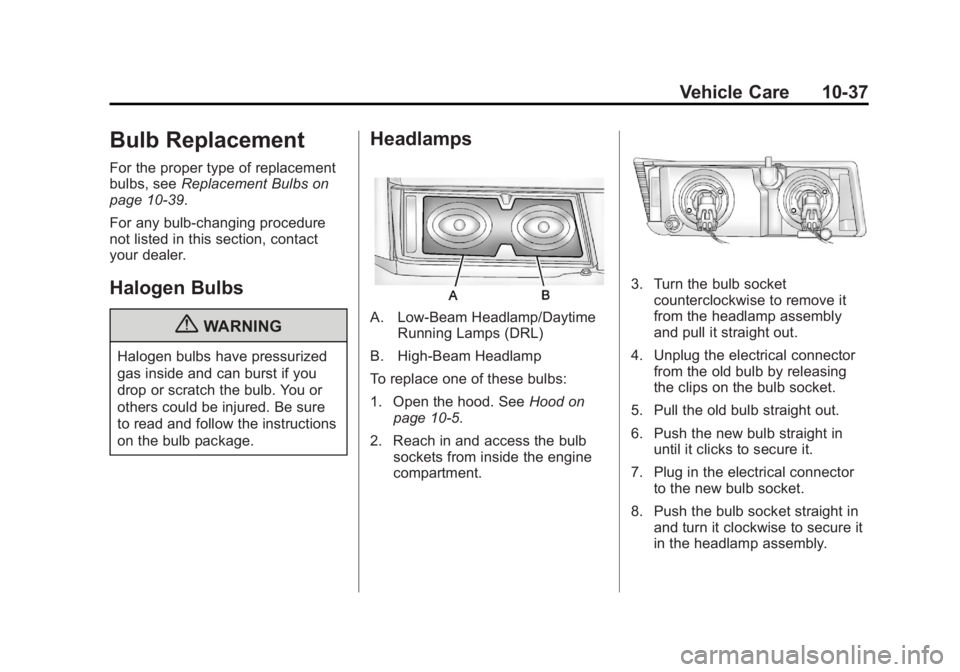
A. Low-Beam Headlamp/Daytime Running Lamps (DRL)
B. High-Beam Headlamp
To replace one of these bulbs:
1. Open the hood. See Hood on
page 10‑5.
2. Reach in and access the bulb sockets from inside the engine
compartment.
3. Turn the bulb socketcounterclockwise to remove it
from the headlamp assembly
and pull it straight out.
4. Unplug the electrical connector from the old bulb by releasing
the clips on the bulb socket.
5. Pull the old bulb straight out.
6. Push the new bulb straight in until it clicks to secure it.
7. Plug in the electrical connector to the new bulb socket.
8. Push the bulb socket straight in and turn it clockwise to secure it
in the headlamp assembly.
Page 282 of 404
Black plate (38,1)GMC Canyon Owner Manual - 2012
10-38 Vehicle Care
Taillamps, Turn Signal,
Stoplamps, and Back-Up
Lamps
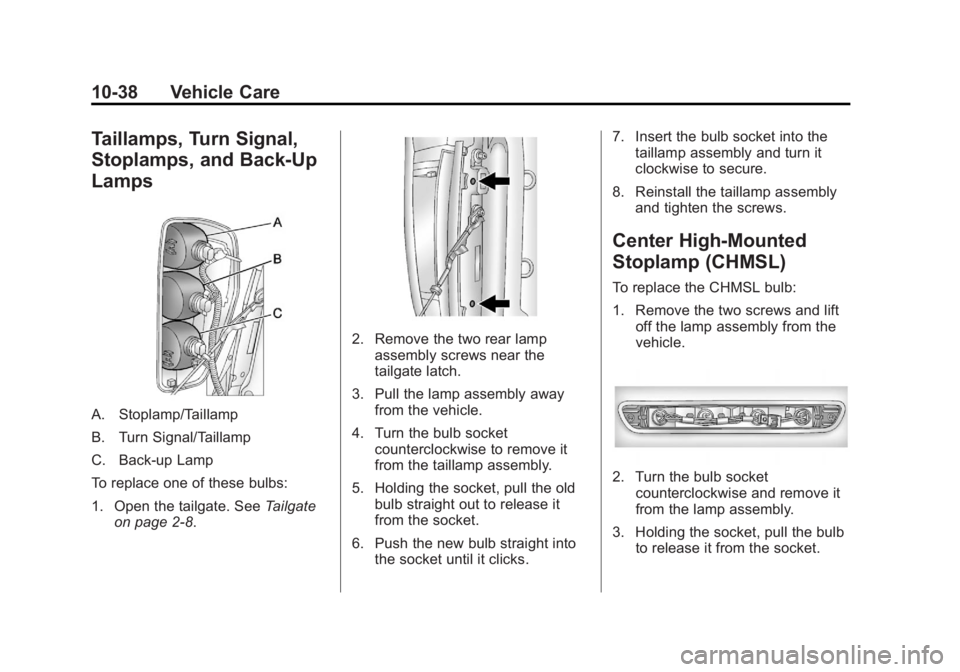
A. Stoplamp/Taillamp
B. Turn Signal/Taillamp
C. Back‐up Lamp
To replace one of these bulbs:
1. Open the tailgate. SeeTailgate
on page 2‑8.
2. Remove the two rear lamp assembly screws near the
tailgate latch.
3. Pull the lamp assembly away from the vehicle.
4. Turn the bulb socket counterclockwise to remove it
from the taillamp assembly.
5. Holding the socket, pull the old bulb straight out to release it
from the socket.
6. Push the new bulb straight into the socket until it clicks. 7. Insert the bulb socket into the
taillamp assembly and turn it
clockwise to secure.
8. Reinstall the taillamp assembly and tighten the screws.
Center High-Mounted
Stoplamp (CHMSL)
To replace the CHMSL bulb:
1. Remove the two screws and liftoff the lamp assembly from the
vehicle.
2. Turn the bulb socketcounterclockwise and remove it
from the lamp assembly.
3. Holding the socket, pull the bulb to release it from the socket.
Page 283 of 404
Black plate (39,1)GMC Canyon Owner Manual - 2012
Vehicle Care 10-39
4. Push the new bulb into thesocket until it clicks.
5. Insert the bulb socket into the lamp assembly and turn it
clockwise to secure.
6. Reinstall the lamp assembly and tighten the screws.
License Plate Lamp
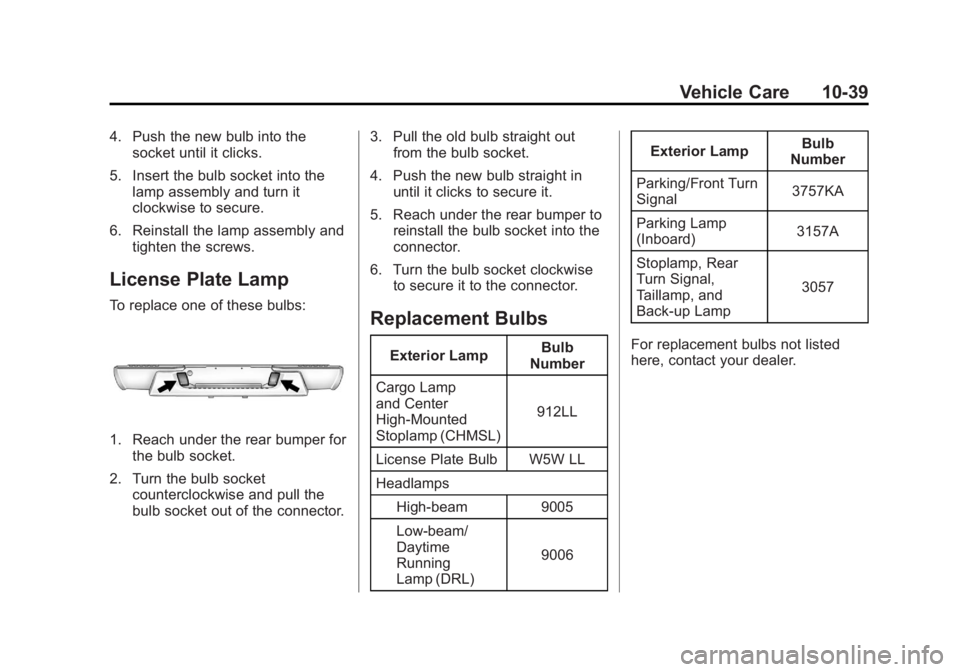
To replace one of these bulbs:
1. Reach under the rear bumper forthe bulb socket.
2. Turn the bulb socket counterclockwise and pull the
bulb socket out of the connector. 3. Pull the old bulb straight out
from the bulb socket.
4. Push the new bulb straight in until it clicks to secure it.
5. Reach under the rear bumper to reinstall the bulb socket into the
connector.
6. Turn the bulb socket clockwise to secure it to the connector.
Replacement Bulbs
Exterior Lamp Bulb
Number
Cargo Lamp
and Center
High‐Mounted
Stoplamp (CHMSL) 912LL
License Plate Bulb W5W LL
Headlamps High-beam 9005
Low-beam/
Daytime
Running
Lamp (DRL) 9006Exterior Lamp
Bulb
Number
Parking/Front Turn
Signal 3757KA
Parking Lamp
(Inboard) 3157A
Stoplamp, Rear
Turn Signal,
Taillamp, and
Back‐up Lamp 3057
For replacement bulbs not listed
here, contact your dealer.
Page 285 of 404
Black plate (41,1)GMC Canyon Owner Manual - 2012
Vehicle Care 10-41
Fuses and Circuit
Breakers
The wiring circuits in the vehicle are
protected from short circuits by a
combination of fuses and circuit
breakers. This greatly reduces the
chance of fires caused by electrical
problems.
Look at the silver-colored band
inside the fuse. If the band is broken
or melted, replace the fuse. Be sure
you replace a bad fuse with a new
one of the identical size and rating.
If you ever have a problem on the
road and do not have a spare fuse,
you can borrow one that has the
same amperage. Just pick some
feature of the vehicle that you can
get along without—like the radio or
cigarette lighter —and use its fuse,
if it is the correct amperage.
Replace it as soon as you can.
Engine Compartment
Fuse Block
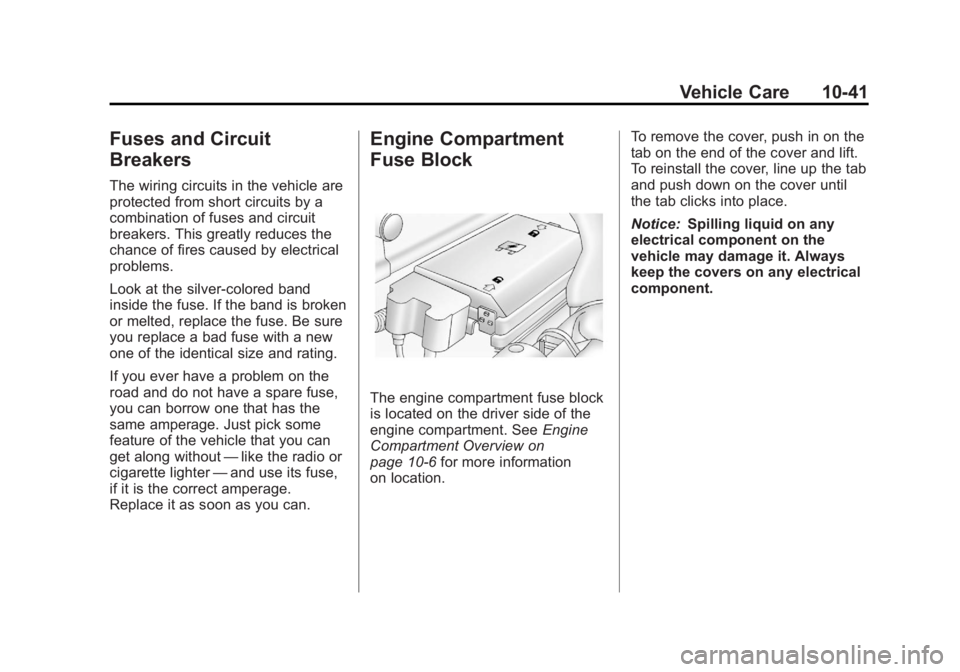
The engine compartment fuse block
is located on the driver side of the
engine compartment. See Engine
Compartment Overview on
page 10‑6 for more information
on location. To remove the cover, push in on the
tab on the end of the cover and lift.
To reinstall the cover, line up the tab
and push down on the cover until
the tab clicks into place.
Notice:
Spilling liquid on any
electrical component on the
vehicle may damage it. Always
keep the covers on any electrical
component.
Page 286 of 404
Black plate (42,1)GMC Canyon Owner Manual - 2012
10-42 Vehicle Care
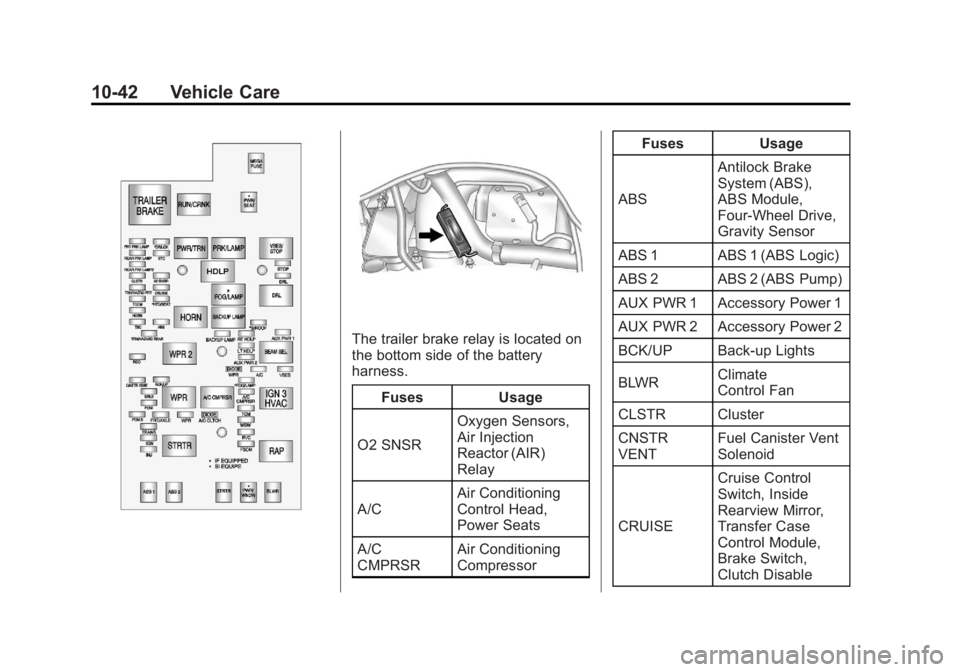
The trailer brake relay is located on
the bottom side of the battery
harness.Fuses Usage
O2 SNSR Oxygen Sensors,
Air Injection
Reactor (AIR)
Relay
A/C Air Conditioning
Control Head,
Power Seats
A/C
CMPRSR Air Conditioning
Compressor Fuses Usage
ABS Antilock Brake
System (ABS),
ABS Module,
Four‐Wheel Drive,
Gravity Sensor
ABS 1 ABS 1 (ABS Logic)
ABS 2 ABS 2 (ABS Pump)
AUX PWR 1 Accessory Power 1
AUX PWR 2 Accessory Power 2
BCK/UP Back-up Lights
BLWR Climate
Control Fan
CLSTR Cluster
CNSTR
VENT Fuel Canister Vent
Solenoid
CRUISE Cruise Control
Switch, Inside
Rearview Mirror,
Transfer Case
Control Module,
Brake Switch,
Clutch Disable
Page 287 of 404
Black plate (43,1)GMC Canyon Owner Manual - 2012
Vehicle Care 10-43
FusesUsage
DR/LCK Power Door
Locks (If Equipped)
DRL Daylight Running
Lamps
ERLS Mass Air
Flow (MAF)
Sensor, Can Purge
Solenoid,
Air Injector
Reactor (AIR)
Relay
ETC Electronic Throttle
Control (ETC)
FOG/LAMP Fog Lamps
(If Equipped)
FRT
PRK LAMP Front Park/Turn
Lamps, Driver and
Passenger Side
Power Window
Switches Lighting
FRT/AXLE Front Axle Actuator Fuses
Usage
FSCM Fuel System
Control Module
BACKUP
LAMP Backup Lamp
HORN Horn
HTD/SEAT Heated Seat
(If Equipped)
IGN Ignition, Clutch
Starter Switch,
Neutral Safety
Back‐Up Switch,
Ignition Coils 1‐5,
Air Conditioning
Relay
INJ Injectors
LT HDLP Driver Side
Headlamp
PCM B Power Control
Module (PCM) B
PCMI Power Control
Module (PCM) Fuses
Usage
PWR/SEAT Power Seat
Circuit Breaker
(If Equipped)
PWR/WNDW Power Windows
(If Equipped)
RDO Radio
REAR
PRK LAMP Rear Parking
Lamp 1, Passenger
Side Taillamp,
License Plate
Lamps
REAR PRK
LAMP2 Driver Side
Rear Taillamp,
Passenger Side
Airbag Indicator
Lighting,
Instrument Panel
Dimming Power
(2WD/4WD switch
lighting)
Page 304 of 404
Black plate (60,1)GMC Canyon Owner Manual - 2012
10-60 Vehicle Care
The malfunction light and the DIC
message should go off at the next
ignition cycle. The sensors are
matched to the tire/wheel positions,
using a TPMS relearn tool, in the
following order: driver side front tire,
passenger side front tire, passenger
side rear tire, and driver side rear.
See your dealer for service or to
purchase a relearn tool.
There is one minute to match the
first tire/wheel position, and
five minutes overall to match all
four tire/wheel positions. If it takes
longer, the matching process stops
and must be restarted.
The TPMS sensor matching
procedure is:
1. Set the parking brake.
2. Turn the ignition to ON/RUN withthe engine off.
3. Turn the exterior lamp switch from AUTO to OFF four times
within three seconds. A double
horn chirp will sound and the
TPMS low tire warning light starts flashing. The double horn
chirp and flashing TPMS
warning light indicates the TPMS
matching process has started.
The TPMS warning light should
continue flashing throughout the
matching procedure. The LOW
TIRE message displays on the
Driver Information Center (DIC).
4. Start with the driver side front tire.
5. Place the relearn tool against the tire sidewall, near the valve
stem. Then press the button to
activate the TPMS sensor.
A horn chirp confirms that the
sensor identification code has
been matched to this tire and
wheel position.
6. Proceed to the passenger side front tire, and repeat the
procedure in Step 5.
7. Proceed to the passenger side rear tire, and repeat the
procedure in Step 5. 8. Proceed to the driver side rear
tire, and repeat the procedure in
Step 5.
9. After hearing the confirming horn chirp for the driver side rear tire,
check to see if the TPMS low tire
warning light and the DIC LOW
TIRE messages have turned off.
If yes, the TPMS sensors have
been relearned. Turn the ignition
switch to LOCK/OFF.
If the low tire warning light and
the SERV TPM message on the
DIC are on after completing
Step 5 for the driver side rear
tire, the sensor relearn process
has not been successful. Turn
the ignition to LOCK/OFF and
repeat the matching process
beginning with Step 2.
10. Set all four tires to the recommended air pressure
level as indicated on the Tire
and Loading Information label.
Page 309 of 404
Black plate (65,1)GMC Canyon Owner Manual - 2012
Vehicle Care 10-65
Different Size Tires and
Wheels
If wheels or tires are installed that
are a different size than the original
equipment wheels and tires, vehicle
performance, including its braking,
ride and handling characteristics,
stability, and resistance to rollover
may be affected. If the vehicle has
electronic systems such as antilock
brakes, rollover airbags, traction
control, and electronic stability
control, the performance of these
systems can also be affected.
{WARNING
If different sized wheels are used,
there may not be an acceptable
level of performance and safety if
tires not recommended for those
wheels are selected. This
increases the chance of a crash
and serious injury. Only use GM
specific wheel and tire systems(Continued)
WARNING (Continued)
developed for the vehicle, and
have them properly installed by a
GM certified technician.
See Buying New Tires on
page 10‑63 andAccessories and
Modifications on page 10‑4 for
additional information.
Uniform Tire Quality
Grading
Quality grades can be found
where applicable on the tire
sidewall between tread shoulder
and maximum section width.
For example:
Treadwear 200 Traction AA
Temperature A
The following information relates
to the system developed by the
United States National Highway
Traffic Safety Administration (NHTSA), which grades tires
by treadwear, traction, and
temperature performance. This
applies only to vehicles sold in
the United States. The grades
are molded on the sidewalls of
most passenger car tires. The
Uniform Tire Quality Grading
(UTQG) system does not apply
to deep tread, winter-type snow
tires, space-saver, or temporary
use spare tires, tires with
nominal rim diameters of
10 to 12 inches (25 to 30 cm),
or to some limited-production
tires.
While the tires available on
General Motors passenger cars
and light trucks may vary with
respect to these grades, they
must also conform to federal
safety requirements and
additional General Motors Tire
Performance Criteria (TPC)
standards.
Page 314 of 404
Black plate (70,1)GMC Canyon Owner Manual - 2012
10-70 Vehicle Care
{WARNING
Changing a tire can be
dangerous. The vehicle can slip
off the jack and roll over or fall
causing injury or death. Find a
level place to change the tire.
To help prevent the vehicle
from moving:1. Set the parking brake firmly.
2. Put an automatic transmission in P (Park) or a
manual transmission in
1 (First) or R (Reverse).
3. For four-wheel-drive vehicles, be sure the
transfer case is in a drive
gear– not in N (Neutral).
4. Turn off the engine and do not restart while the vehicle
is raised.
5. Do not allow passengers to remain in the vehicle.
(Continued)
WARNING (Continued)
6. Place wheel blocks on bothsides of the tire at the
opposite corner of the tire
being changed.
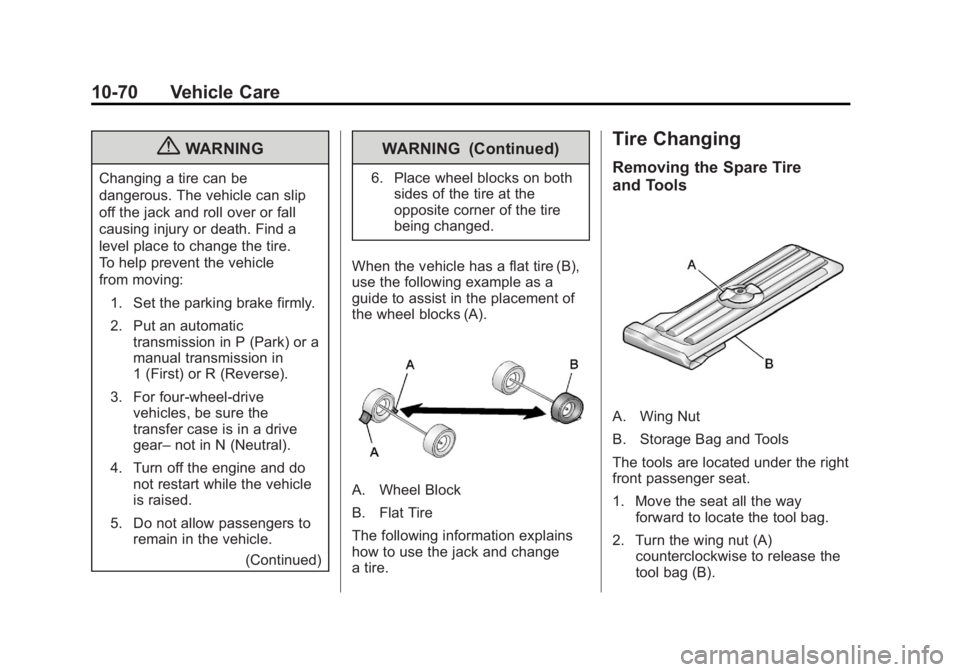
When the vehicle has a flat tire (B),
use the following example as a
guide to assist in the placement of
the wheel blocks (A).
A. Wheel Block
B. Flat Tire
The following information explains
how to use the jack and change
a tire.
Tire Changing
Removing the Spare Tire
and Tools
A. Wing Nut
B. Storage Bag and Tools
The tools are located under the right
front passenger seat.
1. Move the seat all the way forward to locate the tool bag.
2. Turn the wing nut (A) counterclockwise to release the
tool bag (B).
Page 315 of 404
Black plate (71,1)GMC Canyon Owner Manual - 2012
Vehicle Care 10-71
Put the tools to the side while you
access the jack and wheel blocks.
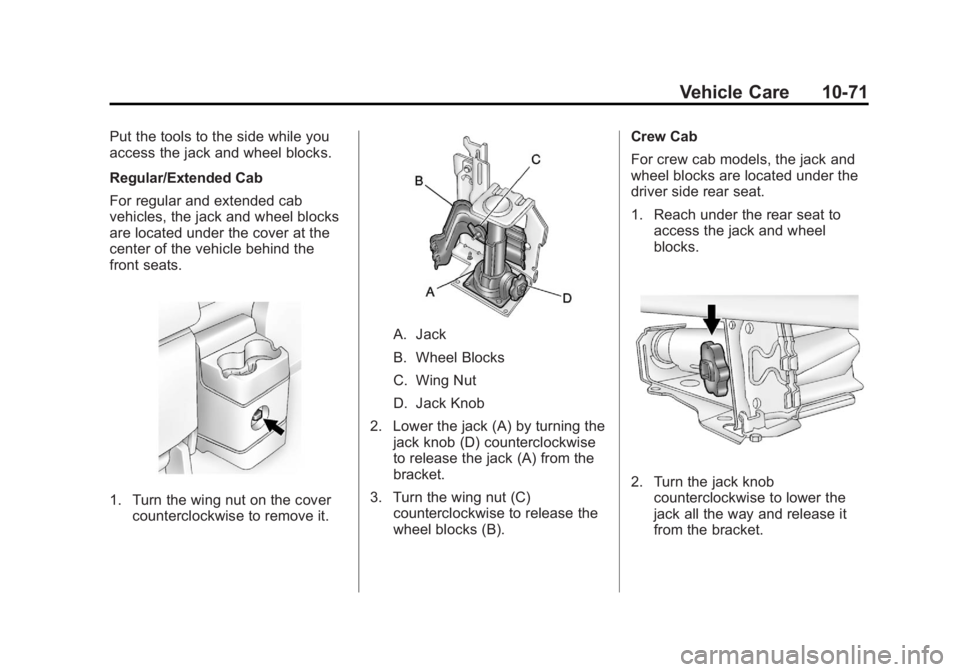
Regular/Extended Cab
For regular and extended cab
vehicles, the jack and wheel blocks
are located under the cover at the
center of the vehicle behind the
front seats.
1. Turn the wing nut on the covercounterclockwise to remove it.
A. Jack
B. Wheel Blocks
C. Wing Nut
D. Jack Knob
2. Lower the jack (A) by turning the jack knob (D) counterclockwise
to release the jack (A) from the
bracket.
3. Turn the wing nut (C) counterclockwise to release the
wheel blocks (B). Crew Cab
For crew cab models, the jack and
wheel blocks are located under the
driver side rear seat.
1. Reach under the rear seat to
access the jack and wheel
blocks.
2. Turn the jack knobcounterclockwise to lower the
jack all the way and release it
from the bracket.