clock GMC CANYON 2012 User Guide
[x] Cancel search | Manufacturer: GMC, Model Year: 2012, Model line: CANYON, Model: GMC CANYON 2012Pages: 404, PDF Size: 5.25 MB
Page 283 of 404
Black plate (39,1)GMC Canyon Owner Manual - 2012
Vehicle Care 10-39
4. Push the new bulb into thesocket until it clicks.
5. Insert the bulb socket into the lamp assembly and turn it
clockwise to secure.
6. Reinstall the lamp assembly and tighten the screws.
License Plate Lamp
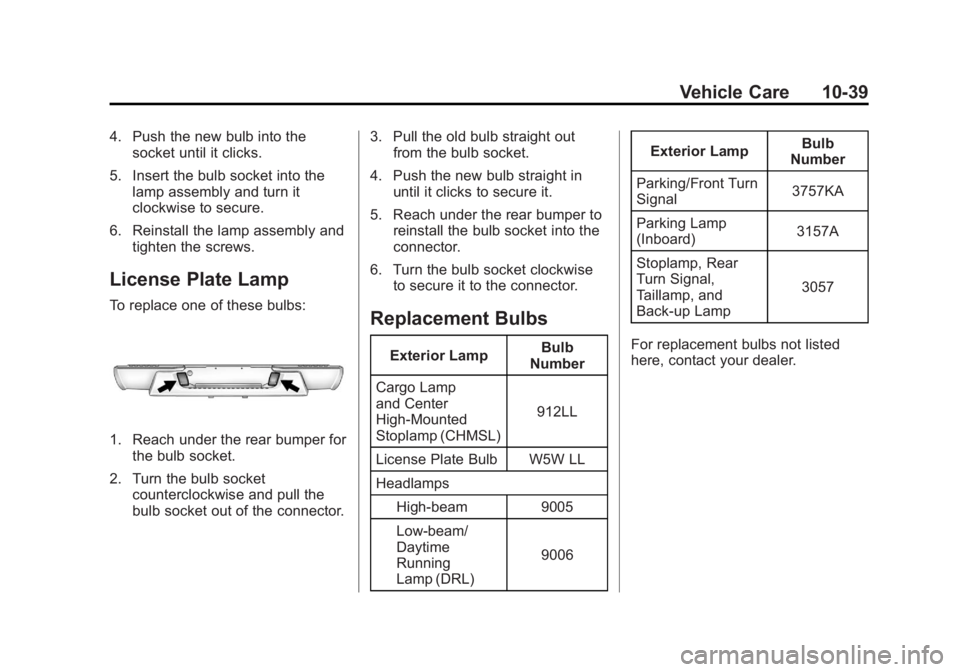
To replace one of these bulbs:
1. Reach under the rear bumper forthe bulb socket.
2. Turn the bulb socket counterclockwise and pull the
bulb socket out of the connector. 3. Pull the old bulb straight out
from the bulb socket.
4. Push the new bulb straight in until it clicks to secure it.
5. Reach under the rear bumper to reinstall the bulb socket into the
connector.
6. Turn the bulb socket clockwise to secure it to the connector.
Replacement Bulbs
Exterior Lamp Bulb
Number
Cargo Lamp
and Center
High‐Mounted
Stoplamp (CHMSL) 912LL
License Plate Bulb W5W LL
Headlamps High-beam 9005
Low-beam/
Daytime
Running
Lamp (DRL) 9006Exterior Lamp
Bulb
Number
Parking/Front Turn
Signal 3757KA
Parking Lamp
(Inboard) 3157A
Stoplamp, Rear
Turn Signal,
Taillamp, and
Back‐up Lamp 3057
For replacement bulbs not listed
here, contact your dealer.
Page 314 of 404
Black plate (70,1)GMC Canyon Owner Manual - 2012
10-70 Vehicle Care
{WARNING
Changing a tire can be
dangerous. The vehicle can slip
off the jack and roll over or fall
causing injury or death. Find a
level place to change the tire.
To help prevent the vehicle
from moving:1. Set the parking brake firmly.
2. Put an automatic transmission in P (Park) or a
manual transmission in
1 (First) or R (Reverse).
3. For four-wheel-drive vehicles, be sure the
transfer case is in a drive
gear– not in N (Neutral).
4. Turn off the engine and do not restart while the vehicle
is raised.
5. Do not allow passengers to remain in the vehicle.
(Continued)
WARNING (Continued)
6. Place wheel blocks on bothsides of the tire at the
opposite corner of the tire
being changed.
When the vehicle has a flat tire (B),
use the following example as a
guide to assist in the placement of
the wheel blocks (A).
A. Wheel Block
B. Flat Tire
The following information explains
how to use the jack and change
a tire.
Tire Changing
Removing the Spare Tire
and Tools
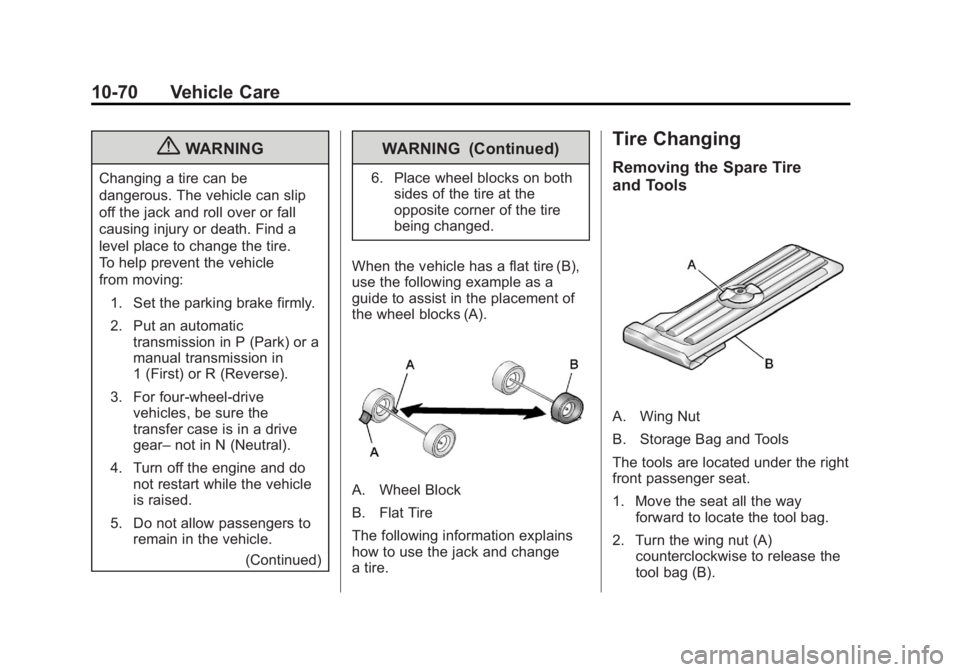
A. Wing Nut
B. Storage Bag and Tools
The tools are located under the right
front passenger seat.
1. Move the seat all the way forward to locate the tool bag.
2. Turn the wing nut (A) counterclockwise to release the
tool bag (B).
Page 315 of 404
Black plate (71,1)GMC Canyon Owner Manual - 2012
Vehicle Care 10-71
Put the tools to the side while you
access the jack and wheel blocks.
Regular/Extended Cab
For regular and extended cab
vehicles, the jack and wheel blocks
are located under the cover at the
center of the vehicle behind the
front seats.
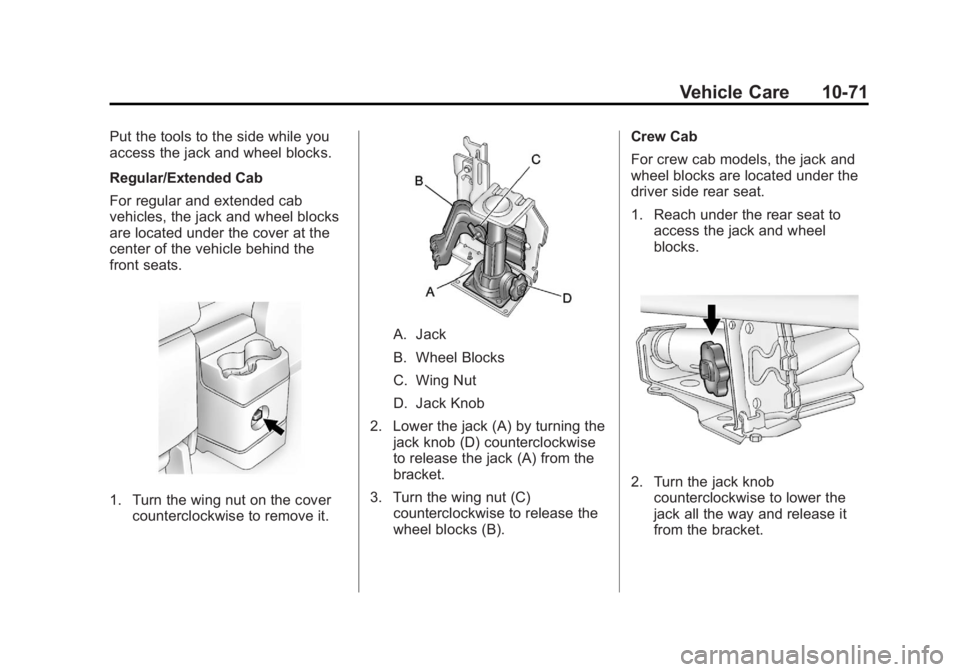
1. Turn the wing nut on the covercounterclockwise to remove it.
A. Jack
B. Wheel Blocks
C. Wing Nut
D. Jack Knob
2. Lower the jack (A) by turning the jack knob (D) counterclockwise
to release the jack (A) from the
bracket.
3. Turn the wing nut (C) counterclockwise to release the
wheel blocks (B). Crew Cab
For crew cab models, the jack and
wheel blocks are located under the
driver side rear seat.
1. Reach under the rear seat to
access the jack and wheel
blocks.
2. Turn the jack knobcounterclockwise to lower the
jack all the way and release it
from the bracket.
Page 316 of 404
Black plate (72,1)GMC Canyon Owner Manual - 2012
10-72 Vehicle Care
3. Turn the wing nutcounterclockwise to remove the
wheel blocks and the wheel
block retainer.
Use the jack handle extensions and
the wheel wrench to remove the
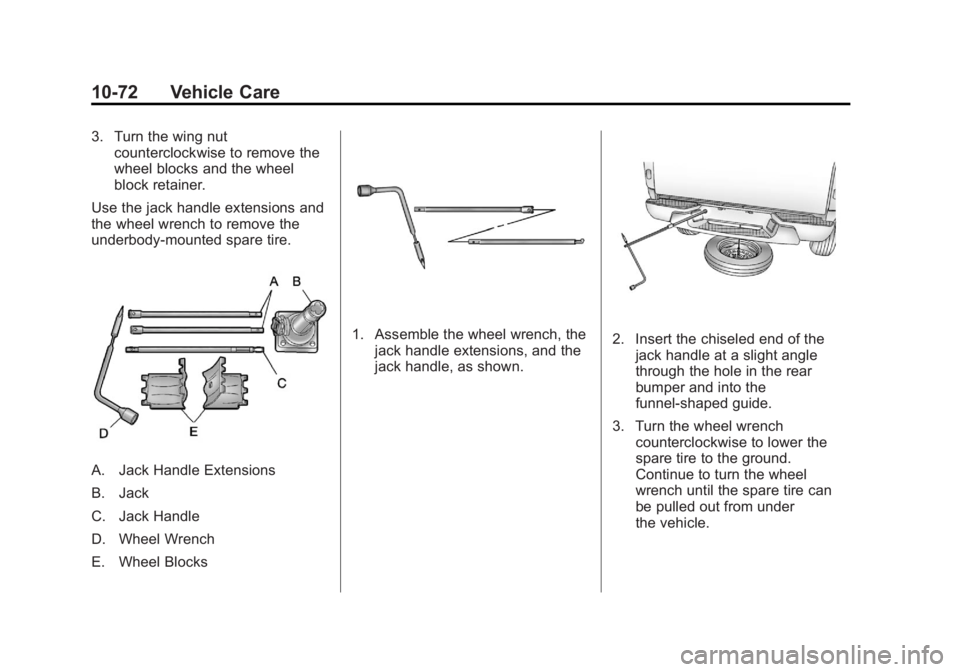
underbody-mounted spare tire.
A. Jack Handle Extensions
B. Jack
C. Jack Handle
D. Wheel Wrench
E. Wheel Blocks
1. Assemble the wheel wrench, the jack handle extensions, and the
jack handle, as shown.2. Insert the chiseled end of thejack handle at a slight angle
through the hole in the rear
bumper and into the
funnel-shaped guide.
3. Turn the wheel wrench counterclockwise to lower the
spare tire to the ground.
Continue to turn the wheel
wrench until the spare tire can
be pulled out from under
the vehicle.
Page 318 of 404
Black plate (74,1)GMC Canyon Owner Manual - 2012
10-74 Vehicle Care
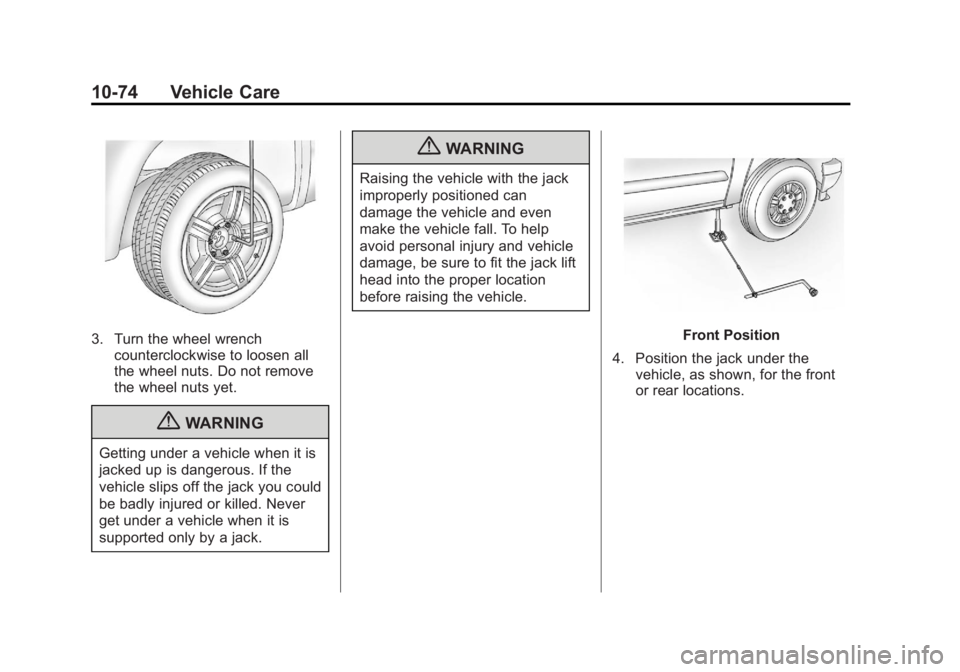
3. Turn the wheel wrenchcounterclockwise to loosen all
the wheel nuts. Do not remove
the wheel nuts yet.
{WARNING
Getting under a vehicle when it is
jacked up is dangerous. If the
vehicle slips off the jack you could
be badly injured or killed. Never
get under a vehicle when it is
supported only by a jack.
{WARNING
Raising the vehicle with the jack
improperly positioned can
damage the vehicle and even
make the vehicle fall. To help
avoid personal injury and vehicle
damage, be sure to fit the jack lift
head into the proper location
before raising the vehicle.
Front Position
4. Position the jack under the vehicle, as shown, for the front
or rear locations.
Page 319 of 404
Black plate (75,1)GMC Canyon Owner Manual - 2012
Vehicle Care 10-75
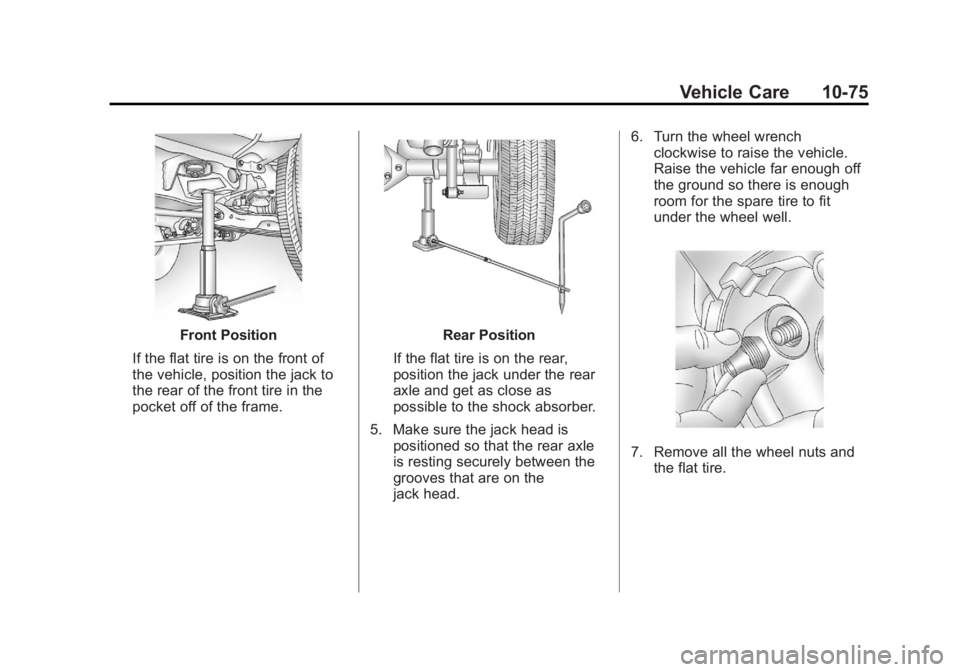
Front Position
If the flat tire is on the front of
the vehicle, position the jack to
the rear of the front tire in the
pocket off of the frame.Rear Position
If the flat tire is on the rear,
position the jack under the rear
axle and get as close as
possible to the shock absorber.
5. Make sure the jack head is positioned so that the rear axle
is resting securely between the
grooves that are on the
jack head. 6. Turn the wheel wrench
clockwise to raise the vehicle.
Raise the vehicle far enough off
the ground so there is enough
room for the spare tire to fit
under the wheel well.
7. Remove all the wheel nuts andthe flat tire.
Page 321 of 404
Black plate (77,1)GMC Canyon Owner Manual - 2012
Vehicle Care 10-77
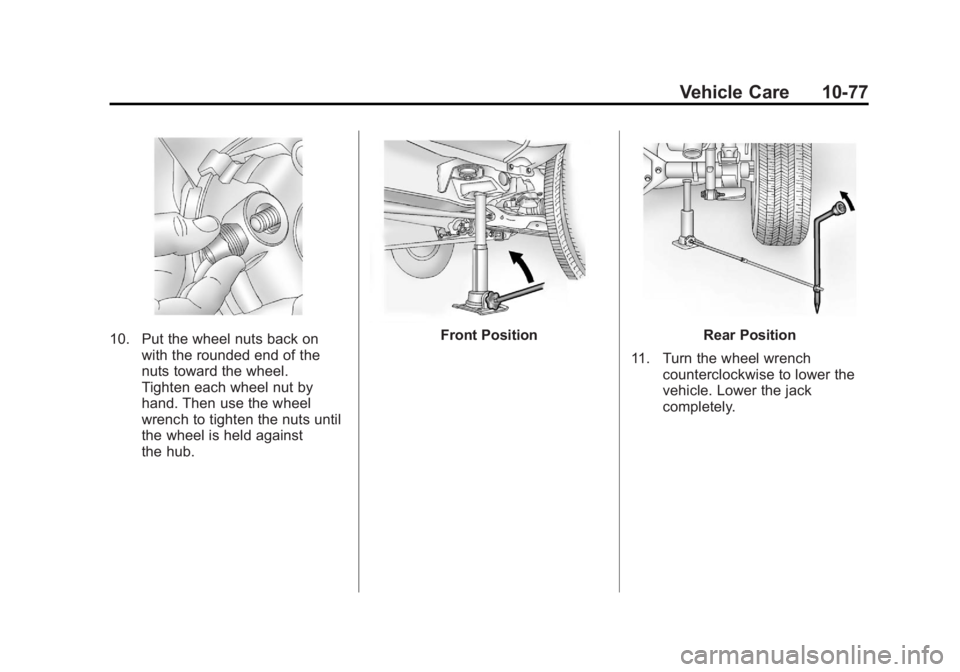
10. Put the wheel nuts back onwith the rounded end of the
nuts toward the wheel.
Tighten each wheel nut by
hand. Then use the wheel
wrench to tighten the nuts until
the wheel is held against
the hub.Front PositionRear Position
11. Turn the wheel wrench counterclockwise to lower the
vehicle. Lower the jack
completely.
Page 322 of 404
Black plate (78,1)GMC Canyon Owner Manual - 2012
10-78 Vehicle Care
{WARNING
Wheel nuts that are improperly or
incorrectly tightened can cause
the wheels to become loose or
come off. The wheel nuts should
be tightened with a torque wrench
to the proper torque specification
after replacing. Follow the torque
specification supplied by the
aftermarket manufacturer when
using accessory locking wheel
nuts. SeeCapacities and
Specifications on page 12‑2 for
original equipment wheel nut
torque specifications.
Notice: Improperly tightened
wheel nuts can lead to brake
pulsation and rotor damage. To
avoid expensive brake repairs,
evenly tighten the wheel nuts in
the proper sequence and to the
proper torque specification. See
Capacities and Specifications on
page 12‑2 for the wheel nut
torque specification.
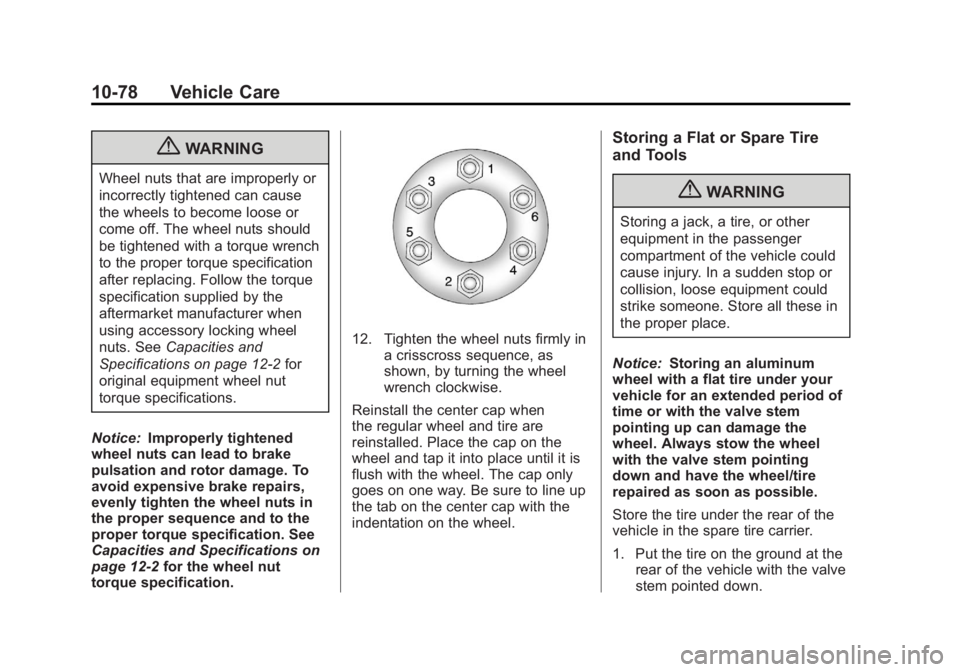
12. Tighten the wheel nuts firmly in a crisscross sequence, as
shown, by turning the wheel
wrench clockwise.
Reinstall the center cap when
the regular wheel and tire are
reinstalled. Place the cap on the
wheel and tap it into place until it is
flush with the wheel. The cap only
goes on one way. Be sure to line up
the tab on the center cap with the
indentation on the wheel.
Storing a Flat or Spare Tire
and Tools
{WARNING
Storing a jack, a tire, or other
equipment in the passenger
compartment of the vehicle could
cause injury. In a sudden stop or
collision, loose equipment could
strike someone. Store all these in
the proper place.
Notice: Storing an aluminum
wheel with a flat tire under your
vehicle for an extended period of
time or with the valve stem
pointing up can damage the
wheel. Always stow the wheel
with the valve stem pointing
down and have the wheel/tire
repaired as soon as possible.
Store the tire under the rear of the
vehicle in the spare tire carrier.
1. Put the tire on the ground at the rear of the vehicle with the valve
stem pointed down.
Page 324 of 404
Black plate (80,1)GMC Canyon Owner Manual - 2012
10-80 Vehicle Care
5. Turn the wheel wrenchclockwise to raise the tire part
way up. Make sure the retainer
is seated in the wheel opening
and the valve stem is
pointed down.
Continue raising the tire, watch
to make sure it does not get
caught on anything on the
underbody. If the tire does get
caught, loosen two or three turns
and push and pull the tire and
then retighten.
Repeat this procedure as many
times as needed to ensure
proper stowage.
6. When the tire is properly seated to the underbody, continue
turning the wheel wrench
clockwise until you hear two
clicks or feel it skip twice. You
cannot overtighten the cable.
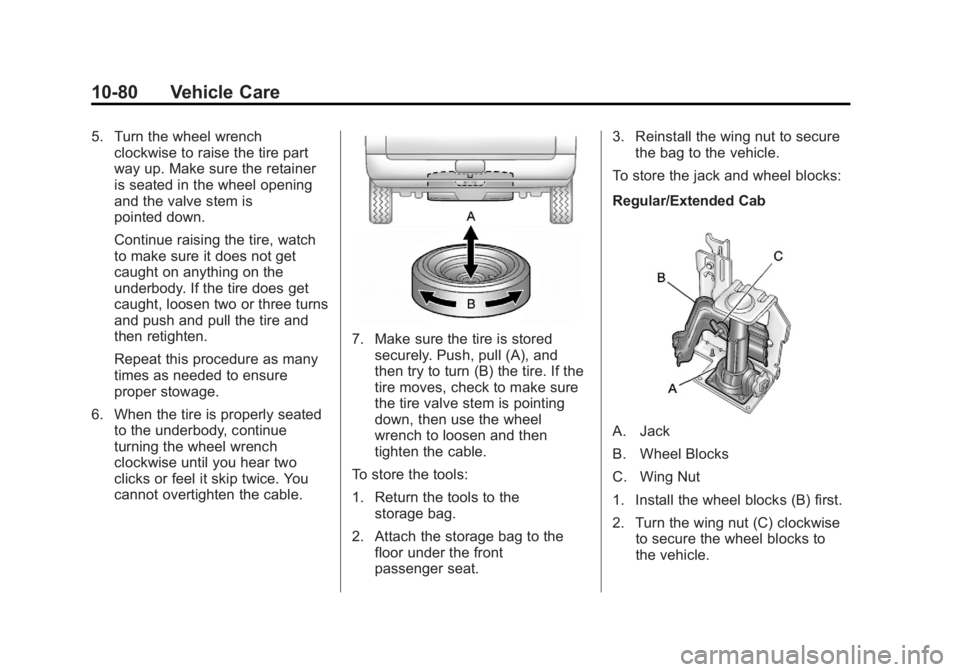
7. Make sure the tire is storedsecurely. Push, pull (A), and
then try to turn (B) the tire. If the
tire moves, check to make sure
the tire valve stem is pointing
down, then use the wheel
wrench to loosen and then
tighten the cable.
To store the tools:
1. Return the tools to the storage bag.
2. Attach the storage bag to the floor under the front
passenger seat. 3. Reinstall the wing nut to secure
the bag to the vehicle.
To store the jack and wheel blocks:
Regular/Extended Cab
A. Jack
B. Wheel Blocks
C. Wing Nut
1. Install the wheel blocks (B) first.
2. Turn the wing nut (C) clockwise to secure the wheel blocks to
the vehicle.
Page 325 of 404
Black plate (81,1)GMC Canyon Owner Manual - 2012
Vehicle Care 10-81
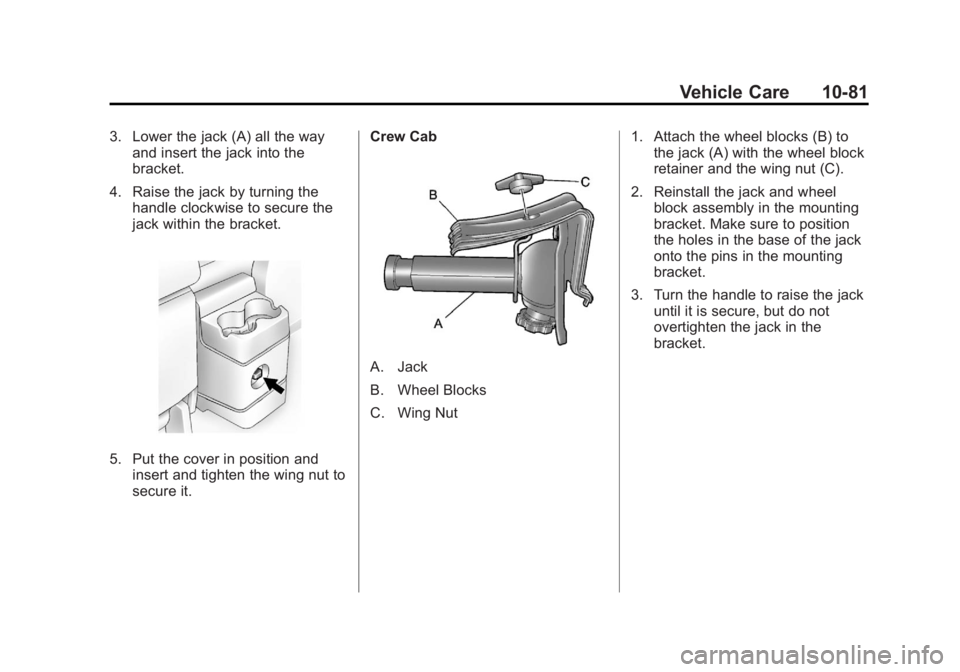
3. Lower the jack (A) all the wayand insert the jack into the
bracket.
4. Raise the jack by turning the handle clockwise to secure the
jack within the bracket.
5. Put the cover in position andinsert and tighten the wing nut to
secure it. Crew Cab
A. Jack
B. Wheel Blocks
C. Wing Nut
1. Attach the wheel blocks (B) to
the jack (A) with the wheel block
retainer and the wing nut (C).
2. Reinstall the jack and wheel block assembly in the mounting
bracket. Make sure to position
the holes in the base of the jack
onto the pins in the mounting
bracket.
3. Turn the handle to raise the jack until it is secure, but do not
overtighten the jack in the
bracket.