service GMC CANYON 2012 User Guide
[x] Cancel search | Manufacturer: GMC, Model Year: 2012, Model line: CANYON, Model: GMC CANYON 2012Pages: 404, PDF Size: 5.25 MB
Page 42 of 404
Black plate (14,1)GMC Canyon Owner Manual - 2012
2-14 Keys, Doors, and Windows
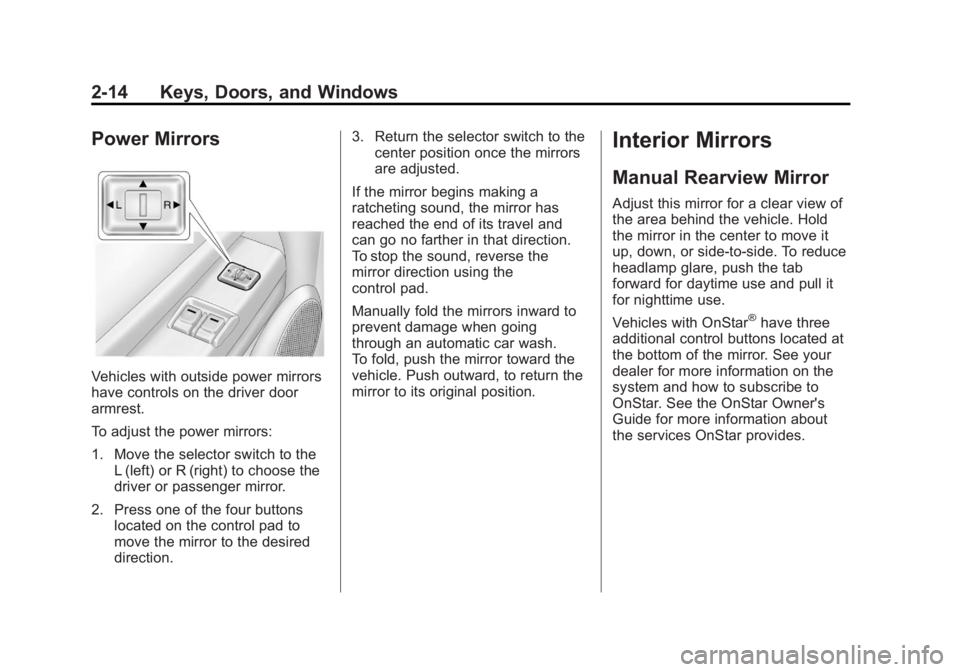
Power Mirrors
Vehicles with outside power mirrors
have controls on the driver door
armrest.
To adjust the power mirrors:
1. Move the selector switch to theL (left) or R (right) to choose the
driver or passenger mirror.
2. Press one of the four buttons located on the control pad to
move the mirror to the desired
direction. 3. Return the selector switch to the
center position once the mirrors
are adjusted.
If the mirror begins making a
ratcheting sound, the mirror has
reached the end of its travel and
can go no farther in that direction.
To stop the sound, reverse the
mirror direction using the
control pad.
Manually fold the mirrors inward to
prevent damage when going
through an automatic car wash.
To fold, push the mirror toward the
vehicle. Push outward, to return the
mirror to its original position.
Interior Mirrors
Manual Rearview Mirror
Adjust this mirror for a clear view of
the area behind the vehicle. Hold
the mirror in the center to move it
up, down, or side-to-side. To reduce
headlamp glare, push the tab
forward for daytime use and pull it
for nighttime use.
Vehicles with OnStar
®have three
additional control buttons located at
the bottom of the mirror. See your
dealer for more information on the
system and how to subscribe to
OnStar. See the OnStar Owner's
Guide for more information about
the services OnStar provides.
Page 43 of 404
Black plate (15,1)GMC Canyon Owner Manual - 2012
Keys, Doors, and Windows 2-15
Automatic Dimming
Rearview Mirror
The vehicle may have an automatic
dimming inside rearview mirror.
Automatic dimming reduces the
glare of lights from behind the
vehicle.
The mirror may also have OnStar
®
and/or a compass and outside
temperature display.
Control buttons for the OnStar
system are at the bottom of the
mirror. See the OnStar Owners
Guide for more information about
the services OnStar provides. See
Compass on page 5‑3for more
information about the compass
display. See “Temperature Display”
after, for more information about the
outside temperature display. AUTO/
(/O(On/Off):
Press and hold AUTO/
(for about
three seconds or depending on the
mirror, press
Oto turn automatic
dimming on or off. The automatic
dimming feature comes on and the
indicator light illuminates each time
the vehicle is started.
Temperature Display
Y b/O(On/Off): PressYbor
depending on the mirror, press
Oto
turn the display on or off.
To adjust between Fahrenheit and
Celsius:
1. Press and hold
Y b/Ofor a
few seconds. The current unit of
measure (C or F) flashes. 2. Press
Y
b/Oagain and
release to change the unit of
measure. Wait several seconds
and the compass/temperature
display returns with the selected
unit of measure.
It is normal under certain conditions
for the temperature update to be
delayed. If an incorrect temperature
displays for an extended period, see
your dealer.
Cleaning the Mirror
Do not spray glass cleaner directly
on the mirror. Use a soft towel
dampened with water.
Page 74 of 404
Black plate (28,1)GMC Canyon Owner Manual - 2012
3-28 Seats and Restraints
Additional windshield breakage may
also occur from the right front
passenger airbag.
.Airbags are designed to inflate
only once. After an airbag
inflates, you will need some new
parts for the airbag system.
If you do not get them, the
airbag system will not be there
to help protect you in another
crash. A new system will include
airbag modules and possibly
other parts. The service manual
for your vehicle covers the need
to replace other parts.
.Your vehicle has a crash
sensing and diagnostic module
which records information after
a crash. SeeVehicle Data
Recording and Privacy on
page 13‑20 andEvent Data
Recorders on page 13‑20.
.Let only qualified technicians
work on the airbag system.
Improper service can mean that
the airbag system will not work
properly. See your dealer for
service.
Passenger Sensing
System
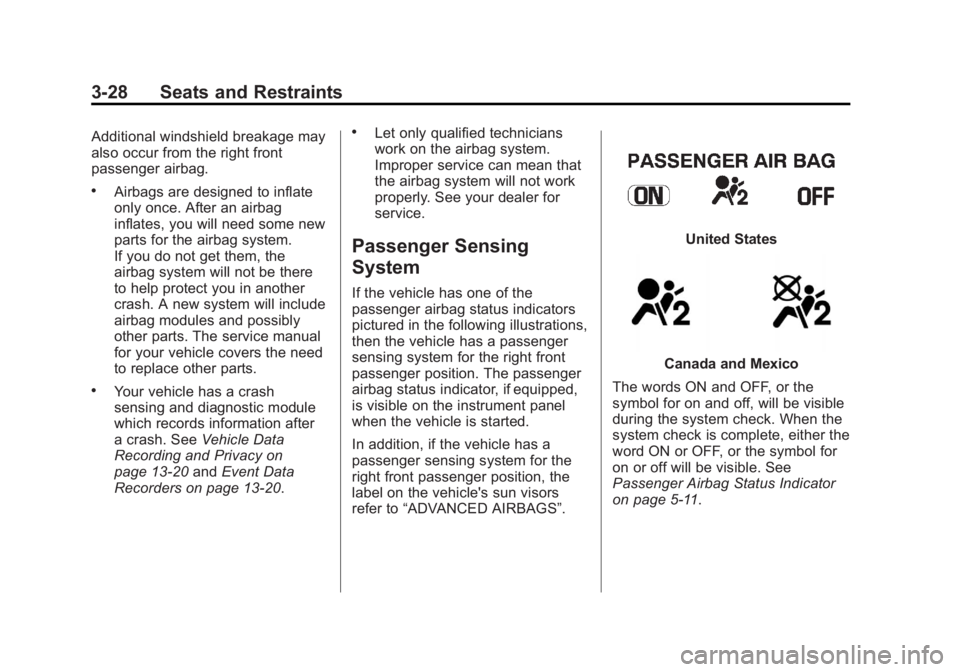
If the vehicle has one of the
passenger airbag status indicators
pictured in the following illustrations,
then the vehicle has a passenger
sensing system for the right front
passenger position. The passenger
airbag status indicator, if equipped,
is visible on the instrument panel
when the vehicle is started.
In addition, if the vehicle has a
passenger sensing system for the
right front passenger position, the
label on the vehicle's sun visors
refer to “ADVANCED AIRBAGS”.
United States
Canada and Mexico
The words ON and OFF, or the
symbol for on and off, will be visible
during the system check. When the
system check is complete, either the
word ON or OFF, or the symbol for
on or off will be visible. See
Passenger Airbag Status Indicator
on page 5‑11.
Page 76 of 404
Black plate (30,1)GMC Canyon Owner Manual - 2012
3-30 Seats and Restraints
If your vehicle does not have a
rear seat that will accommodate a
rear-facing child restraint, a
rear-facing child restraint should not
be installed in the vehicle, even if
the airbag is off.
The passenger sensing system is
designed to turn off the right front
passenger airbag if:
.The right front passenger seat is
unoccupied.
.The system determines that an
infant is present in a rear-facing
infant seat.
.The system determines that a
small child is present in a child
restraint.
.The system determines that a
small child is present in a
booster seat.
.A right front passenger takes
his/her weight off of the seat for
a period of time.
.The right front passenger seat is
occupied by a smaller person,
such as a child who has
outgrown child restraints.
.Or, if there is a critical problem
with the airbag system or the
passenger sensing system.
When the passenger sensing
system has turned off the right front
passenger frontal airbag, the off
indicator will light and stay lit to
remind you that the airbag is off.
See Passenger Airbag Status
Indicator on page 5‑11.
The passenger sensing system is
designed to turn on (may inflate) the
right front passenger frontal airbag
anytime the system senses that a
person of adult size is sitting
properly in the right front passenger
seat. When the passenger sensing
system has allowed the airbag to be
enabled, the on indicator will light
and stay lit to remind you that the
airbag is active. For some children who have
outgrown child restraints and for
very small adults, the passenger
sensing system may or may not turn
off the right front passenger's frontal
airbag, depending upon the
person's seating posture and body
build. Everyone in your vehicle
who has outgrown child restraints
should wear a safety belt
properly
—whether or not there
is an airbag for that person.
{WARNING
If the airbag readiness light ever
comes on and stays on, it means
that something may be wrong
with the airbag system. To help
avoid injury to yourself or others,
have the vehicle serviced right
away. See Airbag Readiness
Light on page 5‑10 for more
information, including important
safety information.
Page 79 of 404
Black plate (33,1)GMC Canyon Owner Manual - 2012
Seats and Restraints 3-33
A thick layer of additional material,
such as a blanket or cushion,
or aftermarket equipment such as
seat covers, seat heaters, and seat
massagers can affect how well the
passenger sensing system
operates. We recommend that you
not use seat covers or other
aftermarket equipment except when
approved by GM for your specific
vehicle. SeeAdding Equipment to
the Airbag-Equipped Vehicle on
page 3‑34 for more information
about modifications that can affect
how the system operates.
{WARNING
Stowing of articles under the
passenger seat or between the
passenger seat cushion and
seatback may interfere with the
proper operation of the passenger
sensing system.
Servicing the
Airbag-Equipped Vehicle
Airbags affect how the vehicle
should be serviced. There are parts
of the airbag system in several
places around the vehicle. Your
dealer and the service manual have
information about servicing the
vehicle and the airbag system.
To purchase a service manual, see
Service Publications Ordering
Information on page 13‑17.
{WARNING
For up to 10 seconds after the
vehicle is turned off and the
battery is disconnected, an airbag
can still inflate during improper
service. You can be injured if you
are close to an airbag when it
inflates. Avoid yellow connectors.
They are probably part of the
airbag system. Be sure to follow
proper service procedures, and
make sure the person performing
work for you is qualified to do so.
Page 80 of 404
Black plate (34,1)GMC Canyon Owner Manual - 2012
3-34 Seats and Restraints
Adding Equipment to the
Airbag-Equipped Vehicle
Q: Is there anything I might addto or change about the vehicle
that could keep the airbags
from working properly?
A: Yes. If you add things that
change the vehicle's frame,
bumper system, height, front end
or side sheet metal, they may
keep the airbag system from
working properly. Changing or
moving any parts of the front
seats, safety belts, the airbag
sensing and diagnostic module,
steering wheel, instrument
panel, roof-rail airbag modules,
ceiling headliner or pillar garnish
trim, front sensors, or airbag
wiring can affect the operation
of the airbag system.
In addition, the vehicle may have
a passenger sensing system for
the right front passenger
position, which includes sensors
that are part of the passenger
seat. The passenger sensing system may not operate properly
if the original seat trim is
replaced with non-GM covers,
upholstery or trim, or with
GM covers, upholstery or trim
designed for a different vehicle.
Any object, such as an
aftermarket seat heater or a
comfort enhancing pad or
device, installed under or on top
of the seat fabric, could also
interfere with the operation of
the passenger sensing system.
This could either prevent proper
deployment of the passenger
airbag(s) or prevent the
passenger sensing system from
properly turning off the
passenger airbag(s). See
Passenger Sensing System on
page 3‑28.
If you have any questions, call
Customer Assistance. The
phone numbers and addresses
for Customer Assistance are in
Step Two of the Customer
Satisfaction Procedure in this
manual. See
Customer Satisfaction Procedure (U.S. and
Canada) on page 13‑3
or
Customer Satisfaction
Procedure (Mexico) on
page 13‑3.
Q: Because I have a disability, I have to get my vehicle
modified. How can I find out
whether this will affect my
airbag system?
A: If you have questions, call
Customer Assistance. The
phone numbers and addresses
for Customer Assistance are in
Step Two of the Customer
Satisfaction Procedure in this
manual. See Customer
Satisfaction Procedure (U.S. and
Canada) on page 13‑1 or
Customer Satisfaction
Procedure (Mexico) on
page 13‑3.
In addition, your dealer and the
service manual have information
about the location of the airbag
sensors, sensing and diagnostic
module and airbag wiring.
Page 81 of 404
Black plate (35,1)GMC Canyon Owner Manual - 2012
Seats and Restraints 3-35
Airbag System Check
The airbag system does not need
regularly scheduled maintenance or
replacement. Make sure the airbag
readiness light is working. See
Airbag Readiness Light on
page 5‑10for more information.
Notice: If an airbag covering is
damaged, opened, or broken, the
airbag may not work properly.
Do not open or break the airbag
coverings. If there are any
opened or broken airbag covers,
have the airbag covering and/or
airbag module replaced. For the
location of the airbags, see
Where Are the Airbags? on
page 3‑23. See your dealer
for service.
Replacing Airbag System
Parts after a Crash
{WARNING
A crash can damage the
airbag systems in the vehicle.
A damaged airbag system may
not work properly and may
not protect you and your
passenger(s) in a crash, resulting
in serious injury or even death.
To help make sure the airbag
systems are working properly
after a crash, have them
inspected and any necessary
replacements made as soon
as possible. If an airbag inflates, you will
need to replace airbag system
parts. See your dealer for service.
If the airbag readiness light stays on
after the vehicle is started or comes
on when you are driving, the airbag
system may not work properly.
Have the vehicle serviced right
away. See
Airbag Readiness Light
on page 5‑10 for more information.
Page 111 of 404
Black plate (1,1)GMC Canyon Owner Manual - 2012
Instruments and Controls 5-1
Instruments and
Controls
Controls
Steering Wheel Adjustment . . . 5-2
Horn . . . . . . . . . . . . . . . . . . . . . . . . . . 5-2
Windshield Wiper/Washer . . . . . 5-2
Compass . . . . . . . . . . . . . . . . . . . . . 5-3
Clock . . . . . . . . . . . . . . . . . . . . . . . . . 5-4
Power Outlets . . . . . . . . . . . . . . . . . 5-5
Cigarette Lighter . . . . . . . . . . . . . . 5-5
Ashtrays . . . . . . . . . . . . . . . . . . . . . . 5-5
Warning Lights, Gauges, and
Indicators
Warning Lights, Gauges, andIndicators . . . . . . . . . . . . . . . . . . . . 5-6
Chime Level Adjustment . . . . . . 5-6
Instrument Cluster . . . . . . . . . . . . 5-7
Speedometer . . . . . . . . . . . . . . . . . 5-8
Odometer . . . . . . . . . . . . . . . . . . . . . 5-8
Trip Odometer . . . . . . . . . . . . . . . . . 5-8
Tachometer . . . . . . . . . . . . . . . . . . . 5-8 Fuel Gauge . . . . . . . . . . . . . . . . . . . 5-8
Engine Coolant Temperature
Gauge . . . . . . . . . . . . . . . . . . . . . . . 5-9
Safety Belt Reminders . . . . . . . . 5-9
Airbag Readiness Light . . . . . . 5-10
Passenger Airbag Status Indicator . . . . . . . . . . . . . . . . . . . . 5-11
Charging System Light . . . . . . 5-12
Malfunction Indicator Lamp . . . . . . . . . . . . . 5-12
Brake System Warning Light . . . . . . . . . . . . . . . . . . . . . . . 5-15
Antilock Brake System (ABS) Warning Light . . . . . . . . . . . . . . 5-16
StabiliTrak
®OFF Light . . . . . . . 5-17
Traction Control System (TCS)/StabiliTrak
®Light . . . . 5-17
Tire Pressure Light . . . . . . . . . . 5-17
Engine Oil Pressure Light . . . . 5-18
Security Light . . . . . . . . . . . . . . . . 5-19
High-Beam On Light . . . . . . . . . 5-19
Cruise Control Light . . . . . . . . . 5-19
Information Displays
Driver Information Center (DIC) . . . . . . . . . . . . . . . 5-20
Vehicle Messages
Vehicle Messages . . . . . . . . . . . 5-23
Battery Voltage and ChargingMessages . . . . . . . . . . . . . . . . . . 5-23
Brake System Messages . . . . 5-23
Door Ajar Messages . . . . . . . . . 5-24
Engine Cooling System Messages . . . . . . . . . . . . . . . . . . 5-24
Engine Oil Messages . . . . . . . . 5-24
Engine Power Messages . . . . 5-25
Fuel System Messages . . . . . . 5-25
Lamp Messages . . . . . . . . . . . . . 5-25
Ride Control System Messages . . . . . . . . . . . . . . . . . . 5-26
Service Vehicle Messages . . . 5-27
Tire Messages . . . . . . . . . . . . . . . 5-27
Transmission Messages . . . . . 5-27
Page 121 of 404
Black plate (11,1)GMC Canyon Owner Manual - 2012
Instruments and Controls 5-11
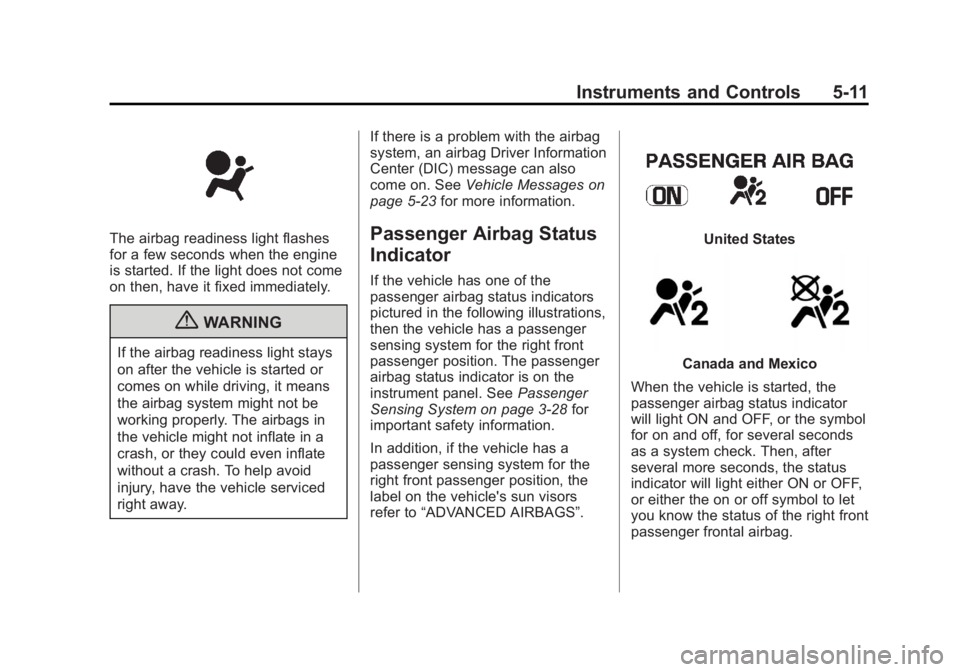
The airbag readiness light flashes
for a few seconds when the engine
is started. If the light does not come
on then, have it fixed immediately.
{WARNING
If the airbag readiness light stays
on after the vehicle is started or
comes on while driving, it means
the airbag system might not be
working properly. The airbags in
the vehicle might not inflate in a
crash, or they could even inflate
without a crash. To help avoid
injury, have the vehicle serviced
right away.If there is a problem with the airbag
system, an airbag Driver Information
Center (DIC) message can also
come on. See
Vehicle Messages on
page 5‑23 for more information.
Passenger Airbag Status
Indicator
If the vehicle has one of the
passenger airbag status indicators
pictured in the following illustrations,
then the vehicle has a passenger
sensing system for the right front
passenger position. The passenger
airbag status indicator is on the
instrument panel. See Passenger
Sensing System on page 3‑28 for
important safety information.
In addition, if the vehicle has a
passenger sensing system for the
right front passenger position, the
label on the vehicle's sun visors
refer to “ADVANCED AIRBAGS”.
United States
Canada and Mexico
When the vehicle is started, the
passenger airbag status indicator
will light ON and OFF, or the symbol
for on and off, for several seconds
as a system check. Then, after
several more seconds, the status
indicator will light either ON or OFF,
or either the on or off symbol to let
you know the status of the right front
passenger frontal airbag.
Page 122 of 404
Black plate (12,1)GMC Canyon Owner Manual - 2012
5-12 Instruments and Controls
If the word ON or the on symbol is
lit on the passenger airbag status
indicator, it means that the right
front passenger frontal airbag is
enabled (may inflate).
If the word OFF or the off symbol is
lit on the airbag status indicator, it
means that the passenger sensing
system has turned off the right front
passenger frontal airbag.
If, after several seconds, both status
indicator lights remain on, or if there
are no lights at all, there may be a
problem with the lights or the
passenger sensing system.
See your dealer for service.
{WARNING
If the airbag readiness light ever
comes on and stays on, it means
that something may be wrong
with the airbag system. To help
avoid injury to yourself or others,
have the vehicle serviced right
away. SeeAirbag Readiness
(Continued)
WARNING (Continued)
Light on page 5‑10 for more
information, including important
safety information.
Charging System Light
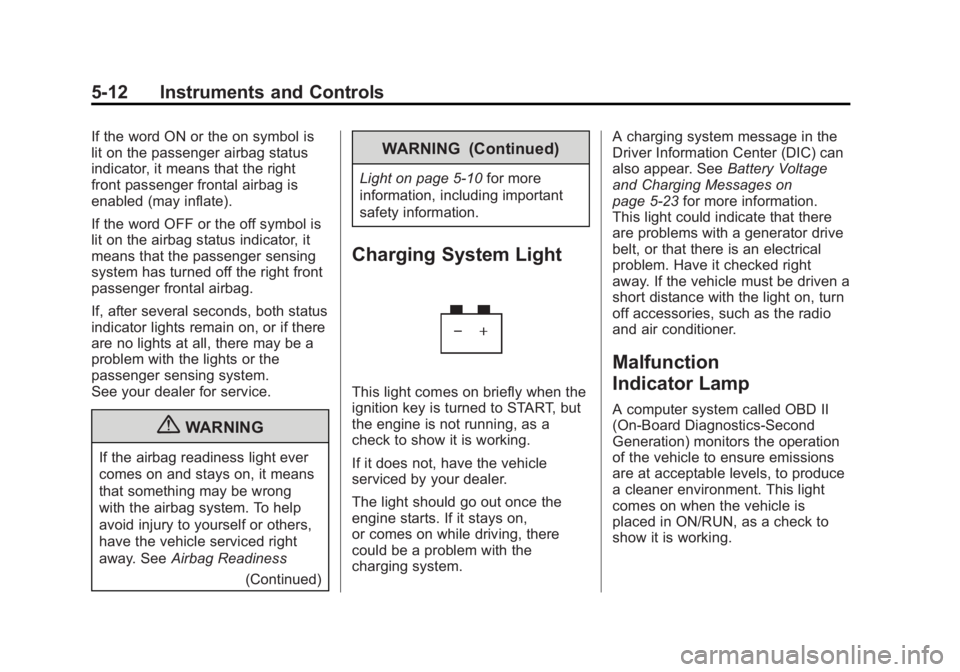
This light comes on briefly when the
ignition key is turned to START, but
the engine is not running, as a
check to show it is working.
If it does not, have the vehicle
serviced by your dealer.
The light should go out once the
engine starts. If it stays on,
or comes on while driving, there
could be a problem with the
charging system. A charging system message in the
Driver Information Center (DIC) can
also appear. See
Battery Voltage
and Charging Messages on
page 5‑23 for more information.
This light could indicate that there
are problems with a generator drive
belt, or that there is an electrical
problem. Have it checked right
away. If the vehicle must be driven a
short distance with the light on, turn
off accessories, such as the radio
and air conditioner.
Malfunction
Indicator Lamp
A computer system called OBD II
(On-Board Diagnostics-Second
Generation) monitors the operation
of the vehicle to ensure emissions
are at acceptable levels, to produce
a cleaner environment. This light
comes on when the vehicle is
placed in ON/RUN, as a check to
show it is working.