turn signal GMC CANYON 2012 User Guide
[x] Cancel search | Manufacturer: GMC, Model Year: 2012, Model line: CANYON, Model: GMC CANYON 2012Pages: 404, PDF Size: 5.25 MB
Page 142 of 404
Black plate (4,1)GMC Canyon Owner Manual - 2012
6-4 Lighting
Automatic Headlamp
System
When it is dark enough outside, the
automatic headlamp system will turn
on after the transmission has been
shifted from P (Park) to D (Drive).
The headlamps, taillamps,
sidemarker, parking lamps, roof
marker lamps, and the instrument
panel lights turn on at normal
brightness. The radio lights will
become dimmer when the
headlights are off compared to
when the headlights are on.
The vehicle has a light sensor
located on the top of the instrument
panel. Do not cover the sensor,
or the system will be on whenever
the ignition is on.
The system can turn on the
headlamps when driving in a
parking garage, through a tunnel or
when there is overcast weather.
This is normal.There is a delay in the transition
between the daytime and nighttime
operation of the Daytime Running
Lamps (DRL) and the automatic
headlamp system so that driving
under bridges or bright overhead
street lights does not affect the
system. The DRL and automatic
headlamp system will only be
affected when the light sensor
detects a change in lighting lasting
longer than the delay.
If the vehicle is started in a dark
garage, the automatic headlamp
system will come on immediately.
Once the vehicle leaves the garage,
it will take about 1 minute for the
automatic headlamp system to
change to DRL if it is light outside.
During that delay, the instrument
panel cluster may not be as bright
as usual. Make sure the instrument
panel brightness control is in the full
bright position. See
Instrument
Panel Illumination Control on
page 6‑7.
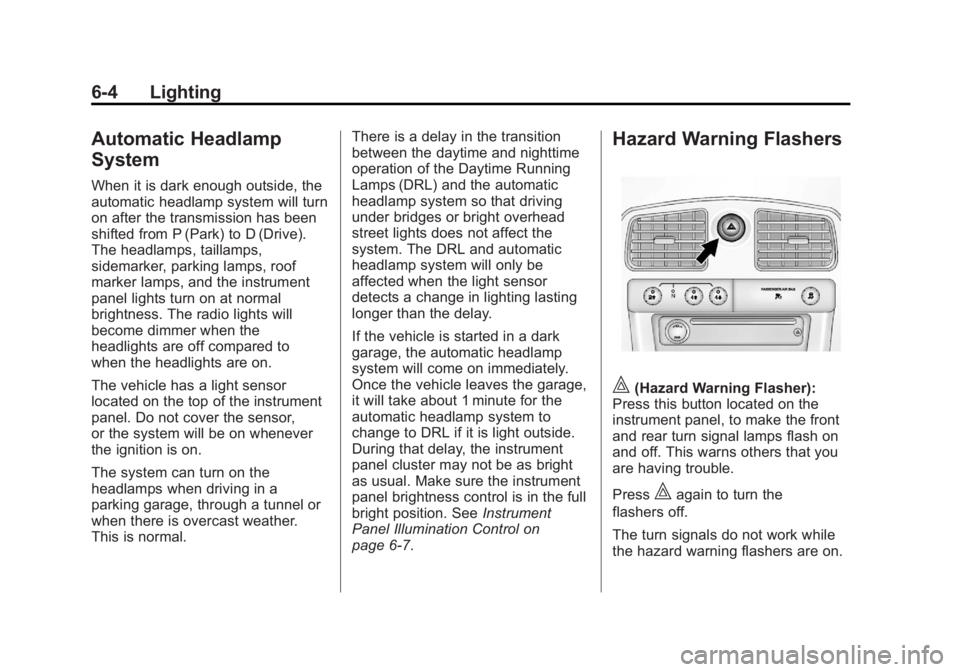
Hazard Warning Flashers
|(Hazard Warning Flasher):
Press this button located on the
instrument panel, to make the front
and rear turn signal lamps flash on
and off. This warns others that you
are having trouble.
Press
|again to turn the
flashers off.
The turn signals do not work while
the hazard warning flashers are on.
Page 143 of 404
Black plate (5,1)GMC Canyon Owner Manual - 2012
Lighting 6-5
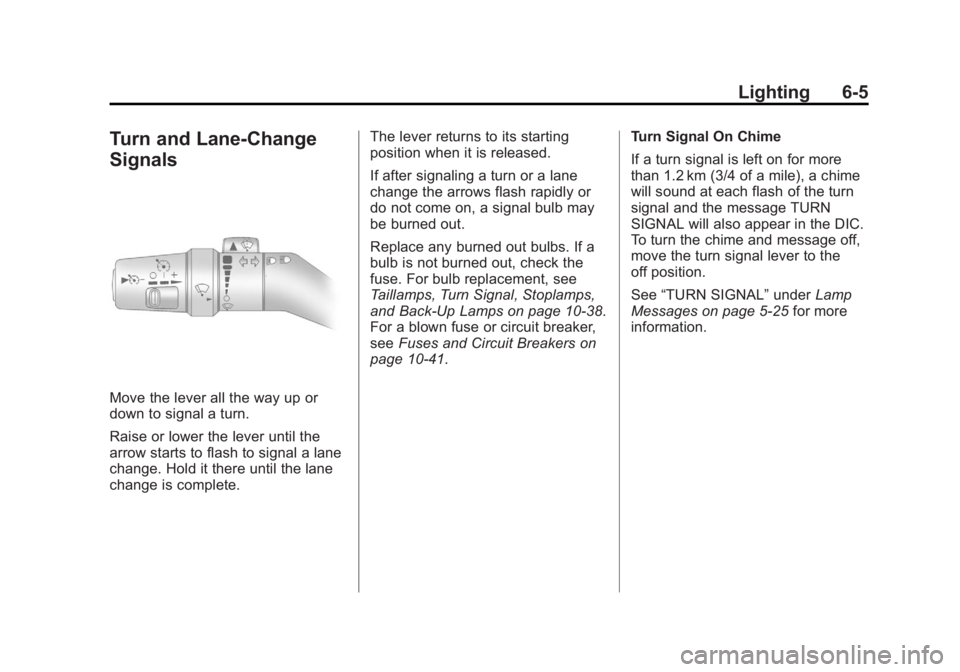
Turn and Lane-Change
Signals
Move the lever all the way up or
down to signal a turn.
Raise or lower the lever until the
arrow starts to flash to signal a lane
change. Hold it there until the lane
change is complete.The lever returns to its starting
position when it is released.
If after signaling a turn or a lane
change the arrows flash rapidly or
do not come on, a signal bulb may
be burned out.
Replace any burned out bulbs. If a
bulb is not burned out, check the
fuse. For bulb replacement, see
Taillamps, Turn Signal, Stoplamps,
and Back-Up Lamps on page 10‑38.
For a blown fuse or circuit breaker,
see
Fuses and Circuit Breakers on
page 10‑41. Turn Signal On Chime
If a turn signal is left on for more
than 1.2 km (3/4 of a mile), a chime
will sound at each flash of the turn
signal and the message TURN
SIGNAL will also appear in the DIC.
To turn the chime and message off,
move the turn signal lever to the
off position.
See
“TURN SIGNAL” underLamp
Messages on page 5‑25 for more
information.
Page 160 of 404
Black plate (14,1)GMC Canyon Owner Manual - 2012
7-14 Infotainment System
XM Radio Messages
XL (Explicit Language
Channels):These channels, or
any others, can be blocked at a
customer's request, by calling
1-800-929-2100 in the U.S. and
1-877-438-9677 in Canada.
Updating: The encryption code in
the receiver is being updated, and
no action is required. This process
should take no longer than
30 seconds.
No Signl: The system is
functioning correctly, but the vehicle
is in a location that is blocking the
XM signal. When the vehicle is
moved into an open area, the signal
should return.
Loading: The radio system is
acquiring and processing audio and
text data. No action is needed. This
message should disappear shortly.
Off Air: This channel is not
currently in service. Tune to another
channel. CH Unavl:
This previously
assigned channel is no longer
assigned. Tune to another station.
If this station was one of the
presets, choose another station
for that preset button.
Unauth: This channel is blocked or
cannot be received with your XM
Subscription package.
No Info: No artist, song title,
category, or text information is
available at this time on this
channel. The system is working
properly.
No Subscription Please Renew:
XM subscription needs to be
reactivated. Contact XM at
www.xmradio.com or call
1-800-929-2100 in the U.S. and
www.xmradio.ca or call
1-877-438-9677 in Canada.
NotFound: No artist, song title,
category, or text information is
available at this time on this
channel. The system is working
properly. XM Lock:
The XM receiver in your
vehicle could have previously been
in another vehicle. For security
purposes, XM receivers cannot be
swapped between vehicles. If this
message is received after having
your vehicle serviced, check with
your dealer.
Radio ID: If this message is
received when tuned to channel 0,
there could be a receiver fault.
Consult with your dealer.
Unknown: If this message is
received when tuned to channel 0,
there could be a receiver fault.
Consult with your dealer.
Check XM: If this message does
not clear within a short period of
time, the receiver could have a fault.
Consult with your dealer.
Page 161 of 404
Black plate (15,1)GMC Canyon Owner Manual - 2012
Infotainment System 7-15
Radio Reception
Frequency interference and static
can occur during normal radio
reception if items such as cell phone
chargers, vehicle convenience
accessories, and external electronic
devices are plugged into the
accessory power outlet. If there is
interference or static, unplug the
item from the accessory power
outlet.
AM
The range for most AM stations is
greater than for FM, especially at
night. The longer range can cause
station frequencies to interfere with
each other. For better radio
reception, most AM radio stations
boost the power levels during the
day, and then reduce these levels
during the night. Static can also
occur when things like storms and
power lines interfere with radio
reception. When this happens, try
reducing the treble on the radio.
FM Stereo
FM signals only reach about
16 to 65 km (10 to 40 miles).
Although the radio has a built-in
electronic circuit that automatically
works to reduce interference, some
static can occur, especially around
tall buildings or hills, causing the
sound to fade in and out.
XM™Satellite Radio Service
XM Satellite Radio Service gives
digital radio reception from
coast-to-coast in the 48 contiguous
United States, and in Canada. Just
as with FM, tall buildings or hills can
interfere with satellite radio signals,
causing the sound to fade in and
out. In addition, traveling or standing
under heavy foliage, bridges,
garages, or tunnels may cause loss
of the XM signal for a period of time.
Cellular Phone Usage
Cellular phone usage may cause
interference with the vehicle's radio.
This interference may occur when
making or receiving phone calls,
charging the phone's battery,
or simply having the phone on. This
interference causes an increased
level of static while listening to the
radio. If static is received while
listening to the radio, unplug the
cellular phone and turn it off.
Page 196 of 404
Black plate (16,1)GMC Canyon Owner Manual - 2012
9-16 Driving and Operating
To save fuel, run the engine for only
short periods as needed to warm
the vehicle and then shut the engine
off and close the window most of
the way to save heat. Repeat this
until help arrives but only when you
feel really uncomfortable from the
cold. Moving about to keep warm
also helps.
If it takes some time for help to
arrive, now and then when you run
the engine, push the accelerator
pedal slightly so the engine runs
faster than the idle speed. This
keeps the battery charged to restart
the vehicle and to signal for help
with the headlamps. Do this as little
as possible to save fuel.If the Vehicle Is Stuck
Slowly and cautiously spin the
wheels to free the vehicle when
stuck in sand, mud, ice, or snow.
See“Rocking Your vehicle to get
It Out” later in this section.
If stuck too severely for the traction
system to free the vehicle, turn the
traction system off and use the
rocking method.{WARNING
If the vehicle's tires spin at high
speed, they can explode, and you
or others could be injured. The
vehicle can overheat, causing an
engine compartment fire or other
damage. Spin the wheels as little
as possible and avoid going
above 55 km/h (35 mph).
For information about using tire
chains on the vehicle, see Tire
Chains on page 10‑68.
Page 236 of 404
Black plate (56,1)GMC Canyon Owner Manual - 2012
9-56 Driving and Operating
Following Distance
Stay at least twice as far behind the
vehicle ahead as you would when
driving the vehicle without a trailer.
This can help to avoid situations
that require heavy braking and
sudden turns.
Passing
More passing distance is needed
when towing a trailer. Because the
rig is longer, it is necessary to go
much farther beyond the passed
vehicle before returning to the lane.
Backing Up
Hold the bottom of the steering
wheel with one hand. Then, to move
the trailer to the left, move that hand
to the left. To move the trailer to the
right, move your hand to the right.
Always back up slowly and,
if possible, have someone
guide you.
Making Turns
Notice:Making very sharp turns
while trailering could cause the
trailer to come in contact with the
vehicle. The vehicle could be
damaged. Avoid making very
sharp turns while trailering.
When turning with a trailer, make
wider turns than normal. Do this
so the trailer will not strike soft
shoulders, curbs, road signs, trees
or other objects. Avoid jerky or
sudden maneuvers. Signal well
in advance.
Turn Signals When Towing a
Trailer
The arrows on the instrument panel
flash whenever signaling a turn or
lane change. Properly hooked up,
the trailer lamps also flash, telling
other drivers the vehicle is turning,
changing lanes or stopping. When towing a trailer, the arrows on
the instrument panel flash for turns
even if the bulbs on the trailer are
burned out. For this reason you may
think other drivers are seeing the
signal when they are not. It is
important to check occasionally to
be sure the trailer bulbs are still
working.
Driving On Grades
Reduce speed and shift to a
lower gear
beforestarting down a
long or steep downgrade. If the
transmission is not shifted down, the
brakes might have to be used so
much that they would get hot and
no longer work well.
Vehicles with automatic
transmissions can tow in D (Drive),
but you may want to shift to a lower
gear selection if the transmission
shifts too often (e.g., under heavy
loads and/or hilly conditions). If the
vehicle has a manual transmission it
is better not to use the highest gear.
Page 244 of 404
Black plate (64,1)GMC Canyon Owner Manual - 2012
9-64 Driving and Operating
Trailer Brakes
A loaded trailer that weighs more
than 450 kg (1,000 lbs) needs to
have its own brake system that is
adequate for the weight of the
trailer. Be sure to read and follow
the instructions for the trailer brakes
so they are installed, adjusted and
maintained properly.
Since the vehicle is equipped with
StabiliTrak
®, the trailer cannot tap
into the vehicle's hydraulic brake
system.
Trailer Wiring Harness
The vehicle may be equipped
with a four‐pin trailer towing
harness. This harness has a
four‐pin trailer connector that is
attached to a bracket on the hitch
platform. The four‐wire harness
contains the following trailer circuits:
.Yellow: Left Stop/Turn Signal
.Green: Right Stop/Turn Signal
.Brown: Taillamps/Park lamps
.White: Ground
Conversions and
Add-Ons
Add-On Electrical
Equipment
Notice: Do not add anything
electrical to the vehicle unless
you check with your dealer first.
Some electrical equipment can
damage the vehicle and the
damage would not be covered by
the vehicle's warranty. Some
add-on electrical equipment can
keep other components from
working as they should.
Add-on equipment can drain the
vehicle's 12‐volt battery, even if the
vehicle is not operating.
The vehicle has an airbag system.
Before attempting to add anything
electrical to the vehicle, see
Servicing the Airbag-Equipped
Vehicle on page 3‑33 andAdding
Equipment to the Airbag-Equipped
Vehicle on page 3‑34.
Pickup Conversion to
Chassis Cab
We are aware that some vehicle
owners might consider having the
pickup box removed and a
commercial or recreational body
installed. However, we recommend
that conversions of this type not be
done to pickups. Owners should be
aware that, as manufactured, there
are differences between a chassis
cab and a pickup with the box
removed which could affect
vehicle safety.
Page 245 of 404
Black plate (1,1)GMC Canyon Owner Manual - 2012
Vehicle Care 10-1
Vehicle Care
General Information
General Information . . . . . . . . . . 10-3
California Proposition65 Warning . . . . . . . . . . . . . . . . . 10-3
California Perchlorate Materials Requirements . . . . 10-3
Accessories and Modifications . . . . . . . . . . . . . . . 10-4
Vehicle Checks
Doing Your OwnService Work . . . . . . . . . . . . . . . 10-4
Hood . . . . . . . . . . . . . . . . . . . . . . . . 10-5
Engine Compartment Overview . . . . . . . . . . . . . . . . . . . 10-6
Engine Oil . . . . . . . . . . . . . . . . . . . 10-9
Engine Oil Life System . . . . . 10-12
Automatic Transmission Fluid . . . . . . . . . . . . . . . . . . . . . . 10-13
Manual Transmission Fluid . . . . . . . . . . . . . . . . . . . . . . 10-15 Hydraulic Clutch . . . . . . . . . . . . 10-16
Engine Air Cleaner/Filter . . . . 10-17
Cooling System . . . . . . . . . . . . 10-18
Engine Coolant . . . . . . . . . . . . . 10-19
Engine Overheating . . . . . . . . 10-23
Engine Fan . . . . . . . . . . . . . . . . . 10-25
Power Steering Fluid . . . . . . . 10-25
Washer Fluid . . . . . . . . . . . . . . . 10-26
Brakes . . . . . . . . . . . . . . . . . . . . . 10-27
Brake Fluid . . . . . . . . . . . . . . . . . 10-28
Battery . . . . . . . . . . . . . . . . . . . . . 10-30
Four-Wheel Drive . . . . . . . . . . . 10-30
Front Axle . . . . . . . . . . . . . . . . . . 10-31
Rear Axle . . . . . . . . . . . . . . . . . . 10-32
Starter Switch Check . . . . . . . 10-32
Automatic Transmission Shift
Lock Control Function
Check . . . . . . . . . . . . . . . . . . . . . 10-33
Ignition Transmission Lock Check . . . . . . . . . . . . . . . . . . . . . 10-33
Park Brake and P (Park) Mechanism Check . . . . . . . . 10-34
Wiper Blade Replacement . . . . . . . . . . . . . . 10-34
Headlamp Aiming
Headlamp Aiming . . . . . . . . . . 10-36
Bulb Replacement
Bulb Replacement . . . . . . . . . . 10-37
Halogen Bulbs . . . . . . . . . . . . . . 10-37
Headlamps . . . . . . . . . . . . . . . . . 10-37
Taillamps, Turn Signal,Stoplamps, and Back-Up
Lamps . . . . . . . . . . . . . . . . . . . . 10-38
Center High-Mounted Stoplamp (CHMSL) . . . . . . . 10-38
License Plate Lamp . . . . . . . . 10-39
Replacement Bulbs . . . . . . . . . 10-39
Electrical System
Electrical System Overload . . . . . . . . . . . . . . . . . . 10-40
Fuses and Circuit Breakers . . . . . . . . . . . . . . . . . . 10-41
Engine Compartment Fuse Block . . . . . . . . . . . . . . . . . . . . . 10-41
Page 282 of 404
Black plate (38,1)GMC Canyon Owner Manual - 2012
10-38 Vehicle Care
Taillamps, Turn Signal,
Stoplamps, and Back-Up
Lamps
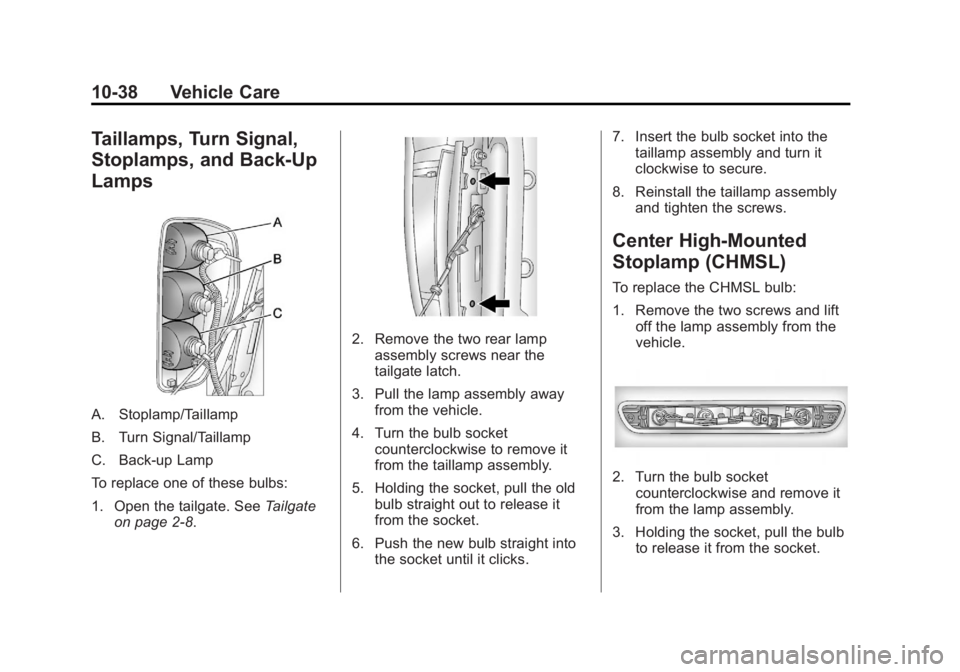
A. Stoplamp/Taillamp
B. Turn Signal/Taillamp
C. Back‐up Lamp
To replace one of these bulbs:
1. Open the tailgate. SeeTailgate
on page 2‑8.
2. Remove the two rear lamp assembly screws near the
tailgate latch.
3. Pull the lamp assembly away from the vehicle.
4. Turn the bulb socket counterclockwise to remove it
from the taillamp assembly.
5. Holding the socket, pull the old bulb straight out to release it
from the socket.
6. Push the new bulb straight into the socket until it clicks. 7. Insert the bulb socket into the
taillamp assembly and turn it
clockwise to secure.
8. Reinstall the taillamp assembly and tighten the screws.
Center High-Mounted
Stoplamp (CHMSL)
To replace the CHMSL bulb:
1. Remove the two screws and liftoff the lamp assembly from the
vehicle.
2. Turn the bulb socketcounterclockwise and remove it
from the lamp assembly.
3. Holding the socket, pull the bulb to release it from the socket.
Page 283 of 404
Black plate (39,1)GMC Canyon Owner Manual - 2012
Vehicle Care 10-39
4. Push the new bulb into thesocket until it clicks.
5. Insert the bulb socket into the lamp assembly and turn it
clockwise to secure.
6. Reinstall the lamp assembly and tighten the screws.
License Plate Lamp
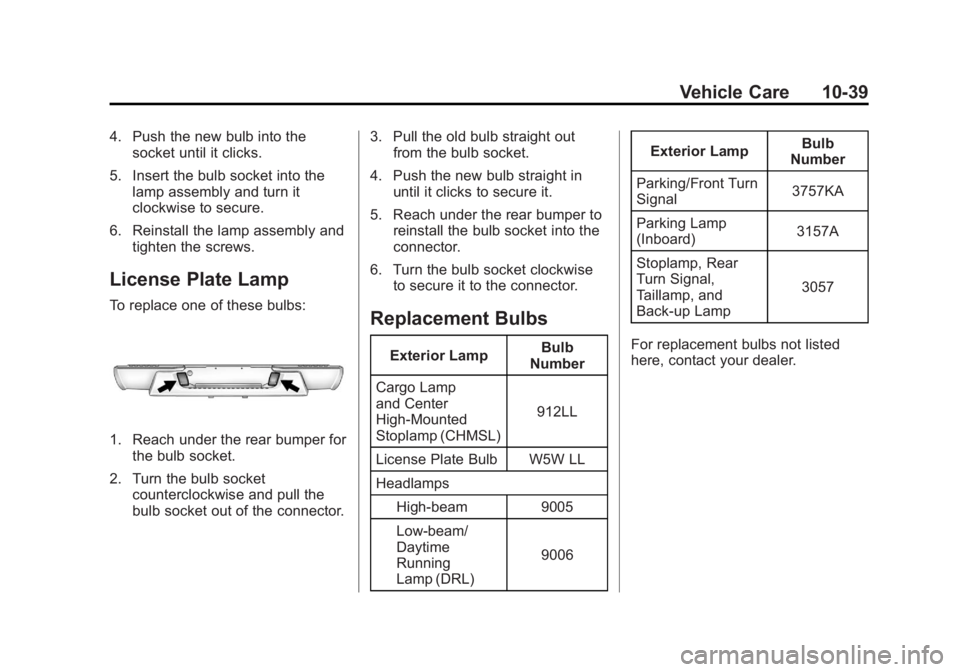
To replace one of these bulbs:
1. Reach under the rear bumper forthe bulb socket.
2. Turn the bulb socket counterclockwise and pull the
bulb socket out of the connector. 3. Pull the old bulb straight out
from the bulb socket.
4. Push the new bulb straight in until it clicks to secure it.
5. Reach under the rear bumper to reinstall the bulb socket into the
connector.
6. Turn the bulb socket clockwise to secure it to the connector.
Replacement Bulbs
Exterior Lamp Bulb
Number
Cargo Lamp
and Center
High‐Mounted
Stoplamp (CHMSL) 912LL
License Plate Bulb W5W LL
Headlamps High-beam 9005
Low-beam/
Daytime
Running
Lamp (DRL) 9006Exterior Lamp
Bulb
Number
Parking/Front Turn
Signal 3757KA
Parking Lamp
(Inboard) 3157A
Stoplamp, Rear
Turn Signal,
Taillamp, and
Back‐up Lamp 3057
For replacement bulbs not listed
here, contact your dealer.