radio GMC CANYON 2012 Owner's Guide
[x] Cancel search | Manufacturer: GMC, Model Year: 2012, Model line: CANYON, Model: GMC CANYON 2012Pages: 404, PDF Size: 5.25 MB
Page 164 of 404
Black plate (18,1)GMC Canyon Owner Manual - 2012
7-18 Infotainment System
BAND:Press to listen to the radio
when a CD is playing. The inactive
CD remains inside the radio for
future listening.
CD AUX (Auxiliary): Press to play
a CD when listening to the radio.
The CD symbol displays when a
CD is loaded.
Z(Eject): Press to eject a CD.
Eject can be activated with either
the ignition or radio off. CDs can be
loaded with the ignition and radio off
if this button is pressed first.
Playing an MP3/WMA Disc
MP3/WMA CD-R Disc Format
If you burn your own MP3/WMA
disc on a personal computer:
.Make sure the MP3/WMA files
are recorded on a CD-R disc.
.Make sure playlists have a .m3u
or .wpl extension, other file
extensions might not work.
.Files can be recorded with a
variety of fixed or variable bit
rates. Song title, artist name,
and album are displayed by the
radio when recorded using ID3
tags version 1 and 2.
.Create a folder structure that
makes it easy to find songs
while driving. Organize songs by
albums using one folder for each
album. Each folder or album
should contain 18 songs or less.
.Make sure to finalize the disc
when burning an MP3/WMA
disc, using multiple sessions.
It is usually better to burn the
disc all at once.
The player is able to read and
play a maximum of 253 folders,
50 playlists, 20 sessions, and
949 files. Long file names, folder
names, or playlist names may use
more disc memory space than
necessary. To conserve space on
the disc, minimize the length of the
file, folder, or playlist names. An MP3/WMA CD-R that was
recorded using no file folders can
also be used. The system can
support up to 11 folders in depth,
though, keep the depth of the
folders to a minimum in order to
keep down the complexity and
confusion in trying to locate a
particular folder during playback.
If a CD contains more than the
maximum of 253 folders,
50 playlists, 20 sessions, and
949 files, the player lets you access
and navigate up to the maximum,
but all items over the maximum
are played.
Root Directory
The root directory is treated as a
folder. If the root directory has
compressed audio files, the
directory displays as F1 ROOT. All
files contained directly under the
root directory are accessed prior to
any root directory folders. However,
playlists (Px) are always accessed
before root folders or files.
Page 165 of 404
Black plate (19,1)GMC Canyon Owner Manual - 2012
Infotainment System 7-19
Empty Directory or Folder
If a root directory or a folder exists
somewhere in the file structure that
contains only folders/subfolders and
no compressed files directly
beneath them, the player advances
to the next folder in the file structure
that contains compressed audio
files. The empty folder does not
display.
No Folder
When the CD contains only
compressed files, the files are
located under the root folder. The
next and previous folder functions
have no function on a CD that was
recorded without folders or playlists.
When displaying the name of the
folder the radio displays ROOT.
When the CD contains only playlists
and compressed audio files, but no
folders, all files are located under
the root folder. The folder down
and the folder up buttons searchplaylists (Px) first and then go to the
root folder. When the radio displays
the name of the folder, the radio
displays ROOT.
Order of Play
Tracks are played in the following
order:
.Play begins from the first track in
the first playlist and continues
sequentially through all tracks in
each playlist. When the last
track of the last playlist has
played, play continues from the
first track of the first playlist.
.If the CD does not contain any
playlists, then play begins from
the first track under the root
directory. When all tracks from
the root directory have played,
play continues from files
according to their numerical
listing. After playing the last
track from the last folder, play
begins again at the first track of
the first folder or root directory.When play enters a new folder, the
display does not automatically show
the new folder name unless you
have chosen the folder mode as the
default display. See DISPL (display)
later in this section for more
information. The new track
name displays.
File System and Naming
The song name that displays is the
song name that is contained in the
ID3 tag. If the song name is not
present in the ID3 tag, then the
radio displays the file name without
the extension (such as .mp3) as
the track name.
Track names longer than
32 characters or four pages are
shortened. Parts of words on the
last page of text and the extension
of the filename does not display.
Page 166 of 404
Black plate (20,1)GMC Canyon Owner Manual - 2012
7-20 Infotainment System
Preprogrammed Playlists
Preprogrammed playlists which
were created by WinAmp™,
MusicMatch™, or Real Jukebox™
software can be accessed, however,
they cannot be edited. These
playlists are treated as special
folders containing compressed
audio song files.
Playing an MP3/WMA
Insert a CD partway into the slot,
label side up. The player pulls it in,
and READING displays. The CD
should begin playing and the CD
symbol displays. If you want to
insert a CD with the ignition off,
first press the
Zbutton or the
DISPL knob.
If the ignition or radio is turned off
with a CD in the player it stays in
the player. When the ignition or
radio is turned on, the CD starts to
play where it stopped, if it was the
last selected audio source.
As each new track starts to play, the
track number displays. 1 FLD
x(Previous Folder):
Press
this button to go to the first track in
the previous folder. Pressing this
button while in folder random mode
takes you to the previous folder and
plays the tracks in random order in
that folder.
2 FLD
w(Next Folder): Press this
button to go to the first track in the
next folder. Pressing this button
while in folder random mode takes
the CD to the next folder and plays
the tracks in random order in that
folder.
3 REV (Reverse): Press and hold
this button to reverse quickly within
a track. Press and hold this button
for less than two seconds to reverse
at 10 times the normal playing
speed. Press and hold it for more
than two seconds to reverse at
20 times the normal playing
speed. Release this button to play
the track.
4 FWD (Forward): Press and hold
this button to advance quickly within
a track. Press and hold this button for less than two seconds to
advance at 10 times the normal
playing speed. Press and hold it for
more than two seconds to advance
at 20 times the normal playing
speed. Release this button to play
the track.
6 RDM (Random):
To play the
tracks in random order in the current
folder or playlist, press and release
this button. FLDR RDM (folder
random) displays. Once all of the
tracks in the current folder or playlist
have played, the system moves to
the next folder or playlist and plays
all of the tracks in random order.
To play all the tracks in random
order on the CD, press and hold this
button for two seconds. A beep
sounds and DISC RDM (disc
random) displays. This feature does
not work with playlists.
When in random, pressing and
releasing either SEEK arrow takes
the CD to the previous or to the next
random track.
Page 167 of 404
Black plate (21,1)GMC Canyon Owner Manual - 2012
Infotainment System 7-21
Press and release this button again
to turn off random play. NO RDM (no
random) displays.
qSEEKr:Press the left SEEK
arrow to go to the start of the
previous track. Press the right
SEEK arrow to go to the start of the
next track. Pressing either SEEK
arrow for more than two seconds
searches the previous or next tracks
at two tracks per second. Release
the button to stop searching and to
play the track.
qTUNEr: Turn to reverse or
advance through the tracks in all
folders or playlists. The track
number and file name displays for
each track. Turning this knob while
in random reverses or advances the
tracks in sequential order.
DISPL (Display): Press this knob
to switch between track mode,
folder/playlist mode, and time of day
mode. The display shows only
eight characters, but there can be
up to four pages of text. If there are more than
eight characters in the song,
folder, or playlist name, pressing
this knob within two seconds takes
you to the next page of text. If there
are no other pages to be shown,
pressing this knob within
two seconds takes you to the
next display mode.
.Track mode displays the current
track number and the ID3 tag
song name.
.Folder/playlist mode displays the
current folder or playlist number
and the folder/playlist name.
.Time of day mode displays the
time of day and the ID3 tag
song name.
To change the default on the
display, press the DISPL knob until
you see the desired display, then
press and hold this knob for two
two seconds. The radio produces
one beep and the selected display
is now the default. INFO (Information):
INFO displays
when a current track has ID3 tag
information. Press this button to
display the artist name and album
contained in the tag. INFO
disappears from the display when
the information in the ID3 tag has
finished being read.
BAND: Press this button to listen to
the radio when a CD is playing. The
inactive CD remains inside the radio
for future listening.
CD AUX (Auxiliary): Press this
button to play a CD when listening
to the radio. The CD symbol
illuminates on the display when a
CD is loaded.
Z(Eject): Press this button to
eject a CD. Eject can activate while
either the ignition or radio is off.
CDs can be loaded with the
ignition and radio off if this button
is pressed first.
Page 168 of 404
Black plate (22,1)GMC Canyon Owner Manual - 2012
7-22 Infotainment System
CD Messages
CHECK CD:If this message
displays and/or the CD comes out, it
could be for one of the following
reasons:
.It is very hot. When the
temperature returns to normal,
the CD should play.
.You are driving on a very rough
road. When the road becomes
smoother, the CD should play.
.The CD is dirty, scratched, wet,
or upside down.
.The air is very humid. If so, wait
about an hour and try again.
.The format of the CD might not
be compatible. See “Using an
MP3” later in this section.
.There could have been a
problem while burning the CD.
.The label could be caught in the
CD player.
If the CD is not playing correctly, for
any other reason, try a known
good CD.
If any error occurs repeatedly or
if an error cannot be corrected,
contact your dealer. If the radio
displays an error message, write it
down and provide it to your dealer
when reporting the problem.
Phone
Bluetooth
For vehicles equipped with
Bluetooth capability, the system can
interact with many cell phones,
allowing:
.Placement and receipt of calls in
a hands-free mode.
.Sharing of the cell phone’s
address book or contact list with
the vehicle.
To minimize driver distraction,
before driving, and with the
vehicle parked:
.Become familiar with the
features of the cell phone.
Organize the phone book and
contact lists clearly and delete
duplicate or rarely used entries.
If possible, program speed dial
or other shortcuts.
.Review the controls and
operation of the infotainment
system.
Page 175 of 404
Black plate (29,1)GMC Canyon Owner Manual - 2012
Infotainment System 7-29
Voice Pass-Thru
Voice Pass‐Thru allows access to
the voice recognition commands on
the cell phone. See the cell phone
manufacturer's user guide to see if
the cell phone supports this feature.
This feature can be used to verbally
access contacts stored in the
cell phone.
1. Press and release
g.
2. Say “Bluetooth.” This command
can be skipped.
3. Say “Voice.”
.The cell phone's normal
prompt messages will go
through its cycle according
to the phone's operating
instructions.
Dual Tone Multi-Frequency
(DTMF) Tones
The Bluetooth system can send
numbers and the numbers stored as
name tags during a call. You can
use this feature when calling a
menu driven phone system. Account
numbers can also be stored for use.
Sending a Number or Name Tag
During a Call
1. Press
g. The system responds
“Ready,” followed by a tone.
2. Say “Dial.”
3. Say the number or name tag to send.
Clearing the System
Unless information is deleted out of
the in‐vehicle Bluetooth system, it
will be retained indefinitely. This
includes all saved name tags in
the phonebook and phone pairing
information. For information on how
to delete this information, see the
above sections on Deleting a Paired
Phone and Deleting Name Tags.
Other Information
The Bluetooth®word mark and
logos are owned by the Bluetooth®
SIG, Inc. and any use of such marks
by General Motors is under license.
Other trademarks and trade names
are those of their respective owners.
See Radio Frequency Statement on
page 13‑22 for information
regarding Part 15 of the Federal
Communications Commission (FCC)
rules and Industry Canada
Standards RSS-GEN/210/220/310.
Page 182 of 404
Black plate (2,1)GMC Canyon Owner Manual - 2012
9-2 Driving and Operating
Fuel
Fuel . . . . . . . . . . . . . . . . . . . . . . . . . 9-49
Recommended Fuel . . . . . . . . . 9-49
Gasoline Specifications(U.S. and Canada Only) . . . . 9-50
California Fuel
Requirements . . . . . . . . . . . . . . 9-50
Fuels in Foreign Countries . . . 9-50
Fuel Additives . . . . . . . . . . . . . . . 9-50
Filling the Tank . . . . . . . . . . . . . . 9-52
Filling a Portable Fuel Container . . . . . . . . . . . . . . . . . . . 9-53
Towing
General TowingInformation . . . . . . . . . . . . . . . . . 9-54
Driving Characteristics and Towing Tips . . . . . . . . . . . . . . . . 9-54
Trailer Towing . . . . . . . . . . . . . . . . 9-58
Towing Equipment . . . . . . . . . . . 9-63
Conversions and Add-Ons
Add-On Electrical Equipment . . . . . . . . . . . . . . . . . 9-64
Pickup Conversion to Chassis Cab . . . . . . . . . . . . . . . 9-64
Driving Information
Distracted Driving
Distraction comes in many forms
and can take your focus from the
task of driving. Exercise good
judgment and do not let other
activities divert your attention
away from the road. Many local
governments have enacted laws
regarding driver distraction.
Become familiar with the local laws
in your area.
To avoid distracted driving, always
keep your eyes on the road, hands
on the wheel, and mind on the drive.
.Do not use a phone in
demanding driving situations.
Use a hands-free method to
place or receive necessary
phone calls.
.Watch the road. Do not read,
take notes, or look up
information on phones or other
electronic devices.
.Designate a front seat
passenger to handle potential
distractions.
.Become familiar with vehicle
features before driving, such as
programming favorite radio
stations and adjusting climate
control and seat settings.
Program all trip information into
any navigation device prior to
driving.
.Wait until the vehicle is parked
to retrieve items that have fallen
to the floor.
.Stop or park the vehicle to tend
to children.
.Keep pets in an appropriate
carrier or restraint.
.Avoid stressful conversations
while driving, whether with a
passenger or on a cell phone.
Page 285 of 404
Black plate (41,1)GMC Canyon Owner Manual - 2012
Vehicle Care 10-41
Fuses and Circuit
Breakers
The wiring circuits in the vehicle are
protected from short circuits by a
combination of fuses and circuit
breakers. This greatly reduces the
chance of fires caused by electrical
problems.
Look at the silver-colored band
inside the fuse. If the band is broken
or melted, replace the fuse. Be sure
you replace a bad fuse with a new
one of the identical size and rating.
If you ever have a problem on the
road and do not have a spare fuse,
you can borrow one that has the
same amperage. Just pick some
feature of the vehicle that you can
get along without—like the radio or
cigarette lighter —and use its fuse,
if it is the correct amperage.
Replace it as soon as you can.
Engine Compartment
Fuse Block
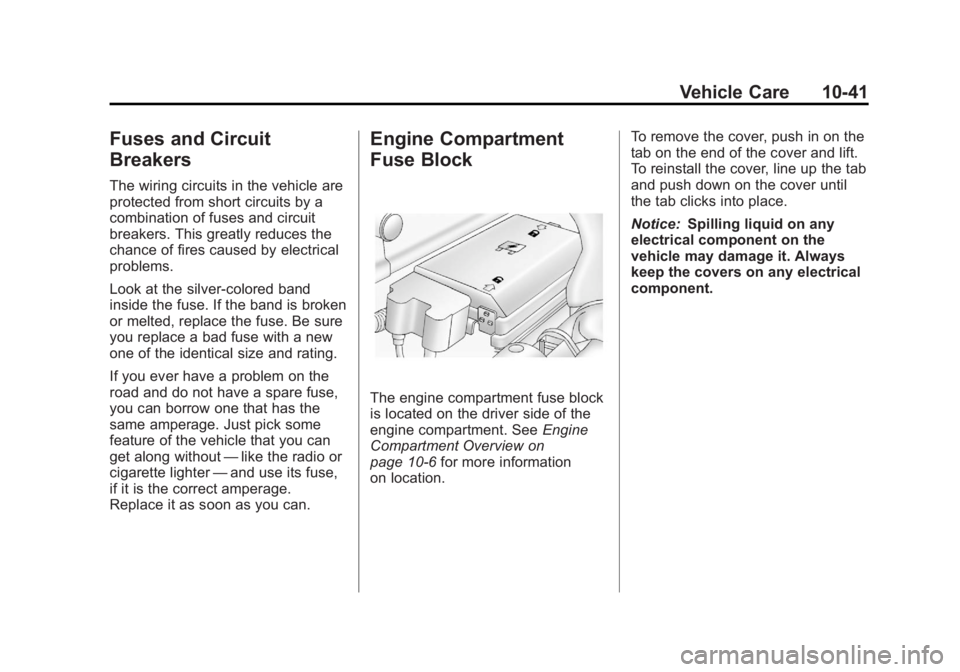
The engine compartment fuse block
is located on the driver side of the
engine compartment. See Engine
Compartment Overview on
page 10‑6 for more information
on location. To remove the cover, push in on the
tab on the end of the cover and lift.
To reinstall the cover, line up the tab
and push down on the cover until
the tab clicks into place.
Notice:
Spilling liquid on any
electrical component on the
vehicle may damage it. Always
keep the covers on any electrical
component.
Page 287 of 404
Black plate (43,1)GMC Canyon Owner Manual - 2012
Vehicle Care 10-43
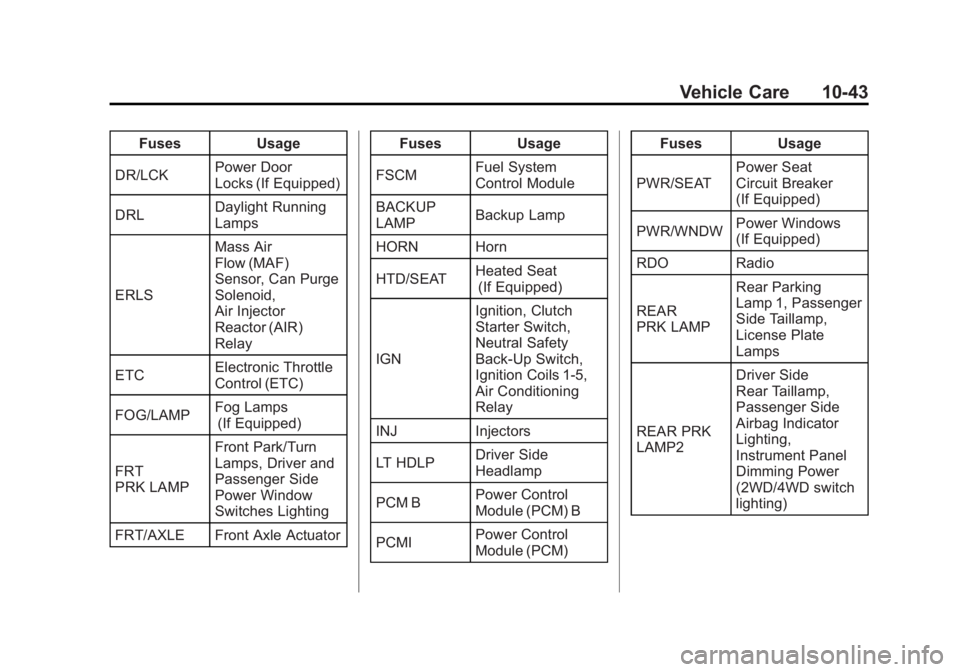
FusesUsage
DR/LCK Power Door
Locks (If Equipped)
DRL Daylight Running
Lamps
ERLS Mass Air
Flow (MAF)
Sensor, Can Purge
Solenoid,
Air Injector
Reactor (AIR)
Relay
ETC Electronic Throttle
Control (ETC)
FOG/LAMP Fog Lamps
(If Equipped)
FRT
PRK LAMP Front Park/Turn
Lamps, Driver and
Passenger Side
Power Window
Switches Lighting
FRT/AXLE Front Axle Actuator Fuses
Usage
FSCM Fuel System
Control Module
BACKUP
LAMP Backup Lamp
HORN Horn
HTD/SEAT Heated Seat
(If Equipped)
IGN Ignition, Clutch
Starter Switch,
Neutral Safety
Back‐Up Switch,
Ignition Coils 1‐5,
Air Conditioning
Relay
INJ Injectors
LT HDLP Driver Side
Headlamp
PCM B Power Control
Module (PCM) B
PCMI Power Control
Module (PCM) Fuses
Usage
PWR/SEAT Power Seat
Circuit Breaker
(If Equipped)
PWR/WNDW Power Windows
(If Equipped)
RDO Radio
REAR
PRK LAMP Rear Parking
Lamp 1, Passenger
Side Taillamp,
License Plate
Lamps
REAR PRK
LAMP2 Driver Side
Rear Taillamp,
Passenger Side
Airbag Indicator
Lighting,
Instrument Panel
Dimming Power
(2WD/4WD switch
lighting)
Page 300 of 404
Black plate (56,1)GMC Canyon Owner Manual - 2012
10-56 Vehicle Care
Tire Pressure for
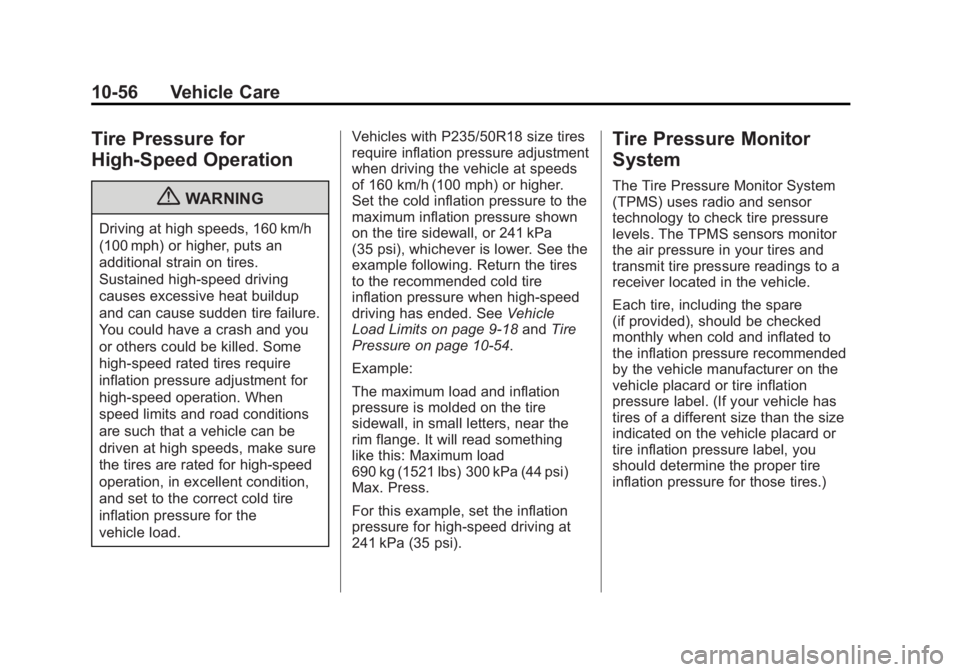
High-Speed Operation
{WARNING
Driving at high speeds, 160 km/h
(100 mph) or higher, puts an
additional strain on tires.
Sustained high-speed driving
causes excessive heat buildup
and can cause sudden tire failure.
You could have a crash and you
or others could be killed. Some
high-speed rated tires require
inflation pressure adjustment for
high-speed operation. When
speed limits and road conditions
are such that a vehicle can be
driven at high speeds, make sure
the tires are rated for high-speed
operation, in excellent condition,
and set to the correct cold tire
inflation pressure for the
vehicle load.Vehicles with P235/50R18 size tires
require inflation pressure adjustment
when driving the vehicle at speeds
of 160 km/h (100 mph) or higher.
Set the cold inflation pressure to the
maximum inflation pressure shown
on the tire sidewall, or 241 kPa
(35 psi), whichever is lower. See the
example following. Return the tires
to the recommended cold tire
inflation pressure when high-speed
driving has ended. See
Vehicle
Load Limits on page 9‑18 andTire
Pressure on page 10‑54.
Example:
The maximum load and inflation
pressure is molded on the tire
sidewall, in small letters, near the
rim flange. It will read something
like this: Maximum load
690 kg (1521 lbs) 300 kPa (44 psi)
Max. Press.
For this example, set the inflation
pressure for high‐speed driving at
241 kPa (35 psi).
Tire Pressure Monitor
System
The Tire Pressure Monitor System
(TPMS) uses radio and sensor
technology to check tire pressure
levels. The TPMS sensors monitor
the air pressure in your tires and
transmit tire pressure readings to a
receiver located in the vehicle.
Each tire, including the spare
(if provided), should be checked
monthly when cold and inflated to
the inflation pressure recommended
by the vehicle manufacturer on the
vehicle placard or tire inflation
pressure label. (If your vehicle has
tires of a different size than the size
indicated on the vehicle placard or
tire inflation pressure label, you
should determine the proper tire
inflation pressure for those tires.)