AUX GMC CANYON 2012 Owner's Manual
[x] Cancel search | Manufacturer: GMC, Model Year: 2012, Model line: CANYON, Model: GMC CANYON 2012Pages: 404, PDF Size: 5.25 MB
Page 164 of 404
Black plate (18,1)GMC Canyon Owner Manual - 2012
7-18 Infotainment System
BAND:Press to listen to the radio
when a CD is playing. The inactive
CD remains inside the radio for
future listening.
CD AUX (Auxiliary): Press to play
a CD when listening to the radio.
The CD symbol displays when a
CD is loaded.
Z(Eject): Press to eject a CD.
Eject can be activated with either
the ignition or radio off. CDs can be
loaded with the ignition and radio off
if this button is pressed first.
Playing an MP3/WMA Disc
MP3/WMA CD-R Disc Format
If you burn your own MP3/WMA
disc on a personal computer:
.Make sure the MP3/WMA files
are recorded on a CD-R disc.
.Make sure playlists have a .m3u
or .wpl extension, other file
extensions might not work.
.Files can be recorded with a
variety of fixed or variable bit
rates. Song title, artist name,
and album are displayed by the
radio when recorded using ID3
tags version 1 and 2.
.Create a folder structure that
makes it easy to find songs
while driving. Organize songs by
albums using one folder for each
album. Each folder or album
should contain 18 songs or less.
.Make sure to finalize the disc
when burning an MP3/WMA
disc, using multiple sessions.
It is usually better to burn the
disc all at once.
The player is able to read and
play a maximum of 253 folders,
50 playlists, 20 sessions, and
949 files. Long file names, folder
names, or playlist names may use
more disc memory space than
necessary. To conserve space on
the disc, minimize the length of the
file, folder, or playlist names. An MP3/WMA CD-R that was
recorded using no file folders can
also be used. The system can
support up to 11 folders in depth,
though, keep the depth of the
folders to a minimum in order to
keep down the complexity and
confusion in trying to locate a
particular folder during playback.
If a CD contains more than the
maximum of 253 folders,
50 playlists, 20 sessions, and
949 files, the player lets you access
and navigate up to the maximum,
but all items over the maximum
are played.
Root Directory
The root directory is treated as a
folder. If the root directory has
compressed audio files, the
directory displays as F1 ROOT. All
files contained directly under the
root directory are accessed prior to
any root directory folders. However,
playlists (Px) are always accessed
before root folders or files.
Page 167 of 404
Black plate (21,1)GMC Canyon Owner Manual - 2012
Infotainment System 7-21
Press and release this button again
to turn off random play. NO RDM (no
random) displays.
qSEEKr:Press the left SEEK
arrow to go to the start of the
previous track. Press the right
SEEK arrow to go to the start of the
next track. Pressing either SEEK
arrow for more than two seconds
searches the previous or next tracks
at two tracks per second. Release
the button to stop searching and to
play the track.
qTUNEr: Turn to reverse or
advance through the tracks in all
folders or playlists. The track
number and file name displays for
each track. Turning this knob while
in random reverses or advances the
tracks in sequential order.
DISPL (Display): Press this knob
to switch between track mode,
folder/playlist mode, and time of day
mode. The display shows only
eight characters, but there can be
up to four pages of text. If there are more than
eight characters in the song,
folder, or playlist name, pressing
this knob within two seconds takes
you to the next page of text. If there
are no other pages to be shown,
pressing this knob within
two seconds takes you to the
next display mode.
.Track mode displays the current
track number and the ID3 tag
song name.
.Folder/playlist mode displays the
current folder or playlist number
and the folder/playlist name.
.Time of day mode displays the
time of day and the ID3 tag
song name.
To change the default on the
display, press the DISPL knob until
you see the desired display, then
press and hold this knob for two
two seconds. The radio produces
one beep and the selected display
is now the default. INFO (Information):
INFO displays
when a current track has ID3 tag
information. Press this button to
display the artist name and album
contained in the tag. INFO
disappears from the display when
the information in the ID3 tag has
finished being read.
BAND: Press this button to listen to
the radio when a CD is playing. The
inactive CD remains inside the radio
for future listening.
CD AUX (Auxiliary): Press this
button to play a CD when listening
to the radio. The CD symbol
illuminates on the display when a
CD is loaded.
Z(Eject): Press this button to
eject a CD. Eject can activate while
either the ignition or radio is off.
CDs can be loaded with the
ignition and radio off if this button
is pressed first.
Page 286 of 404
Black plate (42,1)GMC Canyon Owner Manual - 2012
10-42 Vehicle Care
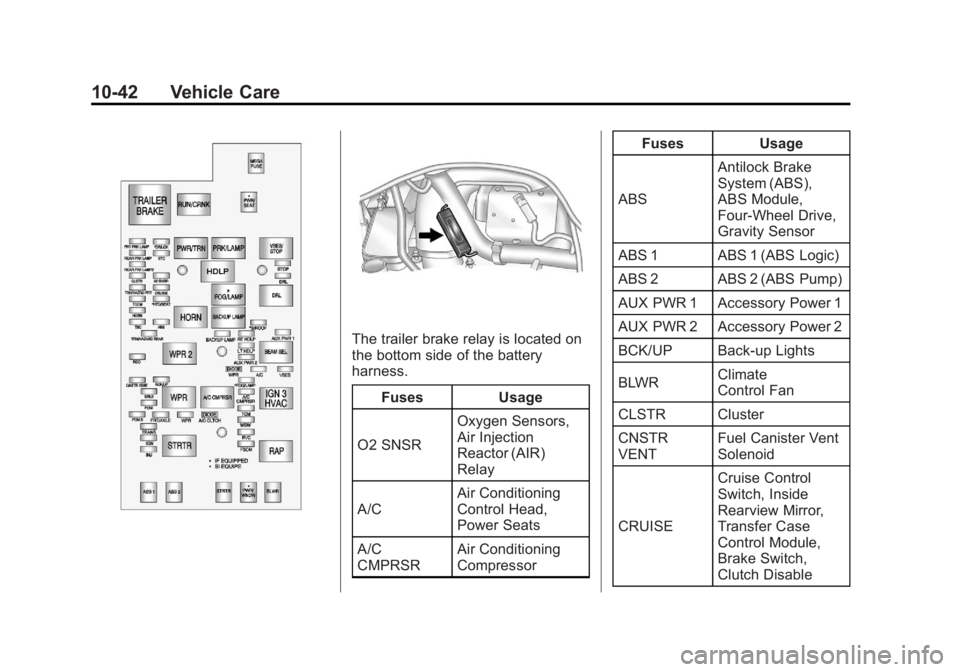
The trailer brake relay is located on
the bottom side of the battery
harness.Fuses Usage
O2 SNSR Oxygen Sensors,
Air Injection
Reactor (AIR)
Relay
A/C Air Conditioning
Control Head,
Power Seats
A/C
CMPRSR Air Conditioning
Compressor Fuses Usage
ABS Antilock Brake
System (ABS),
ABS Module,
Four‐Wheel Drive,
Gravity Sensor
ABS 1 ABS 1 (ABS Logic)
ABS 2 ABS 2 (ABS Pump)
AUX PWR 1 Accessory Power 1
AUX PWR 2 Accessory Power 2
BCK/UP Back-up Lights
BLWR Climate
Control Fan
CLSTR Cluster
CNSTR
VENT Fuel Canister Vent
Solenoid
CRUISE Cruise Control
Switch, Inside
Rearview Mirror,
Transfer Case
Control Module,
Brake Switch,
Clutch Disable
Page 291 of 404
Black plate (47,1)GMC Canyon Owner Manual - 2012
Vehicle Care 10-47
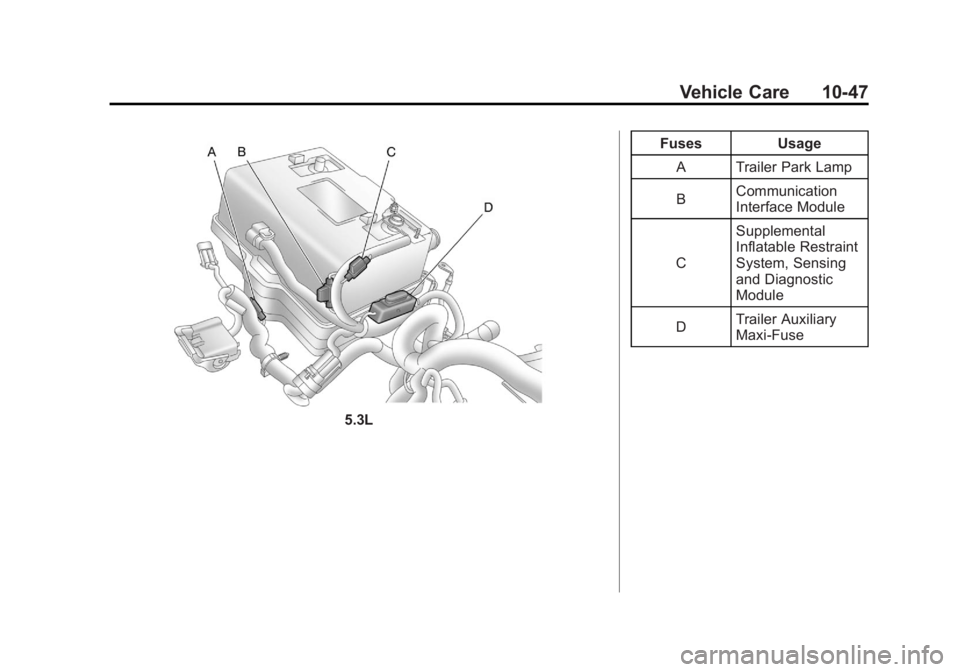
5.3LFuses Usage
A Trailer Park Lamp
B Communication
Interface Module
C Supplemental
Inflatable Restraint
System, Sensing
and Diagnostic
Module
D Trailer Auxiliary
Maxi-Fuse