ad blue GMC CANYON 2012 Owner's Manual
[x] Cancel search | Manufacturer: GMC, Model Year: 2012, Model line: CANYON, Model: GMC CANYON 2012Pages: 404, PDF Size: 5.25 MB
Page 17 of 404
Black plate (11,1)GMC Canyon Owner Manual - 2012
In Brief 1-11
Steering Wheel
Adjustment
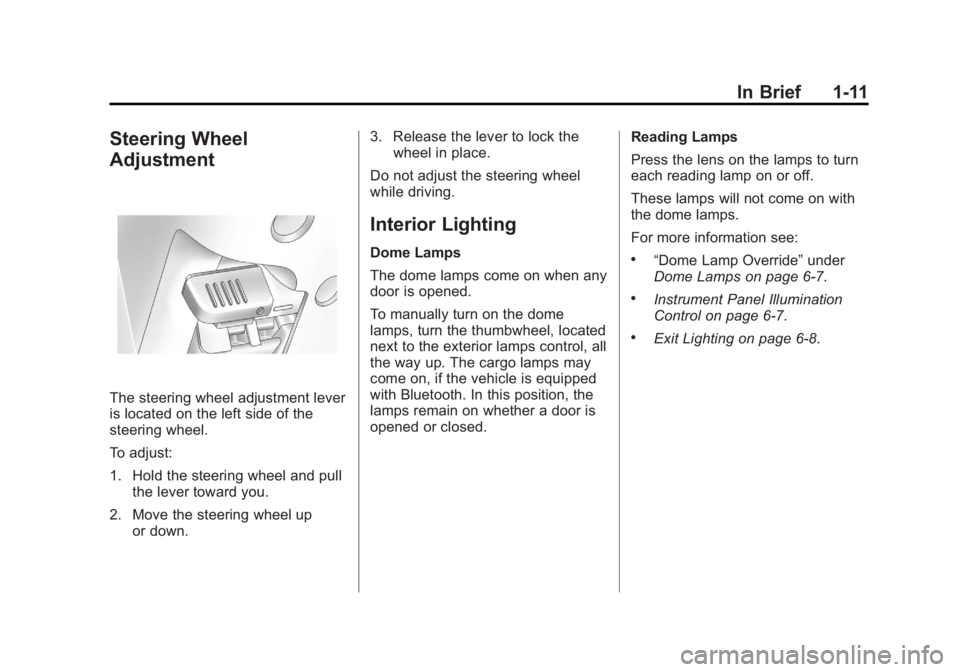
The steering wheel adjustment lever
is located on the left side of the
steering wheel.
To adjust:
1. Hold the steering wheel and pullthe lever toward you.
2. Move the steering wheel up or down. 3. Release the lever to lock the
wheel in place.
Do not adjust the steering wheel
while driving.
Interior Lighting
Dome Lamps
The dome lamps come on when any
door is opened.
To manually turn on the dome
lamps, turn the thumbwheel, located
next to the exterior lamps control, all
the way up. The cargo lamps may
come on, if the vehicle is equipped
with Bluetooth. In this position, the
lamps remain on whether a door is
opened or closed. Reading Lamps
Press the lens on the lamps to turn
each reading lamp on or off.
These lamps will not come on with
the dome lamps.
For more information see:.“Dome Lamp Override”
under
Dome Lamps on page 6‑7.
.Instrument Panel Illumination
Control on page 6‑7.
.Exit Lighting on page 6‑8.
Page 26 of 404

Black plate (20,1)GMC Canyon Owner Manual - 2012
1-20 In Brief
Roadside Assistance and OnStar
(U.S. and Canada)
If you have an active OnStar
subscription, press the
Qbutton
and the current GPS location will be
sent to an OnStar advisor who will
assess your problem, contact
Roadside Assistance, and relay
your exact location to get the help
you need.
Online Owner Center
(U.S. and Canada)
The Online Owner Center is a
complimentary service that includes
online service reminders, vehicle
maintenance tips, online owner
manual, special privileges,
and more.
Sign up today at:
U.S.: gmc.com (click on
“Owners,” then“Manage My
GMC/Owners Login”)
Canada: gmcowner.ca
OnStar®
For vehicles with an active OnStar
subscription, OnStar uses several
innovative technologies and live
Advisors to provide a wide range of
safety, security, navigation,
diagnostics, and calling services.
Automatic Crash Response
In a crash, built‐in sensors
automatically alert an OnStar
Advisor who is immediately
connected to the vehicle to see if
you need help.
How OnStar Service Works
Q: Push this blue button to
connect to a specially trained
OnStar Advisor to verify your
account information and to answer
questions.
]: Push this red emergency
button to get priority help from
specially trained OnStar Emergency
Advisors.
X: Push this button for hands‐free,
voice‐activated calling and to give
voice commands for Hands‐Free
Calling and Turn‐by‐Turn
Navigation.
Automatic Crash Response,
Emergency Services, Crisis Assist,
Stolen Vehicle Assistance, Vehicle
Diagnostics, Remote Door Unlock,
Roadside Assistance, Turn‐by‐Turn
Navigation, and Hands‐Free Calling
are available on most vehicles. Not
all OnStar services are available on
all vehicles. For more information,
see the OnStar Owner's Guide; visit
www.onstar.com (U.S.) or
www.onstar.ca (Canada); contact
Page 144 of 404
Black plate (6,1)GMC Canyon Owner Manual - 2012
6-6 Lighting
Fog Lamps
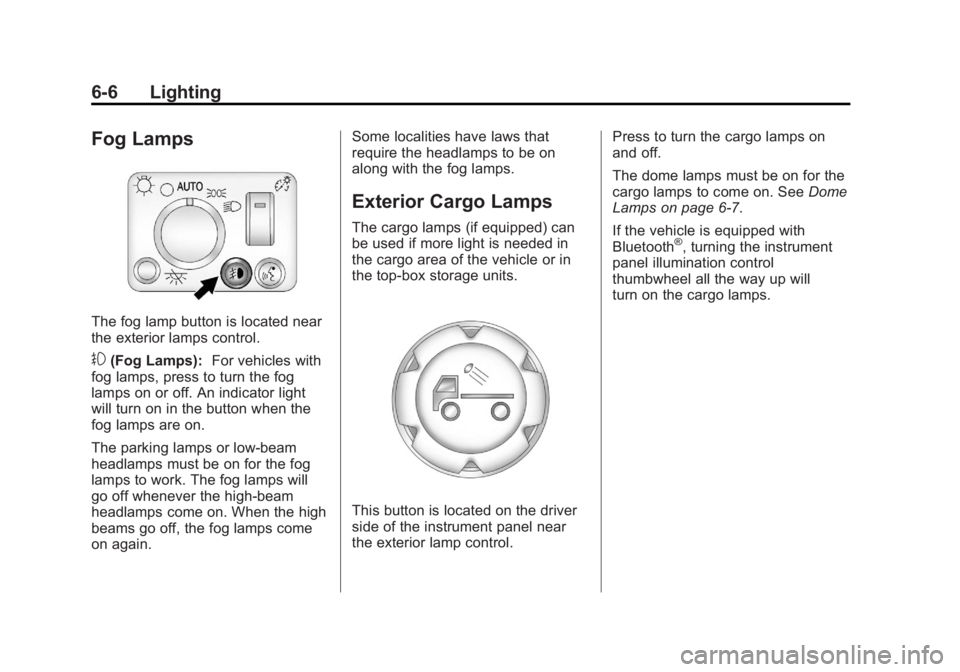
The fog lamp button is located near
the exterior lamps control.
#(Fog Lamps):For vehicles with
fog lamps, press to turn the fog
lamps on or off. An indicator light
will turn on in the button when the
fog lamps are on.
The parking lamps or low-beam
headlamps must be on for the fog
lamps to work. The fog lamps will
go off whenever the high-beam
headlamps come on. When the high
beams go off, the fog lamps come
on again. Some localities have laws that
require the headlamps to be on
along with the fog lamps.
Exterior Cargo Lamps
The cargo lamps (if equipped) can
be used if more light is needed in
the cargo area of the vehicle or in
the top-box storage units.
This button is located on the driver
side of the instrument panel near
the exterior lamp control.
Press to turn the cargo lamps on
and off.
The dome lamps must be on for the
cargo lamps to come on. See
Dome
Lamps on page 6‑7.
If the vehicle is equipped with
Bluetooth
®, turning the instrument
panel illumination control
thumbwheel all the way up will
turn on the cargo lamps.
Page 145 of 404
Black plate (7,1)GMC Canyon Owner Manual - 2012
Lighting 6-7
Interior Lighting
Instrument Panel
Illumination Control
D
(Instrument Panel Lights):
Turn the thumbwheel up or down to
brighten or dim the instrument panel
lights and the radio display. The
instrument panel lights, cluster, and
radio display do not dim to complete
darkness. Turning the thumbwheel
all the way up will turn on the dome
lamps and may also turn on the
cargo lamp, if the vehicle is
equipped with Bluetooth.
The instrument panel light
brightness control will only work if
the headlamps or parking lamps are
on. See Exterior Lamp Controls on
page 6‑1.
Dome Lamps
The dome lamps come on when any
door is opened.
To manually turn on the dome
lamps, turn the thumbwheel, located
next to the exterior lamps control, all
the way up. The cargo lamps may
come on, if the vehicle is equipped
with Bluetooth. In this position, the
lamps remain on whether a door is
opened or closed.
Reading Lamps
Press the lens on the lamps to
turn each reading lamp on or off.
These lamps will not come on with
the dome lamps. Dome Lamp Override
The dome lamp override button is
located below the exterior lamps
control.
E(Dome Lamp Override):
Press this button in to make the
dome lamps remain off when the
doors are open. To return the lamps
to automatic operation, press
E
again and return it to the out
position.
Page 147 of 404
Black plate (1,1)GMC Canyon Owner Manual - 2012
Infotainment System 7-1
Infotainment
System
Introduction
Infotainment . . . . . . . . . . . . . . . . . . . 7-1
Theft-Deterrent Feature . . . . . . . 7-3
Operation . . . . . . . . . . . . . . . . . . . . . 7-4
Radio
AM-FM Radio . . . . . . . . . . . . . . . . . 7-9
Satellite Radio . . . . . . . . . . . . . . . 7-12
Radio Reception . . . . . . . . . . . . . 7-15
Fixed Mast Antenna . . . . . . . . . 7-16
Satellite Radio Antenna . . . . . . 7-16
Audio Players
CD Player . . . . . . . . . . . . . . . . . . . 7-16
Phone
Bluetooth . . . . . . . . . . . . . . . . . . . . 7-22
Introduction
Infotainment
Determine which radio the vehicle
has and read the following pages to
become familiar with its features.
{WARNING
Taking your eyes off the road for
extended periods could cause a
crash resulting in injury or death
to you or others. Do not give
extended attention to infotainment
tasks while driving.
Page 168 of 404
Black plate (22,1)GMC Canyon Owner Manual - 2012
7-22 Infotainment System
CD Messages
CHECK CD:If this message
displays and/or the CD comes out, it
could be for one of the following
reasons:
.It is very hot. When the
temperature returns to normal,
the CD should play.
.You are driving on a very rough
road. When the road becomes
smoother, the CD should play.
.The CD is dirty, scratched, wet,
or upside down.
.The air is very humid. If so, wait
about an hour and try again.
.The format of the CD might not
be compatible. See “Using an
MP3” later in this section.
.There could have been a
problem while burning the CD.
.The label could be caught in the
CD player.
If the CD is not playing correctly, for
any other reason, try a known
good CD.
If any error occurs repeatedly or
if an error cannot be corrected,
contact your dealer. If the radio
displays an error message, write it
down and provide it to your dealer
when reporting the problem.
Phone
Bluetooth
For vehicles equipped with
Bluetooth capability, the system can
interact with many cell phones,
allowing:
.Placement and receipt of calls in
a hands-free mode.
.Sharing of the cell phone’s
address book or contact list with
the vehicle.
To minimize driver distraction,
before driving, and with the
vehicle parked:
.Become familiar with the
features of the cell phone.
Organize the phone book and
contact lists clearly and delete
duplicate or rarely used entries.
If possible, program speed dial
or other shortcuts.
.Review the controls and
operation of the infotainment
system.
Page 169 of 404
Black plate (23,1)GMC Canyon Owner Manual - 2012
Infotainment System 7-23
.Pair cell phone(s) to the vehicle.
The system may not work with
all cell phones. See“Pairing a
Phone” in this section for more
information.
.If the cell phone has voice
dialing capability, learn to use
that feature to access the
address book or contact list. See
“Voice Pass-Thru” in this section
for more information.
.See “Storing and Deleting Phone
Numbers” in this section for
more information.
{WARNING
When using a cell phone, it can
be distracting to look too long or
too often at the screen of the
phone or the infotainment
(navigation) system. Taking your
eyes off the road too long or too
often could cause a crash
resulting in injury or death.
Focus your attention on driving. Vehicles with a Bluetooth system
can use a Bluetooth capable cell
phone with a Hands‐Free Profile to
make and receive phone calls. The
system can be used while the key is
in ON/RUN or ACC/ACCESSORY
position. The range of the Bluetooth
system can be up to 9.1 m (30 ft).
Not all phones support all functions,
and not all phones work with
the Bluetooth system. See
www.gm.com/bluetooth for more
information on compatible phones.
Voice Recognition
The Bluetooth system uses voice
recognition to interpret voice
commands to dial phone numbers
and name tags.
For additional information say
“Help”
while you are in a voice
recognition menu.
Noise: Keep interior noise levels to
a minimum. The system may not
recognize voice commands if there
is too much background noise. When to Speak:
A short tone
sounds after the system responds
indicating when it is waiting for a
voice command. Wait until the tone
and then speak.
How to Speak: Speak clearly in a
calm and natural voice.
Audio System
When using the in‐vehicle Bluetooth
system, sound comes through the
vehicle's front audio system
speakers and overrides the audio
system. Use the audio system
volume knob, during a call, to
change the volume level. The
adjusted volume level remains in
memory for later calls. To prevent
missed calls, a minimum volume
level is used if the volume is turned
down too low.
Page 170 of 404
Black plate (24,1)GMC Canyon Owner Manual - 2012
7-24 Infotainment System
Bluetooth Controls
Use thegbutton, located on the
driver side of the instrument panel
near the headlamp controls, to
operate the Bluetooth system.
g(Push To Talk): Press to answer
incoming calls, to confirm system
information, and to start speech
recognition.
Pairing
A Bluetooth‐enabled cell phone
must be paired to the Bluetooth
system and then connected to the
vehicle before it can be used. See
your cell phone manufacturer's user
guide for Bluetooth functions before
pairing the cell phone. If a Bluetooth
phone is not connected, calls will be
made using OnStar
®Hands‐Free
Calling, if available. Refer to the
OnStar owner's guide for more
information. Pairing Information
.A Bluetooth phone with MP3
capability cannot be paired to
the vehicle as a phone and an
MP3 player at the same time.
.Up to five cell phones can be
paired to the Bluetooth system.
.The pairing process is disabled
when the vehicle is moving.
.Pairing only needs to be
completed once, unless the
pairing information on the cell
phone changes or the cell phone
is deleted from the system.
.Only one paired cell phone can
be connected to the Bluetooth
system at a time.
.If multiple paired cell phones are
within range of the system, the
system connects to the first
available paired cell phone in the
order that they were first paired
to the system. To link to a
different paired phone, see
“Linking to a Different Phone”
later in this section.Pairing a Phone
1. Press and release
g.
2. Say “Bluetooth.” This command
can be skipped.
3. Say “Pair.”The system responds
with instructions and a four‐digit
Personal Identification
Number (PIN).
4. Start the pairing process on the cell phone that you want to pair.
For help with this process, see
your cell phone manufacturer's
user guide.
5. Locate the device named “Your
Vehicle” in the list on the cell
phone. Follow the instructions
on the cell phone to enter the
PIN that was provided in Step 3.
After the PIN is successfully
entered, the system prompts you
to provide a name for the paired
cell phone. This name will be
used to indicate which phones
are paired and connected to
the vehicle. The system
responds with “
Page 171 of 404
Black plate (25,1)GMC Canyon Owner Manual - 2012
Infotainment System 7-25
has been successfully paired”
after the pairing process is
complete.
6. Repeat Steps 1 through 5 to pair additional phones.
Listing All Paired and Connected
Phones
The system can list all cell phones
paired to it. If a paired cell phone is
also connected to the vehicle, the
system responds with “is connected”
after that phone name.
1. Press and release
g.
2. Say “Bluetooth.”
3. Say “List.”
Deleting a Paired Phone
If the phone name you want to
delete is unknown, see “Listing All
Paired and Connected Phones.”
1. Press and release
g.
2. Say “Bluetooth.” 3. Say
“Delete.” The system asks
for which phone to delete.
4. Say the name of the phone you want to delete.
Connecting to a Different Phone
To connect to a different cell phone,
the Bluetooth system looks for the
next available cell phone in the
order in which all the available cell
phones were paired. Depending on
which cell phone you want to
connect to, you may have to use
this command several times.
1. Press and release
g.
2. Say “Bluetooth.”
3. Say “Change phone.”
.If another cell phone is
found, the response will be
“
connected.”
.If another cell phone is not
found, the original phone
remains connected.
Storing and Deleting Phone
Numbers
The system can store up to
30 phone numbers as name tags in
the Hands Free Directory that is
shared between the Bluetooth and
OnStar systems.
The following commands are used
delete and store phone numbers.
Store:This command will store a
phone number, or a group of
numbers as a name tag.
Digit Store: This command allows
a phone number to be stored as a
name tag by entering the digits one
at a time.
Delete: This command is used to
delete individual name tags.
Delete All Name Tags: This
command deletes all stored name
tags in the Hands Free Calling
Directory and the OnStar Turn by
Turn Destinations Directory.
Page 173 of 404
Black plate (27,1)GMC Canyon Owner Manual - 2012
Infotainment System 7-27
Using the“Dial”or“Call”
Command
1. Press and release
g.
2. Say “Dial”or“Call.”
3. Say the entire number without pausing or say the name tag.
Once connected, the person called
will be heard through the audio
speakers.
Using the “Digit Dial” Command
The digit dial command allows a
phone number to be dialed by
entering the digits one at a time.
After each digit is entered, the
system repeats back the digit it
heard followed by a tone.
If an unwanted number is
recognized by the system, say
“Clear” at any time to clear the
last number. To hear all of the numbers
recognized by the system, say
“Verify”
at any time.
1. Press and release
g.
2. Say “Digit Dial.”
3. Say each digit, one at a time, that you want to dial. After each
digit is entered, the system
repeats back the digit it heard
followed by a tone. After the
last digit has been entered,
say “Dial.”
Once connected, the person called
will be heard through the audio
speakers.
Using the “Re‐dial”Command
1. Press and release
g.
2. After the tone, say “Re‐dial.”
Once connected, the person called
will be heard through the audio
speakers.
Receiving a Call
When an incoming call is received,
the audio system mutes and a ring
tone is heard in the vehicle. Press
and release
gto answer the call.
Call Waiting
Call waiting must be supported on
the Bluetooth phone and enabled by
the wireless service carrier to work.
.Press and releasegto answer
an incoming call when another
call is active. The original call is
placed on hold.
.Press and releasegagain to
return to the original call.
.To ignore the incoming call,
continue with the original call
with no action.