climate control GMC CANYON 2012 Owner's Manual
[x] Cancel search | Manufacturer: GMC, Model Year: 2012, Model line: CANYON, Model: GMC CANYON 2012Pages: 404, PDF Size: 5.25 MB
Page 1 of 404
Black plate (1,1)GMC Canyon Owner Manual - 2012
2012 GMC Canyon Owner ManualM
In Brief. . . . . . . . . . . . . . . . . . . . . . . . 1-1
Instrument Panel . . . . . . . . . . . . . . 1-2
Initial Drive Information . . . . . . . . 1-4
Vehicle Features . . . . . . . . . . . . . 1-15
Performance and Maintenance . . . . . . . . . . . . . . . . 1-17
Keys, Doors, and Windows . . . . . . . . . . . . . . . . . . . . 2-1
Keys and Locks . . . . . . . . . . . . . . . 2-2
Doors . . . . . . . . . . . . . . . . . . . . . . . . . . 2-7
Vehicle Security . . . . . . . . . . . . . . 2-10
Exterior Mirrors . . . . . . . . . . . . . . . 2-13
Interior Mirrors . . . . . . . . . . . . . . . . 2-14
Windows . . . . . . . . . . . . . . . . . . . . . 2-16 Seats and Restraints
. . . . . . . . . 3-1
Head Restraints . . . . . . . . . . . . . . . 3-2
Front Seats . . . . . . . . . . . . . . . . . . . . 3-3
Rear Seats . . . . . . . . . . . . . . . . . . . . 3-9
Safety Belts . . . . . . . . . . . . . . . . . . 3-12
Airbag System . . . . . . . . . . . . . . . . 3-21
Child Restraints . . . . . . . . . . . . . . 3-36
Storage . . . . . . . . . . . . . . . . . . . . . . . 4-1
Storage Compartments . . . . . . . . 4-1
Instruments and Controls . . . . 5-1
Controls . . . . . . . . . . . . . . . . . . . . . . . 5-2
Warning Lights, Gauges, and Indicators . . . . . . . . . . . . . . . . . . . . 5-6
Information Displays . . . . . . . . . . 5-20
Vehicle Messages . . . . . . . . . . . . 5-23 Lighting
. . . . . . . . . . . . . . . . . . . . . . . 6-1
Exterior Lighting . . . . . . . . . . . . . . . 6-1
Interior Lighting . . . . . . . . . . . . . . . . 6-7
Lighting Features . . . . . . . . . . . . . . 6-8
Infotainment System . . . . . . . . . 7-1
Introduction . . . . . . . . . . . . . . . . . . . . 7-1
Radio . . . . . . . . . . . . . . . . . . . . . . . . . . 7-9
Audio Players . . . . . . . . . . . . . . . . 7-16
Phone . . . . . . . . . . . . . . . . . . . . . . . . 7-22
Climate Controls . . . . . . . . . . . . . 8-1
Climate Control Systems . . . . . . 8-1
Air Vents . . . . . . . . . . . . . . . . . . . . . . . 8-3
Page 7 of 404
Black plate (1,1)GMC Canyon Owner Manual - 2012
In Brief 1-1
In Brief
Instrument Panel
Instrument Panel . . . . . . . . . . . . . . 1-2
Initial Drive Information
Initial Drive Information . . . . . . . . 1-4
Remote Keyless Entry (RKE)System . . . . . . . . . . . . . . . . . . . . . . 1-4
Door Locks . . . . . . . . . . . . . . . . . . . 1-4
Tailgate . . . . . . . . . . . . . . . . . . . . . . . 1-6
Windows . . . . . . . . . . . . . . . . . . . . . . 1-6
Seat Adjustment . . . . . . . . . . . . . . 1-7
Heated Seats . . . . . . . . . . . . . . . . . 1-8
Head Restraint Adjustment . . . . 1-8
Safety Belts . . . . . . . . . . . . . . . . . . . 1-9
Passenger Sensing System . . . 1-9 Mirror Adjustment . . . . . . . . . . . . 1-10
Steering Wheel
Adjustment . . . . . . . . . . . . . . . . . 1-11
Interior Lighting . . . . . . . . . . . . . . 1-11
Exterior Lighting . . . . . . . . . . . . . 1-12
Windshield Wiper/Washer . . . . 1-12
Climate Controls . . . . . . . . . . . . . 1-13
Four-Wheel Drive . . . . . . . . . . . . 1-14
Vehicle Features
Radio(s) . . . . . . . . . . . . . . . . . . . . . 1-15
Satellite Radio . . . . . . . . . . . . . . . 1-16
Cruise Control . . . . . . . . . . . . . . . 1-16
Driver Information Center (DIC) . . . . . . . . . . . . . . . 1-17
Power Outlets . . . . . . . . . . . . . . . 1-17
Performance and Maintenance
Traction Control System (TCS) . . . . . . . . . . . . . . 1-17
StabiliTrak
®System . . . . . . . . . 1-18
Tire Pressure Monitor . . . . . . . . 1-18
Engine Oil Life System . . . . . . 1-19
Driving for Better Fuel Economy . . . . . . . . . . . . . . . . . . . 1-19
Roadside Assistance Program . . . . . . . . . . . . . . . . . . . . 1-19
OnStar
®. . . . . . . . . . . . . . . . . . . . . 1-20
Page 9 of 404
Black plate (3,1)GMC Canyon Owner Manual - 2012
In Brief 1-3
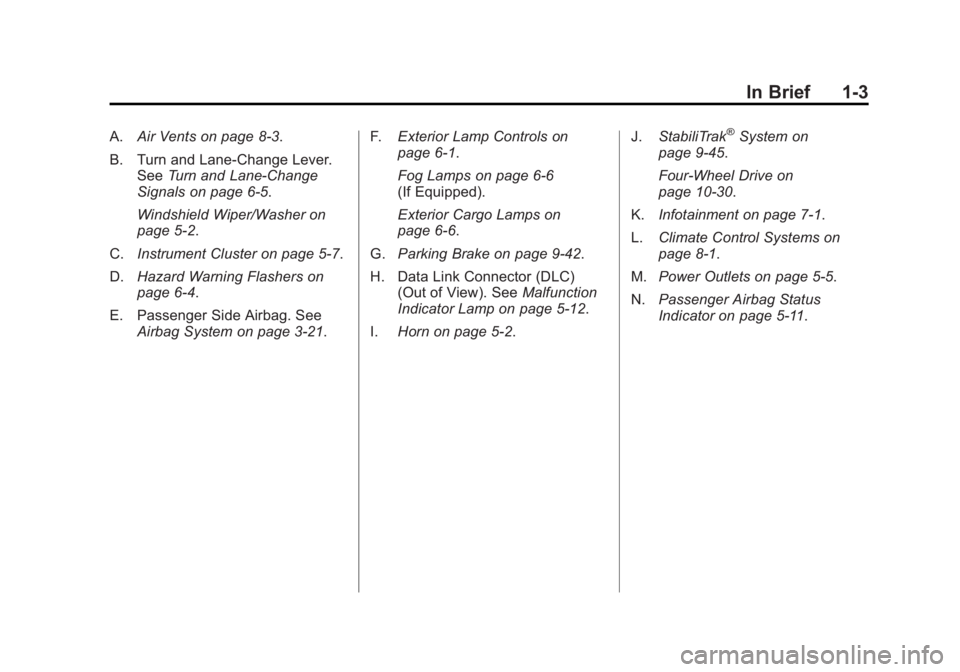
A.Air Vents on page 8‑3.
B. Turn and Lane‐Change Lever. See Turn and Lane-Change
Signals on page 6‑5.
Windshield Wiper/Washer on
page 5‑2.
C. Instrument Cluster on page 5‑7.
D. Hazard Warning Flashers on
page 6‑4.
E. Passenger Side Airbag. See Airbag System on page 3‑21. F.
Exterior Lamp Controls on
page 6‑1.
Fog Lamps on page 6‑6
(If Equipped).
Exterior Cargo Lamps on
page 6‑6.
G. Parking Brake on page 9‑42.
H. Data Link Connector (DLC) (Out of View). See Malfunction
Indicator Lamp on page 5‑12.
I. Horn on page 5‑2. J.
StabiliTrak®System on
page 9‑45.
Four-Wheel Drive on
page 10‑30.
K. Infotainment on page 7‑1.
L. Climate Control Systems on
page 8‑1.
M. Power Outlets on page 5‑5.
N. Passenger Airbag Status
Indicator on page 5‑11.
Page 19 of 404
Black plate (13,1)GMC Canyon Owner Manual - 2012
In Brief 1-13
6:For slow wipes, turn the
band to the first solid position past
the delay settings.
1: For fast wipes, turn the band to
the second solid position past the
delay settings.
9: Use to turn the wipers off.
Windshield Washer: Push the
paddle on top of the turn signal/lane
change lever to spray washer fluid
on the windshield.
See Windshield Wiper/Washer on
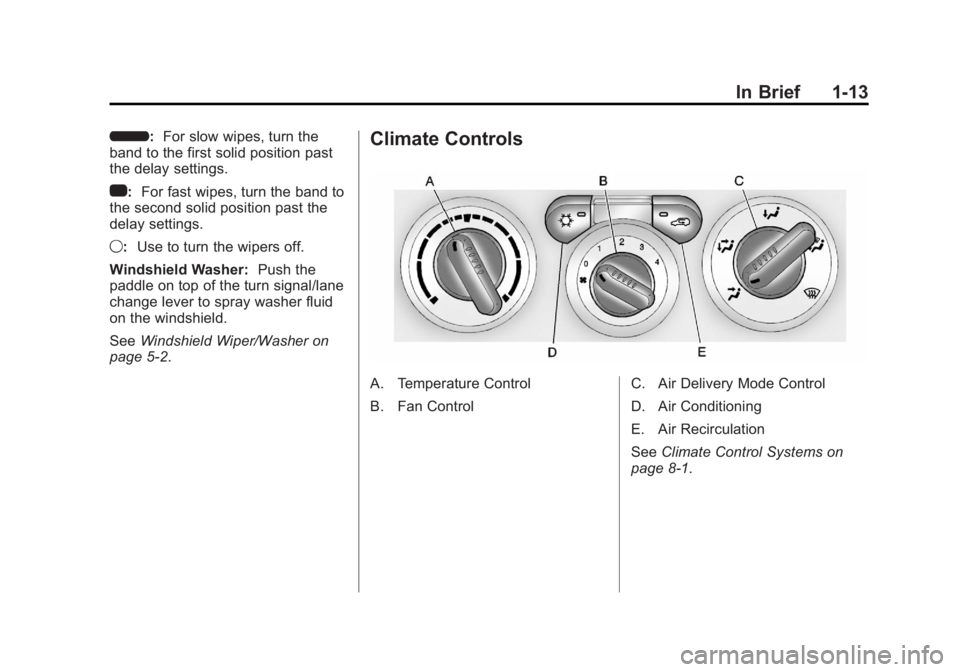
page 5‑2.Climate Controls
A. Temperature Control
B. Fan Control C. Air Delivery Mode Control
D. Air Conditioning
E. Air Recirculation
See
Climate Control Systems on
page 8‑1.
Page 23 of 404
Black plate (17,1)GMC Canyon Owner Manual - 2012
In Brief 1-17
Driver Information
Center (DIC)
The DIC is located on the
instrument panel cluster. It displays
the status of many vehicle systems
and enables some features to be
personalized.
Use the trip reset stem located on
the instrument panel cluster to scroll
through the available functions.
For more information, seeDriver
Information Center (DIC) on
page 5‑20.
Vehicle Personalization
Some vehicle features can be
personalized through the DIC.
These features include:
.Language: English, Spanish,
or French
.Automatic Door Locks
.RKE Feedback
For more information, see Driver
Information Center (DIC) on
page 5‑20.
Power Outlets
The accessory power outlets can be
used to plug in electrical equipment,
such as a cell phone or MP3 player.
The vehicle may have an accessory
power outlet located below the
climate control system and on the
rear of the center console.
See Power Outlets on page 5‑5.
Performance and
Maintenance
Traction Control
System (TCS)
The traction control system limits
wheel spin. The system turns on
automatically every time the vehicle
is started.
.To turn off traction control, press
and release the TCS/StabiliTrak
button
don the instrument
panel.
gilluminates and the
appropriate DIC message is
displayed. See Ride Control
System Messages on page 5‑26.
.Press and release the TCS/
StabiliTrak button again to turn
on traction control.
For more information, see Traction
Control System (TCS) on
page 9‑44.
Page 115 of 404
Black plate (5,1)GMC Canyon Owner Manual - 2012
Instruments and Controls 5-5
Power Outlets
The accessory power outlets can be
used to plug in electrical equipment,
such as a cell phone or MP3 player.
The vehicle may have an accessory
power outlet located below the
climate control system and on the
rear of the center console. Remove
the cover to access and replace
when not in use.
{WARNING
Power is always supplied to the
outlets. Do not leave electrical
equipment plugged in when the
vehicle is not in use because the
vehicle could catch fire and cause
injury or death.
Notice: Leaving electrical
equipment plugged in for an
extended period of time while
the vehicle is off will drain the
battery. Always unplug electrical
equipment when not in use and do not plug in equipment that
exceeds the maximum 20 ampere
rating.
Certain electrical accessories may
not be compatible with the
accessory power outlet and could
overload vehicle and adapter fuses.
If a problem is experienced, see
your dealer.
When adding electrical equipment,
be sure to follow the proper
installation instructions included with
the equipment. See
Add-On
Electrical Equipment on page 9‑64.
Notice: Hanging heavy
equipment from the power outlet
can cause damage not covered
by the vehicle warranty. The
power outlets are designed for
accessory power plugs only, such
as cell phone charge cords.
Cigarette Lighter
To use the lighter, press it in all the
way, and let go. When it is ready, it
will pop back out by itself. Notice:
Holding a cigarette lighter
in while it is heating does not let
the lighter back away from the
heating element when it is hot.
Damage from overheating can
occur to the lighter or heating
element, or a fuse could be
blown. Do not hold a cigarette
lighter in while it is heating.
Ashtrays
The vehicle may have a removable
ashtray and cigarette lighter.
The ashtray is located in the center
console area. The ashtray can be
removed for cleaning. When the
ashtray is removed, this area can
also be used as a cupholder.
Notice: If papers, pins, or other
flammable items are put in the
ashtray, hot cigarettes or other
smoking materials could ignite
them and possibly damage the
vehicle. Never put flammable
items in the ashtray.
Page 134 of 404
Black plate (24,1)GMC Canyon Owner Manual - 2012
5-24 Instruments and Controls
FLUID
This message displays if the brake
fluid is low. Check the brake fluid as
soon as possible and have your
vehicle serviced by your dealer.
SeeBraking on page 9‑4 for more
information. Press and release the
reset stem to acknowledge the
message and clear it from the
display.
PARK BRK (Brake)
This message displays when the
parking brake is set. See Parking
Brake on page 9‑42 andAntilock
Brake System (ABS) Warning Light
on page 5‑16 for more information.
The message clears from the
display after the parking brake is
released or by pressing and
releasing the reset stem.
Door Ajar Messages
DOORS
This message displays when one or
more of the doors is ajar. Check all
the doors on your vehicle to make
sure they are closed. The message
clears from the display after all of
the doors are closed.
Engine Cooling System
Messages
AC (Air Conditioning) OFF
This message displays when the
engine coolant temperature is too
high and the air conditioning in your
vehicle needs to be turned off. See
Engine Overheating on page 10‑23
and Climate Control Systems on
page 8‑1 for more information. This
message displays along with the
ENG HOT message.
ENG (Engine) HOT
This message displays when the
engine coolant temperature is hot.
Check the engine coolant
temperature gauge. See Engine
Coolant Temperature Gauge on
page 5‑9. Have your vehicle
serviced by your dealer as soon as
possible if you suspect the engine is
overheating. See Engine
Overheating on page 10‑23 for
more information.
Engine Oil Messages
CHANGE OIL
This message displays when the oil
needs to be changed. Check the oil
in your vehicle as soon as possible
and have your vehicle serviced by
your dealer. See Engine Oil on
page 10‑9 andMaintenance
Schedule on page 11‑3 for more
information. Press and release the
reset stem to acknowledge the
message and clear it from the
display.
Page 146 of 404
Black plate (8,1)GMC Canyon Owner Manual - 2012
6-8 Lighting
Lighting Features
Exit Lighting
The interior lamps will come on
when the key is removed from the
ignition. The lamps will not come on
if the dome override button is
pressed in.
Battery Load
Management
The vehicle has Electric Power
Management (EPM) that estimates
the battery's temperature and state
of charge. It then adjusts the voltage
for best performance and extended
life of the battery.
When the battery's state of charge
is low, the voltage is raised slightly
to quickly bring the charge back up.
When the state of charge is high,
the voltage is lowered slightly to
prevent overcharging. If the vehicle
has a voltmeter gauge or a voltage
display on the Driver Information
Center (DIC), you may see thevoltage move up or down. This is
normal. If there is a problem, an
alert will be displayed.
The battery can be discharged at
idle if the electrical loads are very
high. This is true for all vehicles.
This is because the generator
(alternator) may not be spinning fast
enough at idle to produce all of the
power needed for very high
electrical loads.
A high electrical load occurs when
several of the following are on, such
as: headlamps, high beams, fog
lamps, rear window defogger,
climate control fan at high speed,
heated seats, engine cooling fans,
trailer loads, and loads plugged into
accessory power outlets.
EPM works to prevent excessive
discharge of the battery. It does this
by balancing the generator's output
and the vehicle's electrical needs.
It can increase engine idle speed to
generate more power whenever
needed. It can temporarily reduce
the power demands of some
accessories.
Normally, these actions occur in
steps or levels, without being
noticeable. In rare cases at the
highest levels of corrective action,
this action may be noticeable to the
driver. If so, a DIC message might
be displayed, such as BATTERY
SAVER ACTIVE, BATTERY
VOLTAGE LOW, or LOW BATTERY.
If one of these messages displays, it
is recommended that the driver
reduce the electrical loads as much
as possible. See
Driver Information
Center (DIC) on page 5‑20.
Battery Power Protection
This feature shuts off the dome
lamp if it is left on for more than
20 minutes when the ignition is in
LOCK/OFF. This helps to prevent
the battery from running down.
Page 177 of 404
Black plate (1,1)GMC Canyon Owner Manual - 2012
Climate Controls 8-1
Climate Controls
Climate Control Systems
Climate Control Systems . . . . . . 8-1
Air Vents
Air Vents . . . . . . . . . . . . . . . . . . . . . . 8-3
Climate Control Systems
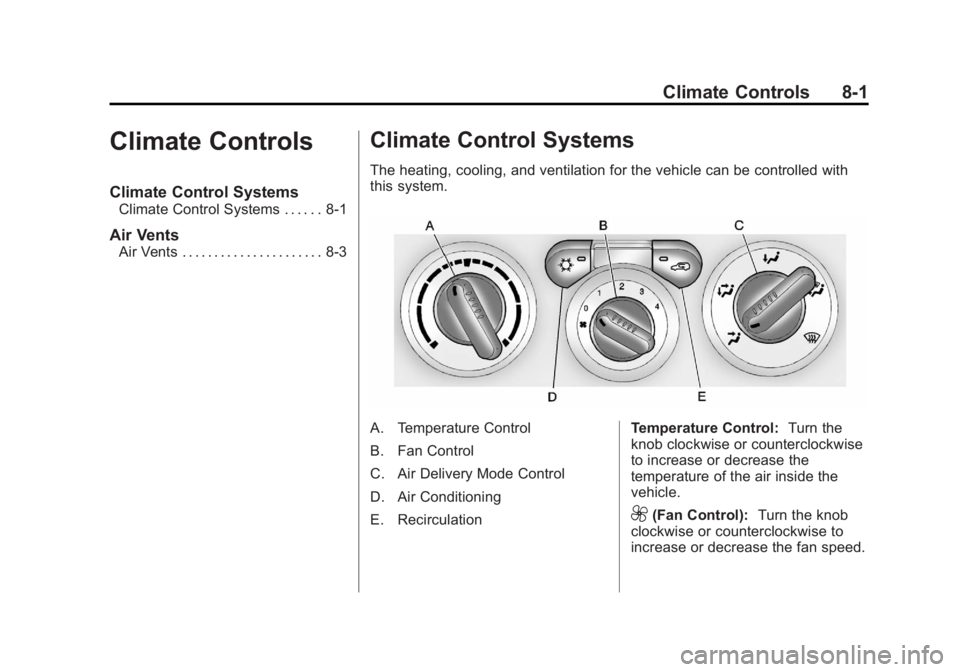
The heating, cooling, and ventilation for the vehicle can be controlled with
this system.
A. Temperature Control
B. Fan Control
C. Air Delivery Mode Control
D. Air Conditioning
E. RecirculationTemperature Control:
Turn the
knob clockwise or counterclockwise
to increase or decrease the
temperature of the air inside the
vehicle.
9(Fan Control): Turn the knob
clockwise or counterclockwise to
increase or decrease the fan speed.
Page 178 of 404
Black plate (2,1)GMC Canyon Owner Manual - 2012
8-2 Climate Controls
If the knob is set on“0”(zero), some
outside air will still enter the vehicle
and will be directed according to the
position of the mode knob.
Air Delivery Mode Control:
Turn the knob clockwise or
counterclockwise to change the
current airflow mode.
Select from the following modes:
H(Vent): Air is directed to the
instrument panel outlets.
\(Bi-Level): Air is divided
between the instrument panel
outlets and floor and side window
outlets. Cooler air is directed to the
upper outlets and warmer air to the
floor outlets.
[(Floor): Air is directed to the
floor outlets. Recirculation cannot
be selected while in floor mode
because this could cause the
interior window to fog.
/(Floor/Defog): This mode
clears the windows of fog or
moisture. Air is directed to the floor,
windshield, and side window outlets.
When this mode is selected, the
system runs the air conditioning
compressor unless the outside
temperature is near freezing or
below. Recirculation is not available
in this mode.
0(Defrost): This mode clears
the windshield of fog or frost more
quickly. Air is directed to the
windshield and side window outlets.
When this mode is selected, the
system runs the air conditioning
compressor unless the outside
temperature is near, or below
freezing. Recirculation is not
available in this mode.
Do not drive the vehicle until all the
windows are clear.
#(Air Conditioning): Press to
turn the air conditioning system on
or off. An indicator light on the
button comes on to show that the air
conditioning is on.
The fan control must be on to use
the air conditioning.
There might be a slight change in
engine performance when the air
conditioning compressor shuts off
and turns on again. This is normal.
The system is designed to make
adjustments to help with fuel
economy while still maintaining the
selected temperature.
The air conditioning system
removes moisture from the air, so a
small amount of water might drip
under the vehicle while idling or
after turning off the engine.
This is normal.