oil pressure GMC CANYON 2012 Owner's Manual
[x] Cancel search | Manufacturer: GMC, Model Year: 2012, Model line: CANYON, Model: GMC CANYON 2012Pages: 404, PDF Size: 5.25 MB
Page 5 of 404
Black plate (5,1)GMC Canyon Owner Manual - 2012
Introduction v
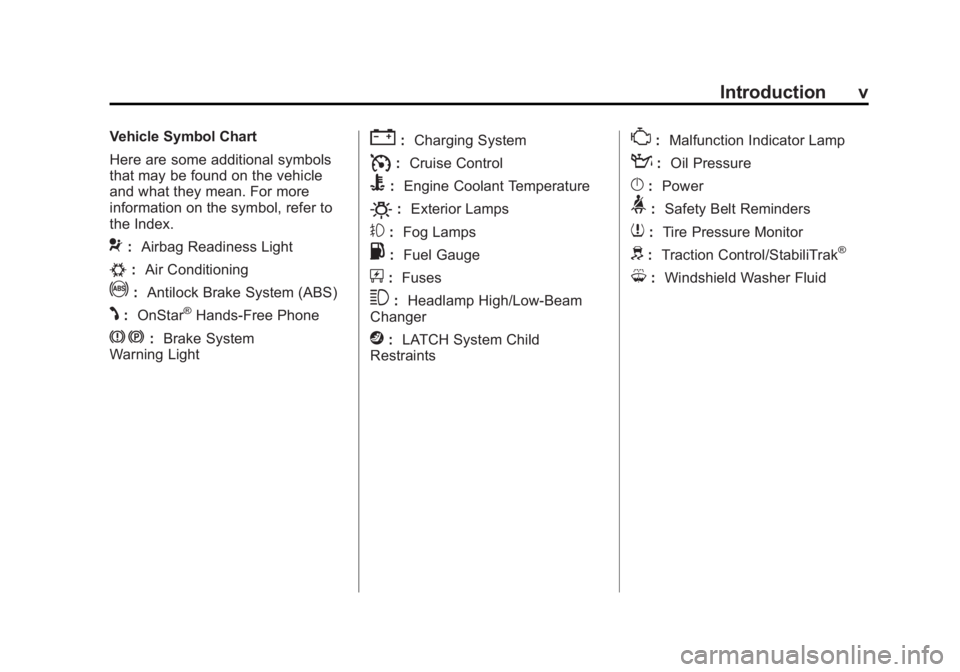
Vehicle Symbol Chart
Here are some additional symbols
that may be found on the vehicle
and what they mean. For more
information on the symbol, refer to
the Index.
9:Airbag Readiness Light
#:Air Conditioning
!:Antilock Brake System (ABS)
J:OnStar®Hands-Free Phone
J:Brake System
Warning Light
": Charging System
I:Cruise Control
B: Engine Coolant Temperature
O:Exterior Lamps
#:Fog Lamps
.: Fuel Gauge
+:Fuses
3: Headlamp High/Low-Beam
Changer
j: LATCH System Child
Restraints
*: Malfunction Indicator Lamp
::Oil Pressure
}:Power
>:Safety Belt Reminders
7:Tire Pressure Monitor
d:Traction Control/StabiliTrak®
M:Windshield Washer Fluid
Page 7 of 404
Black plate (1,1)GMC Canyon Owner Manual - 2012
In Brief 1-1
In Brief
Instrument Panel
Instrument Panel . . . . . . . . . . . . . . 1-2
Initial Drive Information
Initial Drive Information . . . . . . . . 1-4
Remote Keyless Entry (RKE)System . . . . . . . . . . . . . . . . . . . . . . 1-4
Door Locks . . . . . . . . . . . . . . . . . . . 1-4
Tailgate . . . . . . . . . . . . . . . . . . . . . . . 1-6
Windows . . . . . . . . . . . . . . . . . . . . . . 1-6
Seat Adjustment . . . . . . . . . . . . . . 1-7
Heated Seats . . . . . . . . . . . . . . . . . 1-8
Head Restraint Adjustment . . . . 1-8
Safety Belts . . . . . . . . . . . . . . . . . . . 1-9
Passenger Sensing System . . . 1-9 Mirror Adjustment . . . . . . . . . . . . 1-10
Steering Wheel
Adjustment . . . . . . . . . . . . . . . . . 1-11
Interior Lighting . . . . . . . . . . . . . . 1-11
Exterior Lighting . . . . . . . . . . . . . 1-12
Windshield Wiper/Washer . . . . 1-12
Climate Controls . . . . . . . . . . . . . 1-13
Four-Wheel Drive . . . . . . . . . . . . 1-14
Vehicle Features
Radio(s) . . . . . . . . . . . . . . . . . . . . . 1-15
Satellite Radio . . . . . . . . . . . . . . . 1-16
Cruise Control . . . . . . . . . . . . . . . 1-16
Driver Information Center (DIC) . . . . . . . . . . . . . . . 1-17
Power Outlets . . . . . . . . . . . . . . . 1-17
Performance and Maintenance
Traction Control System (TCS) . . . . . . . . . . . . . . 1-17
StabiliTrak
®System . . . . . . . . . 1-18
Tire Pressure Monitor . . . . . . . . 1-18
Engine Oil Life System . . . . . . 1-19
Driving for Better Fuel Economy . . . . . . . . . . . . . . . . . . . 1-19
Roadside Assistance Program . . . . . . . . . . . . . . . . . . . . 1-19
OnStar
®. . . . . . . . . . . . . . . . . . . . . 1-20
Page 111 of 404
Black plate (1,1)GMC Canyon Owner Manual - 2012
Instruments and Controls 5-1
Instruments and
Controls
Controls
Steering Wheel Adjustment . . . 5-2
Horn . . . . . . . . . . . . . . . . . . . . . . . . . . 5-2
Windshield Wiper/Washer . . . . . 5-2
Compass . . . . . . . . . . . . . . . . . . . . . 5-3
Clock . . . . . . . . . . . . . . . . . . . . . . . . . 5-4
Power Outlets . . . . . . . . . . . . . . . . . 5-5
Cigarette Lighter . . . . . . . . . . . . . . 5-5
Ashtrays . . . . . . . . . . . . . . . . . . . . . . 5-5
Warning Lights, Gauges, and
Indicators
Warning Lights, Gauges, andIndicators . . . . . . . . . . . . . . . . . . . . 5-6
Chime Level Adjustment . . . . . . 5-6
Instrument Cluster . . . . . . . . . . . . 5-7
Speedometer . . . . . . . . . . . . . . . . . 5-8
Odometer . . . . . . . . . . . . . . . . . . . . . 5-8
Trip Odometer . . . . . . . . . . . . . . . . . 5-8
Tachometer . . . . . . . . . . . . . . . . . . . 5-8 Fuel Gauge . . . . . . . . . . . . . . . . . . . 5-8
Engine Coolant Temperature
Gauge . . . . . . . . . . . . . . . . . . . . . . . 5-9
Safety Belt Reminders . . . . . . . . 5-9
Airbag Readiness Light . . . . . . 5-10
Passenger Airbag Status Indicator . . . . . . . . . . . . . . . . . . . . 5-11
Charging System Light . . . . . . 5-12
Malfunction Indicator Lamp . . . . . . . . . . . . . 5-12
Brake System Warning Light . . . . . . . . . . . . . . . . . . . . . . . 5-15
Antilock Brake System (ABS) Warning Light . . . . . . . . . . . . . . 5-16
StabiliTrak
®OFF Light . . . . . . . 5-17
Traction Control System (TCS)/StabiliTrak
®Light . . . . 5-17
Tire Pressure Light . . . . . . . . . . 5-17
Engine Oil Pressure Light . . . . 5-18
Security Light . . . . . . . . . . . . . . . . 5-19
High-Beam On Light . . . . . . . . . 5-19
Cruise Control Light . . . . . . . . . 5-19
Information Displays
Driver Information Center (DIC) . . . . . . . . . . . . . . . 5-20
Vehicle Messages
Vehicle Messages . . . . . . . . . . . 5-23
Battery Voltage and ChargingMessages . . . . . . . . . . . . . . . . . . 5-23
Brake System Messages . . . . 5-23
Door Ajar Messages . . . . . . . . . 5-24
Engine Cooling System Messages . . . . . . . . . . . . . . . . . . 5-24
Engine Oil Messages . . . . . . . . 5-24
Engine Power Messages . . . . 5-25
Fuel System Messages . . . . . . 5-25
Lamp Messages . . . . . . . . . . . . . 5-25
Ride Control System Messages . . . . . . . . . . . . . . . . . . 5-26
Service Vehicle Messages . . . 5-27
Tire Messages . . . . . . . . . . . . . . . 5-27
Transmission Messages . . . . . 5-27
Page 128 of 404
Black plate (18,1)GMC Canyon Owner Manual - 2012
5-18 Instruments and Controls
A Driver Information Center (DIC)
tire pressure message may also
display. SeeVehicle Messages on
page 5‑23 for more information.
Stop as soon as possible, and
inflate the tires to the pressure value
shown on the Tire and Loading
Information label. See Tire Pressure
on page 10‑54 for more information.
When the Light Flashes First and
Then Is On Steady
If the light flashes for about a minute
and then stays on, there may be a
problem with the TPMS. If the
problem is not corrected, the light
will come on at every ignition cycle.
See Tire Pressure Monitor
Operation on page 10‑58 for
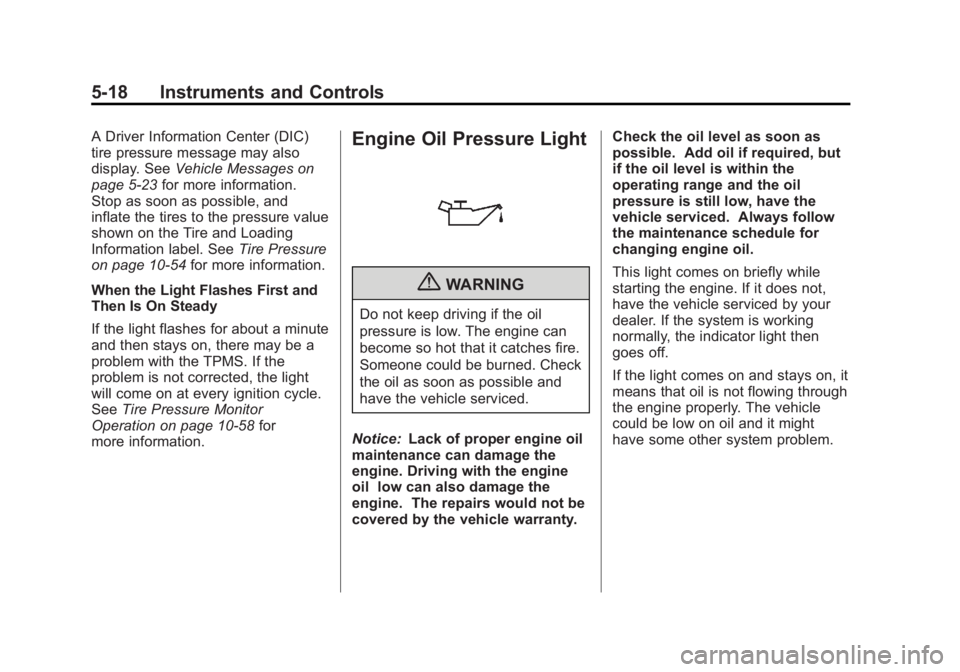
more information.Engine Oil Pressure Light
{WARNING
Do not keep driving if the oil
pressure is low. The engine can
become so hot that it catches fire.
Someone could be burned. Check
the oil as soon as possible and
have the vehicle serviced.
Notice: Lack of proper engine oil
maintenance can damage the
engine. Driving with the engine
oil low can also damage the
engine. The repairs would not be
covered by the vehicle warranty. Check the oil level as soon as
possible. Add oil if required, but
if the oil level is within the
operating range and the oil
pressure is still low, have the
vehicle serviced. Always follow
the maintenance schedule for
changing engine oil.
This light comes on briefly while
starting the engine. If it does not,
have the vehicle serviced by your
dealer. If the system is working
normally, the indicator light then
goes off.
If the light comes on and stays on, it
means that oil is not flowing through
the engine properly. The vehicle
could be low on oil and it might
have some other system problem.
Page 135 of 404
Black plate (25,1)GMC Canyon Owner Manual - 2012
Instruments and Controls 5-25
OIL
This message displays when the oil
pressure is low. SeeEngine Oil
Pressure Light on page 5‑18 and
Engine Oil on page 10‑9 for more
information.
Engine Power Messages
REDUCED POWER
This message displays when the
vehicle's engine power is reduced.
Reduced engine power can affect
the vehicle's ability to accelerate.
If this message is on, but there
is no reduction in performance,
proceed to your destination. The
performance may be reduced the
next time the vehicle is driven. The
vehicle may be driven at a reduced
speed while this message is on, but
acceleration and speed may be
reduced. Anytime this message
stays on, the vehicle should be
taken to your dealer for service as
soon as possible. Press and release the reset stem to
acknowledge the message and
clear it from the display.
Fuel System Messages
FUEL CAP
This message displays if the
vehicle's fuel cap is either off or
loose. Pull over as soon as possible
and check to see if the fuel cap is
secure. You may also see the check
engine light on the instrument panel
cluster. If the check engine light
does come on when the fuel cap
was loose, it may take a few driving
trips before the light turns off. See
Malfunction Indicator Lamp on
page 5‑12
for more information if the
light still remains on. Press and
release the reset stem to
acknowledge the message and
clear it from the display.
LOW FUEL
This message displays if the level of
fuel in the vehicle is low. Also check
the fuel gauge. See Fuel Gauge on
page 5‑8 for more information. Refill
the fuel tank as soon as possible.
Lamp Messages
TURN SIGNAL
This message displays when the
turn signal is on for about 1.2 km
(0.75 miles) of travel. Press and
release the reset stem to
acknowledge the message and
clear it from the display.
Page 251 of 404
Black plate (7,1)GMC Canyon Owner Manual - 2012
Vehicle Care 10-7
A. Windshield Washer Fluid. See“Adding Washer Fluid” under
Washer Fluid on page 10‑26.
B. Engine Coolant Recovery Tank. See Engine Coolant on
page 10‑19.
C. Engine Air Cleaner/Filter on
page 10‑17.
D. Power Steering Fluid Reservoir (low in engine compartment).
See Power Steering Fluid on
page 10‑25. E. Automatic Transmission Fluid
Dipstick (If Equipped). See
“Checking the Fluid Level”
under Automatic Transmission
Fluid on page 10‑13.
F. Engine Oil Fill Cap. See “When
to Add Engine Oil” under
Engine Oil on page 10‑9.
G. Radiator Pressure Cap. See Cooling System on page 10‑18.
H. Remote Negative (−) Terminal (GND). See Jump Starting on
page 10‑87. I. Engine Oil Dipstick. See
“Checking Engine Oil” under
Engine Oil on page 10‑9.
J. Remote Positive (+) Terminal. See Jump Starting on
page 10‑87.
K. Brake Fluid Reservoir. See Brake Fluid on page 10‑28.
L. Engine Compartment Fuse
Block on page 10‑41.
M. Battery on page 10‑30.
N. Hydraulic Clutch Fluid Reservoir (If Equipped). See Hydraulic
Clutch on page 10‑16.
Page 253 of 404
Black plate (9,1)GMC Canyon Owner Manual - 2012
Vehicle Care 10-9
A.Engine Air Cleaner/Filter on
page 10‑17.
B. Air Filter Restriction Indicator (If Equipped). See Engine Air
Cleaner/Filter on page 10‑17.
C. Windshield Washer Fluid Reservoir. See “Adding Washer
Fluid” under Washer Fluid on
page 10‑26.
D. Engine Coolant Recovery Tank. See Engine Coolant on
page 10‑19.
E. Automatic Transmission Fluid Dipstick (If Equipped). See
“Checking the Fluid Level”
under Automatic Transmission
Fluid on page 10‑13. F. Engine Oil Dipstick. See
“Checking Engine Oil” under
Engine Oil on page 10‑9.
G. Engine Oil Fill Cap. See “When
to Add Engine Oil” under
Engine Oil on page 10‑9.
H. Brake Fluid Reservoir. See Brake Fluid on page 10‑28.
I. Battery on page 10‑30.
J. Power Steering Fluid Reservoir. See Power Steering Fluid on
page 10‑25.
K. Engine Compartment Fuse
Block on page 10‑41.
L. Radiator Pressure Cap. See Cooling System on page 10‑18.Engine Oil
To ensure proper engine
performance and long life, careful
attention must be paid to engine oil.
Following these simple, but
important steps will help protect
your investment:
.Always use engine oil approved
to the proper specification and of
the proper viscosity grade. See
“Selecting the Right Engine Oil”
in this section.
.Check the engine oil level
regularly and maintain the
proper oil level. See “Checking
Engine Oil” and“When to Add
Engine Oil” in this section.
.Change the engine oil at the
appropriate time. See Engine Oil
Life System on page 10‑12.
.Always dispose of engine oil
properly. See “What to Do with
Used Oil” in this section.
Page 296 of 404
Black plate (52,1)GMC Canyon Owner Manual - 2012
10-52 Vehicle Care
Belt:A rubber coated layer of
cords that is located between
the plies and the tread. Cords
may be made from steel or other
reinforcing materials.
Bead
:The tire bead contains
steel wires wrapped by steel
cords that hold the tire onto
the rim.
Bias Ply Tire
:A pneumatic tire
in which the plies are laid at
alternate angles less than
90 degrees to the centerline of
the tread.
Cold Tire Pressure
:The
amount of air pressure in a tire,
measured in kPa (kilopascal)
or psi (pounds per square inch)
before a tire has built up heat
from driving. See Tire Pressure
on page 10‑54.
Curb Weight
:The weight of a
motor vehicle with standard and
optional equipment including the maximum capacity of fuel, oil,
and coolant, but without
passengers and cargo.
DOT Markings
:A code molded
into the sidewall of a tire
signifying that the tire is in
compliance with the U.S.
Department of Transportation
(DOT) Motor Vehicle Safety
Standards. The DOT code
includes the Tire Identification
Number (TIN), an alphanumeric
designator which can also
identify the tire manufacturer,
production plant, brand, and
date of production.
GVWR
:Gross Vehicle Weight
Rating. See Vehicle Load Limits
on page 9‑18.
GAWR FRT
:Gross Axle Weight
Rating for the front axle.
See Vehicle Load Limits on
page 9‑18. GAWR RR
:Gross Axle Weight
Rating for the rear axle. See
Vehicle Load Limits on
page 9‑18.
Intended Outboard Sidewall
:
The side of an asymmetrical tire,
that must always face outward
when mounted on a vehicle.
Kilopascal (kPa)
:The metric
unit for air pressure.
Light Truck (LT‐Metric) Tire
:
A tire used on light duty trucks
and some multipurpose
passenger vehicles.
Load Index
:An assigned
number ranging from 1 to 279
that corresponds to the load
carrying capacity of a tire.
Maximum Inflation Pressure
:
The maximum air pressure to
which a cold tire can be inflated.
The maximum air pressure is
molded onto the sidewall.
Page 341 of 404
Black plate (97,1)GMC Canyon Owner Manual - 2012
Vehicle Care 10-97
Notice:Avoid using high
pressure washes closer than
30 cm (12 in) to the surface of the
vehicle. Use of power washers
exceeding 8,274 kPa (1,200 psi)
can result in damage or removal
of paint and decals.
Rinse the vehicle well, before
washing and after, to remove all
cleaning agents completely. If they
are allowed to dry on the surface,
they could stain.
Dry the finish with a soft, clean
chamois or an all-cotton towel to
avoid surface scratches and water
spotting.
Finish Care
Application of aftermarket clearcoat
sealant/wax materials is not
recommended. If painted surfaces
are damaged, see your dealer to
have the damage assessed and
repaired. Foreign materials such as
calcium chloride and other salts, ice
melting agents, road oil and tar, tree
sap, bird droppings, chemicals from industrial chimneys, etc., can
damage the vehicle's finish if they
remain on painted surfaces. Wash
the vehicle as soon as possible.
If necessary, use non-abrasive
cleaners that are marked safe for
painted surfaces to remove foreign
matter.
Occasional hand waxing or mild
polishing should be done to remove
residue from the paint finish. See
your dealer for approved cleaning
products.
Notice:
Machine compounding or
aggressive polishing on a
basecoat/clearcoat paint finish
may damage it. Use only
non-abrasive waxes and polishes
that are made for a basecoat/
clearcoat paint finish on the
vehicle.
To keep the paint finish looking new,
keep the vehicle garaged or
covered whenever possible. Protecting Exterior Bright Metal
Parts
Regularly clean bright metal parts
with water or chrome polish on
chrome or stainless steel trim,
if necessary.
For aluminum, never use auto or
chrome polish, steam, or caustic
soap to clean. A coating of wax,
rubbed to high polish, is
recommended for all bright metal
parts.
Cleaning Exterior Lamps/
Lenses
Use only lukewarm or cold water, a
soft cloth, and a car washing soap
to clean exterior lamps and lenses.
Follow instructions under "Washing
the Vehicle" later in this section.
Page 344 of 404
Black plate (100,1)GMC Canyon Owner Manual - 2012
10-100 Vehicle Care
Interior Care
To prevent dirt particle abrasions,
regularly clean the vehicle's interior.
Immediately remove any soils. Note
that newspapers or dark garments
that can transfer color to home
furnishings can also permanently
transfer color to the vehicle's
interior.
Use a soft bristle brush to remove
dust from knobs and crevices on the
instrument cluster. Using a mild
soap solution, immediately remove
hand lotions, sunscreen, and insect
repellant from all interior surfaces or
permanent damage may result.
Your dealer may have products for
cleaning the interior. Use cleaners
specifically designed for the
surfaces being cleaned to prevent
permanent damage. To prevent
overspray, apply all cleaners directly
to the cleaning cloth. Cleaners
should be removed quickly. Never
allow cleaners to remain on the
surface being cleaned for extended
periods of time.Cleaners may contain solvents that
can become concentrated in the
interior. Before using cleaners, read
and adhere to all safety instructions
on the label. While cleaning the
interior, maintain adequate
ventilation by opening the doors and
windows.
To prevent damage, do not clean
the interior using the following
cleaners or techniques:
.Never use a razor or any other
sharp object to remove a soil
from any interior surface.
.Never use a brush with stiff
bristles.
.Never rub any surface
aggressively or with excessive
pressure.
.Do not use laundry detergents or
dishwashing soaps with
degreasers. For liquid cleaners,
use approximately 20 drops
per 3.78L (1 gal) of water.
A concentrated soap solution will
leave a residue that creates
streaks and attracts dirt. Do not
use solutions that contain strong
or caustic soap.
.Do not heavily saturate the
upholstery when cleaning.
.Do not use solvents or cleaners
containing solvents.
Interior Glass
To clean, use a terry cloth fabric
dampened with water. Wipe droplets
left behind with a clean dry cloth.
Commercial glass cleaners may be
used, if necessary, after cleaning
the interior glass with plain water.
Notice:
To prevent scratching,
never use abrasive cleaners on
automotive glass. Abrasive
cleaners or aggressive cleaning
may damage the rear window
defogger.