remote control GMC CANYON 2015 User Guide
[x] Cancel search | Manufacturer: GMC, Model Year: 2015, Model line: CANYON, Model: GMC CANYON 2015Pages: 433, PDF Size: 4.61 MB
Page 158 of 433
Black plate (45,1)GMC Canyon Owner Manual (GMNA-Localizing-U.S./Canada-7587000) -
2015 - CRC - 3/17/15
Instruments and Controls 5-45
Select All Doors or Driver Door.
Remote Start Auto Heat Seats
If equipped and turned on, this
feature will turn the heated seats on
when using remote start on
cold days.
Select Off or On.
Bluetooth
Select and the following may
display:
.Pair New Device
.Device Management
.Ringtones
.Voice Mail Numbers
.Text Message Alerts
Pair New Device
Select to pair a new device. See
“Pairing” underBluetooth
(Overview) on page 7-25 or
Bluetooth (Infotainment Controls -
Base Radio) on page 7-26 or
Bluetooth (Infotainment Controls -
Base Connected Radio) on page 7-30
or“Pairing” in
“Infotainment Controls” under
“Bluetooth” in the infotainment
manual.
Device Management
Select to connect to a different
phone source, disconnect a phone,
or delete a phone.
Ringtones
Press to change the ring tone for
the specific phone. The phone does
not need to be connected to change
the ring tones.
Voice Mail Numbers
This feature displays the voice mail
number for all connected phones.
To change the voice mail number,
select EDIT or press the EDIT
button. Type a new number, then
select SAVE or press the SAVE
button.
Text Message Alerts
This allows the feature to be turned
on or off. Select Off or On.
Voice
Select and the following may
display:
.Confidence Threshold
.Prompt Length
.Audio Feedback Speed
Confidence Threshold
This feature allows the adjustment
of the sensitivity of the speech
recognition system.
Select Confirm More or
Confirm Less.
Prompt Length
This feature adjusts the voice
prompt length.
Select Short or Long.
Audio Feedback Speed
This feature adjusts the audio
feedback speed.
Select Slow, Medium, or Fast.
Page 166 of 433
Black plate (7,1)GMC Canyon Owner Manual (GMNA-Localizing-U.S./Canada-7587000) -
2015 - CRC - 3/17/15
Lighting 6-7
Reading Lamps
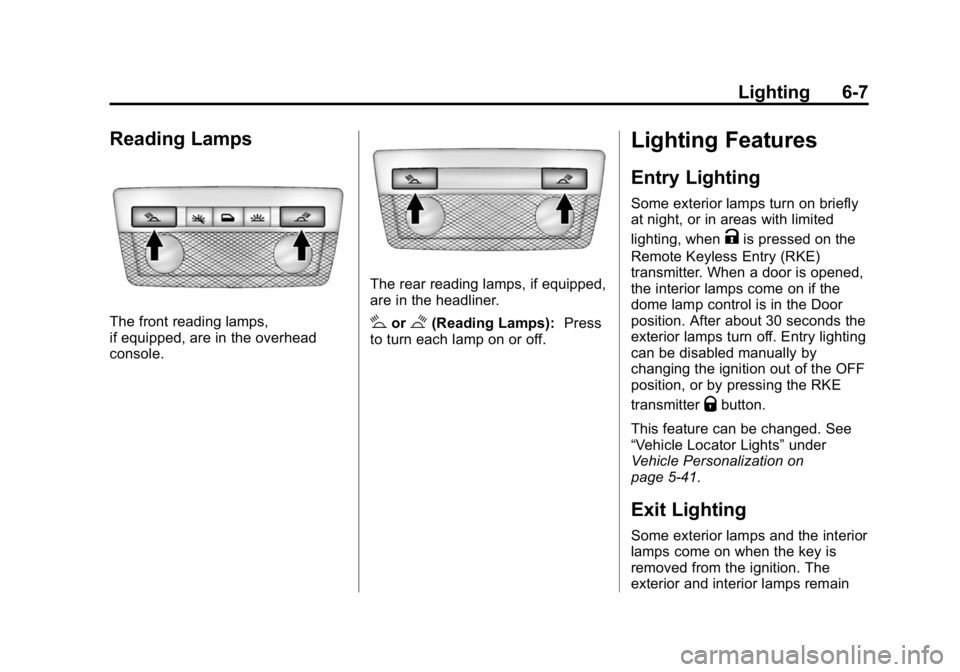
The front reading lamps,
if equipped, are in the overhead
console.
The rear reading lamps, if equipped,
are in the headliner.
#or$(Reading Lamps):Press
to turn each lamp on or off.
Lighting Features
Entry Lighting
Some exterior lamps turn on briefly
at night, or in areas with limited
lighting, when
Kis pressed on the
Remote Keyless Entry (RKE)
transmitter. When a door is opened,
the interior lamps come on if the
dome lamp control is in the Door
position. After about 30 seconds the
exterior lamps turn off. Entry lighting
can be disabled manually by
changing the ignition out of the OFF
position, or by pressing the RKE
transmitter
Qbutton.
This feature can be changed. See
“Vehicle Locator Lights” under
Vehicle Personalization on
page 5-41.
Exit Lighting
Some exterior lamps and the interior
lamps come on when the key is
removed from the ignition. The
exterior and interior lamps remain
Page 178 of 433
Black plate (11,1)GMC Canyon Owner Manual (GMNA-Localizing-U.S./Canada-7587000) -
2015 - CRC - 3/17/15
Infotainment System 7-11
}(Bookmarks):When selected
during a track, a choice displays to
bookmark the artist or track. This
sends the bookmark to the Pandora
account.
,(Thumbs Down): When
selected, Pandora stores this
information, changes to the next
track, and does not play this track
on this station again. This helps
Pandora choose which tracks
should not play on this station. This
feature is only available on user
created stations.
-(Thumbs Up): When selected,
Pandora stores this information and
-is highlighted for the remainder
of the track. This helps Pandora
choose which tracks should play on
this station.
d(Next Track): When selected,
Pandora changes to the next track.
rorj(Play/Pause): Select to play
or pause playback. Pandora Skip Limit
Pandora limits the number of skips
allowed on their service. When the
skip limit is reached,
,or next
arrow will not skip the currently
playing track, but the
,feedback
will be recorded.
Advertisement on Pandora
Pandora may display
advertisements. The artist name
and track title will not be displayed
and the skip track button will not be
available.
Pandora Troubleshooting
Unable to Connect Device to
Vehicle
If the device is unable to connect to
the USB or Bluetooth:
1. Turn the vehicle off.
2. Take the Remote Keyless Entry (RKE) transmitter at least 6 m
(20 ft) away from the vehicle. 3. Wait about 30 seconds, and try
to connect the device again.
See Bluetooth (Overview) on
page 7-25 orBluetooth
(Infotainment Controls - Base
Radio) on page 7-26 or
Bluetooth (Infotainment Controls
- Base Connected Radio) on
page 7-30.
Unable to Start Pandora
If the device is unable to launch
Pandora:
.Check that the latest version of
Pandora is installed.
.Check that there is an active
account logged into Pandora.
.Have at least one station
created.
.For Android and BlackBerry
devices, check that the device is
paired with the vehicle, and
whether the device displays in
the Connected phone sources
list under the Phone icon from
the Home Page.
Page 279 of 433
Black plate (64,1)GMC Canyon Owner Manual (GMNA-Localizing-U.S./Canada-7587000) -
2015 - CRC - 3/17/15
9-64 Driving and Operating
When using a weight-distributing
hitch, the spring bars should be
adjusted so the distance (1) is the
same after coupling the trailer to the
tow vehicle and adjusting the hitch.
Safety Chains
Always attach chains between the
vehicle and the trailer. Cross the
safety chains under the tongue of
the trailer to help prevent the tongue
from contacting the road if it
becomes separated from the hitch.
Instructions about safety chains
may be provided by the hitch
manufacturer or by the trailer
manufacturer. Always leave just
enough slack so the combination
can turn. Never allow safety chains
to drag on the ground.
Trailer Brakes
A loaded trailer that weighs more
than 900 kg (2,000 lb) needs to have
its own brake system that is
adequate for the weight of the
trailer. Be sure to read and followthe instructions for the trailer brakes
so they are installed, adjusted, and
maintained properly.
Trailer Wiring Harness
For vehicles not equipped with
heavy-duty trailering, a harness is
secured underneath the left side of
the vehicle, next to the spare tire.
The harness requires the installation
of a trailer connector, which is
available through your dealer. The
seven-wire harness contains the
following trailer circuits:
.Yellow: Left Stop/Turn Signal
.Green: Right Stop/Turn Signal
.Brown: Taillamps/Parking Lamps
.Black: Ground
.Gray: Back-up Lamps
.Orange: Battery Feed
.Blue: Trailer Brake
If charging a remote (non-vehicle)
battery, press the Tow/Haul Mode
button, if equipped, on the center
stack. This will boost the vehicle system voltage and properly charge
the battery. If the trailer is too light
for Tow/Haul Mode, or the vehicle is
not equipped with Tow/Haul, turn on
the headlamps as a second way to
boost the vehicle system and
charge the battery.
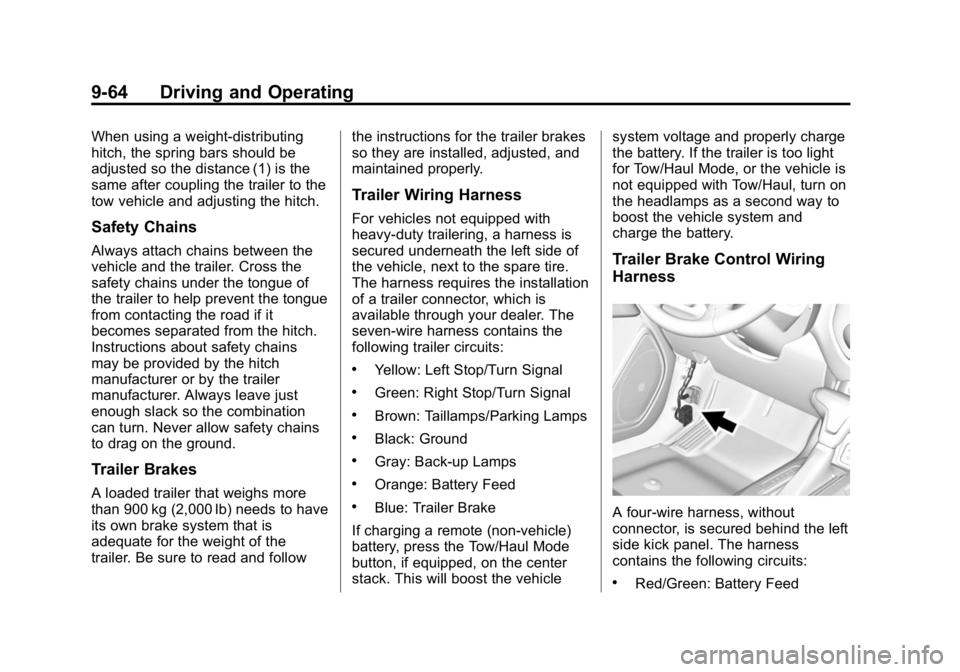
Trailer Brake Control Wiring
Harness
A four-wire harness, without
connector, is secured behind the left
side kick panel. The harness
contains the following circuits:
.Red/Green: Battery Feed
Page 284 of 433
Black plate (3,1)GMC Canyon Owner Manual (GMNA-Localizing-U.S./Canada-7587000) -
2015 - CRC - 3/17/15
Vehicle Care 10-3
of California to cause cancer and
birth defects or other reproductive
harm. Engine exhaust, many parts
and systems, many fluids, and
some component wear by-products
contain and/or emit these
chemicals.
SeeBattery - North America on
page 10-24 andJump Starting -
North America on page 10-75.
California Perchlorate
Materials Requirements
Certain types of automotive
applications, such as airbag
initiators, safety belt pretensioners,
and lithium batteries contained in
Remote Keyless Entry transmitters,
may contain perchlorate materials.
Special handling may be necessary.
For additional information, see
www.dtsc.ca.gov/hazardouswaste/
perchlorate.
Accessories and
Modifications
Adding non-dealer accessories or
making modifications to the vehicle
can affect vehicle performance and
safety, including such things as
airbags, braking, stability, ride and
handling, emissions systems,
aerodynamics, durability, and
electronic systems like antilock
brakes, traction control, and stability
control. These accessories or
modifications could even cause
malfunction or damage not covered
by the vehicle warranty.
Damage to vehicle components
resulting from modifications or the
installation or use of non-GM
certified parts, including control
module or software modifications, is
not covered under the terms of the
vehicle warranty and may affect
remaining warranty coverage for
affected parts. GM Accessories are designed to
complement and function with other
systems on the vehicle. See your
dealer to accessorize the vehicle
using genuine GM Accessories
installed by a dealer technician.
Also, see
Adding Equipment to the
Airbag-Equipped Vehicle on
page 3-28.
Page 416 of 433
Black plate (7,1)GMC Canyon Owner Manual (GMNA-Localizing-U.S./Canada-7587000) -
2015 - CRC - 3/17/15
OnStar 14-7
in that area. The wireless service
provider must also have coverage,
network capacity, reception, and
technology compatible with OnStar
services. Service involving location
information about the vehicle cannot
work unless GPS signals are
available, unobstructed, and
compatible with the OnStar
hardware. OnStar services may not
work if the OnStar equipment is not
properly installed or it has not been
properly maintained. If equipment or
software is added, connected,
or modified, OnStar services may
not work. Other problems beyond
the control of OnStar may prevent
service such as hills, tall buildings,
tunnels, weather, electrical system
design and architecture of the
vehicle, damage to the vehicle in a
crash, or wireless phone network
congestion or jamming.
SeeRadio Frequency Statement on
page 13-12.Services for People with
Disabilities
Advisors provide services to help
subscribers with physical disabilities
and medical conditions.
Press
Qfor help with:
.Locating a gas station with an
attendant to pump gas.
.Finding a hotel, restaurant, etc.,
that meets accessibility needs.
.Providing directions to the
closest hospital or pharmacy in
urgent situations.
TTY Users
OnStar has the ability to
communicate to deaf,
hard-of-hearing, or speech-impaired
customers while in the vehicle. The
available dealer-installed TTY
system can provide in-vehicle
access to all of the OnStar services,
except Virtual Advisor and OnStar
Turn-by-Turn Navigation.
OnStar Personal Identification
Number (PIN)
A PIN is needed to access some of
the OnStar services, like Remote
Door Unlock and Stolen Vehicle
Assistance. The PIN will need to be
changed the first time when
speaking with an Advisor. To
change the OnStar PIN, contact an
OnStar Advisor by pressing
Qor
calling 1-888-4-ONSTAR.
Warranty
OnStar equipment may be
warranted as part of the vehicle
warranty.
Languages
The vehicle can be programmed to
respond in multiple languages.
Press
Qand ask for an Advisor.
Advisors are available in English,
Spanish, and French. Available
languages may vary by country.
Page 425 of 433

Black plate (6,1)GMC Canyon Owner Manual (GMNA-Localizing-U.S./Canada-7587000) -
2015 - CRC - 3/17/15
i-6 INDEX
Heated Mirrors . . . . . . . . . . . . . . . . . 2-15
HeaterEngine Coolant . . . . . . . . . . . . . . . 9-25
Heating and Air Conditioning . . . . . . . . . . . . . . . 8-1, 8-3
High-Beam On Light . . . . . . . . . . . 5-25
Hill and Mountain Roads . . . . . . . 9-11
Hill Descent Control (HDC) . . . . 9-45
Hill Descent Control Light . . . . . . 5-22
Hill Start Assist (HSA) . . . . . . . . . 9-42
Home Page . . . . . . . . . . . . . . . . . . . . . 7-4
Hood . . . . . . . . . . . . . . . . . . . . . . . . . . 10-5
Horn . . . . . . . . . . . . . . . . . . . . . . . . . . . . 5-3
How to Wear Safety Belts Properly . . . . . . . . . . . . . . . . . . . . . . 3-10
Hydraulic Clutch . . . . . . . . . . . . . . 10-13
I
Ignition Positions . . . . . . . . . . . . . . 9-22
Ignition Transmission Lock
Check . . . . . . . . . . . . . . . . . . . . . . . 10-28
Immobilizer . . . . . . . . . . . . . . . . . . . . 2-13
Indicator Vehicle Ahead . . . . . . . . . . . . . . . . 5-22
Infants and Young Children, Restraints . . . . . . . . . . . . . . . . . . . . 3-32 Infotainment . . . . . . . . . . . . . . . . . . . . 7-1
Infotainment System . . . . . . . . . . 13-15
Instrument Cluster . . . . . . . . 5-8, 5-10
Interior Rearview Mirrors . . . . . . . 2-17
Internet Radio
Pandora . . . . . . . . . . . . . . . . . . . . . . . 7-9
Introduction . . . . . . . . . . . . . . . . . . . . . . . iii
J
Jack
Auxiliary . . . . . . . . . . . . . . . . . . . . . . 7-15
Jump Starting - North America . . . . . . . . . . . . . . . . . . . . . 10-75
K
Key and Lock Messages . . . . . . . 5-36
Keyless Entry
Remote (RKE) System . . . . . . . . 2-4
Keys . . . . . . . . . . . . . . . . . . . . . . . . . . . . 2-1
L
Labeling, Tire Sidewall . . . . . . . . 10-43 Lamps
Cargo . . . . . . . . . . . . . . . . . . . . . . . . . . 6-6
Daytime Running (DRL) . . . . . . . 6-3
Dome . . . . . . . . . . . . . . . . . . . . . . . . . . 6-6
Exterior Controls . . . . . . . . . . . . . . . 6-1
Exterior Lamps OffReminder . . . . . . . . . . . . . . . . . . . . 6-2
Fog . . . . . . . . . . . . . . . . . . . . . . . . . . . . 6-5
Malfunction Indicator . . . . . . . . . 5-18
Messages . . . . . . . . . . . . . . . . . . . . 5-36
On Reminder . . . . . . . . . . . . . . . . . 5-26
Reading . . . . . . . . . . . . . . . . . . . . . . . 6-7
Lane Departure Warning (LDW) . . . . . . . . . . . . . . . 9-52
Lane Departure Warning Light . . . . . . . . . . . . . . . . . . . . . . . . . 5-22
Lap-Shoulder Belt . . . . . . . . . . . . . 3-11
LATCH System Replacing Parts after aCrash . . . . . . . . . . . . . . . . . . . . . . . 3-53
LATCH, Lower Anchors and
Tethers for Children . . . . . . . . . . 3-38
Light Hill Decent Control . . . . . . . . . . . 5-22
Page 429 of 433

Black plate (10,1)GMC Canyon Owner Manual (GMNA-Localizing-U.S./Canada-7587000) -
2015 - CRC - 3/17/15
i-10 INDEX
Reimbursement Program,GM Mobility . . . . . . . . . . . . . . . . . . 13-5
Remote Keyless Entry (RKE) System . . . . . . . . . . . . . . . . . . . . . . . . 2-4
Remote Vehicle Start . . . . . . . . . . . 2-6
Replacement Bulbs . . . . . . . . . . . 10-32
Replacement Parts Airbags . . . . . . . . . . . . . . . . . . . . . . . 3-29
Maintenance . . . . . . . . . . . . . . . . .11-15
Replacing Airbag System . . . . . . 3-29
Replacing LATCH System Parts after a Crash . . . . . . . . . . . 3-53
Replacing Safety Belt System Parts after a Crash . . . 3-15
Reporting Safety Defects Canadian Government . . . . . . 13-13
General Motors . . . . . . . . . . . . . 13-13
U.S. Government . . . . . . . . . . . 13-12
Restraints Where to Put . . . . . . . . . . . . . . . . . 3-36
Retained Accessory
Power (RAP) . . . . . . . . . . . . . . . . . 9-24
Ride Control Systems Messages . . . . . . . . . . . . . . . . . . . . 5-37
Roads
Driving, Wet . . . . . . . . . . . . . . . . . . 9-10 Roadside Assistance
Program . . . . . . . . . . . . . . . . . . . . . . 13-5
Rotation, Tires . . . . . . . . . . . . . . . . 10-55
Routing, Engine Drive Belt . . . . . 12-4
Running the Vehicle While Parked . . . . . . . . . . . . . . . . . . . . . . . 9-30
S
Safety Belts . . . . . . . . . . . . . . . . . . . . 3-9Care . . . . . . . . . . . . . . . . . . . . . . . . . . 3-15
Extender . . . . . . . . . . . . . . . . . . . . . . 3-15
How to Wear Safety BeltsProperly . . . . . . . . . . . . . . . . . . . . . 3-10
Lap-Shoulder Belt . . . . . . . . . . . . 3-11
Reminders . . . . . . . . . . . . . . . . . . . . 5-15
Replacing after a Crash . . . . . . 3-15
Use During Pregnancy . . . . . . . . 3-14
Safety Defects Reporting
Canadian Government . . . . . . 13-13
General Motors . . . . . . . . . . . . . 13-13
U.S. Government . . . . . . . . . . . 13-12
Safety Locks . . . . . . . . . . . . . . . . . . . 2-10
Safety System Check . . . . . . . . . . 3-15
Satellite Radio . . . . . . . . . . . . . . . . . . 7-8
Scheduling Appointments . . . . . . 13-7 Seats
Adjustment, Front . . . . . . . . . . . . . . 3-3
Head Restraints . . . . . . . . . . . . . . . 3-2
Heated Front . . . . . . . . . . . . . . . . . . 3-6
Lumbar Adjustment, Front . . . . . 3-4
Power Adjustment, Front . . . . . . 3-4
Rear . . . . . . . . . . . . . . . . . . . . . . . . . . . 3-7
Reclining Seatbacks . . . . . . . . . . . 3-4
Underseat Storage . . . . . . . . . . . . 4-2
Securing Child Restraints . . . . . . . . . . . . . . 3-53, 3-59
Security Light . . . . . . . . . . . . . . . . . . . . . . . . . . 5-25
Messages . . . . . . . . . . . . . . . . . . . . 5-38
OnStar
®. . . . . . . . . . . . . . . . . . . . . . 14-3
Vehicle . . . . . . . . . . . . . . . . . . . . . . . 2-12
Vehicle Alarm . . . . . . . . . . . . . . . . . 2-12
Service Accessories andModifications . . . . . . . . . . . . . . . . 10-3
Doing Your Own Work . . . . . . . . 10-4
Engine Soon Light . . . . . . . . . . . . 5-18
Maintenance Records . . . . . . .11-16
Maintenance, General Information . . . . . . . . . . . . . . . . . . 11-1
Page 430 of 433

Black plate (11,1)GMC Canyon Owner Manual (GMNA-Localizing-U.S./Canada-7587000) -
2015 - CRC - 3/17/15
INDEX i-11
Service (cont'd)Parts Identification Label . . . . . 12-1
Publications Ordering
Information . . . . . . . . . . . . . . . . .13-11
Scheduling Appointments . . . . . 13-7
Services Special Application . . . . . . . . . . . 11-9
Servicing the Airbag . . . . . . . . . . . 3-27
Shift Lock Control Function Check, Automatic
Transmission . . . . . . . . . . . . . . . . 10-28
Shifting Into Park . . . . . . . . . . . . . . . . . . . . . . 9-26
Out of Park . . . . . . . . . . . . . . . . . . . 9-28
Signals, Turn and Lane-Change . . . . . . . . . . . . . . . . . 6-4
Software Updates . . . . . . . . . . . . . . 7-6
Spare Tire Compact . . . . . . . . . . . . . . . . . . . . 10-73
Special Application Services . . . 11-9
Specifications and Capacities . . . . . . . . . . . . . . . . . . . . 12-2
Speedometer . . . . . . . . . . . . . . . . . . 5-13
StabiliTrak
OFF Light . . . . . . . . . . . . . . . . . . . . . 5-23
Start Assist, Hills . . . . . . . . . . . . . . 9-42
Start Vehicle, Remote . . . . . . . . . . 2-6 Starter Switch Check . . . . . . . . . 10-27
Starting the Engine . . . . . . . . . . . . 9-23
Steering . . . . . . . . . . . . . . . . . . . . . . . . 9-4
Wheel Adjustment . . . . . . . . . . . . . 5-2
Wheel Controls . . . . . . . . . . . . . . . . 5-3
Steering System Messages . . . . 5-38
Stoplamps and Back-up Lamps Bulb Replacement . . . . . . . . . . 10-31
Storage Areas Center Console . . . . . . . . . . . . . . . . 4-2
Glove Box . . . . . . . . . . . . . . . . . . . . . 4-1
Sunglasses . . . . . . . . . . . . . . . . . . . . 4-2
Underseat . . . . . . . . . . . . . . . . . . . . . 4-2
Storage Compartments . . . . . . . . . 4-1
Stuck Vehicle . . . . . . . . . . . . . . . . . . 9-13
Sun Visors . . . . . . . . . . . . . . . . . . . . . 2-20
Sunglass Storage . . . . . . . . . . . . . . . 4-2
Symbols . . . . . . . . . . . . . . . . . . . . . . . . . . iv
System Forward CollisionAlert (FCA) . . . . . . . . . . . . . . . . . . 9-48
Infotainment . . . . . . . . . . . . 7-1, 13-15T
Tachometer . . . . . . . . . . . . . . . . . . . . 5-13
Tailgate . . . . . . . . . . . . . . . . . . . . . . . . 2-10
Taillamps Bulb Replacement . . . . . . . . . . 10-31
Teen Driver . . . . . . . . . . . . . . . . . . . . 7-35
Text Messaging . . . . . . . . . . . . . . . . 7-34
Text Telephone (TTY) Users . . . 13-4
Theft-Deterrent Systems . . . . . . . 2-13 Immobilizer . . . . . . . . . . . . . . . . . . . 2-13
Time . . . . . . . . . . . . . . . . . . . . . . . . . . . . 5-4
Tires . . . . . . . . . . . . . . . . . . . . . . . . . . 10-41
All-Season . . . . . . . . . . . . . . . . . . 10-42
All-Terrain . . . . . . . . . . . . . . . . . . 10-43
Buying New Tires . . . . . . . . . . . 10-57
Chains . . . . . . . . . . . . . . . . . . . . . . 10-62
Changing . . . . . . . . . . . . . . . . . . . 10-64
Compact Spare . . . . . . . . . . . . . 10-73
Designations . . . . . . . . . . . . . . . 10-45
Different Size . . . . . . . . . . . . . . . 10-59
Full-Size Spare . . . . . . . . . . . . . 10-74
If a Tire Goes Flat . . . . . . . . . . 10-63
Inflation Monitor System . . . . 10-51
Inspection . . . . . . . . . . . . . . . . . . 10-55
Messages . . . . . . . . . . . . . . . . . . . . 5-38
Pressure Light . . . . . . . . . . . . . . . . 5-24
Page 431 of 433

Black plate (12,1)GMC Canyon Owner Manual (GMNA-Localizing-U.S./Canada-7587000) -
2015 - CRC - 3/17/15
i-12 INDEX
Tires (cont'd)Pressure Monitor System . . . 10-50
Rotation . . . . . . . . . . . . . . . . . . . . 10-55
Sidewall Labeling . . . . . . . . . . . 10-43
Terminology and
Definitions . . . . . . . . . . . . . . . . . 10-46
Uniform Tire Quality Grading . . . . . . . . . . . . . . . . . . . 10-59
Wheel Alignment and Tire
Balance . . . . . . . . . . . . . . . . . . . 10-61
Wheel Replacement . . . . . . . . 10-61
When It Is Time for New Tires . . . . . . . . . . . . . . . . . . . . . . 10-56
Winter . . . . . . . . . . . . . . . . . . . . . . 10-42
Tow/Haul Mode . . . . . . . . . . . . . . . . 9-34
Tow/Haul Mode Light . . . . . . . . . . 5-22
Towing Driving Characteristics . . . . . . . . 9-57
Equipment . . . . . . . . . . . . . . . . . . . . 9-63
General Information . . . . . . . . . . 9-57
Recreational Vehicle . . . . . . . . 10-78
Trailer . . . . . . . . . . . . . . . . . . . . . . . . 9-60
Trailer Sway Control (TSC) . . . 9-66
Vehicle . . . . . . . . . . . . . . . . . . . . . 10-78 Traction
Control System (TCS)/
StabiliTrak
®Light . . . . . . . . . . . . 5-23
Off Light . . . . . . . . . . . . . . . . . . . . . . 5-23
Traction Control/Electronic Stability Control . . . . . . . . . . . . . . 9-43
Trademarks and License
Agreements . . . . . . . . . . . . . . . . . . 7-37
Trailer Sway Control (TSC) . . . . . . . . . . 9-66
Towing . . . . . . . . . . . . . . . . . . . . . . . . 9-60
Transfer Case . . . . . . . . . . . . . . . . . 9-36
Transmission Automatic . . . . . . . . . . . . . . . . . . . . . 9-30
Fluid, Automatic . . . . . . . . . . . . 10-13
Fluid, Manual . . . . . . . . . . . . . . . 10-13
Messages . . . . . . . . . . . . . . . . . . . . 5-39
Transportation Program, Courtesy . . . . . . . . . . . . . . . . . . . . . 13-8
Trip Odometer . . . . . . . . . . . . . . . . . 5-13
Truck-Camper Loading Information . . . . . . . . . . . . . . . . . . . 9-21
Turn and Lane-Change Signals . . . . . . . . . . . . . . . . . . . . . . . . 6-4
Turn Signal
Bulb Replacement . . . . . . . . . . 10-31
U
Underseat Storage . . . . . . . . . . . . . 4-2
Uniform Tire QualityGrading . . . . . . . . . . . . . . . . . . . . . 10-59
Up-Shift Light . . . . . . . . . . . . . . . . . . 5-22
Updates Software . . . . . . . . . . . . . . . . . . . . . . . 7-6
USB Port . . . . . . . . . . . . . . . . . . . . . . 7-13
Using This Manual . . . . . . . . . . . . . . . . iv
V
Vehicle Alarm System . . . . . . . . . . . . . . . . 2-12
Canadian Owners . . . . . . . . . . . . . . . iii
Control . . . . . . . . . . . . . . . . . . . . . . . . 9-3
Identification
Number (VIN) . . . . . . . . . . . . . . . 12-1
Load Limits . . . . . . . . . . . . . . . . . . . 9-14
Messages . . . . . . . . . . . . . . . . . . . . 5-33
Personalization . . . . . . . . . . . . . . . 5-41
Reminder Messages . . . . . . . . . . 5-40
Remote Start . . . . . . . . . . . . . . . . . . 2-6
Security . . . . . . . . . . . . . . . . . . . . . . 2-12
Speed Messages . . . . . . . . . . . . . 5-40
Towing . . . . . . . . . . . . . . . . . . . . . . 10-78
Vehicle Ahead Indicator . . . . . . . 5-22