weight GMC CANYON 2015 User Guide
[x] Cancel search | Manufacturer: GMC, Model Year: 2015, Model line: CANYON, Model: GMC CANYON 2015Pages: 433, PDF Size: 4.61 MB
Page 232 of 433
Black plate (17,1)GMC Canyon Owner Manual (GMNA-Localizing-U.S./Canada-7587000) -
2015 - CRC - 3/17/15
Driving and Operating 9-17
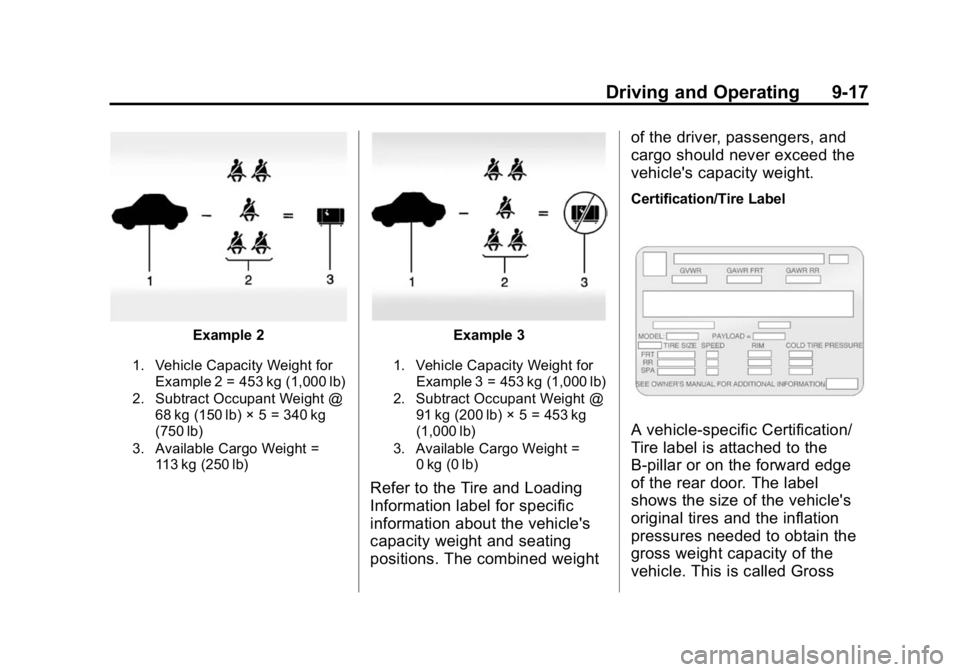
Example 2
1. Vehicle Capacity Weight forExample 2 = 453 kg (1,000 lb)
2. Subtract Occupant Weight @ 68 kg (150 lb) × 5 = 340 kg
(750 lb)
3. Available Cargo Weight = 113 kg (250 lb)
Example 3
1. Vehicle Capacity Weight for
Example 3 = 453 kg (1,000 lb)
2. Subtract Occupant Weight @ 91 kg (200 lb) × 5 = 453 kg
(1,000 lb)
3. Available Cargo Weight = 0 kg (0 lb)
Refer to the Tire and Loading
Information label for specific
information about the vehicle's
capacity weight and seating
positions. The combined weight of the driver, passengers, and
cargo should never exceed the
vehicle's capacity weight.
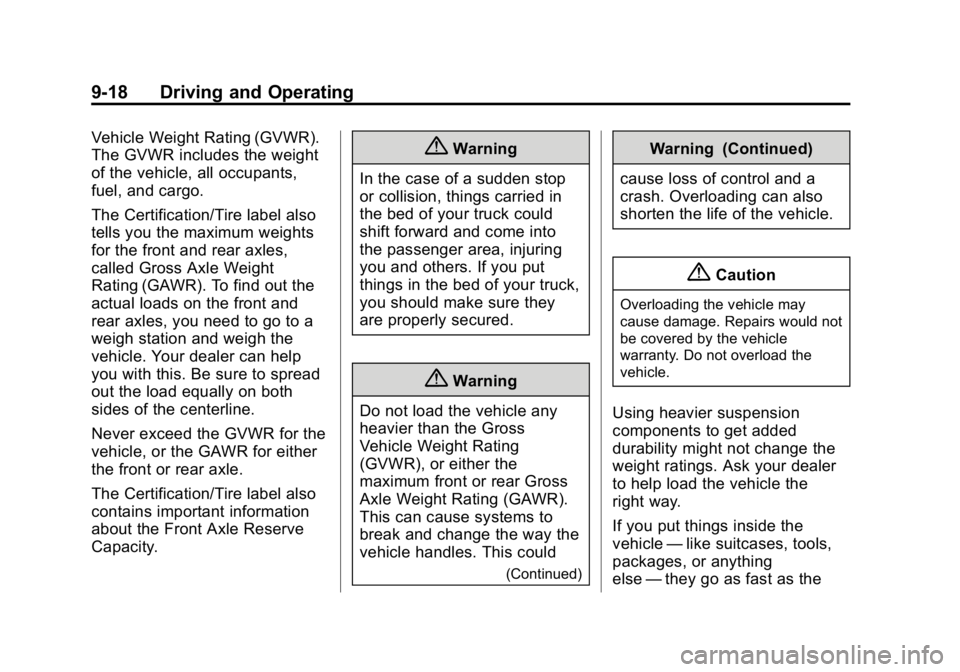
Certification/Tire Label
A vehicle-specific Certification/
Tire label is attached to the
B-pillar or on the forward edge
of the rear door. The label
shows the size of the vehicle's
original tires and the inflation
pressures needed to obtain the
gross weight capacity of the
vehicle. This is called Gross
Page 233 of 433
Black plate (18,1)GMC Canyon Owner Manual (GMNA-Localizing-U.S./Canada-7587000) -
2015 - CRC - 3/17/15
9-18 Driving and Operating
Vehicle Weight Rating (GVWR).
The GVWR includes the weight
of the vehicle, all occupants,
fuel, and cargo.
The Certification/Tire label also
tells you the maximum weights
for the front and rear axles,
called Gross Axle Weight
Rating (GAWR). To find out the
actual loads on the front and
rear axles, you need to go to a
weigh station and weigh the
vehicle. Your dealer can help
you with this. Be sure to spread
out the load equally on both
sides of the centerline.
Never exceed the GVWR for the
vehicle, or the GAWR for either
the front or rear axle.
The Certification/Tire label also
contains important information
about the Front Axle Reserve
Capacity.{Warning
In the case of a sudden stop
or collision, things carried in
the bed of your truck could
shift forward and come into
the passenger area, injuring
you and others. If you put
things in the bed of your truck,
you should make sure they
are properly secured.
{Warning
Do not load the vehicle any
heavier than the Gross
Vehicle Weight Rating
(GVWR), or either the
maximum front or rear Gross
Axle Weight Rating (GAWR).
This can cause systems to
break and change the way the
vehicle handles. This could
(Continued)
Warning (Continued)
cause loss of control and a
crash. Overloading can also
shorten the life of the vehicle.
{Caution
Overloading the vehicle may
cause damage. Repairs would not
be covered by the vehicle
warranty. Do not overload the
vehicle.
Using heavier suspension
components to get added
durability might not change the
weight ratings. Ask your dealer
to help load the vehicle the
right way.
If you put things inside the
vehicle —like suitcases, tools,
packages, or anything
else —they go as fast as the
Page 234 of 433
Black plate (19,1)GMC Canyon Owner Manual (GMNA-Localizing-U.S./Canada-7587000) -
2015 - CRC - 3/17/15
Driving and Operating 9-19
vehicle goes. If you have to stop
or turn quickly, or if there is a
crash, they will keep going.
{Warning
Things you put inside the
vehicle can strike and injure
people in a sudden stop or
turn, or in a crash.
.Put things in the cargo
area of the vehicle. Try to
spread the weight evenly.
.Never stack heavier
things, like suitcases,
inside the vehicle so that
some of them are above
the tops of the seats.
.Do not leave an
unsecured child restraint
in the vehicle.
(Continued)
Warning (Continued)
.When you carry something
inside the vehicle, secure
it whenever you can.
.Do not leave a seat folded
down unless you need to.
There is also important loading
information for off-road driving in
this manual. See “Loading the
Vehicle for Off-Road Driving“
under Off-Road Driving on
page 9-5.
Two-Tiered Loading
Depending on the model of the
pickup, an upper load platform
can be created by positioning
three or four 5 cm (2 in) by
15 cm (6 in) wooden planks
across the width of the pickup
box. The planks must be
inserted in the pickup box
depressions. When using this upper load
platform, be sure the load is
securely tied down to prevent it
from shifting. The load's center
of gravity should be positioned
in a zone over the rear axle.
The zone is located in the area
between the front of each wheel
well and the rear of each wheel
well. The center of gravity height
must not extend above the top
of the pickup box flareboard.
Any load that extends beyond
the vehicle's taillamp area must
be properly marked according to
local laws and regulations.
Remember not to exceed
the Gross Axle Weight
Rating (GAWR) of the front or
rear axle.
Page 235 of 433
Black plate (20,1)GMC Canyon Owner Manual (GMNA-Localizing-U.S./Canada-7587000) -
2015 - CRC - 3/17/15
9-20 Driving and Operating
Add-On Equipment
When carrying removable items,
a limit on how many people
carried inside the vehicle may
be necessary. Be sure to weigh
the vehicle before buying and
installing the new equipment.
{Caution
Overloading the vehicle may
cause damage. Repairs would not
be covered by the vehicle
warranty. Do not overload the
vehicle.
Remember not to exceed
the Gross Axle Weight
Rating (GAWR) of the front or
rear axle.* Equipment
Maximum
Weight
Ladder Rack
and Cargo 340 kg (750 lb)
Cross Toolbox
and Cargo 181 kg (400 lb)
Side Boxes
and Cargo 113 kg per
side (250 lb
per side)
* The combined weight for all
rail-mounted equipment should
not exceed 454 kg (1,000 lb).
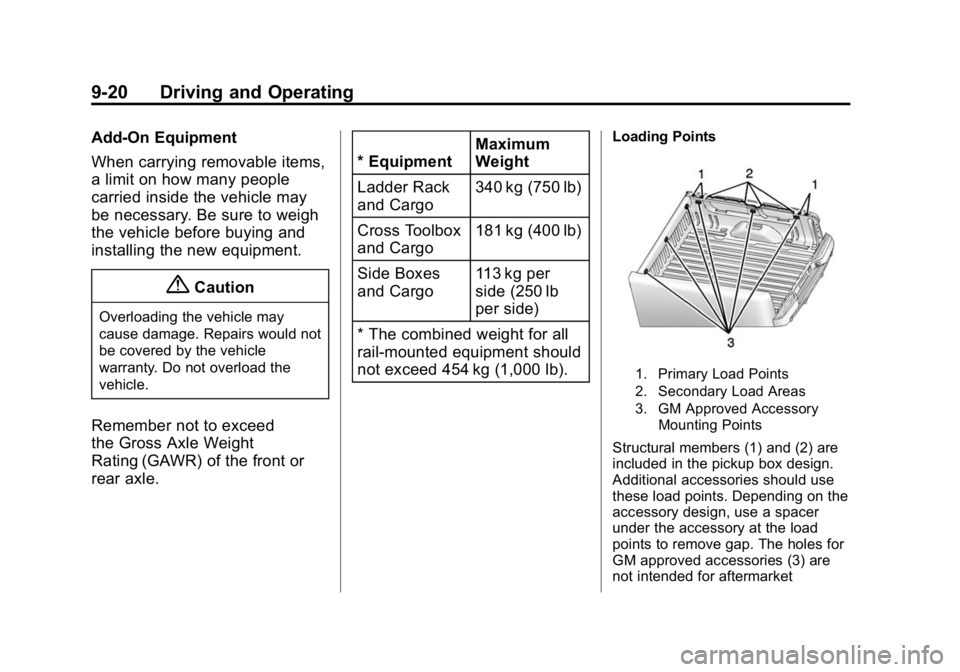
Loading Points
1. Primary Load Points
2. Secondary Load Areas
3. GM Approved Accessory Mounting Points
Structural members (1) and (2) are
included in the pickup box design.
Additional accessories should use
these load points. Depending on the
accessory design, use a spacer
under the accessory at the load
points to remove gap. The holes for
GM approved accessories (3) are
not intended for aftermarket
Page 242 of 433
Black plate (27,1)GMC Canyon Owner Manual (GMNA-Localizing-U.S./Canada-7587000) -
2015 - CRC - 3/17/15
Driving and Operating 9-27
Warning (Continued)
free to roll, even if the shift lever
is in P (Park). Be sure the transfer
case is in a drive gear. If towing a
trailer, seeDriving Characteristics
and Towing Tips on page 9-57.
1. Hold the brake pedal down, then set the parking brake.
See Parking Brake on
page 9-41.
2. Hold the button on the shift lever and push the lever toward the
front of the vehicle into P (Park).
3. Be sure the transfer case (if equipped) is in a drive
gear —not in N (Neutral).
4. Turn the ignition key to LOCK/OFF.
5. Remove the key and take it with you. If you can leave the vehicle
with the ignition key in your
hand, the vehicle is in P (Park).
Leaving the Vehicle with the
Engine Running
{Warning
It can be dangerous to leave the
vehicle with the engine running.
The vehicle could move suddenly
if the shift lever is not fully in
P (Park) with the parking brake
firmly set.
If you have four-wheel drive and
the transfer case is in N (Neutral),
the vehicle will be free to roll,
even if the shift lever is in
P (Park). So be sure the transfer
case is in a drive gear —not in
N (Neutral).
And, if you leave the vehicle with
the engine running, it could
overheat and even catch fire. You
or others could be injured. Do not
leave the vehicle with the engine
running unless you have to. If you have to leave the vehicle with
the engine running, be sure the
vehicle is in P (Park) and the
parking brake is firmly set before
you leave it. After you move the shift
lever into P (Park), hold the regular
brake pedal down. Then, see if you
can move the shift lever away from
P (Park) without pressing the button
on the shift lever. If you can, it
means that the shift lever was not
fully locked into P (Park).
Torque Lock
If you are parking on a hill and you
do not shift the transmission into
P (Park) properly, the weight of the
vehicle may put too much force on
the parking pawl in the
transmission. You may find it difficult
to pull the shift lever out of P (Park).
This is called torque lock. To
prevent torque lock, set the parking
brake and then shift into P (Park)
properly before you leave the driver
seat. To find out how, see
Shifting
Into Park on page 9-26.
Page 276 of 433
Black plate (61,1)GMC Canyon Owner Manual (GMNA-Localizing-U.S./Canada-7587000) -
2015 - CRC - 3/17/15
Driving and Operating 9-61
{Caution
Pulling a trailer improperly can
damage the vehicle and result in
costly repairs not covered by the
vehicle warranty. To pull a trailer
correctly, follow the advice in this
section and see your dealer for
important information about
towing a trailer with the vehicle.
See Vehicle Load Limits on
page 9-14 for more information
about the vehicle's maximum load
capacity.
To identify the trailering capacity of
the vehicle, read the information in
“Weight of the Trailer” later in this
section.
Trailering is different than just
driving the vehicle by itself.
Trailering means changes in
handling, acceleration, braking,
durability, and fuel economy. Successful, safe trailering takes
correct equipment, and it has to be
used properly.
The following information has many
time-tested, important trailering tips
and safety rules. Many of these are
important for your safety and that of
your passengers. Read this section
carefully before pulling a trailer.
Weight of the Trailer
How heavy can a trailer safely be?
It depends on how the rig is used.
Speed, altitude, road grades,
outside temperature, and how much
the vehicle is used to pull a trailer
are all important. It can depend on
any special equipment on the
vehicle, and the amount of tongue
weight the vehicle can carry. See
“Weight of the Trailer Tongue”
later
in this section for more information. Trailer Weight Rating (TWR) is
calculated assuming the tow vehicle
has only the driver but all required
trailering equipment. Weight of
additional optional equipment,
passengers, and cargo in the tow
vehicle must be subtracted from the
trailer weight rating.
Use the following chart to determine
how much the vehicle can weigh,
based upon the vehicle model and
options.
Page 277 of 433
Black plate (62,1)GMC Canyon Owner Manual (GMNA-Localizing-U.S./Canada-7587000) -
2015 - CRC - 3/17/15
9-62 Driving and Operating
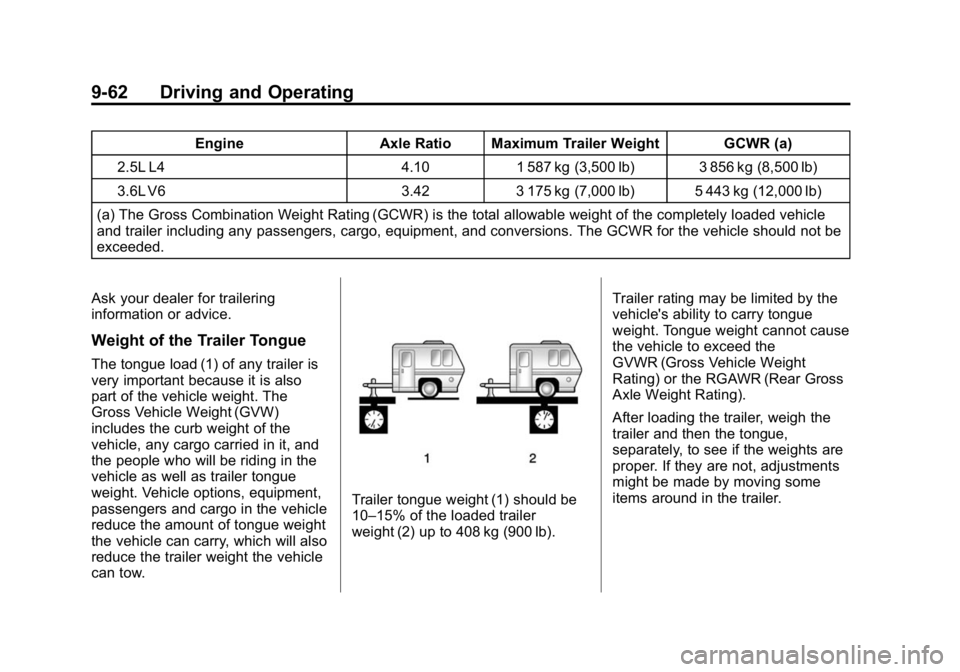
EngineAxle Ratio Maximum Trailer Weight GCWR (a)
2.5L L4 4.101 587 kg (3,500 lb) 3 856 kg (8,500 lb)
3.6L V6 3.423 175 kg (7,000 lb) 5 443 kg (12,000 lb)
(a) The Gross Combination Weight Rating (GCWR) is the total allowable weight of the completely loaded vehicle
and trailer including any passengers, cargo, equipment, and conversions. The GCWR for the vehicle should not be
exceeded.
Ask your dealer for trailering
information or advice.
Weight of the Trailer Tongue
The tongue load (1) of any trailer is
very important because it is also
part of the vehicle weight. The
Gross Vehicle Weight (GVW)
includes the curb weight of the
vehicle, any cargo carried in it, and
the people who will be riding in the
vehicle as well as trailer tongue
weight. Vehicle options, equipment,
passengers and cargo in the vehicle
reduce the amount of tongue weight
the vehicle can carry, which will also
reduce the trailer weight the vehicle
can tow.
Trailer tongue weight (1) should be
10–15% of the loaded trailer
weight (2) up to 408 kg (900 lb). Trailer rating may be limited by the
vehicle's ability to carry tongue
weight. Tongue weight cannot cause
the vehicle to exceed the
GVWR (Gross Vehicle Weight
Rating) or the RGAWR (Rear Gross
Axle Weight Rating).
After loading the trailer, weigh the
trailer and then the tongue,
separately, to see if the weights are
proper. If they are not, adjustments
might be made by moving some
items around in the trailer.
Page 278 of 433
Black plate (63,1)GMC Canyon Owner Manual (GMNA-Localizing-U.S./Canada-7587000) -
2015 - CRC - 3/17/15
Driving and Operating 9-63
Total Weight on the Vehicle's
Tires
Be sure the vehicle's tires are
inflated to the inflation pressures
found on the Certification/Tire label
on the center pillar or seeVehicle
Load Limits on page 9-14. Make
sure not to exceed the GVWR limit
for the vehicle, or the RGAWR, with
the tow vehicle and trailer fully
loaded for the trip including the
weight of the trailer tongue. If using
a weight-distributing hitch, make
sure not to exceed the RGAWR
before applying the weight
distribution spring bars.
Weight of the Trailering
Combination
It is important that the combination
of the tow vehicle and trailer does
not exceed any of its weight
ratings —GCWR, GVWR, RGAWR,
Trailer Weight Rating, or Tongue
Weight. The only way to be sure it is
not exceeding any of these ratings
is to weigh the tow vehicle and trailer combination, fully loaded for
the trip, getting individual weights
for each of these items.
Towing Equipment
Hitches
The correct hitch equipment helps
maintain combination control. Many
trailers can be towed with a
weight-carrying hitch which simply
features a coupler latched to the
hitch ball, or a tow eye latched to a
pintle hook. Other trailers may
require a weight-distributing hitch
that uses spring bars to distribute
the trailer tongue weight among the
tow vehicle and trailer axles.
If a step-bumper hitch will be used,
the bumper could be damaged in
sharp turns. Make sure there
is ample room when turning to avoid
contact between the trailer and the
bumper.
A step-bumper hitch is limited to
1587 kg (3,500 lb) total weight.
Consider using sway controls with
any trailer. Ask a trailering
professional about sway controls or
refer to the trailer manufacturer's
recommendations and instructions.
Weight-Distributing Hitch
Adjustment
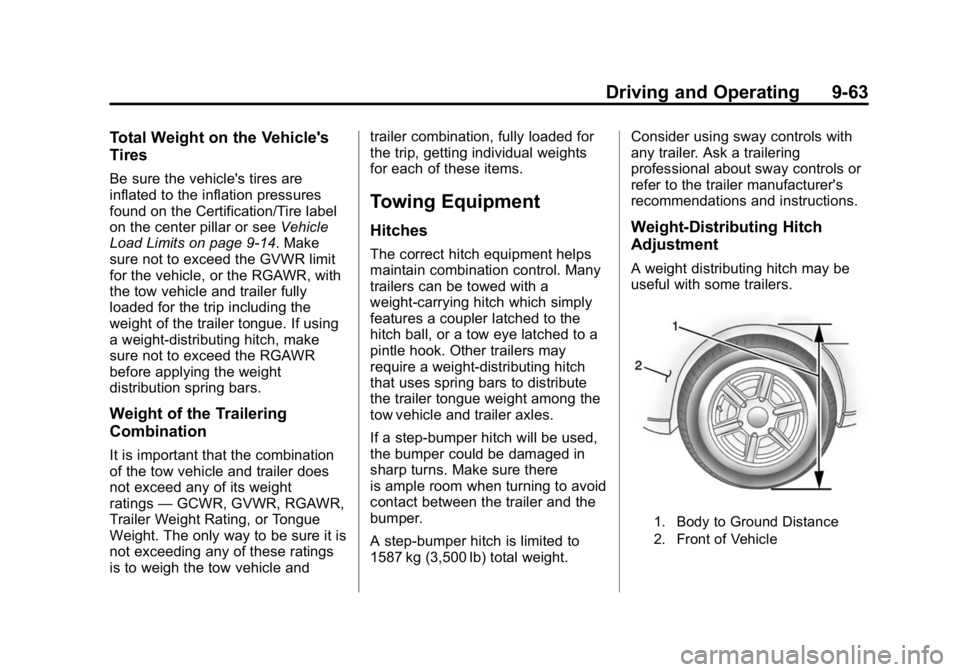
A weight distributing hitch may be
useful with some trailers.
1. Body to Ground Distance
2. Front of Vehicle
Page 279 of 433
Black plate (64,1)GMC Canyon Owner Manual (GMNA-Localizing-U.S./Canada-7587000) -
2015 - CRC - 3/17/15
9-64 Driving and Operating
When using a weight-distributing
hitch, the spring bars should be
adjusted so the distance (1) is the
same after coupling the trailer to the
tow vehicle and adjusting the hitch.
Safety Chains
Always attach chains between the
vehicle and the trailer. Cross the
safety chains under the tongue of
the trailer to help prevent the tongue
from contacting the road if it
becomes separated from the hitch.
Instructions about safety chains
may be provided by the hitch
manufacturer or by the trailer
manufacturer. Always leave just
enough slack so the combination
can turn. Never allow safety chains
to drag on the ground.
Trailer Brakes
A loaded trailer that weighs more
than 900 kg (2,000 lb) needs to have
its own brake system that is
adequate for the weight of the
trailer. Be sure to read and followthe instructions for the trailer brakes
so they are installed, adjusted, and
maintained properly.
Trailer Wiring Harness
For vehicles not equipped with
heavy-duty trailering, a harness is
secured underneath the left side of
the vehicle, next to the spare tire.
The harness requires the installation
of a trailer connector, which is
available through your dealer. The
seven-wire harness contains the
following trailer circuits:
.Yellow: Left Stop/Turn Signal
.Green: Right Stop/Turn Signal
.Brown: Taillamps/Parking Lamps
.Black: Ground
.Gray: Back-up Lamps
.Orange: Battery Feed
.Blue: Trailer Brake
If charging a remote (non-vehicle)
battery, press the Tow/Haul Mode
button, if equipped, on the center
stack. This will boost the vehicle system voltage and properly charge
the battery. If the trailer is too light
for Tow/Haul Mode, or the vehicle is
not equipped with Tow/Haul, turn on
the headlamps as a second way to
boost the vehicle system and
charge the battery.
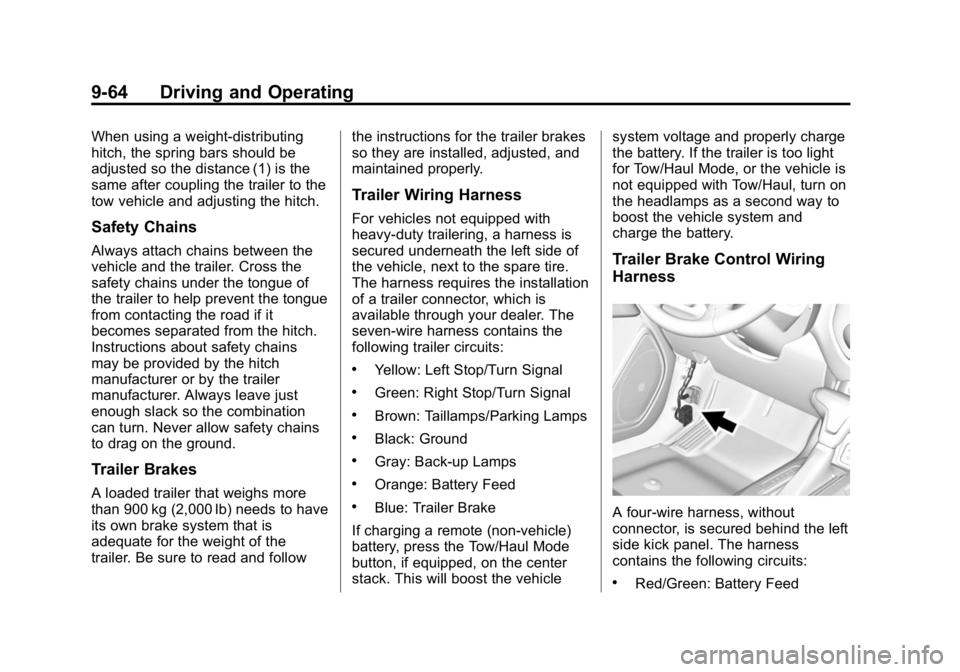
Trailer Brake Control Wiring
Harness
A four-wire harness, without
connector, is secured behind the left
side kick panel. The harness
contains the following circuits:
.Red/Green: Battery Feed
Page 280 of 433
Black plate (65,1)GMC Canyon Owner Manual (GMNA-Localizing-U.S./Canada-7587000) -
2015 - CRC - 3/17/15
Driving and Operating 9-65
.Black: Ground
.White/Blue: Brake signal to
controller
.Blue: Trailer Brake power to
trailer connector
To remove the left side kick panel,
start at the front of the panel pulling
toward the rear of the vehicle and lift
upward to disengage the integral
clips.
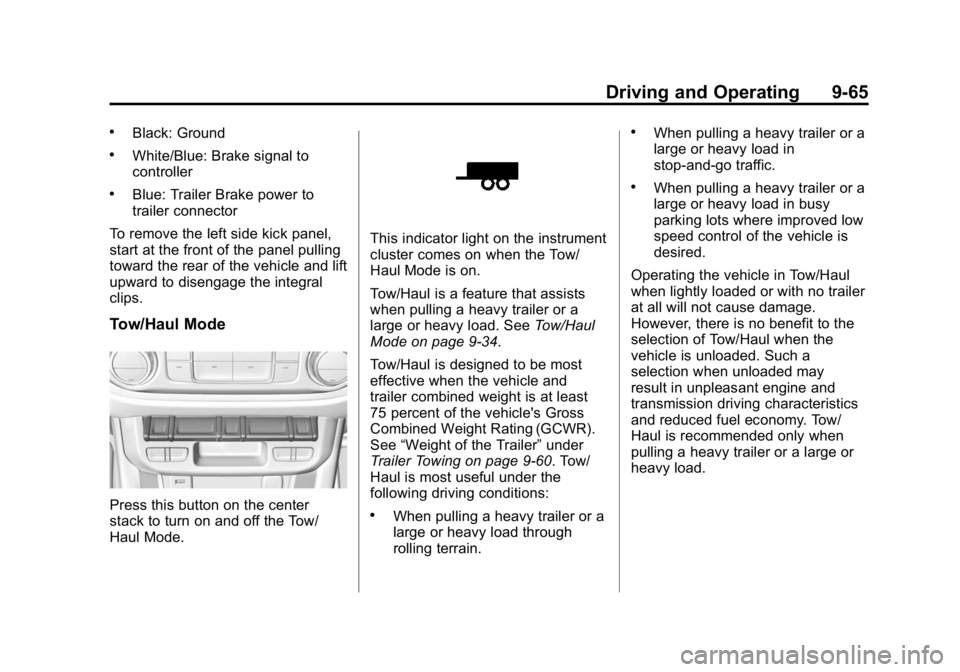
Tow/Haul Mode
Press this button on the center
stack to turn on and off the Tow/
Haul Mode.
This indicator light on the instrument
cluster comes on when the Tow/
Haul Mode is on.
Tow/Haul is a feature that assists
when pulling a heavy trailer or a
large or heavy load. See Tow/Haul
Mode on page 9-34.
Tow/Haul is designed to be most
effective when the vehicle and
trailer combined weight is at least
75 percent of the vehicle's Gross
Combined Weight Rating (GCWR).
See “Weight of the Trailer” under
Trailer Towing on page 9-60. Tow/
Haul is most useful under the
following driving conditions:
.When pulling a heavy trailer or a
large or heavy load through
rolling terrain.
.When pulling a heavy trailer or a
large or heavy load in
stop-and-go traffic.
.When pulling a heavy trailer or a
large or heavy load in busy
parking lots where improved low
speed control of the vehicle is
desired.
Operating the vehicle in Tow/Haul
when lightly loaded or with no trailer
at all will not cause damage.
However, there is no benefit to the
selection of Tow/Haul when the
vehicle is unloaded. Such a
selection when unloaded may
result in unpleasant engine and
transmission driving characteristics
and reduced fuel economy. Tow/
Haul is recommended only when
pulling a heavy trailer or a large or
heavy load.