key GMC CANYON 2015 Owner's Guide
[x] Cancel search | Manufacturer: GMC, Model Year: 2015, Model line: CANYON, Model: GMC CANYON 2015Pages: 433, PDF Size: 4.61 MB
Page 45 of 433
Black plate (16,1)GMC Canyon Owner Manual (GMNA-Localizing-U.S./Canada-7587000) -
2015 - CRC - 3/17/15
2-16 Keys, Doors, and Windows
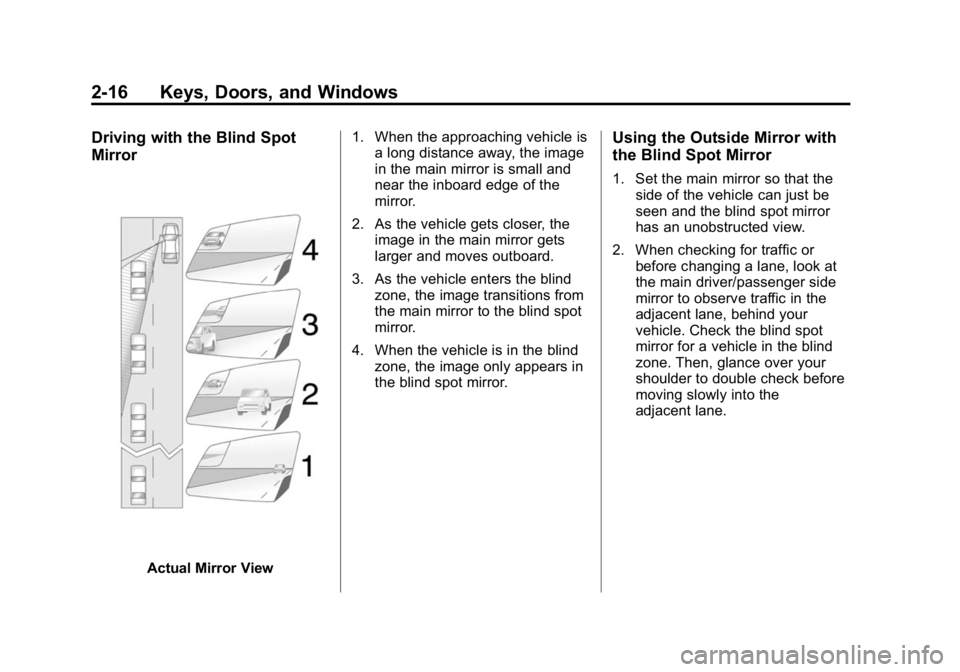
Driving with the Blind Spot
Mirror
Actual Mirror View1. When the approaching vehicle is
a long distance away, the image
in the main mirror is small and
near the inboard edge of the
mirror.
2. As the vehicle gets closer, the image in the main mirror gets
larger and moves outboard.
3. As the vehicle enters the blind zone, the image transitions from
the main mirror to the blind spot
mirror.
4. When the vehicle is in the blind zone, the image only appears in
the blind spot mirror.
Using the Outside Mirror with
the Blind Spot Mirror
1. Set the main mirror so that theside of the vehicle can just be
seen and the blind spot mirror
has an unobstructed view.
2. When checking for traffic or before changing a lane, look at
the main driver/passenger side
mirror to observe traffic in the
adjacent lane, behind your
vehicle. Check the blind spot
mirror for a vehicle in the blind
zone. Then, glance over your
shoulder to double check before
moving slowly into the
adjacent lane.
Page 46 of 433
Black plate (17,1)GMC Canyon Owner Manual (GMNA-Localizing-U.S./Canada-7587000) -
2015 - CRC - 3/17/15
Keys, Doors, and Windows 2-17
Interior Mirrors
Interior Rearview Mirrors
Adjust the rearview mirror for a clear
view of the area behind your
vehicle.
If equipped with OnStar, the vehicle
may have three control buttons at
the bottom of the mirror. See your
dealer for more information about
OnStar and how to subscribe to it.
SeeOnStar Overview on page 14-1.
Do not spray glass cleaner directly
on the mirror. Use a soft towel
dampened with water.
Manual Rearview Mirror
If equipped, push the tab forward for
daytime use and pull it rearward for
nighttime use to avoid glare from
the headlamps from behind.
Automatic Dimming
Rearview Mirror
If equipped, the mirror will
automatically reduce the glare of the
headlamps from behind. The
dimming feature comes on each
time the vehicle is started.
Windows
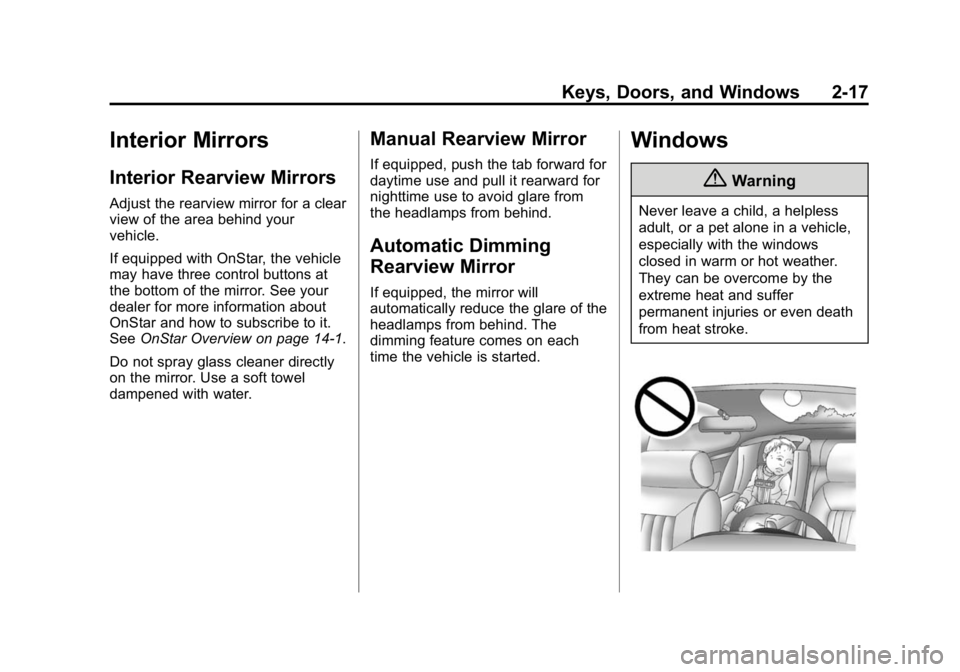
{Warning
Never leave a child, a helpless
adult, or a pet alone in a vehicle,
especially with the windows
closed in warm or hot weather.
They can be overcome by the
extreme heat and suffer
permanent injuries or even death
from heat stroke.
Page 47 of 433
Black plate (18,1)GMC Canyon Owner Manual (GMNA-Localizing-U.S./Canada-7587000) -
2015 - CRC - 3/17/15
2-18 Keys, Doors, and Windows
The vehicle aerodynamics are
designed to improve fuel economy
performance. This may result in a
pulsing sound when either rear
window is down and the front
windows are up. To reduce the
sound, open either a front window
or the sunroof, if equipped.
Power Windows
{Warning
Children could be seriously
injured or killed if caught in the
path of a closing window. Never
leave keys in a vehicle with
children. When there are children
in the rear seat, use the window
lockout button to prevent
operation of the windows.
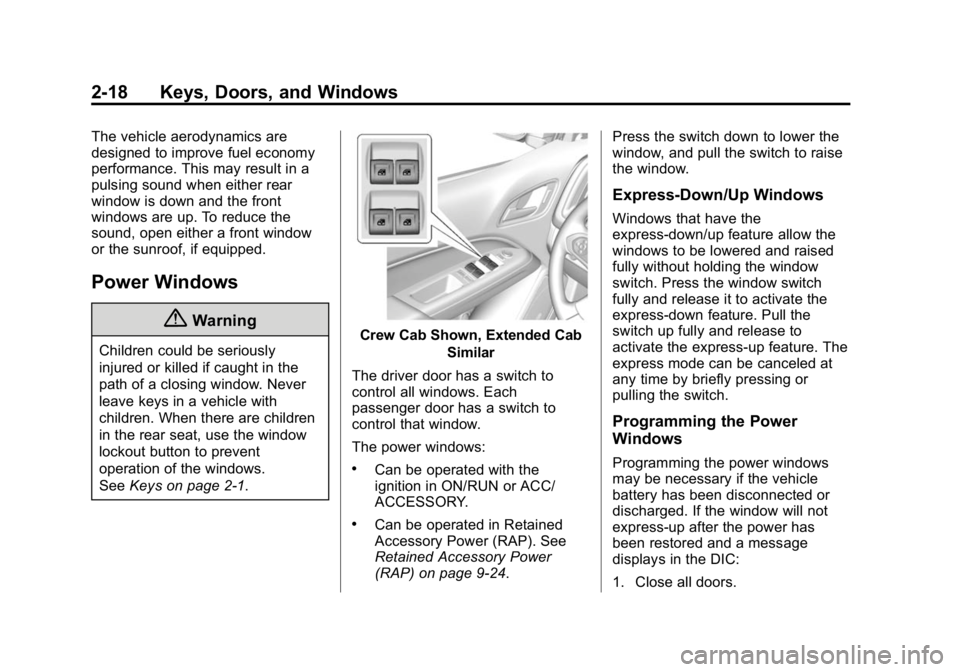
SeeKeys on page 2-1.Crew Cab Shown, Extended Cab
Similar
The driver door has a switch to
control all windows. Each
passenger door has a switch to
control that window.
The power windows:
.Can be operated with the
ignition in ON/RUN or ACC/
ACCESSORY.
.Can be operated in Retained
Accessory Power (RAP). See
Retained Accessory Power
(RAP) on page 9-24. Press the switch down to lower the
window, and pull the switch to raise
the window.
Express-Down/Up Windows
Windows that have the
express-down/up feature allow the
windows to be lowered and raised
fully without holding the window
switch. Press the window switch
fully and release it to activate the
express-down feature. Pull the
switch up fully and release to
activate the express-up feature. The
express mode can be canceled at
any time by briefly pressing or
pulling the switch.
Programming the Power
Windows
Programming the power windows
may be necessary if the vehicle
battery has been disconnected or
discharged. If the window will not
express-up after the power has
been restored and a message
displays in the DIC:
1. Close all doors.
Page 48 of 433
Black plate (19,1)GMC Canyon Owner Manual (GMNA-Localizing-U.S./Canada-7587000) -
2015 - CRC - 3/17/15
Keys, Doors, and Windows 2-19
2. Place the ignition in ACC/ACCESSORY or ON/RUN/
START.
3. From any partial open position, close the window and continue
to pull the switch briefly after the
window has fully closed.
The window is now reprogrammed.
Obstacle Detection Feature
The obstacle detection feature is
part of the express-up feature and is
active:
.In the middle and upper portions
of the window opening.
.During window up movements.
.In ignition OFF during window
up movements and during
express-up in ignition ON/RUN/
START.
If there is something blocking the
window during automatic closing,
the window will reverse direction for
a short distance. Weather conditions
may cause the window to
auto-reverse. The window will return to normal operation once the
object or condition is removed.
If conditions prevent the window
from closing and the window
continues to auto-reverse, it is
possible to close the window by
activating the express override.
Hold the window switch in the
partially or fully pulled position.
Release of the switch from the
partially pulled up position will cause
the window to stop. Release of the
switch from the fully pulled position
will activate the express-up and
related obstacle detection features.
{Warning
If express override is activated,
the window will not reverse
automatically. You or others could
be injured and the window could
be damaged. Before you use
express override, make sure that
all people and obstructions are
clear of the window path.
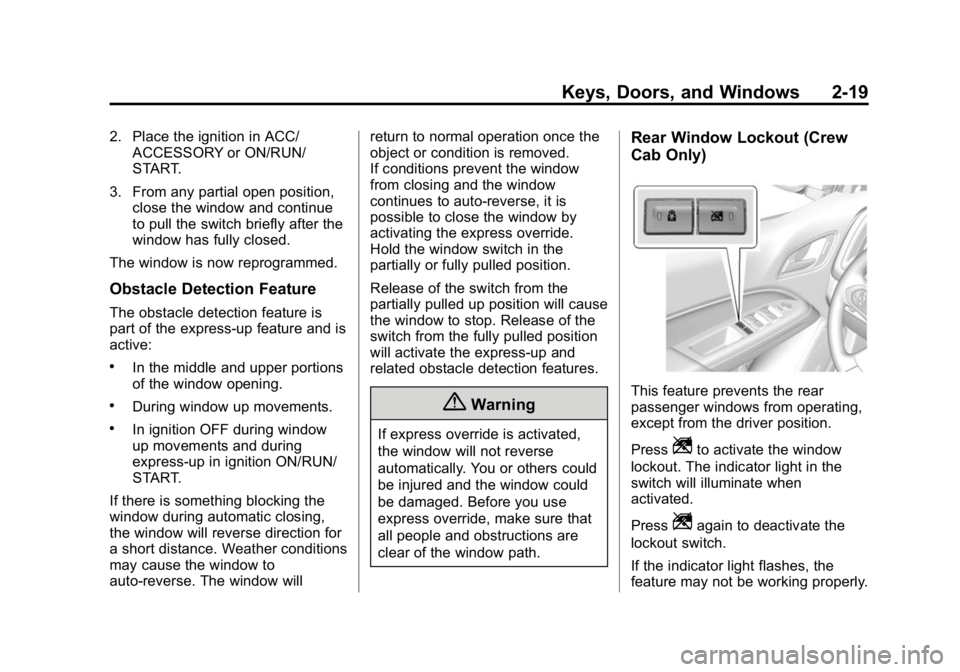
Rear Window Lockout (Crew
Cab Only)
This feature prevents the rear
passenger windows from operating,
except from the driver position.
Press
Zto activate the window
lockout. The indicator light in the
switch will illuminate when
activated.
Press
Zagain to deactivate the
lockout switch.
If the indicator light flashes, the
feature may not be working properly.
Page 49 of 433
Black plate (20,1)GMC Canyon Owner Manual (GMNA-Localizing-U.S./Canada-7587000) -
2015 - CRC - 3/17/15
2-20 Keys, Doors, and Windows
Rear Windows
Sliding Rear Window
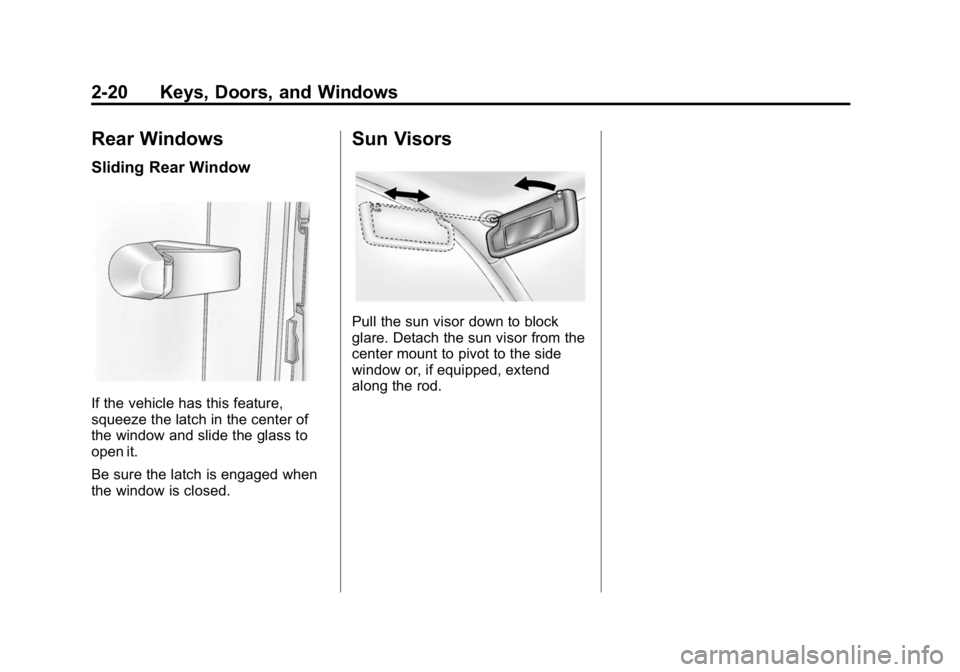
If the vehicle has this feature,
squeeze the latch in the center of
the window and slide the glass to
open it.
Be sure the latch is engaged when
the window is closed.
Sun Visors
Pull the sun visor down to block
glare. Detach the sun visor from the
center mount to pivot to the side
window or, if equipped, extend
along the rod.
Page 64 of 433
Black plate (15,1)GMC Canyon Owner Manual (GMNA-Localizing-U.S./Canada-7587000) -
2015 - CRC - 3/17/15
Seats and Restraints 3-15
The best way to protect the fetus is
to protect the mother. When a safety
belt is worn properly, it is more likely
that the fetus will not be hurt in a
crash. For pregnant women, as for
anyone, the key to making safety
belts effective is wearing them
properly.
Safety Belt Extender
If the vehicle's safety belt will fasten
around you, you should use it.
But if a safety belt is not long
enough, your dealer will order you
an extender. When you go in to
order it, take the heaviest coat you
will wear, so the extender will be
long enough for you. To help avoid
personal injury, do not let someone
else use it, and use it only for the
seat it is made to fit. The extender
has been designed for adults. Never
use it for securing child seats. To
wear it, attach it to the regular safety
belt. See the instruction sheet that
comes with the extender.
Safety System Check
Now and then, check that the safety
belt reminder light, safety belts,
buckles, latch plates, retractors, and
anchorages are all working properly.
Look for any other loose or
damaged safety belt system parts
that might keep a safety belt system
from doing its job. See your dealer
to have it repaired. Torn or frayed
safety belts may not protect you in a
crash. They can rip apart under
impact forces. If a belt is torn or
frayed, get a new one right away.
Make sure the safety belt reminder
light is working. SeeSafety Belt
Reminders on page 5-15.
Keep safety belts clean and dry.
See Safety Belt Care on page 3-15.
Safety Belt Care
Keep belts clean and dry.
{Warning
Do not bleach or dye safety belts.
It may severely weaken them. In
a crash, they might not be able to
provide adequate protection.
Clean safety belts only with mild
soap and lukewarm water.
Replacing Safety Belt
System Parts after a
Crash
{Warning
A crash can damage the safety
belt system in the vehicle.
A damaged safety belt system
may not properly protect the
person using it, resulting in
serious injury or even death in a
(Continued)
Page 114 of 433
Black plate (1,1)GMC Canyon Owner Manual (GMNA-Localizing-U.S./Canada-7587000) -
2015 - CRC - 3/17/15
Instruments and Controls 5-1
Instruments and
Controls
Controls
Steering Wheel Adjustment . . . 5-2
Steering Wheel Controls . . . . . . 5-3
Horn . . . . . . . . . . . . . . . . . . . . . . . . . . 5-3
Windshield Wiper/Washer . . . . . 5-3
Compass . . . . . . . . . . . . . . . . . . . . . 5-4
Clock . . . . . . . . . . . . . . . . . . . . . . . . . 5-4
Power Outlets . . . . . . . . . . . . . . . . . 5-5
Warning Lights, Gauges, and
Indicators
Warning Lights, Gauges, andIndicators . . . . . . . . . . . . . . . . . . . . 5-7
Instrument Cluster (Base Level) . . . . . . . . . . . . . . . . . . . . . . . 5-8
Instrument Cluster (Uplevel) . . . . . . . . . . . . . . . . . . . 5-10
Speedometer . . . . . . . . . . . . . . . . 5-13
Odometer . . . . . . . . . . . . . . . . . . . . 5-13
Trip Odometer . . . . . . . . . . . . . . . 5-13
Tachometer . . . . . . . . . . . . . . . . . . 5-13
Fuel Gauge . . . . . . . . . . . . . . . . . . 5-14
Engine Coolant Temperature
Gauge . . . . . . . . . . . . . . . . . . . . . . 5-15 Safety Belt Reminders . . . . . . . 5-15
Airbag Readiness Light . . . . . . 5-16
Passenger Airbag Status
Indicator . . . . . . . . . . . . . . . . . . . . 5-17
Charging System Light . . . . . . 5-17
Malfunction
Indicator Lamp . . . . . . . . . . . . . 5-18
Brake System Warning Light . . . . . . . . . . . . . . . . . . . . . . . 5-20
Antilock Brake System (ABS) Warning Light . . . . . . . . . . . . . . 5-21
Up-Shift Light (Manual Transmission) . . . . . . . . . . . . . . 5-22
Tow/Haul Mode Light . . . . . . . . 5-22
Hill Descent Control Light . . . . 5-22
Lane Departure Warning (LDW) Light . . . . . . . . . . . . . . . . 5-22
Vehicle Ahead Indicator . . . . . . 5-22
Traction Off Light . . . . . . . . . . . . 5-23
StabiliTrak
®OFF Light . . . . . . . 5-23
Traction Control System (TCS)/StabiliTrak
®Light . . . . 5-23
Tire Pressure Light . . . . . . . . . . 5-24
Engine Oil Pressure Light . . . . 5-24
Low Fuel Warning Light (Base Level) . . . . . . . . . . . . . . . . . . . . . . 5-25
Low Fuel Warning Light (Uplevel) . . . . . . . . . . . . . . . . . . . 5-25
Security Light . . . . . . . . . . . . . . . . 5-25 High-Beam On Light . . . . . . . . . 5-25
Front Fog Lamp Light . . . . . . . . 5-26
Lamps On Reminder . . . . . . . . . 5-26
Cruise Control Light . . . . . . . . . 5-26
Door Ajar Light (Uplevel
Cluster) . . . . . . . . . . . . . . . . . . . . 5-26
Information Displays
Driver Information Center(DIC) (Base Level) . . . . . . . . . 5-27
Driver Information Center (DIC) (Uplevel) . . . . . . . . . . . . . 5-29
Vehicle Messages
Vehicle Messages . . . . . . . . . . . 5-33
Battery Voltage and ChargingMessages . . . . . . . . . . . . . . . . . . 5-33
Brake System Messages . . . . 5-34
Compass Messages . . . . . . . . . 5-34
Door Ajar Messages . . . . . . . . . 5-34
Engine Cooling System Messages . . . . . . . . . . . . . . . . . . 5-34
Engine Oil Messages . . . . . . . . 5-35
Engine Power Messages . . . . 5-36
Fuel System Messages . . . . . . 5-36
Key and Lock Messages . . . . . 5-36
Lamp Messages . . . . . . . . . . . . . 5-36
Object Detection System Messages . . . . . . . . . . . . . . . . . . 5-37
Page 146 of 433
Black plate (33,1)GMC Canyon Owner Manual (GMNA-Localizing-U.S./Canada-7587000) -
2015 - CRC - 3/17/15
Instruments and Controls 5-33
Vehicle Messages
Messages displayed on the DIC
indicate the status of the vehicle or
some action that may be needed to
correct a condition. Multiple
messages may display one after
the other.
The messages that do not require
immediate action can be
acknowledged and cleared by
pressing SET/CLR or
V. The
messages that require immediate
action cannot be cleared until that
action is performed. All messages
should be taken seriously and
clearing the messages does not
correct the problem.
The following are some of the
vehicle messages that may be
displayed depending on your
vehicle content.
Battery Voltage and
Charging Messages
BATTERY LOW START
VEHICLE
When the vehicle’ s battery is
severely discharged, this message
will display and four chimes will
sound. Start the vehicle
immediately. If the vehicle is not
started and the battery continues to
discharge, the climate controls,
heated seats, and audio systems
will shut off and the vehicle may
require a jump start. These systems
will function again after the vehicle
is started.
BATTERY SAVER ACTIVE
This message displays when the
battery voltage drops below
expected levels and features are
disabled. Turn off all unnecessary
accessory features.
SERVICE BATTERY
CHARGING SYSTEM
On some vehicles, this message
displays if there is a problem with
the battery charging system. Under
certain conditions, the charging
system light may also turn on in the
instrument cluster. See Charging
System Light on page 5-17. Driving
with this problem could drain the
battery. Turn off all unnecessary
accessories. Have the electrical
system checked as soon as
possible. See your dealer.
TRANSPORT MODE ON
This message is displayed when the
vehicle is in transport mode. Some
features can be disabled while in
this mode, including Remote
Keyless Entry (RKE), remote start,
and the vehicle alarm system. Take
the vehicle to your dealer for service
to turn transport mode off.
Page 149 of 433
Black plate (36,1)GMC Canyon Owner Manual (GMNA-Localizing-U.S./Canada-7587000) -
2015 - CRC - 3/17/15
5-36 Instruments and Controls
Engine Power Messages
ENGINE POWER IS REDUCED
This message displays and a chime
may sound when the cooling system
temperature gets too hot and the
engine further enters the engine
coolant protection mode. See
Engine Overheating on page 10-19
for more information.
This message also displays when
the vehicle's engine power is
reduced. Reduced engine power
can affect the vehicle's ability to
accelerate. If this message is on,
but there is no reduction in
performance, proceed to your
destination. The performance may
be reduced the next time the vehicle
is driven. The vehicle may be driven
at a reduced speed while this
message is on, but acceleration and
speed may be reduced. Anytime
this message stays on, the vehicle
should be taken to your dealer for
service as soon as possible.
Fuel System Messages
FUEL LEVEL LOW
This message displays and a chime
may sound if the fuel level is low.
Refuel as soon as possible. See
Fuel Gauge on page 5-14andFuel
on page 9-54.
TIGHTEN GAS CAP
This message may display along
with the malfunction indicator lamp
on the instrument cluster if the
vehicle's fuel cap is not tightened
properly. See Malfunction Indicator
Lamp on page 5-18. Reinstall the
fuel cap fully. See Filling the Tank
on page 9-55. The diagnostic
system can determine if the fuel cap
has been left off or improperly
installed. A loose or missing fuel
cap allows fuel to evaporate into the
atmosphere. A few driving trips with
the cap properly installed should
turn this light and message off.
Key and Lock Messages
REPLACE BATTERY IN
REMOTE KEY
This message displays if a Remote
Keyless Entry (RKE) transmitter
battery is low. The battery needs to
be replaced in the transmitter. See
“Battery Replacement” under
Remote Keyless Entry (RKE)
System Operation on page 2-4.
Lamp Messages
TURN SIGNAL ON
This message displays and a chime
sounds if a turn signal is left on for
1.2 km (0.75 mi). Move the turn
signal lever to the off position.
Page 152 of 433
Black plate (39,1)GMC Canyon Owner Manual (GMNA-Localizing-U.S./Canada-7587000) -
2015 - CRC - 3/17/15
Instruments and Controls 5-39
SeeTire Inspection on page 10-55,
Tire Rotation on page 10-55, Tire
Pressure Monitor System on
page 10-50, and Tire Pressure on
page 10-49.
TIRE PRESSURE LOW ADD
AIR TO TIRE
If equipped with the Tire Pressure
Monitor System (TPMS), this
message displays when the
pressure in one or more of the
vehicle's tires is low. This message
also displays with a vehicle picture
to indicate the location of the low
tire. The low tire pressure warning
light will also come on. See Tire
Pressure Light on page 5-24. You
can receive more than one tire
pressure message at a time. If a tire
pressure message appears on the
DIC, stop as soon as you can. Have
the tire pressures checked and set
to those shown on the Tire and
Loading Information label. See Tires
on page 10-41, Vehicle Load Limits
on page 9-14, and Tire Pressure on
page 10-49. The DIC also shows the tire
pressure values. See
Driver
Information Center (DIC) (Base
Level) on page 5-27 orDriver
Information Center (DIC) (Uplevel)
on page 5-29.
Transmission Messages
4WD OFF
If equipped with four-wheel drive,
this message displays when the
four-wheel-drive system is
temporarily disabled due to an
overheated condition. The vehicle
will run in two-wheel drive when this
message is present. Once the
four-wheel-drive system cools down,
the message turns off and the
four-wheel-drive system returns to
normal operation.
4WD SHIFT IN PROGRESS
This message will display while the
four-wheel-drive system is shifting.
FOR 4WD LOW SLOW TO XXX
If a four-wheel drive shift into
Four-Wheel Drive Low is requested,
but the vehicle speed is too high,
this message will display until the
correct vehicle speed is reached.
FOR 4WD LOW SHIFT TO
NEUTRAL
If a four-wheel drive shift into
Four-Wheel Drive Low is requested,
and the vehicle speed is correct, but
the transmission is not in
N (Neutral), this message will
display until the transmission is
shifted to N (Neutral).
SERVICE 4WD
If the vehicle has four-wheel drive,
this message may display if a
problem occurs with the
four-wheel-drive system. If this
message appears, stop as soon as
possible and turn off the vehicle.
Make sure the key is in the
LOCK/OFF position for at least
one minute, then restart the vehicle
and check for the message on the