lock GMC CANYON 2015 Repair Manual
[x] Cancel search | Manufacturer: GMC, Model Year: 2015, Model line: CANYON, Model: GMC CANYON 2015Pages: 433, PDF Size: 4.61 MB
Page 172 of 433
Black plate (5,1)GMC Canyon Owner Manual (GMNA-Localizing-U.S./Canada-7587000) -
2015 - CRC - 3/17/15
Infotainment System 7-5
Pandora (If Equipped)
Select the PANDORA icon to begin
Pandora. SeePandora Internet
Radio on page 7-9.
Setting Radio Preferences
Select the SETTINGS screen icon
to display the Settings menu and
the following may display:
Time and Date: SeeClock on
page 5-4.
Language (Current Language):
This will set the display language in
the radio and instrument cluster.
Select to display a list of languages.
Select
oBACK to go back to the
previous menu.
Valet Mode:
Using the circular numeric keypad,
enter a four-digit code:
1. Turn the MENU knob to highlight a number. 2. Press the MENU knob to select
it. Do this for each one of the
four digits. Select Enter to go to
the confirmation screen.
3. Re-enter the four-digit code. Select LOCK to lock the system.
4. Enter the four-digit code to unlock the system. Select
o
BACK to go back to the
previous menu.
Radio: See“Radio Setup” later in
this section.
Vehicle: SeeVehicle
Personalization on page 5-41.
Display: Press the MENU knob to
turn the display on or off.
Return to Factory Settings: See
“Return to Factory Settings” later in
this section.
Software Information (If
Equipped): Press the MENU knob
to select Save Vehicle Info to USB.
Press the MENU knob again to start
downloading the vehicle information
to the USB. Radio Setup
Press the RADIO button and the
following may display:
Manage Favorites:
.Turn the MENU knob and press
to select a favorite.
.To delete a favorite, press
the button just below the
DELETE screen button.
.To move a favorite, press the
MOVE screen button. Turn
the MENU knob to select a
new location, then press the
DROP screen button to
select the new location.
.SelectoBACK to go back to
the previous menu.
Number of Favorites Shown:
Select Auto and the system will
automatically adjust the number of
favorite pages when favorites are
added and removed, or select a
number from 5–25 to manually
adjust the number of favorites
shown.
Page 177 of 433
Black plate (10,1)GMC Canyon Owner Manual (GMNA-Localizing-U.S./Canada-7587000) -
2015 - CRC - 3/17/15
7-10 Infotainment System
A phone or tablet with Internet
connection and the Pandora
application installed is required.
Personal cell phone data plans are
used. Make sure the latest version
is installed on the device.
Launching Pandora
Connect the iPhone to the USB
port, or connect Android®or
BlackBerry®through Bluetooth. See
Bluetooth (Overview) on page 7-25
or Bluetooth (Infotainment Controls -
Base Radio) on page 7-26 or
Bluetooth (Infotainment Controls -
Base Connected Radio) on
page 7-30. For first time use, set up
the stations before connecting to the
vehicle. The Pandora icon will be
available on the Home Page.
When Pandora is chosen, the
Pandora logo will populate on the
screen and the system will display
“Acquiring Pandora Radio Station.”
Launch times can be significant. Using the iPhone
1. Plug the device into the USB
port. The phone screen must be
unlocked.
2. Launch Pandora from the Home Page by selecting the
Pandora icon.
If nothing happens when the
available Pandora screen button is
pressed, download the latest
Pandora application and retry.
The login screen may display on the
device.
Using an Android or BlackBerry
Phone
The BlackBerry phone must be
unlocked to launch Pandora service.
1. Pair the phone using Bluetooth.
2. Launch Pandora by selecting Pandora on the Home Page.
If nothing happens when the
available Pandora screen button is
selected, download the latest
Pandora application and retry. The login screen may display on the
device.
Pandora Menus
Press the MENU knob.
Pandora has a menu with the
following:
Tone Settings:
Select to adjust the
tone settings. See AM-FM Radio on
page 7-7.
Bookmark Artist: Select to
bookmark the artist.
Bookmark Song: Select to
bookmark the song.
Auto Volume: This feature sets the
auto volume based on the speed of
the vehicle and noise in the vehicle.
See AM-FM Radio on page 7-7.
Pandora Features
Pandora service has features to rate
tracks, skip tracks, or change
stations.
Page 179 of 433
Black plate (12,1)GMC Canyon Owner Manual (GMNA-Localizing-U.S./Canada-7587000) -
2015 - CRC - 3/17/15
7-12 Infotainment System
.For an iPhone, check that the
USB cable is connected to the
USB port and the screen is
unlocked.
.Close Pandora on the device
and launch again. Devices that
allow multitasking may require
an extra step to quit the Pandora
application. See the cell phone
manufacturer's user guide.
Thumbs Up or Thumbs Down
Error
If there is an error trying to rate a
track with the
,or-buttons, the
message “Thumbs Down Error” or
“Thumbs Up Error” will display.
Press OK to dismiss.
Loss of Audio
Loss of Pandora audio can happen
in different ways:
.Weak or lost data connection.
.Device needs to be charged.
.Application needs to be
relaunched.
.Connection between phone and
radio lost.
.An iPhone is connected to both
Bluetooth and the USB port.
Playback can be resumed from
a loss of audio by double
tapping on the iPhone home
button then scrolling through the
icons to find an icon that allows
a change of flow between
Bluetooth and USB cable.
Volume and song selection may
be controlled using the
Infotainment controls or on the
phone/device. If Pandora is
selected and nothing is heard,
check the volume setting on
both phone/device and the
Infotainment system.
Common Pandora Messages
Pandora Error/Please Check
Device: Not signed in or Pandora
is down for maintenance.
No Stations Available: No stations
are available on the Pandora server
through the connected device. Action Unavailable. Please Check
Device Connection:
A few
conditions for loss of Internet
connection are:
.The connected device loses its
cellular connection.
.The device does not support
Internet connectivity.
.The device is not in the vehicle.
.The Bluetooth signal is lost.
No skips remaining for this
station or permitted during
advertisements:
.The maximum Pandora skip limit
has been reached according to
the plan that was obtained.
.Skipping an advertisement was
tried.
See www.pandora.com/help. If the
service will not work, see a dealer
for assistance.
Page 205 of 433
Black plate (38,1)GMC Canyon Owner Manual (GMNA-Localizing-U.S./Canada-7587000) -
2015 - CRC - 3/17/15
7-38 Infotainment System
iPod shuffle®, and iPod touch®are
trademarks of Apple Inc., registered
in the U.S. and other countries.
Fees and Taxes: Subscription fee,
taxes, one time activation fee, and
other fees may apply. Subscription
fee is consumer only. All fees and
programming subject to change.
Subscriptions subject to Customer
Agreement available at
www.siriusxm.com. SiriusXM
®
service only available in the
48 contiguous United States and
Canada.
In Canada: Some deterioration of
service may occur in extreme
northern latitudes. This is beyond
the control of SiriusXM
®Satellite
Radio. Explicit Language Notice: Channels
with frequent explicit language are
indicated with an
“XL”preceding the
channel name. Channel blocking is
available for SiriusXM Satellite
Radio receivers by notifying
SiriusXM:
.USA Customers —See
www.siriusxm.com or call
1-866-635–2349.
.Canadian Customers —See
www.xmradio.ca or call
1-877-209-0079.
It is prohibited to copy, decompile,
disassemble, reverse engineer,
hack, manipulate, or otherwise
make available any technology or
software incorporated in receivers
compatible with the SiriusXM
®
Satellite Radio System or that
support the SiriusXM website, the
Online Service or any of its content.
Furthermore, the AMBER voice
compression software included in
this product is protected by
intellectual property rights including patent rights, copyrights, and trade
secrets of Digital Voice
Systems, Inc.
General Requirements:
1. A License Agreement from
SiriusXM
®is required for any
product that incorporates
SiriusXM Technology and/or for
use of any of the SiriusXM
marks to be manufactured,
distributed, or marketed in the
SiriusXM Service Area.
2. For products to be distributed, marketed, and/or sold in
Canada, a separate agreement
is required with Canadian
Satellite Radio Inc. (operating as
SiriusXM Canada).
Other Information
The Bluetooth®word mark and
logos are owned by the Bluetooth®
SIG, Inc. and any use of such marks
by General Motors is under license.
Other trademarks and trade names
are those of their respective owners.
Page 210 of 433
Black plate (1,1)GMC Canyon Owner Manual (GMNA-Localizing-U.S./Canada-7587000) -
2015 - CRC - 3/17/15
Climate Controls 8-1
Climate Controls
Climate Control Systems
Climate Control Systems . . . . . . 8-1
Automatic Climate ControlSystem . . . . . . . . . . . . . . . . . . . . . . 8-3
Air Vents
Air Vents . . . . . . . . . . . . . . . . . . . . . . 8-6
Maintenance
Passenger Compartment AirFilter . . . . . . . . . . . . . . . . . . . . . . . . . 8-6
Climate Control Systems
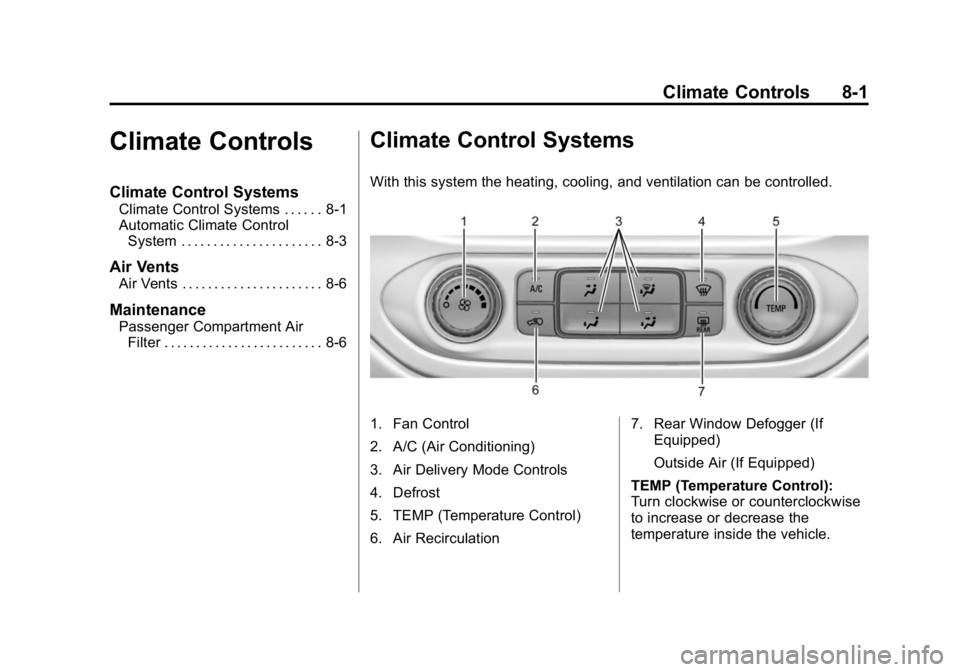
With this system the heating, cooling, and ventilation can be controlled.
1. Fan Control
2. A/C (Air Conditioning)
3. Air Delivery Mode Controls
4. Defrost
5. TEMP (Temperature Control)
6. Air Recirculation 7. Rear Window Defogger (If
Equipped)
Outside Air (If Equipped)
TEMP (Temperature Control):
Turn clockwise or counterclockwise
to increase or decrease the
temperature inside the vehicle.
Page 211 of 433
Black plate (2,1)GMC Canyon Owner Manual (GMNA-Localizing-U.S./Canada-7587000) -
2015 - CRC - 3/17/15
8-2 Climate Controls
9(Fan Control):Turn clockwise
or counterclockwise to increase or
decrease the fan speed. There is
about a 5 second delay when the
fan is turned on. Turn the knob all
the way counterclockwise to turn the
fan off.
Air Delivery Mode Control: Press
Y,\,[, or-to change the
direction of the airflow. An indicator
light comes on in the selected mode
button.
Y(Vent): Air is directed to the
instrument panel outlets.
\(Bi-Level): Air is divided
between the instrument panel and
floor outlets.
[(Floor): Air is directed to the
floor outlets, with some air directed
to the windshield, outboard
instrument panel and side window
outlets.
-(Defog): This mode clears the
windows of fog or moisture. Air is
directed to the windshield, with some air directed to the floor,
outboard instrument panel outlets,
and side window vents.
0(Defrost):
Press to clear the
windshield of fog or frost more
quickly. Air is directed to the
windshield and side window vents,
with some air directed to the
outboard instrument panel. The
system automatically forces outside
air into the vehicle and the air
conditioning compressor will run,
unless the outside temperature is
close to freezing.
Do not drive the vehicle until all the
windows are clear.
See Air Vents on page 8-6.
@(Recirculation): Press to turn
on recirculation. An indicator light
comes on. Air is recirculated to
quickly cool the inside of the
vehicle. It can also be used to help
reduce outside air and odors that
enter the vehicle.
8(Outside Air, (If Equipped)):
Press to turn on outside air. An
indicator light comes on. Outside air
is circulated throughout the vehicle.
A/C (Air Conditioning): Press to
turn the air conditioning system on
or off. An indicator light comes on to
show that the air conditioning is
enabled. If the fan is turned off, the
air conditioner will not run. The A/C
light will stay on even if the outside
temperatures are below freezing.
Rear Window Defogger
K(Rear Window Defogger,
(If Equipped)): Press to turn the
rear window defogger on or off. An
indicator light on the button comes
on to show that the rear window
defogger is on.
The rear window defogger only
works when the ignition is in ON/
RUN. The defogger also turns off if
the ignition is turned to ACC/
ACCESSORY or LOCK/OFF.
Page 213 of 433
Black plate (4,1)GMC Canyon Owner Manual (GMNA-Localizing-U.S./Canada-7587000) -
2015 - CRC - 3/17/15
8-4 Climate Controls
To place the system in
automatic mode:
1. Press AUTO.
2. Set the temperature.To find your comfort setting, start
with 22°C (72°F) and allow the
system time to stabilize. Then
adjust the temperature as
needed for best comfort.
To improve fuel efficiency and to
cool the vehicle faster, recirculation
may be automatically selected in
warm weather.
The recirculation light will not come
on when automatically controlled.
Press
@to manually select
recirculation; press it again to select
outside air.
Do not cover the solar sensor on the
top of the instrument panel near the
windshield. This sensor regulates
air temperature based on sun load.
See “Sensors” later in this section.
Manual Operation
O(On/Off): PressOto turn the
climate control system on or off.
Outside air still enters the vehicle,
and is directed to the floor. This
direction can be changed by
pressing the air delivery mode.
A(Fan Control): Turn clockwise
or counterclockwise to increase or
decrease the fan speed. There is
about a 5 second delay when the
fan is turned on. Press the knob to
turn the fan off.
Press AUTO to return to automatic
operation.
Temperature Control: Turn the
knob clockwise or counterclockwise
to increase or decrease temperature
setting.
Air Delivery Mode Controls:
Press
Y,\,[, or-to change
the direction of the airflow. An
indicator light comes on in the
selected mode button. Changing the mode cancels the
automatic operation and the system
goes into manual mode. Press
AUTO to return to automatic
operation.
Y(Vent):
Air is directed to the
instrument panel outlets.
\(Bi-Level): Air is divided
between the instrument panel and
floor outlets.
[(Floor): Air is directed to the
floor outlets, with some to the
windshield, outboard instrument
panel outlets, side window outlets,
and second row floor outlets.
-(Defog): This mode clears the
windows of fog or moisture. Air is
directed to the windshield, floor
outlets, outboard instrument panel
outlets and side window vents. The
system automatically forces outside
air into the vehicle and the air
conditioning compressor will run,
unless the outside temperature is
close to freezing.
Page 214 of 433
Black plate (5,1)GMC Canyon Owner Manual (GMNA-Localizing-U.S./Canada-7587000) -
2015 - CRC - 3/17/15
Climate Controls 8-5
0(Defrost):Press to clear the
windshield of fog or frost more
quickly. Air is directed to the
windshield and the side window
vents, with some air directed to the
outboard instrument panel outlets.
The system automatically forces
outside air into the vehicle and the
air conditioning compressor will run,
unless the outside temperature is
below freezing.
Do not drive the vehicle until all
windows are clear.
See Air Vents on page 8-6.
A/C (Air Conditioning): Press to
turn the air conditioning system on
or off. An indicator light comes on to
show that the air conditioning is
enabled. The A/C light will stay on
even if the outside temperatures are
below freezing. If the fan is turned
off, the air conditioner will not run.
@(Recirculation): Press to turn
on recirculation. An indicator light
comes on. Air is recirculated to
quickly cool the inside of the
vehicle. It can also be used to help reduce outside air and odors that
enter the vehicle. The air
conditioning compressor also comes
on when this mode is activated.
Auto Defog:
The climate control
system may have a sensor to
automatically detect high humidity
inside the vehicle. When high
humidity is detected, the climate
control system may adjust to
outside air supply and turn on the
air conditioner. If the climate control
system does not detect possible
window fogging, it returns to normal
operation. To turn Auto Defog off or
on, see “Climate and Air Quality”
under Vehicle Personalization on
page 5-41.
Rear Window Defogger
The rear window defogger uses a
warming grid to remove fog from the
rear window.
K(Rear Window Defogger):
Press to turn the rear window
defogger on or off. An indicator light
on the button comes on to show that
the rear window defogger is on. The rear window defogger only
works when the ignition is in ON/
RUN. The defogger also turns off if
the ignition is turned to ACC/
ACCESSORY or LOCK/OFF.
{Caution
Using a razor blade or sharp
object to clear the inside rear
window can damage the rear
window defogger. Repairs would
not be covered by the vehicle
warranty. Do not clear the inside
rear window with sharp objects.
Heated Mirror: If equipped with
heated outside rearview mirrors, the
mirrors heat to help clear fog or frost
from the surface of the mirror when
the rear window defog button is
pressed. See Heated Mirrors on
page 2-15.
Page 215 of 433
Black plate (6,1)GMC Canyon Owner Manual (GMNA-Localizing-U.S./Canada-7587000) -
2015 - CRC - 3/17/15
8-6 Climate Controls
Air Vents
Adjustable air vents are in the
center and on the side of the
instrument panel. Use the sliding
knobs on the air vents to change
the direction of the airflow. Slide the
knob up or down to open or close
off the airflow.
Air vents blow warm air on the side
windows in cold weather. If Floor,
Defog, or Defrost modes are
selected, a small amount of air will
come from the vents close to the
window. If the airflow is shut off
using the sliding knobs, warm air
will be directed to the other
instrument panel vents.
This is normal operation.
Use the sliding knobs to turn vent
airflow on or off based on the mode
selected.Operation Tips.Clear away any ice, snow,
or leaves from air inlets at the
base of the windshield that could
block the flow of air into the
vehicle.
.Keep the path under the front
seats clear of objects to help
circulate the air inside of the
vehicle more effectively.
.Use of non-GM approved hood
deflectors can adversely affect
the performance of the system.
Check with your dealer before
adding equipment to the outside
of the vehicle.
Maintenance
Passenger Compartment
Air Filter
The passenger compartment air
filter reduces dust, pollen, and other
airborne irritants from outside air
that is pulled into the vehicle. The
filter will need to be replaced
periodically. See
Maintenance
Schedule on page 11-3.
Using the climate control system
without an air filter installed is not
recommended. Water or other
debris could enter the system and
result in leaks or noises. Always
install a new filter when removing
the old filter.
For more information on filter
replacement, see your dealer.
Page 216 of 433
Black plate (1,1)GMC Canyon Owner Manual (GMNA-Localizing-U.S./Canada-7587000) -
2015 - CRC - 3/17/15
Driving and Operating 9-1
Driving and
Operating
Driving Information
Distracted Driving . . . . . . . . . . . . . 9-2
Defensive Driving . . . . . . . . . . . . . 9-3
Drunk Driving . . . . . . . . . . . . . . . . . 9-3
Control of a Vehicle . . . . . . . . . . . 9-3
Braking . . . . . . . . . . . . . . . . . . . . . . . 9-3
Steering . . . . . . . . . . . . . . . . . . . . . . . 9-4
Off-Road Recovery . . . . . . . . . . . . 9-4
Loss of Control . . . . . . . . . . . . . . . . 9-5
Off-Road Driving . . . . . . . . . . . . . . 9-5
Driving on Wet Roads . . . . . . . 9-10
Hill and Mountain Roads . . . . . 9-11
Winter Driving . . . . . . . . . . . . . . . 9-12
If the Vehicle Is Stuck . . . . . . . . 9-13
Vehicle Load Limits . . . . . . . . . . 9-14
Truck-Camper LoadingInformation . . . . . . . . . . . . . . . . . 9-21
Starting and Operating
New Vehicle Break-In . . . . . . . . 9-21
Ignition Positions . . . . . . . . . . . . 9-22
Starting the Engine . . . . . . . . . . 9-23
Retained AccessoryPower (RAP) . . . . . . . . . . . . . . . 9-24 Engine Coolant Heater . . . . . . . 9-25
Shifting Into Park . . . . . . . . . . . . 9-26
Shifting out of Park . . . . . . . . . . 9-28
Parking . . . . . . . . . . . . . . . . . . . . . . 9-28
Parking over Things
That Burn . . . . . . . . . . . . . . . . . . 9-29
Engine Exhaust
Engine Exhaust . . . . . . . . . . . . . . 9-29
Running the Vehicle WhileParked . . . . . . . . . . . . . . . . . . . . . 9-30
Automatic Transmission
Automatic Transmission . . . . . 9-30
Manual Mode . . . . . . . . . . . . . . . . 9-33
Tow/Haul Mode . . . . . . . . . . . . . . 9-34
Manual Transmission
Manual Transmission . . . . . . . . 9-35
Drive Systems
Four-Wheel Drive . . . . . . . . . . . . 9-36
Brakes
Antilock BrakeSystem (ABS) . . . . . . . . . . . . . . 9-40
Parking Brake . . . . . . . . . . . . . . . 9-41
Brake Assist . . . . . . . . . . . . . . . . . 9-42
Hill Start Assist (HSA) . . . . . . . 9-42
Ride Control Systems
Traction Control/Electronic Stability Control . . . . . . . . . . . . 9-43
Hill Descent Control (HDC) . . . . . . . . . . . . . . 9-45
Cruise Control
Cruise Control . . . . . . . . . . . . . . . 9-46
Driver Assistance Systems
Forward Collision Alert (FCA)System . . . . . . . . . . . . . . . . . . . . . 9-48
Rear Vision Camera (RVC) . . . . . . . . . . . . . 9-50
Lane Departure Warning (LDW) . . . . . . . . . . . . . 9-52
Fuel
Fuel . . . . . . . . . . . . . . . . . . . . . . . . . 9-54
California FuelRequirements . . . . . . . . . . . . . . 9-55
Fuels in Foreign Countries . . . 9-55
Fuel Additives . . . . . . . . . . . . . . . 9-55
Filling the Tank . . . . . . . . . . . . . . 9-55
Filling a Portable Fuel Container . . . . . . . . . . . . . . . . . . . 9-57