keyless GMC CANYON 2016 User Guide
[x] Cancel search | Manufacturer: GMC, Model Year: 2016, Model line: CANYON, Model: GMC CANYON 2016Pages: 392, PDF Size: 5.31 MB
Page 130 of 392
GMC Canyon Owner Manual (GMNA-Localizing-U.S/Canada-9159361) -
2016 - crc - 8/25/15
Instruments and Controls 129
SERVICE BATTERY
CHARGING SYSTEM
On some vehicles, this message
displays if there is a problem with
the battery charging system. Under
certain conditions, the charging
system light may also turn on in the
instrument cluster. SeeCharging
System Light 0114
ii. Driving with
this problem could drain the battery.
Turn off all unnecessary
accessories. Have the electrical
system checked as soon as
possible. See your dealer.
TRANSPORT MODE ON
This message is displayed when the
vehicle is in transport mode. Some
features can be disabled while in
this mode, including Remote
Keyless Entry (RKE), remote start,
and the vehicle alarm system. Take
the vehicle to your dealer for service
to turn transport mode off.
Brake System Messages
BRAKE FLUID LOW
This message is displayed when the
brake fluid level is low; see Brake
Fluid 0275
ii.
HILL START ASSIST ACTIVE
This message is displayed when the
vehicle is stopped on a grade
sufficient to activate HSA. HSA
holds the braking pressure for a
maximum of two seconds to ensure
that there is no rolling, which will
assist the driver to transition
between releasing the brake pedal
and accelerating to drive off while
on the grade. The brakes will
automatically release when the
accelerator pedal is applied within
the two-second window. See Hill
Start Assist (HSA) 0231
ii.
RELEASE PARKING BRAKE
This message is displayed as a
reminder that the parking brake is
on. Release it before you attempt to
drive.
SERVICE BRAKE ASSIST
This message may be displayed
when there is a problem with the
brake boost assist system. When
this message is displayed, the brake
boost assist motor may be heard
operating and you might notice
pulsation in the brake pedal. This is
normal under these conditions. Take
the vehicle to your dealer for
service.
Compass Messages
Dashes may be displayed if the
vehicle temporarily loses
communication with the Global
Positioning System (GPS).
Door Ajar Messages
DOOR OPEN
This message displays and a chime
may sound if a door is not fully
closed. Stop and turn off the
vehicle, check the door for
obstructions, and close the door
again. Check to see if the message
still appears on the DIC.
Page 132 of 392
GMC Canyon Owner Manual (GMNA-Localizing-U.S/Canada-9159361) -
2016 - crc - 8/25/15
Instruments and Controls 131
and allow the vehicle to idle until it
cools down. SeeEngine Coolant
Temperature Gauge 0111
ii.
OIL PRESSURE LOW STOP
ENGINE
This message displays if low oil
pressure levels occur. Stop the
vehicle as soon as safely possible
and do not operate it until the cause
of the low oil pressure has been
corrected. Check the oil as soon as
possible and have the vehicle
serviced by your dealer. See Engine
Oil 0262
ii.
Engine Power Messages
ENGINE POWER IS REDUCED
This message displays and a chime
may sound when the cooling system
temperature gets too hot and the
engine further enters the engine
coolant protection mode. See
Engine Overheating 0271
iifor more
information.
This message also displays when
the vehicle's engine power is
reduced. Reduced engine power
can affect the vehicle's ability to accelerate. If this message is on,
but there is no reduction in
performance, proceed to your
destination. The performance may
be reduced the next time the vehicle
is driven. The vehicle may be driven
at a reduced speed while this
message is on, but acceleration and
speed may be reduced. Anytime
this message stays on, the vehicle
should be taken to your dealer for
service as soon as possible.
Fuel System Messages
FUEL LEVEL LOW
This message displays and a chime
may sound if the fuel level is low.
Refuel as soon as possible. See
Fuel Gauge
0110
iiand Fuel 0241ii.
TIGHTEN GAS CAP
This message may display along
with the malfunction indicator lamp
on the instrument cluster if the
vehicle's fuel cap is not tightened
properly. See Malfunction Indicator
Lamp (Check Engine Light) 0114
ii.
Reinstall the fuel cap fully. See
Filling the Tank 0243
ii. The diagnostic system can determine if
the fuel cap has been left off or
improperly installed. A loose or
missing fuel cap allows fuel to
evaporate into the atmosphere.
A few driving trips with the cap
properly installed should turn this
light and message off.
Key and Lock Messages
REPLACE BATTERY IN
REMOTE KEY
This message displays if a Remote
Keyless Entry (RKE) transmitter
battery is low. The battery needs to
be replaced in the transmitter. See
“Battery Replacement”
under
Remote Keyless Entry (RKE)
System Operation 028
ii.
Lamp Messages
TURN SIGNAL ON
This message displays and a chime
sounds if a turn signal is left on for
1.2 km (0.75 mi). Move the turn
signal lever to the off position.
Page 138 of 392
GMC Canyon Owner Manual (GMNA-Localizing-U.S/Canada-9159361) -
2016 - crc - 8/25/15
Instruments and Controls 137
Select the desired number or select
Auto and the infotainment system
will automatically adjust the number
of favorites shown.
Audible Touch Feedback
This allows Audible Touch
Feedback to be turned on or off.
Select Off or On.
Auto Volume
This feature adjusts the volume
based on vehicle speed and
ambient noise.
Select Off, Low, Medium-Low,
Medium, Medium-High, or High.
Maximum Startup Volume
This feature sets the maximum
startup volume. If the vehicle is
started and the volume is greater
than this level, the volume is
adjusted to this level. To set the
maximum startup volume, press +
or−to increase or decrease.
Vehicle
Select and the following may
display: .
Climate and Air Quality
. Comfort and Convenience
. Lighting
. Power Door Locks
. Remote Lock, Unlock, Start
Climate and Air Quality
Select and the following may
display:
. Auto Fan Speed
. Auto Defog
. Auto Rear Defog
Auto Fan Speed
This feature will set the maximum
auto fan speed.
Select Low, Medium, or High.
Auto Defog
This allows the feature to be turned
on or off.
Select Off or On.
Auto Rear Defog
This allows the feature to be turned
on or off. Select Off or On.
Comfort and Convenience
Select and the following may
display:
.
Chime Volume
Chime Volume
This allows the selection of the
chime volume level.
Select + or −to adjust the volume.
Lighting
Select and the following may
display:
. Vehicle Locator Lights
. Exit Lighting
Vehicle Locator Lights
This feature will flash the exterior
lamps and allows the headlamps,
parking lamps, taillamps, and most
of the interior lamps to turn on
briefly when
Kon the Remote
Keyless Entry (RKE) transmitter is
pressed to locate the vehicle.
Select Off or On.
Page 148 of 392
GMC Canyon Owner Manual (GMNA-Localizing-U.S/Canada-9159361) -
2016 - crc - 8/25/15
Lighting 147
Dome Lamps
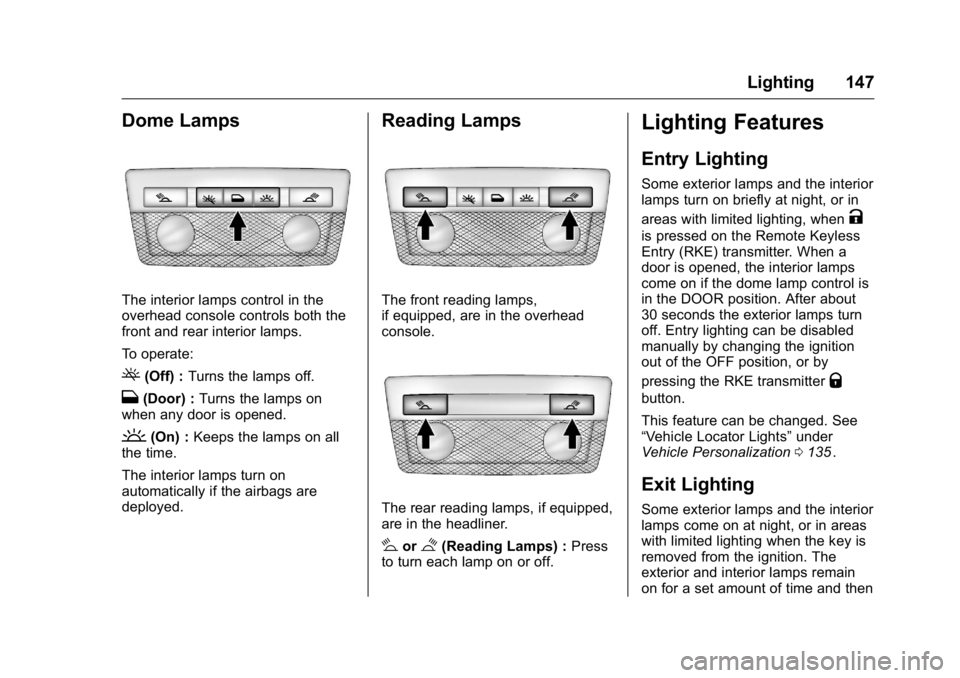
The interior lamps control in the
overhead console controls both the
front and rear interior lamps.
To operate:
((Off) :Turns the lamps off.
H(Door) : Turns the lamps on
when any door is opened.
'(On) : Keeps the lamps on all
the time.
The interior lamps turn on
automatically if the airbags are
deployed.
Reading Lamps
The front reading lamps,
if equipped, are in the overhead
console.
The rear reading lamps, if equipped,
are in the headliner.
#or$(Reading Lamps) : Press
to turn each lamp on or off.
Lighting Features
Entry Lighting
Some exterior lamps and the interior
lamps turn on briefly at night, or in
areas with limited lighting, when
K
is pressed on the Remote Keyless
Entry (RKE) transmitter. When a
door is opened, the interior lamps
come on if the dome lamp control is
in the DOOR position. After about
30 seconds the exterior lamps turn
off. Entry lighting can be disabled
manually by changing the ignition
out of the OFF position, or by
pressing the RKE transmitter
Q
button.
This feature can be changed. See
“Vehicle Locator Lights” under
Vehicle Personalization 0135
ii.
Exit Lighting
Some exterior lamps and the interior
lamps come on at night, or in areas
with limited lighting when the key is
removed from the ignition. The
exterior and interior lamps remain
on for a set amount of time and then
Page 160 of 392
GMC Canyon Owner Manual (GMNA-Localizing-U.S/Canada-9159361) -
2016 - crc - 8/25/15
Infotainment System 159
Advertisement on Pandora
Pandora may display
advertisements. The artist name
and track title will not be displayed
and the skip track button will not be
available.
Pandora Troubleshooting
Unable to Connect Device to
Vehicle
If the device is unable to connect to
the USB or Bluetooth:1. Turn the vehicle off.
2. Take the Remote Keyless Entry (RKE) transmitter at least 6 m
(20 ft) away from the vehicle.
3. Wait about 30 seconds, and try to connect the device again.
See Bluetooth (Overview)
0 170
iior Bluetooth
(Infotainment Controls - Base
Radio) 0171
iior Bluetooth
(Infotainment Controls - Base
Connected Radio) 0175
ii. Unable to Start Pandora
If the device is unable to launch
Pandora:
.
Check that the latest version of
Pandora is installed.
. Check that there is an active
account logged into Pandora.
. Have at least one station
created.
. For Android and BlackBerry
devices, check that the device is
paired with the vehicle, and
whether the device displays in
the Connected phone sources
list under the Phone icon from
the Home Page.
. For an iPhone, check that the
USB cable is connected to the
USB port and the screen is
unlocked.
. Close Pandora on the device
and launch again. Devices that
allow multitasking may require
an extra step to quit the Pandora
application. See the cell phone
manufacturer's user guide. Thumbs Up or Thumbs Down
Error
If there is an error trying to rate a
track with the
,or-, the message
“Thumbs Down Error” or“Thumbs
Up Error” will display. Press OK to
dismiss.
Loss of Audio
Loss of Pandora audio can happen
in different ways:
. Weak or lost data connection.
. Device needs to be charged.
. Application needs to be
relaunched.
. Connection between phone and
radio lost.
. An iPhone is connected to both
Bluetooth and the USB port.
Playback can be resumed from
a loss of audio by double
tapping on the iPhone home
button then scrolling through the
icons to find an icon that allows
a change of flow between
Bluetooth and USB cable.
Page 257 of 392
GMC Canyon Owner Manual (GMNA-Localizing-U.S/Canada-9159361) -
2016 - crc - 8/25/15
256 Vehicle Care
Wheel Alignment and TireBalance . . . . . . . . . . . . . . . . . . . . . 310
Wheel Replacement . . . . . . . . . . 310
Tire Chains . . . . . . . . . . . . . . . . . . . 311
If a Tire Goes Flat . . . . . . . . . . . . 312
Tire Changing . . . . . . . . . . . . . . . . 313
Compact Spare Tire . . . . . . . . . . 322
Full-Size Spare Tire . . . . . . . . . . 323
Jump Starting
Jump Starting - North America . . . . . . . . . . . . . . . . . . . . . 324
Towing the Vehicle
Towing the Vehicle . . . . . . . . . . . 326
Recreational VehicleTowing . . . . . . . . . . . . . . . . . . . . . . 327
Appearance Care
Exterior Care . . . . . . . . . . . . . . . . . 331
Interior Care . . . . . . . . . . . . . . . . . . 336
Floor Mats . . . . . . . . . . . . . . . . . . . . 339
General Information
For service and parts needs, visit
your dealer. You will receive
genuine GM parts and GM-trained
and supported service people.
Genuine GM parts have one of
these marks:
California Proposition
65 Warning
WARNING: Most motor vehicles,
including this one, contain and/or
emit chemicals known to the State
of California to cause cancer and
birth defects or other reproductive harm. Engine exhaust, many parts
and systems, many fluids, and
some component wear by-products
contain and/or emit these
chemicals.
See
Battery - North America 0276
iiand Jump Starting - North America
0 324ii.
California Perchlorate
Materials Requirements
Certain types of automotive
applications, such as airbag
initiators, safety belt pretensioners,
and lithium batteries contained in
Remote Keyless Entry transmitters,
may contain perchlorate materials.
Special handling may be necessary.
For additional information, see
www.dtsc.ca.gov/hazardouswaste/
perchlorate.
Page 387 of 392

GMC Canyon Owner Manual (GMNA-Localizing-U.S/Canada-9159361) -
2016 - crc - 8/25/15
386 Index
Internet RadioPandora . . . . . . . . . . . . . . . . . . . . . . 157
Introduction . . . . . . . . . . . . . . . . . . . . . . . 2
J
Jack Auxiliary . . . . . . . . . . . . . . . . . . . . . . 163
Jump Starting - North America . . . . . . . . . . . . . . . . . . . . . . . 324
K
Key and Lock Messages . . . . . . . . 131
Keyless EntryRemote (RKE) System . . . . . . . . . 28
Keys . . . . . . . . . . . . . . . . . . . . . . . . . . . . . 25
L
Labeling, Tire Sidewall . . . . . . . . . . 294
Lamps Cargo . . . . . . . . . . . . . . . . . . . . . . . . . 146
Daytime Running (DRL) . . . . . . 143
Dome . . . . . . . . . . . . . . . . . . . . . . . . . 147
Exterior Controls . . . . . . . . . . . . . . 142
Exterior Lamps OffReminder . . . . . . . . . . . . . . . . . . . 143
Malfunction Indicator . . . . . . . . . .114
Messages . . . . . . . . . . . . . . . . . . . . 131
On Reminder . . . . . . . . . . . . . . . . . 121 Lamps (cont'd)
Reading . . . . . . . . . . . . . . . . . . . . . . 147
Lane Departure Warning (LDW) . . . . . . . . . . . . . . . . 240
Lane Departure Warning Light . . . . . . . . . . . . . . . . . . . . . . . . . . 118
Lap-Shoulder Belt . . . . . . . . . . . . . . . 52
LATCH System Replacing Parts after a
Crash . . . . . . . . . . . . . . . . . . . . . . . . . 89
LATCH, Lower Anchors and Tethers for Children . . . . . . . . . . . . 75
Light Hill Decent Control . . . . . . . . . . . .117
Lighting Entry . . . . . . . . . . . . . . . . . . . . . . . . . 147
Exit . . . . . . . . . . . . . . . . . . . . . . . . . . . 147
Illumination Control . . . . . . . . . . . 146
Lights . . . . . . . . . . . . . . . . . . . . . . . . . . . 118 Airbag Readiness . . . . . . . . . . . . . .113
Antilock Brake System(ABS) Warning . . . . . . . . . . . . . . .117
Brake System Warning . . . . . . . .116
Charging System . . . . . . . . . . . . . .114
Cruise Control . . . . . . . . . . . . . . . . 121
Door Ajar . . . . . . . . . . . . . . . . . . . . . 121
Engine Oil Pressure . . . . . . . . . . 120
Flash-to-Pass . . . . . . . . . . . . . . . . . 143 Lights (cont'd)
Front Fog Lamp . . . . . . . . . . . . . . 121
High-Beam On . . . . . . . . . . . . . . . . 121
High/Low Beam Changer . . . . . 143
Lane Departure Warning . . . . . . .118
Low Fuel Warning . . . . . . . . . . . . 120
Safety Belt Reminders . . . . . . . . .112
Security . . . . . . . . . . . . . . . . . . . . . . 121
StabiliTrak
®OFF . . . . . . . . . . . . . .118
Tire Pressure . . . . . . . . . . . . . . . . . .119
Tow/Haul Mode . . . . . . . . . . . . . . . .117
Traction Control System (TCS)/StabiliTrak
®. . . . . . . . . . .119
Traction Off . . . . . . . . . . . . . . . . . . . .118
Up-Shift . . . . . . . . . . . . . . . . . . . . . . .117
Locks Automatic Door . . . . . . . . . . . . . . . . . 32
Delayed Locking . . . . . . . . . . . . . . . . 32
Door . . . . . . . . . . . . . . . . . . . . . . . . . . . . 31
Lockout Protection . . . . . . . . . . . . . . 32
Power Door . . . . . . . . . . . . . . . . . . . . . 32
Safety . . . . . . . . . . . . . . . . . . . . . . . . . . 33
Loss of Control . . . . . . . . . . . . . . . . . 195
Low Fuel Warning Light . . . . . . . . . 120
Lower Anchors and Tethers
for Children (LATCH
System) . . . . . . . . . . . . . . . . . . . . . . . . 75
Page 389 of 392

GMC Canyon Owner Manual (GMNA-Localizing-U.S/Canada-9159361) -
2016 - crc - 8/25/15
388 Index
OrderingService Publications . . . . . . . . . . 366
Outlets Power . . . . . . . . . . . . . . . . . . . . . . . . 104
Overheating, Engine . . . . . . . . . . . . 271
Overview . . . . . . . . . . . . . . . . . . . . . . . 151
P
Pandora Internet Radio . . . . . . . . . 157
Park Shifting Into . . . . . . . . . . . . . . . . . . . 216
Shifting Out of . . . . . . . . . . . . . . . . 217
Parking . . . . . . . . . . . . . . . . . . . . . . . . . 217 Brake . . . . . . . . . . . . . . . . . . . . . . . . . 230
Brake and P (Park)Mechanism Check . . . . . . . . . . 280
Over Things That Burn . . . . . . . 218
Passenger Airbag Status Indicator . . . . . . . . . . . . . . . . . . . . . . 113
Passenger Compartment Air Filter . . . . . . . . . . . . . . . . . . . . . . . . . . 191
Passenger Sensing System . . . . . 62
Perchlorate Materials Requirements, California . . . . . . 256
Personalization Vehicle . . . . . . . . . . . . . . . . . . . . . . . 135
Phone Bluetooth . . . . . . . . . . . 170, 171, 175 Port
USB . . . . . . . . . . . . . . . . . . . . . . . . . . 160
Power Door Locks . . . . . . . . . . . . . . . . . . . . . 32
Mirrors . . . . . . . . . . . . . . . . . . . . . . . . . . 37
Outlets . . . . . . . . . . . . . . . . . . . . . . . 104
Protection, Battery . . . . . . . . . . . . 148
Retained Accessory (RAP) . . . 213
Seat Adjustment . . . . . . . . . . . . . . . . 45
Windows . . . . . . . . . . . . . . . . . . . . . . . 39
Pregnancy, Using Safety Belts . . . 55
Privacy
Vehicle Data Recording . . . . . . . 369
Program Courtesy Transportation . . . . . . 363
Proposition
65 Warning,
California . . . . . . . . . . . .256, 276, 324
R
Radio Frequency Statement . . . . 367
Radio Reception . . . . . . . . . . . . . . . . 156
RadiosAM-FM Radio . . . . . . . . . . . . . . . . . 155
Satellite . . . . . . . . . . . . . . . . . . . . . . . 156
Reading Lamps . . . . . . . . . . . . . . . . . 147
Rear Axle . . . . . . . . . . . . . . . . . . . . . . . 278
Rear Seats . . . . . . . . . . . . . . . . . . . . . . 48
Rear Vision Camera (RVC) . . . . . 236 Rear Windows . . . . . . . . . . . . . . . . . . . 41
Rearview Mirrors . . . . . . . . . . . . . . . . 38
Automatic Dimming . . . . . . . . . . . . . 39
Reclining Seatbacks . . . . . . . . . . . . . 46
Recognition Voice . . . . . . . . . . . . . . . . . . . . . . . . . 164
Recommended Fluids and
Lubricants . . . . . . . . . . . . . . . . . . . . . 350
Records Maintenance . . . . . . . . . . . . . . . . . . 353
Recreational Vehicle Towing . . . . 327
Reimbursement Program,
GM Mobility . . . . . . . . . . . . . . . . . . . 361
Remote Keyless Entry (RKE) System . . . . . . . . . . . . . . . . . . . . . . . . . 28
Remote Vehicle Start . . . . . . . . . . . . 30
Replacement Bulbs . . . . . . . . . . . . . 284
Replacement Parts
Airbags . . . . . . . . . . . . . . . . . . . . . . . . . 68
Maintenance . . . . . . . . . . . . . . . . . . 351
Replacing Airbag System . . . . . . . . 68
Replacing LATCH System
Parts after a Crash . . . . . . . . . . . . . 89
Replacing Safety Belt System Parts after a Crash . . . . . . . . . . . . . 56
Reporting Safety Defects Canadian Government . . . . . . . . 368
General Motors . . . . . . . . . . . . . . . 368