maintenance schedule GMC CANYON 2016 Owner's Guide
[x] Cancel search | Manufacturer: GMC, Model Year: 2016, Model line: CANYON, Model: GMC CANYON 2016Pages: 392, PDF Size: 5.31 MB
Page 354 of 392
GMC Canyon Owner Manual (GMNA-Localizing-U.S/Canada-9159361) -
2016 - crc - 8/25/15
Service and Maintenance 353
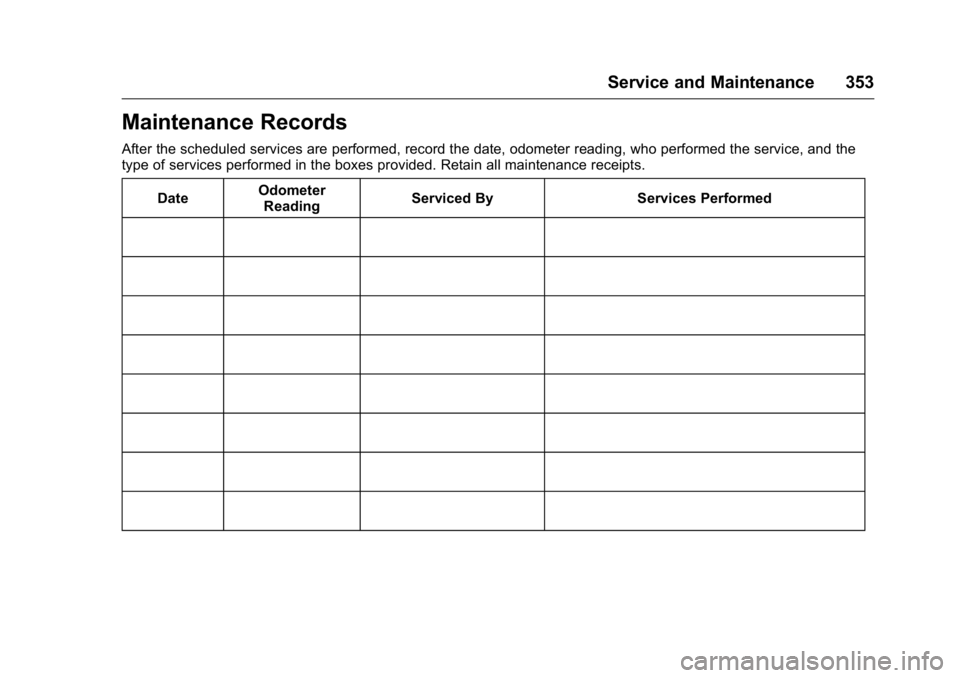
Maintenance Records
After the scheduled services are performed, record the date, odometer reading, who performed the service, and the
type of services performed in the boxes provided. Retain all maintenance receipts.Date Odometer
Reading Serviced By Services Performed
Page 361 of 392
GMC Canyon Owner Manual (GMNA-Localizing-U.S/Canada-9159361) -
2016 - crc - 8/25/15
360 Customer Information
Customer Assistance for
Text Telephone (TTY)
Users (U.S. and Canada)
To assist customers who are deaf,
hard of hearing, or speech-impaired
and who use Text Telephones
(TTYs), GMC has TTY equipment
available at its Customer Assistance
Center. Any TTY user in the U.S.
can communicate with GMC by
dialing: 1-888-889-2438. TTY users
in Canada can dial 1-800-263-3830.
Online Owner Center
Online Owner Experience
(U.S.) my.gmc.com
The GMC online owner experience
is a one-stop resource that allows
interaction with GMC and keeps
important vehicle-specific
information in one place.
Membership Benefits
E(Vehicle Information) :
Download owner manuals and view
vehicle-specific how-to videos.
G(Maintenance Information) :
View maintenance schedules,
alerts, and OnStar onboard vehicle
diagnostic information. Schedule
service appointments.
I(Service History) : View and
print dealer-recorded service
records and self-recorded service
records.
D(Preferred Dealer
Information) : Select a preferred
dealer and view dealer location,
maps, phone numbers, and hours.
r(Warranty Tracking
Information) : Track your vehicle’s
warranty information.
J(Recall Information) : View
active recalls by Vehicle
Identification Number (VIN). See
Vehicle Identification Number (VIN)
0 354
ii.
H(Other Account Information) :
View GM Card, SiriusXM Satellite
radio (if equipped), and OnStar
account information (if equipped).
F(Live Chat Support) : Chat live
with online help representatives. Visit my.gmc.com to register your
vehicle.
GMC Owner Centre (Canada)
gmcowner.ca
Take a trip to the GMC Owner
Centre:
.
Chat live with online help
representatives.
. Use the Vehicle Tools section.
. Access third party enthusiast
sites and social media networks.
. Locate owner resources such as
lease-end, financing, and
warranty information.
. Retrieve your favorite articles,
quizzes, tips, and multimedia
galleries organized into the
Features and Auto Care
Sections.
. Download the owner manual for
your vehicle, quickly and easily.
. Find the GMC-recommended
maintenance services for your
vehicle.
Page 367 of 392
GMC Canyon Owner Manual (GMNA-Localizing-U.S/Canada-9159361) -
2016 - crc - 8/25/15
366 Customer Information
.Vehicle make, model, and
model year.
. Vehicle Identification
Number (VIN).
. Insurance company and policy
number.
. General description of the
damage to the other vehicle.
Choose a reputable repair facility
that uses quality replacement parts.
See “Collision Parts” earlier in this
section.
If the airbag has inflated, see What
Will You See after an Airbag
Inflates? 061
ii.
Managing the Vehicle Damage
Repair Process
In the event that the vehicle requires
damage repairs, GM recommends
that you take an active role in its
repair. If you have a pre-determined
repair facility of choice, take the
vehicle there, or have it towed there.
Specify to the facility that any
required replacement collision parts
be original equipment parts, either
new Genuine GM parts or recycled original GM parts. Remember,
recycled parts will not be covered by
the GM vehicle warranty.
Insurance pays the bill for the repair,
but you must live with the repair.
Depending on your policy limits,
your insurance company may
initially value the repair using
aftermarket parts. Discuss this with
the repair professional, and insist on
Genuine GM parts. Remember,
if the vehicle is leased, you may be
obligated to have the vehicle
repaired with Genuine GM parts,
even if your insurance coverage
does not pay the full cost.
If another party's insurance
company is paying for the repairs,
you are not obligated to accept a
repair valuation based on that
insurance company's collision policy
repair limits, as you have no
contractual limits with that company.
In such cases, you can have control
of the repair and parts choices as
long as the cost stays within
reasonable limits.
Service Publications
Ordering Information
(U.S. and Canada Only)
Service Manuals
Service Manuals have the diagnosis
and repair information on the
engines, transmission, axle,
suspension, brakes, electrical,
steering, body, etc.
Service Bulletins
Service Bulletins give additional
technical service information
needed to knowledgeably service
General Motors cars and trucks.
Each bulletin contains instructions
to assist in the diagnosis and
service of the vehicle.
Owner Information
Owner publications are written
specifically for owners and intended
to provide basic operational
information about the vehicle. The
Owner Manual includes the
Maintenance Schedule for all
models.
Page 388 of 392

GMC Canyon Owner Manual (GMNA-Localizing-U.S/Canada-9159361) -
2016 - crc - 8/25/15
Index 387
Lumbar Adjustment . . . . . . . . . . . . . . 46Front Seats . . . . . . . . . . . . . . . . . . . . . 46
M
Maintenance
Records . . . . . . . . . . . . . . . . . . . . . . 353
Maintenance and Care
Additional . . . . . . . . . . . . . . . . . . . . . 347
Maintenance Schedule . . . . . . . . . 341 Recommended Fluids andLubricants . . . . . . . . . . . . . . . . . . . 350
Transfer Case . . . . . . . . . . . . . . . . 225
Malfunction Indicator Lamp . . . . . 114
Manual Mirrors . . . . . . . . . . . . . . . . . . 36
Manual Mode . . . . . . . . . . . . . . . . . . . 222
Manual Transmission . . . . . . . . . . . 224 Fluid . . . . . . . . . . . . . . . . . . . . . . . . . . 266
Messages Airbag System . . . . . . . . . . . . . . . . 133
Battery Voltage andCharging . . . . . . . . . . . . . . . . . . . . 128
Brake System . . . . . . . . . . . . . . . . 129
Compass . . . . . . . . . . . . . . . . . . . . . 129
Door Ajar . . . . . . . . . . . . . . . . . . . . . 129
Engine Cooling System . . . . . . . 130
Engine Oil . . . . . . . . . . . . . . . . . . . . 130
Engine Power . . . . . . . . . . . . . . . . 131
Fuel System . . . . . . . . . . . . . . . . . . 131
Key and Lock . . . . . . . . . . . . . . . . . 131 Messages (cont'd)
Lamp . . . . . . . . . . . . . . . . . . . . . . . . . 131
Object Detection System . . . . . 132
Ride Control System . . . . . . . . . . 132
Security . . . . . . . . . . . . . . . . . . . . . . 133
Steering System . . . . . . . . . . . . . . 133
Tire . . . . . . . . . . . . . . . . . . . . . . . . . . . 133
Transmission . . . . . . . . . . . . . . . . . 134
Vehicle . . . . . . . . . . . . . . . . . . . . . . . 128
Vehicle Reminder . . . . . . . . . . . . . 135
Vehicle Speed . . . . . . . . . . . . . . . . 135
Messaging Text . . . . . . . . . . . . . . . . . . . . . . . . . . . 179
Mirrors
Automatic DimmingRearview . . . . . . . . . . . . . . . . . . . . . . 39
Blind Spot . . . . . . . . . . . . . . . . . . . . . . 37
Convex . . . . . . . . . . . . . . . . . . . . . . . . . 36
Folding . . . . . . . . . . . . . . . . . . . . . . . . . 37
Heated . . . . . . . . . . . . . . . . . . . . . . . . . 37
Manual . . . . . . . . . . . . . . . . . . . . . . . . . 36
Manual Rearview . . . . . . . . . . . . . . . 38
Power . . . . . . . . . . . . . . . . . . . . . . . . . . 37
Mirrors, Interior Rearview . . . . . . . . 38
Monitor System, Tire Pressure . . . . . . . . . . . . . . . . . . . . . . 300
Multi-band Antenna . . . . . . . . . . . . . 157
N
Navigation OnStar®. . . . . . . . . . . . . . . . . . . . . . 372
New Vehicle Break-In . . . . . . . . . . . 210
O
Object Detection System Messages . . . . . . . . . . . . . . . . . . . . . 132
Odometer . . . . . . . . . . . . . . . . . . . . . . . 110 Trip . . . . . . . . . . . . . . . . . . . . . . . . . . . .110
Off-Road . . . . . . . . . . . . . . . . . . . . . . . 196
Driving . . . . . . . . . . . . . . . . . . . . . . . . 196
Recovery . . . . . . . . . . . . . . . . . . . . . 195
Oil Engine . . . . . . . . . . . . . . . . . . . . . . . . 262
Engine Oil Life System . . . . . . . 264
Messages . . . . . . . . . . . . . . . . . . . . 130
Pressure Light . . . . . . . . . . . . . . . . 120
Older Children, Restraints . . . . . . . 68
Online Owner Center . . . . . . . . . . . 360
OnStar . . . . . . . . . . . . . . . . . . . . . . . . . 370
OnStar
®Additional
Information . . . . . . . . . . . . . . . . . . . . 375
OnStar
®Connections . . . . . . . . . . . 373
OnStar®Diagnostics . . . . . . . . . . . . 375
OnStar®Emergency . . . . . . . . . . . . 372
OnStar®Navigation . . . . . . . . . . . . . 372
OnStar®Overview . . . . . . . . . . . . . . 371
OnStar®Security . . . . . . . . . . . . . . . 372