belt GMC CANYON 2016 Service Manual
[x] Cancel search | Manufacturer: GMC, Model Year: 2016, Model line: CANYON, Model: GMC CANYON 2016Pages: 392, PDF Size: 5.31 MB
Page 94 of 392
GMC Canyon Owner Manual (GMNA-Localizing-U.S/Canada-9159361) -
2016 - crc - 8/25/15
Seats and Restraints 93
10. Tighten the top tether. SeeLower Anchors and Tethers for
Children (LATCH System)
075
ii.
11. Before placing a child in the child restraint, make sure it is
securely held in place. To
check, grasp the child restraint
at the safety belt path and
attempt to move it side to side
and back and forth. When the
child restraint is properly
installed, there should be no
more than 2.5 cm (1 in) of
movement.
To remove the child restraint,
unbuckle the vehicle’s safety belt
and let it return to the stowed
position. If the top tether is attached
to a top tether anchor, disconnect it.
Reinstall the headrest in the
seatback before the seating position
is used. See “Head Restraint/
Headrest Removal and
Reinstallation” underLower Anchors
and Tethers for Children (LATCH
System) 075
iifor additional
information on installing the
headrest properly.
Crew Cab
When using the lap-shoulder belt to
secure the child restraint in this
position, follow the instructions that
came with the child restraint and the
following instructions:
1. If the head restraint interferes with the proper installation of
the child restraint, the head
restraint may be removed. See
“Head Restraint/Headrest
Removal and Reinstallation”
under Lower Anchors and
Tethers for Children (LATCH
System) 075
ii.
2. If the child restraint manufacturer recommends
using a top tether, adjust the
top tether to its full length and
attach it to the top tether
anchor. Refer to the
instructions that came with the
child restraint and see Lower
Anchors and Tethers for
Children (LATCH System)
0 75
ii.
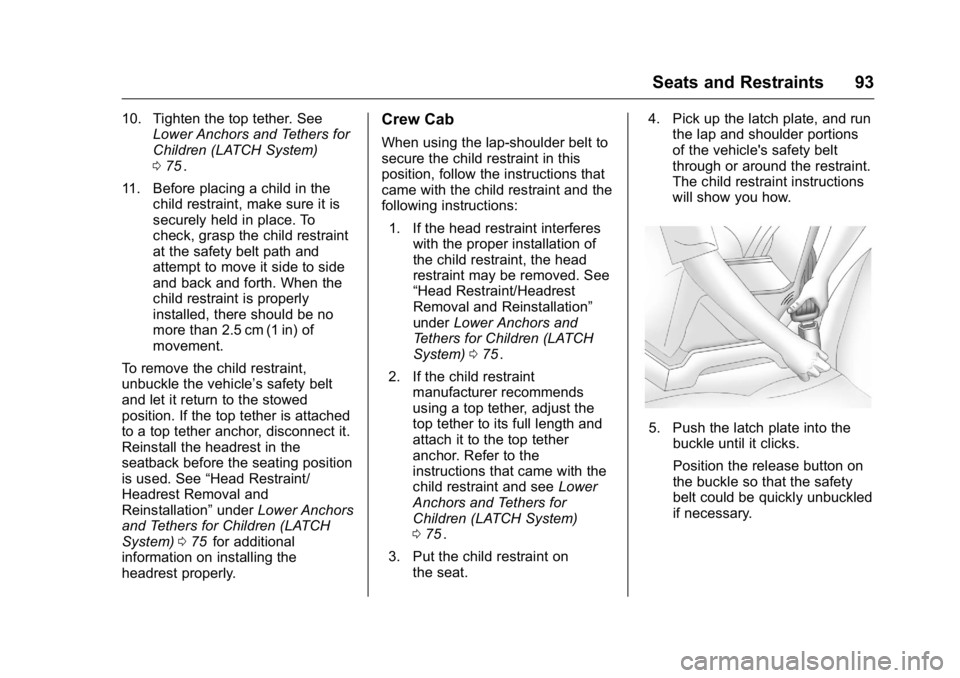
3. Put the child restraint on the seat. 4. Pick up the latch plate, and run
the lap and shoulder portions
of the vehicle's safety belt
through or around the restraint.
The child restraint instructions
will show you how.
5. Push the latch plate into thebuckle until it clicks.
Position the release button on
the buckle so that the safety
belt could be quickly unbuckled
if necessary.
Page 95 of 392
GMC Canyon Owner Manual (GMNA-Localizing-U.S/Canada-9159361) -
2016 - crc - 8/25/15
94 Seats and Restraints
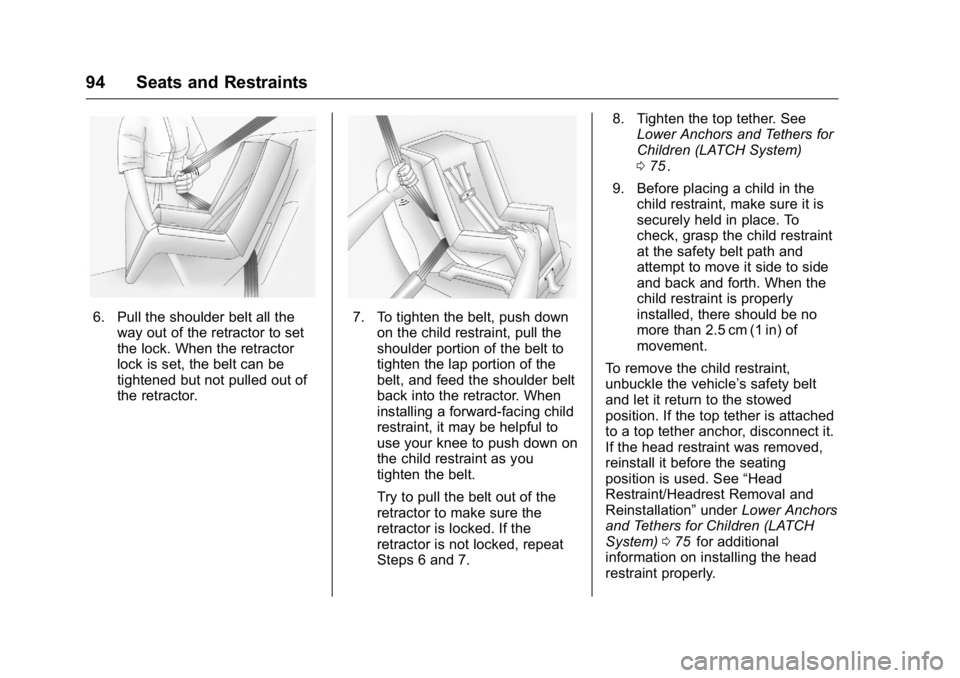
6. Pull the shoulder belt all theway out of the retractor to set
the lock. When the retractor
lock is set, the belt can be
tightened but not pulled out of
the retractor.7. To tighten the belt, push downon the child restraint, pull the
shoulder portion of the belt to
tighten the lap portion of the
belt, and feed the shoulder belt
back into the retractor. When
installing a forward-facing child
restraint, it may be helpful to
use your knee to push down on
the child restraint as you
tighten the belt.
Try to pull the belt out of the
retractor to make sure the
retractor is locked. If the
retractor is not locked, repeat
Steps 6 and 7. 8. Tighten the top tether. See
Lower Anchors and Tethers for
Children (LATCH System)
075
ii.
9. Before placing a child in the child restraint, make sure it is
securely held in place. To
check, grasp the child restraint
at the safety belt path and
attempt to move it side to side
and back and forth. When the
child restraint is properly
installed, there should be no
more than 2.5 cm (1 in) of
movement.
To remove the child restraint,
unbuckle the vehicle’s safety belt
and let it return to the stowed
position. If the top tether is attached
to a top tether anchor, disconnect it.
If the head restraint was removed,
reinstall it before the seating
position is used. See “Head
Restraint/Headrest Removal and
Reinstallation” underLower Anchors
and Tethers for Children (LATCH
System) 075
iifor additional
information on installing the head
restraint properly.
Page 97 of 392
GMC Canyon Owner Manual (GMNA-Localizing-U.S/Canada-9159361) -
2016 - crc - 8/25/15
96 Seats and Restraints
In Canada, the law requires that
forward-facing child restraints have
a top tether, and that the tether be
attached.
When using the lap-shoulder belt to
secure the child restraint in this
position, follow the instructions that
came with the child restraint and the
following instructions:1. Move the seat as far back as it will go before securing the
forward-facing child restraint.
When the passenger sensing
system has turned off the front
outboard passenger frontal
airbag, the off indicator on the
passenger airbag status
indicator should light and stay
lit when you start the vehicle.
See Passenger Airbag Status
Indicator 0113
ii.
2. Put the child restraint on the seat.
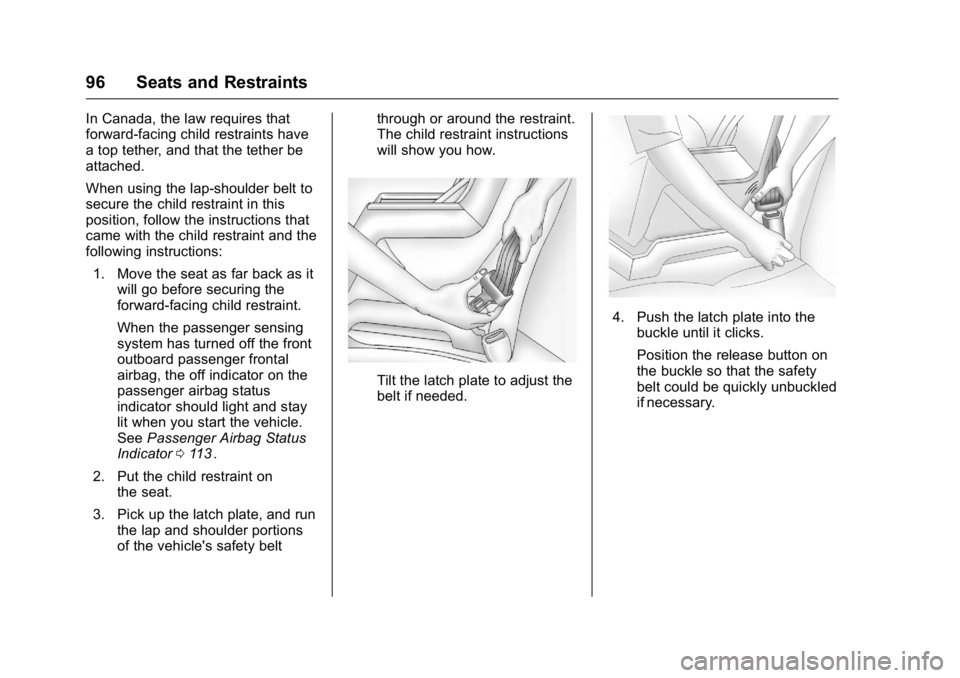
3. Pick up the latch plate, and run the lap and shoulder portions
of the vehicle's safety belt through or around the restraint.
The child restraint instructions
will show you how.
Tilt the latch plate to adjust the
belt if needed.
4. Push the latch plate into the
buckle until it clicks.
Position the release button on
the buckle so that the safety
belt could be quickly unbuckled
if necessary.
Page 98 of 392
GMC Canyon Owner Manual (GMNA-Localizing-U.S/Canada-9159361) -
2016 - crc - 8/25/15
Seats and Restraints 97
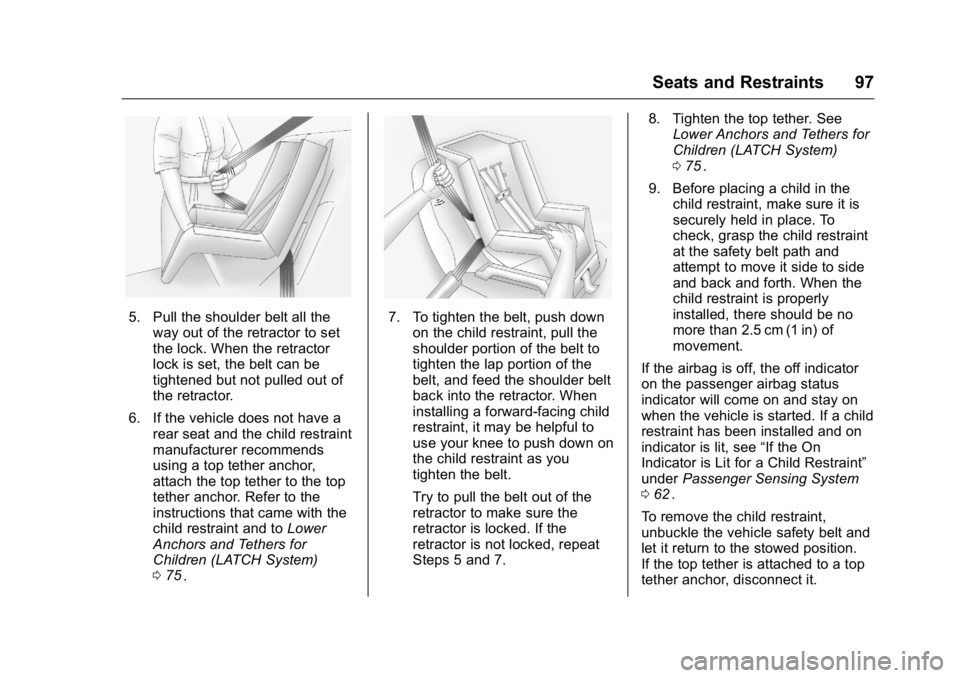
5. Pull the shoulder belt all theway out of the retractor to set
the lock. When the retractor
lock is set, the belt can be
tightened but not pulled out of
the retractor.
6. If the vehicle does not have a rear seat and the child restraint
manufacturer recommends
using a top tether anchor,
attach the top tether to the top
tether anchor. Refer to the
instructions that came with the
child restraint and to Lower
Anchors and Tethers for
Children (LATCH System)
0 75
ii.
7. To tighten the belt, push down
on the child restraint, pull the
shoulder portion of the belt to
tighten the lap portion of the
belt, and feed the shoulder belt
back into the retractor. When
installing a forward-facing child
restraint, it may be helpful to
use your knee to push down on
the child restraint as you
tighten the belt.
Try to pull the belt out of the
retractor to make sure the
retractor is locked. If the
retractor is not locked, repeat
Steps 5 and 7. 8. Tighten the top tether. See
Lower Anchors and Tethers for
Children (LATCH System)
075
ii.
9. Before placing a child in the child restraint, make sure it is
securely held in place. To
check, grasp the child restraint
at the safety belt path and
attempt to move it side to side
and back and forth. When the
child restraint is properly
installed, there should be no
more than 2.5 cm (1 in) of
movement.
If the airbag is off, the off indicator
on the passenger airbag status
indicator will come on and stay on
when the vehicle is started. If a child
restraint has been installed and on
indicator is lit, see “If the On
Indicator is Lit for a Child Restraint”
under Passenger Sensing System
0 62
ii.
To remove the child restraint,
unbuckle the vehicle safety belt and
let it return to the stowed position.
If the top tether is attached to a top
tether anchor, disconnect it.
Page 101 of 392
GMC Canyon Owner Manual (GMNA-Localizing-U.S/Canada-9159361) -
2016 - crc - 8/25/15
100 Instruments and Controls
Instruments and
Controls
Controls
Steering Wheel Adjustment . . . 101
Steering Wheel Controls . . . . . . 102
Horn . . . . . . . . . . . . . . . . . . . . . . . . . . 102
Windshield Wiper/Washer . . . . 102
Compass . . . . . . . . . . . . . . . . . . . . . 103
Clock . . . . . . . . . . . . . . . . . . . . . . . . . 103
Power Outlets . . . . . . . . . . . . . . . . 104
Warning Lights, Gauges, and
Indicators
Warning Lights, Gauges, andIndicators . . . . . . . . . . . . . . . . . . . 105
Instrument Cluster (Base Level) . . . . . . . . . . . . . . . . . . . . . . . 106
Instrument Cluster (Uplevel) . . . . . . . . . . . . . . . . . . . . 108
Speedometer . . . . . . . . . . . . . . . . . 110
Odometer . . . . . . . . . . . . . . . . . . . . . 110
Trip Odometer . . . . . . . . . . . . . . . . 110
Tachometer . . . . . . . . . . . . . . . . . . . 110
Fuel Gauge . . . . . . . . . . . . . . . . . . . 110
Engine Coolant Temperature
Gauge . . . . . . . . . . . . . . . . . . . . . . . 111
Safety Belt Reminders . . . . . . . . 112
Airbag Readiness Light . . . . . . . 113 Passenger Airbag Status
Indicator . . . . . . . . . . . . . . . . . . . . . 113
Charging System Light . . . . . . . 114
Malfunction Indicator Lamp (Check Engine Light) . . . . . . . . 114
Brake System Warning Light . . . . . . . . . . . . . . . . . . . . . . . . 116
Antilock Brake System (ABS) Warning Light . . . . . . . . . . . . . . . 117
Up-Shift Light (Manual Transmission) . . . . . . . . . . . . . . . 117
Tow/Haul Mode Light . . . . . . . . . 117
Hill Descent Control Light . . . . . 117
Lane Departure Warning (LDW) Light . . . . . . . . . . . . . . . . . 118
Vehicle Ahead Indicator . . . . . . . 118
Traction Off Light . . . . . . . . . . . . . 118
StabiliTrak®OFF Light . . . . . . . . 118
Traction Control System (TCS)/ StabiliTrak
®Light . . . . . . . . . . . . 119
Tire Pressure Light . . . . . . . . . . . 119
Engine Oil Pressure Light . . . . 120
Low Fuel Warning Light (Base Level) . . . . . . . . . . . . . . . . . . . . . . . 120
Low Fuel Warning Light (Uplevel) . . . . . . . . . . . . . . . . . . . . 120
Security Light . . . . . . . . . . . . . . . . . 121
High-Beam On Light . . . . . . . . . . 121
Front Fog Lamp Light . . . . . . . . . 121
Lamps On Reminder . . . . . . . . . 121
Cruise Control Light . . . . . . . . . . 121 Door Ajar Light (Uplevel
Cluster) . . . . . . . . . . . . . . . . . . . . . 121
Information Displays
Driver Information Center (DIC)(Base Level) . . . . . . . . . . . . . . . . 122
Driver Information Center (DIC) (Uplevel) . . . . . . . . . . . . . . . . . . . . 125
Vehicle Messages
Vehicle Messages . . . . . . . . . . . . 128
Battery Voltage and ChargingMessages . . . . . . . . . . . . . . . . . . . 128
Brake System Messages . . . . . 129
Compass Messages . . . . . . . . . . 129
Door Ajar Messages . . . . . . . . . . 129
Engine Cooling System Messages . . . . . . . . . . . . . . . . . . . 130
Engine Oil Messages . . . . . . . . . 130
Engine Power Messages . . . . . 131
Fuel System Messages . . . . . . . 131
Key and Lock Messages . . . . . 131
Lamp Messages . . . . . . . . . . . . . . 131
Object Detection System Messages . . . . . . . . . . . . . . . . . . . 132
Ride Control System Messages . . . . . . . . . . . . . . . . . . . 132
Airbag System Messages . . . . 133
Security Messages . . . . . . . . . . . 133
Steering System Messages . . . . . . . . . . . . . . . . . . . 133
Page 113 of 392
GMC Canyon Owner Manual (GMNA-Localizing-U.S/Canada-9159361) -
2016 - crc - 8/25/15
112 Instruments and Controls
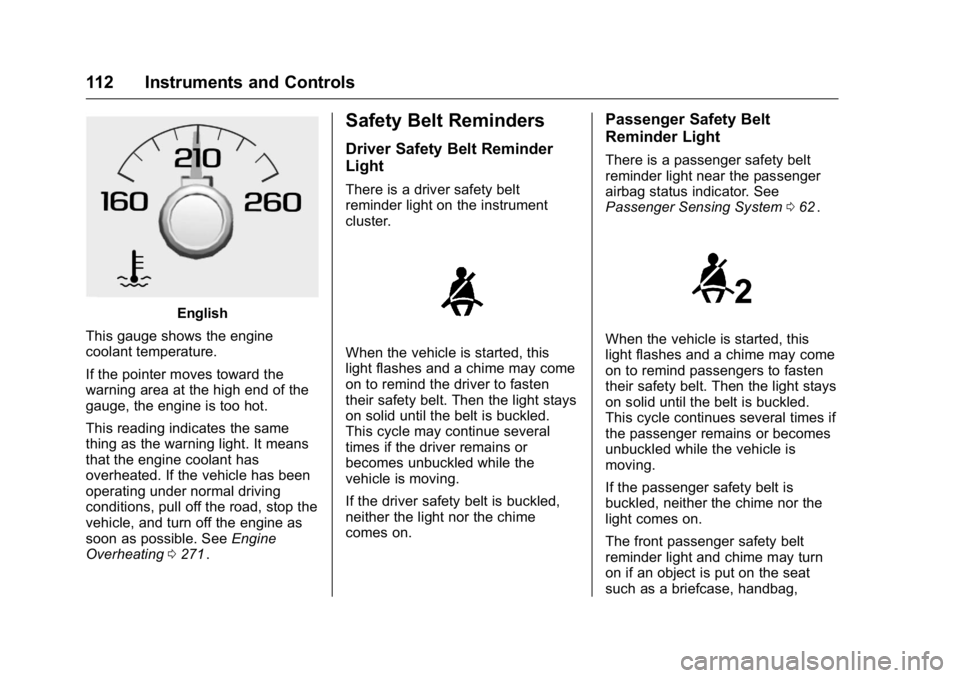
English
This gauge shows the engine
coolant temperature.
If the pointer moves toward the
warning area at the high end of the
gauge, the engine is too hot.
This reading indicates the same
thing as the warning light. It means
that the engine coolant has
overheated. If the vehicle has been
operating under normal driving
conditions, pull off the road, stop the
vehicle, and turn off the engine as
soon as possible. See Engine
Overheating 0271
ii.
Safety Belt Reminders
Driver Safety Belt Reminder
Light
There is a driver safety belt
reminder light on the instrument
cluster.
When the vehicle is started, this
light flashes and a chime may come
on to remind the driver to fasten
their safety belt. Then the light stays
on solid until the belt is buckled.
This cycle may continue several
times if the driver remains or
becomes unbuckled while the
vehicle is moving.
If the driver safety belt is buckled,
neither the light nor the chime
comes on.
Passenger Safety Belt
Reminder Light
There is a passenger safety belt
reminder light near the passenger
airbag status indicator. See
Passenger Sensing System 062
ii.
When the vehicle is started, this
light flashes and a chime may come
on to remind passengers to fasten
their safety belt. Then the light stays
on solid until the belt is buckled.
This cycle continues several times if
the passenger remains or becomes
unbuckled while the vehicle is
moving.
If the passenger safety belt is
buckled, neither the chime nor the
light comes on.
The front passenger safety belt
reminder light and chime may turn
on if an object is put on the seat
such as a briefcase, handbag,
Page 114 of 392
GMC Canyon Owner Manual (GMNA-Localizing-U.S/Canada-9159361) -
2016 - crc - 8/25/15
Instruments and Controls 113
grocery bag, laptop, or other
electronic device. To turn off the
reminder light and/or chime, remove
the object from the seat or buckle
the safety belt.
Airbag Readiness Light
This light shows if there is an
electrical problem with the airbag
system. The system check includes
the airbag sensor(s), the passenger
sensing system, the pretensioners,
the airbag modules, the wiring, and
the crash sensing and diagnostic
module. For more information on the
airbag system, seeAirbag System
0 56
ii.
The airbag readiness light comes on
for several seconds when the
vehicle is started. If the light does
not come on then, have it fixed
immediately.
{Warning
If the airbag readiness light stays
on after the vehicle is started or
comes on while driving, it means
the airbag system might not be
working properly. The airbags in
the vehicle might not inflate in a
crash, or they could even inflate
without a crash. To help avoid
injury, have the vehicle serviced
right away.
If there is a problem with the airbag
system, a Driver Information Center
(DIC) message may also come on.
See Airbag System Messages
0 133
ii.
Passenger Airbag Status
Indicator
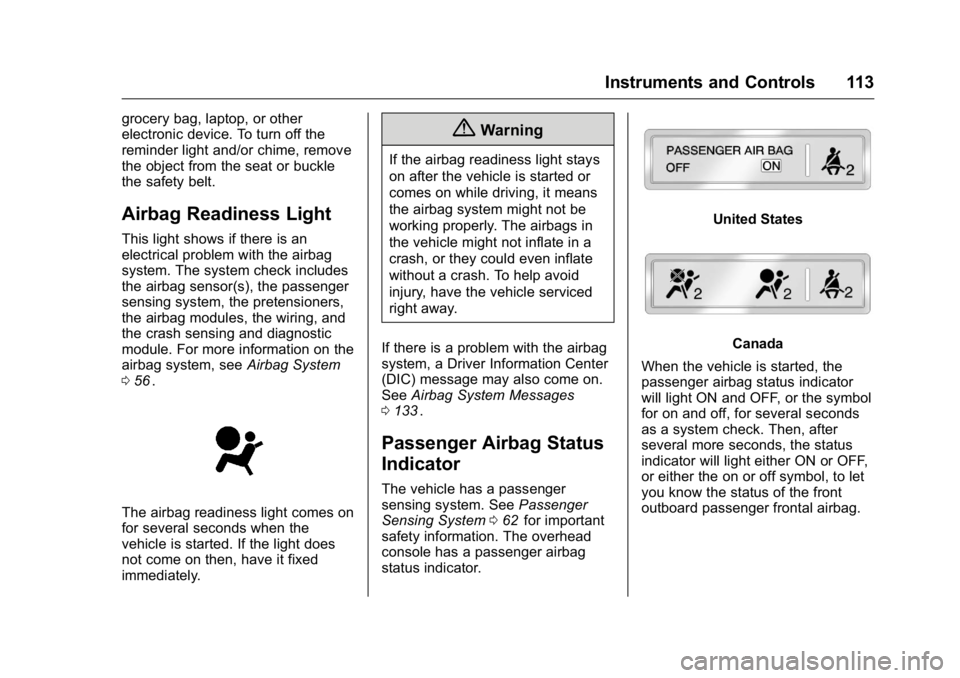
The vehicle has a passenger
sensing system. See Passenger
Sensing System 062
iifor important
safety information. The overhead
console has a passenger airbag
status indicator.
United States
Canada
When the vehicle is started, the
passenger airbag status indicator
will light ON and OFF, or the symbol
for on and off, for several seconds
as a system check. Then, after
several more seconds, the status
indicator will light either ON or OFF,
or either the on or off symbol, to let
you know the status of the front
outboard passenger frontal airbag.
Page 194 of 392
GMC Canyon Owner Manual (GMNA-Localizing-U.S/Canada-9159361) -
2016 - crc - 8/25/15
Driving and Operating 193
Driving Information
Distracted Driving
Distraction comes in many forms
and can take your focus from the
task of driving. Exercise good
judgment and do not let other
activities divert your attention away
from the road. Many local
governments have enacted laws
regarding driver distraction. Become
familiar with the local laws in
your area.
To avoid distracted driving, always
keep your eyes on the road, hands
on the wheel, and mind on the drive.
.Do not use a phone in
demanding driving situations.
Use a hands-free method to
place or receive necessary
phone calls.
. Watch the road. Do not read,
take notes, or look up
information on phones or other
electronic devices.
. Designate a front seat
passenger to handle potential
distractions. .
Become familiar with vehicle
features before driving, such as
programming favorite radio
stations and adjusting climate
control and seat settings.
Program all trip information into
any navigation device prior to
driving.
. Wait until the vehicle is parked
to retrieve items that have fallen
to the floor.
. Stop or park the vehicle to tend
to children.
. Keep pets in an appropriate
carrier or restraint.
. Avoid stressful conversations
while driving, whether with a
passenger or on a cell phone.
{Warning
Taking your eyes off the road too
long or too often could cause a
crash resulting in injury or death.
Focus your attention on driving. Refer to the infotainment section for
more information on using that
system and the navigation system,
if equipped, including pairing and
using a cell phone.
Defensive Driving
Defensive driving means
“always
expect the unexpected.” The first
step in driving defensively is to wear
the safety belt. See Safety Belts
0 50
ii.
. Assume that other road users
(pedestrians, bicyclists, and
other drivers) are going to be
careless and make mistakes.
Anticipate what they might do
and be ready.
. Allow enough following distance
between you and the driver in
front of you.
. Focus on the task of driving.
Drunk Driving
Death and injury associated with
drinking and driving is a global
tragedy.
Page 197 of 392
GMC Canyon Owner Manual (GMNA-Localizing-U.S/Canada-9159361) -
2016 - crc - 8/25/15
196 Driving and Operating
The vehicle may straighten out.
Be ready for a second skid if it
occurs.
. Slow down and adjust your
driving according to weather
conditions. Stopping distance
can be longer and vehicle
control can be affected when
traction is reduced by water,
snow, ice, gravel, or other
material on the road. Learn to
recognize warning clues —such
as enough water, ice, or packed
snow on the road to make a
mirrored surface —and slow
down when you have any doubt.
. Try to avoid sudden steering,
acceleration, or braking,
including reducing vehicle speed
by shifting to a lower gear. Any
sudden changes could cause
the tires to slide.
Remember: Antilock brakes help
avoid only the braking skid.
Off-Road Driving
Four-wheel-drive vehicles can be
used for off-road driving. Vehicles
without four-wheel drive and vehicles not equipped with All
Terrain (AT) or On-Off Road (OOR)
tires must not be driven off-road
except on a level, solid surface. For
contact information about the
original equipment tires, see the
warranty manual.
One of the best ways for successful
off-road driving is to control the
speed.
{Warning
When driving off-road, bouncing
and quick changes in direction
can easily throw you out of
position. This could cause you to
lose control and crash. You and
your passengers should always
wear safety belts.
Before Driving Off-Road
.
Have all necessary maintenance
and service work completed.
. Fuel the vehicle, fill fluid levels,
and check inflation pressure in
all tires, including the spare,
if equipped. .
Read all the information about
four-wheel-drive vehicles in this
manual.
. Remove any underbody air
deflector, if equipped. Re-attach
the air deflector after off-road
driving.
. See Hill Descent Control (HDC)
0 233
ii.
. Know the local laws that apply to
off-road driving.
To gain more ground clearance if
needed, it may be necessary to
remove the front fascia lower air
dam. However, driving without the
air dam reduces fuel economy.
Caution
Operating the vehicle for
extended periods without the front
fascia lower air dam installed can
cause improper air flow to the
engine. Re-attach the front fascia
air dam after off-road driving.
Page 249 of 392
GMC Canyon Owner Manual (GMNA-Localizing-U.S/Canada-9159361) -
2016 - crc - 8/25/15
248 Driving and Operating
4. Reapply the brake pedal. Thenapply the parking brake and
shift into P (Park).
5. Release the brake pedal.
Leaving After Parking on a Hill
1. Apply and hold the brake pedal.
2. Start the engine.
3. Shift into a gear.
4. Release the parking brake.
5. Let up on the brake pedal.
6. Drive slowly until the trailer is clear of the chocks.
7. Stop and have someone pick up and store the chocks.
Maintenance when Trailer
Towing
The vehicle needs service more
often when pulling a trailer. See
Maintenance Schedule 0341
ii.
Things that are especially important
in trailer operation are automatic
transmission fluid, engine oil, axle
lubricant, belts, cooling system, and brake system. It is a good idea to
inspect these before and during
the trip.
Check periodically to see that all
hitch nuts and bolts are tight.
Trailer Towing
Do not tow a trailer during break-in.
See
New Vehicle Break-In 0210ii.
{Warning
The driver can lose control when
pulling a trailer if the correct
equipment is not used or the
vehicle is not driven properly. For
example, if the trailer is too
heavy, the brakes may not work
well or even at all. The driver and
passengers could be seriously
injured. The vehicle may also be
damaged; the resulting repairs
would not be covered by the
vehicle warranty. Pull a trailer
only if all the steps in this section
have been followed. Ask your
(Continued)
Warning (Continued)
dealer for advice and information
about towing a trailer with the
vehicle.
Caution
Pulling a trailer improperly can
damage the vehicle and result in
costly repairs not covered by the
vehicle warranty. To pull a trailer
correctly, follow the advice in this
section and see your dealer for
important information about
towing a trailer with the vehicle.
See Vehicle Load Limits 0204
iifor
more information about the vehicle's
maximum load capacity.
To identify the trailering capacity of
the vehicle, read the information in
“Weight of the Trailer” later in this
section.
Trailering is different than just
driving the vehicle by itself.
Trailering means changes in