charging GMC CANYON 2017 User Guide
[x] Cancel search | Manufacturer: GMC, Model Year: 2017, Model line: CANYON, Model: GMC CANYON 2017Pages: 417, PDF Size: 5.36 MB
Page 167 of 417
GMC Canyon Owner Manual (GMNA-Localizing-U.S./Canada-10122677) -
2017 - crc - 1/20/17
166 Infotainment System
AM
The range for most AM stations is
greater than for FM, especially at
night. The longer range can cause
station frequencies to interfere with
each other. Static can occur when
things like storms and power lines
interfere with radio reception. When
this happens, try reducing the treble
on the radio.
SiriusXM Satellite Radio
Service
If equipped, SiriusXM Satellite
Radio Service provides digital radio
reception. Tall buildings or hills can
interfere with satellite radio signals,
causing the sound to fade in and
out. In addition, traveling or standing
under heavy foliage, bridges,
garages, or tunnels may cause loss
of the SiriusXM signal for a period
of time.
Cell Phone Usage
Cell phone usage, such as making
or receiving phone calls, charging,
or just having the phone on maycause static interference with the
radio. Unplug the phone or turn it off
if this happens.
Multi-Band Antenna
The multi-band antenna is on the
roof of the vehicle. The antenna is
used for OnStar, the SiriusXM
Satellite Radio Service System, and
GPS (Global Positioning System),
if the vehicle has these features.
Keep the antenna clear of
obstructions for clear reception.
Items on the roof of the vehicle can
interfere with the performance of the
radio system and OnStar (if
equipped). Make sure the
multi-band antenna is not
obstructed.
Pandora Internet Radio
If equipped, Pandora®is a free
Internet radio service that streams
personalized radio stations based
on artists, tracks, genres, and
comedians. Create stations using
the Pandora website or Smartphone
application, then use
-or,to
personalize stations. To set up an account, or for more information, go
to www.pandora.com. Pandora may
not be available in Canada or
Mexico.
A phone or tablet with Internet
connection and the Pandora
application installed is required.
Personal cell phone data plans are
used. Make sure the latest version
is installed on the device.
Launching Pandora
Connect an iPhone to the USB port,
or connect Android®or BlackBerry®
through Bluetooth.
See
Bluetooth (Overview) 0186 or
Bluetooth (Infotainment Controls -
Base Radio) 0187 orBluetooth
(Voice Recognition) 0191 or
Bluetooth (Infotainment Controls -
Base Radio with Touchscreen)
0 196. For first time use, set up the
stations before connecting to the
vehicle. The Pandora icon will be
available on the Home Page.
When Pandora is chosen, the
Pandora logo will populate on the
screen and the system will display
“Acquiring Pandora Radio Station.”
Launch times can be significant.
Page 170 of 417
GMC Canyon Owner Manual (GMNA-Localizing-U.S./Canada-10122677) -
2017 - crc - 1/20/17
Infotainment System 169
Volume and song selection may
be controlled using the
infotainment controls or the
phone/device. If Pandora is
selected and nothing is heard,
check the volume setting on the
phone/device and the
infotainment system.
Common Pandora Messages
Pandora Error/Please Check
Device : Not signed in or Pandora
is down for maintenance.
No Stations Available : No stations
are available on the Pandora server
through the connected device.
Action Unavailable. Please Check
Device Connection : A few
conditions for loss of Internet
connection are:
. The connected device loses its
cellular connection.
. The device does not support
Internet connectivity.
. The device is not in the vehicle.
. The Bluetooth signal is lost. No Skips Remaining For This
Station or Permitted During
Advertisements :
.
The maximum Pandora skip limit
has been reached according to
the plan that was obtained.
. Skipping an advertisement was
tried.
See www.pandora.com/help. If the
service will not work, see your
dealer for assistance.Audio Players
Avoiding Untrusted Media
Devices
When using media devices such as
CDs, DVDs, Blu-ray Discs, SD
cards, USB devices, and mobile
devices, consider the source.
Untrusted media devices could
contain files that affect system
operation or performance. Avoid use
if the content or origin cannot be
trusted.
USB Port (Base Radio)
If equipped, there is a USB port for
data and charging in the center
stack, inside the center console,
and/or at the rear of the center
console. For uplevel radios, see the
infotainment manual.
Playing from a USB
A USB mass storage device or
Media Transfer Protocol (MTP)
device can be connected to the
USB port.
Page 172 of 417
GMC Canyon Owner Manual (GMNA-Localizing-U.S./Canada-10122677) -
2017 - crc - 1/20/17
Infotainment System 171
The device battery recharges
automatically while the vehicle is on.
When the vehicle is off while a
device is connected using the USB
cable, the device battery stops
charging and the device will
automatically turn off.
If the device is an unsupported
model, it can still be listened to in
the vehicle by connecting to the
auxiliary input jack using a standard
3.5 mm (1/8 in) stereo cable.
Menu
Press MENU to display the device
Menu and the following may display:
Browse :Select to display the files
or songs on the device. See
“Browse Device Media” later in this
section.
Tone Settings : Select to adjust
Bass, Midrange, Treble, Balance,
Fade, and EQ (Equalizer). See
“Tone Settings” inAM-FM Radio
(Base Radio) 0160 orAM-FM
Radio (Base Radio with
Touchscreen) 0162. EQ :
If equipped, this feature
adjusts the Equalizer settings. See
“EQ (Equalizer)” inAM-FM Radio
(Base Radio) 0160 orAM-FM
Radio (Base Radio with
Touchscreen) 0162.
Browse Device Media
Use the following to browse:
Playlists: 1. Turn MENU to highlight and press to view the playlists
stored on the device.
2. Turn MENU to highlight and press to select a playlist name
to view a list of all songs in the
playlist.
3. Turn MENU to highlight and press to select the song from
the list to begin playback.
Artists: 1. Turn MENU to highlight and press to view the artists stored
on the device.
2. Turn MENU to highlight and press to select an artist name
to view a list of all albums by
the artist. 3. Turn MENU to highlight and
press to select an album name
to view a list of all songs on the
album.
4. Turn MENU to highlight and press to select the song from
the list to begin playback.
Albums: 1. Turn MENU to highlight and press to view the albums
stored on the device.
2. Turn MENU to highlight and press to select an album name
to view a list of all songs on the
album.
3. Turn MENU to highlight and press to select the song from
the list to begin playback.
Genres: 1. Turn MENU to highlight and press to view the genres stored
on the device.
2. Turn MENU to highlight and press to select a genre name
to view a list of artists of that
genre.
Page 173 of 417
GMC Canyon Owner Manual (GMNA-Localizing-U.S./Canada-10122677) -
2017 - crc - 1/20/17
172 Infotainment System
3. Turn MENU to highlight andpress to select to view albums
by that artist.
4. Turn MENU to highlight and press to select an album to
view songs.
5. Turn MENU to highlight and press to select the song from
the list to begin playback.
Songs: 1. Turn MENU to highlight and press to view a list of all songs
stored on the device.
2. Turn MENU to highlight and press to select the song from
the list to begin playback.
USB Port (Base Radio
with Touchscreen)
If equipped, there is a USB port for
data and charging in the center
stack, inside the center console,
and/or at the rear of the center
console. For uplevel radios, see the
infotainment manual.
Using the USB Port
The infotainment system can play
music by connecting an auxiliary
device to the USB port.
USB Support
The USB port uses the USB 2.0
standard. External devices such as
iPhones/iPods
®and USB storage
devices may be connected.
USB Supported Devices
. USB flash drives
. Portable USB hard drives
. iPod/iPhone devices
Not all iPods and USB drives are
compatible with the USB port.
Make sure the iPod has the latest
firmware from Apple
®for proper
operation. iPod firmware can be
updated using the latest iTunes
®
application. See www.apple.com/
itunes.
For help with identifying your iPod,
go to www.apple.com/support. The USB port can play both lower
and upper case .mp3, .wma, .ogg,
and .wav files stored on a USB
storage device.
Supported Apple
®Devices
To view supported devices in the
U.S., see www.my.gmc.com/
learned.
To view supported devices in
Canada, see www.gmcowner.ca.
USB Supported File and Folder
Structure
The infotainment system supports:
. FAT16.
. FAT32.
. exFAT.
Connecting a USB Storage
Device or iPod/iPhone
To connect a USB storage device,
connect the device to the USB port.
To connect an iPod/iPhone, connect
one end of the device’ s cable to the
iPod/iPhone and the other end to
the USB port.
Page 315 of 417
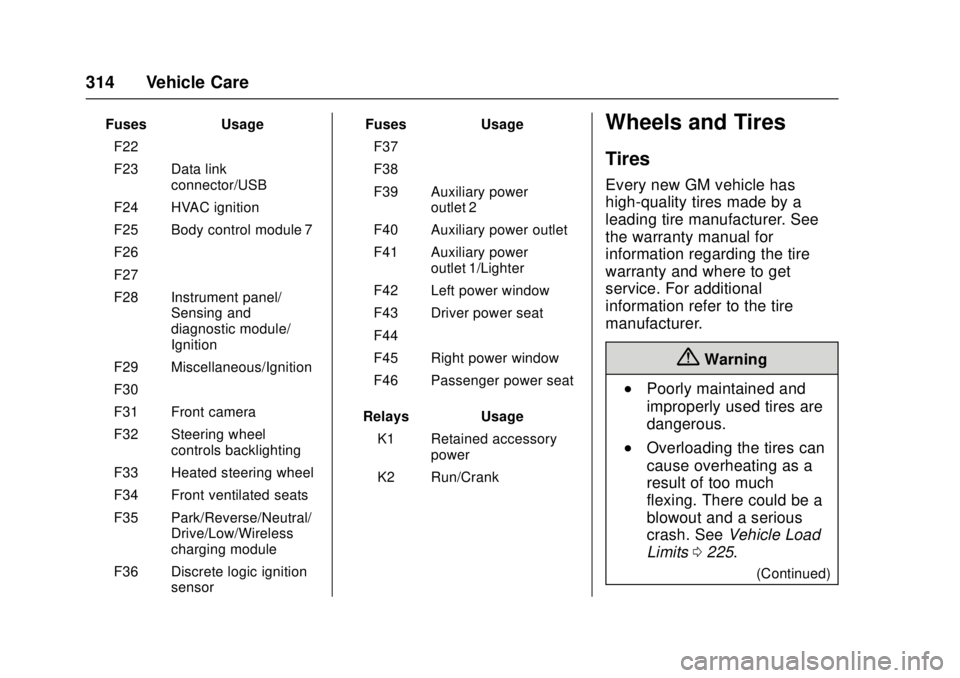
GMC Canyon Owner Manual (GMNA-Localizing-U.S./Canada-10122677) -
2017 - crc - 1/20/17
314 Vehicle Care
FusesUsage
F22 –
F23 Data link connector/USB
F24 HVAC ignition
F25 Body control module 7
F26 –
F27 –
F28 Instrument panel/ Sensing and
diagnostic module/
Ignition
F29 Miscellaneous/Ignition
F30 –
F31 Front camera
F32 Steering wheel controls backlighting
F33 Heated steering wheel
F34 Front ventilated seats
F35 Park/Reverse/Neutral/ Drive/Low/Wireless
charging module
F36 Discrete logic ignition sensor Fuses
Usage
F37 –
F38 –
F39 Auxiliary power outlet 2
F40 Auxiliary power outlet
F41 Auxiliary power outlet 1/Lighter
F42 Left power window
F43 Driver power seat
F44 –
F45 Right power window
F46 Passenger power seat
Relays Usage
K1 Retained accessory power
K2 Run/CrankWheels and Tires
Tires
Every new GM vehicle has
high-quality tires made by a
leading tire manufacturer. See
the warranty manual for
information regarding the tire
warranty and where to get
service. For additional
information refer to the tire
manufacturer.
{Warning
.Poorly maintained and
improperly used tires are
dangerous.
.Overloading the tires can
cause overheating as a
result of too much
flexing. There could be a
blowout and a serious
crash. See Vehicle Load
Limits 0225.
(Continued)
Page 407 of 417

GMC Canyon Owner Manual (GMNA-Localizing-U.S./Canada-10122677) -
2017 - crc - 1/20/17
406 Index
Audio (cont'd)Theft-Deterrent Feature . . . . . . . 153
Automatic Climate Control System . . . . . . . 209
Door Locks . . . . . . . . . . . . . . . . . . . . . 33
Headlamp System . . . . . . . . . . . . 147
Transmission . . . . . . . . . . . . . . . . . 240
Transmission Fluid . . . . . . . . . . . 288
Automatic Transmission
Manual Mode . . . . . . . . . . . . . . . . . 242
Shift Lock Control FunctionCheck . . . . . . . . . . . . . . . . . . . . . . . 302
Auxiliary Jack . . . . . . . . . . . . . . . . . . . 178
Avoiding Untrusted Media Devices . . . . . . . . . . . . . . . . . . . . . . . 169
Axle, Front . . . . . . . . . . . . . . . . . . . . . . 300
Axle, Rear . . . . . . . . . . . . . . . . . . . . . . 300
B
Battery Load Management . . . . . . . . . . . . 151
Power Protection . . . . . . . . . . . . . 151
Voltage and ChargingMessages . . . . . . . . . . . . . . . . . . . 131
Battery - North America . . . . 298, 346
Blade Replacement, Wiper . . . . . 303
Blind Spot Mirrors . . . . . . . . . . . . . . . 38 Bluetooth
Overview . . . . . . . . 186, 187, 191, 196
Bluetooth Audio . . . . . . . . . . . . . . . . 179
Brake
System Warning Light . . . . . . . . .119
Brakes . . . . . . . . . . . . . . . . . . . . . . . . . . 296 Antilock . . . . . . . . . . . . . . . . . . . . . . . 251
Assist . . . . . . . . . . . . . . . . . . . . . . . . . 252
Fluid . . . . . . . . . . . . . . . . . . . . . . . . . . 297
Parking . . . . . . . . . . . . . . . . . . . . . . . 251
System Messages . . . . . . . . . . . . 132
Braking . . . . . . . . . . . . . . . . . . . . . . . . . 215
Break-In, New Vehicle . . . . . . . . . . 231
Bulb Replacement . . . . . . . . . . . . . . 306
Center High-MountedStoplamp (CHMSL) and
Cargo Lamp . . . . . . . . . . . . . . . . . 306
Halogen Bulbs . . . . . . . . . . . . . . . . 304
Headlamp Aiming . . . . . . . . . . . . . 304
Headlamps . . . . . . . . . . . . . . . . . . . 304
Headlamps, Front Turn Signal, Sidemarker, and
Parking Lamps . . . . . . . . . . . . . . 304
Taillamps, Turn Signal, Stoplamps, and Back-up
Lamps . . . . . . . . . . . . . . . . . . . . . . 305
Buying New Tires . . . . . . . . . . . . . . . 329
C
Calibration . . . . . . . . . . . . . . . . . . . . . . 105
California Fuel Requirements . . . . . . . . . . . 264
Perchlorate MaterialsRequirements . . . . . . . . . . . . . . . 278
California Proposition
65 Warning . . . . . . . . . .278, 298, 346
Camera
Rear Vision (RVC) . . . . . . . . . . . . 258
Canadian Vehicle Owners . . . . . . . . 2
Capacities and Specifications . . . . . . . . . . . . . . . . . 378
Carbon Monoxide Engine Exhaust . . . . . . . . . . . . . . . 239
Tailgate . . . . . . . . . . . . . . . . . . . . . . . . . 34
Winter Driving . . . . . . . . . . . . . . . . 223
Cargo Lamp . . . . . . . . . . . . . . . . . . . . 149
Caution, Danger, and Warning . . . . 3
Center Console Storage . . . . . . . . 100
Center High-Mounted
Stoplamp (CHMSL) and
Cargo Lamp . . . . . . . . . . . . . . . . . . . 306
Chains, Tire . . . . . . . . . . . . . . . . . . . . 333
Charging Wireless . . . . . . . . . . . . . . . . . . . . . . 107
Charging System Light . . . . . . . . . 117
Page 411 of 417

GMC Canyon Owner Manual (GMNA-Localizing-U.S./Canada-10122677) -
2017 - crc - 1/20/17
410 Index
Infants and Young Children,Restraints . . . . . . . . . . . . . . . . . . . . . . 70
Infotainment . . . . . . . . . . . . . . . . . . . . 152
Infotainment System . . . . . . . . . . . . 394
Instrument Cluster . . . . . . . . . 109, 111
Interior Rearview Mirrors . . . . . . . . . 39
Internet Radio Pandora . . . . . . . . . . . . . . . . . . . . . . 166
Introduction . . . . . . . . . . . . . . . . . . . . . . . 2
J
Jack Auxiliary . . . . . . . . . . . . . . . . . . . . . . 178
Jump Starting - North America . . . . . . . . . . . . . . . . . . . . . . . 346
K
Key and Lock Messages . . . . . . . . 134
Keyless EntryRemote (RKE) System . . . . . . . . . 29
Keys . . . . . . . . . . . . . . . . . . . . . . . . . . . . . 26
L
Labeling, Tire Sidewall . . . . . . . . . . 316
Lamps Cargo . . . . . . . . . . . . . . . . . . . . . . . . . 149
Daytime Running (DRL) . . . . . . 146
Dome . . . . . . . . . . . . . . . . . . . . . . . . . 150
Exterior Controls . . . . . . . . . . . . . . 145 Lamps (cont'd)
Exterior Lamps Off
Reminder . . . . . . . . . . . . . . . . . . . 146
Malfunction Indicator
(Check Engine) . . . . . . . . . . . . . .117
Messages . . . . . . . . . . . . . . . . . . . . 134
On Reminder . . . . . . . . . . . . . . . . . 124
Reading . . . . . . . . . . . . . . . . . . . . . . 150
Lane Departure
Warning (LDW) . . . . . . . . . . . . . . . . 261
Lane Departure Warning Light . . . . . . . . . . . . . . . . . . . . . . . . . . 121
Lap-Shoulder Belt . . . . . . . . . . . . . . . 52
LATCH System Replacing Parts after aCrash . . . . . . . . . . . . . . . . . . . . . . . . . 89
LATCH, Lower Anchors and Tethers for Children . . . . . . . . . . . . 76
Light Hill Descent Control . . . . . . . . . . 120
Lighting Entry . . . . . . . . . . . . . . . . . . . . . . . . . 150
Exit . . . . . . . . . . . . . . . . . . . . . . . . . . . 150
Illumination Control . . . . . . . . . . . 149
Lights . . . . . . . . . . . . . . . . . . . . . . . . . . . 121 Airbag Readiness . . . . . . . . . . . . . .116
Antilock Brake System(ABS) Warning . . . . . . . . . . . . . . 120 Lights (cont'd)
Brake System Warning . . . . . . . .119
Charging System . . . . . . . . . . . . . .117
Check Engine (Malfunction
Indicator) . . . . . . . . . . . . . . . . . . . . .117
Cruise Control . . . . . . . . . . . . . . . . 124
Door Ajar . . . . . . . . . . . . . . . . . . . . . 125
Engine Oil Pressure . . . . . . . . . . 123
Flash-to-Pass . . . . . . . . . . . . . . . . . 146
Front Fog Lamp . . . . . . . . . . . . . . 124
High-Beam On . . . . . . . . . . . . . . . . 124
High/Low Beam Changer . . . . . 146
Lane Departure Warning . . . . . . 121
Low Fuel Warning . . . . . . . . . . . . 123
Safety Belt Reminders . . . . . . . . .115
Security . . . . . . . . . . . . . . . . . . . . . . 124
StabiliTrak
®OFF . . . . . . . . . . . . . 121
Tire Pressure . . . . . . . . . . . . . . . . . 122
Tow/Haul Mode . . . . . . . . . . . . . . . 120
Traction Control System
(TCS)/StabiliTrak
®. . . . . . . . . . 122
Traction Off . . . . . . . . . . . . . . . . . . . 121
Up-Shift . . . . . . . . . . . . . . . . . . . . . . 120
Locks Automatic Door . . . . . . . . . . . . . . . . . 33
Delayed Locking . . . . . . . . . . . . . . . . 33
Door . . . . . . . . . . . . . . . . . . . . . . . . . . . . 32
Lockout Protection . . . . . . . . . . . . . . 33
Page 412 of 417

GMC Canyon Owner Manual (GMNA-Localizing-U.S./Canada-10122677) -
2017 - crc - 1/20/17
Index 411
Locks (cont'd)Power Door . . . . . . . . . . . . . . . . . . . . . 33
Safety . . . . . . . . . . . . . . . . . . . . . . . . . . 34
Loss of Control . . . . . . . . . . . . . . . . . 216
Low Fuel Warning Light . . . . . . . . . 123
Lower Anchors and Tethers
for Children (LATCH
System) . . . . . . . . . . . . . . . . . . . . . . . . 76
Lumbar Adjustment . . . . . . . . . . . . . . 46
Front Seats . . . . . . . . . . . . . . . . . . . . . 46
M
MaintenanceRecords . . . . . . . . . . . . . . . . . . . . . . 376
Maintenance and Care Additional . . . . . . . . . . . . . . . . . . . . . 370
Maintenance Schedule . . . . . . . . . 364 Recommended Fluids andLubricants . . . . . . . . . . . . . . . . . . . 373
Transfer Case . . . . . . . . . . . . . . . . 247
Malfunction Indicator Lamp . . . . . 117
Manual Mirrors . . . . . . . . . . . . . . . . . . 37
Manual Mode . . . . . . . . . . . . . . . . . . . 242
Manual Transmission . . . . . . . . . . . 245 Fluid . . . . . . . . . . . . . . . . . . . . . . . . . . 288
Media Avoiding Untrusted Devices . . 169
Messages
Airbag System . . . . . . . . . . . . . . . . 135 Messages (cont'd)
Battery Voltage and
Charging . . . . . . . . . . . . . . . . . . . . 131
Brake System . . . . . . . . . . . . . . . . 132
Compass . . . . . . . . . . . . . . . . . . . . . 132
Door Ajar . . . . . . . . . . . . . . . . . . . . . 132
Engine Cooling System . . . . . . . 132
Engine Oil . . . . . . . . . . . . . . . . . . . . 133
Engine Power . . . . . . . . . . . . . . . . 133
Fuel System . . . . . . . . . . . . . . . . . . 134
Key and Lock . . . . . . . . . . . . . . . . . 134
Lamp . . . . . . . . . . . . . . . . . . . . . . . . . 134
Object Detection System . . . . . 134
Ride Control System . . . . . . . . . . 135
Security . . . . . . . . . . . . . . . . . . . . . . 135
Starting the Vehicle . . . . . . . . . . . 136
Steering System . . . . . . . . . . . . . . 135
Tire . . . . . . . . . . . . . . . . . . . . . . . . . . . 136
Transmission . . . . . . . . . . . . . . . . . 136
Vehicle . . . . . . . . . . . . . . . . . . . . . . . 131
Vehicle Reminder . . . . . . . . . . . . . 137
Vehicle Speed . . . . . . . . . . . . . . . . 138
Messaging
Text . . . . . . . . . . . . . . . . . . . . . . . . . . . 200
Mirrors Automatic DimmingRearview . . . . . . . . . . . . . . . . . . . . . . 40
Blind Spot . . . . . . . . . . . . . . . . . . . . . . 38 Mirrors (cont'd)
Convex . . . . . . . . . . . . . . . . . . . . . . . . . 37
Folding . . . . . . . . . . . . . . . . . . . . . . . . . 38
Heated . . . . . . . . . . . . . . . . . . . . . . . . . 38
Manual . . . . . . . . . . . . . . . . . . . . . . . . . 37
Manual Rearview . . . . . . . . . . . . . . . 39
Power . . . . . . . . . . . . . . . . . . . . . . . . . . 38
Mirrors, Interior Rearview . . . . . . . . 39
Monitor System, Tire Pressure . . . . . . . . . . . . . . . . . . . . . . 323
Multi-band Antenna . . . . . . . . . . . . . 166N
Navigation OnStar®. . . . . . . . . . . . . . . . . . . . . . 396
New Vehicle Break-In . . . . . . . . . . . 231
O
Object Detection System Messages . . . . . . . . . . . . . . . . . . . . . 134
Odometer . . . . . . . . . . . . . . . . . . . . . . . 113 Trip . . . . . . . . . . . . . . . . . . . . . . . . . . . .113
Off-Road . . . . . . . . . . . . . . . . . . . . . . . 217 Driving . . . . . . . . . . . . . . . . . . . . . . . . 217
Recovery . . . . . . . . . . . . . . . . . . . . . 216
Oil Engine . . . . . . . . . . . . . . . . . . . . . . . . 284
Engine Oil Life System . . . . . . . 286
Messages . . . . . . . . . . . . . . . . . . . . 133
Page 417 of 417

GMC Canyon Owner Manual (GMNA-Localizing-U.S./Canada-10122677) -
2017 - crc - 1/20/17
416 Index
Wi-Fi . . . . . . . . . . . . . . . . . . . . . . . . . . . 397
Windows . . . . . . . . . . . . . . . . . . . . . . . . 40Power . . . . . . . . . . . . . . . . . . . . . . . . . . 40
Rear . . . . . . . . . . . . . . . . . . . . . . . . . . . . 42
Windshield Wiper/Washer . . . . . . . . . . . . . . . . 104
Winter
Driving . . . . . . . . . . . . . . . . . . . . . . . . 223
Winter Tires . . . . . . . . . . . . . . . . . . . . 315
Wiper Blade Replacement . . . . . . 303
Wireless Charging . . . . . . . . . . . . . . 107