ignition GMC CANYON 2017 Repair Manual
[x] Cancel search | Manufacturer: GMC, Model Year: 2017, Model line: CANYON, Model: GMC CANYON 2017Pages: 417, PDF Size: 5.36 MB
Page 338 of 417
GMC Canyon Owner Manual (GMNA-Localizing-U.S./Canada-10122677) -
2017 - crc - 1/20/17
Vehicle Care 337
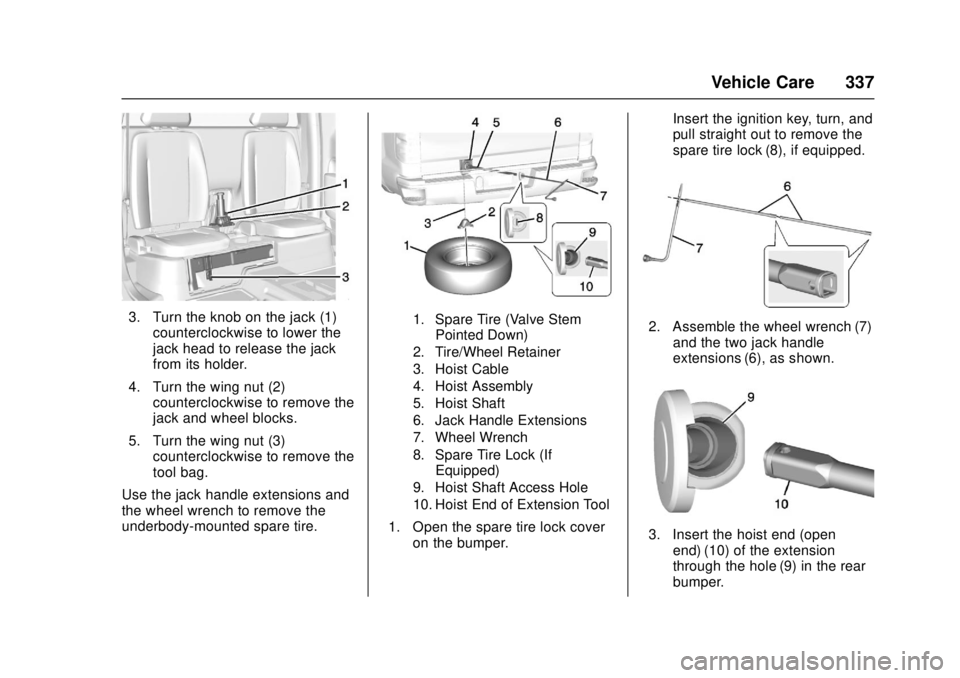
3. Turn the knob on the jack (1)counterclockwise to lower the
jack head to release the jack
from its holder.
4. Turn the wing nut (2) counterclockwise to remove the
jack and wheel blocks.
5. Turn the wing nut (3) counterclockwise to remove the
tool bag.
Use the jack handle extensions and
the wheel wrench to remove the
underbody-mounted spare tire.1. Spare Tire (Valve Stem Pointed Down)
2. Tire/Wheel Retainer
3. Hoist Cable
4. Hoist Assembly
5. Hoist Shaft
6. Jack Handle Extensions
7. Wheel Wrench
8. Spare Tire Lock (If Equipped)
9. Hoist Shaft Access Hole
10. Hoist End of Extension Tool
1. Open the spare tire lock cover on the bumper. Insert the ignition key, turn, and
pull straight out to remove the
spare tire lock (8), if equipped.
2. Assemble the wheel wrench (7)
and the two jack handle
extensions (6), as shown.
3. Insert the hoist end (openend) (10) of the extension
through the hole (9) in the rear
bumper.
Page 349 of 417
GMC Canyon Owner Manual (GMNA-Localizing-U.S./Canada-10122677) -
2017 - crc - 1/20/17
348 Vehicle Care
4. Turn the ignition to LOCK/OFF.Turn off all lights and
accessories in both vehicles,
except the hazard warning
flashers if needed.
{Warning
An electric fan can start up even
when the engine is not running
and can injure you. Keep hands,
clothing, and tools away from any
underhood electric fan.
{Warning
Using a match near a battery can
cause battery gas to explode.
People have been hurt doing this,
and some have been blinded.
Use a flashlight if you need more
light.
Battery fluid contains acid that
can burn you. Do not get it on
you. If you accidentally get it in
(Continued)
Warning (Continued)
your eyes or on your skin, flush
the place with water and get
medical help immediately.
{Warning
Fans or other moving engine
parts can injure you badly. Keep
your hands away from moving
parts once the engine is running.
5. Connect one end of the red positive (+) cable to the
positive (+) terminal on the
discharged battery.
6. Connect the other end of the red positive (+) cable to the
positive (+) terminal of the good
battery.
7. Connect one end of the black negative (–) cable to the
negative (–) terminal of the
good battery. 8. Connect the other end of the
black negative (–) cable to the
negative (–) grounding stud for
the discharged battery.
9. Start the engine in the vehicle with the good battery and run
the engine at idle speed for at
least four minutes.
10. Try to start the vehicle that had the dead battery. If it will not
start after a few tries, it
probably needs service.
Caution
If the jumper cables are
connected or removed in the
wrong order, electrical shorting
may occur and damage the
vehicle. The repairs would not be
covered by the vehicle warranty.
Always connect and remove the
jumper cables in the correct order,
making sure that the cables do
not touch each other or other
metal.
Page 352 of 417
GMC Canyon Owner Manual (GMNA-Localizing-U.S./Canada-10122677) -
2017 - crc - 1/20/17
Vehicle Care 351
(Drive). There should be no
movement of the vehicle while
shifting.
5. Shift the transmission into D (Drive). Turn the engine off.
Then shift the transmission into
P (Park).
6. Wait for at least 10 seconds, then restart the engine.
7. Shift the transmission to D (Drive), then turn the engine off
again.
Caution
Failure to disconnect the negative
battery cable or to have it contact
the terminals can cause damage
to the vehicle.
8. Disconnect the negative battery cable at the battery and
secure the nut and bolt. Cover
the negative battery post with a
non-conductive material to
prevent any contact with the
negative battery terminal. 9. Shift the transmission to
P (Park).
Caution
If the steering column is locked,
vehicle damage may occur.
10. Move the steering wheel to make sure the steering column
is unlocked.
11. With a foot on the brake pedal, release the parking brake.
Keep the ignition key in the
towed vehicle in ACC/
ACCESSORY to prevent the
steering column from locking.
Disconnecting the Towed Vehicle
Before disconnecting the towed
vehicle: 1. Park on a level surface.
2. Set the parking brake, then shift the transmission to
P (Park), and move the ignition
key to OFF.
3. Connect the battery.
4. Apply the brake pedal. 5. Shift the transfer case out of
N (Neutral) to Two-Wheel Drive
High. See “Shifting out of
N (Neutral)” underFour-Wheel
Drive 0247. See your dealer if
the transfer case cannot be
shifted out of N (Neutral).
6. Check that the vehicle is in Two-Wheel Drive High by
shifting the transmission to
R (Reverse) and then to D
(Drive). There should be
movement of the vehicle while
shifting.
7. Shift the transmission to P (Park) and turn off the
ignition.
8. Disconnect the vehicle from the tow vehicle.
9. Release the parking brake.
10. Reset any lost presets. The outside temperature
display will default to 0 °C
(32 °F) but will reset with
normal usage.
Page 354 of 417
GMC Canyon Owner Manual (GMNA-Localizing-U.S./Canada-10122677) -
2017 - crc - 1/20/17
Vehicle Care 353
6. Secure the vehicle to the dollyfollowing the manufacturer's
instructions.
7. Shift the transfer case to N (Neutral). See “Shifting into
N (Neutral)” underFour-Wheel
Drive 0247 for the proper
procedure.
8. Release the parking brake only after the vehicle being towed is
firmly attached to the tow
vehicle.
9. Turn the ignition to LOCK/OFF.Rear Towing (Rear Wheels Off
the Ground)
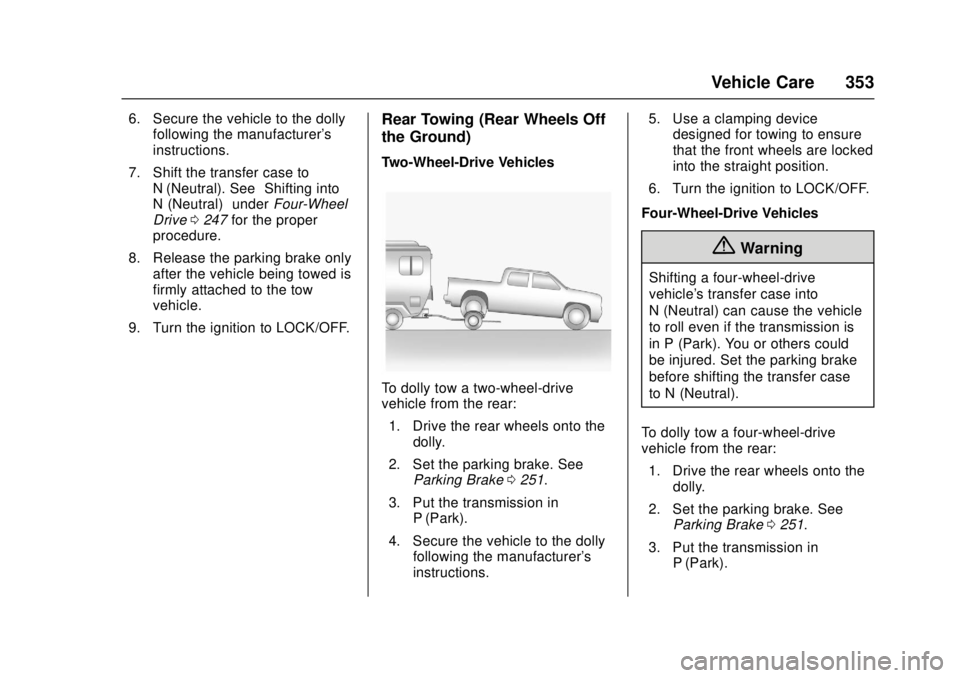
Two-Wheel-Drive Vehicles
To dolly tow a two-wheel-drive
vehicle from the rear: 1. Drive the rear wheels onto the dolly.
2. Set the parking brake. See Parking Brake 0251.
3. Put the transmission in P (Park).
4. Secure the vehicle to the dolly following the manufacturer's
instructions. 5. Use a clamping device
designed for towing to ensure
that the front wheels are locked
into the straight position.
6. Turn the ignition to LOCK/OFF.
Four-Wheel-Drive Vehicles
{Warning
Shifting a four-wheel-drive
vehicle's transfer case into
N (Neutral) can cause the vehicle
to roll even if the transmission is
in P (Park). You or others could
be injured. Set the parking brake
before shifting the transfer case
to N (Neutral).
To dolly tow a four-wheel-drive
vehicle from the rear: 1. Drive the rear wheels onto the dolly.
2. Set the parking brake. See Parking Brake 0251.
3. Put the transmission in P (Park).
Page 355 of 417
GMC Canyon Owner Manual (GMNA-Localizing-U.S./Canada-10122677) -
2017 - crc - 1/20/17
354 Vehicle Care
4. Secure the vehicle to the dollyfollowing the manufacturer's
instructions.
5. Use a clamping device designed for towing to ensure
that the front wheels are locked
into the straight position.
6. Shift the transfer case to N (Neutral). See “Shifting into
N (Neutral)” underFour-Wheel
Drive 0247 for the proper
procedure.
7. Turn the ignition to LOCK/OFF.Appearance Care
Exterior Care
Locks
Locks are lubricated at the factory.
Use a de-icing agent only when
absolutely necessary, and have the
locks greased after using. See
Recommended Fluids and
Lubricants 0373.
Washing the Vehicle
To preserve the vehicle's finish,
wash it often and out of direct
sunlight.
Caution
Do not use petroleum-based,
acidic, or abrasive cleaning
agents as they can damage the
vehicle's paint, metal, or plastic
parts. If damage occurs, it would
not be covered by the vehicle
warranty. Approved cleaning
products can be obtained from
(Continued)
Caution (Continued)
your dealer. Follow all
manufacturer directions regarding
correct product usage, necessary
safety precautions, and
appropriate disposal of any
vehicle care product.
Caution
Avoid using high-pressure
washes closer than 30 cm (12 in)
to the surface of the vehicle. Use
of power washers exceeding
8,274 kPa (1,200 psi) can result
in damage or removal of paint
and decals.
Caution
Do not power wash any
component under the hood that
has this
esymbol.
(Continued)
Page 367 of 417

GMC Canyon Owner Manual (GMNA-Localizing-U.S./Canada-10122677) -
2017 - crc - 1/20/17
366 Service and Maintenance
.Check automatic transmission
shift lock control function. See
Automatic Transmission Shift
Lock Control Function Check
0302.
. Check ignition transmission lock.
See Ignition Transmission Lock
Check 0302.
. Check parking brake and
automatic transmission park
mechanism. See Park Brake and
P (Park) Mechanism Check
0 302.
. Check accelerator pedal for
damage, high effort, or binding.
Replace if needed.
. Visually inspect gas strut for
signs of wear, cracks, or other
damage. Check the hold open
ability of the strut. See your
dealer if service is required.
. Verify spare tire key lock
operation and lubricate as
needed. See Tire Changing
0 336.
Page 397 of 417
GMC Canyon Owner Manual (GMNA-Localizing-U.S./Canada-10122677) -
2017 - crc - 1/20/17
396 OnStar
.Obtain and customize the Wi-Fi®
hotspot name or SSID and
password, if equipped.
Press
Qto connect to an
Advisor to:
. Verify account information or
update contact information.
. Get driving directions.
. Receive a Diagnostic check of
the vehicle's key operating
systems.
. Receive Roadside Assistance.
. Manage Wi-Fi Settings,
if equipped.
Press
>to get a priority connection
to an OnStar Advisor available 24/
7 to:
. Get help for an emergency.
. Be a Good Samaritan or
respond to an AMBER Alert.
. Get assistance in severe
weather or other crisis situations
and find evacuation routes.
OnStar Services
Emergency
Emergency Services require an
active, OnStar service plan
(excludes Basic Plan). With
Automatic Crash Response, built-in
sensors can automatically alert a
specially trained OnStar Advisor
who is immediately connected in to
the vehicle to help.
Press
>for a priority connection to
an OnStar Advisor who can contact
emergency service providers, direct
them to your exact location, and
relay important information.
With OnStar Crisis Assist, specially
trained Advisors are available
24 hours a day, 7 days a week, to
provide a central point of contact,
assistance, and information during a
crisis.
With Roadside Assistance, Advisors
can locate a nearby service provider
to help with a flat tire, a battery
jump, or an empty gas tank.
Security
If equipped, OnStar provides these
services:
. With Stolen Vehicle Assistance,
OnStar Advisors can use GPS to
pinpoint the vehicle and help
authorities quickly recover it.
. With Remote Ignition Block,
if equipped, OnStar can block
the engine from being restarted.
. With Stolen Vehicle Slowdown,
if equipped, OnStar can work
with law enforcement to
gradually slow the vehicle down.
Theft Alarm Notification
If equipped, if the doors are locked
and the vehicle alarm sounds, a
notification by text, e-mail, or phone
call will be sent. If the vehicle is
stolen, an OnStar Advisor can work
with authorities to recover the
vehicle.
Navigation
OnStar navigation requires a
specific OnStar service plan.
Page 402 of 417
GMC Canyon Owner Manual (GMNA-Localizing-U.S./Canada-10122677) -
2017 - crc - 1/20/17
OnStar 401
to the vehicle in a crash, or wireless
phone network congestion or
jamming—may prevent service.
See Radio Frequency Statement
0 391.
Services for People with
Disabilities
Advisors provide services to help
Subscribers with physical disabilities
and medical conditions.
Press
Qto help:
. Locate a gas station with an
attendant to pump gas.
. Find a hotel, restaurant, etc.,
that meets accessibility needs.
. Provide directions to the closest
hospital or pharmacy in urgent
situations.
TTY Users
OnStar has the ability to
communicate to deaf,
hard-of-hearing, or speech-impaired
customers while in the vehicle. The
available dealer-installed TTY
system can provide in-vehicle access to all OnStar services,
except Virtual Advisor and OnStar
Turn-by-Turn Navigation.
OnStar Personal Identification
Number (PIN)
A PIN is needed to access some
OnStar services. The PIN will need
to be changed the first time when
speaking with an Advisor. To
change the OnStar PIN, contact an
OnStar Advisor by pressing
Qor
calling 1-888-4ONSTAR.
Warranty
OnStar equipment may be
warranted as part of the vehicle
warranty.
Languages
The vehicle can be programmed to
respond in multiple languages.
Press
Qand ask for an Advisor.
Advisors are available in English,
Spanish, and French. Available
languages may vary by country.
Potential Issues
OnStar cannot perform Remote
Door Unlock or Stolen Vehicle
Assistance after the vehicle has
been off continuously for 10 days
without an ignition cycle. If the
vehicle has not been started for
five days, OnStar can contact
Roadside Assistance or a locksmith
to help gain access to the vehicle.
Global Positioning
System (GPS)
. Obstruction of the GPS can
occur in a large city with tall
buildings; in parking garages;
around airports; in tunnels and
underpasses; or in an area with
very dense trees. If GPS signals
are not available, the OnStar
system should still operate to
call OnStar. However, OnStar
could have difficulty identifying
the exact location.
. In emergency situations, OnStar
can use the last stored GPS
location to send to emergency
responders.
Page 408 of 417

GMC Canyon Owner Manual (GMNA-Localizing-U.S./Canada-10122677) -
2017 - crc - 1/20/17
Index 407
CheckEngine Light (Malfunction
Indicator) . . . . . . . . . . . . . . . . . . . . .117
Ignition Transmission Lock . . . 302
Child Restraints Infants and Young Children . . . . . 70
Lower Anchors and Tethersfor Children . . . . . . . . . . . . . . . . . . . 76
Older Children . . . . . . . . . . . . . . . . . . 69
Securing . . . . . . . . . . . . . . . . . . . . 90, 95
Systems . . . . . . . . . . . . . . . . . . . . . . . . 73
Cleaning Exterior Care . . . . . . . . . . . . . . . . . 354
Interior Care . . . . . . . . . . . . . . . . . . 359
Climate Control Systems . . . . . . . 207 Air Conditioning . . . . . . . . . . . . . . 207
Automatic . . . . . . . . . . . . . . . . . . . . . 209
Heating . . . . . . . . . . . . . . . . . . . . . . . 207
Clock . . . . . . . . . . . . . . . . . . . . . . . . . . . 105
Cluster, Instrument . . . . . . . . 109, 111
Clutch, Hydraulic . . . . . . . . . . . . . . . 288
Collision Damage Repair . . . . . . . 388
Compact Spare Tire . . . . . . . . . . . . 344
Compartments Storage . . . . . . . . . . . . . . . . . . . . . . . . . 99
Compass . . . . . . . . . . . . . . . . . . . . . . . 105 Messages . . . . . . . . . . . . . . . . . . . . 132 Connections
OnStar®. . . . . . . . . . . . . . . . . . . . . . 397
Control . . . . . . . . . . . . . . . . . . . . . . . . . 255 Traction and ElectronicStability . . . . . . . . . . . . . . . . . . . . . 253
Control Light Hill Descent . . . . . . . . . . . . . . . . . . 120
Control of a Vehicle . . . . . . . . . . . . . 215
Convex Mirrors . . . . . . . . . . . . . . . . . . 37
Coolant Engine . . . . . . . . . . . . . . . . . . . . . . . . 292
Engine Temperature Gauge . . .114
Cooling . . . . . . . . . . . . . . . . . . . . 207, 209
Cooling System . . . . . . . . . . . . . . . . . 290 Engine Messages . . . . . . . . . . . . 132
Courtesy Transportation
Program . . . . . . . . . . . . . . . . . . . . . . . 387
Cruise Control . . . . . . . . . . . . . . . . . . 256 Light . . . . . . . . . . . . . . . . . . . . . . . . . . 124
Cupholders . . . . . . . . . . . . . . . . . . . . . . 99
Customer Assistance . . . . . . . . . . . 384 Offices . . . . . . . . . . . . . . . . . . . . . . . . 383
Text Telephone (TTY)Users . . . . . . . . . . . . . . . . . . . . . . . 384
Customer Information
Service PublicationsOrdering Information . . . . . . . . 390 Customer Satisfaction
Procedure . . . . . . . . . . . . . . . . . . . . . 381
D
Damage Repair, Collision . . . . . . . 388
Danger, Warning, and Caution . . . . 3
Data Collection
Infotainment System . . . . . . . . . . 394
OnStar . . . . . . . . . . . . . . . . . . . . . . . 393
Data Recorders, Event . . . . . . . . . 393
Daytime Running Lamps (DRL) . . . . . . . . . . . . . . . . . . 146
Defensive Driving . . . . . . . . . . . . . . . 214
Delayed Locking . . . . . . . . . . . . . . . . . 33
Diagnostics OnStar
®. . . . . . . . . . . . . . . . . . . . . . 399
Distracted Driving . . . . . . . . . . . . . . . 214
Dome Lamps . . . . . . . . . . . . . . . . . . . 150
Door
Ajar Light . . . . . . . . . . . . . . . . . . . . . 125
Ajar Messages . . . . . . . . . . . . . . . 132
Delayed Locking . . . . . . . . . . . . . . . . 33
Locks . . . . . . . . . . . . . . . . . . . . . . . . . . . 32
Power Locks . . . . . . . . . . . . . . . . . . . . 33
Drive Belt Routing, Engine . . . . . . 380
Driver Information Center (DIC) . . . . . . . . . . . . . 125, 128
Page 410 of 417

GMC Canyon Owner Manual (GMNA-Localizing-U.S./Canada-10122677) -
2017 - crc - 1/20/17
Index 409
Front Seats (cont'd)Heated and Ventilated . . . . . . . . . . 47
Fuel . . . . . . . . . . . . . . . . . . . . . . . . . . . . 263 Additives . . . . . . . . . . . . . . . . . . . . . 264
Economy Driving . . . . . . . . . . . . . . . 25
Filling a Portable Fuel
Container . . . . . . . . . . . . . . . . . . . 266
Filling the Tank . . . . . . . . . . . . . . . 264
Foreign Countries . . . . . . . . . . . . 264
Gauge . . . . . . . . . . . . . . . . . . . . . . . . .113
Low Fuel Warning Light . . . . . . . 123
Requirements, California . . . . . 264
System Messages . . . . . . . . . . . . 134
Full-Size Spare Tire . . . . . . . . . . . . 345
Fuses . . . . . . . . . . . . . . . . . . . . . . . . . . 307
Engine Compartment FuseBlock . . . . . . . . . . . . . . . . . . . . . . . . 308
Instrument Panel Fuse
Block . . . . . . . . . . . . . . . . . . . . . . . . 312
G
GaugesEngine CoolantTemperature . . . . . . . . . . . . . . . . .114
Fuel . . . . . . . . . . . . . . . . . . . . . . . . . . .113
Odometer . . . . . . . . . . . . . . . . . . . . . .113
Speedometer . . . . . . . . . . . . . . . . . .113
Tachometer . . . . . . . . . . . . . . . . . . . .113
Trip Odometer . . . . . . . . . . . . . . . . .113 Gauges (cont'd)
Warning Lights and
Indicators . . . . . . . . . . . . . . . . . . . 108
General Information
Service and Maintenance . . . . . 363
Towing . . . . . . . . . . . . . . . . . . . . . . . . 267
Vehicle Care . . . . . . . . . . . . . . . . . . 278
Glove Box . . . . . . . . . . . . . . . . . . . . . . . 99
GM Mobility Reimbursement Program . . . . . . . . . . . . . . . . . . . . . . . 385
H
Halogen Bulbs . . . . . . . . . . . . . . . . . . 304
Hazard Warning Flashers . . . . . . . 148
Head Restraints . . . . . . . . . . . . . . . . . 44
HeadlampsAiming . . . . . . . . . . . . . . . . . . . . . . . . 304
Automatic . . . . . . . . . . . . . . . . . . . . . 147
Bulb Replacement . . . . . . . . . . . . 304
Daytime RunningLamps (DRL) . . . . . . . . . . . . . . . . 146
Flash-to-Pass . . . . . . . . . . . . . . . . . 146
Headlamps, Front Turn Signal, Sidemarker, and
Parking Lamps . . . . . . . . . . . . . . 304
High-Beam On Light . . . . . . . . . . 124
High/Low Beam Changer . . . . . 146
Lamps On Reminder . . . . . . . . . 124 Heated
Steering Wheel . . . . . . . . . . . . . . . 103
Heated and Ventilated Front Seats . . . . . . . . . . . . . . . . . . . . . . . . . . 47
Heated Mirrors . . . . . . . . . . . . . . . . . . . 38
Heater Engine . . . . . . . . . . . . . . . . . . . . . . . . 234
Heating . . . . . . . . . . . . . . . . . . . . 207, 209
High-Beam On Light . . . . . . . . . . . . 124
Hill and Mountain Roads . . . . . . . . 222
Hill Descent Control (HDC) . . . . . 255
Hill Descent Control Light . . . . . . . 120
Hill Start Assist (HSA) . . . . . . . . . . 252
Home Page . . . . . . . . . . . . . . . . 157, 159
Hood . . . . . . . . . . . . . . . . . . . . . . . . . . . 280
Horn . . . . . . . . . . . . . . . . . . . . . . . . . . . . 104
How to Wear Safety Belts Properly . . . . . . . . . . . . . . . . . . . . . . . . 51
HVAC . . . . . . . . . . . . . . . . . . . . . . 207, 209
Hydraulic Clutch . . . . . . . . . . . . . . . . 288
I
Ignition Positions . . . . . . . . . . . . . . . 232
Ignition Transmission Lock Check . . . . . . . . . . . . . . . . . . . . . . . . . 302
Immobilizer . . . . . . . . . . . . . . . . . . . . . . 36
Indicator
Vehicle Ahead . . . . . . . . . . . . . . . . 121