lock GMC CANYON 2017 Repair Manual
[x] Cancel search | Manufacturer: GMC, Model Year: 2017, Model line: CANYON, Model: GMC CANYON 2017Pages: 417, PDF Size: 5.36 MB
Page 169 of 417
GMC Canyon Owner Manual (GMNA-Localizing-U.S./Canada-10122677) -
2017 - crc - 1/20/17
168 Infotainment System
Advertisement on Pandora
Pandora may display
advertisements. The artist name
and track title will not be displayed
and the skip track button will not be
available.
Pandora Troubleshooting
Unable to Connect Device to
Vehicle
If the device is unable to connect to
the USB or Bluetooth:1. Turn the vehicle off.
2. Take the Remote Keyless Entry (RKE) transmitter at least 6 m
(20 ft) away from the vehicle.
3. Wait about 30 seconds, and try to connect the device again.
See Bluetooth (Overview)
0 186 orBluetooth
(Infotainment Controls - Base
Radio) 0187 orBluetooth
(Voice Recognition) 0191 or
Bluetooth (Infotainment
Controls - Base Radio with
Touchscreen) 0196. Unable to Start Pandora
If the device is unable to launch
Pandora:
.
Check that the latest version of
Pandora is installed.
. Check that there is an active
account logged into Pandora.
. Have at least one station
created.
. For Android and BlackBerry
devices, check that the device is
paired with the vehicle, and
whether the device displays in
the Connected phone sources
list under the Phone icon from
the Home Page.
. For an iPhone, check that the
USB cable is connected to the
USB port and the screen is
unlocked.
. Close Pandora on the device
and launch again. Devices that
allow multitasking may require
an extra step to quit the Pandora
application. See the cell phone
manufacturer's user guide. Thumbs Up or Thumbs Down
Error
If there is an error trying to rate a
track with
,or-, the message
“Thumbs Down Error” or“Thumbs
Up Error” will display. Touch OK to
dismiss.
Loss of Audio
Loss of Pandora audio can happen
in different ways:
. Weak or lost data connection.
. Device needs to be charged.
. Application needs to be
relaunched.
. Connection between phone and
radio lost.
. An iPhone is connected to both
Bluetooth and the USB port.
Playback can be resumed from
a loss of audio by double
tapping the iPhone home button
then scrolling through the icons
to find an icon that allows a
change of flow between
Bluetooth and USB cable.
Page 178 of 417
GMC Canyon Owner Manual (GMNA-Localizing-U.S./Canada-10122677) -
2017 - crc - 1/20/17
Infotainment System 177
2. Touch the desired music.
Tone Settings
. Touch Tone Settings. The Tone
Settings menu is displayed. See
“Tone Settings” inAM-FM Radio
(Base Radio) 0160 orAM-FM
Radio (Base Radio with
Touchscreen) 0162.
Auto Volume
. Touch Auto Volume. The Auto
Volume menu is displayed. See
“Auto Volume” inAM-FM Radio
(Base Radio) 0160 orAM-FM
Radio (Base Radio with
Touchscreen) 0162.
Picture System Information
The infotainment system can view
picture files stored on a USB
storage device and devices that
support Media Transfer
Protocol (MTP).
.
Supported file extensions: .jpg,
.bmp, .png, .gif.
. Animated GIF files are not
supported. .
Some files may not operate due
to a different recording format or
the condition of the file.
Viewing Pictures 1. Connect the USB device to the USB port.
2. Touch the screen to open to full screen. Touch the screen again
to return to the previous
screen.
If the USB device is already
connected:
1. Touch
{.
2. Touch GALLERY.
Some features are disabled while
the vehicle is in motion.
Viewing a Slide Show
1. Touch
zfrom the picture
screen.
2. Touch the screen to cancel the slide show during the slide
show playback. Viewing a Previous or Next
Picture
Touch
SorTfrom the picture
screen.
Rotating a Picture
Touch
wfrom the picture screen.
Enlarging a Picture
Touch
xfrom the picture screen.
Using the USB Picture Menu 1. Touch MENU from the picture screen.
2. Touch the appropriate menu: .Slide Show Time: Allows
selection of the slide show
interval.
. Clock, Temp. Display:
Allows selection of On or
Off to show the clock and
temperature on the full
screen.
. Display Settings: Adjusts
for Brightness and Contrast.
3. Touch
0to exit.
Page 203 of 417
GMC Canyon Owner Manual (GMNA-Localizing-U.S./Canada-10122677) -
2017 - crc - 1/20/17
202 Infotainment System
channel name. Channel blocking is
available for SiriusXM Satellite
Radio receivers by notifying
SiriusXM:
.USA Customers —See
www.siriusxm.com or call
1-888-601–6296.
. Canadian Customers —See
www.siriusxm.ca or call
1-877-438-9677.
It is prohibited to copy, decompile,
disassemble, reverse engineer,
hack, manipulate, or otherwise
make available any technology or
software incorporated in receivers
compatible with the SiriusXM
®
Satellite Radio System or that
support the SiriusXM website, the
Online Service or any of its content.
Furthermore, the AMBER voice
compression software included in
this product is protected by
intellectual property rights including
patent rights, copyrights, and trade
secrets of Digital Voice
Systems, Inc. General Requirements:
1. A License Agreement from SiriusXM
®is required for any
product that incorporates
SiriusXM Technology and/or for
use of any of the SiriusXM
marks to be manufactured,
distributed, or marketed in the
SiriusXM Service Area.
2. For products to be distributed, marketed, and/or sold in
Canada, a separate agreement
is required with Canadian
Satellite Radio Inc. (operating
as SiriusXM Canada).
Other Information
The Bluetooth®word mark and
logos are owned by the Bluetooth®
SIG, Inc. and any use of such marks
by General Motors is under license.
Other trademarks and trade names
are those of their respective owners.
Schedule I: Gracenote EULA
Music recognition technology and
related data are provided by
Gracenote
®. Gracenote is the
industry standard in music
recognition technology and related
content delivery. For more
information visit
www.gracenote.com.
Music-related data from Gracenote,
Inc., copyright © 2000 to present
Gracenote. Gracenote Software,
copyright © 2000 to present
Gracenote. One or more patents
owned by Gracenote may apply to
this product and service. See the
Gracenote website for a
non-exhaustive list of applicable
Gracenote patents. Gracenote,
CDDB, MusicID, MediaVOCS, the
Gracenote logo and logotype, and
the "Powered by Gracenote" logo
Page 208 of 417
GMC Canyon Owner Manual (GMNA-Localizing-U.S./Canada-10122677) -
2017 - crc - 1/20/17
Climate Controls 207
Climate Controls
Climate Control Systems
Climate Control Systems . . . . . 207
Automatic Climate ControlSystem . . . . . . . . . . . . . . . . . . . . . . 209
Air Vents
Air Vents . . . . . . . . . . . . . . . . . . . . . . 211
Maintenance
Passenger Compartment AirFilter . . . . . . . . . . . . . . . . . . . . . . . . 212
Climate Control Systems
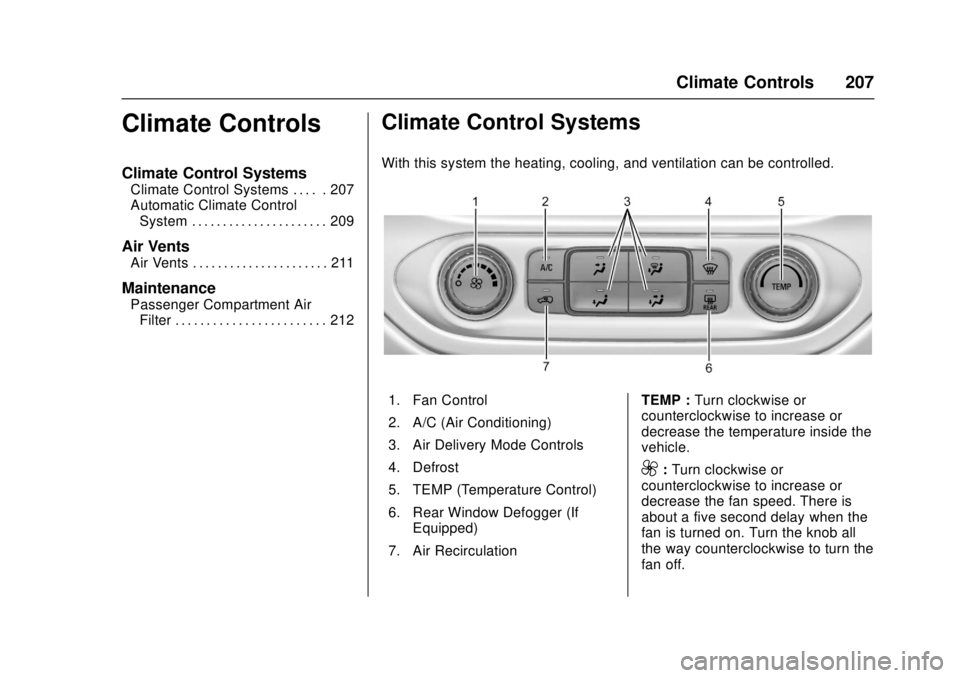
With this system the heating, cooling, and ventilation can be controlled.
1. Fan Control
2. A/C (Air Conditioning)
3. Air Delivery Mode Controls
4. Defrost
5. TEMP (Temperature Control)
6. Rear Window Defogger (If
Equipped)
7. Air Recirculation TEMP :
Turn clockwise or
counterclockwise to increase or
decrease the temperature inside the
vehicle.
9: Turn clockwise or
counterclockwise to increase or
decrease the fan speed. There is
about a five second delay when the
fan is turned on. Turn the knob all
the way counterclockwise to turn the
fan off.
Page 209 of 417
GMC Canyon Owner Manual (GMNA-Localizing-U.S./Canada-10122677) -
2017 - crc - 1/20/17
208 Climate Controls
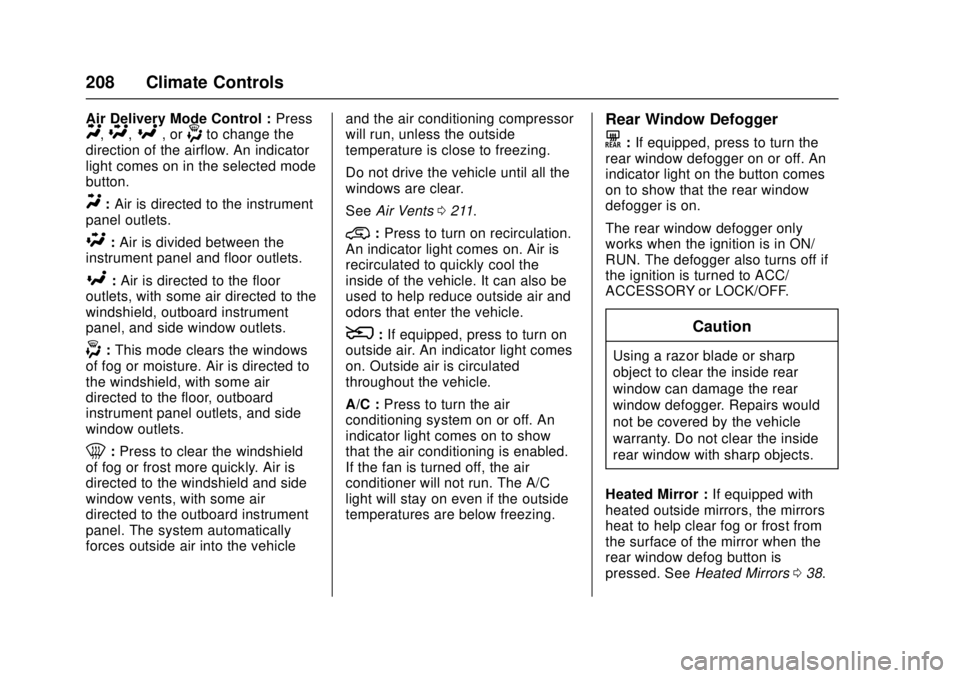
Air Delivery Mode Control :PressY,\,[, or-to change the
direction of the airflow. An indicator
light comes on in the selected mode
button.
Y: Air is directed to the instrument
panel outlets.
\: Air is divided between the
instrument panel and floor outlets.
[: Air is directed to the floor
outlets, with some air directed to the
windshield, outboard instrument
panel, and side window outlets.
-: This mode clears the windows
of fog or moisture. Air is directed to
the windshield, with some air
directed to the floor, outboard
instrument panel outlets, and side
window outlets.
0: Press to clear the windshield
of fog or frost more quickly. Air is
directed to the windshield and side
window vents, with some air
directed to the outboard instrument
panel. The system automatically
forces outside air into the vehicle and the air conditioning compressor
will run, unless the outside
temperature is close to freezing.
Do not drive the vehicle until all the
windows are clear.
See
Air Vents 0211.
@:Press to turn on recirculation.
An indicator light comes on. Air is
recirculated to quickly cool the
inside of the vehicle. It can also be
used to help reduce outside air and
odors that enter the vehicle.
8: If equipped, press to turn on
outside air. An indicator light comes
on. Outside air is circulated
throughout the vehicle.
A/C : Press to turn the air
conditioning system on or off. An
indicator light comes on to show
that the air conditioning is enabled.
If the fan is turned off, the air
conditioner will not run. The A/C
light will stay on even if the outside
temperatures are below freezing.
Rear Window Defogger
K: If equipped, press to turn the
rear window defogger on or off. An
indicator light on the button comes
on to show that the rear window
defogger is on.
The rear window defogger only
works when the ignition is in ON/
RUN. The defogger also turns off if
the ignition is turned to ACC/
ACCESSORY or LOCK/OFF.
Caution
Using a razor blade or sharp
object to clear the inside rear
window can damage the rear
window defogger. Repairs would
not be covered by the vehicle
warranty. Do not clear the inside
rear window with sharp objects.
Heated Mirror : If equipped with
heated outside mirrors, the mirrors
heat to help clear fog or frost from
the surface of the mirror when the
rear window defog button is
pressed. See Heated Mirrors 038.
Page 211 of 417
GMC Canyon Owner Manual (GMNA-Localizing-U.S./Canada-10122677) -
2017 - crc - 1/20/17
210 Climate Controls
Do not cover the solar sensor on the
top of the instrument panel near the
windshield. This sensor regulates
air temperature based on sun load.
See“Sensors” later in this section.
Manual Operation
O:Press to turn the climate control
system on or off. When the system
is turned off, air will stop flowing into
the cabin. Press
Oagain or adjust
any of the climate controls to turn
the system back on and the airflow
will continue based on the selected
climate control settings.
A: Turn clockwise or
counterclockwise to increase or
decrease the fan speed. There is
about a five second delay when the
fan is turned on. Press the knob to
turn the fan off. Press AUTO to
return to automatic operation.
Temperature Control : Turn the
knob clockwise or counterclockwise
to increase or decrease temperature
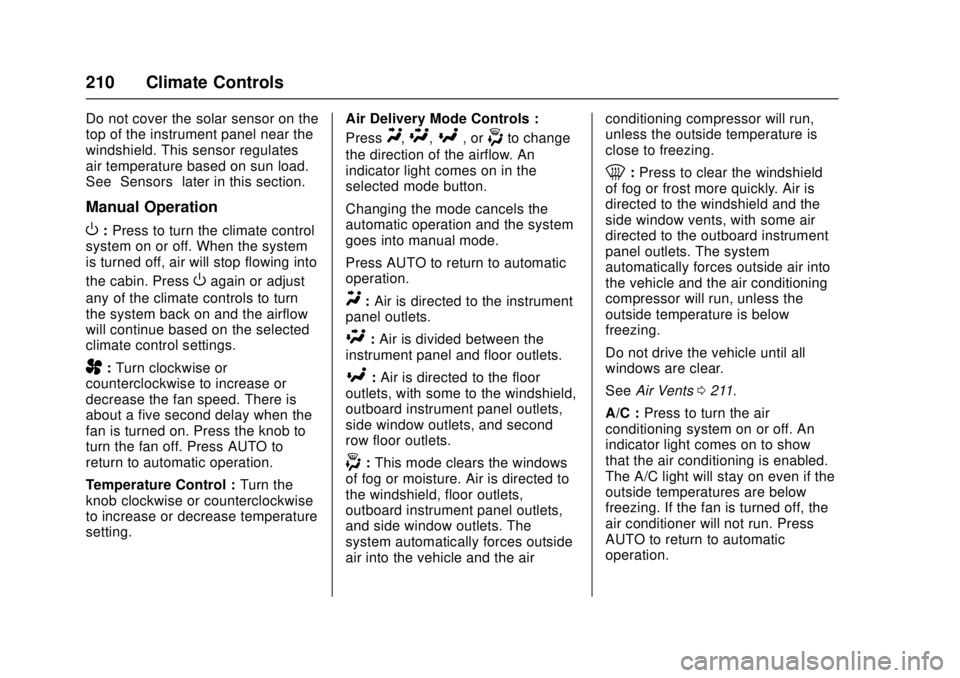
setting. Air Delivery Mode Controls :
Press
Y,\,[, or-to change
the direction of the airflow. An
indicator light comes on in the
selected mode button.
Changing the mode cancels the
automatic operation and the system
goes into manual mode.
Press AUTO to return to automatic
operation.
Y: Air is directed to the instrument
panel outlets.
\: Air is divided between the
instrument panel and floor outlets.
[: Air is directed to the floor
outlets, with some to the windshield,
outboard instrument panel outlets,
side window outlets, and second
row floor outlets.
-: This mode clears the windows
of fog or moisture. Air is directed to
the windshield, floor outlets,
outboard instrument panel outlets,
and side window outlets. The
system automatically forces outside
air into the vehicle and the air conditioning compressor will run,
unless the outside temperature is
close to freezing.
0:
Press to clear the windshield
of fog or frost more quickly. Air is
directed to the windshield and the
side window vents, with some air
directed to the outboard instrument
panel outlets. The system
automatically forces outside air into
the vehicle and the air conditioning
compressor will run, unless the
outside temperature is below
freezing.
Do not drive the vehicle until all
windows are clear.
See Air Vents 0211.
A/C : Press to turn the air
conditioning system on or off. An
indicator light comes on to show
that the air conditioning is enabled.
The A/C light will stay on even if the
outside temperatures are below
freezing. If the fan is turned off, the
air conditioner will not run. Press
AUTO to return to automatic
operation.
Page 212 of 417
GMC Canyon Owner Manual (GMNA-Localizing-U.S./Canada-10122677) -
2017 - crc - 1/20/17
Climate Controls 211
@:Press to turn on recirculation.
An indicator light comes on. Air is
recirculated to quickly cool the
inside of the vehicle. It can also be
used to help reduce outside air and
odors that enter the vehicle. The air
conditioning compressor also comes
on when this mode is activated.
Press AUTO to return to automatic
operation.
Auto Defog : The climate control
system may have a sensor to
automatically detect high humidity
inside the vehicle. When high
humidity is detected, the climate
control system may adjust air
delivery modes, outside air supply,
and turn on the air conditioner. If the
climate control system does not
detect possible window fogging, it
returns to normal operation. To turn
Auto Defog off or on, see “Climate
and Air Quality” underVehicle
Personalization 0138.
Rear Window Defogger
The rear window defogger uses a
warming grid to remove fog from the
rear window.
K:Press to turn the rear window
defogger on or off. An indicator light
on the button comes on to show that
the rear window defogger is on.
The rear window defogger only
works when the ignition is in ON/
RUN. The defogger also turns off if
the ignition is turned to ACC/
ACCESSORY or LOCK/OFF.
Caution
Using a razor blade or sharp
object to clear the inside rear
window can damage the rear
window defogger. Repairs would
not be covered by the vehicle
warranty. Do not clear the inside
rear window with sharp objects.
Heated Mirror : If equipped with
heated outside mirrors, the mirrors
heat to help clear fog or frost from
the surface of the mirror when the
rear window defog button is
pressed. See Heated Mirrors 038.
Air Vents
Adjustable air vents are in the
center and on the side of the
instrument panel. Use the sliding
knobs on the air vents to change
the direction of the airflow. Slide the
knob up or down to open or close
off the airflow.
Air vents blow warm air on the side
windows in cold weather. If Floor,
Defog, or Defrost modes are
selected, a small amount of air will
come from the vents close to the
window. If the airflow is shut off
using the sliding knobs, warm air
will be directed to the other
instrument panel vents. This is
normal operation.
Use the sliding knobs to turn vent
airflow on or off based on the mode
selected.
Operation Tips
.
Clear away any ice, snow,
or leaves from air inlets at the
base of the windshield that could
block the flow of air into the
vehicle.
Page 214 of 417
GMC Canyon Owner Manual (GMNA-Localizing-U.S./Canada-10122677) -
2017 - crc - 1/20/17
Driving and Operating 213
Driving and
Operating
Driving Information
Distracted Driving . . . . . . . . . . . . 214
Defensive Driving . . . . . . . . . . . . . 214
Drunk Driving . . . . . . . . . . . . . . . . . 214
Control of a Vehicle . . . . . . . . . . . 215
Braking . . . . . . . . . . . . . . . . . . . . . . . 215
Steering . . . . . . . . . . . . . . . . . . . . . . 215
Off-Road Recovery . . . . . . . . . . . 216
Loss of Control . . . . . . . . . . . . . . . 216
Off-Road Driving . . . . . . . . . . . . . 217
Driving on Wet Roads . . . . . . . . 221
Hill and Mountain Roads . . . . . 222
Winter Driving . . . . . . . . . . . . . . . . 223
If the Vehicle Is Stuck . . . . . . . . 224
Vehicle Load Limits . . . . . . . . . . . 225
Truck-Camper LoadingInformation . . . . . . . . . . . . . . . . . . 231
Starting and Operating
New Vehicle Break-In . . . . . . . . . 231
Ignition Positions . . . . . . . . . . . . . 232
Starting the Engine . . . . . . . . . . . 233
Engine Heater . . . . . . . . . . . . . . . . 234
Retained AccessoryPower (RAP) . . . . . . . . . . . . . . . . 236
Shifting Into Park . . . . . . . . . . . . . 236 Shifting out of Park . . . . . . . . . . . 238
Parking . . . . . . . . . . . . . . . . . . . . . . . 238
Parking over Things
That Burn . . . . . . . . . . . . . . . . . . . 238
Engine Exhaust
Engine Exhaust . . . . . . . . . . . . . . 239
Running the Vehicle WhileParked . . . . . . . . . . . . . . . . . . . . . . 239
Automatic Transmission
Automatic Transmission . . . . . . 240
Manual Mode . . . . . . . . . . . . . . . . . 242
Tow/Haul Mode . . . . . . . . . . . . . . . 245
Manual Transmission
Manual Transmission . . . . . . . . . 245
Drive Systems
Four-Wheel Drive . . . . . . . . . . . . . 247
Brakes
Antilock BrakeSystem (ABS) . . . . . . . . . . . . . . . 251
Parking Brake . . . . . . . . . . . . . . . . 251
Brake Assist . . . . . . . . . . . . . . . . . . 252
Hill Start Assist (HSA) . . . . . . . . 252
Ride Control Systems
Traction Control/Electronic Stability Control . . . . . . . . . . . . . 253
Hill Descent Control (HDC) . . . 255
Cruise Control
Cruise Control . . . . . . . . . . . . . . . . 256
Driver Assistance Systems
Rear Vision Camera (RVC) . . . 258
Forward Collision Alert (FCA) System . . . . . . . . . . . . . . . . . . . . . . 260
Lane Departure Warning (LDW) . . . . . . . . . . . . . 261
Fuel
Fuel . . . . . . . . . . . . . . . . . . . . . . . . . . 263
California FuelRequirements . . . . . . . . . . . . . . . 264
Fuels in Foreign Countries . . . 264
Fuel Additives . . . . . . . . . . . . . . . . 264
Filling the Tank . . . . . . . . . . . . . . . 264
Filling a Portable Fuel Container . . . . . . . . . . . . . . . . . . . 266
Trailer Towing
General TowingInformation . . . . . . . . . . . . . . . . . . 267
Driving Characteristics and Towing Tips . . . . . . . . . . . . . . . . . 267
Trailer Towing . . . . . . . . . . . . . . . . 269
Towing Equipment . . . . . . . . . . . . 272
Trailer Sway Control (TSC) . . . 275
Conversions and Add-Ons
Add-On Electrical Equipment . . . . . . . . . . . . . . . . . . 275
Page 217 of 417
GMC Canyon Owner Manual (GMNA-Localizing-U.S./Canada-10122677) -
2017 - crc - 1/20/17
216 Driving and Operating
Curve Tips
.Take curves at a reasonable
speed.
. Reduce speed before entering a
curve.
. Maintain a reasonable steady
speed through the curve.
. Wait until the vehicle is out of
the curve before accelerating
gently into the straightaway.
Steering in Emergencies
.There are some situations when
steering around a problem may
be more effective than braking.
. Holding both sides of the
steering wheel allows you to turn
180 degrees without removing
a hand.
. The Antilock Brake System
(ABS) allows steering while
braking.
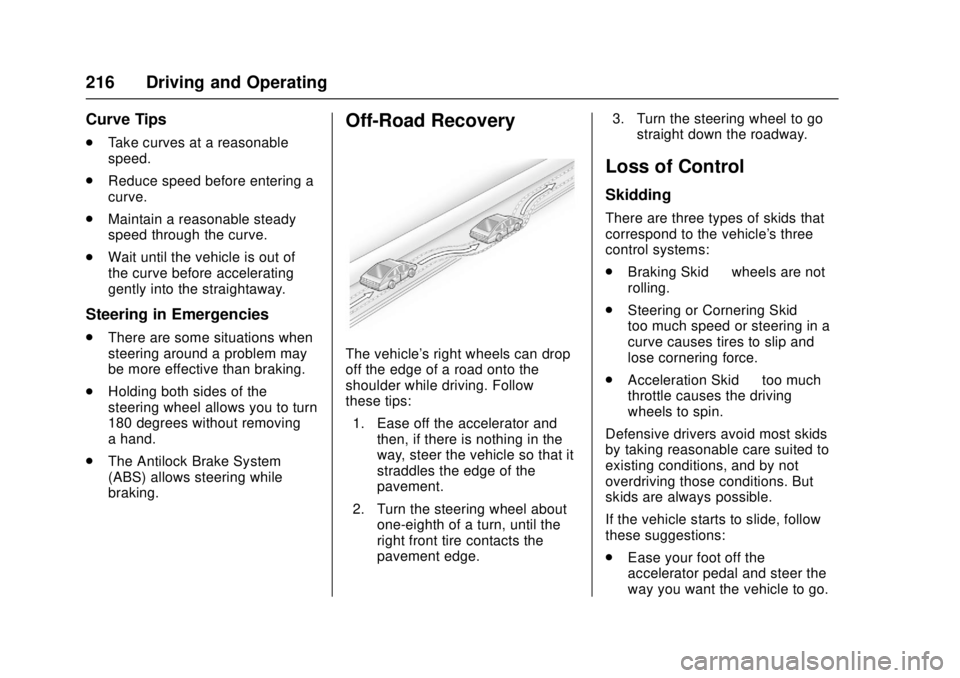
Off-Road Recovery
The vehicle's right wheels can drop
off the edge of a road onto the
shoulder while driving. Follow
these tips:
1. Ease off the accelerator and then, if there is nothing in the
way, steer the vehicle so that it
straddles the edge of the
pavement.
2. Turn the steering wheel about one-eighth of a turn, until the
right front tire contacts the
pavement edge. 3. Turn the steering wheel to go
straight down the roadway.
Loss of Control
Skidding
There are three types of skids that
correspond to the vehicle's three
control systems:
.Braking Skid —wheels are not
rolling.
. Steering or Cornering Skid —
too much speed or steering in a
curve causes tires to slip and
lose cornering force.
. Acceleration Skid —too much
throttle causes the driving
wheels to spin.
Defensive drivers avoid most skids
by taking reasonable care suited to
existing conditions, and by not
overdriving those conditions. But
skids are always possible.
If the vehicle starts to slide, follow
these suggestions:
. Ease your foot off the
accelerator pedal and steer the
way you want the vehicle to go.
Page 218 of 417
GMC Canyon Owner Manual (GMNA-Localizing-U.S./Canada-10122677) -
2017 - crc - 1/20/17
Driving and Operating 217
The vehicle may straighten out.
Be ready for a second skid if it
occurs.
. Slow down and adjust your
driving according to weather
conditions. Stopping distance
can be longer and vehicle
control can be affected when
traction is reduced by water,
snow, ice, gravel, or other
material on the road. Learn to
recognize warning clues —such
as enough water, ice, or packed
snow on the road to make a
mirrored surface —and slow
down when you have any doubt.
. Try to avoid sudden steering,
acceleration, or braking,
including reducing vehicle speed
by shifting to a lower gear. Any
sudden changes could cause
the tires to slide.
Remember: Antilock brakes help
avoid only the braking skid.
Off-Road Driving
Four-wheel-drive vehicles can be
used for off-road driving. Vehicles
without four-wheel drive and vehicles not equipped with All
Terrain (AT) or On-Off Road (OOR)
tires must not be driven off-road
except on a level, solid surface. For
contact information about the
original equipment tires, see the
warranty manual.
One of the best ways for successful
off-road driving is to control the
speed.
{Warning
When driving off-road, bouncing
and quick changes in direction
can easily throw you out of
position. This could cause you to
lose control and crash. You and
your passengers should always
wear safety belts.
Before Driving Off-Road
.
Have all necessary maintenance
and service work completed.
. Fuel the vehicle, fill fluid levels,
and check inflation pressure in
all tires, including the spare,
if equipped. .
Read all the information about
four-wheel-drive vehicles in this
manual.
. Remove any underbody air
deflector, if equipped. Re-attach
the air deflector after off-road
driving.
. See Hill Descent Control (HDC)
0 255.
. Know the local laws that apply to
off-road driving.
To gain more ground clearance if
needed, it may be necessary to
remove the front fascia lower air
dam. However, driving without the
air dam reduces fuel economy.
Caution
Operating the vehicle for
extended periods without the front
fascia lower air dam installed can
cause improper airflow to the
engine. Reattach the front fascia
air dam after off-road driving.