instrument panel GMC CANYON 2018 Get To Know Guide
[x] Cancel search | Manufacturer: GMC, Model Year: 2018, Model line: CANYON, Model: GMC CANYON 2018Pages: 417, PDF Size: 5.47 MB
Page 257 of 417

GMC Canyon/Canyon Denali Owner Manual (GMNA-Localizing-U.S./Canada-
11354423) - 2018 - crc - 10/12/17
256 Driving and Operating
Trailer Towing
General Towing
Information
Only use towing equipment that has
been designed for the vehicle.
Contact your dealer or trailering
dealer for assistance with preparing
the vehicle for towing a trailer. Read
the entire section before towing a
trailer.
For towing a disabled vehicle, see
Towing the Vehicle0344. For
towing the vehicle behind another
vehicle such as a motor home, see
Recreational Vehicle Towing 0345.
Driving Characteristics
and Towing Tips
Driving with a Trailer
When towing a trailer:
.
Become familiar with the state
and local laws that apply to
trailer towing. .
Do not tow a trailer during the
first 800 km (500 mi) to prevent
damage to the engine, axle,
or other parts.
. Then during the first 800 km
(500 mi) of trailer towing, do not
drive over 80 km/h (50 mph) and
do not make starts at full throttle.
. Vehicles can tow in D (Drive).
Shift the transmission to a lower
gear if the transmission shifts
too often under heavy loads and/
or hilly conditions.
. If equipped with 4WD, see
Four-Wheel Drive 0232 before
pulling a trailer.
{Warning
When towing a trailer, exhaust
gases may collect at the rear of
the vehicle and enter if the
liftgate, trunk/hatch, or rear-most
window is open.
(Continued)
Warning (Continued)
When towing a trailer:
. Do not drive with the
liftgate, trunk/hatch,
or rear-most window open.
. Fully open the air outlets on
or under the instrument
panel.
. Also adjust the climate
control system to a setting
that brings in only outside
air. See “Climate Control
Systems” in the Index.
For more information about
carbon monoxide, see Engine
Exhaust 0224.
Towing a trailer requires a certain
amount of experience. The
combination you are driving is
longer and not as responsive as the
vehicle itself. Get acquainted with
the handling and braking of the rig
before setting out for the open road.
Page 264 of 417
GMC Canyon/Canyon Denali Owner Manual (GMNA-Localizing-U.S./Canada-
11354423) - 2018 - crc - 10/12/17
Driving and Operating 263
Tow/Haul Mode, turn on the
headlamps to help charge the
battery.
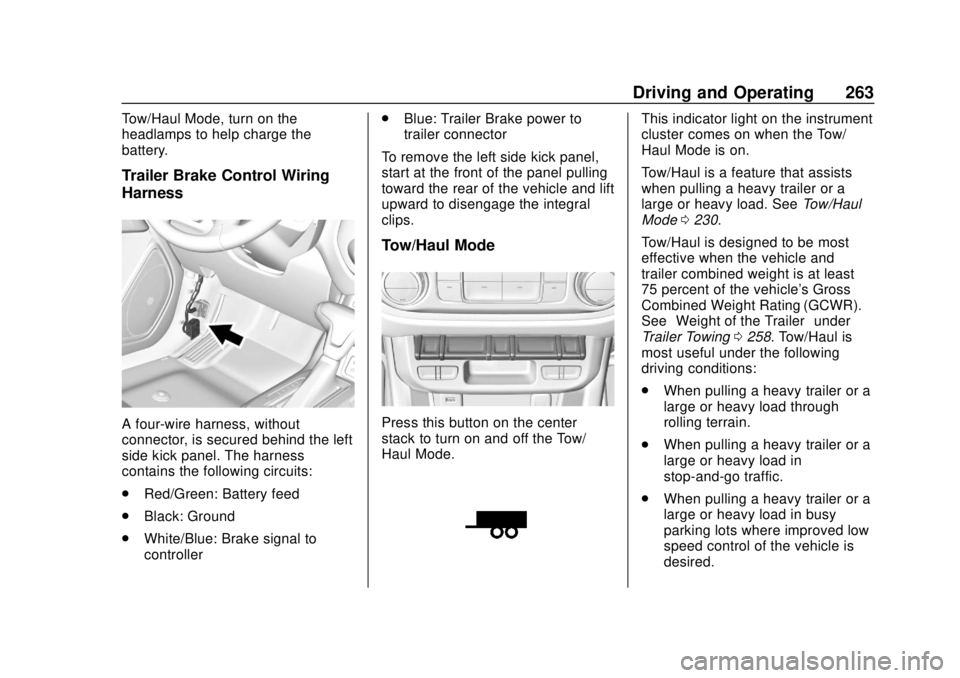
Trailer Brake Control Wiring
Harness
A four-wire harness, without
connector, is secured behind the left
side kick panel. The harness
contains the following circuits:
.Red/Green: Battery feed
. Black: Ground
. White/Blue: Brake signal to
controller .
Blue: Trailer Brake power to
trailer connector
To remove the left side kick panel,
start at the front of the panel pulling
toward the rear of the vehicle and lift
upward to disengage the integral
clips.
Tow/Haul Mode
Press this button on the center
stack to turn on and off the Tow/
Haul Mode.
This indicator light on the instrument
cluster comes on when the Tow/
Haul Mode is on.
Tow/Haul is a feature that assists
when pulling a heavy trailer or a
large or heavy load. See Tow/Haul
Mode 0230.
Tow/Haul is designed to be most
effective when the vehicle and
trailer combined weight is at least
75 percent of the vehicle's Gross
Combined Weight Rating (GCWR).
See “Weight of the Trailer” under
Trailer Towing 0258. Tow/Haul is
most useful under the following
driving conditions:
. When pulling a heavy trailer or a
large or heavy load through
rolling terrain.
. When pulling a heavy trailer or a
large or heavy load in
stop-and-go traffic.
. When pulling a heavy trailer or a
large or heavy load in busy
parking lots where improved low
speed control of the vehicle is
desired.
Page 266 of 417
GMC Canyon/Canyon Denali Owner Manual (GMNA-Localizing-U.S./Canada-
11354423) - 2018 - crc - 10/12/17
Driving and Operating 265
Warning (Continued)
system only with electric or
electric over hydraulic trailer
brakes.
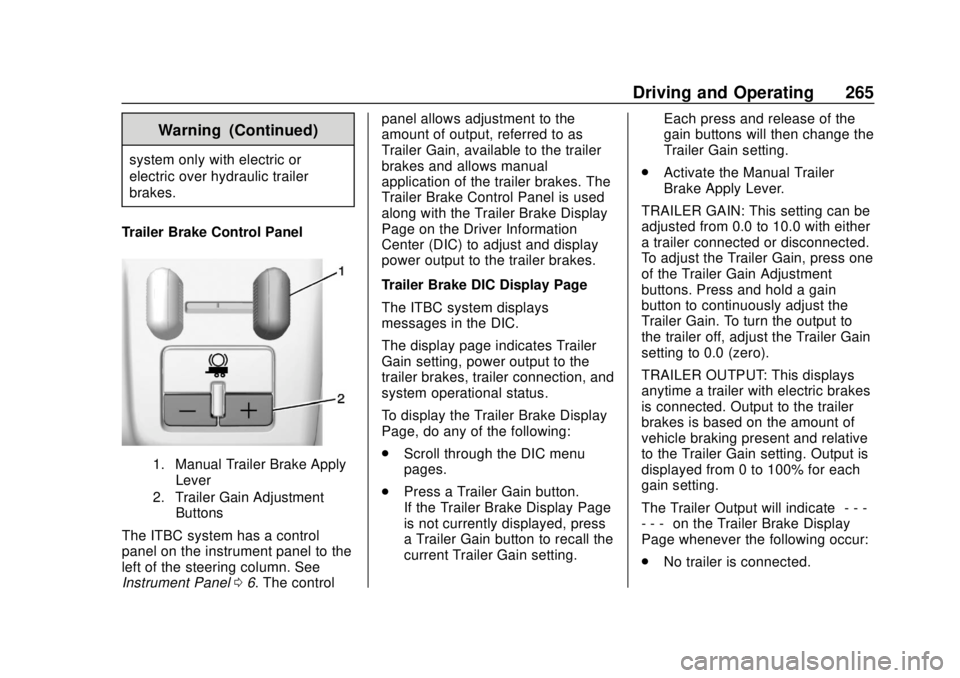
Trailer Brake Control Panel
1. Manual Trailer Brake Apply Lever
2. Trailer Gain Adjustment Buttons
The ITBC system has a control
panel on the instrument panel to the
left of the steering column. See
Instrument Panel 06. The control panel allows adjustment to the
amount of output, referred to as
Trailer Gain, available to the trailer
brakes and allows manual
application of the trailer brakes. The
Trailer Brake Control Panel is used
along with the Trailer Brake Display
Page on the Driver Information
Center (DIC) to adjust and display
power output to the trailer brakes.
Trailer Brake DIC Display Page
The ITBC system displays
messages in the DIC.
The display page indicates Trailer
Gain setting, power output to the
trailer brakes, trailer connection, and
system operational status.
To display the Trailer Brake Display
Page, do any of the following:
.
Scroll through the DIC menu
pages.
. Press a Trailer Gain button.
If the Trailer Brake Display Page
is not currently displayed, press
a Trailer Gain button to recall the
current Trailer Gain setting. Each press and release of the
gain buttons will then change the
Trailer Gain setting.
. Activate the Manual Trailer
Brake Apply Lever.
TRAILER GAIN: This setting can be
adjusted from 0.0 to 10.0 with either
a trailer connected or disconnected.
To adjust the Trailer Gain, press one
of the Trailer Gain Adjustment
buttons. Press and hold a gain
button to continuously adjust the
Trailer Gain. To turn the output to
the trailer off, adjust the Trailer Gain
setting to 0.0 (zero).
TRAILER OUTPUT: This displays
anytime a trailer with electric brakes
is connected. Output to the trailer
brakes is based on the amount of
vehicle braking present and relative
to the Trailer Gain setting. Output is
displayed from 0 to 100% for each
gain setting.
The Trailer Output will indicate “- - -
- - -” on the Trailer Brake Display
Page whenever the following occur:
. No trailer is connected.
Page 272 of 417
GMC Canyon/Canyon Denali Owner Manual (GMNA-Localizing-U.S./Canada-
11354423) - 2018 - crc - 10/12/17
Vehicle Care 271
Vehicle Care
General Information
General Information . . . . . . . . . . 272
California Proposition65 Warning . . . . . . . . . . . . . . . . . 272
California Perchlorate Materials Requirements . . . . . 273
Accessories and Modifications . . . . . . . . . . . . . . . . 273
Vehicle Checks
Doing Your OwnService Work . . . . . . . . . . . . . . . 273
Hood . . . . . . . . . . . . . . . . . . . . . . . . . 274
Engine Compartment Overview . . . . . . . . . . . . . . . . . . . . 275
Engine Oil . . . . . . . . . . . . . . . . . . . . 278
Engine Oil Life System . . . . . . . 280
Automatic Transmission Fluid . . . . . . . . . . . . . . . . . . . . . . . . 282
Manual Transmission Fluid . . . 282
Hydraulic Clutch . . . . . . . . . . . . . . 282
Engine Air Cleaner/Filter . . . . . . 283
Cooling System . . . . . . . . . . . . . . 284
Engine Overheating . . . . . . . . . . 288
Engine Fan . . . . . . . . . . . . . . . . . . . 289
Washer Fluid . . . . . . . . . . . . . . . . . 290
Brakes . . . . . . . . . . . . . . . . . . . . . . . 290 Brake Fluid . . . . . . . . . . . . . . . . . . . 291
Battery - North America . . . . . . 292
Four-Wheel Drive . . . . . . . . . . . . . 293
Front Axle . . . . . . . . . . . . . . . . . . . . 294
Rear Axle . . . . . . . . . . . . . . . . . . . . 294
Starter Switch Check . . . . . . . . . 295
Automatic Transmission Shift
Lock Control Function
Check . . . . . . . . . . . . . . . . . . . . . . . 296
Ignition Transmission Lock Check . . . . . . . . . . . . . . . . . . . . . . . 296
Park Brake and P (Park) Mechanism Check . . . . . . . . . . 296
Wiper Blade Replacement . . . . 297
Windshield Replacement . . . . . 297
Gas Strut(s) . . . . . . . . . . . . . . . . . . 297
Headlamp Aiming
Headlamp Aiming . . . . . . . . . . . . 299
Bulb Replacement
Bulb Replacement . . . . . . . . . . . . 299
Halogen Bulbs . . . . . . . . . . . . . . . . 299
Headlamps, Front Turn Signal, Sidemarker, and Parking
Lamps . . . . . . . . . . . . . . . . . . . . . . 299
Taillamps, Turn Signal, Stoplamps, and Back-Up
Lamps . . . . . . . . . . . . . . . . . . . . . . 300 Center High-Mounted
Stoplamp (CHMSL) and
Cargo Lamp . . . . . . . . . . . . . . . . . 301
Electrical System
Electrical System Overload . . . 302
Fuses and Circuit Breakers . . . 302
Engine Compartment FuseBlock . . . . . . . . . . . . . . . . . . . . . . . . 303
Instrument Panel Fuse Block . . . . . . . . . . . . . . . . . . . . . . . . 307
Wheels and Tires
Tires . . . . . . . . . . . . . . . . . . . . . . . . . . 309
All-Season Tires . . . . . . . . . . . . . . 310
Winter Tires . . . . . . . . . . . . . . . . . . 310
All-Terrain Tires . . . . . . . . . . . . . . . 311
Tire Sidewall Labeling . . . . . . . . 311
Tire Designations . . . . . . . . . . . . . 313
Tire Terminology andDefinitions . . . . . . . . . . . . . . . . . . 314
Tire Pressure . . . . . . . . . . . . . . . . . 317
Tire Pressure Monitor System . . . . . . . . . . . . . . . . . . . . . . 318
Tire Pressure Monitor Operation . . . . . . . . . . . . . . . . . . . 319
Tire Inspection . . . . . . . . . . . . . . . . 322
Tire Rotation . . . . . . . . . . . . . . . . . 322
When It Is Time for New Tires . . . . . . . . . . . . . . . . . . . . . . . . 323
Buying New Tires . . . . . . . . . . . . . 324
Page 308 of 417

GMC Canyon/Canyon Denali Owner Manual (GMNA-Localizing-U.S./Canada-
11354423) - 2018 - crc - 10/12/17
Vehicle Care 307
RelaysUsage
K9 –
K10 –
K11 Center high-mounted
stoplamp
K12 –
K13 Vacuum pump
K14 Trailer parking lamps
K15 Run/Crank
K16 –
K17 Rear window defoggerInstrument Panel Fuse
Block
The instrument panel fuse block is
behind the passenger side cowl side
trim panel. Remove the plastic nut
at the front of the cover, then pull
the cover away from the trim panel
to access the fuse block.
Page 310 of 417
GMC Canyon/Canyon Denali Owner Manual (GMNA-Localizing-U.S./Canada-
11354423) - 2018 - crc - 10/12/17
Vehicle Care 309
FusesUsage
F21 –
F22 –
F23 Data link connector/USB
F24 HVAC ignition
F25 Body control module 7
F26 –
F27 –
F28 Instrument panel/ Sensing and
diagnostic module/
Ignition
F29 Miscellaneous/Ignition
F30 –
F31 Front camera
F32 Steering wheel controls backlighting
F33 Heated steering wheel
F34 Front ventilated seats
F35 Park/Reverse/Neutral/ Drive/Low/Wireless
charging module Fuses
Usage
F36 Discrete logic ignition sensor
F37 –
F38 –
F39 Auxiliary power outlet 2
F40 Auxiliary power outlet
F41 Auxiliary power outlet 1/Lighter
F42 Left power window
F43 Driver power seat
F44 –
F45 Right power window
F46 Passenger power seat
Relays Usage
K1 Retained accessory power
K2 Run/CrankWheels and Tires
Tires
Every new GM vehicle has
high-quality tires made by a
leading tire manufacturer. See
the warranty manual for
information regarding the tire
warranty and where to get
service. For additional
information refer to the tire
manufacturer.
{Warning
.Poorly maintained and
improperly used tires are
dangerous.
.Overloading the tires can
cause overheating as a
result of too much
flexing. There could be a
blowout and a serious
crash. See Vehicle Load
Limits 0211.
(Continued)
Page 358 of 417

GMC Canyon/Canyon Denali Owner Manual (GMNA-Localizing-U.S./Canada-
11354423) - 2018 - crc - 10/12/17
Vehicle Care 357
Instrument Panel, Leather,
Vinyl, Other Plastic Surfaces,
Low Gloss Paint Surfaces, and
Natural Open Pore Wood
Surfaces
Use a soft microfiber cloth
dampened with water to remove
dust and loose dirt. For a more
thorough cleaning, use a soft
microfiber cloth dampened with a
mild soap solution.
Caution
Soaking or saturating leather,
especially perforated leather, as
well as other interior surfaces,
may cause permanent damage.
Wipe excess moisture from these
surfaces after cleaning and allow
them to dry naturally. Never use
heat, steam, or spot removers. Do
not use cleaners that contain
silicone or wax-based products.
Cleaners containing these
solvents can permanently change(Continued)
Caution (Continued)
the appearance and feel of
leather or soft trim, and are not
recommended.
Do not use cleaners that increase
gloss, especially on the instrument
panel. Reflected glare can decrease
visibility through the windshield
under certain conditions.
Caution
Use of air fresheners may cause
permanent damage to plastics
and painted surfaces. If an air
freshener comes in contact with
any plastic or painted surface in
the vehicle, blot immediately and
clean with a soft cloth dampened
with a mild soap solution.
Damage caused by air fresheners
would not be covered by the
vehicle warranty.
Cargo Cover and
Convenience Net
If equipped, wash with warm water
and mild detergent. Do not use
chlorine bleach. Rinse with cold
water, and then dry completely.
Care of Seat Belts
Keep belts clean and dry.
{Warning
Do not bleach or dye seat belt
webbing. It may severely weaken
the webbing. In a crash, they
might not be able to provide
adequate protection. Clean and
rinse seat belt webbing only with
mild soap and lukewarm water.
Allow the webbing to dry.
Page 375 of 417

GMC Canyon/Canyon Denali Owner Manual (GMNA-Localizing-U.S./Canada-
11354423) - 2018 - crc - 10/12/17
374 Technical Data
Technical Data
Vehicle Identification
Vehicle IdentificationNumber (VIN) . . . . . . . . . . . . . . . 374
Service Parts Identification Label . . . . . . . . . . . . . . . . . . . . . . . . 374
Vehicle Data
Capacities andSpecifications . . . . . . . . . . . . . . . 375
Engine Drive Belt Routing . . . . 377
Vehicle Identification
Vehicle Identification
Number (VIN)
This legal identifier is in the front
corner of the instrument panel, on
the driver side of the vehicle. It can
be seen through the windshield from
outside. The Vehicle Identification
Number (VIN) also appears on the
Vehicle Certification and Service
Parts labels and certificates of title
and registration.
Engine Identification
The eighth character in the VIN is
the engine code. This code
identifies the vehicle's engine,
specifications, and replacement parts. See
“Engine Specifications”
under Capacities and Specifications
0 375 for the vehicle's engine code.
Service Parts
Identification Label
There may be a label on the inside
of the glove box that contains the
following information:
.
Vehicle Identification
Number (VIN)
. Model designation
. Paint information
. Production options and special
equipment
If there is no label, there is a
barcode on the certification label on
the center (B) pillar to scan for this
same information.
Page 380 of 417

GMC Canyon/Canyon Denali Owner Manual (GMNA-Localizing-U.S./Canada-
11354423) - 2018 - crc - 10/12/17
Customer Information 379
resolved by your dealership without
further help, in the U.S., call
1-800-462-8782. In Canada, call
General Motors of Canada
Customer Care Centre at
1-800-263-3777 (English),
or 1-800-263-7854 (French).
We encourage you to call the
toll-free number in order to give your
inquiry prompt attention. Have the
following information available to
give the Customer Assistance
representative:
.Vehicle Identification
Number (VIN). This is available
from the vehicle registration or
title, or the plate at the top left of
the instrument panel and visible
through the windshield.
. Dealership name and location.
. Vehicle delivery date and
present mileage.
When contacting GMC, remember
that your concern will likely be
resolved at a dealer's facility. That is
why we suggest following Step One
first. STEP THREE
—U.S. Owners :
Both General Motors and your
dealer are committed to making
sure you are completely satisfied
with your new vehicle. However,
if you continue to remain unsatisfied
after following the procedure
outlined in Steps One and Two, you
can file with the Better Business
Bureau (BBB) Auto Line Program to
enforce your rights.
The BBB Auto Line Program is an
out-of-court program administered
by the Council of Better Business
Bureaus to settle automotive
disputes regarding vehicle repairs or
the interpretation of the New Vehicle
Limited Warranty. Although you may
be required to resort to this informal
dispute resolution program prior to
filing a court action, use of the
program is free of charge and your
case will generally be heard within
40 days. If you do not agree with the
decision given in your case, you
may reject it and proceed with any
other venue for relief available
to you. You may contact the BBB Auto Line
Program using the toll-free
telephone number or write them at
the following address:
BBB Auto Line Program
Council of Better Business Bureaus,
Inc.
3033 Wilson Blvd.
Suite 600
Arlington, VA 22201
Telephone: 1-800-955-5100
http://www.bbb.org/council/
programs-services/
dispute-handling-and-resolution/
bbb-auto-line
This program is available in all
50 states and the District of
Columbia. Eligibility is limited by
vehicle age, mileage, and other
factors. General Motors reserves
the right to change eligibility
limitations and/or discontinue its
participation in this program.
STEP THREE
—Canadian
Owners : In the event that you do
not feel your concerns have been
addressed after following the
procedure outlined in Steps One
Page 408 of 417

GMC Canyon/Canyon Denali Owner Manual (GMNA-Localizing-U.S./Canada-
11354423) - 2018 - crc - 10/12/17
Index 407
Driving (cont'd)Drunk . . . . . . . . . . . . . . . . . . . . . . . . . 200
For Better Fuel Economy . . . . . . . 25
Hill and Mountain Roads . . . . . . 208
If the Vehicle is Stuck . . . . . . . . . 210
Loss of Control . . . . . . . . . . . . . . . 202
Off-Road . . . . . . . . . . . . . . . . . . . . . 202
Off-Road Recovery . . . . . . . . . . . 201
Vehicle Load Limits . . . . . . . . . . . .211
Wet Roads . . . . . . . . . . . . . . . . . . . 207
Winter . . . . . . . . . . . . . . . . . . . . . . . . 208
E
Electrical Equipment,
Add-On . . . . . . . . . . . . . . . . . . . . . . . 269
Electrical System Engine Compartment FuseBlock . . . . . . . . . . . . . . . . . . . . . . . . 303
Fuses and Circuit Breakers . . . 302
Instrument Panel Fuse
Block . . . . . . . . . . . . . . . . . . . . . . . . 307
Overload . . . . . . . . . . . . . . . . . . . . . 302
Emergency OnStar . . . . . . . . . . . . . . . . . . . . . . . 393
Engine Air Cleaner/Filter . . . . . . . . . . . . . 283
Check Light (MalfunctionIndicator) . . . . . . . . . . . . . . . . . . . . 120 Engine (cont'd)
Compartment Overview . . . . . . . 275
Coolant Temperature
Gauge . . . . . . . . . . . . . . . . . . . . . . .117
Cooling System . . . . . . . . . . . . . . . 284
Drive Belt Routing . . . . . . . . . . . . 377
Exhaust . . . . . . . . . . . . . . . . . . . . . . 224
Fan . . . . . . . . . . . . . . . . . . . . . . . . . . . 289
Heater . . . . . . . . . . . . . . . . . . . . . . . . 220
Oil Life System . . . . . . . . . . . . . . . 280
Oil Pressure Light . . . . . . . . . . . . 126
Overheating . . . . . . . . . . . . . . . . . . 288
Power Messages . . . . . . . . . . . . . 135
Running While Parked . . . . . . . . 225
Starting . . . . . . . . . . . . . . . . . . . . . . . 219
Entry Lighting . . . . . . . . . . . . . . . . . . . 149
Equipment, Towing . . . . . . . . . . . . . 261
Event Data Recorders . . . . . . . . . . 390
Exit Lighting . . . . . . . . . . . . . . . . . . . . 149
Extender, Seat Belt . . . . . . . . . . . . . . 57
Exterior Lamp Controls . . . . . . . . . 143
Exterior Lamps Off Reminder . . . 144
Exterior Lighting Battery Saver . . . . . . . . . . . . . . . . . . . . . . . . . 150
F
FanEngine . . . . . . . . . . . . . . . . . . . . . . . . 289
Filter, Engine Air Cleaner . . . . . . . . . . . 283
Flash-to-Pass . . . . . . . . . . . . . . . . . . . 144
Flashers, Hazard Warning . . . . . . 146
Flat Tire . . . . . . . . . . . . . . . . . . . . . . . . 329 Changing . . . . . . . . . . . . . . . . . . . . . 331
Floor Mats . . . . . . . . . . . . . . . . . . . . . . 358
Fluid
Automatic Transmission . . . . . . 282
Brakes . . . . . . . . . . . . . . . . . . . . . . . . 291
Four-Wheel DriveTransfer Case . . . . . . . . . . . . . . . 232
Washer . . . . . . . . . . . . . . . . . . . . . . . 290
Fog Lamps . . . . . . . . . . . . . . . . . . . . . 147
Folding Mirrors . . . . . . . . . . . . . . . . . . 38
Forward Collision Alert (FCA) System . . . . . . . . . . . . . . . . . 249
Four-Wheel Drive . . . . . . . . . . 232, 293
Four-Wheel-Drive Light . . . . . . . . . 123
Frequency Statement Radio . . . . . . . . . . . . . . . . . . . . . . . . . 388
Front Axle . . . . . . . . . . . . . . . . . . . . . . 294
Front Fog Lamp Light . . . . . . . . . . . . . . . . . . . . . . . . . . 128