ignition GMC CANYON 2020 Repair Manual
[x] Cancel search | Manufacturer: GMC, Model Year: 2020, Model line: CANYON, Model: GMC CANYON 2020Pages: 364, PDF Size: 5.59 MB
Page 253 of 364
GMC Canyon/Canyon Denali Owner Manual (GMNA-Localizing-U.S./Canada-
13566643) - 2020 - CRC - 10/4/19
252 Vehicle Care
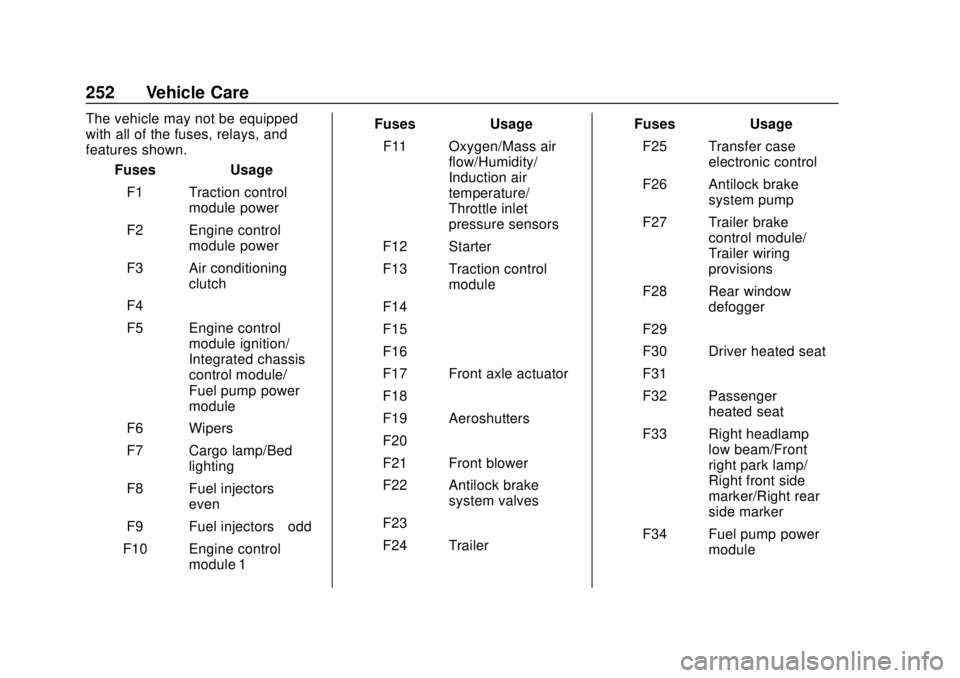
The vehicle may not be equipped
with all of the fuses, relays, and
features shown.Fuses Usage
F1 Traction control module power
F2 Engine control module power
F3 Air conditioning clutch
F4 –
F5 Engine control module ignition/
Integrated chassis
control module/
Fuel pump power
module
F6 Wipers
F7 Cargo lamp/Bed lighting
F8 Fuel injectors –
even
F9 Fuel injectors –odd
F10 Engine control module 1 Fuses Usage
F11 Oxygen/Mass air flow/Humidity/
Induction air
temperature/
Throttle inlet
pressure sensors
F12 Starter
F13 Traction control module
F14 –
F15 –
F16 –
F17 Front axle actuator
F18 –
F19 Aeroshutters
F20 –
F21 Front blower
F22 Antilock brake system valves
F23 –
F24 Trailer Fuses Usage
F25 Transfer case electronic control
F26 Antilock brake system pump
F27 Trailer brake control module/
Trailer wiring
provisions
F28 Rear window defogger
F29 –
F30 Driver heated seat
F31 –
F32 Passenger heated seat
F33 Right headlamp low beam/Front
right park lamp/
Right front side
marker/Right rear
side marker
F34 Fuel pump power module
Page 257 of 364
GMC Canyon/Canyon Denali Owner Manual (GMNA-Localizing-U.S./Canada-
13566643) - 2020 - CRC - 10/4/19
256 Vehicle Care
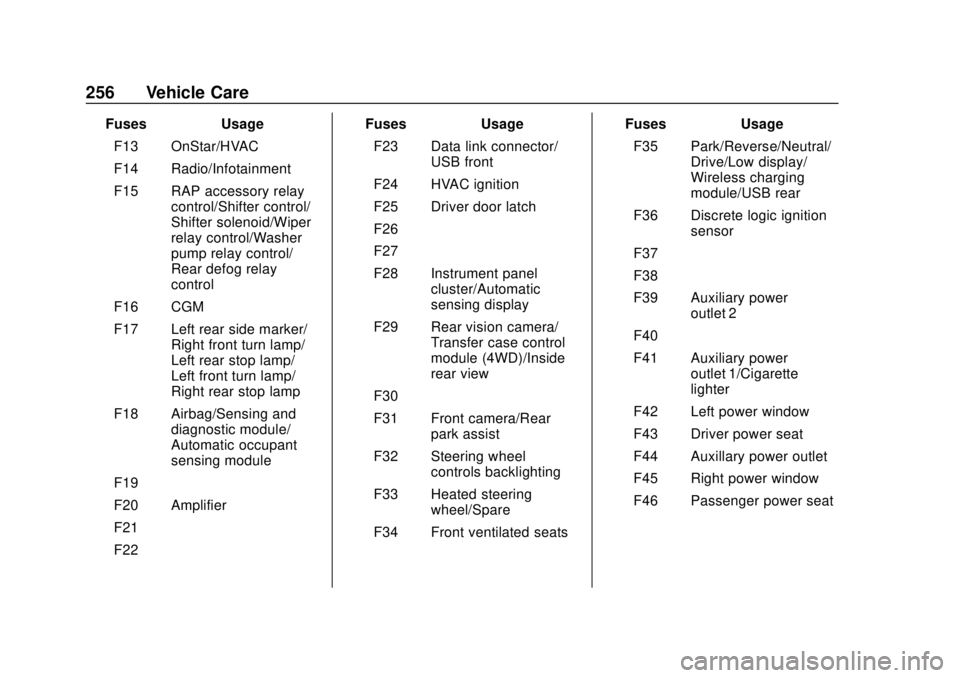
FusesUsage
F13 OnStar/HVAC
F14 Radio/Infotainment
F15 RAP accessory relay control/Shifter control/
Shifter solenoid/Wiper
relay control/Washer
pump relay control/
Rear defog relay
control
F16 CGM
F17 Left rear side marker/ Right front turn lamp/
Left rear stop lamp/
Left front turn lamp/
Right rear stop lamp
F18 Airbag/Sensing and diagnostic module/
Automatic occupant
sensing module
F19 –
F20 Amplifier
F21 –
F22 – Fuses
Usage
F23 Data link connector/ USB front
F24 HVAC ignition
F25 Driver door latch
F26 –
F27 –
F28 Instrument panel cluster/Automatic
sensing display
F29 Rear vision camera/ Transfer case control
module (4WD)/Inside
rear view
F30 –
F31 Front camera/Rear park assist
F32 Steering wheel controls backlighting
F33 Heated steering wheel/Spare
F34 Front ventilated seats Fuses
Usage
F35 Park/Reverse/Neutral/ Drive/Low display/
Wireless charging
module/USB rear
F36 Discrete logic ignition sensor
F37 –
F38 –
F39 Auxiliary power outlet 2
F40 –
F41 Auxiliary power outlet 1/Cigarette
lighter
F42 Left power window
F43 Driver power seat
F44 Auxillary power outlet
F45 Right power window
F46 Passenger power seat
Page 268 of 364
GMC Canyon/Canyon Denali Owner Manual (GMNA-Localizing-U.S./Canada-
13566643) - 2020 - CRC - 10/4/19
Vehicle Care 267
sensors monitor the air pressure in
the tires and transmit the tire
pressure readings to a receiver
located in the vehicle.
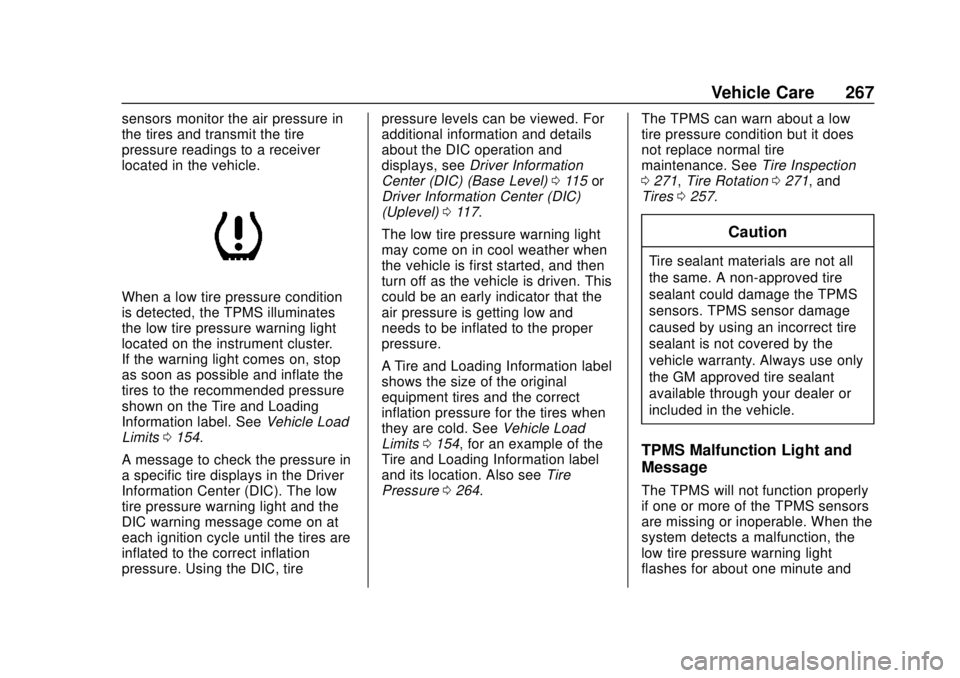
When a low tire pressure condition
is detected, the TPMS illuminates
the low tire pressure warning light
located on the instrument cluster.
If the warning light comes on, stop
as soon as possible and inflate the
tires to the recommended pressure
shown on the Tire and Loading
Information label. SeeVehicle Load
Limits 0154.
A message to check the pressure in
a specific tire displays in the Driver
Information Center (DIC). The low
tire pressure warning light and the
DIC warning message come on at
each ignition cycle until the tires are
inflated to the correct inflation
pressure. Using the DIC, tire pressure levels can be viewed. For
additional information and details
about the DIC operation and
displays, see
Driver Information
Center (DIC) (Base Level) 0115 or
Driver Information Center (DIC)
(Uplevel) 0117.
The low tire pressure warning light
may come on in cool weather when
the vehicle is first started, and then
turn off as the vehicle is driven. This
could be an early indicator that the
air pressure is getting low and
needs to be inflated to the proper
pressure.
A Tire and Loading Information label
shows the size of the original
equipment tires and the correct
inflation pressure for the tires when
they are cold. See Vehicle Load
Limits 0154, for an example of the
Tire and Loading Information label
and its location. Also see Tire
Pressure 0264. The TPMS can warn about a low
tire pressure condition but it does
not replace normal tire
maintenance. See
Tire Inspection
0 271, Tire Rotation 0271, and
Tires 0257.
Caution
Tire sealant materials are not all
the same. A non-approved tire
sealant could damage the TPMS
sensors. TPMS sensor damage
caused by using an incorrect tire
sealant is not covered by the
vehicle warranty. Always use only
the GM approved tire sealant
available through your dealer or
included in the vehicle.
TPMS Malfunction Light and
Message
The TPMS will not function properly
if one or more of the TPMS sensors
are missing or inoperable. When the
system detects a malfunction, the
low tire pressure warning light
flashes for about one minute and
Page 269 of 364
GMC Canyon/Canyon Denali Owner Manual (GMNA-Localizing-U.S./Canada-
13566643) - 2020 - CRC - 10/4/19
268 Vehicle Care
then stays on for the remainder of
the ignition cycle. A DIC warning
message also displays. The
malfunction light and DIC warning
message come on at each ignition
cycle until the problem is corrected.
Some of the conditions that can
cause these to come on are:
.One of the road tires has been
replaced with the spare tire. The
spare tire does not have a
TPMS sensor. The malfunction
light and the DIC message
should go off after the road tire
is replaced and the sensor
matching process is performed
successfully. See “TPMS Sensor
Matching Process” later in this
section.
. The TPMS sensor matching
process was not done or not
completed successfully after
rotating the tires. The
malfunction light and the DIC
message should go off after
successfully completing the
sensor matching process. See
“TPMS Sensor Matching
Process” later in this section. .
One or more TPMS sensors are
missing or damaged. The
malfunction light and the DIC
message should go off when the
TPMS sensors are installed and
the sensor matching process is
performed successfully. See
your dealer for service.
. Replacement tires or wheels do
not match the original equipment
tires or wheels. Tires and wheels
other than those recommended
could prevent the TPMS from
functioning properly. See Buying
New Tires 0273.
. Operating electronic devices or
being near facilities using radio
wave frequencies similar to the
TPMS could cause the TPMS
sensors to malfunction.
If the TPMS is not functioning
properly, it cannot detect or signal a
low tire pressure condition. See
your dealer for service if the TPMS
malfunction light and DIC message
come on and stay on.Tire Fill Alert (If Equipped)
This feature provides visual and
audible alerts outside the vehicle to
help when inflating an underinflated
tire to the recommended cold tire
pressure.
When the low tire pressure warning
light comes on: 1. Park the vehicle in a safe, level place.
2. Set the parking brake firmly.
3. Place the vehicle in P (Park).
4. Add air to the tire that is underinflated. The turn signal
lamp will flash.
When the recommended
pressure is reached, the horn
sounds once and the turn
signal lamp will stop flashing
and briefly turn solid.
Repeat these steps for all
underinflated tires that have
illuminated the low tire pressure
warning light.
Page 270 of 364
GMC Canyon/Canyon Denali Owner Manual (GMNA-Localizing-U.S./Canada-
13566643) - 2020 - CRC - 10/4/19
Vehicle Care 269
{Warning
Overinflating a tire could cause
the tire to rupture and you or
others could be injured. Do not
exceed the maximum pressure
listed on the tire sidewall. See
Tire Sidewall Labeling0259 and
Vehicle Load Limits 0154.
If the tire is overinflated by more
than 35 kPa (5 psi), the horn will
sound multiple times and the turn
signal lamp will continue to flash for
several seconds after filling stops.
To release and correct the pressure,
while the turn signal lamp is still
flashing, briefly press the center of
the valve stem. When the
recommended pressure is reached,
the horn sounds once.
If the turn signal lamp does not flash
within 15 seconds after starting to
inflate the tire, the tire fill alert has
not been activated or is not working.
If the hazard warning flashers are
on, the tire fill alert visual feedback
will not work properly. The TPMS will not activate the tire
fill alert properly under the following
conditions:
.
There is interference from an
external device or transmitter.
. The air pressure from the
inflation device is not sufficient
to inflate the tire.
. There is a malfunction in
the TPMS.
. There is a malfunction in the
horn or turn signal lamps.
. The identification code of the
TPMS sensor is not registered to
the system.
. The battery of the TPMS sensor
is low.
If the tire fill alert does not operate
due to TPMS interference, move the
vehicle about 1 m (3 ft) back or
forward and try again. If the tire fill
alert feature is not working, use a
tire pressure gauge.
TPMS Sensor Matching
Process
Each TPMS sensor has a unique
identification code. The identification
code needs to be matched to a new
tire/wheel position after rotating the
vehicle’s tires or replacing one or
more of the TPMS sensors. Also,
the TPMS sensor matching process
should be performed after replacing
a spare tire with a road tire
containing the TPMS sensor. The
malfunction light and the DIC
message should go off at the next
ignition cycle. The sensors are
matched to the tire/wheel positions,
using a TPMS relearn tool, in the
following order: driver side front tire,
passenger side front tire, passenger
side rear tire, and driver side rear.
See your dealer for service or to
purchase a relearn tool. A TPMS
relearn tool can also be purchased.
See Tire Pressure Monitor Sensor
Activation Tool at
www.gmtoolsandequipment.com or
call 1-800-GM TOOLS
(1-800-468-6657).
Page 271 of 364
GMC Canyon/Canyon Denali Owner Manual (GMNA-Localizing-U.S./Canada-
13566643) - 2020 - CRC - 10/4/19
270 Vehicle Care
There are two minutes to match the
first tire/wheel position, and
five minutes overall to match all four
tire/wheel positions. If it takes
longer, the matching process stops
and must be restarted.
The TPMS sensor matching
process is:1. Set the parking brake.
2. Turn the ignition on without starting the vehicle.
3. If the vehicle has an uplevel DIC, make sure the Tire
Pressure info page option is
turned on. The info pages on
the DIC can be turned on and
off through the Options menu.
See Driver Information Center
(DIC) (Base Level) 0115 or
Driver Information Center (DIC)
(Uplevel) 0117.
4. If the vehicle has an uplevel DIC, use the DIC controls on
the right side of the steering
wheel to scroll to the Tire
Pressure screen under the DIC
info page. If the vehicle has a base level
DIC, use the MENU button to
select the Vehicle Information
menu in the DIC. Use the
thumbwheel to scroll to the Tire
Pressure Menu item screen.
5. If the vehicle has an uplevel DIC, press and hold
Vin the
center of the DIC controls.
If the vehicle has a base level
DIC, press SET/CLR on the
turn signal lever to begin the
sensor matching process.
A message asking if the
process should begin should
appear. Press SET/CLR again
to confirm the selection.
The horn sounds twice to
signal the receiver is in relearn
mode and the TIRE
LEARNING ACTIVE message
displays on the DIC screen.
6. Start with the driver side front tire.
7. Place the relearn tool against the tire sidewall, near the valve
stem. Then press the button to activate the TPMS sensor.
A horn chirp confirms that the
sensor identification code has
been matched to this tire and
wheel position.
8. Proceed to the passenger side front tire, and repeat the
procedure in Step 7.
9. Proceed to the passenger side rear tire, and repeat the
procedure in Step 7.
10. Proceed to the driver side rear tire, and repeat the procedure
in Step 7. The horn sounds two
times to indicate the sensor
identification code has been
matched to the driver side rear
tire, and the TPMS sensor
matching process is no longer
active. The TIRE LEARNING
ACTIVE message on the DIC
display screen goes off.
11. Turn the vehicle off.
12. Set all four tires to the recommended air pressure
level as indicated on the Tire
and Loading Information label.
Page 282 of 364
GMC Canyon/Canyon Denali Owner Manual (GMNA-Localizing-U.S./Canada-
13566643) - 2020 - CRC - 10/4/19
Vehicle Care 281
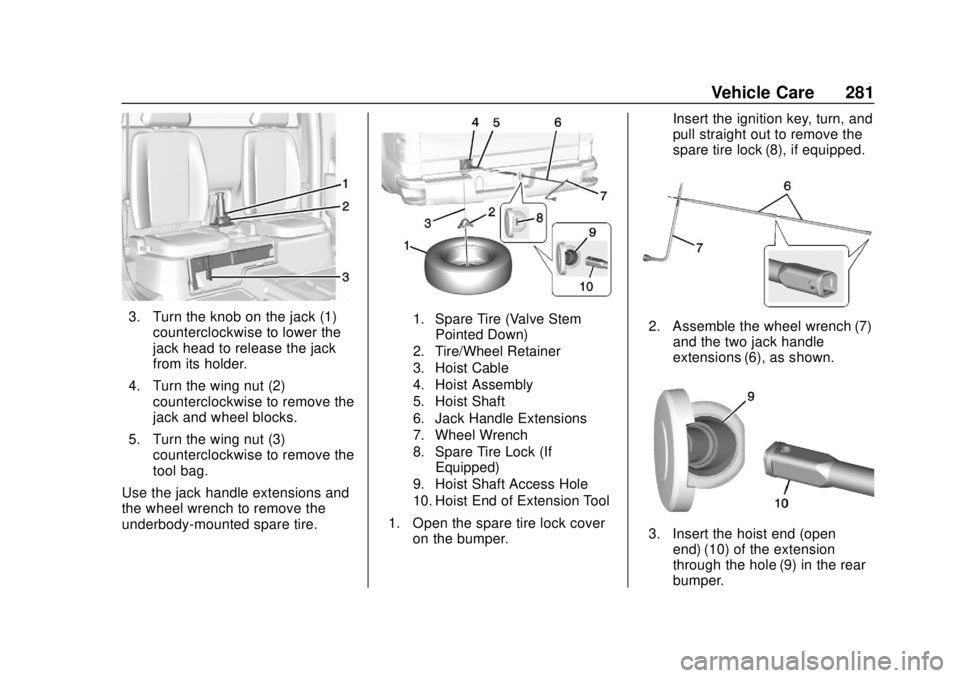
3. Turn the knob on the jack (1)counterclockwise to lower the
jack head to release the jack
from its holder.
4. Turn the wing nut (2) counterclockwise to remove the
jack and wheel blocks.
5. Turn the wing nut (3) counterclockwise to remove the
tool bag.
Use the jack handle extensions and
the wheel wrench to remove the
underbody-mounted spare tire.1. Spare Tire (Valve Stem Pointed Down)
2. Tire/Wheel Retainer
3. Hoist Cable
4. Hoist Assembly
5. Hoist Shaft
6. Jack Handle Extensions
7. Wheel Wrench
8. Spare Tire Lock (If Equipped)
9. Hoist Shaft Access Hole
10. Hoist End of Extension Tool
1. Open the spare tire lock cover on the bumper. Insert the ignition key, turn, and
pull straight out to remove the
spare tire lock (8), if equipped.
2. Assemble the wheel wrench (7)
and the two jack handle
extensions (6), as shown.
3. Insert the hoist end (openend) (10) of the extension
through the hole (9) in the rear
bumper.
Page 294 of 364
GMC Canyon/Canyon Denali Owner Manual (GMNA-Localizing-U.S./Canada-
13566643) - 2020 - CRC - 10/4/19
Vehicle Care 293
3. Set the parking brake firmlyand put the shift lever in
P (Park) with an automatic
transmission, or N (Neutral)
with a manual transmission.
Caution
If any accessories are left on or
plugged in during the jump
starting procedure, they could be
damaged. The repairs would not
be covered by the vehicle
warranty. Whenever possible, turn
off or unplug all accessories on
either vehicle when jump starting.
4. Turn the ignition off. Turn off all lights and accessories in both
vehicles, except the hazard
warning flashers if needed.
{Warning
An electric fan can start up even
when the engine is not running
and can injure you. Keep hands,
clothing, and tools away from any
underhood electric fan.
{Warning
Using a match near a battery can
cause battery gas to explode.
People have been hurt doing this,
and some have been blinded.
Use a flashlight if you need more
light.
Battery fluid contains acid that
can burn you. Do not get it on
you. If you accidentally get it in
your eyes or on your skin, flush
the place with water and get
medical help immediately.
{Warning
Fans or other moving engine
parts can injure you badly. Keep
your hands away from moving
parts once the engine is running.
5. Connect one end of the red positive (+) cable to the
positive (+) terminal on the
discharged battery.
6. Connect the other end of the red positive (+) cable to the
positive (+) terminal of the good
battery.
7. Connect one end of the black negative (–) cable to the
negative (–) terminal of the
good battery.
8. Connect the other end of the black negative (–) cable to the
negative (–) grounding stud for
the discharged battery.
9. Start the engine in the vehicle with the good battery and run
the engine at idle speed for at
least four minutes.
Page 298 of 364

GMC Canyon/Canyon Denali Owner Manual (GMNA-Localizing-U.S./Canada-
13566643) - 2020 - CRC - 10/4/19
Vehicle Care 297
5. With the engine off, leave thekey in ACC/ACCESSORY to
prevent the steering column
from locking.
Caution
Failure to disconnect the negative
battery cable or to have it contact
the terminals can cause damage
to the vehicle.
6. Disconnect the negative battery cable at the battery and
secure the nut and bolt. Cover
the negative battery post with a
non-conductive material to
prevent any contact with the
negative battery terminal.
Caution
If the steering column is locked,
vehicle damage may occur.
7. Move the steering wheel to make sure the steering column
is unlocked. 8. With a foot on the brake pedal,
release the parking brake.
Keep the ignition key in the
towed vehicle in ACC/
ACCESSORY to prevent the
steering column from locking.
Disconnecting the Towed Vehicle
Before disconnecting the towed
vehicle: 1. Park on a level surface.
2. Set the parking brake, then shift the transmission to
P (Park), and move the ignition
key to OFF.
3. Connect the battery.
4. With your foot off the brake, turn the ignition on with the
engine off.
5. Shift the transfer case out of N (Neutral) to Two-Wheel Drive
High. See “Shifting out of
N (Neutral)” underFour-Wheel
Drive 0174. See your dealer if
the transfer case cannot be
shifted out of N (Neutral). 6. Start the engine and check that
the vehicle is in Two-Wheel
Drive High by shifting the
transmission to R (Reverse)
and then to D (Drive). There
should be movement of the
vehicle while shifting.
7. Shift the transmission to P (Park) and turn off the
ignition.
8. Disconnect the vehicle from the tow vehicle.
9. Release the parking brake.
10. Reset any lost presets. The outside temperature
display will default to 0 °C
(32 °F) but will reset with
normal usage.
Page 300 of 364
GMC Canyon/Canyon Denali Owner Manual (GMNA-Localizing-U.S./Canada-
13566643) - 2020 - CRC - 10/4/19
Vehicle Care 299
9. Turn the ignition to LOCK/OFF.
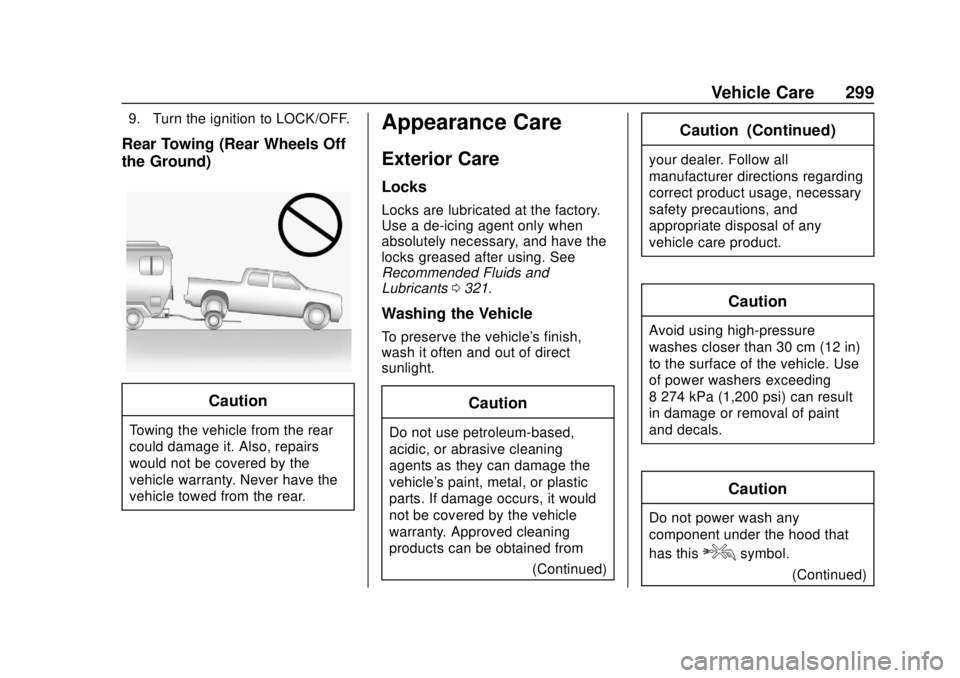
Rear Towing (Rear Wheels Off
the Ground)
Caution
Towing the vehicle from the rear
could damage it. Also, repairs
would not be covered by the
vehicle warranty. Never have the
vehicle towed from the rear.
Appearance Care
Exterior Care
Locks
Locks are lubricated at the factory.
Use a de-icing agent only when
absolutely necessary, and have the
locks greased after using. See
Recommended Fluids and
Lubricants0321.
Washing the Vehicle
To preserve the vehicle's finish,
wash it often and out of direct
sunlight.
Caution
Do not use petroleum-based,
acidic, or abrasive cleaning
agents as they can damage the
vehicle's paint, metal, or plastic
parts. If damage occurs, it would
not be covered by the vehicle
warranty. Approved cleaning
products can be obtained from
(Continued)
Caution (Continued)
your dealer. Follow all
manufacturer directions regarding
correct product usage, necessary
safety precautions, and
appropriate disposal of any
vehicle care product.
Caution
Avoid using high-pressure
washes closer than 30 cm (12 in)
to the surface of the vehicle. Use
of power washers exceeding
8 274 kPa (1,200 psi) can result
in damage or removal of paint
and decals.
Caution
Do not power wash any
component under the hood that
has this
esymbol.
(Continued)