maintenance GMC CANYON 2023 User Guide
[x] Cancel search | Manufacturer: GMC, Model Year: 2023, Model line: CANYON, Model: GMC CANYON 2023Pages: 371, PDF Size: 7.41 MB
Page 149 of 371
GMC Canyon/Canyon Denali Owner Manual (GMNA-Localizing-U.S./Canada/
Mexico-16510661) - 2023 - CRC - 11/29/22
148 Climate Controls
close to the window. If the airflow is shut
off using the sliding knobs, warm air will be
directed to the other instrument panel
vents. This is normal operation.
Operation Tips
.Clear away any ice, snow, or leaves from
air inlets at the base of the windshield
that could block the flow of air into the
vehicle.
.Clear snow off the hood to improve
visibility and help decrease moisture
drawn into the vehicle.
.Keep the path under the front seats clear
of objects to help circulate the air inside
of the vehicle more effectively.
.Hood deflectors can adversely affect the
performance of the system. Check with
your dealer before adding equipment to
the outside of the vehicle.
Maintenance
Passenger Compartment Air Filter
The passenger compartment air filter
reduces dust, pollen, and other airborne
irritants from outside air that is pulled into
the vehicle. Replace the filter periodically.
SeeMaintenance Schedule 0328. Using the climate control system without an
air filter installed is not recommended.
Water or other debris could enter the
system and result in leaks or noises. Always
install a new filter when removing the old
filter.
For more information on filter replacement,
see your dealer.
Service
All vehicles have a label underhood that
identifies the refrigerant used in the vehicle.
The refrigerant system should only be
serviced by trained and certified technicians.
The air conditioning evaporator should never
be repaired or replaced by one from a
salvage vehicle. It should only be replaced
by a new evaporator to ensure proper and
safe operation.
During service, all refrigerants should be
reclaimed with proper equipment. Venting
refrigerants directly to the atmosphere is
harmful to the environment and may also
create unsafe conditions based on
inhalation, combustion, frostbite, or other
health-based concerns.
The air conditioning system requires periodic
maintenance. See
Maintenance Schedule
0 328.
Page 151 of 371
GMC Canyon/Canyon Denali Owner Manual (GMNA-Localizing-U.S./Canada/
Mexico-16510661) - 2023 - CRC - 11/29/22
150 Driving and Operating
Filling the Tank . . . . . . . . . . . . . . . . . . . . . . . . 225
Filling a Portable Fuel Container . . . . . . . 227
Trailer Towing
General Towing Information . . . . . . . . . . . 227
Driving Characteristics andTowing Tips . . . . . . . . . . . . . . . . . . . . . . . . . . 227
Trailer Towing . . . . . . . . . . . . . . . . . . . . . . . . . 231
Towing Equipment . . . . . . . . . . . . . . . . . . . . 236
Trailer Sway Control (TSC) . . . . . . . . . . . . . 242
Trailering App . . . . . . . . . . . . . . . . . . . . . . . . . 243
Conversions and Add-Ons
Add-On Electrical Equipment . . . . . . . . . . . 251
Driving Information
Driving for Better Fuel Economy
Driving habits can affect fuel mileage. Here
are some driving tips to get the best fuel
economy possible:
.Set the climate controls to the desired
temperature after the engine is started,
or turn them off when not required.
.Avoid fast starts and accelerate smoothly.
.Brake gradually and avoid abrupt stops.
.Avoid idling the engine for long periods
of time.
.When road and weather conditions are
appropriate, use cruise control.
.Always follow posted speed limits or
drive more slowly when conditions
require.
.Keep vehicle tires properly inflated.
.Combine several trips into a single trip.
.Replace the vehicle's tires with the same
TPC Spec number molded into the tire's
sidewall near the size.
.Follow recommended scheduled
maintenance.
Distracted Driving
Distraction comes in many forms and can
take your focus from the task of driving.
Exercise good judgment and do not let other
activities divert your attention away from
the road. Many local governments have
enacted laws regarding driver distraction.
Become familiar with the local laws in
your area.
To avoid distracted driving, keep your eyes
on the road, keep your hands on the
steering wheel, and focus your attention on
driving.
.Do not use a phone in demanding driving
situations. Use a hands-free method to
place or receive necessary phone calls.
.Watch the road. Do not read, take notes,
or look up information on phones or
other electronic devices.
.Designate a front seat passenger to
handle potential distractions.
.Become familiar with vehicle features
before driving, such as programming
favorite radio stations and adjusting
climate control and seat settings. Program
all trip information into any navigation
device prior to driving.
Page 153 of 371
GMC Canyon/Canyon Denali Owner Manual (GMNA-Localizing-U.S./Canada/
Mexico-16510661) - 2023 - CRC - 11/29/22
152 Driving and Operating
applied. Once the power assist is used up, it
can take longer to stop and the brake pedal
will be harder to push.
Steering
Caution
To avoid damage to the steering system,
do not drive over curbs, parking barriers,
or similar objects at speeds greater than
3 km/h (1 mph). Use care when driving
over other objects such as lane dividers
and speed bumps. Damage caused by
misuse of the vehicle is not covered by
the vehicle warranty.
Electric Power Steering
The vehicle is equipped with an electric
power steering system, which reduces the
amount of effort needed to steer the
vehicle. It does not have power steering
fluid. Regular maintenance is not required.
If the vehicle experiences a system
malfunction and loses power steering,
greater steering effort may be required.
Power steering assist also may be reduced if
you turn the steering wheel as far as it can
turn and hold it there with force for an
extended period of time.
See your dealer if there is a problem.
Curve Tips
.Take curves at a reasonable speed.
.Reduce speed before entering a curve.
.Maintain a reasonable steady speed
through the curve.
.Wait until the vehicle is out of the curve
before accelerating gently into the
straightaway.
Steering in Emergencies
.There are some situations when steering
around a problem may be more effective
than braking.
.Holding both sides of the steering wheel
allows you to turn 180 degrees without
removing a hand.
.The Antilock Brake System (ABS) allows
steering while braking.
Off-Road Recovery
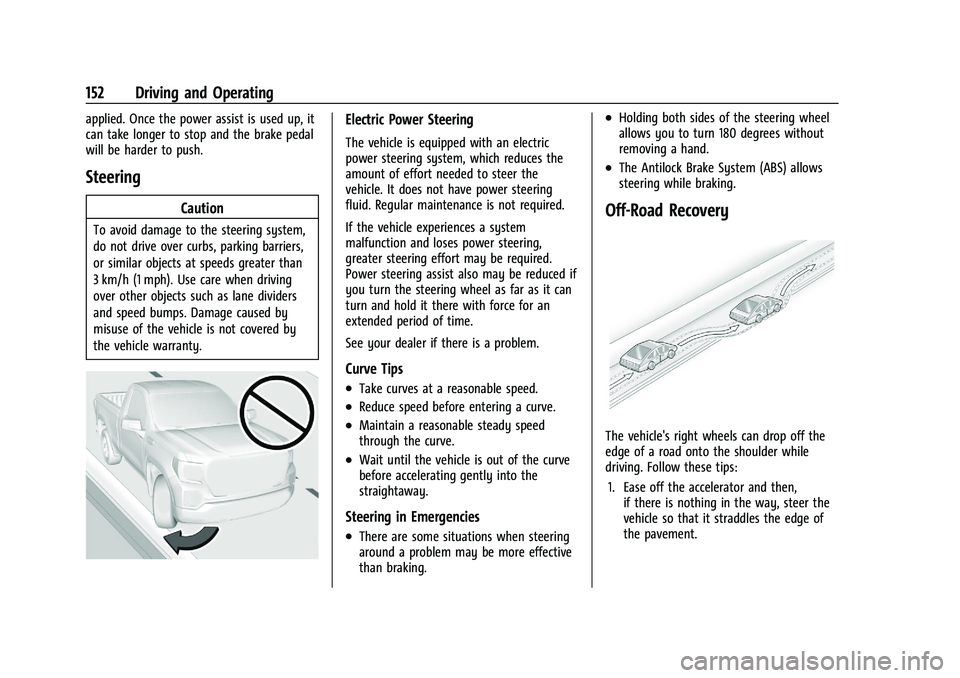
The vehicle's right wheels can drop off the
edge of a road onto the shoulder while
driving. Follow these tips:1. Ease off the accelerator and then, if there is nothing in the way, steer the
vehicle so that it straddles the edge of
the pavement.
Page 155 of 371
GMC Canyon/Canyon Denali Owner Manual (GMNA-Localizing-U.S./Canada/
Mexico-16510661) - 2023 - CRC - 11/29/22
154 Driving and Operating
Before Driving Your Vehicle Off-Road
Have all necessary maintenance and service
work completed.
Fuel the vehicle, fill fluid levels, and check
inflation pressure in all tires, including the
spare, if equipped.
Read all the information about
four-wheel-drive vehicles in this manual.
Remove any underbody air deflector,
if equipped. Re-attach the air deflector after
off-road driving.
Know the local laws that apply to off-road
driving.
To gain more ground clearance if needed, it
may be necessary to remove the front fascia
lower air dam, if equipped. However, driving
without the air dam reduces fuel economy.
Caution
Operating the vehicle for extended
periods without the front fascia lower air
dam installed can cause improper airflow
to the engine. Reattach the front fascia
air dam after off-road driving.
Loading the Vehicle for Off-Road Driving
{Warning
.Unsecured cargo on the load floor can
be tossed about when driving over
rough terrain. You or your passengers
can be struck by flying objects. Secure
the cargo properly.
.Keep cargo in the cargo area as far
forward and as low as possible. The
heaviest things should be on the floor,
forward of the rear axle.
.Heavy loads on the roof raise the
vehicle's center of gravity, making it
more likely to roll over. You can be
seriously or fatally injured if the
vehicle rolls over. Put heavy loads
inside the cargo area, not on the roof.
For more information about loading the
vehicle, see Vehicle Load Limits 0162 and
Tires 0284.
Environmental Concerns
Always use established trails, roads, and
areas that are reserved for public off-road
recreational driving. Obey all posted
regulations. Do not damage shrubs, flowers, trees,
or grasses or disturb wildlife.
Do not park over things that burn. See
Parking over Things That Burn
0173.
Driving on Hills
Driving safely on hills requires good
judgment and an understanding of the
vehicle’s capabilities.
{Warning
Many hills are simply too steep for any
vehicle. Driving up hills can cause the
vehicle to stall. Driving down hills can
cause loss of control. Driving across hills
can cause a rollover. You could be injured
or killed. Do not drive on steep hills.
Before driving on a hill, assess the
steepness, traction, and obstructions. If the
terrain ahead cannot be seen, get out of the
vehicle and walk the hill before driving
further.
When driving on hills:
.Maintain a slow speed and keep a firm
grip on the steering wheel.
.Use headlamps even during the day to
make the vehicle more visible.
Page 158 of 371
GMC Canyon/Canyon Denali Owner Manual (GMNA-Localizing-U.S./Canada/
Mexico-16510661) - 2023 - CRC - 11/29/22
Driving and Operating 157
Warning (Continued)
shallow water, it can still wash away the
ground from under your tires. Traction
could be lost, and the vehicle could roll
over. Do not drive through rushing water.
Caution
Do not drive through standing water if it
is deep enough to cover the wheel hubs,
axles, or exhaust pipe. Deep water can
damage the axle and other vehicle parts.
If the standing water is not too deep, drive
through it slowly. At faster speeds, water
can get into the engine and cause it to stall.
Stalling can occur if the exhaust pipe is
under water.
Do not turn off the ignition when driving
through water. If the exhaust pipe is under
water, the engine will not start.
Always drive in the direction of waves.
Avoid oncoming vehicles as they will
increase the water depth hitting your
vehicle. Be aware of submerged obstacles as they
can damage your vehicle or cause loss of
control.
Never open the vehicle doors while in the
water.
When going through water, the brakes get
wet and it may take longer to stop. After
exiting the water, repeatedly and gently
apply the brakes to dry them off and
restore effectiveness. See
Driving on Wet
Roads 0159.
After Driving Your Vehicle Off-Road
Be sure to switch out of Off-Road Mode or
Terrain Mode on your Driver Mode Control
to return to normal driving. See Driver Mode
Control 0187.
Remove any brush or debris that has
collected on the underbody or chassis,
or under the hood. Clean the lens of the
underbody camera. These accumulations can
be a fire hazard.
After operation in mud or sand, have the
brake linings cleaned and checked. These
substances can cause glazing and uneven
braking. Check the body structure, driveline, steering,
suspension, wheels, tires, and exhaust
system for damage, and check the fuel lines
and cooling system for any leakage.
{Warning
Lifting a vehicle and getting under it to
do maintenance or repairs is dangerous
without the appropriate safety equipment
and training. If a jack is provided with
the vehicle, it is designed only for
changing a flat tire. If it is used for
anything else, you or others could be
badly injured or killed if the vehicle slips
off the jack. If a jack is provided with the
vehicle, only use it for changing a
flat tire.
The extreme conditions of off-road driving
require more frequent maintenance service.
See "Severe Conditions Requiring More
Frequent Maintenance" and "Additional
Required Services —Severe Service" on
Maintenance Schedule 0328.
Page 192 of 371
GMC Canyon/Canyon Denali Owner Manual (GMNA-Localizing-U.S./Canada/
Mexico-16510661) - 2023 - CRC - 11/29/22
Driving and Operating 191
Mode Selection Attributes
MODESNormal
Default Off-Road Tow/Haul Terrain Baja
Steering Normal Normal Tow/Haul Terrain Normal
Transmission (2WD/4WD High) Normal Tow/Haul Tow/Haul Crawl Baja with DPM
Locking Rear Axle Up to 40 km/h
(25 mph) Unlimited Up to 40 km/h
(25 mph)Up to 80 km/h
(50 mph) Unlimited
Locking Front Axle Up to 40 km/h
(25 mph) Up to 40 km/h
(25 mph) Up to 40 km/h
(25 mph) Up to 40 km/h
(25 mph) Up to 40 km/h
(25 mph)
Throttle Progression (2WD/4WD High) Normal Normal Normal Crawl Baja
Traction Control (TCS) Normal Off-Road Normal Terrain Off-Road
Stability Control (ESC) Normal Off-Road Normal Off-Road Baja
Antilock Brake System (ABS) Normal Off-Road Normal Normal Baja
Limited-Slip Differential
If equipped, the limited-slip differential can
give more traction on snow, mud, ice, sand,
or gravel. It works like a standard axle most
of the time, but when traction is low, thisfeature allows the drive wheel with the
most traction to move the vehicle. For
vehicles with the limited-slip differential,
driven under severe conditions, the rear axle
fluid should be changed. See
Maintenance
Schedule 0328.
Locking Rear Axle
If equipped, the locking rear axle can give
the vehicle additional traction from the rear
wheels when traveling in off-road situations
such as mud, snow, steep hills, and uneven
terrain.
Page 232 of 371
GMC Canyon/Canyon Denali Owner Manual (GMNA-Localizing-U.S./Canada/
Mexico-16510661) - 2023 - CRC - 11/29/22
Driving and Operating 231
5. Gradually release the brake pedal toallow the chocks to absorb the load of
the trailer.
6. Reapply the brake pedal. Then apply the parking brake and shift into P (Park).
7. Release the brake pedal.
Pulling the Trailer from the Water
To pull the trailer of the water: 1. Press and hold the brake pedals.
2. Start the engine and shift into gear.
3. Release the parking brake.
4. Let up on the brake pedal.
5. Drive slowly until the tires are clear of the chocks.
6. Stop and have someone pick up and store the chocks.
7. Slowly pull the trailer from the water.
8. Once the vehicle and trailer have been driven from the sloped part of the boat
ramp, the vehicle can be shifted from
four-wheel-drive high. Shift into the drive
mode that is appropriate for the road
conditions.Caution
If the vehicle tires begin to spin and the
vehicle begins to slide toward the water,
remove your foot from the accelerator
pedal and apply the brake pedal. Seek
help to have the vehicle towed up
the ramp.
Maintenance when Trailer Towing
The vehicle needs service more often when
used to tow trailers. See Maintenance
Schedule 0328. It is especially important to
check the automatic transmission fluid,
engine oil, axle lubricant, belts, cooling
system, and brake system before and during
each trip.
Check periodically to see that all nuts and
bolts on the trailer hitch are tight.
Engine Cooling When Trailer Towing
The cooling system may temporarily
overheat during severe operating conditions.
See Engine Overheating 0264.
Trailer Towing
Caution
Towing a trailer improperly can damage
the vehicle and result in costly repairs
not covered by the vehicle warranty. To
tow a trailer correctly, follow the
directions in this section and see your
dealer for important information about
towing a trailer with the vehicle.
Trailering is different than just driving the
vehicle by itself. Trailering affects handling,
acceleration, braking, durability, and fuel
economy. Successful, safe trailering takes
correct equipment, and it has to be used
properly.
The following information has many
time-tested, important trailering tips and
safety rules. Many of these are important
for your safety and that of your passengers.
Read this section carefully before pulling a
trailer.
Page 246 of 371
GMC Canyon/Canyon Denali Owner Manual (GMNA-Localizing-U.S./Canada/
Mexico-16510661) - 2023 - CRC - 11/29/22
Driving and Operating 245
After a Trailer Profile has been created and
the trailer is electrically connected, the
trailer detection pop-up appears with a list
of all of the custom Trailer Profiles stored
on the vehicle. To load an existing Trailer
Profile, select one of the Trailer Profiles
listed or load the Guest Trailer Profile by
selecting GUEST TRAILER. Selecting Accessory
as the active Trailer Profile dismisses the
pop-up. Shifting the vehicle from P (Park)
selects Guest Trailer as the active Trailer
Profile and dismisses the pop-up.
Create a Trailer Profile
Touch Add Trailer on the trailer detection
pop-up or touch + Add New Trailer in the
Trailering App.
After a profile is created, set up for
additional trailer features may become
available through the sections shown in the
Status View. See“Status View”below.
Import a Trailer Profile
Touch Import on the trailer detection pop-up
or touch Import in the Trailering App.
Follow on-screen instructions to import a
profile. After a profile is imported, it can be selected
from the trailer list. If equipped, the Tow/
Haul Mode reminder and Brake Gain Setting
do not import.
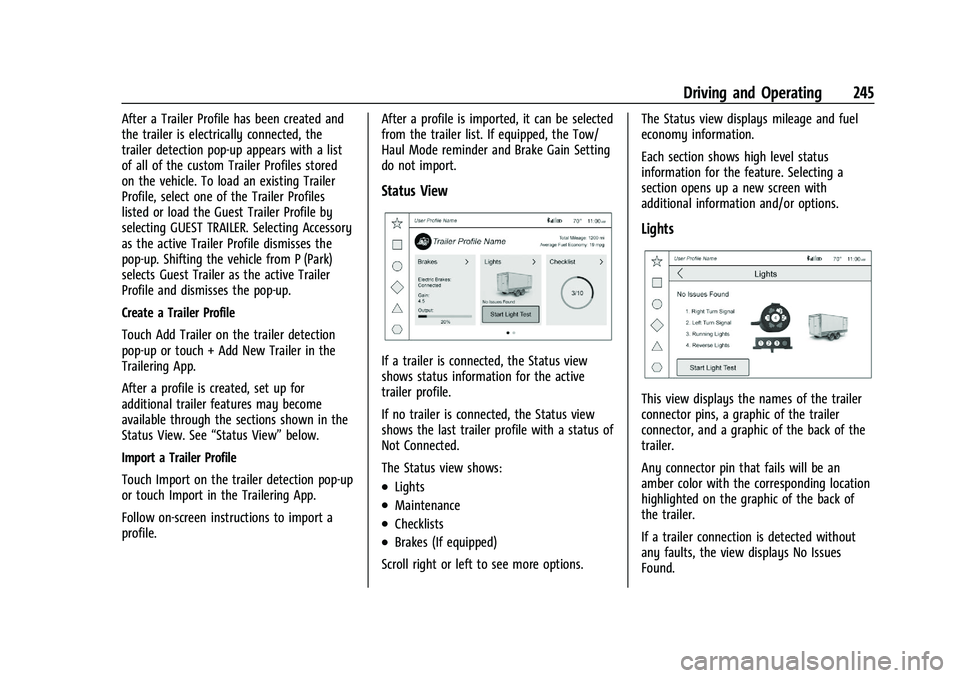
Status View
If a trailer is connected, the Status view
shows status information for the active
trailer profile.
If no trailer is connected, the Status view
shows the last trailer profile with a status of
Not Connected.
The Status view shows:
.Lights
.Maintenance
.Checklists
.Brakes (If equipped)
Scroll right or left to see more options. The Status view displays mileage and fuel
economy information.
Each section shows high level status
information for the feature. Selecting a
section opens up a new screen with
additional information and/or options.
Lights
This view displays the names of the trailer
connector pins, a graphic of the trailer
connector, and a graphic of the back of the
trailer.
Any connector pin that fails will be an
amber color with the corresponding location
highlighted on the graphic of the back of
the trailer.
If a trailer connection is detected without
any faults, the view displays No Issues
Found.
Page 248 of 371
GMC Canyon/Canyon Denali Owner Manual (GMNA-Localizing-U.S./Canada/
Mexico-16510661) - 2023 - CRC - 11/29/22
Driving and Operating 247
Maintenance
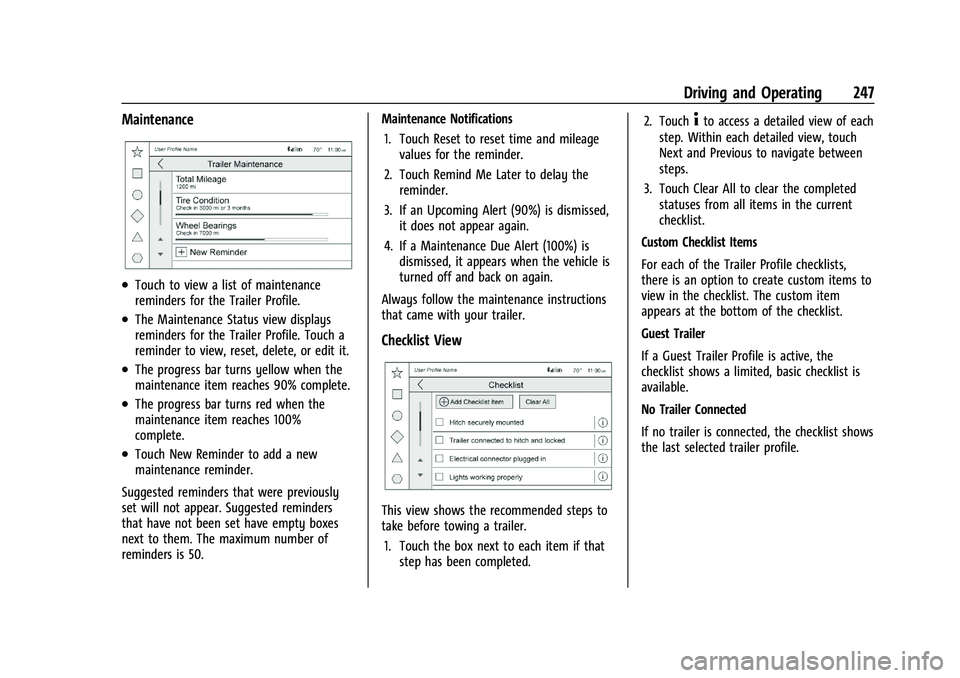
.Touch to view a list of maintenance
reminders for the Trailer Profile.
.The Maintenance Status view displays
reminders for the Trailer Profile. Touch a
reminder to view, reset, delete, or edit it.
.The progress bar turns yellow when the
maintenance item reaches 90% complete.
.The progress bar turns red when the
maintenance item reaches 100%
complete.
.Touch New Reminder to add a new
maintenance reminder.
Suggested reminders that were previously
set will not appear. Suggested reminders
that have not been set have empty boxes
next to them. The maximum number of
reminders is 50. Maintenance Notifications
1. Touch Reset to reset time and mileage values for the reminder.
2. Touch Remind Me Later to delay the reminder.
3. If an Upcoming Alert (90%) is dismissed, it does not appear again.
4. If a Maintenance Due Alert (100%) is dismissed, it appears when the vehicle is
turned off and back on again.
Always follow the maintenance instructions
that came with your trailer.
Checklist View
This view shows the recommended steps to
take before towing a trailer. 1. Touch the box next to each item if that step has been completed. 2. Touch
4to access a detailed view of each
step. Within each detailed view, touch
Next and Previous to navigate between
steps.
3. Touch Clear All to clear the completed statuses from all items in the current
checklist.
Custom Checklist Items
For each of the Trailer Profile checklists,
there is an option to create custom items to
view in the checklist. The custom item
appears at the bottom of the checklist.
Guest Trailer
If a Guest Trailer Profile is active, the
checklist shows a limited, basic checklist is
available.
No Trailer Connected
If no trailer is connected, the checklist shows
the last selected trailer profile.
Page 249 of 371
GMC Canyon/Canyon Denali Owner Manual (GMNA-Localizing-U.S./Canada/
Mexico-16510661) - 2023 - CRC - 11/29/22
248 Driving and Operating
Brakes
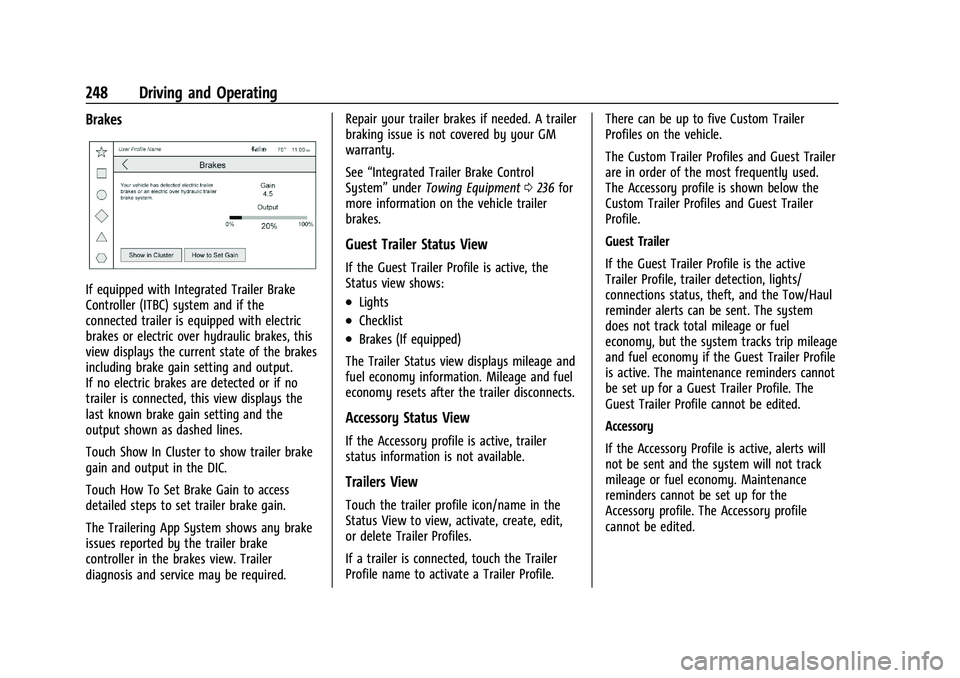
If equipped with Integrated Trailer Brake
Controller (ITBC) system and if the
connected trailer is equipped with electric
brakes or electric over hydraulic brakes, this
view displays the current state of the brakes
including brake gain setting and output.
If no electric brakes are detected or if no
trailer is connected, this view displays the
last known brake gain setting and the
output shown as dashed lines.
Touch Show In Cluster to show trailer brake
gain and output in the DIC.
Touch How To Set Brake Gain to access
detailed steps to set trailer brake gain.
The Trailering App System shows any brake
issues reported by the trailer brake
controller in the brakes view. Trailer
diagnosis and service may be required.Repair your trailer brakes if needed. A trailer
braking issue is not covered by your GM
warranty.
See
“Integrated Trailer Brake Control
System” underTowing Equipment 0236 for
more information on the vehicle trailer
brakes.
Guest Trailer Status View
If the Guest Trailer Profile is active, the
Status view shows:
.Lights
.Checklist
.Brakes (If equipped)
The Trailer Status view displays mileage and
fuel economy information. Mileage and fuel
economy resets after the trailer disconnects.
Accessory Status View
If the Accessory profile is active, trailer
status information is not available.
Trailers View
Touch the trailer profile icon/name in the
Status View to view, activate, create, edit,
or delete Trailer Profiles.
If a trailer is connected, touch the Trailer
Profile name to activate a Trailer Profile. There can be up to five Custom Trailer
Profiles on the vehicle.
The Custom Trailer Profiles and Guest Trailer
are in order of the most frequently used.
The Accessory profile is shown below the
Custom Trailer Profiles and Guest Trailer
Profile.
Guest Trailer
If the Guest Trailer Profile is the active
Trailer Profile, trailer detection, lights/
connections status, theft, and the Tow/Haul
reminder alerts can be sent. The system
does not track total mileage or fuel
economy, but the system tracks trip mileage
and fuel economy if the Guest Trailer Profile
is active. The maintenance reminders cannot
be set up for a Guest Trailer Profile. The
Guest Trailer Profile cannot be edited.
Accessory
If the Accessory Profile is active, alerts will
not be sent and the system will not track
mileage or fuel economy. Maintenance
reminders cannot be set up for the
Accessory profile. The Accessory profile
cannot be edited.