roof GMC CANYON 2023 User Guide
[x] Cancel search | Manufacturer: GMC, Model Year: 2023, Model line: CANYON, Model: GMC CANYON 2023Pages: 371, PDF Size: 7.41 MB
Page 128 of 371
GMC Canyon/Canyon Denali Owner Manual (GMNA-Localizing-U.S./Canada/
Mexico-16510661) - 2023 - CRC - 11/29/22
Infotainment System 127
.The surface streets run parallel to a
freeway.
.The vehicle has been transferred by a
vehicle carrier or a ferry.
.The current position calibration is set
incorrectly.
.The vehicle is traveling at high speed.
.The vehicle changes directions more than
once, or the vehicle is turning on a turn
table in a parking lot.
.The vehicle is entering and/or exiting a
parking lot, garage, or a lot with a roof.
.The GPS signal is not received.
.A roof carrier is installed on the vehicle.
.Tire chains are installed on the vehicle.
.The tires are replaced or worn.
.The tire pressure for the tires is incorrect.
.This is the first navigation use after the
map data is updated.
.The 12-volt battery has been disconnected
for several days.
.The vehicle is driving in heavy traffic
where driving is at low speeds, and the
vehicle is stopped and started repeatedly.
Problems with Route Guidance
Inappropriate route guidance can occur
under one or more of the following
conditions:
.The turn was not made on the road
indicated.
.Route guidance might not be available
when using automatic rerouting for the
next right or left turn.
.The route might not be changed when
using automatic rerouting.
.There is no route guidance when turning
at an intersection.
.Automatic rerouting might display a route
returning to the set waypoint if heading
for a destination without passing through
a set waypoint.
.The route prohibits the entry of a vehicle
due to a regulation by time or season or
any other regulation which may be given.
.Some routes might not be searched.
.The route to the destination might not be
shown if there are new roads, if roads
have recently changed, or if certain roads
are not listed in Maps.To recalibrate the vehicle's position on the
map, park with the vehicle running for two
to five minutes, until the vehicle position
updates. Make sure the vehicle is parked in
a location that is safe and has a clear view
of the sky and away from large
obstructions.
Voice Recognition
If equipped, Google Assistant allows for
hands-free use of media and messaging,
navigation and climate control functionality
in the vehicle. This feature can be started by
pressing
gon the steering wheel, touching
Google Assistant on the Home screen, or by
using the wake up words “Hey Google”or
“OK Google.”
However, not all features within these areas
are supported by voice commands and
requires the user to have a valid data
subscription plan in order to use some of
the Google Assistant features.
Using Voice Recognition
Voice recognition becomes available once
the system is initialized. This begins when
the vehicle is turned on. Initialization may
take a few moments.
Page 155 of 371
GMC Canyon/Canyon Denali Owner Manual (GMNA-Localizing-U.S./Canada/
Mexico-16510661) - 2023 - CRC - 11/29/22
154 Driving and Operating
Before Driving Your Vehicle Off-Road
Have all necessary maintenance and service
work completed.
Fuel the vehicle, fill fluid levels, and check
inflation pressure in all tires, including the
spare, if equipped.
Read all the information about
four-wheel-drive vehicles in this manual.
Remove any underbody air deflector,
if equipped. Re-attach the air deflector after
off-road driving.
Know the local laws that apply to off-road
driving.
To gain more ground clearance if needed, it
may be necessary to remove the front fascia
lower air dam, if equipped. However, driving
without the air dam reduces fuel economy.
Caution
Operating the vehicle for extended
periods without the front fascia lower air
dam installed can cause improper airflow
to the engine. Reattach the front fascia
air dam after off-road driving.
Loading the Vehicle for Off-Road Driving
{Warning
.Unsecured cargo on the load floor can
be tossed about when driving over
rough terrain. You or your passengers
can be struck by flying objects. Secure
the cargo properly.
.Keep cargo in the cargo area as far
forward and as low as possible. The
heaviest things should be on the floor,
forward of the rear axle.
.Heavy loads on the roof raise the
vehicle's center of gravity, making it
more likely to roll over. You can be
seriously or fatally injured if the
vehicle rolls over. Put heavy loads
inside the cargo area, not on the roof.
For more information about loading the
vehicle, see Vehicle Load Limits 0162 and
Tires 0284.
Environmental Concerns
Always use established trails, roads, and
areas that are reserved for public off-road
recreational driving. Obey all posted
regulations. Do not damage shrubs, flowers, trees,
or grasses or disturb wildlife.
Do not park over things that burn. See
Parking over Things That Burn
0173.
Driving on Hills
Driving safely on hills requires good
judgment and an understanding of the
vehicle’s capabilities.
{Warning
Many hills are simply too steep for any
vehicle. Driving up hills can cause the
vehicle to stall. Driving down hills can
cause loss of control. Driving across hills
can cause a rollover. You could be injured
or killed. Do not drive on steep hills.
Before driving on a hill, assess the
steepness, traction, and obstructions. If the
terrain ahead cannot be seen, get out of the
vehicle and walk the hill before driving
further.
When driving on hills:
.Maintain a slow speed and keep a firm
grip on the steering wheel.
.Use headlamps even during the day to
make the vehicle more visible.
Page 172 of 371
GMC Canyon/Canyon Denali Owner Manual (GMNA-Localizing-U.S./Canada/
Mexico-16510661) - 2023 - CRC - 11/29/22
Driving and Operating 171
conditions at or below−18 °C (0 °F). Vehicles
with an engine heater should be plugged in
at least four hours before starting. An
internal thermostat in the plug-end of the
cord may exist, which will prevent engine
heater operation at temperatures above
−18 °C (0 °F).
{Warning
Do not plug in the engine block heater
while the vehicle is parked in a garage or
under a carport. Property damage or
personal injury may result. Always park
the vehicle in a clear open area away
from buildings or structures.
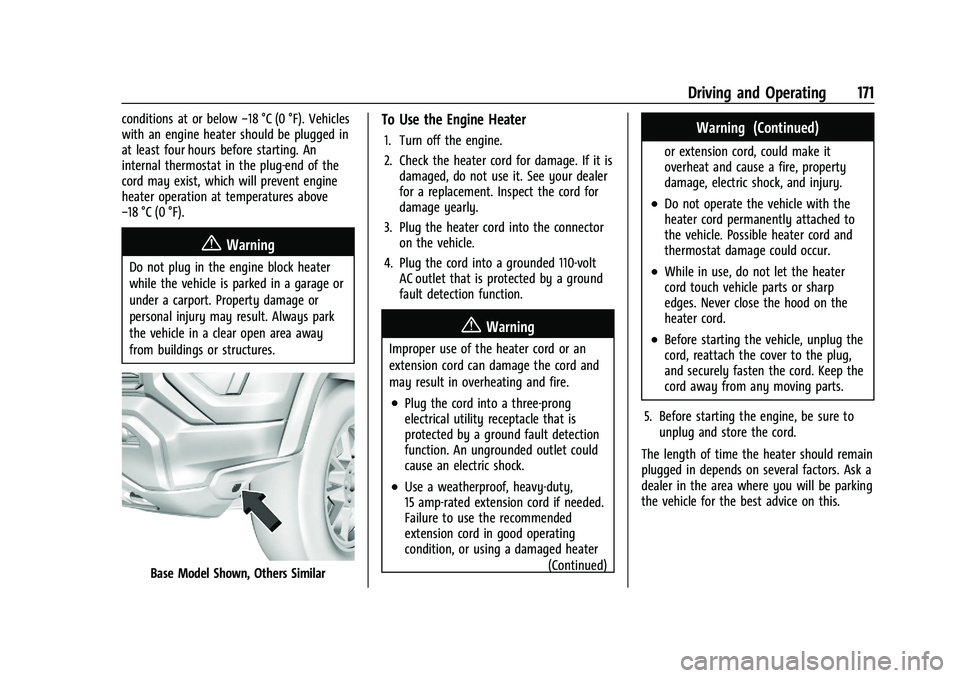
Base Model Shown, Others Similar
To Use the Engine Heater
1. Turn off the engine.
2. Check the heater cord for damage. If it is damaged, do not use it. See your dealer
for a replacement. Inspect the cord for
damage yearly.
3. Plug the heater cord into the connector on the vehicle.
4. Plug the cord into a grounded 110-volt AC outlet that is protected by a ground
fault detection function.
{Warning
Improper use of the heater cord or an
extension cord can damage the cord and
may result in overheating and fire.
.Plug the cord into a three-prong
electrical utility receptacle that is
protected by a ground fault detection
function. An ungrounded outlet could
cause an electric shock.
.Use a weatherproof, heavy-duty,
15 amp-rated extension cord if needed.
Failure to use the recommended
extension cord in good operating
condition, or using a damaged heater
(Continued)
Warning (Continued)
or extension cord, could make it
overheat and cause a fire, property
damage, electric shock, and injury.
.Do not operate the vehicle with the
heater cord permanently attached to
the vehicle. Possible heater cord and
thermostat damage could occur.
.While in use, do not let the heater
cord touch vehicle parts or sharp
edges. Never close the hood on the
heater cord.
.Before starting the vehicle, unplug the
cord, reattach the cover to the plug,
and securely fasten the cord. Keep the
cord away from any moving parts.
5. Before starting the engine, be sure to unplug and store the cord.
The length of time the heater should remain
plugged in depends on several factors. Ask a
dealer in the area where you will be parking
the vehicle for the best advice on this.
Page 173 of 371
GMC Canyon/Canyon Denali Owner Manual (GMNA-Localizing-U.S./Canada/
Mexico-16510661) - 2023 - CRC - 11/29/22
172 Driving and Operating
Retained Accessory Power (RAP)
When the vehicle is turned from on to off,
the following features (if equipped) will
continue to function for up to 10 minutes,
or until the driver door is opened. These
features will also work when the vehicle is
on or in accessory mode:
.Infotainment System
.Power Windows (during RAP this
functionality will be lost when any door
is opened)
.Sunroof (during RAP this functionality will
be lost when any door is opened)
.Auxiliary Power Outlet
.Audio System
.OnStar System
Shifting Into Park
{Warning
Parking on grades with poor traction such
as ice, snow, mud, or gravel may cause
the vehicle to unintentionally move and
could result in injury, death, and/or
vehicle damage. If equipped with
four-wheel drive, use AUTO or 4 (High) to(Continued)
Warning (Continued)
provide additional traction. Be sure to
apply the parking brake. SeeElectric
Parking Brake 0183 and
Four-Wheel Drive 0179.
{Warning
It can be dangerous to get out of the
vehicle if the shift lever is not fully in
P (Park) with the parking brake firmly set.
The vehicle can roll. If you have left the
engine running, the vehicle can move
suddenly. You or others could be injured.
To be sure the vehicle will not move,
even when you are on fairly level ground,
use the steps that follow. With
four-wheel drive, if the transfer case is in
N (Neutral), the vehicle will be free to
roll, even if the shift lever is in P (Park).
Be sure the transfer case is in a drive
gear. If towing a trailer, see Driving
Characteristics and Towing Tips 0227.
1. Hold the brake pedal down, then set the parking brake. See Electric Parking Brake
0 183. 2. Hold the button on the shift lever and
push the lever toward the front of the
vehicle into P (Park).
3. Be sure the transfer case (if equipped) is in a drive gear –not in N (Neutral).
4. Turn the ignition off.
5. Take the remote key with you.
Leaving the Vehicle with the Engine
Running
{Warning
It can be dangerous to leave the vehicle
with the engine running. The vehicle
could move suddenly if the shift lever is
not fully in P (Park) with the parking
brake firmly set.
If you have four-wheel drive and the
transfer case is in N (Neutral), the vehicle
will be free to roll, even if the shift lever
is in P (Park). So be sure the transfer case
is in a drive gear –not in N (Neutral).
And, if you leave the vehicle with the
engine running, it could overheat and
even catch fire. You or others could be
injured. Do not leave the vehicle with the
engine running unless you have to.
Page 207 of 371
GMC Canyon/Canyon Denali Owner Manual (GMNA-Localizing-U.S./Canada/
Mexico-16510661) - 2023 - CRC - 11/29/22
206 Driving and Operating
.Low sun angles cause the camera to not
detect objects, or it is more difficult to
detect objects in the same traffic lane.
.Lighting is poor in the evening or early
morning
.There are multiple changes in brightness
or shadows along the vehicle roadway.
.In a tunnel without the headlamps on,
or in a tunnel when there is a vehicle in
front that does not have its taillamps on.
.Subjected to strong light from opposing
lane traffic in the front of the vehicle,
such as high-beam headlamps from
oncoming traffic.
Accessory Installations and Vehicle
Modifications
Do not install or place any object around
the front camera windshield area that would
obstruct the front camera view.
Do not install objects on top of the vehicle
that overhang and obstruct the front
camera, such as a canoe, kayak, or other
items that can be transported on the
vehicle roof.
Do not modify the hood, headlamps, or fog
lamps, as this may limit the camera’s ability
to detect an object. Cleaning the Sensing System
The camera sensor on the windshield behind
the rearview mirror can become blocked by
snow, ice, dirt, mud, or debris. This area
needs to be cleaned for ACC to operate
properly.
The vehicle headlamps may need to be
cleaned due to dirt, snow, or ice. Objects
that are not illuminated correctly may be
difficult to detect.
If ACC will not operate, regular cruise control
may be available. See
“Switching Between
ACC and Regular Cruise Control” previously
in this section. Always consider driving
conditions before using either cruise control
system.
For cleaning instructions, see “Washing the
Vehicle” underExterior Care 0319.
Driver Assistance Systems
This vehicle may have features that work
together to help avoid crashes or reduce
crash damage while driving, backing, and
parking. Read this entire section before
using these systems.
{Warning
Do not rely on the Driver Assistance
Systems. These systems do not replace
the need for paying attention and driving
safely. You may not hear or see alerts or
warnings provided by these systems.
Failure to use proper care when driving
may result in injury, death, or vehicle
damage. See Defensive Driving 0151.
Under many conditions, these systems
will not:
.Detect children, pedestrians, bicyclists,
or animals.
.Detect vehicles or objects outside the
area monitored by the system.
.Work at all driving speeds.
.Warn you or provide you with enough
time to avoid a crash.
.Work under poor visibility or bad
weather conditions.
.Work if the detection sensor is not
cleaned or is covered by ice, snow,
mud, or dirt. (Continued)
Page 284 of 371
GMC Canyon/Canyon Denali Owner Manual (GMNA-Localizing-U.S./Canada/
Mexico-16510661) - 2023 - CRC - 11/29/22
Vehicle Care 283
FusesUsage
F13 CGM & SDM/AOS –Central
Gateway Module/Sensing
and Diagnostic Module/
Automatic Occupant
Sensing Module
F14 MISCELLANEOUS 2 –
Transmission Control
Module/Transfer Case
Control/Electronic Brake
Control Module/Integrated
Chassis Control Module/
Trailer Interface Module
F15 MISCELLANEOUS 3 –
Exterior Lighting Module/
DC-AC Inverter Module/
Vented Module
F16 –
F17 WCM/DATA LINK CONN –
Wireless Charger Module/
Data Link Connector Fuses
Usage
F18 MISCELLANEOUS 4 –E-Stop/
Driver Mode Switch/
Reflective Light Auxiliary
Display/Sensing and
Diagnostic Module/Inside
Rear View Mirror/Humidity
Sensor
F19 ENGINE CNTRL MODULE –
Engine Control Module
F20 RFA/RPA –Remote
Function Antenna/Park
Assist
AMP –Amplifier
F21 MISC 1 DISPLAYS/VPM –
Video Processing Module/
Display
F22 SUNROOF –Sunroof
F23 –
F24 TRLR BRK CNTRL SW –
Trailer Break Control Switch
F25 AUX USB FLOOR CNSL –
Auxiliary USB Power Outlet
F26 BODY CNTRL MODULE 2 –
Body Control Module 2 Fuses
Usage
F27 DOOR PANEL SW LF (EXPRESS UP/DOWN) –
Door Panel Switch Left
F28 BODY CNTRL MODULE 3 –
Body Control Module 3
F29 ELM 3 –Exterior Lighting
Module 3
F30 FRONT CAMERA –Front
Camera Module
F31 VCU MDL/SPARE –Virtual
Cockpit Unit Module
F32 HTD STR WHL –Heated
Steering Wheel Module
F33 ELM 5 –Exterior Lighting
Module 5
F34 BODY CNTRL MODULE 4 –
Body Control Module 4
F35 DC/DC Converter 2
F36 DC/DC Converter 1 F37 FRT SEATS LMBR SWS –
Seat Lumbar Switch
F38 –
Page 367 of 371
GMC Canyon/Canyon Denali Owner Manual (GMNA-Localizing-U.S./Cana-
da/Mexico-16510661) - 2023 - CRC - 11/29/22
366 Index
R
Radiator . . . . . . . . . . . . . . . . . . . . . . . . . . . . . . . . . 262
RadioAM-FM Radio . . . . . . . . . . . . . . . . . . . . . . . . . . 120
Frequency Statement . . . . . . . . . . . . . . . . . . 346
Reception . . . . . . . . . . . . . . . . . . . . . . . . . . . . . . 122
Satellite . . . . . . . . . . . . . . . . . . . . . . . . . . . . . . . . 122
Reading Lamps . . . . . . . . . . . . . . . . . . . . . . . . . . . 114
Rear Axle . . . . . . . . . . . . . . . . . . . . . . . . . . . . . . . . . . . . 271
Cross Traffic Alert (RCTA) System . . . . . . 214
Locking Axle . . . . . . . . . . . . . . . . . . . . . . . . . . . . 191
Pedestrian Alert . . . . . . . . . . . . . . . . . . . . . . . 213
Seats . . . . . . . . . . . . . . . . . . . . . . . . . . . . . . . . . . . 32
Vision Camera (RVC) . . . . . . . . . . . . . . . . . . . 208
Windows . . . . . . . . . . . . . . . . . . . . . . . . . . . . . . . 22
Rearview Mirrors . . . . . . . . . . . . . . . . . . . . . . . . . 20 Automatic Dimming . . . . . . . . . . . . . . . . . . . . 20
Reclining Seatbacks . . . . . . . . . . . . . . . . . . . . . . . .27
Recognition
Voice . . . . . . . . . . . . . . . . . . . . . . . . . . . . . . . . . . . 127
Recommended Fuel . . . . . . . . . . . . . . . . . . . . . . . . . . . . . . . . . . . . 224
Recommended Fluids and Lubricants . . . . . 332
Records
Maintenance . . . . . . . . . . . . . . . . . . . . . . . . . . . 334
Recreational Vehicle Towing . . . . . . . . . . . . . 316 Reimbursement Program, GM
Mobility . . . . . . . . . . . . . . . . . . . . . . . . . . . . . . . .341
Remote Key . . . . . . . . . . . . . . . . . . . . . . . . . . . . . . . . . . . . . . 7
Key Operation . . . . . . . . . . . . . . . . . . . . . . . . . . . 7
Vehicle Start . . . . . . . . . . . . . . . . . . . . . . . . . . . . . 12
Replacement Parts
Airbags . . . . . . . . . . . . . . . . . . . . . . . . . . . . . . . . . 50
Maintenance . . . . . . . . . . . . . . . . . . . . . . . . . . . 333
Replacing Airbag System . . . . . . . . . . . . . . . . . . . . . . . . . . 50
LATCH System Parts After a Crash . . . . . . 65
Seat Belt System Parts after a
Crash . . . . . . . . . . . . . . . . . . . . . . . . . . . . . . . . . 40
Reporting Safety Defects Canadian Government . . . . . . . . . . . . . . . . . 347
General Motors . . . . . . . . . . . . . . . . . . . . . . . . 347
U.S. Government . . . . . . . . . . . . . . . . . . . . . . . 346
Restraints Where to Put . . . . . . . . . . . . . . . . . . . . . . . . . . . 56
Retained Accessory Power (RAP) . . . . . . . . . . 172
Ride Control Systems
Enhanced Traction System (ETS) . . . . . . . . 191
Roads Driving, Wet . . . . . . . . . . . . . . . . . . . . . . . . . . . 159
Roadside Assistance Program . . . . . . . . . . . . .341
Roof Sunroof . . . . . . . . . . . . . . . . . . . . . . . . . . . . . . . . . 23 Rotation, Tires . . . . . . . . . . . . . . . . . . . . . . . . . . . 296
Routing, Engine Drive Belt . . . . . . . . . . . . . . . 337
Running the Vehicle While Parked . . . . . . . .174
S
Safety
Locks . . . . . . . . . . . . . . . . . . . . . . . . . . . . . . . . . . . . 15
Safety Defects Reporting Canadian Government . . . . . . . . . . . . . . . . . 347
General Motors . . . . . . . . . . . . . . . . . . . . . . . . 347
U.S. Government . . . . . . . . . . . . . . . . . . . . . . . 346
Safety System Check . . . . . . . . . . . . . . . . . . . . . 40
Satellite Radio . . . . . . . . . . . . . . . . . . . . . . . . . . . . 122
Scheduling Appointments . . . . . . . . . . . . . . . . 343
Seat Belts . . . . . . . . . . . . . . . . . . . . . . . . . . . . . . . . . .33
Buckle To Drive . . . . . . . . . . . . . . . . . . . . . . . . . 34
Care . . . . . . . . . . . . . . . . . . . . . . . . . . . . . . . . . . . . 40
Extender . . . . . . . . . . . . . . . . . . . . . . . . . . . . . . . . 39
How to Wear Seat Belts Properly . . . . . . . 34
Lap-Shoulder Belt . . . . . . . . . . . . . . . . . . . . . . . 36
Reminders . . . . . . . . . . . . . . . . . . . . . . . . . . . . . . 87
Replacing after a Crash . . . . . . . . . . . . . . . . . 40
Use During Pregnancy . . . . . . . . . . . . . . . . . . 39
Seats Adjustment, Front . . . . . . . . . . . . . . . . . . . . . . 25
Head Restraints . . . . . . . . . . . . . . . . . . . . . . . . . 24
Heated and Ventilated, Front . . . . . . . . . . . . 31
Lumbar Adjustment, Front . . . . . . . . . . . . . . 28
Page 368 of 371
GMC Canyon/Canyon Denali Owner Manual (GMNA-Localizing-U.S./Cana-
da/Mexico-16510661) - 2023 - CRC - 11/29/22
Index 367
Seats (cont'd)Memory . . . . . . . . . . . . . . . . . . . . . . . . . . . . . . . . 28
Power Adjustment, Front . . . . . . . . . . . . . . . 26
Rear . . . . . . . . . . . . . . . . . . . . . . . . . . . . . . . . . . . . 32
Reclining Seatbacks . . . . . . . . . . . . . . . . . . . . . 27
Underseat Storage . . . . . . . . . . . . . . . . . . . . . . 70
Securing Child Restraints . . . . . . . . . . . . . . .65, 67
Security
Light . . . . . . . . . . . . . . . . . . . . . . . . . . . . . . . . . . . . 97
OnStar . . . . . . . . . . . . . . . . . . . . . . . . . . . . . . . . . 351
Vehicle . . . . . . . . . . . . . . . . . . . . . . . . . . . . . . . . . 18
Vehicle Alarm . . . . . . . . . . . . . . . . . . . . . . . . . . . 18
Service . . . . . . . . . . . . . . . . . . . . . . . . . . . . . . . . . . . 148 Accessories and Modifications . . . . . . . . . 253
Climate Control System . . . . . . . . . . . . . . . . 143
Doing Your Own Work . . . . . . . . . . . . . . . . . 254
Electric Parking Brake Light . . . . . . . . . . . . . 92
Maintenance Records . . . . . . . . . . . . . . . . . . 334
Maintenance, General Information . . . . . 327
Parts Identification . . . . . . . . . . . . . . . . . . . . . 335
Scheduling Appointments . . . . . . . . . . . . . . 343
Services Special Application . . . . . . . . . . . . . . . . . . . . . 331
Servicing the Airbag . . . . . . . . . . . . . . . . . . . . . . 49
Settings . . . . . . . . . . . . . . . . . . . . . . . . . . . . . . . . . . . 135
Shifting Into Park . . . . . . . . . . . . . . . . . . . . . . . . . . . . . . . 172
Out of Park . . . . . . . . . . . . . . . . . . . . . . . . . . . . . 173 Side Blind Zone Alert (SBZA) . . . . . . . . . . . . . 220
Signals, Turn and Lane-Change . . . . . . . . . . . . 112
Software Updates . . . . . . . . . . . . . . . . . . . . . . . . 120
Special Application Services . . . . . . . . . . . . . . . 331
Specifications and Capacities . . . . . . . . . . . . . 336
Speedometer . . . . . . . . . . . . . . . . . . . . . . . . . . . . . 82
Start Assist, Hill . . . . . . . . . . . . . . . . . . . . . . . . . . .185
Start Vehicle, Remote . . . . . . . . . . . . . . . . . . . . . . 12
Starting the Engine . . . . . . . . . . . . . . . . . . . . . . 169
Status
Vehicle . . . . . . . . . . . . . . . . . . . . . . . . . . . . . . . . 103
Steering . . . . . . . . . . . . . . . . . . . . . . . . . . . . . . . . . . 152 Assist, Blind Zone (BZSA) . . . . . . . . . . . . . . 222
Heated Wheel . . . . . . . . . . . . . . . . . . . . . . . . . . 73
Wheel Adjustment . . . . . . . . . . . . . . . . . . . . . . 73
Wheel Controls . . . . . . . . . . . . . . . . . . . . . . . . . 118
Stop/Start System . . . . . . . . . . . . . . . . . . . . . . . 170
Stoplamps and Back-up Lamps Bulb Replacement . . . . . . . . . . . . . . . . . . . . . . 274
Storage Center Console . . . . . . . . . . . . . . . . . . . . . . . . . . 71
Compartments . . . . . . . . . . . . . . . . . . . . . . . . . . 70
Cupholders . . . . . . . . . . . . . . . . . . . . . . . . . . . . . 70
Glove Box . . . . . . . . . . . . . . . . . . . . . . . . . . . . . . 70
Tailgate . . . . . . . . . . . . . . . . . . . . . . . . . . . . . . . . . 70
Underseat . . . . . . . . . . . . . . . . . . . . . . . . . . . . . . 70
Struts Gas . . . . . . . . . . . . . . . . . . . . . . . . . . . . . . . . . . . . 272 Stuck Vehicle . . . . . . . . . . . . . . . . . . . . . . . . . . . . . 161
Sun Visors . . . . . . . . . . . . . . . . . . . . . . . . . . . . . . . . .22
Sunroof . . . . . . . . . . . . . . . . . . . . . . . . . . . . . . . . . . . .23
Surround Vision System . . . . . . . . . . . . . . . . . 209
Symbols . . . . . . . . . . . . . . . . . . . . . . . . . . . . . . . . . . . .3
Navigation . . . . . . . . . . . . . . . . . . . . . . . . . . . . . 125
System
Airbag . . . . . . . . . . . . . . . . . . . . . . . . . . . . . . . . . . 41
Brake Pad Life . . . . . . . . . . . . . . . . . . . . . . . . . 267
Driver Assistance . . . . . . . . . . . . . . . . . . . . . . 206
Engine Air Filter Life . . . . . . . . . . . . . . . . . . . 260
Forward Collision Alert (FCA) . . . . . . . . . . . 215
Global Positioning . . . . . . . . . . . . . . . . . . . . . 126
Infotainment . . . . . . . . . . . . . . . . . . . . . . . . . . . 349
Rear Cross Traffic Alert . . . . . . . . . . . . . . . . 214
Surround Vision . . . . . . . . . . . . . . . . . . . . . . . . 209
T
Tachometer . . . . . . . . . . . . . . . . . . . . . . . . . . . . . . . 82
Tailgate . . . . . . . . . . . . . . . . . . . . . . . . . . . . . . . . . . . .16Storage . . . . . . . . . . . . . . . . . . . . . . . . . . . . . . . . . 70
Taillamps Bulb Replacement . . . . . . . . . . . . . . . . . . . . . . 274
Teen Driver . . . . . . . . . . . . . . . . . . . . . . . . . . . . . . . 137
Text Telephone (TTY) Users . . . . . . . . . . . . . . 340
Theft-Deterrent Systems . . . . . . . . . . . . . . . . . . .19 Immobilizer . . . . . . . . . . . . . . . . . . . . . . . . . . . . . 19
Time . . . . . . . . . . . . . . . . . . . . . . . . . . . . . . . . . . . . . . .75