stop start GMC CANYON 2023 User Guide
[x] Cancel search | Manufacturer: GMC, Model Year: 2023, Model line: CANYON, Model: GMC CANYON 2023Pages: 371, PDF Size: 7.41 MB
Page 102 of 371
GMC Canyon/Canyon Denali Owner Manual (GMNA-Localizing-U.S./Canada/
Mexico-16510661) - 2023 - CRC - 11/30/22
Instruments and Controls 101
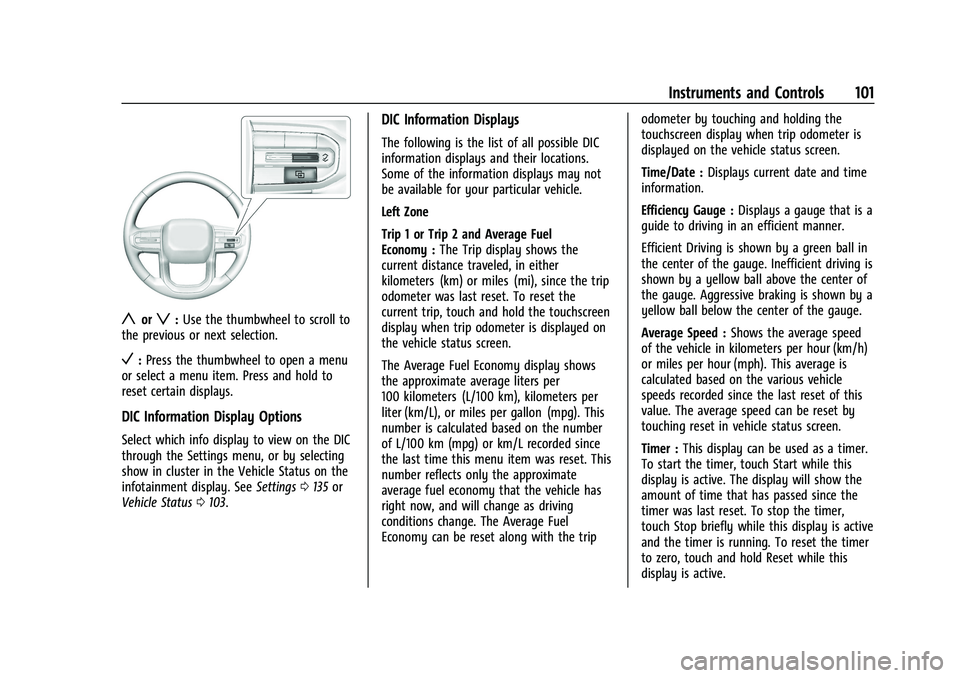
yorz:Use the thumbwheel to scroll to
the previous or next selection.
V: Press the thumbwheel to open a menu
or select a menu item. Press and hold to
reset certain displays.
DIC Information Display Options
Select which info display to view on the DIC
through the Settings menu, or by selecting
show in cluster in the Vehicle Status on the
infotainment display. See Settings0135 or
Vehicle Status 0103.
DIC Information Displays
The following is the list of all possible DIC
information displays and their locations.
Some of the information displays may not
be available for your particular vehicle.
Left Zone
Trip 1 or Trip 2 and Average Fuel
Economy : The Trip display shows the
current distance traveled, in either
kilometers (km) or miles (mi), since the trip
odometer was last reset. To reset the
current trip, touch and hold the touchscreen
display when trip odometer is displayed on
the vehicle status screen.
The Average Fuel Economy display shows
the approximate average liters per
100 kilometers (L/100 km), kilometers per
liter (km/L), or miles per gallon (mpg). This
number is calculated based on the number
of L/100 km (mpg) or km/L recorded since
the last time this menu item was reset. This
number reflects only the approximate
average fuel economy that the vehicle has
right now, and will change as driving
conditions change. The Average Fuel
Economy can be reset along with the trip odometer by touching and holding the
touchscreen display when trip odometer is
displayed on the vehicle status screen.
Time/Date :
Displays current date and time
information.
Efficiency Gauge : Displays a gauge that is a
guide to driving in an efficient manner.
Efficient Driving is shown by a green ball in
the center of the gauge. Inefficient driving is
shown by a yellow ball above the center of
the gauge. Aggressive braking is shown by a
yellow ball below the center of the gauge.
Average Speed : Shows the average speed
of the vehicle in kilometers per hour (km/h)
or miles per hour (mph). This average is
calculated based on the various vehicle
speeds recorded since the last reset of this
value. The average speed can be reset by
touching reset in vehicle status screen.
Timer : This display can be used as a timer.
To start the timer, touch Start while this
display is active. The display will show the
amount of time that has passed since the
timer was last reset. To stop the timer,
touch Stop briefly while this display is active
and the timer is running. To reset the timer
to zero, touch and hold Reset while this
display is active.
Page 128 of 371
GMC Canyon/Canyon Denali Owner Manual (GMNA-Localizing-U.S./Canada/
Mexico-16510661) - 2023 - CRC - 11/29/22
Infotainment System 127
.The surface streets run parallel to a
freeway.
.The vehicle has been transferred by a
vehicle carrier or a ferry.
.The current position calibration is set
incorrectly.
.The vehicle is traveling at high speed.
.The vehicle changes directions more than
once, or the vehicle is turning on a turn
table in a parking lot.
.The vehicle is entering and/or exiting a
parking lot, garage, or a lot with a roof.
.The GPS signal is not received.
.A roof carrier is installed on the vehicle.
.Tire chains are installed on the vehicle.
.The tires are replaced or worn.
.The tire pressure for the tires is incorrect.
.This is the first navigation use after the
map data is updated.
.The 12-volt battery has been disconnected
for several days.
.The vehicle is driving in heavy traffic
where driving is at low speeds, and the
vehicle is stopped and started repeatedly.
Problems with Route Guidance
Inappropriate route guidance can occur
under one or more of the following
conditions:
.The turn was not made on the road
indicated.
.Route guidance might not be available
when using automatic rerouting for the
next right or left turn.
.The route might not be changed when
using automatic rerouting.
.There is no route guidance when turning
at an intersection.
.Automatic rerouting might display a route
returning to the set waypoint if heading
for a destination without passing through
a set waypoint.
.The route prohibits the entry of a vehicle
due to a regulation by time or season or
any other regulation which may be given.
.Some routes might not be searched.
.The route to the destination might not be
shown if there are new roads, if roads
have recently changed, or if certain roads
are not listed in Maps.To recalibrate the vehicle's position on the
map, park with the vehicle running for two
to five minutes, until the vehicle position
updates. Make sure the vehicle is parked in
a location that is safe and has a clear view
of the sky and away from large
obstructions.
Voice Recognition
If equipped, Google Assistant allows for
hands-free use of media and messaging,
navigation and climate control functionality
in the vehicle. This feature can be started by
pressing
gon the steering wheel, touching
Google Assistant on the Home screen, or by
using the wake up words “Hey Google”or
“OK Google.”
However, not all features within these areas
are supported by voice commands and
requires the user to have a valid data
subscription plan in order to use some of
the Google Assistant features.
Using Voice Recognition
Voice recognition becomes available once
the system is initialized. This begins when
the vehicle is turned on. Initialization may
take a few moments.
Page 138 of 371
GMC Canyon/Canyon Denali Owner Manual (GMNA-Localizing-U.S./Canada/
Mexico-16510661) - 2023 - CRC - 11/29/22
Infotainment System 137
Google
This menu allows adjustment of the Google
settings.
Teen Driver
If equipped, this allows multiple keys to be
registered for beginner drivers to encourage
safe driving habits. When the vehicle is
started with a Teen Driver key, it will
automatically activate certain safety
systems, allow setting of some features, and
limit the use of others. The Report Card will
record vehicle data about driving behavior
that can be viewed later. When the vehicle
is started with a registered key, the Driver
Information Center (DIC) displays a message
that Teen Driver is active.
To access:1. Touch Settings on the Home Page, then touch Vehicle, and then Teen Driver.
2. Create a Personal Identification Number (PIN) by choosing a four-digit PIN.
Re-enter the PIN to confirm. To change
the PIN, touch Change PIN.
The PIN is required to:
.Set up/Add or remove keys.
.Change Teen Driver settings.
.Change or clear the Teen Driver PIN.
.Access or delete Report Card data.
Set up/Add keys to activate Teen Driver and
assign restrictions to the key:
Any vehicle key can be registered, up to a
maximum of eight keys. Label the key to
tell it apart from the other keys.
For a pushbutton start system: 1. Start the vehicle.
2. For automatic transmissions, the vehicle must be in P (Park). For manual
transmissions, the vehicle must be
stopped with the parking brake set.
3. From the Settings menu, touch Vehicle and then Teen Driver.
4. Enter the PIN.
5. Place the remote key you wish to register in the transmitter pocket. The
key does not need to be the one that
started the vehicle. See Remote Key
Operation 07for transmitter pocket
location.
6. From the Teen Driver menu, touch Setup Keys or Add/Remove Teen Driver Keys.
.If the remote key has not previously
been registered, the option to add
the key displays. Touch Add and a confirmation message displays. Teen
Driver restrictions will be applied
whenever this remote key is used to
operate the vehicle.
.If the remote key has already been
registered, the option to remove the
key displays. If Remove is touched,
the remote key is no longer
registered. A confirmation message
displays, and Teen Driver restrictions
will not be applied if this remote key
is used to operate the vehicle.
In vehicles with a pushbutton start system,
if a Teen Driver and a non-Teen Driver key
are both present at start up, the vehicle will
recognize the non-Teen Driver key to start
the vehicle. The Teen Driver settings will not
be active.
For a keyed ignition system: 1. Start the vehicle.
2. For automatic transmissions, the vehicle must be in P (Park). For manual
transmissions, the vehicle must be
stopped with the parking brake set.
3. From the Settings menu, touch Vehicle and then Teen Driver.
4. Enter the PIN.
Page 150 of 371
GMC Canyon/Canyon Denali Owner Manual (GMNA-Localizing-U.S./Canada/
Mexico-16510661) - 2023 - CRC - 11/29/22
Driving and Operating 149
Driving and Operating
Driving Information
Driving for Better Fuel Economy . . . . . . . 150
Distracted Driving . . . . . . . . . . . . . . . . . . . . . 150
Defensive Driving . . . . . . . . . . . . . . . . . . . . . . 151
Impaired Driving . . . . . . . . . . . . . . . . . . . . . . . 151
Control of a Vehicle . . . . . . . . . . . . . . . . . . . . 151
Braking . . . . . . . . . . . . . . . . . . . . . . . . . . . . . . . . 151
Steering . . . . . . . . . . . . . . . . . . . . . . . . . . . . . . . 152
Off-Road Recovery . . . . . . . . . . . . . . . . . . . . . 152
Loss of Control . . . . . . . . . . . . . . . . . . . . . . . . . 153
Off-Road Driving . . . . . . . . . . . . . . . . . . . . . . . 153
Off-Road App . . . . . . . . . . . . . . . . . . . . . . . . . . 158
Driving on Wet Roads . . . . . . . . . . . . . . . . . 159
Hill and Mountain Roads . . . . . . . . . . . . . . 159
Winter Driving . . . . . . . . . . . . . . . . . . . . . . . . 160
If the Vehicle Is Stuck . . . . . . . . . . . . . . . . . . 161
Vehicle Load Limits . . . . . . . . . . . . . . . . . . . . 162
Truck-Camper Loading Information . . . . . 167
Starting and Operating
New Vehicle Break-In . . . . . . . . . . . . . . . . . . 167
Ignition Positions . . . . . . . . . . . . . . . . . . . . . . 167
Starting the Engine . . . . . . . . . . . . . . . . . . . . 169
Stop/Start System . . . . . . . . . . . . . . . . . . . . . 170
Engine Heater . . . . . . . . . . . . . . . . . . . . . . . . . 170
Retained Accessory Power (RAP) . . . . . . . 172
Shifting Into Park . . . . . . . . . . . . . . . . . . . . . . 172
Shifting out of Park . . . . . . . . . . . . . . . . . . . . 173Parking over Things That Burn . . . . . . . . . 173
Active Fuel Management . . . . . . . . . . . . . . 173
Extended Parking . . . . . . . . . . . . . . . . . . . . . . 174
Engine Exhaust
Engine Exhaust . . . . . . . . . . . . . . . . . . . . . . . . 174
Running the Vehicle While Parked . . . . . 174
Automatic Transmission
Automatic Transmission . . . . . . . . . . . . . . . 175
Manual Mode . . . . . . . . . . . . . . . . . . . . . . . . . . 177
Tow/Haul Mode . . . . . . . . . . . . . . . . . . . . . . . 178
Drive Systems
Four-Wheel Drive . . . . . . . . . . . . . . . . . . . . . . 179
Brakes
Antilock Brake System (ABS) . . . . . . . . . . . 183
Electric Parking Brake . . . . . . . . . . . . . . . . . . 183
Brake Assist . . . . . . . . . . . . . . . . . . . . . . . . . . . 184
Hill Start Assist (HSA) . . . . . . . . . . . . . . . . . . 185
Ride Control Systems
Traction Control/Electronic Stability
Control . . . . . . . . . . . . . . . . . . . . . . . . . . . . . . 185
Hill Descent Control (HDC) . . . . . . . . . . . . . 187
Driver Mode Control . . . . . . . . . . . . . . . . . . . 187
Limited-Slip Differential . . . . . . . . . . . . . . . . 191
Locking Rear Axle . . . . . . . . . . . . . . . . . . . . . . 191
Locking Front Axle . . . . . . . . . . . . . . . . . . . . . 192
Cruise Control
Cruise Control . . . . . . . . . . . . . . . . . . . . . . . . . 194
Adaptive Cruise Control (Camera) . . . . . . 196
Driver Assistance Systems
Driver Assistance Systems . . . . . . . . . . . . . 206
Assistance Systems for Parking or Backing . . . . . . . . . . . . . . . . . . . . . . . . . . . . . . 208
Rear Vision Camera (RVC) . . . . . . . . . . . . . 208
Surround Vision System . . . . . . . . . . . . . . . 209
Park Assist . . . . . . . . . . . . . . . . . . . . . . . . . . . . . 213
Rear Pedestrian Alert . . . . . . . . . . . . . . . . . . 213
Rear Cross Traffic Alert (RCTA) System . . . . . . . . . . . . . . . . . . . . . . . . . . . . . . 214
Assistance Systems for Driving . . . . . . . . 215
Forward Collision Alert (FCA) System . . . . . . . . . . . . . . . . . . . . . . . . . . . . . . . 215
Automatic Emergency Braking (AEB) . . . 217
Front Pedestrian Braking (FPB)
System . . . . . . . . . . . . . . . . . . . . . . . . . . . . . . 218
Side Blind Zone Alert (SBZA) . . . . . . . . . . 220
Lane Change Alert (LCA) . . . . . . . . . . . . . . . 220
Blind Zone Steering Assist (BZSA) . . . . . . 222
Lane Keep Assist (LKA) . . . . . . . . . . . . . . . . . 222
Fuel
Top Tier Fuel . . . . . . . . . . . . . . . . . . . . . . . . . . 224
Recommended Fuel . . . . . . . . . . . . . . . . . . . . 224
Prohibited Fuels . . . . . . . . . . . . . . . . . . . . . . . 225
Fuels in Foreign Countries . . . . . . . . . . . . . 225
Fuel Additives . . . . . . . . . . . . . . . . . . . . . . . . . 225
Page 151 of 371
GMC Canyon/Canyon Denali Owner Manual (GMNA-Localizing-U.S./Canada/
Mexico-16510661) - 2023 - CRC - 11/29/22
150 Driving and Operating
Filling the Tank . . . . . . . . . . . . . . . . . . . . . . . . 225
Filling a Portable Fuel Container . . . . . . . 227
Trailer Towing
General Towing Information . . . . . . . . . . . 227
Driving Characteristics andTowing Tips . . . . . . . . . . . . . . . . . . . . . . . . . . 227
Trailer Towing . . . . . . . . . . . . . . . . . . . . . . . . . 231
Towing Equipment . . . . . . . . . . . . . . . . . . . . 236
Trailer Sway Control (TSC) . . . . . . . . . . . . . 242
Trailering App . . . . . . . . . . . . . . . . . . . . . . . . . 243
Conversions and Add-Ons
Add-On Electrical Equipment . . . . . . . . . . . 251
Driving Information
Driving for Better Fuel Economy
Driving habits can affect fuel mileage. Here
are some driving tips to get the best fuel
economy possible:
.Set the climate controls to the desired
temperature after the engine is started,
or turn them off when not required.
.Avoid fast starts and accelerate smoothly.
.Brake gradually and avoid abrupt stops.
.Avoid idling the engine for long periods
of time.
.When road and weather conditions are
appropriate, use cruise control.
.Always follow posted speed limits or
drive more slowly when conditions
require.
.Keep vehicle tires properly inflated.
.Combine several trips into a single trip.
.Replace the vehicle's tires with the same
TPC Spec number molded into the tire's
sidewall near the size.
.Follow recommended scheduled
maintenance.
Distracted Driving
Distraction comes in many forms and can
take your focus from the task of driving.
Exercise good judgment and do not let other
activities divert your attention away from
the road. Many local governments have
enacted laws regarding driver distraction.
Become familiar with the local laws in
your area.
To avoid distracted driving, keep your eyes
on the road, keep your hands on the
steering wheel, and focus your attention on
driving.
.Do not use a phone in demanding driving
situations. Use a hands-free method to
place or receive necessary phone calls.
.Watch the road. Do not read, take notes,
or look up information on phones or
other electronic devices.
.Designate a front seat passenger to
handle potential distractions.
.Become familiar with vehicle features
before driving, such as programming
favorite radio stations and adjusting
climate control and seat settings. Program
all trip information into any navigation
device prior to driving.
Page 154 of 371
GMC Canyon/Canyon Denali Owner Manual (GMNA-Localizing-U.S./Canada/
Mexico-16510661) - 2023 - CRC - 11/29/22
Driving and Operating 153
2. Turn the steering wheel aboutone-eighth of a turn, until the right front
tire contacts the pavement edge.
3. Turn the steering wheel to go straight down the roadway.
Loss of Control
Skidding
There are three types of skids that
correspond to the vehicle's three control
systems:
.Braking Skid —wheels are not rolling.
.Steering or Cornering Skid —too much
speed or steering in a curve causes tires
to slip and lose cornering force.
.Acceleration Skid —too much throttle
causes the driving wheels to spin.
Defensive drivers avoid most skids by taking
reasonable care suited to existing conditions,
and by not overdriving those conditions. But
skids are always possible.
If the vehicle starts to slide, follow these
suggestions:
.Ease your foot off the accelerator pedal
and steer the way you want the vehicle
to go. The vehicle may straighten out. Be
ready for a second skid if it occurs.
.Slow down and adjust your driving
according to weather conditions. Stopping
distance can be longer and vehicle control
can be affected when traction is reduced
by water, snow, ice, gravel, or other
material on the road. Learn to recognize
warning clues —such as enough water,
ice, or packed snow on the road to make
a mirrored surface —and slow down
when you have any doubt.
.Try to avoid sudden steering, acceleration,
or braking, including reducing vehicle
speed by shifting to a lower gear. Any
sudden changes could cause the tires to
slide.
Remember: Antilock brakes help avoid only
the braking skid.
Off-Road Driving
Four-wheel-drive vehicles can be used for
off-road driving. Vehicles without four-wheel
drive and vehicles not equipped with All
Terrain (AT) or On-Off Road (OOR) tires must
not be driven off-road except on a level,
solid surface. For contact information about
the original equipment tires, see the
warranty manual.
One of the best ways for successful off-road
driving is to control the speed.
{Warning
When driving off-road, bouncing and
quick changes in direction can easily
throw you out of position. This could
cause you to lose control and crash. You
and your passengers should always wear
seat belts.
Off-Road Vehicle Features
If equipped, the following off-road features
may be available:
.Air Down Mode: Allows the driver to set
a custom tire pressure for off-road driving.
See Tire Pressure Monitor Operation
0 292.
.Underbody Camera System: Provides a
view of the area underneath the vehicle
to avoid obstacles during off-roading
events. See Surround Vision System
0 209.
.Off-Road App: Provides access to off-road
performance data and to on-screen
auxiliary switches for controlling vehicle
accessories. See Off-Road App0158.
Page 156 of 371
GMC Canyon/Canyon Denali Owner Manual (GMNA-Localizing-U.S./Canada/
Mexico-16510661) - 2023 - CRC - 11/29/22
Driving and Operating 155
.D (Drive) can be used when driving on
steep hills. If the transmission shifts too
often, move the shift lever to L (Manual
Mode) and choose an appropriate low
gear for current driving conditions. See
Manual Mode0177.
.When possible, drive straight up or down
the hill.
.Slow down when approaching the top of
the hill.
{Warning
Driving to the top of a hill at high speed
can cause a crash. There could be a
drop-off, embankment, cliff, or even
another vehicle. You could be seriously
injured or killed. As you near the top of a
hill, slow down and stay alert.
.Never go downhill forward or backward
with the transmission in N (Neutral). The
brakes could overheat and you could lose
control.
{Warning
If the vehicle has the two-speed
automatic or electronic transfer case,
shifting the transfer case to N (Neutral)
can cause your vehicle to roll even if the
transmission is in P (Park). This is because
the N (Neutral) position on the transfer
case overrides the transmission. You or
someone else could be injured. If leaving
the vehicle, set the parking brake and
shift the transmission to P (Park). Shift
the transfer case to any position but
N (Neutral).
.When driving down a hill, keep the
vehicle headed straight down. Use a low
gear because the engine will work with
the brakes to slow the vehicle and help
keep the vehicle under control.
{Warning
Heavy braking when going down a hill
can cause your brakes to overheat and
fade. This could cause loss of control and
you or others could be injured or killed.
(Continued)
Warning (Continued)
Apply the brakes lightly when descending
a hill and use a low gear to keep vehicle
speed under control.
.Avoid turns that take the vehicle across
the incline of the hill. Driving across an
incline puts more weight on the downhill
wheels, which could cause a downhill
slide or a rollover.
.Loose gravel, muddy spots, or even wet
grass can cause the tires to slip sideways,
downhill. If the vehicle slips sideways, it
can hit something and potentially
roll over.
.Hidden obstacles can make the steepness
of the incline more severe. If a rock is
driven across with the uphill wheels, or if
the downhill wheels drop into a rut or
depression, the vehicle can tilt even more.
.If driving across an incline is not
avoidable and the vehicle starts to slide,
turn downhill. This should help straighten
out the vehicle and prevent side slipping.
If the vehicle stalls on a hill: 1. Apply the brakes to stop the vehicle, and then apply the parking brake.
Page 157 of 371
GMC Canyon/Canyon Denali Owner Manual (GMNA-Localizing-U.S./Canada/
Mexico-16510661) - 2023 - CRC - 11/29/22
156 Driving and Operating
2. Shift into P (Park) and then restart theengine.
.If driving uphill when the vehicle
stalls, shift to R (Reverse), release the
parking brake, and back
straight down.
.Never try to turn the vehicle around.
If the hill is steep enough to stall the
vehicle, it is steep enough to cause it
to roll over.
.If you cannot make it up the hill,
back straight down the hill.
.Never back down a hill in N (Neutral)
using only the brake. The vehicle can
roll backward quickly and you could
lose control.
.If driving downhill when the vehicle
stalls, shift to a lower gear, release
the parking brake, and drive straight
down the hill.
3. If the vehicle cannot be restarted after stalling, set the parking brake, shift into
P (Park), and turn the vehicle off.
3.1. Leave the vehicle and seek help.
3.2. Stay clear of the path the vehicle would take if it rolled downhill.
{Warning
Getting out of the vehicle on the
downhill side when stopped across an
incline is dangerous. If the vehicle rolls
over, you could be crushed or killed.
Always get out on the uphill side of the
vehicle and stay well clear of the
rollover path.
Driving in Mud, Sand, Snow, or Ice
Use a low gear when driving in mud —the
deeper the mud, the lower the gear. Keep
the vehicle moving to avoid getting stuck.
See Manual Mode 0177.
Traction changes when driving on sand. On
loose sand, such as on beaches or sand
dunes, the tires tend to sink into the sand.
This affects steering, accelerating, and
braking. Drive at a reduced speed and avoid
sharp turns or abrupt maneuvers.
Traction is reduced on hard packed snow
and ice and it is easy to lose control. Reduce
vehicle speed when driving on hard packed
snow and ice.
{Warning
Driving on frozen lakes, ponds, or rivers
can be dangerous. Ice conditions vary
greatly and the vehicle could fall through
the ice; you and your passengers could
drown. Drive your vehicle on safe
surfaces only.
Water Fording
Your vehicle is capable of driving through or
across deeper water depending on vehicle
trim level as follows:
.AT4, Elevation, and Denali –Up to
66 cm (26 in)
.AT4X –Up to 71 cm (28 in)
Before entering any water, determine the
water depth. Enter the water slowly. As
water depth increases, reduce the vehicle
speed to prevent potential vehicle damage
or loss of control.
{Warning
Driving through rushing water can be
dangerous. Deep water can sweep your
vehicle downstream and you and your
passengers could drown. If it is only (Continued)
Page 158 of 371
GMC Canyon/Canyon Denali Owner Manual (GMNA-Localizing-U.S./Canada/
Mexico-16510661) - 2023 - CRC - 11/29/22
Driving and Operating 157
Warning (Continued)
shallow water, it can still wash away the
ground from under your tires. Traction
could be lost, and the vehicle could roll
over. Do not drive through rushing water.
Caution
Do not drive through standing water if it
is deep enough to cover the wheel hubs,
axles, or exhaust pipe. Deep water can
damage the axle and other vehicle parts.
If the standing water is not too deep, drive
through it slowly. At faster speeds, water
can get into the engine and cause it to stall.
Stalling can occur if the exhaust pipe is
under water.
Do not turn off the ignition when driving
through water. If the exhaust pipe is under
water, the engine will not start.
Always drive in the direction of waves.
Avoid oncoming vehicles as they will
increase the water depth hitting your
vehicle. Be aware of submerged obstacles as they
can damage your vehicle or cause loss of
control.
Never open the vehicle doors while in the
water.
When going through water, the brakes get
wet and it may take longer to stop. After
exiting the water, repeatedly and gently
apply the brakes to dry them off and
restore effectiveness. See
Driving on Wet
Roads 0159.
After Driving Your Vehicle Off-Road
Be sure to switch out of Off-Road Mode or
Terrain Mode on your Driver Mode Control
to return to normal driving. See Driver Mode
Control 0187.
Remove any brush or debris that has
collected on the underbody or chassis,
or under the hood. Clean the lens of the
underbody camera. These accumulations can
be a fire hazard.
After operation in mud or sand, have the
brake linings cleaned and checked. These
substances can cause glazing and uneven
braking. Check the body structure, driveline, steering,
suspension, wheels, tires, and exhaust
system for damage, and check the fuel lines
and cooling system for any leakage.
{Warning
Lifting a vehicle and getting under it to
do maintenance or repairs is dangerous
without the appropriate safety equipment
and training. If a jack is provided with
the vehicle, it is designed only for
changing a flat tire. If it is used for
anything else, you or others could be
badly injured or killed if the vehicle slips
off the jack. If a jack is provided with the
vehicle, only use it for changing a
flat tire.
The extreme conditions of off-road driving
require more frequent maintenance service.
See "Severe Conditions Requiring More
Frequent Maintenance" and "Additional
Required Services —Severe Service" on
Maintenance Schedule 0328.
Page 162 of 371
GMC Canyon/Canyon Denali Owner Manual (GMNA-Localizing-U.S./Canada/
Mexico-16510661) - 2023 - CRC - 11/29/22
Driving and Operating 161
Warning (Continued)
If the vehicle is stuck in snow:
.Clear snow from the base of the
vehicle, especially any blocking the
exhaust pipe.
.Open a window about 5 cm (2 in) on
the vehicle side that is away from the
wind, to bring in fresh air.
.Fully open the air outlets on or under
the instrument panel.
.Adjust the climate control system to
circulate the air inside the vehicle and
set the fan speed to the highest
setting. See“Climate Control Systems.”
For more information about CO, see
Engine Exhaust 0174.
To save fuel, run the engine for short
periods to warm the vehicle and then shut
the engine off and partially close the
window. Moving about to keep warm also
helps.
If it takes time for help to arrive, when
running the engine, push the accelerator
pedal slightly so the engine runs faster than
the idle speed. This keeps the battery charged to restart the vehicle and to signal
for help with the headlamps. Do this as
little as possible, to save fuel.
If the Vehicle Is Stuck
Slowly and cautiously spin the wheels to
free the vehicle when stuck in sand, mud,
ice, or snow. See
“Rocking the Vehicle to Get
It Out” later in this section.
If equipped, the front and rear axles may be
locked to improve traction. See Locking Front
Axle 0192 and
Locking Rear Axle 0191.
The Traction Control System (TCS) can often
help to free a stuck vehicle. See Traction
Control/Electronic Stability Control 0185.
If TCS cannot free the vehicle, see “Rocking
the Vehicle to Get it Out” following.
{Warning
If the vehicle's tires spin at high speed,
they can explode, and you or others
could be injured. The vehicle can
overheat, causing an engine compartment
fire or other damage. Spin the wheels as
little as possible and avoid going above
56 km/h (35 mph). For information about using tire chains on
the vehicle, see
Tire Chains0302.
Rocking the Vehicle to Get It Out
Turn the steering wheel left and right to
clear the area around the front wheels. For
four-wheel-drive vehicles, shift into
Four-Wheel Drive High. Turn the TCS off.
Shift back and forth between R (Reverse) and
a forward gear, spinning the wheels as little
as possible. To prevent transmission wear,
wait until the wheels stop spinning before
shifting gears. Slowly spinning the wheels in
the forward and reverse directions causes a
rocking motion that could free the vehicle.
If that does not get the vehicle out after a
few tries, it might need to be towed out.
See Transporting a Disabled Vehicle 0314.
Recovery hooks can be used, if the vehicle
has them.
Recovery Hooks
{Warning
Never pull on recovery hooks from the
side. The hooks could break and you and
others could be injured. When using
recovery hooks, always pull the vehicle
from the front.