brake light GMC CANYON 2023 Owner's Manual
[x] Cancel search | Manufacturer: GMC, Model Year: 2023, Model line: CANYON, Model: GMC CANYON 2023Pages: 371, PDF Size: 7.41 MB
Page 187 of 371
GMC Canyon/Canyon Denali Owner Manual (GMNA-Localizing-U.S./Canada/
Mexico-16510661) - 2023 - CRC - 11/29/22
186 Driving and Operating
The indicator light for both systems is in the
instrument cluster. This light:
.Flashes when TCS is limiting wheel spin
.Flashes when ESC is activated
.Turns on and stays on when either
system is not working
See Traction Control System (TCS)/Electronic
Stability Control Light 094.
If either system fails to turn on or to
activate, a message displays in the Driver
Information Center (DIC), and
dcomes on
and stays on to indicate that the system is
inactive and is not assisting the driver in
maintaining control. Adjust driving
accordingly.
If
dcomes on and stays on:
1. Stop the vehicle.
2. Turn the vehicle off and wait 15 seconds.
3. Start the vehicle.
4. Drive the vehicle.
If the above steps does not remove
d, see
your dealer as soon as possible.
Turning the Systems Off and On
Caution
Do not repeatedly brake or accelerate
heavily when TCS is off. The vehicle
driveline could be damaged.
To turn Traction (TCS) on and off, in the
controls app on the infotainment home
screen, select Controls > DRIVE & PARK >
Traction Control. To turn ESC on or off,
select
Tnext to the Traction Control menu.
The following options appear:
.Traction Control Off
.ESC Off and Traction Control Off
.ESC On and Traction Control On
.Traction Control and ESC On
The traction control off light
idisplays in
the instrument cluster when the traction
control is turned off. When the traction
control is turned back on, the traction
control off light
idisplayed in the
instrument cluster will turn off. See Traction
Off Light 094.
If TCS is actively limiting wheel spin when
disabled, the system will not turn off until
the wheels stop spinning. To turn ESC off, select
Tnext to the
Traction Control menu. Select the Traction
Control and ESC Off option. The ESC off light
gwill display in the instrument cluster. See
Electronic Stability Control (ESC) Off Light
0 95.
The light strategy may differ depending on
the vehicle model, trim, and mode the
vehicle is in. The ESC light may be on in
addition to the TCS light on certain vehicle
models, trims, and/or in certain modes. See
Driver Mode Control 0187.
TCS cannot be on when ESC is off.
In Normal mode, ESC will automatically turn
on if the vehicle exceeds 56 km/h (35 mph)
and cannot be turned off again until speed
is reduced. Traction control will remain off.
The vehicle has a Trailer Sway Control (TSC)
feature and a Hill Start Assist (HSA) feature.
See Trailer Sway Control (TSC) 0242 or
Hill Start Assist (HSA) 0185.
Entering Teen Driver will automatically
enable both TCS and ESC, and prevent these
safety features from being turned off. See
Teen Driver 0137.
Page 188 of 371
GMC Canyon/Canyon Denali Owner Manual (GMNA-Localizing-U.S./Canada/
Mexico-16510661) - 2023 - CRC - 11/29/22
Driving and Operating 187
Adding accessories can affect the vehicle
performance. SeeAccessories and
Modifications 0253.
Hill Descent Control (HDC)
If equipped, HDC can be used when driving
downhill. It sets and maintains vehicle speed
while descending a very steep incline in a
forward or reverse gear.
To activate HDC, in the controls app on the
infotainment home screen, select Controls >
Drive & Park > Hill Descent Control.
Press ON or OFF to enable or disable HDC.
Vehicle speed must be below 60 km/h
(37 mph).
The HDC light displays on the instrument
cluster when enabled.
HDC can maintain vehicle speeds between
4 and 30 km/h (3 and 19 mph) on an incline
greater than or equal to a 10% grade. A blinking HDC light indicates that the
system is actively applying the brakes to
maintain vehicle speed.
Set speed is established as soon as you
enable HDC. Apply the accelerator to
increase, or the brake pedal to decrease, the
set speed.
Smaller HDC speed control adjustments are
accomplished using the cruise up or down
buttons. Each tap of the +RES will increase
the set speed by 0.8 km/h (0.5 mph), while
each tap of the SET–
will decrease the set
speed by 0.8 km/h (0.5 mph). This adjusted
speed becomes the new set speed.
HDC will remain enabled between 30 and
60 km/h (19 and 37 mph); however, vehicle
speed cannot be set or maintained in this
range. It will automatically disable if the
vehicle speed is above 80 km/h (50 mph) or
above 60 km/h (37 mph) for at least
30 seconds.
5must be pressed again to
re-enable HDC.
When enabled, if the vehicle is at a speed
above 30 km/h (19 mph) and less than
60 km/h (37 mph), a Driver Information
Center (DIC) message will display instructing
the driver to reduce speed for HDC
operation. Cruise control will not function while HDC is
enabled and vehicle speed is below 40 km/h
(25 mph).
Driver Mode Control
Driver Mode Control (DMC) allows you to
adjust the overall driving experience by
selecting different driving modes.
If equipped, driver mode control may have
the following modes: Normal, Off-Road,
Tow/Haul, Terrain, and Baja. Drive mode
availability and affected vehicle subsystems
are dependent upon vehicle trim level,
region, and optional features.
All modes, other than the default (Normal),
display a unique and persistent indicator on
the instrument cluster when selected.
When entering a mode, there is an
information icon on the infotainment screen.
Select the information icon to get more
information and helpful hints on the
selected mode.
Page 190 of 371
GMC Canyon/Canyon Denali Owner Manual (GMNA-Localizing-U.S./Canada/
Mexico-16510661) - 2023 - CRC - 11/29/22
Driving and Operating 189
Do not lock the front axle while in Terrain
Mode when driving on slippery roads. If the
front axle is locked while in Terrain mode,
the ABS warning light appears indicating
that ABS is off, which may result in the
wheels locking during deceleration. See
Locking Front Axle0192.
When the vehicle comes to a stop on an
upward grade, Automatic Vehicle Hold is
engaged until the accelerator pedal is
pressed. Start/Stop and cruise control are
disabled in Terrain Mode.
Active Braking will be engaged while in
Terrain Mode when vehicle speed is less
than 48 km/h (30 mph). Terrain mode will
not operate at speeds exceeding 80 km/h
(50 mph).
In D (Drive) and 4
n, moderate braking is
applied until the vehicle comes to a stop. In
D (Drive) and 4
m, moderate braking is
applied until the vehicle is at idle speeds. In
4
nor 4mand L1 or L2, the braking is applied
until the vehicle comes to a stop. In 4
nor
4
mand in L3-L8, the braking is applied until
the vehicle is at idle speeds. Terrain Mode will automatically exit to
Normal Mode if the brake or transmission
temperatures become too hot, the Electronic
Parking Brake (EPB) becomes inoperable, the
vehicle cannot perform braking or vehicle
hold, or if the transfer case is shifted out of
4
mor 4n.
For more information on off-road driving,
see Off-Road Driving 0153 and
Hill and Mountain Roads 0159.
_Tow/Haul Mode : Use this mode
when towing heavy loads to provide
increased performance and vehicle control.
Tow/Haul mode adjusts steering, pedal map,
transmission shift points, ABS, ESC, TCS
performance, and uses Trailer Sway
Control (TSC).
If equipped with only Normal and Tow/Haul
modes, there may be a Tow/Haul mode
button on the drive mode control knob or
center stack. Press
_to enter the mode. If the vehicle is turned off with Tow/Haul
Mode active and then restarted within four
hours or less, Tow/Haul will remain active.
Otherwise, the vehicle will start in
Normal Mode.
For more information on Tow/Haul mode,
see
Towing Equipment 0236.
9BAJA Mode (AT4x) : Use this mode for
off-road recreational driving at higher
speeds. This mode is not designed for
on-road usage. Hard packed sand, dirt, and
gravel are examples of surfaces that support
high speed driving. Baja mode can be
activated in all transfer case states.
Baja mode adjusts the steering, pedal map,
Four-Wheel Drive Auto, transmission shift
points, ABS, ESC, and TCS performance in
order to maximize response at higher vehicle
speeds. If enabled, the rear lockers will
remain locked at all speeds.
Baja mode optimizes ABS performance to
decrease stopping distances for deformable
or loose surfaces.
Page 194 of 371
GMC Canyon/Canyon Denali Owner Manual (GMNA-Localizing-U.S./Canada/
Mexico-16510661) - 2023 - CRC - 11/29/22
Driving and Operating 193
Caution
If you try to lock the axle while the
vehicle is stuck and the tires are spinning,
the vehicle’s drivetrain could be damaged.
The repairs would not be covered by the
vehicle warranty. Always lock the axle
before attempting situations and/or
navigating terrain that could cause the
vehicle to become stuck.
Caution
If the vehicle’s axle is locked while driving
on pavement, the drivetrain could be
damaged. Repairs would not be covered
by the vehicle warranty. Do not use the
locking axle on pavement.
{Warning
Driving on pavement with a locked front
axle may cause reduction to or complete
loss of steering assist, which could result
in serious injury, death, or property
damage. Do not use the locking front
axle on pavement.Before the front axle can be locked, the
transfer case must be in 4
n.
To lock the front axle, press the front/rear
axle locking switch. If it was not already
locked, the rear axle will lock first followed
by the front axle
To lock the front and rear axles: 1. Place the transfer case in 4
n. This is the
only mode that allows the front axle to
lock. See Four-Wheel Drive 0179 for
more information regarding the transfer
case and four-wheel drive low operation.
2. Press the front/rear axle locking switch with the vehicle stopped or moving less
than 30 km/h (20 mph).
3. Wait for the light in the switch to stop flashing and remain illuminated to show
that the front axle is locked. Engagement
of the front axle lock will disable the
Antilock Brake System (ABS) and
illuminate the ABS warning light. The
wheels may lock up in this condition
when decelerating from either applying
the brake pedal or automatic braking in
Terrain Mode. See Driver Mode Control
0 187. If this occurs, press the accelerator pedal to unlock the wheels. Hill Decent
Control (HDC) will also be disabled when
the front axle lock is engaged.
If the electronic locking differential has
difficulty engaging, release the
accelerator pedal.
To unlock the front axle, perform one of the
following actions:
‐ Press the rear axle locking switch. The
front axle unlocks and the rear axle
remains locked. See Locking Rear Axle
0 191.
‐ Press the front/rear axle locking switch.
The front and rear axles both unlock.
The locking front axle will be disengaged
when the vehicle speed exceeds 30 km/h
(20 mph) or the transfer case is shifted out
of 4
n.
ABS will be automatically enabled and the
ABS warning light will turn off when the
locking front axle is disengaged.
Do not lock the front axle while in Terrain
Mode when driving on slippery roads. If the
front axle is locked while in Terrain mode,
the ABS warning light appears indicating
Page 196 of 371
GMC Canyon/Canyon Denali Owner Manual (GMNA-Localizing-U.S./Canada/
Mexico-16510661) - 2023 - CRC - 11/29/22
Driving and Operating 195
Setting Cruise Control
If
5is on when not in use,−SET or +RES
could get pressed and go into cruise when
not desired. Keep
5off when cruise is not
being used.
1. Press
5to turn the cruise system on.
2. Get up to the desired speed.
3. Press and release −SET.
4. Remove foot from the accelerator.
The cruise control indicator on the
instrument cluster turns green after cruise
control has been set to the desired speed.
See Cruise Control Light 098.
Resuming a Set Speed
If the cruise control is set at a desired speed
and then the brakes are applied or
*is
pressed, the cruise control is disengaged
without erasing the set speed from memory.
Once the vehicle speed reaches about
40 km/h (25 mph) or more, press +RES
briefly. The vehicle returns to the previous
set speed. Increasing Speed While Using Cruise Control
If the cruise control system is already
activated:
.Press and hold +RES until the desired
speed is reached, then release it.
.To increase vehicle speed in small
increments, briefly press +RES. For each
press, the vehicle goes about 1 km/h
(1 mph) faster.
The speedometer reading can be displayed
in either English or metric units. See Settings
0 135. The increment value used depends on
the units displayed.
Reducing Speed While Using Cruise Control
If the cruise control system is already
activated:
.Press and hold –SET until the desired
lower speed is reached, then release it.
.To slow down in small increments, briefly
press –SET. For each press, the vehicle
goes about 1 km/h (1 mph) slower.
The speedometer reading can be displayed
in either English or metric units. See Settings
0 135. The increment value used depends on
the units displayed. Passing Another Vehicle While Using Cruise
Control
Use the accelerator pedal to increase the
vehicle speed. When you take your foot off
the pedal, the vehicle will slow down to the
previous set cruise speed. While pressing the
accelerator pedal or shortly following the
release to override cruise control, briefly
pressing
–SET will result in cruise control set
to the current vehicle speed.
Using Cruise Control on Hills
How well the cruise control will work on
hills depends on the vehicle speed, load, and
the steepness of the hills. When going up
steep hills, you might have to step on the
accelerator pedal to maintain your speed.
When going downhill, you might have to
brake or shift to a lower gear to keep your
speed down. If the brake pedal is applied,
cruise control will disengage.
Ending Cruise Control
There are three ways to end cruise control:
.Step lightly on the brake pedal.
.Press*.
.To turn off cruise control, press5.
Page 204 of 371
GMC Canyon/Canyon Denali Owner Manual (GMNA-Localizing-U.S./Canada/
Mexico-16510661) - 2023 - CRC - 11/29/22
Driving and Operating 203
Regular Cruise Control”previously in this
section. Always consider driving conditions
before using either cruise control system.
Notification to Resume ACC
ACC will maintain a follow gap behind a
detected vehicle and slow your vehicle to a
stop behind that vehicle.
If the stopped vehicle ahead has driven
away and ACC has not resumed, the vehicle
ahead indicator will flash as a reminder to
check traffic ahead before proceeding. In
addition, the left and right sides of the
Safety Alert Seat (if equipped) will pulse
three times, or three beeps will sound.
Touch the Settings icon on the infotainment
home page. Select “Vehicle”to display the
list of available options and select ”Alert
Type” and“Adaptive Cruise Go Notifier” in
“Collision/Detection Systems”.
When the vehicle ahead drives away, ACC
resumes automatically if the stop was brief.
If necessary, press +RES or the accelerator
pedal to resume ACC. If stopped for more
than two minutes or if the driver door is
opened and the driver seat belt is
unbuckled, the ACC automatically applies the
Electric Parking Brake (EPB) to hold the vehicle. The EPB status light will turn on.
See
Electric Parking Brake 0183. To release
the EPB, press the accelerator pedal.
A DIC warning message may display
indicating to shift to P (Park) before exiting
the vehicle.
{Warning
If ACC has stopped the vehicle, and if ACC
is disengaged, turned off, or canceled, the
vehicle will no longer be held at a stop.
The vehicle can move. When ACC is
holding the vehicle at a stop, always be
prepared to manually apply the brakes.
{Warning
Leaving the vehicle without placing it in
P (Park) can be dangerous. Do not leave
the vehicle while it is being held at a
stop by ACC. Always place the vehicle in
P (Park) and turn off the ignition before
leaving the vehicle. ACC Override
If using the accelerator pedal while ACC is
active, the ACC indicator turns blue on the
instrument cluster and in the HUD,
if equipped, to indicate that automatic
braking will not occur. ACC will resume
operation when the accelerator pedal is not
being pressed.
{Warning
The ACC will not automatically apply the
brakes if your foot is resting on the
accelerator pedal. You could crash into a
vehicle ahead of you.
Curves in the Road
{Warning
On curves, ACC may not detect a vehicle
ahead in your lane. You could be startled
if the vehicle accelerates up to the set
speed, especially when following a vehicle
exiting or entering exit ramps. You could
lose control of the vehicle or crash. Do
not use ACC while driving on an entrance
or exit ramp. Always be ready to use the
brakes if necessary.
Page 206 of 371
GMC Canyon/Canyon Denali Owner Manual (GMNA-Localizing-U.S./Canada/
Mexico-16510661) - 2023 - CRC - 11/29/22
Driving and Operating 205
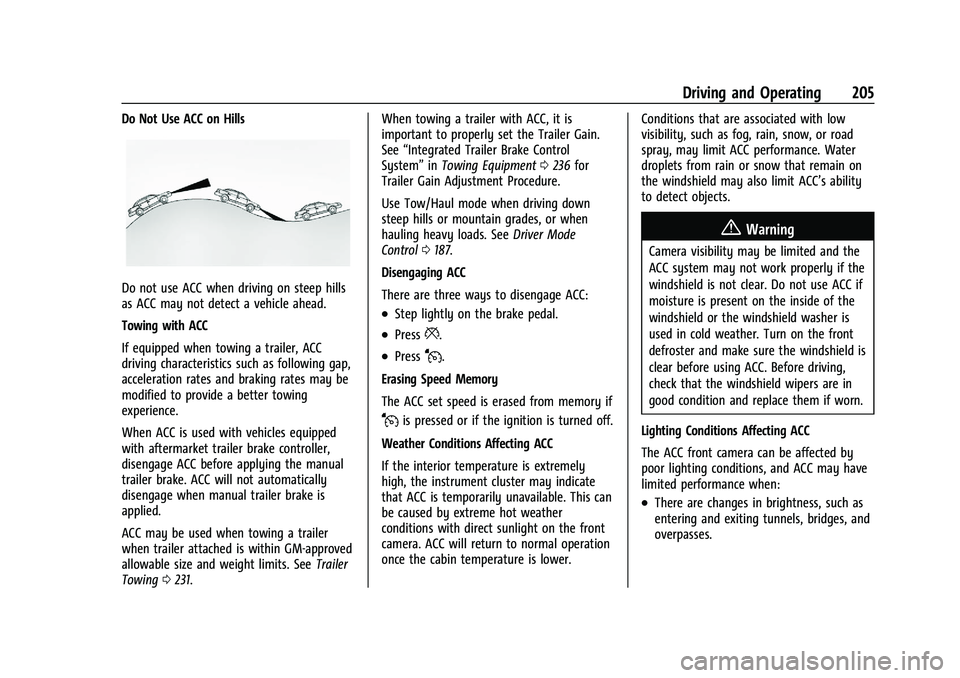
Do Not Use ACC on Hills
Do not use ACC when driving on steep hills
as ACC may not detect a vehicle ahead.
Towing with ACC
If equipped when towing a trailer, ACC
driving characteristics such as following gap,
acceleration rates and braking rates may be
modified to provide a better towing
experience.
When ACC is used with vehicles equipped
with aftermarket trailer brake controller,
disengage ACC before applying the manual
trailer brake. ACC will not automatically
disengage when manual trailer brake is
applied.
ACC may be used when towing a trailer
when trailer attached is within GM-approved
allowable size and weight limits. SeeTrailer
Towing 0231. When towing a trailer with ACC, it is
important to properly set the Trailer Gain.
See
“Integrated Trailer Brake Control
System” inTowing Equipment 0236 for
Trailer Gain Adjustment Procedure.
Use Tow/Haul mode when driving down
steep hills or mountain grades, or when
hauling heavy loads. See Driver Mode
Control 0187.
Disengaging ACC
There are three ways to disengage ACC:
.Step lightly on the brake pedal.
.Press*.
.PressJ.
Erasing Speed Memory
The ACC set speed is erased from memory if
Jis pressed or if the ignition is turned off.
Weather Conditions Affecting ACC
If the interior temperature is extremely
high, the instrument cluster may indicate
that ACC is temporarily unavailable. This can
be caused by extreme hot weather
conditions with direct sunlight on the front
camera. ACC will return to normal operation
once the cabin temperature is lower. Conditions that are associated with low
visibility, such as fog, rain, snow, or road
spray, may limit ACC performance. Water
droplets from rain or snow that remain on
the windshield may also limit ACC’s ability
to detect objects.
{Warning
Camera visibility may be limited and the
ACC system may not work properly if the
windshield is not clear. Do not use ACC if
moisture is present on the inside of the
windshield or the windshield washer is
used in cold weather. Turn on the front
defroster and make sure the windshield is
clear before using ACC. Before driving,
check that the windshield wipers are in
good condition and replace them if worn.
Lighting Conditions Affecting ACC
The ACC front camera can be affected by
poor lighting conditions, and ACC may have
limited performance when:
.There are changes in brightness, such as
entering and exiting tunnels, bridges, and
overpasses.
Page 216 of 371

GMC Canyon/Canyon Denali Owner Manual (GMNA-Localizing-U.S./Canada/
Mexico-16510661) - 2023 - CRC - 11/29/22
Driving and Operating 215
Assistance Systems for Driving
If equipped, when driving the vehicle in a
forward gear, Forward Collision Alert (FCA),
Lane Keep Assist (LKA), Blind Zone Steering
Assist (BZSA), Lane Change Alert (LCA), Front
Pedestrian Braking (FPB), and/or the
Automatic Emergency Braking (AEB) can help
to avoid a crash or reduce crash damage.
Forward Collision Alert (FCA)
System
If equipped, the FCA system may help to
avoid or reduce the harm caused by
front-end crashes. When approaching a
vehicle ahead too quickly, FCA provides a
red flashing alert on the windshield and
rapidly beeps or pulses the drivers seat. FCA
also lights an amber visual alert if following
another vehicle much too closely.
FCA detects vehicles within a distance of
approximately 60 m (197 ft) and operates at
speeds above 8 km/h (5 mph).
{Warning
FCA is a warning system and does not
apply the brakes. When approaching a
slower-moving or stopped vehicle ahead(Continued)
Warning (Continued)
too rapidly, or when following a vehicle
too closely, FCA may not provide a
warning with enough time to help avoid
a crash. It also may not provide any
warning at all. FCA does not warn of
pedestrians, animals, signs, guardrails,
bridges, construction barrels, or other
objects. Be ready to take action and
apply the brakes. SeeDefensive Driving
0 151.
FCA can be disabled. To view available
settings from the infotainment screen, touch
Settings > Vehicle > Collision/Detection
Systems.
Detecting the Vehicle Ahead
FCA warnings will not occur unless the FCA
system detects a vehicle ahead. When a
vehicle is detected, the vehicle ahead
indicator will display green. Vehicles may not be detected on curves, highway exit
ramps, or hills, due to poor visibility; or if a
vehicle ahead is partially blocked by
pedestrians or other objects. FCA will not
detect another vehicle ahead until it is
completely in the driving lane.
{Warning
FCA does not provide a warning to help
avoid a crash, unless it detects a vehicle.
FCA may not detect a vehicle ahead if
the FCA sensor is blocked by dirt, snow,
or ice, or if the windshield is damaged.
It may also not detect a vehicle on
winding or hilly roads, or in conditions
that can limit visibility such as fog, rain,
or snow, or if the headlamps or
windshield are not cleaned or in proper
condition. Keep the windshield,
headlamps, and FCA sensors clean and in
good repair.
Page 221 of 371

GMC Canyon/Canyon Denali Owner Manual (GMNA-Localizing-U.S./Canada/
Mexico-16510661) - 2023 - CRC - 11/29/22
220 Driving and Operating
{Warning
FPB may alert or automatically brake the
vehicle suddenly in situations where it is
unexpected and undesired. It could falsely
alert or brake for objects similar in shape
or size to pedestrians or bicyclists,
including shadows. This is normal
operation and the vehicle does not need
service. To override Automatic Braking,
firmly press the accelerator pedal, if it is
safe to do so.
Automatic Braking can be disabled through
vehicle settings. To view available settings
for this feature, touch the Settings icon on
the infotainment home page. Select
“Vehicle” to display the list of available
options and select “Collision/Detection
Systems”.
Cleaning the System
If FPB does not seem to operate properly,
cleaning the outside of the windshield in
front of the rearview mirror may correct the
issue.
Side Blind Zone Alert (SBZA)
If equipped, the SBZA system is a
lane-changing aid that assists drivers with
avoiding crashes that occur with moving
vehicles in the side blind zone, or blind spot
areas. When the vehicle is in a forward gear,
the left or right side mirror display will light
up if a moving vehicle is detected in that
blind zone. If the turn signal is activated and
a vehicle is also detected on the same side,
the display will flash as an extra warning
not to change lanes. Since this system is
part of the Lane Change Alert (LCA) system,
read the entire LCA section before using this
feature.
Lane Change Alert (LCA)
If equipped, the Lane Change Alert (LCA)
system is a lane-changing aid that can assist
drivers with avoiding lane change crashes
with moving vehicles in the side blind zone,
or blind spot areas or with vehicles rapidly
approaching these areas from behind. When
a vehicle is detected in the blind zone, the
LCA warning display will light up in the
corresponding side mirror and will flash if
the turn signal is on. The Side Blind Zone
Alert (SBZA) system is included as part of
the LCA system.
{Warning
LCA does not alert the driver to vehicles
outside of the system detection zones,
pedestrians, bicyclists, or animals. It may
not provide alerts when changing lanes
under all driving conditions. Failure to use
proper care when changing lanes may
result in injury, death, or vehicle damage.
Before making a lane change, always
check mirrors, glance over your shoulder,
and use the turn signals.
LCA Detection Zones
1. SBZA Detection Zone
2. LCA Detection Zone
When towing a trailer, LCA feature is
disabled. When not towing a trailer, the LCA
sensor covers a zone of approximately one
Page 238 of 371
GMC Canyon/Canyon Denali Owner Manual (GMNA-Localizing-U.S./Canada/
Mexico-16510661) - 2023 - CRC - 11/29/22
Driving and Operating 237
distance (2) is the same height before the
trailer was connected. Do not reduce the
front fender height below the initial
distance (2).
Tires
.Do not tow a trailer while using a
compact spare tire on the vehicle.
.Tires must be properly inflated to support
loads while towing a trailer. SeeTires
0 284 for instructions on proper tire
inflation.
Safety Chains
Always attach chains between the vehicle
and the trailer, and attach the chains to the
holes on the trailer hitch platform.
Instructions about safety chains may be
provided by the hitch manufacturer or by
the trailer manufacturer.
Cross the safety chains under the tongue of
the trailer to help prevent the tongue from
contacting the road if it becomes separated
from the hitch. Always leave just enough
slack so the combination can turn. Never
allow safety chains to drag on the ground.
Trailer Brakes
Loaded trailers over 900 kg (2,000 lb) must
be equipped with brake systems and with
brakes for each axle. Trailer braking
equipment conforming to Canadian
Standards Association (CSA) requirement
CAN3-D313, or its equivalent, is
recommended.
State or local regulations may require
trailers to have their own braking system if
the loaded weight of the trailer exceeds
certain minimums that can vary from state
to state. Read and follow the instructions for
the trailer brakes so they are installed,
adjusted, and maintained properly.
{Warning
Never attempt to tamper with the
hydraulic brake system for your trailer
brakes. Do not connect a trailer's
hydraulic brake system directly to your
vehicle's hydraulic brake system. If you
do, both the vehicle antilock brakes and
the trailer brakes may not function,
which could result in a crash.
Trailer Wiring Harness
For vehicles not equipped with heavy-duty
trailering, a harness is secured underneath
the left side of the vehicle, next to the spare
tire. The harness requires the installation of
a trailer connector, which is available
through your dealer. The seven-wire harness
contains the following trailer circuits:
.Yellow: Left stop/turn signal
.Green: Right stop/turn signal
.Brown: Taillamps/parking lamps
.Black: Ground
.Gray: Back-up lamps
.Orange: Battery feed
.Blue: Trailer brake
To help charge a remote (non-vehicle)
battery, press the Tow/Haul Mode button
on the center stack. If the trailer is too light
for Tow/Haul Mode, turn on the headlamps
to help charge the battery.