cruise control sensor GMC CANYON 2023 Owners Manual
[x] Cancel search | Manufacturer: GMC, Model Year: 2023, Model line: CANYON, Model: GMC CANYON 2023Pages: 371, PDF Size: 7.41 MB
Page 6 of 371
GMC Canyon/Canyon Denali Owner Manual (GMNA-Localizing-U.S./Canada/
Mexico-16510661) - 2023 - CRC - 11/29/22
Introduction 5
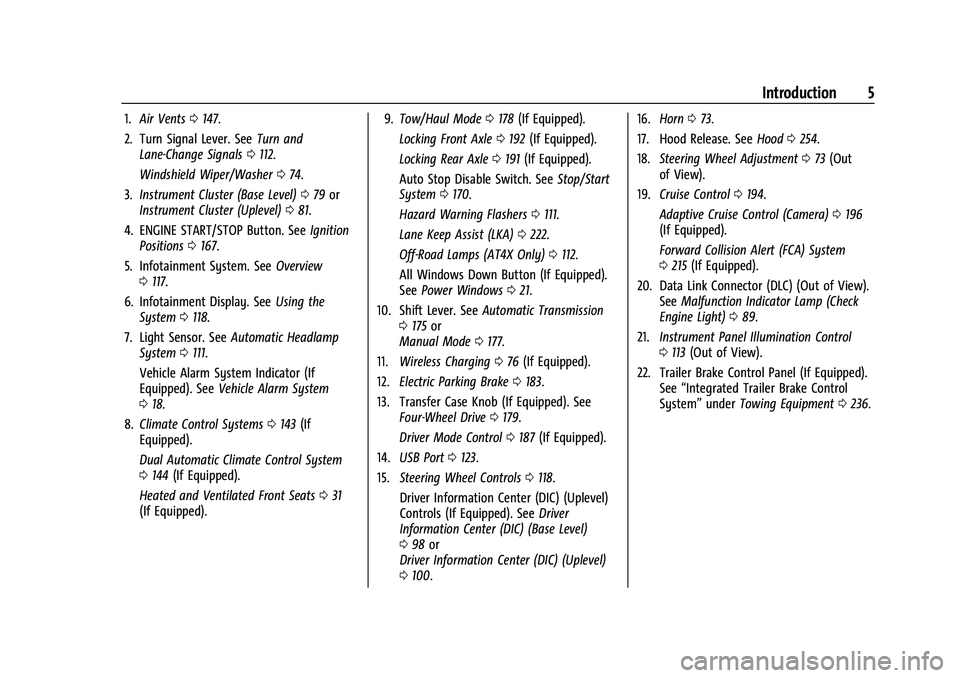
1.Air Vents 0147.
2. Turn Signal Lever. See Turn and
Lane-Change Signals 0112.
Windshield Wiper/Washer 074.
3. Instrument Cluster (Base Level) 079 or
Instrument Cluster (Uplevel) 081.
4. ENGINE START/STOP Button. See Ignition
Positions 0167.
5. Infotainment System. See Overview
0 117.
6. Infotainment Display. See Using the
System 0118.
7. Light Sensor. See Automatic Headlamp
System 0111.
Vehicle Alarm System Indicator (If
Equipped). See Vehicle Alarm System
0 18.
8. Climate Control Systems 0143 (If
Equipped).
Dual Automatic Climate Control System
0 144 (If Equipped).
Heated and Ventilated Front Seats 031
(If Equipped). 9.
Tow/Haul Mode 0178 (If Equipped).
Locking Front Axle 0192 (If Equipped).
Locking Rear Axle 0191 (If Equipped).
Auto Stop Disable Switch. See Stop/Start
System 0170.
Hazard Warning Flashers 0111.
Lane Keep Assist (LKA) 0222.
Off-Road Lamps (AT4X Only) 0112.
All Windows Down Button (If Equipped).
See Power Windows 021.
10. Shift Lever. See Automatic Transmission
0 175 or
Manual Mode 0177.
11. Wireless Charging 076 (If Equipped).
12. Electric Parking Brake 0183.
13. Transfer Case Knob (If Equipped). See Four-Wheel Drive 0179.
Driver Mode Control 0187 (If Equipped).
14. USB Port 0123.
15. Steering Wheel Controls 0118.
Driver Information Center (DIC) (Uplevel)
Controls (If Equipped). See Driver
Information Center (DIC) (Base Level)
0 98 or
Driver Information Center (DIC) (Uplevel)
0 100. 16.
Horn 073.
17. Hood Release. See Hood0254.
18. Steering Wheel Adjustment 073 (Out
of View).
19. Cruise Control 0194.
Adaptive Cruise Control (Camera) 0196
(If Equipped).
Forward Collision Alert (FCA) System
0 215 (If Equipped).
20. Data Link Connector (DLC) (Out of View). SeeMalfunction Indicator Lamp (Check
Engine Light) 089.
21. Instrument Panel Illumination Control
0113 (Out of View).
22. Trailer Brake Control Panel (If Equipped). See“Integrated Trailer Brake Control
System” underTowing Equipment 0236.
Page 197 of 371
GMC Canyon/Canyon Denali Owner Manual (GMNA-Localizing-U.S./Canada/
Mexico-16510661) - 2023 - CRC - 11/29/22
196 Driving and Operating
Erasing Speed Memory
The cruise control set speed is erased from
memory if
5is pressed or if the ignition is
turned off.
Adaptive Cruise Control (Camera)
If equipped, Adaptive Cruise Control (ACC)
allows the cruise control set speed and
following gap to be selected. Read this
entire section before using this system. The
following gap is the following time between
your vehicle and a vehicle detected directly
ahead in your path, moving in the same
direction. If no vehicle is detected in your
path, ACC works like regular cruise control.
ACC uses a windshield mounted front
camera sensor.
If a vehicle is detected in your path, ACC can
apply acceleration or limited, moderate
braking to maintain the selected following
gap. To disengage ACC, apply the brake.
If ACC is controlling the vehicle speed when
the Traction Control System (TCS) or
StabiliTrak/Electronic Stability Control (ESC)
system activates, ACC may automatically
disengage. See Traction Control/Electronic
Stability Control 0185. When road
conditions allow ACC to be safely used, ACC can be turned back on. Disabling the TCS or
StabiliTrak/ESC system will disengage and
prevent engagement of ACC.
ACC can reduce the need for you to
frequently brake and accelerate, especially
when used on expressways, freeways, and
interstate highways. When used on other
roads, you may need to take over the
control of braking or acceleration more
often.
{Warning
ACC has limited braking ability and may
not have time to slow the vehicle down
enough to avoid a collision with another
vehicle you are following. This can occur
when vehicles suddenly slow or stop
ahead, or enter your lane. Also see
“Alerting the Driver”
later in this section.
Complete attention is always required
while driving and you should be ready to
take action and apply the brakes. See
Defensive Driving 0151.
{Warning
ACC will not detect or brake for children,
pedestrians, animals, or other objects.
Do not use ACC when:
.On winding and hilly roads or when
the sensors are blocked by snow, ice,
or dirt. The system may not detect a
vehicle ahead. Keep the entire front of
the vehicle clean.
.Visibility is poor due to rain, snow,
fog, dirt, insect residue, or dust; when
other foreign objects obscure the
camera and/or radar; or when the
vehicle in front or oncoming traffic
causes additional environmental
obstructions, such as road spray. ACC
performance is limited under these
conditions.
.On slippery roads where fast changes
in tire traction can cause excessive
wheel slip.
.With extremely heavy cargo loaded in
the cargo area or rear seat, or when
the vehicle is loaded in excess of load
limits. See Vehicle Load Limits 0162.
Page 207 of 371
GMC Canyon/Canyon Denali Owner Manual (GMNA-Localizing-U.S./Canada/
Mexico-16510661) - 2023 - CRC - 11/29/22
206 Driving and Operating
.Low sun angles cause the camera to not
detect objects, or it is more difficult to
detect objects in the same traffic lane.
.Lighting is poor in the evening or early
morning
.There are multiple changes in brightness
or shadows along the vehicle roadway.
.In a tunnel without the headlamps on,
or in a tunnel when there is a vehicle in
front that does not have its taillamps on.
.Subjected to strong light from opposing
lane traffic in the front of the vehicle,
such as high-beam headlamps from
oncoming traffic.
Accessory Installations and Vehicle
Modifications
Do not install or place any object around
the front camera windshield area that would
obstruct the front camera view.
Do not install objects on top of the vehicle
that overhang and obstruct the front
camera, such as a canoe, kayak, or other
items that can be transported on the
vehicle roof.
Do not modify the hood, headlamps, or fog
lamps, as this may limit the camera’s ability
to detect an object. Cleaning the Sensing System
The camera sensor on the windshield behind
the rearview mirror can become blocked by
snow, ice, dirt, mud, or debris. This area
needs to be cleaned for ACC to operate
properly.
The vehicle headlamps may need to be
cleaned due to dirt, snow, or ice. Objects
that are not illuminated correctly may be
difficult to detect.
If ACC will not operate, regular cruise control
may be available. See
“Switching Between
ACC and Regular Cruise Control” previously
in this section. Always consider driving
conditions before using either cruise control
system.
For cleaning instructions, see “Washing the
Vehicle” underExterior Care 0319.
Driver Assistance Systems
This vehicle may have features that work
together to help avoid crashes or reduce
crash damage while driving, backing, and
parking. Read this entire section before
using these systems.
{Warning
Do not rely on the Driver Assistance
Systems. These systems do not replace
the need for paying attention and driving
safely. You may not hear or see alerts or
warnings provided by these systems.
Failure to use proper care when driving
may result in injury, death, or vehicle
damage. See Defensive Driving 0151.
Under many conditions, these systems
will not:
.Detect children, pedestrians, bicyclists,
or animals.
.Detect vehicles or objects outside the
area monitored by the system.
.Work at all driving speeds.
.Warn you or provide you with enough
time to avoid a crash.
.Work under poor visibility or bad
weather conditions.
.Work if the detection sensor is not
cleaned or is covered by ice, snow,
mud, or dirt. (Continued)
Page 217 of 371

GMC Canyon/Canyon Denali Owner Manual (GMNA-Localizing-U.S./Canada/
Mexico-16510661) - 2023 - CRC - 11/29/22
216 Driving and Operating
Collision Alert
With Head-Up Display
Without Head-Up Display
When your vehicle approaches another
detected vehicle too rapidly, the red FCA
display will flash on the windshield. Also,
eight rapid high-pitched beeps will sound
from the front, or both sides of the Safety
Alert Seat will pulse five times. When this
Collision Alert occurs, the brake system may
prepare for driver braking to occur more
rapidly which can cause a brief, mild
deceleration. Continue to apply the brake
pedal as needed. Tailgating Alert
The vehicle ahead indicator will display
amber when you are following a vehicle
ahead much too closely.
Selecting the Alert Timing
The Collision Alert control is on the steering
wheel. Press
[to set the FCA timing to
Far, Medium, or Near. The first button press
shows the current setting on the DIC.
Additional button presses will change this
setting. The chosen setting will remain until
it is changed and will affect the timing of
both the Collision Alert and the Tailgating
Alert features. The timing of both alerts will
vary based on vehicle speed. The faster the
vehicle speed, the farther away the alert will occur. Consider traffic and weather
conditions when selecting the alert timing.
The range of selectable alert timings may
not be appropriate for all drivers and driving
conditions.
If your vehicle is equipped with Adaptive
Cruise Control (ACC), changing the FCA
timing setting automatically changes the
following gap setting (Far, Medium,
or Near).
Following Distance Indicator
If equipped, the following distance to a
moving vehicle ahead in your path is
indicated in following time in seconds on
the Driver Information Center (DIC). See
Driver Information Center (DIC) (Base Level)
0
98 or
Driver Information Center (DIC) (Uplevel)
0 100. The minimum following time is
0.5 seconds away.
If there is no vehicle detected ahead, or the
vehicle ahead is out of sensor range, dashes
will be displayed.
Page 220 of 371

GMC Canyon/Canyon Denali Owner Manual (GMNA-Localizing-U.S./Canada/
Mexico-16510661) - 2023 - CRC - 11/29/22
Driving and Operating 219
Warning (Continued)
Be ready to take action and apply the
brakes. For more information, see
Defensive Driving0151. Keep the
windshield, headlamps, and FPB sensor
clean and in good repair.
FPB can be set to Off, Alert, or Alert and
Brake through vehicle settings. To view
available settings for this feature, touch the
Settings icon on the infotainment home
page. Select “Vehicle”to display the list of
available options and select “Collision/
Detection Systems”.
Detecting the Pedestrian or Bicyclist
Ahead
FPB alerts and automatic braking will not
occur unless the FPB system detects a
pedestrian or bicyclist. When a nearby pedestrian or bicyclist is detected in front of
the vehicle, the pedestrian ahead indicator
will display amber.
Front Pedestrian Alert
With Head-Up Display
Without Head-Up Display
When the vehicle approaches a pedestrian
or bicyclist ahead too rapidly, the red FPB
alert display will flash on the windshield.
Eight rapid high-pitched beeps will sound
from the front, or both sides of the Safety
Alert Seat will pulse five times. When this
Pedestrian Alert occurs, the brake system
may prepare for driver braking to occur
more rapidly which can cause a brief, mild deceleration. Continue to apply the brake
pedal as needed. Cruise control may be
disengaged when the Front Pedestrian Alert
occurs.
Automatic Braking
If FPB detects it is about to crash into a
pedestrian or bicyclist directly ahead, and
the brakes have not been applied, FPB may
automatically brake moderately or brake
hard. This can help to avoid some very low
speed pedestrian and bicyclist crashes or
reduce pedestrian injury. FPB can
automatically brake to detected pedestrians
or bicyclists between 8 km/h (5 mph) and
80 km/h (50 mph). Automatic braking levels
may be reduced under certain conditions,
such as higher speeds.
FPB may slow the vehicle to a complete
stop to try and avoid a potential collision
with a pedestrian. If this happens, automatic
braking may hold the vehicle at a stop
momentarily. Firmly press the accelerator
pedal to release automatic braking.