park assist GMC CANYON 2023 Owners Manual
[x] Cancel search | Manufacturer: GMC, Model Year: 2023, Model line: CANYON, Model: GMC CANYON 2023Pages: 371, PDF Size: 7.41 MB
Page 4 of 371
GMC Canyon/Canyon Denali Owner Manual (GMNA-Localizing-U.S./Canada/
Mexico-16510661) - 2023 - CRC - 11/29/22
Introduction 3
A circle with a slash through it is a safety
symbol which means“Do not,” “Do not do
this,” or“Do not let this happen.”
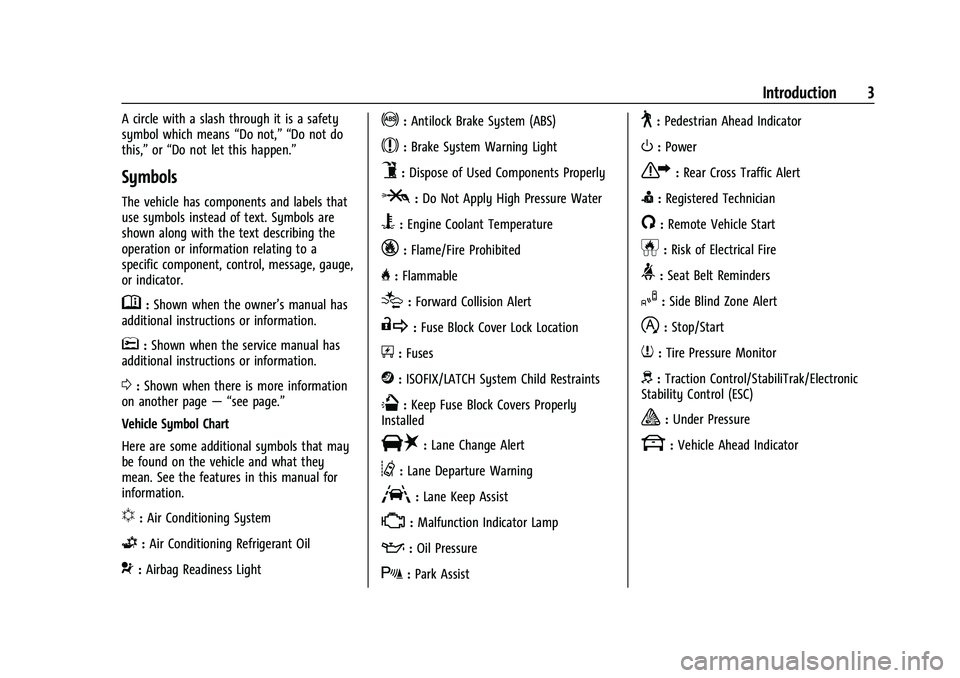
Symbols
The vehicle has components and labels that
use symbols instead of text. Symbols are
shown along with the text describing the
operation or information relating to a
specific component, control, message, gauge,
or indicator.
M:Shown when the owner’s manual has
additional instructions or information.
*: Shown when the service manual has
additional instructions or information.
0: Shown when there is more information
on another page — “see page.”
Vehicle Symbol Chart
Here are some additional symbols that may
be found on the vehicle and what they
mean. See the features in this manual for
information.
u: Air Conditioning System
G:Air Conditioning Refrigerant Oil
9:Airbag Readiness Light
!:Antilock Brake System (ABS)
$:Brake System Warning Light
9:Dispose of Used Components Properly
P:Do Not Apply High Pressure Water
B:Engine Coolant Temperature
_:Flame/Fire Prohibited
H: Flammable
[:Forward Collision Alert
R:Fuse Block Cover Lock Location
+:Fuses
j:ISOFIX/LATCH System Child Restraints
Q:Keep Fuse Block Covers Properly
Installed
|: Lane Change Alert
@:Lane Departure Warning
A:Lane Keep Assist
*: Malfunction Indicator Lamp
::Oil Pressure
X:Park Assist
~:Pedestrian Ahead Indicator
O:Power
7:Rear Cross Traffic Alert
I:Registered Technician
/:Remote Vehicle Start
h:Risk of Electrical Fire
>:Seat Belt Reminders
I:Side Blind Zone Alert
h:Stop/Start
7:Tire Pressure Monitor
d:Traction Control/StabiliTrak/Electronic
Stability Control (ESC)
a: Under Pressure
k: Vehicle Ahead Indicator
Page 6 of 371
GMC Canyon/Canyon Denali Owner Manual (GMNA-Localizing-U.S./Canada/
Mexico-16510661) - 2023 - CRC - 11/29/22
Introduction 5
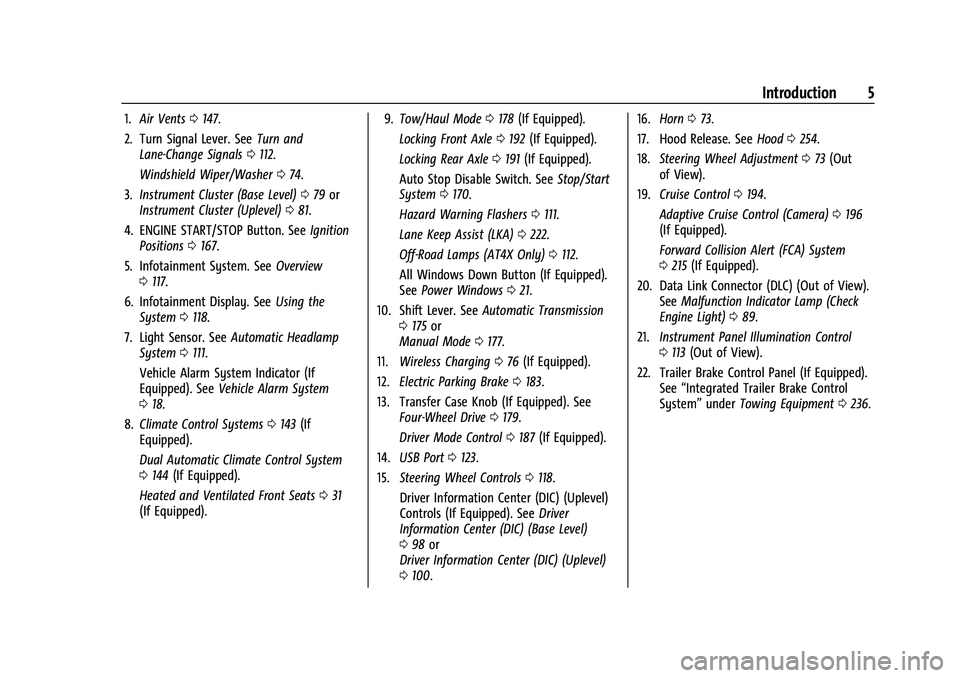
1.Air Vents 0147.
2. Turn Signal Lever. See Turn and
Lane-Change Signals 0112.
Windshield Wiper/Washer 074.
3. Instrument Cluster (Base Level) 079 or
Instrument Cluster (Uplevel) 081.
4. ENGINE START/STOP Button. See Ignition
Positions 0167.
5. Infotainment System. See Overview
0 117.
6. Infotainment Display. See Using the
System 0118.
7. Light Sensor. See Automatic Headlamp
System 0111.
Vehicle Alarm System Indicator (If
Equipped). See Vehicle Alarm System
0 18.
8. Climate Control Systems 0143 (If
Equipped).
Dual Automatic Climate Control System
0 144 (If Equipped).
Heated and Ventilated Front Seats 031
(If Equipped). 9.
Tow/Haul Mode 0178 (If Equipped).
Locking Front Axle 0192 (If Equipped).
Locking Rear Axle 0191 (If Equipped).
Auto Stop Disable Switch. See Stop/Start
System 0170.
Hazard Warning Flashers 0111.
Lane Keep Assist (LKA) 0222.
Off-Road Lamps (AT4X Only) 0112.
All Windows Down Button (If Equipped).
See Power Windows 021.
10. Shift Lever. See Automatic Transmission
0 175 or
Manual Mode 0177.
11. Wireless Charging 076 (If Equipped).
12. Electric Parking Brake 0183.
13. Transfer Case Knob (If Equipped). See Four-Wheel Drive 0179.
Driver Mode Control 0187 (If Equipped).
14. USB Port 0123.
15. Steering Wheel Controls 0118.
Driver Information Center (DIC) (Uplevel)
Controls (If Equipped). See Driver
Information Center (DIC) (Base Level)
0 98 or
Driver Information Center (DIC) (Uplevel)
0 100. 16.
Horn 073.
17. Hood Release. See Hood0254.
18. Steering Wheel Adjustment 073 (Out
of View).
19. Cruise Control 0194.
Adaptive Cruise Control (Camera) 0196
(If Equipped).
Forward Collision Alert (FCA) System
0 215 (If Equipped).
20. Data Link Connector (DLC) (Out of View). SeeMalfunction Indicator Lamp (Check
Engine Light) 089.
21. Instrument Panel Illumination Control
0113 (Out of View).
22. Trailer Brake Control Panel (If Equipped). See“Integrated Trailer Brake Control
System” underTowing Equipment 0236.
Page 73 of 371
GMC Canyon/Canyon Denali Owner Manual (GMNA-Localizing-U.S./Canada/
Mexico-16510661) - 2023 - CRC - 11/30/22
72 Instruments and Controls
Instruments and Controls
Controls
Steering Wheel Adjustment . . . . . . . . . . . . . 73
Heated Steering Wheel . . . . . . . . . . . . . . . . . 73
Horn . . . . . . . . . . . . . . . . . . . . . . . . . . . . . . . . . . . . 73
Windshield Wiper/Washer . . . . . . . . . . . . . . 74
Compass . . . . . . . . . . . . . . . . . . . . . . . . . . . . . . . . 75
Clock . . . . . . . . . . . . . . . . . . . . . . . . . . . . . . . . . . . 75
Power Outlets . . . . . . . . . . . . . . . . . . . . . . . . . . 75
Wireless Charging . . . . . . . . . . . . . . . . . . . . . . 76
Warning Lights, Gauges, and Indicators
Warning Lights, Gauges, andIndicators . . . . . . . . . . . . . . . . . . . . . . . . . . . . . 79
Instrument Cluster (Base Level) . . . . . . . . . 79
Instrument Cluster (Uplevel) . . . . . . . . . . . . 81
Speedometer . . . . . . . . . . . . . . . . . . . . . . . . . . . 82
Odometer . . . . . . . . . . . . . . . . . . . . . . . . . . . . . . 82
Trip Odometer . . . . . . . . . . . . . . . . . . . . . . . . . . 82
Tachometer . . . . . . . . . . . . . . . . . . . . . . . . . . . . 82
Fuel Gauge . . . . . . . . . . . . . . . . . . . . . . . . . . . . . 83
Engine Oil Pressure Gauge . . . . . . . . . . . . . 84
Engine Oil Temperature Gauge . . . . . . . . . 85
Engine Coolant Temperature Gauge . . . . 86
Transmission Temperature Gauge . . . . . . 86
Seat Belt Reminders . . . . . . . . . . . . . . . . . . . . 87
Airbag Readiness Light . . . . . . . . . . . . . . . . . 88
Passenger Airbag Status Indicator . . . . . . 88
Charging System Light . . . . . . . . . . . . . . . . . 89 Malfunction Indicator Lamp (Check
Engine Light) . . . . . . . . . . . . . . . . . . . . . . . . . 89
Brake System Warning Light . . . . . . . . . . . . 91
Electric Parking Brake Light . . . . . . . . . . . . . 91
Service Electric Parking Brake Light . . . . . 92
Antilock Brake System (ABS) Warning Light . . . . . . . . . . . . . . . . . . . . . . . . . . . . . . . . . . 92
Four-Wheel-Drive Light . . . . . . . . . . . . . . . . . 92
Hill Descent Control Light . . . . . . . . . . . . . . 93
Lane Keep Assist (LKA) Light . . . . . . . . . . . . 93
Automatic Emergency Braking (AEB) Disabled Light . . . . . . . . . . . . . . . . . . . . . . . . 93
Vehicle Ahead Indicator . . . . . . . . . . . . . . . . 93
Pedestrian Ahead Indicator . . . . . . . . . . . . . 94
Traction Off Light . . . . . . . . . . . . . . . . . . . . . . 94
Traction Control System (TCS)/Electronic Stability Control Light . . . . . . . . . . . . . . . . 94
Electronic Stability Control (ESC) Off Light . . . . . . . . . . . . . . . . . . . . . . . . . . . . . . . . . . 95
Engine Coolant Temperature Warning Light . . . . . . . . . . . . . . . . . . . . . . . . . . . . . . . . . . 95
Driver Mode Control Light . . . . . . . . . . . . . . 95
Tire Pressure Light . . . . . . . . . . . . . . . . . . . . . 96
Engine Oil Pressure Light . . . . . . . . . . . . . . . 96
Low Fuel Warning Light . . . . . . . . . . . . . . . . 97
Auto Stop Indicator . . . . . . . . . . . . . . . . . . . . . 97
Security Light . . . . . . . . . . . . . . . . . . . . . . . . . . 97
High-Beam On Light . . . . . . . . . . . . . . . . . . . . 97
Front Fog Lamp Light . . . . . . . . . . . . . . . . . . . 97
Lamps On Reminder . . . . . . . . . . . . . . . . . . . . 98 Cruise Control Light . . . . . . . . . . . . . . . . . . . . 98
Door Ajar Light (Uplevel Cluster) . . . . . . . 98
Information Displays
Driver Information Center (DIC) (Base
Level) . . . . . . . . . . . . . . . . . . . . . . . . . . . . . . . . . 98
Driver Information Center (DIC) (Uplevel) . . . . . . . . . . . . . . . . . . . . . . . . . . . . 100
Vehicle Status . . . . . . . . . . . . . . . . . . . . . . . . . 103
Head-Up Display (HUD) . . . . . . . . . . . . . . . . 105
Vehicle Messages
Vehicle Messages . . . . . . . . . . . . . . . . . . . . . . 107
Engine Power Messages . . . . . . . . . . . . . . . 108
Vehicle Speed Messages . . . . . . . . . . . . . . . 108
Page 91 of 371
GMC Canyon/Canyon Denali Owner Manual (GMNA-Localizing-U.S./Canada/
Mexico-16510661) - 2023 - CRC - 11/30/22
90 Instruments and Controls
Caution
If the vehicle is driven continually with
this light on, the emission control system
may not work as well, the fuel economy
may be lower, and the vehicle may not
run smoothly. This could lead to costly
repairs that might not be covered by the
vehicle warranty.
Caution
Modifications to the engine, transmission,
exhaust, intake, or fuel system, or the
use of replacement tires that do not
meet the original tire specifications, can
cause this light to come on. This could
lead to costly repairs not covered by the
vehicle warranty. This could also affect
the vehicle’s ability to pass an Emissions
Inspection/Maintenance test. See
Accessories and Modifications0253.
If the light is flashing : A malfunction has
been detected that could damage the
emission control system and increase vehicle
emissions. Diagnosis and service may be
required. To help prevent damage, reduce vehicle
speed and avoid hard accelerations and
uphill grades. If towing a trailer, reduce the
amount of cargo being hauled as soon as
possible.
If the light continues to flash, find a safe
place to park. Turn the vehicle off and wait
at least 10 seconds before restarting the
engine. If the light is still flashing, follow
the previous guidelines and see your dealer
for service as soon as possible.
If the light is on steady :
A malfunction has
been detected. Diagnosis and service may be
required.
Check the following:
.If fuel has been added to the vehicle
using the capless funnel adapter, make
sure that it has been removed. See
“Filling the Tank with a Portable Gas Can”
under Filling the Tank 0225. The
diagnostic system can detect if the
adapter has been left installed in the
vehicle, allowing fuel to evaporate into
the atmosphere. A few driving trips with
the adapter removed may turn off the
light.
.Poor fuel quality can cause inefficient
engine operation and poor driveability,
which may go away once the engine is warmed up. If this occurs, change the fuel
brand. It may require at least one full
tank of the proper fuel to turn the light
off. See
Recommended Fuel 0224.
If the light remains on, see your dealer.
Emissions Inspection and Maintenance
Programs
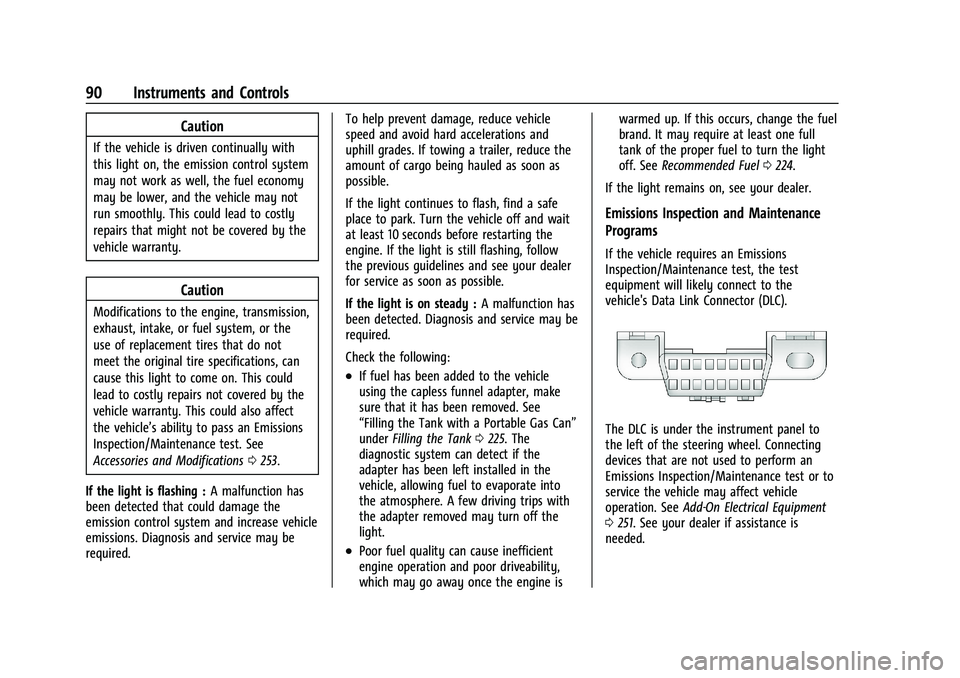
If the vehicle requires an Emissions
Inspection/Maintenance test, the test
equipment will likely connect to the
vehicle's Data Link Connector (DLC).
The DLC is under the instrument panel to
the left of the steering wheel. Connecting
devices that are not used to perform an
Emissions Inspection/Maintenance test or to
service the vehicle may affect vehicle
operation. See Add-On Electrical Equipment
0 251. See your dealer if assistance is
needed.
Page 107 of 371
GMC Canyon/Canyon Denali Owner Manual (GMNA-Localizing-U.S./Canada/
Mexico-16510661) - 2023 - CRC - 11/30/22
106 Instruments and Controls
.Navigation
.Driver Assistance Features
.Vehicle Messages
Some vehicle messages or alerts displayed in
the HUD may be cleared by using the
steering wheel controls.
Head-Up Display (HUD) Controls
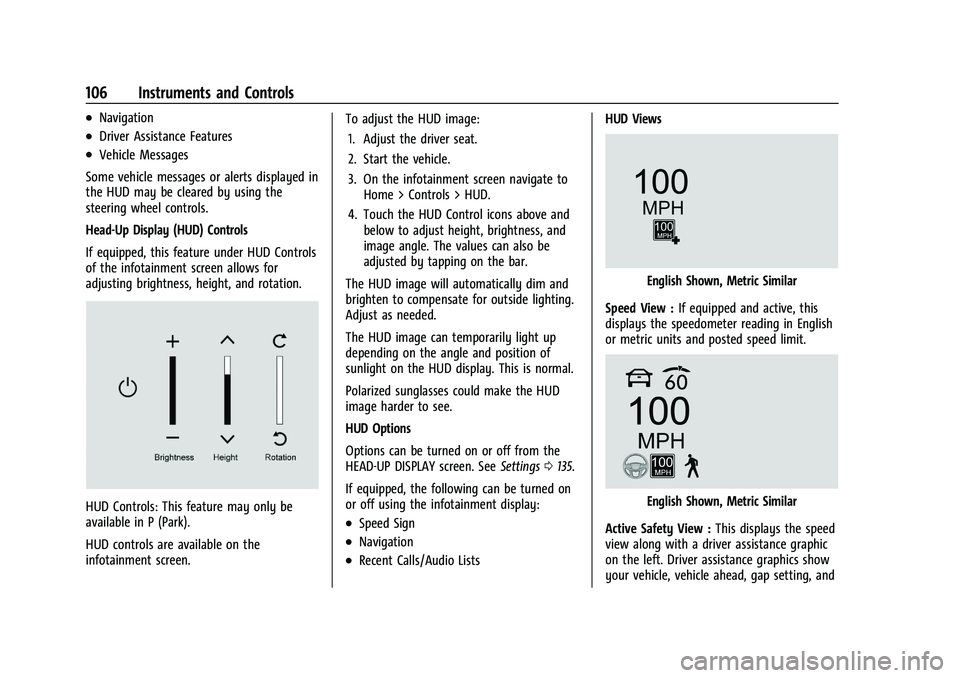
If equipped, this feature under HUD Controls
of the infotainment screen allows for
adjusting brightness, height, and rotation.
HUD Controls: This feature may only be
available in P (Park).
HUD controls are available on the
infotainment screen. To adjust the HUD image:
1. Adjust the driver seat.
2. Start the vehicle.
3. On the infotainment screen navigate to Home > Controls > HUD.
4. Touch the HUD Control icons above and below to adjust height, brightness, and
image angle. The values can also be
adjusted by tapping on the bar.
The HUD image will automatically dim and
brighten to compensate for outside lighting.
Adjust as needed.
The HUD image can temporarily light up
depending on the angle and position of
sunlight on the HUD display. This is normal.
Polarized sunglasses could make the HUD
image harder to see.
HUD Options
Options can be turned on or off from the
HEAD-UP DISPLAY screen. See Settings0135.
If equipped, the following can be turned on
or off using the infotainment display:.Speed Sign
.Navigation
.Recent Calls/Audio Lists HUD Views
English Shown, Metric Similar
Speed View : If equipped and active, this
displays the speedometer reading in English
or metric units and posted speed limit.
English Shown, Metric Similar
Active Safety View : This displays the speed
view along with a driver assistance graphic
on the left. Driver assistance graphics show
your vehicle, vehicle ahead, gap setting, and
Page 120 of 371
GMC Canyon/Canyon Denali Owner Manual (GMNA-Localizing-U.S./Canada/
Mexico-16510661) - 2023 - CRC - 11/29/22
Infotainment System 119
Cameras
If equipped, touch the Cameras icon to
access the camera application. SeeAssistance
Systems for Parking or Backing 0208.
Shortcut Tray
The shortcut tray is left of the display.
It shows up to five applications.
Infotainment Display Features
Infotainment display features show on the
display when available. When a feature is
unavailable, it may gray out. When a
feature is touched, it may highlight.
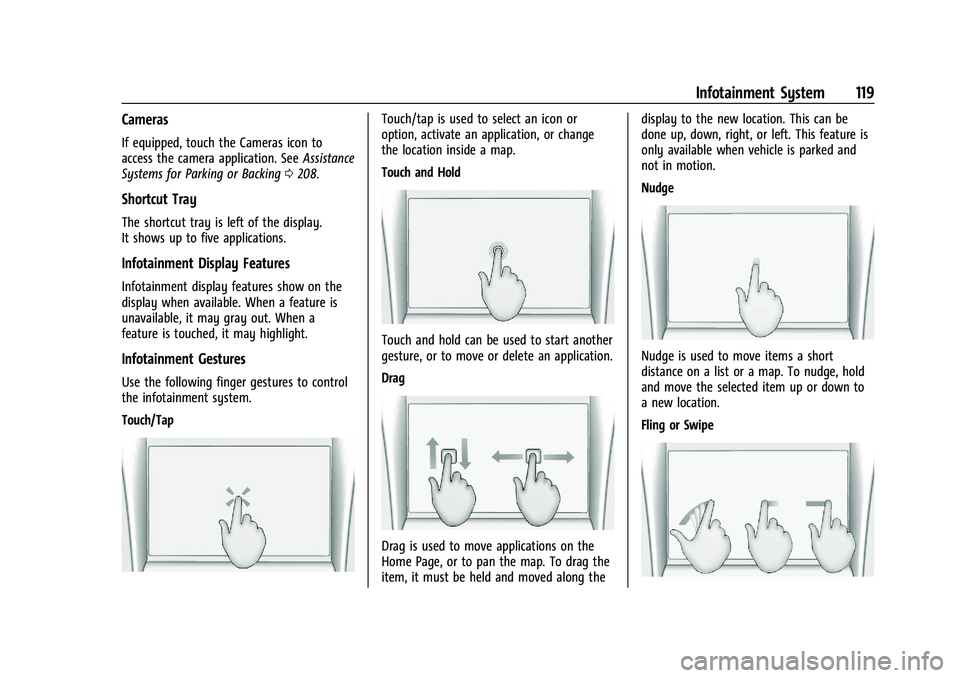
Infotainment Gestures
Use the following finger gestures to control
the infotainment system.
Touch/Tap
Touch/tap is used to select an icon or
option, activate an application, or change
the location inside a map.
Touch and Hold
Touch and hold can be used to start another
gesture, or to move or delete an application.
Drag
Drag is used to move applications on the
Home Page, or to pan the map. To drag the
item, it must be held and moved along the display to the new location. This can be
done up, down, right, or left. This feature is
only available when vehicle is parked and
not in motion.
Nudge
Nudge is used to move items a short
distance on a list or a map. To nudge, hold
and move the selected item up or down to
a new location.
Fling or Swipe
Page 128 of 371
GMC Canyon/Canyon Denali Owner Manual (GMNA-Localizing-U.S./Canada/
Mexico-16510661) - 2023 - CRC - 11/29/22
Infotainment System 127
.The surface streets run parallel to a
freeway.
.The vehicle has been transferred by a
vehicle carrier or a ferry.
.The current position calibration is set
incorrectly.
.The vehicle is traveling at high speed.
.The vehicle changes directions more than
once, or the vehicle is turning on a turn
table in a parking lot.
.The vehicle is entering and/or exiting a
parking lot, garage, or a lot with a roof.
.The GPS signal is not received.
.A roof carrier is installed on the vehicle.
.Tire chains are installed on the vehicle.
.The tires are replaced or worn.
.The tire pressure for the tires is incorrect.
.This is the first navigation use after the
map data is updated.
.The 12-volt battery has been disconnected
for several days.
.The vehicle is driving in heavy traffic
where driving is at low speeds, and the
vehicle is stopped and started repeatedly.
Problems with Route Guidance
Inappropriate route guidance can occur
under one or more of the following
conditions:
.The turn was not made on the road
indicated.
.Route guidance might not be available
when using automatic rerouting for the
next right or left turn.
.The route might not be changed when
using automatic rerouting.
.There is no route guidance when turning
at an intersection.
.Automatic rerouting might display a route
returning to the set waypoint if heading
for a destination without passing through
a set waypoint.
.The route prohibits the entry of a vehicle
due to a regulation by time or season or
any other regulation which may be given.
.Some routes might not be searched.
.The route to the destination might not be
shown if there are new roads, if roads
have recently changed, or if certain roads
are not listed in Maps.To recalibrate the vehicle's position on the
map, park with the vehicle running for two
to five minutes, until the vehicle position
updates. Make sure the vehicle is parked in
a location that is safe and has a clear view
of the sky and away from large
obstructions.
Voice Recognition
If equipped, Google Assistant allows for
hands-free use of media and messaging,
navigation and climate control functionality
in the vehicle. This feature can be started by
pressing
gon the steering wheel, touching
Google Assistant on the Home screen, or by
using the wake up words “Hey Google”or
“OK Google.”
However, not all features within these areas
are supported by voice commands and
requires the user to have a valid data
subscription plan in order to use some of
the Google Assistant features.
Using Voice Recognition
Voice recognition becomes available once
the system is initialized. This begins when
the vehicle is turned on. Initialization may
take a few moments.
Page 130 of 371
GMC Canyon/Canyon Denali Owner Manual (GMNA-Localizing-U.S./Canada/
Mexico-16510661) - 2023 - CRC - 11/29/22
Infotainment System 129
“Find a
initiate navigation to a POI in the command.
“Add
way-point to the current route.
“Take me home” :Starts navigation to
Home location set in Google maps.
Onboard Vehicle Commands
These commands can be used to adjust
vehicle temperature, control window
defrosters and obtain fuel information.
“Turn on the A/C” :Turns on the air
conditioning.
“How much gas do I have left” :Find out
how much fuel your vehicle has left.
“Set temperature to
degrees” :Set to a specific temperature
inside your vehicle.
Phone Assistant Voice Recognition
While a device is connected via Bluetooth,
Android Auto, or CarPlay, press and hold
g
on the steering wheel controls to pass
through and launch the Voice Assistant on
the connected mobile phone (e.g, Google
assistant, Siri, etc.).
Phone
Bluetooth (Overview)
The Bluetooth-capable system can interact
with many mobile devices to:
.Place and receive calls in a
hands-free mode.
.Share the device’s address book or
contact list with the vehicle.
.Stream audio (music, podcasts).
.Notify receipt of text messages.
To minimize driver distraction, before
driving, and with the vehicle parked:
.Become familiar with the features of the
mobile device. Organize the phone book
and contact lists clearly and delete
duplicate or rarely used entries.
.Review the controls and operation of the
infotainment system.
.Pair mobile device(s) to the vehicle. The
system may not work with all mobile
devices. See “Pairing”later in this section.
Vehicles with a Bluetooth system can use a
Bluetooth-capable mobile device with a
Hands-Free Profile to make and receive
phone calls. The infotainment system and
voice recognition are used to control the system. The system can be used while the
vehicle is on or in accessory mode. The
range of the Bluetooth system can be up to
9.1 m (30 ft). Not all mobile devices support
all functions and not all mobile devices work
with the Bluetooth system. See
Online
Account 0340 for more information about
compatible mobile devices.
Controls
Use the controls on the infotainment display
and the steering wheel to operate the
Bluetooth system.
Steering Wheel Controls
g: Press and release to answer incoming
calls on your connected Bluetooth mobile
device. Press and hold for mobile device
assistant.
c: Press to end a call, decline a call,
or cancel an operation. Press to mute or
unmute the infotainment system when not
on a call.
Infotainment System Controls
For information about how to navigate the
menu system using the infotainment
controls, see Using the System 0118.
Page 137 of 371
GMC Canyon/Canyon Denali Owner Manual (GMNA-Localizing-U.S./Canada/
Mexico-16510661) - 2023 - CRC - 11/29/22
136 Infotainment System
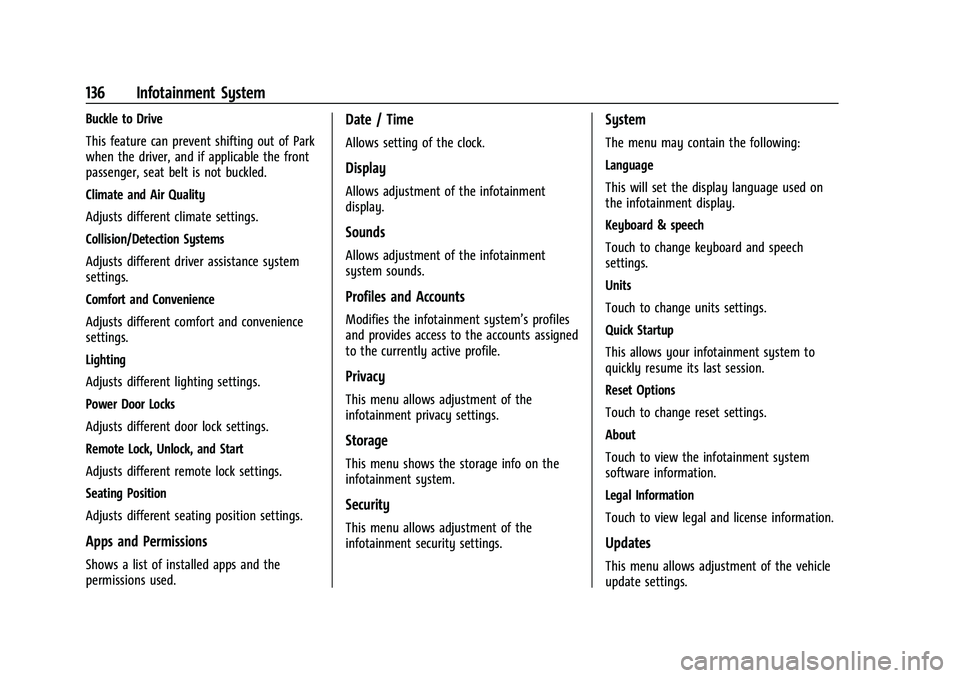
Buckle to Drive
This feature can prevent shifting out of Park
when the driver, and if applicable the front
passenger, seat belt is not buckled.
Climate and Air Quality
Adjusts different climate settings.
Collision/Detection Systems
Adjusts different driver assistance system
settings.
Comfort and Convenience
Adjusts different comfort and convenience
settings.
Lighting
Adjusts different lighting settings.
Power Door Locks
Adjusts different door lock settings.
Remote Lock, Unlock, and Start
Adjusts different remote lock settings.
Seating Position
Adjusts different seating position settings.
Apps and Permissions
Shows a list of installed apps and the
permissions used.
Date / Time
Allows setting of the clock.
Display
Allows adjustment of the infotainment
display.
Sounds
Allows adjustment of the infotainment
system sounds.
Profiles and Accounts
Modifies the infotainment system’s profiles
and provides access to the accounts assigned
to the currently active profile.
Privacy
This menu allows adjustment of the
infotainment privacy settings.
Storage
This menu shows the storage info on the
infotainment system.
Security
This menu allows adjustment of the
infotainment security settings.
System
The menu may contain the following:
Language
This will set the display language used on
the infotainment display.
Keyboard & speech
Touch to change keyboard and speech
settings.
Units
Touch to change units settings.
Quick Startup
This allows your infotainment system to
quickly resume its last session.
Reset Options
Touch to change reset settings.
About
Touch to view the infotainment system
software information.
Legal Information
Touch to view legal and license information.
Updates
This menu allows adjustment of the vehicle
update settings.
Page 150 of 371
GMC Canyon/Canyon Denali Owner Manual (GMNA-Localizing-U.S./Canada/
Mexico-16510661) - 2023 - CRC - 11/29/22
Driving and Operating 149
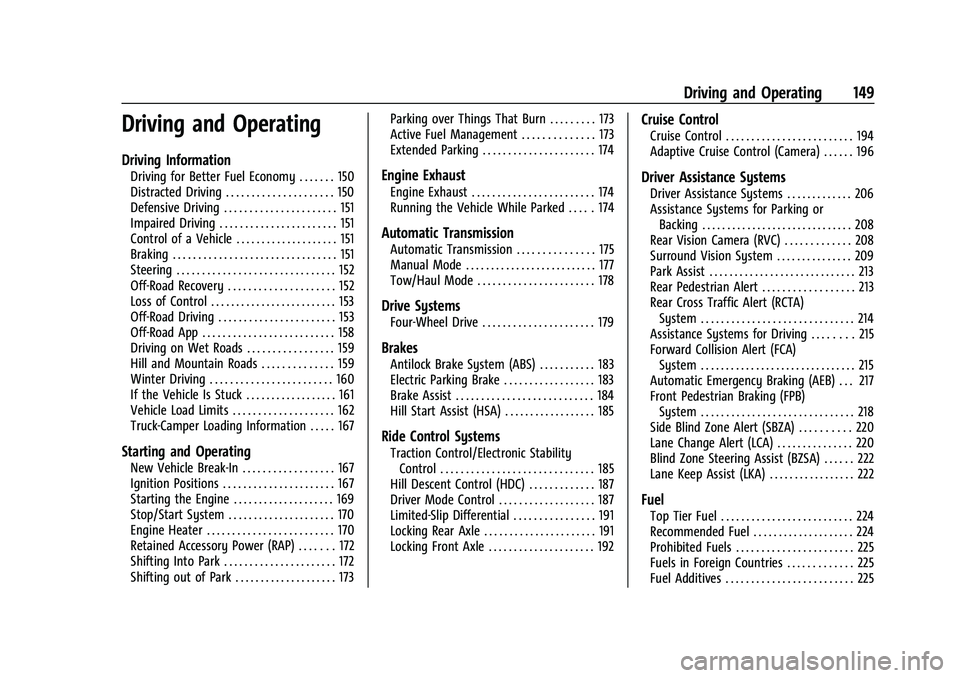
Driving and Operating
Driving Information
Driving for Better Fuel Economy . . . . . . . 150
Distracted Driving . . . . . . . . . . . . . . . . . . . . . 150
Defensive Driving . . . . . . . . . . . . . . . . . . . . . . 151
Impaired Driving . . . . . . . . . . . . . . . . . . . . . . . 151
Control of a Vehicle . . . . . . . . . . . . . . . . . . . . 151
Braking . . . . . . . . . . . . . . . . . . . . . . . . . . . . . . . . 151
Steering . . . . . . . . . . . . . . . . . . . . . . . . . . . . . . . 152
Off-Road Recovery . . . . . . . . . . . . . . . . . . . . . 152
Loss of Control . . . . . . . . . . . . . . . . . . . . . . . . . 153
Off-Road Driving . . . . . . . . . . . . . . . . . . . . . . . 153
Off-Road App . . . . . . . . . . . . . . . . . . . . . . . . . . 158
Driving on Wet Roads . . . . . . . . . . . . . . . . . 159
Hill and Mountain Roads . . . . . . . . . . . . . . 159
Winter Driving . . . . . . . . . . . . . . . . . . . . . . . . 160
If the Vehicle Is Stuck . . . . . . . . . . . . . . . . . . 161
Vehicle Load Limits . . . . . . . . . . . . . . . . . . . . 162
Truck-Camper Loading Information . . . . . 167
Starting and Operating
New Vehicle Break-In . . . . . . . . . . . . . . . . . . 167
Ignition Positions . . . . . . . . . . . . . . . . . . . . . . 167
Starting the Engine . . . . . . . . . . . . . . . . . . . . 169
Stop/Start System . . . . . . . . . . . . . . . . . . . . . 170
Engine Heater . . . . . . . . . . . . . . . . . . . . . . . . . 170
Retained Accessory Power (RAP) . . . . . . . 172
Shifting Into Park . . . . . . . . . . . . . . . . . . . . . . 172
Shifting out of Park . . . . . . . . . . . . . . . . . . . . 173Parking over Things That Burn . . . . . . . . . 173
Active Fuel Management . . . . . . . . . . . . . . 173
Extended Parking . . . . . . . . . . . . . . . . . . . . . . 174
Engine Exhaust
Engine Exhaust . . . . . . . . . . . . . . . . . . . . . . . . 174
Running the Vehicle While Parked . . . . . 174
Automatic Transmission
Automatic Transmission . . . . . . . . . . . . . . . 175
Manual Mode . . . . . . . . . . . . . . . . . . . . . . . . . . 177
Tow/Haul Mode . . . . . . . . . . . . . . . . . . . . . . . 178
Drive Systems
Four-Wheel Drive . . . . . . . . . . . . . . . . . . . . . . 179
Brakes
Antilock Brake System (ABS) . . . . . . . . . . . 183
Electric Parking Brake . . . . . . . . . . . . . . . . . . 183
Brake Assist . . . . . . . . . . . . . . . . . . . . . . . . . . . 184
Hill Start Assist (HSA) . . . . . . . . . . . . . . . . . . 185
Ride Control Systems
Traction Control/Electronic Stability
Control . . . . . . . . . . . . . . . . . . . . . . . . . . . . . . 185
Hill Descent Control (HDC) . . . . . . . . . . . . . 187
Driver Mode Control . . . . . . . . . . . . . . . . . . . 187
Limited-Slip Differential . . . . . . . . . . . . . . . . 191
Locking Rear Axle . . . . . . . . . . . . . . . . . . . . . . 191
Locking Front Axle . . . . . . . . . . . . . . . . . . . . . 192
Cruise Control
Cruise Control . . . . . . . . . . . . . . . . . . . . . . . . . 194
Adaptive Cruise Control (Camera) . . . . . . 196
Driver Assistance Systems
Driver Assistance Systems . . . . . . . . . . . . . 206
Assistance Systems for Parking or Backing . . . . . . . . . . . . . . . . . . . . . . . . . . . . . . 208
Rear Vision Camera (RVC) . . . . . . . . . . . . . 208
Surround Vision System . . . . . . . . . . . . . . . 209
Park Assist . . . . . . . . . . . . . . . . . . . . . . . . . . . . . 213
Rear Pedestrian Alert . . . . . . . . . . . . . . . . . . 213
Rear Cross Traffic Alert (RCTA) System . . . . . . . . . . . . . . . . . . . . . . . . . . . . . . 214
Assistance Systems for Driving . . . . . . . . 215
Forward Collision Alert (FCA) System . . . . . . . . . . . . . . . . . . . . . . . . . . . . . . . 215
Automatic Emergency Braking (AEB) . . . 217
Front Pedestrian Braking (FPB)
System . . . . . . . . . . . . . . . . . . . . . . . . . . . . . . 218
Side Blind Zone Alert (SBZA) . . . . . . . . . . 220
Lane Change Alert (LCA) . . . . . . . . . . . . . . . 220
Blind Zone Steering Assist (BZSA) . . . . . . 222
Lane Keep Assist (LKA) . . . . . . . . . . . . . . . . . 222
Fuel
Top Tier Fuel . . . . . . . . . . . . . . . . . . . . . . . . . . 224
Recommended Fuel . . . . . . . . . . . . . . . . . . . . 224
Prohibited Fuels . . . . . . . . . . . . . . . . . . . . . . . 225
Fuels in Foreign Countries . . . . . . . . . . . . . 225
Fuel Additives . . . . . . . . . . . . . . . . . . . . . . . . . 225