heating GMC ENVOY 2003 User Guide
[x] Cancel search | Manufacturer: GMC, Model Year: 2003, Model line: ENVOY, Model: GMC ENVOY 2003Pages: 442, PDF Size: 3.1 MB
Page 289 of 442
Service............................................................5-3
Doing Your Own Service Work.........................5-3
Adding Equipment to the Outside of Your
Vehicle......................................................5-4
Fuel................................................................5-4
Gasoline Octane............................................5-4
Gasoline Speci®cations....................................5-5
California Fuel...............................................5-5
Additives.......................................................5-6
Fuels in Foreign Countries...............................5-7
Filling Your Tank............................................5-7
Filling a Portable Fuel Container.......................5-9
Checking Things Under the Hood....................5-10
Hood Release..............................................5-10
Engine Compartment Overview.......................5-12
Engine Oil...................................................5-15
Engine Air Cleaner/Filter................................5-20
Automatic Transmission Fluid.........................5-21
Engine Coolant.............................................5-24
Radiator Pressure Cap..................................5-26
Engine Overheating.......................................5-27
Cooling System............................................5-29
Engine Fan Noise.........................................5-35
Power Steering Fluid.....................................5-36
Windshield Washer Fluid................................5-37Brakes........................................................5-38
Battery........................................................5-41
Jump Starting...............................................5-42
Rear Axle.......................................................5-48
Four-Wheel Drive............................................5-48
Bulb Replacement..........................................5-50
Halogen Bulbs..............................................5-50
Headlamps..................................................5-50
Front Turn Signal and Sidemarker Lamps........5-51
Taillamps and Turn Signal Lamps...................5-51
Replacement Bulbs.......................................5-52
Windshield Wiper Blade Replacement..............5-52
Tires..............................................................5-54
In¯ation -- Tire Pressure................................5-55
Tire Inspection and Rotation...........................5-55
When It Is Time for New Tires.......................5-57
Buying New Tires.........................................5-58
Uniform Tire Quality Grading..........................5-59
Wheel Alignment and Tire Balance..................5-60
Wheel Replacement......................................5-60
Tire Chains..................................................5-62
Accessory In¯ator.........................................5-62
If a Tire Goes Flat........................................5-64
Changing a Flat Tire.....................................5-64
Section 5 Service and Appearance Care
5-1
Page 312 of 442
Engine Coolant
The cooling system in your vehicle is ®lled with
DEX-COOLžengine coolant. This coolant is designed
to remain in your vehicle for 5 years or 150,000 miles
(240 000 km), whichever occurs ®rst, if you add
only DEX-COOL
žextended life coolant.
The following explains your cooling system and how to
add coolant when it is low. If you have a problem
with engine overheating, see
Engine Overheating on
page 5-27.
A 50/50 mixture of clean, drinkable water and
DEX-COOL
žcoolant will:
·Give freezing protection down to-34ÉF (-37ÉC).
·Give boiling protection up to 265ÉF (129ÉC).
·Protect against rust and corrosion.
·Help keep the proper engine temperature.
·Let the warning lights and gages work as
they should.
Notice:When adding coolant, it is important that
you use only DEX-COOLž(silicate-free) coolant.
If coolant other than DEX-COOLžis added to
the system, premature engine, heater core or
radiator corrosion may result. In addition, the engine
coolant will require change sooner Ð at 30,000 miles
(50,000 km) or 24 months, whichever occurs ®rst.
Damage caused by the use of coolant other
than DEX-COOL
žis not covered by your new vehicle
warranty.
What to Use
Use a mixture of one-halfclean, drinkable waterand
one-half DEX-COOLžcoolant. If you use this coolant
mixture, you don't need to add anything else.
5-24
Page 314 of 442
Adding Coolant
If you need more coolant, add the proper DEX-COOLž
coolant mixtureat the coolant recovery tank.
{CAUTION:
Turning the radiator pressure cap when the
engine and radiator are hot can allow steam
and scalding liquids to blow out and burn you
badly. With the coolant recovery tank, you will
almost never have to add coolant at the
radiator. Never turn the radiator pressure
cap Ð even a little Ð when the engine and
radiator are hot.
Add coolant mixture at the recovery tank, but be careful
not to spill it.
{CAUTION:
You can be burned if you spill coolant on hot
engine parts. Coolant contains ethylene glycol,
and it will burn if the engine parts are hot
enough. Don't spill coolant on a hot engine.
Occasionally check the coolant level in the radiator. For
information on how to add coolant to the radiator,
see
Cooling System on page 5-29.
Radiator Pressure Cap
Notice:Your pressure cap is a pressure-type cap
and must be tightly installed to prevent coolant loss
and possible engine damage from overheating.
See ªCapacities and Speci®cationsº for more
information.
See
Engine Compartment Overview on page 5-12for
information on location.
5-26
Page 315 of 442
Engine Overheating
You will ®nd a coolant temperature gage on your
vehicle's instrument panel. If your vehicle has a DIC,
the display will show an Engine Coolant Hot/Idle Engine
message.
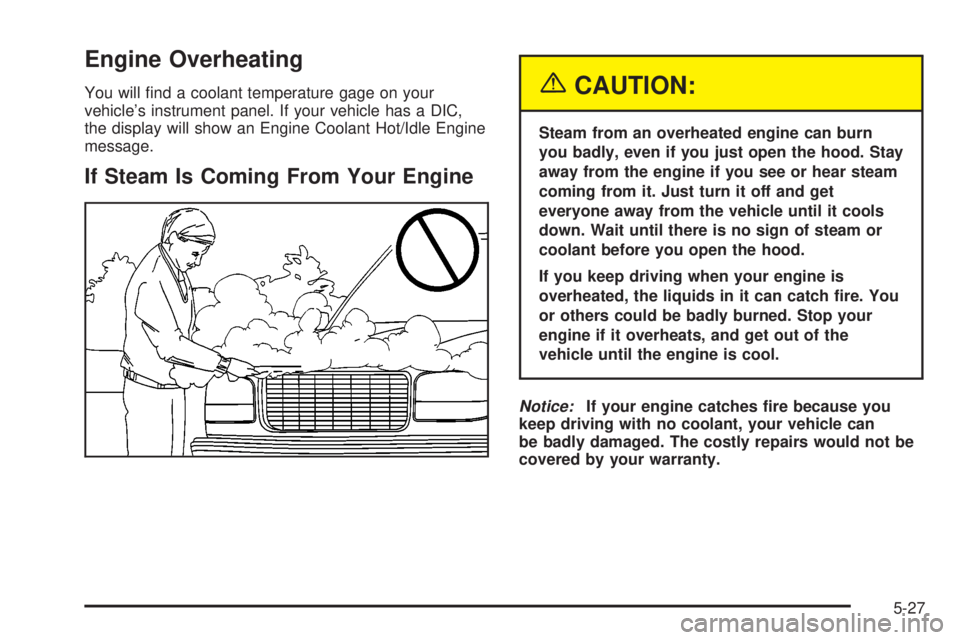
If Steam Is Coming From Your Engine
{CAUTION:
Steam from an overheated engine can burn
you badly, even if you just open the hood. Stay
away from the engine if you see or hear steam
coming from it. Just turn it off and get
everyone away from the vehicle until it cools
down. Wait until there is no sign of steam or
coolant before you open the hood.
If you keep driving when your engine is
overheated, the liquids in it can catch ®re. You
or others could be badly burned. Stop your
engine if it overheats, and get out of the
vehicle until the engine is cool.
Notice:If your engine catches ®re because you
keep driving with no coolant, your vehicle can
be badly damaged. The costly repairs would not be
covered by your warranty.
5-27
Page 342 of 442
Backglass Wiper Blade Replacement
SeeWindshield Wiper Blade Replacement on page 5-52for instructions on how to change the backglass wiper
blade. The backglass wiper blade will not lock in a
vertical position like the windshield wiper blade, so care
should be used when pulling it away from the vehicle.
Tires
Your new vehicle comes with high-quality tires made by
a leading tire manufacturer. If you ever have questions
about your tire warranty and where to obtain service,
see your GMC Warranty booklet for details.
{CAUTION:
Poorly maintained and improperly used tires
are dangerous.
·Overloading your tires can cause
overheating as a result of too much
friction. You could have an air-out and a
serious accident. See ªLoading Your
Vehicleº in the Index.
·Underin¯ated tires pose the same danger
as overloaded tires. The resulting accident
could cause serious injury. Check all tires
frequently to maintain the recommended
pressure. Tire pressure should be checked
when your tires are cold.
·Overin¯ated tires are more likely to be
cut, punctured or broken by a sudden
impact Ð such as when you hit a pothole.
Keep tires at the recommended pressure.
·Worn, old tires can cause accidents. If
your tread is badly worn, or if your tires
have been damaged, replace them.
5-54
Page 351 of 442
The air in¯ator kit may be located in the glove box. The
kit includes a 22 ft (6.7 m) hose with three nozzle
adapters.
To use the air in¯ator, attach the appropriate nozzle
adapter to the end of the hose if required. Then attach
that end of the hose to the object you wish to in¯ate.
Attach the other end of the hose to the outlet.
Press and release the switch to turn the air in¯ator on.
The indicator light will remain on when the in¯ator is
running.
The system has an internal clock to prevent overheating.
The system will allow about ®ve minutes of running
time, then the compressor will stop. The indicator light
will then begin to ¯ash. When the indicator is off,
the in¯ator can be started again by pressing the switch.
If the compressor is still hot, it may only run for a
short time before shutting off again.
Press and release the switch to turn the in¯ator off.
Place the in¯ator kit tools in the pouch and store
it properly. Remove the in¯ator hose from the outlet
during loading and unloading. Load leveling will
not function with the in¯ator hose attached to the in¯ator
outlet.To reinstall the cover, line up the tabs at the back of the
cover, put it in place and latch the tabs.
A continuous ¯ashing indicator light may also indicate a
malfunction in the air suspension system.
{CAUTION:
In¯ating something too much can make it
explode, and you or others could be injured.
Be sure to read the in¯ator instructions, and
in¯ate any object only to its recommended
pressure.
5-63
Page 431 of 442
Driving (cont.)
City...........................................................4-33
Defensive..................................................... 4-2
Drunken....................................................... 4-2
Freeway.....................................................4-34
Hill and Mountain Roads..............................4-37
In Rain and on Wet Roads...........................4-30
Winter........................................................4-39
Dual Automatic Climate Control System.............3-24
Dual Climate Control System............................3-21
DVD Player....................................................3-95
DVD ............................................................3-107
Cleaning the Video Screen..........................3-107
Distortion..................................................3-105
Rear Seat Entertainment System...................3-92
E
Electrical System............................................5-89
Add-On Equipment......................................5-89
Fuses and Circuit Breakers...........................5-90
Headlamps.................................................5-89
Power Windows and Other Power Options......5-90
Windshield Wiper Fuses...............................5-89
Electronically Controlled Air Suspension
System......................................................4-49
Emergency Release for Opening Liftgate............2-13
Emissions Inspection and Maintenance
Programs...................................................3-44Engine Compartment Fuse Block......................5-91
ENGINE COOLANT HOT/IDLE ENGINE.............3-60
Engine Coolant Level Check.............................6-11
Engine Oil Additives........................................5-18
Engine Oil Level Check...................................6-11
Engine Oil Scheduled Maintenance..................... 6-5
Engine..........................................................5-20
Air Cleaner/Filter.........................................5-20
Battery.......................................................5-41
Change Engine Oil Light...............................3-46
Check and Service Engine Soon Light............3-42
Compartment Overview................................5-12
Coolant Heater............................................2-22
Coolant Temperature Gage...........................3-41
Coolant......................................................5-24
Cooling System Inspection............................6-17
Exhaust.....................................................2-33
Fan Noise..................................................5-35
Oil .............................................................5-15
Overheating................................................5-27
Reduced Power Light...................................3-47
Starting......................................................2-21
Entertainment System....................................3-107
Cleaning the Video Screen..........................3-107
DVD Distortion..........................................3-105
Entry Lighting.................................................3-18
Environmental Concerns..................................4-17
Erasing HomeLink
žButtons..............................2-43
Exit Lighting...................................................3-18
Express±Down Window....................................2-16
5