seats GMC ENVOY 2003 User Guide
[x] Cancel search | Manufacturer: GMC, Model Year: 2003, Model line: ENVOY, Model: GMC ENVOY 2003Pages: 442, PDF Size: 3.1 MB
Page 32 of 442
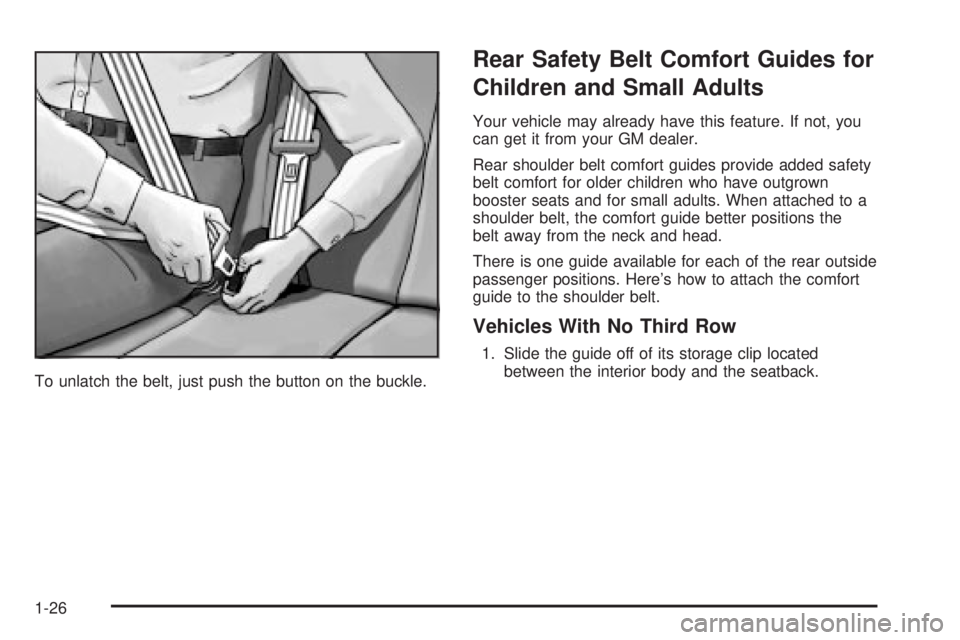
To unlatch the belt, just push the button on the buckle.
Rear Safety Belt Comfort Guides for
Children and Small Adults
Your vehicle may already have this feature. If not, you
can get it from your GM dealer.
Rear shoulder belt comfort guides provide added safety
belt comfort for older children who have outgrown
booster seats and for small adults. When attached to a
shoulder belt, the comfort guide better positions the
belt away from the neck and head.
There is one guide available for each of the rear outside
passenger positions. Here's how to attach the comfort
guide to the shoulder belt.
Vehicles With No Third Row
1. Slide the guide off of its storage clip located
between the interior body and the seatback.
1-26
Page 36 of 442
Child Restraints
Older Children
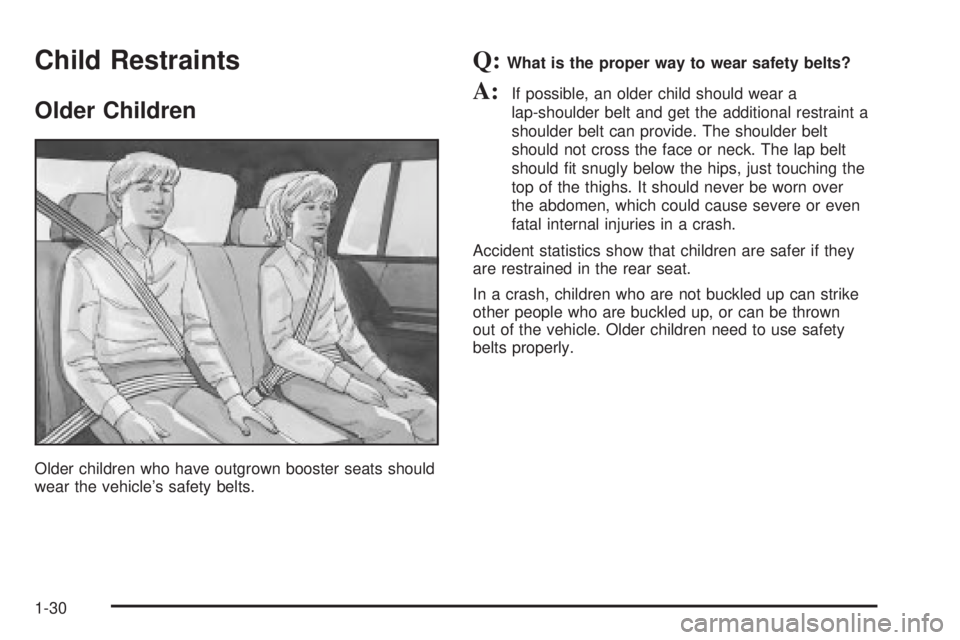
Older children who have outgrown booster seats should
wear the vehicle's safety belts.
Q:What is the proper way to wear safety belts?
A:If possible, an older child should wear a
lap-shoulder belt and get the additional restraint a
shoulder belt can provide. The shoulder belt
should not cross the face or neck. The lap belt
should ®t snugly below the hips, just touching the
top of the thighs. It should never be worn over
the abdomen, which could cause severe or even
fatal internal injuries in a crash.
Accident statistics show that children are safer if they
are restrained in the rear seat.
In a crash, children who are not buckled up can strike
other people who are buckled up, or can be thrown
out of the vehicle. Older children need to use safety
belts properly.
1-30
Page 43 of 442
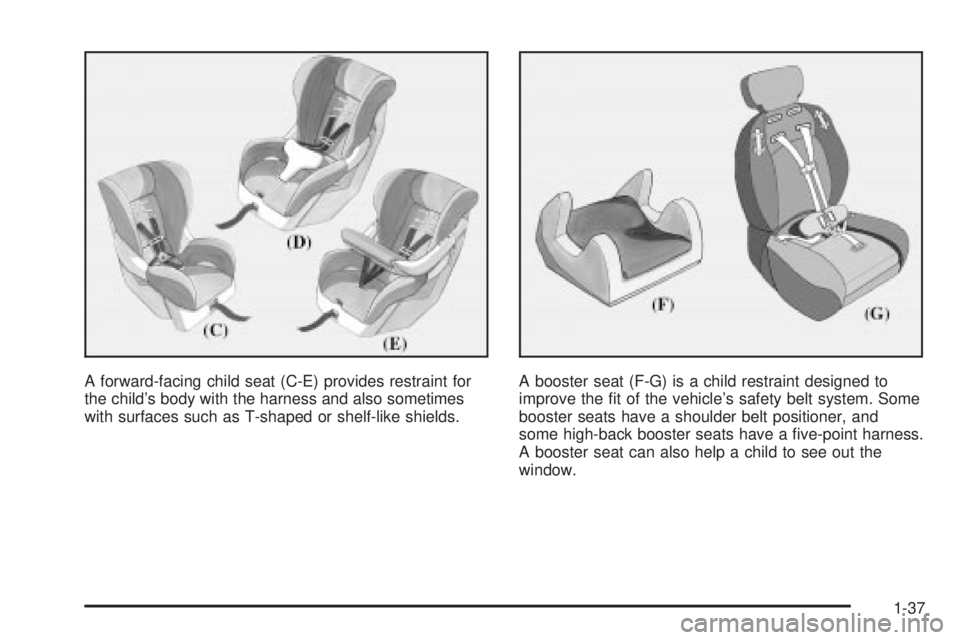
A forward-facing child seat (C-E) provides restraint for
the child's body with the harness and also sometimes
with surfaces such as T-shaped or shelf-like shields.A booster seat (F-G) is a child restraint designed to
improve the ®t of the vehicle's safety belt system. Some
booster seats have a shoulder belt positioner, and
some high-back booster seats have a ®ve-point harness.
A booster seat can also help a child to see out the
window.
1-37
Page 55 of 442

Your vehicle has a right front passenger air bag.Neverput a rear facing child restraint in this seat.
Here's why:
{CAUTION:
A child in a rear-facing child restraint can be
seriously injured or killed if the right front
passenger's air bag in¯ates. This is because
the back of the rear-facing child restraint
would be very close to the in¯ating air bag.
Always secure a rear-facing child restraint in a
rear seat.
Although a rear seat is a safer place, you can secure a
forward-facing child restraint in the right front seat.
You'll be using the lap-shoulder belt. See
Top Strap on
page 1-40if the child restraint has one. Be sure to
follow the instructions that came with the child restraint.
Secure the child in the child restraint when and as
the instructions say.
1. Because your vehicle has a right front passenger's
air bag, always move the seat as far back as it will
go before securing a forward-facing child restraint.
See
Power Seats on page 1-2.2. Put the restraint on the seat.
3. Pick up the latch plate, and run the lap and shoulder
portions of the vehicle's safety belt through or
around the restraint. The child restraint instructions
will show you how.
4. Buckle the belt. Make sure the release button is
positioned so you would be able to unbuckle the
safety belt quickly if you ever had to.
1-49
Page 144 of 442

Operation Tips
·
Keep the hood and front air inlets free of ice, snow,
or any other obstruction (such as leaves). The
heater and defroster will work far better, reducing
the chance of fogging the inside of your windows.
·When you enter a vehicle in cold weather, turn the
fan knob all the way to the right for a few moments
before driving. This helps clear the intake ducts
of snow and moisture, and reduces the chance of
fogging the inside of your window.
·Keep the air path under the front seats clear of
objects. This helps air to circulate throughout
your vehicle.
·Adding outside equipment to the front of your
vehicle, such as hood-air de¯ectors, may affect the
performance of the heating and air conditioning
system. Check with your dealer before adding
equipment to the outside of your vehicle.
Dual Automatic Climate Control
System
Your vehicle may have the optional dual automatic
climate control system. With this system you can control
the heating, cooling and ventilation for your vehicle.
When your vehicle is ®rst started and the climate control
system is on, or if the climate control system has
been turned on, the display will show the driver's
temperature setting for ®ve seconds. Then it will show
the outside temperature.
9(Off):Press this button to turn off the entire climate
control system. Outside air will still enter the vehicle,
and will be directed to the ¯oor. Press the AUTO button,
the mode button, the fan arrows, or either temperature
knob to turn the system on.
3-24
Page 148 of 442

Outlet Adjustment
Use the air outlets located in the center and on the side
of your instrument panel to direct the air¯ow.
Ventilation System
For mild outside temperatures when little heating or
cooling is needed, use the vent setting to direct outside
air through your vehicle.
Your vehicle's ventilation system supplies outside air to
the inside of your vehicle when it is moving. With the
side windows closed, air will ¯ow into the front air inlet
grilles, through the vehicle and out the air exhaust
valves.
Outside air will also enter the vehicle when the heater
or the air conditioning compressor is running, unless you
have pressed the recirculation button.
Operation Tips
·
Keep the hood and front air inlets free of ice, snow,
or any other obstruction (such as leaves). The
heater and defroster will work far better, reducing
the chance of fogging the inside of your windows.
·When you enter a vehicle in cold weather, turn the
fan knob all the way to the right for a few moments
before driving. This helps clear the intake ducts
of snow and moisture, and reduces the chance of
fogging the inside of your window.
·Keep the air path under the front seats clear of
objects. This helps air to circulate throughout
your vehicle.
·Adding outside equipment to the front of your
vehicle, such as hood-air de¯ectors, may affect the
performance of the heating and air conditioning
system. Check with your dealer before adding
equipment to the outside of your vehicle.
3-28
Page 212 of 442
Compact Disc Messages
CHECK CD:If this message appears on the radio
display, it could be due to one of the following reasons:
·You're driving on a very rough road. When the
road becomes smoother, the disc should play.
·The disc is dirty, scratched, wet or upside down.
·The air is very humid. If so, wait about an hour and
try again.
·There may have been a problem while burning
the CD.
·The label may be caught in the CD player.
If the CD is not playing correctly, for any other reason,
try a known good CD.
If any error occurs repeatedly or if an error can't be
corrected, contact your dealer. If your radio displays an
error message, write it down and provide it to your
dealer when reporting the problem.
Rear Seat Entertainment System
Your vehicle may have the optional Digital Versatile Disc
(DVD) entertainment system. The entertainment
system includes a DVD player, a video display screen,
two sets of IR (Infrared) wireless headphones, a
remote control and an instructional video disc.
Before You Drive
The video entertainment system is for passengers in the
second and third row seats only. The driver cannot
safely view the video screen while driving and should
not try to do so.
In severe or extreme temperature conditions your
entertainment system should not be operated until the
temperature is within the operating range. This will keep
your video components from being damaged when
the temperature is below-4ÉF (-20ÉC) or above
140ÉF (60ÉC). To resume operation, shut off the
entertainment system, pull down the video screen and
then heat or cool the vehicle until the temperature
is within the operating range.
Headphones
The entertainment system includes two IR wireless
headphones.
Mini-headphone jacks are also provided for use with
customer provided headphones.
The wireless headphones have an ON/OFF switch and
a volume control. To use the headphones turn the
switch to ON. An indicator light will illuminate. If the light
does not illuminate, the batteries may need to be
replaced. See
Battery Replacementlater in this section
for more information. Switch the headphones to OFF
when not in use.
3-92
Page 276 of 442

To ®nd out the actual loads on your front and rear axles,
you need to go to a weigh station and weigh your vehicle.
Your dealer can help you with this. Be sure to spread out
your load equally on both sides of the centerline.
Never exceed the GVWR for your vehicle, or the GAWR
for either the front or rear axle.
If you do have a heavy load, you should spread it out.
Similar appearing vehicles may have different GVWRs
and payloads. Please note your vehicle's
Certi®cation/Tire label or consult your dealer for
additional details.
{CAUTION:
Do not load your vehicle any heavier than the
GVWR, or either the maximum front or rear
GAWR. If you do, parts on your vehicle can
break, and it can change the way your vehicle
handles. These could cause you to lose
control and crash. Also, overloading can
shorten the life of your vehicle.
Using heavier suspension components to get added
durability might not change your vehicle's weight ratings.
Ask your dealer to help you load your vehicle the
right way.
Notice:Your warranty does not cover parts or
components that fail because of overloading.
If you put things inside your vehicle-like suitcases, tools,
packages, or anything else-they will go as fast as the
vehicle goes. If you have to stop or turn quickly, or
if there's a crash, they'll keep going.
{CAUTION:
Things you put inside your vehicle can strike
and injure people in a sudden stop or turn, or
in a crash.
·Put things in the cargo area of your
vehicle. Try to spread the weight evenly.
·Never stack heavier things, like suitcases,
inside the vehicle so that some of them
are above the tops of the seats.
·Don't leave an unsecured child restraint in
your vehicle.
·When you carry something inside the
vehicle, secure it whenever you can.
·Don't leave a seat folded down unless you
need to.
There's also important loading information for off-road
driving in this manual.
4-48
Page 386 of 442
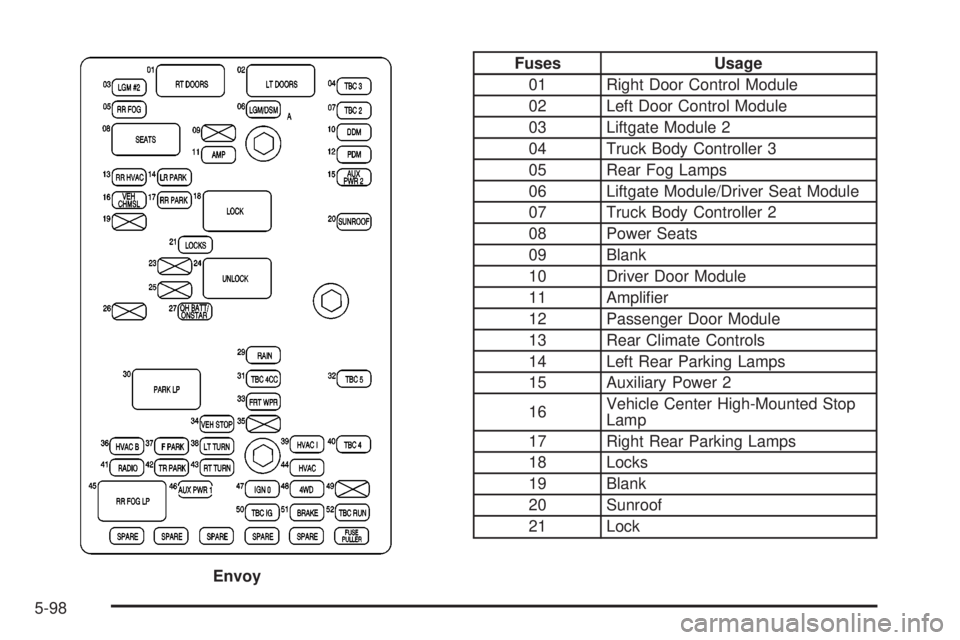
Fuses Usage
01 Right Door Control Module
02 Left Door Control Module
03 Liftgate Module 2
04 Truck Body Controller 3
05 Rear Fog Lamps
06 Liftgate Module/Driver Seat Module
07 Truck Body Controller 2
08 Power Seats
09 Blank
10 Driver Door Module
11 Ampli®er
12 Passenger Door Module
13 Rear Climate Controls
14 Left Rear Parking Lamps
15 Auxiliary Power 2
16Vehicle Center High-Mounted Stop
Lamp
17 Right Rear Parking Lamps
18 Locks
19 Blank
20 Sunroof
21 Lock
Envoy
5-98
Page 388 of 442

Fuses Usage
01 Right Door Control Module
02 Left Door Control Module
03 Liftgate Module 2
04 Truck Body Controller 3
05 Rear Fog Lamps
06 Liftgate Module/Driver Seat Module
07 Truck Body Controller 2
08 Power Seats
09 Rear Wiper
10 Driver Door Module
11 Ampli®er
12 Passenger Door Module
13 Rear Climate Controls
14 Left Rear Parking Lamps
15 Auxiliary Power 2
16Vehicle Center High-Mounted Stop
Lamp
17 Right Rear Parking Lamps
18 Locks
19 Blank
20 Vent Window
21 Lock
Envoy XL
5-100