change time GMC ENVOY 2003 Owner's Guide
[x] Cancel search | Manufacturer: GMC, Model Year: 2003, Model line: ENVOY, Model: GMC ENVOY 2003Pages: 442, PDF Size: 3.1 MB
Page 222 of 442
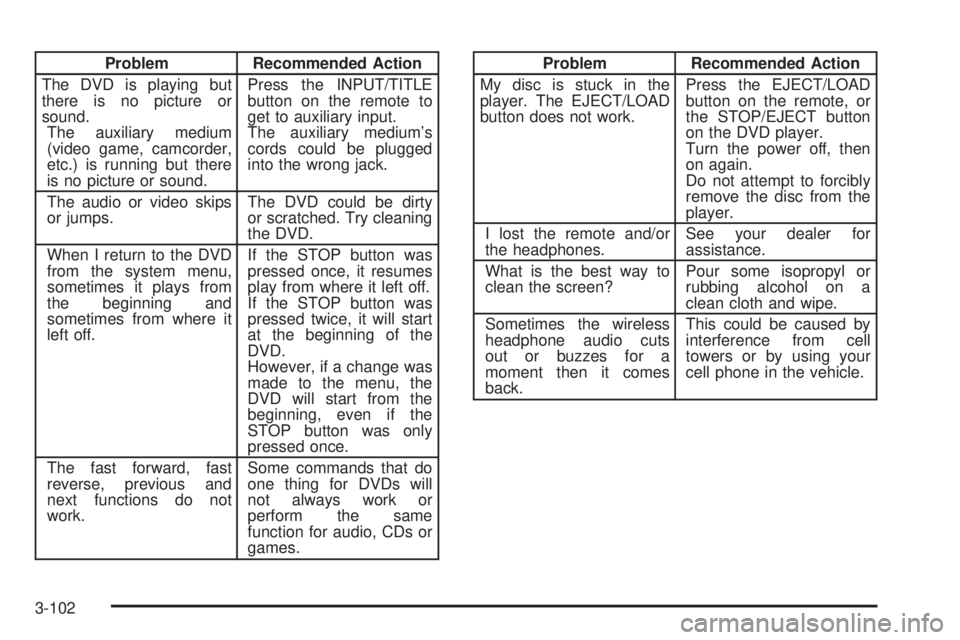
Problem Recommended Action
The DVD is playing but
there is no picture or
sound.
The auxiliary medium
(video game, camcorder,
etc.) is running but there
is no picture or sound.Press the INPUT/TITLE
button on the remote to
get to auxiliary input.
The auxiliary medium's
cords could be plugged
into the wrong jack.
The audio or video skips
or jumps.The DVD could be dirty
or scratched. Try cleaning
the DVD.
When I return to the DVD
from the system menu,
sometimes it plays from
the beginning and
sometimes from where it
left off.If the STOP button was
pressed once, it resumes
play from where it left off.
If the STOP button was
pressed twice, it will start
at the beginning of the
DVD.
However, if a change was
made to the menu, the
DVD will start from the
beginning, even if the
STOP button was only
pressed once.
The fast forward, fast
reverse, previous and
next functions do not
work.Some commands that do
one thing for DVDs will
not always work or
perform the same
function for audio, CDs or
games.Problem Recommended Action
My disc is stuck in the
player. The EJECT/LOAD
button does not work.Press the EJECT/LOAD
button on the remote, or
the STOP/EJECT button
on the DVD player.
Turn the power off, then
on again.
Do not attempt to forcibly
remove the disc from the
player.
I lost the remote and/or
the headphones.See your dealer for
assistance.
What is the best way to
clean the screen?Pour some isopropyl or
rubbing alcohol on a
clean cloth and wipe.
Sometimes the wireless
headphone audio cuts
out or buzzes for a
moment then it comes
back.This could be caused by
interference from cell
towers or by using your
cell phone in the vehicle.
3-102
Page 236 of 442

Remember: Anti-lock doesn't change the time you need
to get your foot up to the brake pedal or always
decrease stopping distance. If you get too close to the
vehicle in front of you, you won't have time to apply
your brakes if that vehicle suddenly slows or stops.
Always leave enough room up ahead to stop, even
though you have anti-lock brakes.
Using Anti-Lock
Don't pump the brakes. Just hold the brake pedal down
®rmly and let anti-lock work for you. You may feel
the brakes vibrate, or you may notice some noise, but
this is normal.
Braking in Emergencies
With anti-lock, you can steer and brake at the same
time. In many emergencies, steering can help you more
than even the very best braking.
Traction Assist System (TAS)
Your two-wheel drive vehicle may have a Traction
Assist System (TAS) that limits wheel spin. This
is especially useful in slippery road conditions. The
system operates only if it senses that one or both of the
rear wheels are spinning or beginning to lose traction.
When this happens, the system reduces engine
power to limit wheel spin.
The low traction symbol next to the button will come on
when the TAS is limiting wheel spin. You may feel or
hear the system working, but this is normal.
The Traction Assist System may operate on dry roads
under some conditions. When this happens, you
may notice a reduction in acceleration. This is normal
and doesn't mean there's a problem with your vehicle.
Examples of these conditions include a hard
acceleration in a turn, an abrupt upshift or downshift of
the transmission or driving on rough roads.
If your vehicle is in cruise control when the TAS begins
to limit wheel spin, the cruise control will automatically
disengage. When road conditions allow you to safely
use it again, you may re-engage the cruise control. See
ªCruise Controlº under
Turn Signal/Multifunction
Lever on page 3-7. When the traction control off symbol
on the button is on, the TAS is off and will not limit
wheel spin. Adjust your driving accordingly.
4-8
Page 237 of 442

The traction control off symbol on the button will come
on under the following conditions:
·The Traction Assist System is turned off, either by
pressing the TAS on/off button or by turning off
the automatic engagement feature of the TAS.
·The transmission is in FIRST (1) gear; TAS will not
operate in this gear. This is normal.
·The vehicle is driven on an extremely rough road.
When the vehicle leaves the rough surface, slows
down or stops, the light will go off and TAS will
be on again. This is normal.
·A Traction Assist System, Anti-Lock Brake System
or engine-related problem has been detected and
the vehicle needs service.
The Traction Assist System, as delivered from the
factory, will automatically come on whenever you start
your vehicle. To limit wheel spin, especially in
slippery road conditions, you should always leave the
system on. But you can turn the TAS off if you ever need
to. You should turn the TAS off if your vehicle ever
gets stuck in sand, mud or snow and rocking the vehicle
is required.To turn the system on or off, press the TAS button
located near the shift lever. If you used the button to turn
the system off, the traction control off symbol on the
button will come on and stay on.
You can turn the system back on at any time by
pressing the button again. The traction control off symbol
on the button should go off.
If desired, you can change the TAS automatic
engagement feature so that the system will not come on
automatically when the engine is started. To do so:
1. Turn the ignition to RUN.
2. Move the shift lever to NEUTRAL.
3. Apply the brake pedal and press the accelerator
pedal to the ¯oor.
4. Press and hold the TAS button for at least six
seconds.
5. Release the TAS button and both pedals.
6. Start the engine and wait a few seconds.
The next time you start your vehicle, the TAS will not
automatically come on. You can restore the automatic
feature by using the same procedure. Whether the TAS
is set to come on automatically or not, you can always
turn the system on or off by pressing the TAS button.
4-9
Page 238 of 442

Locking Rear Axle
If your vehicle has this feature, your locking rear axle
can give you additional traction on snow, mud, ice, sand
or gravel. It works like a standard axle most of the
time, but when one of the rear wheels has no traction
and the other does, this feature will allow the wheel with
traction to move the vehicle.
Steering
Power Steering
If you lose power steering assist because the engine
stops or the system is not functioning, you can steer but
it will take much more effort.
Steering Tips
Driving on Curves
It's important to take curves at a reasonable speed.
A lot of the ªdriver lost controlº accidents mentioned on
the news happen on curves. Here's why:
Experienced driver or beginner, each of us is subject to
the same laws of physics when driving on curves.
The traction of the tires against the road surface makes
it possible for the vehicle to change its path whenyou turn the front wheels. If there's no traction, inertia
will keep the vehicle going in the same direction. If
you've ever tried to steer a vehicle on wet ice, you'll
understand this.
The traction you can get in a curve depends on the
condition of your tires and the road surface, the angle at
which the curve is banked, and your speed. While
you're in a curve, speed is the one factor you can
control.
Suppose you're steering through a sharp curve.
Then you suddenly accelerate. Both control
systems Ð steering and acceleration Ð have to do their
work where the tires meet the road. Adding the
sudden acceleration can demand too much of those
places. You can lose control. See
Traction Assist
System (TAS) on page 4-8.
What should you do if this ever happens? Ease up on
the accelerator pedal, steer the vehicle the way you
want it to go, and slow down.
Speed limit signs near curves warn that you should
adjust your speed. Of course, the posted speeds
are based on good weather and road conditions. Under
less favorable conditions you'll want to go slower.
4-10
Page 241 of 442
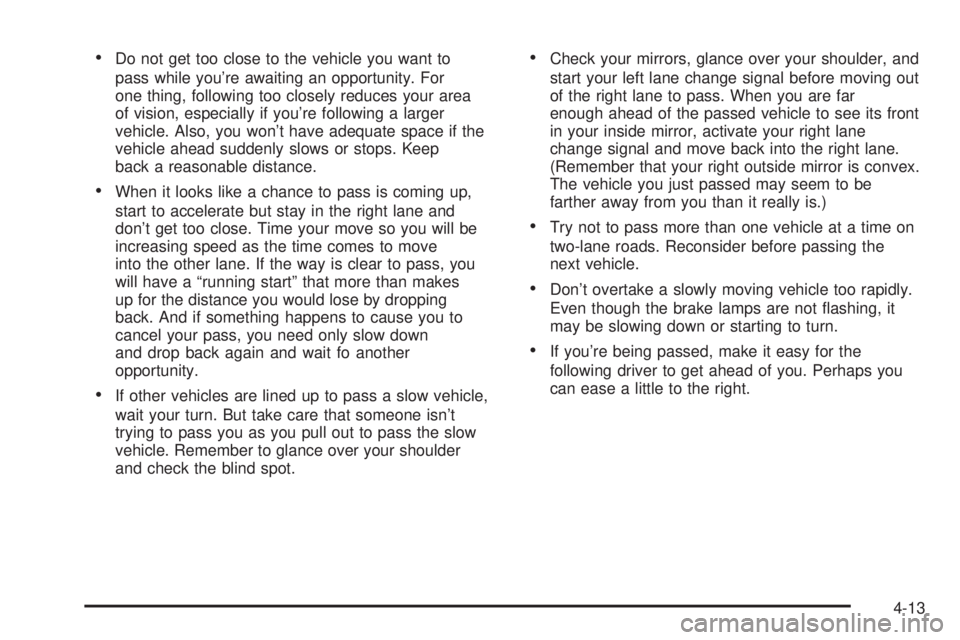
·Do not get too close to the vehicle you want to
pass while you're awaiting an opportunity. For
one thing, following too closely reduces your area
of vision, especially if you're following a larger
vehicle. Also, you won't have adequate space if the
vehicle ahead suddenly slows or stops. Keep
back a reasonable distance.
·When it looks like a chance to pass is coming up,
start to accelerate but stay in the right lane and
don't get too close. Time your move so you will be
increasing speed as the time comes to move
into the other lane. If the way is clear to pass, you
will have a ªrunning startº that more than makes
up for the distance you would lose by dropping
back. And if something happens to cause you to
cancel your pass, you need only slow down
and drop back again and wait fo another
opportunity.
·If other vehicles are lined up to pass a slow vehicle,
wait your turn. But take care that someone isn't
trying to pass you as you pull out to pass the slow
vehicle. Remember to glance over your shoulder
and check the blind spot.
·Check your mirrors, glance over your shoulder, and
start your left lane change signal before moving out
of the right lane to pass. When you are far
enough ahead of the passed vehicle to see its front
in your inside mirror, activate your right lane
change signal and move back into the right lane.
(Remember that your right outside mirror is convex.
The vehicle you just passed may seem to be
farther away from you than it really is.)
·Try not to pass more than one vehicle at a time on
two-lane roads. Reconsider before passing the
next vehicle.
·Don't overtake a slowly moving vehicle too rapidly.
Even though the brake lamps are not ¯ashing, it
may be slowing down or starting to turn.
·If you're being passed, make it easy for the
following driver to get ahead of you. Perhaps you
can ease a little to the right.
4-13
Page 246 of 442

Controlling your vehicle is the key to successful off-road
driving. One of the best ways to control your vehicle
is to control your speed. Here are some things to keep
in mind. At higher speeds:
·you approach things faster and you have less time
to scan the terrain for obstacles.
·you have less time to react.
·you have more vehicle bounce when you drive over
obstacles.
·you'll need more distance for braking, especially
since you're on an unpaved surface.
{CAUTION:
When you're driving off-road, bouncing and
quick changes in direction can easily throw
you out of position. This could cause you to
lose control and crash. So, whether you're
driving on or off the road, you and your
passengers should wear safety belts.
Scanning the Terrain
Off-road driving can take you over many different kinds
of terrain. You need to be familiar with the terrain
and its many different features. Here are some things to
consider.
Surface Conditions:Off-roading can take you over
hard-packed dirt, gravel, rocks, grass, sand, mud, snow
or ice. Each of these surfaces affects the steering,
acceleration and braking of your vehicle in different ways.
Depending upon the kind of surface you are on, you may
experience slipping, sliding, wheel spinning, delayed
acceleration, poor traction and longer braking distances.
Surface Obstacles:Unseen or hidden obstacles can
be hazardous. A rock, log, hole, rut or bump can startle
you if you're not prepared for them. Often these
obstacles are hidden by grass, bushes, snow or even
the rise and fall of the terrain itself. Here are some
things to consider:
·Is the path ahead clear?
·Will the surface texture change abruptly up ahead?
·Does the travel take you uphill or downhill?
(There's more discussion of these subjects later.)
·Will you have to stop suddenly or change direction
quickly?
4-18
Page 279 of 442

Trailering is different than just driving your vehicle by
itself. Trailering means changes in handling, durability
and fuel economy. Successful, safe trailering takes
correct equipment, and it has to be used properly.
That's the reason for this part. In it are many time-tested,
important trailering tips and safety rules. Many of
these are important for your safety and that of your
passengers. So please read this section carefully before
you pull a trailer.
If You Do Decide To Pull A Trailer
If you do, here are some important points:
·There are many different laws, including speed limit
restrictions, having to do with trailering. Make sure
your rig will be legal, not only where you live
but also where you'll be driving. A good source for
this information can be state or provincial police.
·Consider using a sway control if your trailer will
weigh 4,000 lbs. (1 816 kg) or less. You should
always use a sway control if your trailer will weigh
more than 4,000 lbs. (1 816 kg). You can ask a
hitch dealer about sway controls.
·Don't tow a trailer at all during the ®rst 500 miles
(800 km) your new vehicle is driven. Your engine,
axle or other parts could be damaged.
·Then, during the ®rst 500 miles (800 km) that you
tow a trailer, don't drive over 50 mph (80 km/h)
and don't make starts at full throttle. This helps your
engine and other parts of your vehicle wear in at
the heavier loads.
·With an automatic transmission, you can tow in
DRIVE (D). You may want to shift the transmission
to THIRD (3) or, if necessary, a lower gear
selection if the transmission shifts too often e.g.,
under heavy loads and/or hilly conditions.
Three important considerations have to do with weight:
·the weight of the trailer,
·the weight of the trailer tongue
·and the weight on your vehicle's tires.
4-51
Page 306 of 442
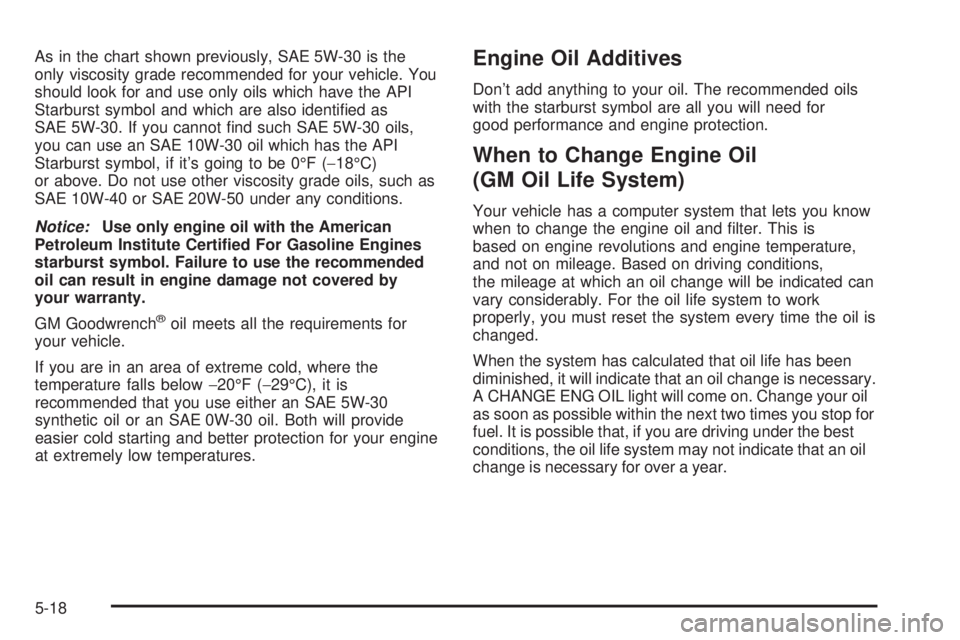
As in the chart shown previously, SAE 5W-30 is the
only viscosity grade recommended for your vehicle. You
should look for and use only oils which have the API
Starburst symbol and which are also identi®ed as
SAE 5W-30. If you cannot ®nd such SAE 5W-30 oils,
you can use an SAE 10W-30 oil which has the API
Starburst symbol, if it's going to be 0ÉF (-18ÉC)
or above. Do not use other viscosity grade oils, such as
SAE 10W-40 or SAE 20W-50 under any conditions.
Notice:Use only engine oil with the American
Petroleum Institute Certi®ed For Gasoline Engines
starburst symbol. Failure to use the recommended
oil can result in engine damage not covered by
your warranty.
GM Goodwrench
žoil meets all the requirements for
your vehicle.
If you are in an area of extreme cold, where the
temperature falls below-20ÉF (-29ÉC), it is
recommended that you use either an SAE 5W-30
synthetic oil or an SAE 0W-30 oil. Both will provide
easier cold starting and better protection for your engine
at extremely low temperatures.
Engine Oil Additives
Don't add anything to your oil. The recommended oils
with the starburst symbol are all you will need for
good performance and engine protection.
When to Change Engine Oil
(GM Oil Life System)
Your vehicle has a computer system that lets you know
when to change the engine oil and ®lter. This is
based on engine revolutions and engine temperature,
and not on mileage. Based on driving conditions,
the mileage at which an oil change will be indicated can
vary considerably. For the oil life system to work
properly, you must reset the system every time the oil is
changed.
When the system has calculated that oil life has been
diminished, it will indicate that an oil change is necessary.
A CHANGE ENG OIL light will come on. Change your oil
as soon as possible within the next two times you stop for
fuel. It is possible that, if you are driving under the best
conditions, the oil life system may not indicate that an oil
change is necessary for over a year.
5-18
Page 307 of 442

However, your engine oil and ®lter must be changed at
least once a year and at this time the system must be
reset. It is also important to check your oil regularly and
keep it at the proper level.
If the system is ever reset accidentally, you must
change your oil at 3,000 miles (5 000 km) since your
last oil change. Remember to reset the oil life system
whenever the oil is changed.
How to Reset the CHANGE ENG OIL Light
The GM Oil Life System calculates when to change
your engine oil and ®lter based on vehicle use. Anytime
your oil is changed, reset the system so it can
calculate when the next oil change is required. If a
situation occurs where you change your oil prior to a
CHANGE ENG OIL light being turned on, reset the
system.
To reset the CHANGE ENG OIL light, do the following:
1. Turn the ignition key to RUN with the
engine off.
2. Fully press and release the accelerator pedal three
times within ®ve seconds.
For vehicles with the Driver Information Center, see
Driver Information Center (DIC) on page 3-50to reset
the system.
What to Do with Used Oil
Used engine oil contains certain elements that may be
unhealthy for your skin and could even cause cancer.
Don't let used oil stay on your skin for very long. Clean
your skin and nails with soap and water, or a good
hand cleaner. Wash or properly dispose of clothing or
rags containing used engine oil. See the manufacturer's
warnings about the use and disposal of oil products.
Used oil can be a threat to the environment. If you
change your own oil, be sure to drain all the oil from the
®lter before disposal. Never dispose of oil by putting it
in the trash, pouring it on the ground, into sewers, or into
streams or bodies of water. Instead, recycle it by
taking it to a place that collects used oil. If you have a
problem properly disposing of your used oil, ask
your dealer, a service station or a local recycling center
for help.
5-19
Page 309 of 442

To inspect or replace the ®lter and reset the indicator (if
equipped), do the following:
1. Remove the screws on the engine cleaner/®lter and
lift off the cover.
2. Remove the air cleaner/®lter from the housing. Care
should be taken to dislodge as little dirt as possible.
3. Install the new engine air cleaner/®lter.
4. Reinstall the cover and tighten the screws.
{CAUTION:
Operating the engine with the air cleaner/®lter
off can cause you or others to be burned. The
air cleaner not only cleans the air, it helps to
stop ¯ame if the engine back®res. If it isn't there
and the engine back®res, you could be burned.
Don't drive with it off, and be careful working on
the engine with the air cleaner/®lter off.
Notice:If the air cleaner/®lter is off, a back®re can
cause a damaging engine ®re. And, dirt can
easily get into your engine, which will damage it.
Always have the air cleaner/®lter in place when
you're driving.
Automatic Transmission Fluid
When to Check and Change
A good time to check your automatic transmission ¯uid
level is when the engine oil is changed.
Change both the ¯uid and ®lter every 50,000 miles
(83 000 km) if the vehicle is mainly driven under one or
more of these conditions:
·In heavy city traffic where the outside temperature
regularly reaches 90ÉF (32ÉC) or higher.
·In hilly or mountainous terrain.
·When doing frequent trailer towing.
·Uses such as found in taxi, police or delivery
service.
If you do not use your vehicle under any of these
conditions, change the ¯uid and ®lter every
100,000 miles (166 000 km).
5-21