trailer GMC ENVOY 2003 Owner's Guide
[x] Cancel search | Manufacturer: GMC, Model Year: 2003, Model line: ENVOY, Model: GMC ENVOY 2003Pages: 442, PDF Size: 3.1 MB
Page 287 of 442

{CAUTION:
It can be dangerous to get out of your vehicle
if the shift lever is not fully in PARK (P) with
the parking brake ®rmly set. Your vehicle
can roll.
If you have left the engine running, the vehicle
can move suddenly. You or others could be
injured. To be sure your vehicle won't move,
even when you're on fairly level ground, use
the steps that follow.
Always put the shift lever fully in PARK (P)
with the parking brake ®rmly set.
If the transfer case on four-wheel drive
vehicles is in NEUTRAL, your vehicle will be
free to roll, even if your shift lever is in
PARK (P). So, be sure the transfer case is in a
drive gear Ð not in NEUTRAL.
See ªFour-Wheel Drive (Automatic Transfer
Case)º in the Index.
When You Are Ready to Leave After
Parking on a Hill
1. Apply your regular brakes and hold the pedal down
while you:
·start your engine,
·shift into a gear, and
·release the parking brake.
2. Let up on the brake pedal.
3. Drive slowly until the trailer is clear of the chocks.
4. Stop and have someone pick up and store the
chocks.
Maintenance When Trailer Towing
Your vehicle will need service more often when you're
pulling a trailer. See the Maintenance Schedule for more
on this. Things that are especially important in trailer
operation are automatic transmission ¯uid (don't over®ll),
engine oil, axle lubricant, belt(s), cooling system and
brake system. Each of these is covered in this manual,
and the Index will help you ®nd them quickly. If
you're trailering, it's a good idea to review these sections
before you start your trip.
Check periodically to see that all hitch nuts and bolts
are tight.
4-59
Page 288 of 442

Trailer Wiring Harness
Your vehicle may be equipped with the seven-wire
trailer towing harness. This harness has a seven-pin
universal heavy-duty trailer connector that is attached to
a bracket on the hitch platform.The seven-wire harness contains the following trailer
circuits:
·Yellow: Left Stop/Turn Signal
·Dark Green: Right Stop/Turn Signal
·Brown: Running Lamps
·White: Ground
·Light Green: Back-up Lamps
·Red: Battery Feed
·Dark Blue: Electric Brakes
If you need to tow a light-duty trailer with a standard
four-way round pin connector, an adapter connector is
available from your dealer.
Your vehicle may also be equipped with wiring for an
electric trailer brake controller. These wires are located
inside the vehicle on the driver's side under the
instrument panel. These wires should be connected to
an electric trailer brake controller by your dealer or
a quali®ed service center.
4-60
Page 309 of 442

To inspect or replace the ®lter and reset the indicator (if
equipped), do the following:
1. Remove the screws on the engine cleaner/®lter and
lift off the cover.
2. Remove the air cleaner/®lter from the housing. Care
should be taken to dislodge as little dirt as possible.
3. Install the new engine air cleaner/®lter.
4. Reinstall the cover and tighten the screws.
{CAUTION:
Operating the engine with the air cleaner/®lter
off can cause you or others to be burned. The
air cleaner not only cleans the air, it helps to
stop ¯ame if the engine back®res. If it isn't there
and the engine back®res, you could be burned.
Don't drive with it off, and be careful working on
the engine with the air cleaner/®lter off.
Notice:If the air cleaner/®lter is off, a back®re can
cause a damaging engine ®re. And, dirt can
easily get into your engine, which will damage it.
Always have the air cleaner/®lter in place when
you're driving.
Automatic Transmission Fluid
When to Check and Change
A good time to check your automatic transmission ¯uid
level is when the engine oil is changed.
Change both the ¯uid and ®lter every 50,000 miles
(83 000 km) if the vehicle is mainly driven under one or
more of these conditions:
·In heavy city traffic where the outside temperature
regularly reaches 90ÉF (32ÉC) or higher.
·In hilly or mountainous terrain.
·When doing frequent trailer towing.
·Uses such as found in taxi, police or delivery
service.
If you do not use your vehicle under any of these
conditions, change the ¯uid and ®lter every
100,000 miles (166 000 km).
5-21
Page 310 of 442

How to Check
Because this operation can be a little difficult, you may
choose to have this done at the dealership service
department.
If you do it yourself, be sure to follow all the instructions
here, or you could get a false reading on the dipstick.
Notice:Too much or too little ¯uid can damage
your transmission. Too much can mean that some
of the ¯uid could come out and fall on hot engine
part or exhaust system parts, starting a ®re.
Too little ¯uid could cause the transmission to
overheat. Be sure to get an accurate reading if you
check your transmission ¯uid.
Wait at least 30 minutes before checking the
transmission ¯uid level if you have been driving:
·When outside temperatures are above 90ÉF (32ÉC).
·At high speed for quite a while.
·In heavy traffic-especially in hot weather.
·While pulling a trailer.
To get the right reading, the ¯uid should be at normal
operating temperature, which is 180ÉF to 200ÉF
(82ÉC to 93ÉC).Get the vehicle warmed up by driving about 15 miles
(24 km) when outside temperatures are above 50ÉF
(10ÉC). If it's colder than 50ÉF (10ÉC), drive the vehicle
in THIRD (3) until the engine temperature gage
moves and then remains steady for 10 minutes.
A cold ¯uid check can be made after the vehicle has
been sitting for eight hours or more with the engine off,
but this is used only as a reference. Let the engine
run at idle for ®ve minutes if outside temperatures are
50ÉF (10ÉC) or more. If it's colder than 50ÉF (10ÉC), you
may have to idle the engine longer. Should the ¯uid
level be low during this cold check, you
mustcheck the
¯uid hot before adding ¯uid. Checking the ¯uid hot
will give you a more accurate reading of the ¯uid level.
Checking the Fluid Level
Prepare your vehicle as follows:
·Park your vehicle on a level place. Keep the engine
running.
·With the parking brake applied, place the shift lever
in PARK (P).
·With your foot on the brake pedal, move the shift
lever through each gear range, pausing for about
three seconds in each range. Then, position the shift
lever in PARK (P).
·Let the engine run at idle for three minutes or more.
5-22
Page 316 of 442

If No Steam Is Coming From Your
Engine
If you get an engine overheat warning but see or hear
no steam, the problem may not be too serious.
Sometimes the engine can get a little too hot when you:
·Climb a long hill on a hot day.
·Stop after high-speed driving.
·Idle for long periods in traffic.
·Tow a trailer.
If you get the overheat warning with no sign of steam,
try this for a minute or so:
1. In heavy traffic, let the engine idle in neutral while
stopped. If it is safe to do so, pull off the road,
shift to PARK (P) or NEUTRAL (N) and let
the engine idle.
2. Turn on your heater to full hot at the highest fan
speed and open the window as necessary.If you no longer have the overheat warning, you can
drive. Just to be safe, drive slower for about 10 minutes.
If the warning doesn't come back on, you can drive
normally.
If the warning continues and you have not stopped, pull
over, stop, and park your vehicle right away.
If there's still no sign of steam, you can push down the
accelerator until the engine speed is about twice as
fast as normal idle speed for at least three minutes while
you're parked. If you still have the warning,
turn off
the engine and get everyone out of the vehicleuntil it
cools down.
You may decide not to lift the hood but to get service
help right away.
5-28
Page 323 of 442

6. Start the engine and let it run until you can feel the
upper radiator hose getting hot. Watch out for the
engine cooling fan.
7. By this time, the coolant level inside the radiator
®ller neck may be lower. If the level is lower, add
more of the proper DEX-COOL
žcoolant mixture
through the ®ller neck until the level reaches
the base of the ®ller neck.
8. Then replace the pressure cap. At any time during
this procedure if coolant begins to ¯ow out of the
®ller neck, reinstall the pressure cap. Be sure
the pressure cap is hand-tight.
Engine Fan Noise
This vehicle has a clutched engine cooling fan. When
the clutch is engaged, the fan spins faster to provide
more air to cool the engine. In most everyday driving
conditions the clutch is not engaged. This improves fuel
economy and reduces fan noise. Under heavy vehicle
loading, trailer towing, and/or high outside temperatures,
the fan speed increases when the clutch engages. So
you may hear an increase in fan noise. This is
normal and should not be mistaken as the transmission
slipping or making extra shifts. It is merely the cooling
system functioning properly. The fan will slow down
when additional cooling is not required and the clutch
disengages.
You may also hear this fan noise when you start the
engine. It will go away as the fan clutch disengages.
5-35
Page 381 of 442
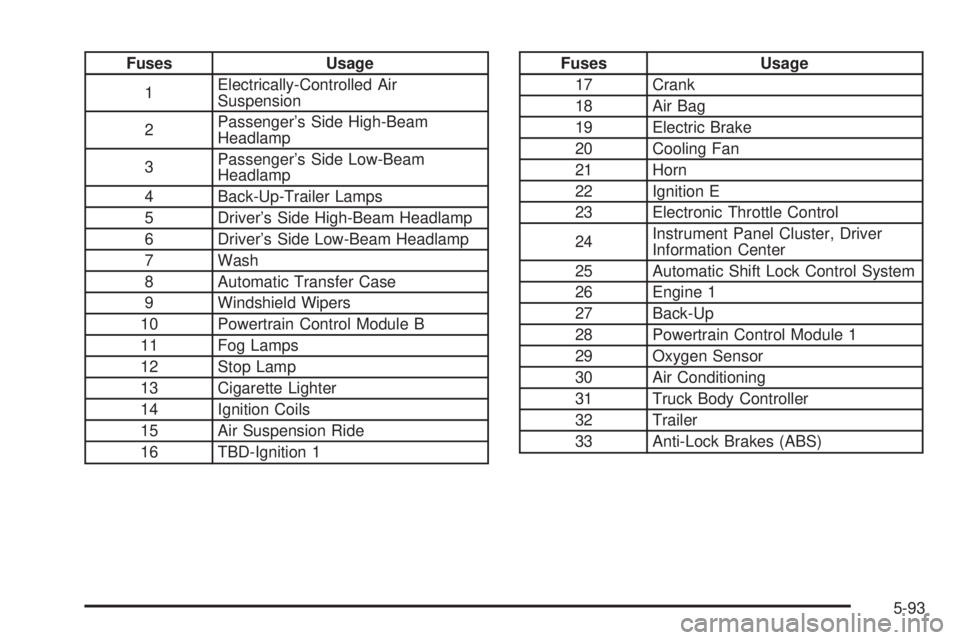
Fuses Usage
1Electrically-Controlled Air
Suspension
2Passenger's Side High-Beam
Headlamp
3Passenger's Side Low-Beam
Headlamp
4 Back-Up-Trailer Lamps
5 Driver's Side High-Beam Headlamp
6 Driver's Side Low-Beam Headlamp
7 Wash
8 Automatic Transfer Case
9 Windshield Wipers
10 Powertrain Control Module B
11 Fog Lamps
12 Stop Lamp
13 Cigarette Lighter
14 Ignition Coils
15 Air Suspension Ride
16 TBD-Ignition 1Fuses Usage
17 Crank
18 Air Bag
19 Electric Brake
20 Cooling Fan
21 Horn
22 Ignition E
23 Electronic Throttle Control
24Instrument Panel Cluster, Driver
Information Center
25 Automatic Shift Lock Control System
26 Engine 1
27 Back-Up
28 Powertrain Control Module 1
29 Oxygen Sensor
30 Air Conditioning
31 Truck Body Controller
32 Trailer
33 Anti-Lock Brakes (ABS)
5-93
Page 382 of 442
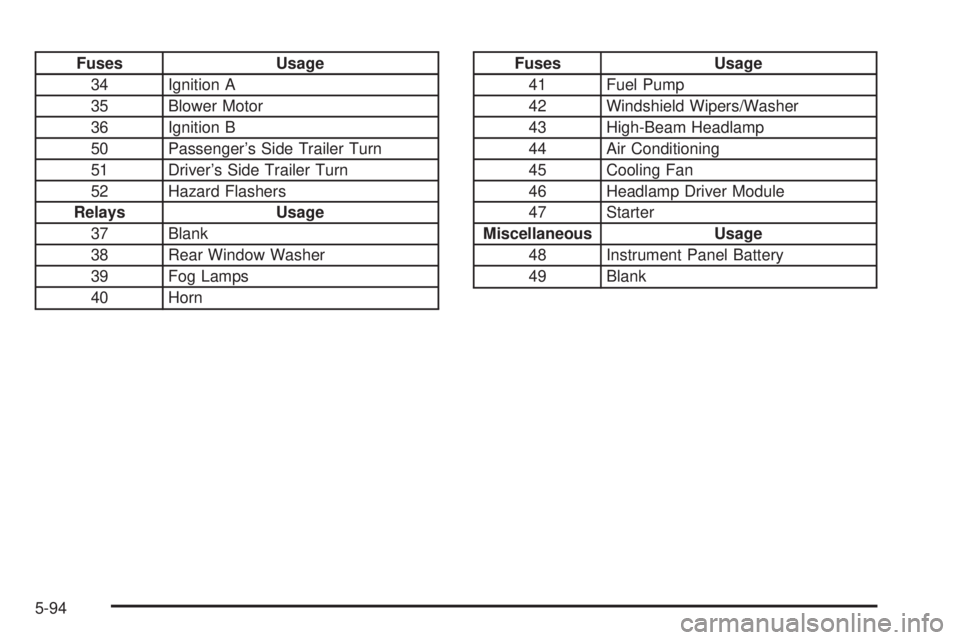
Fuses Usage
34 Ignition A
35 Blower Motor
36 Ignition B
50 Passenger's Side Trailer Turn
51 Driver's Side Trailer Turn
52 Hazard Flashers
Relays Usage
37 Blank
38 Rear Window Washer
39 Fog Lamps
40 HornFuses Usage
41 Fuel Pump
42 Windshield Wipers/Washer
43 High-Beam Headlamp
44 Air Conditioning
45 Cooling Fan
46 Headlamp Driver Module
47 Starter
Miscellaneous Usage
48 Instrument Panel Battery
49 Blank
5-94
Page 384 of 442
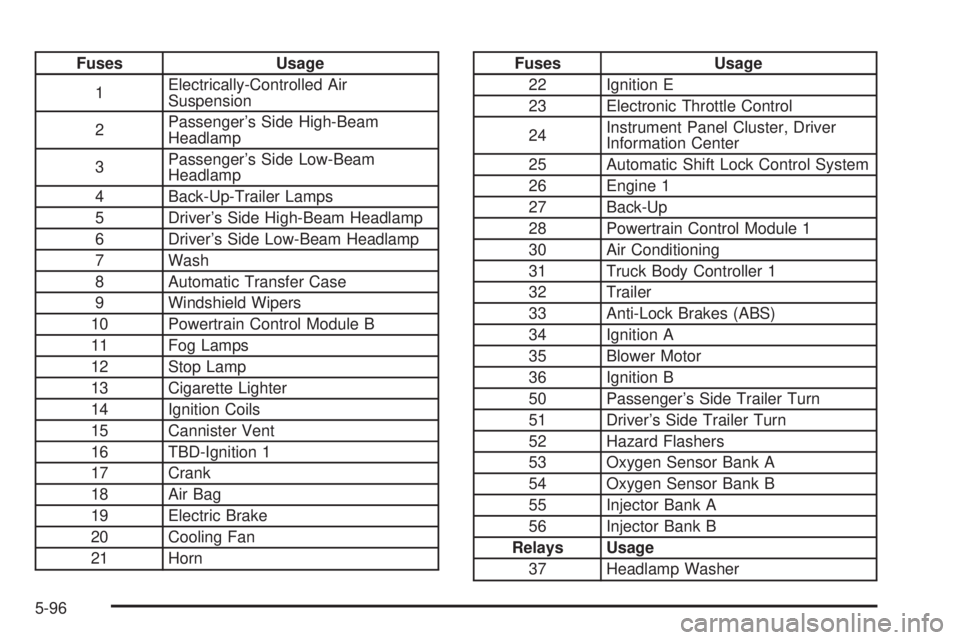
Fuses Usage
1Electrically-Controlled Air
Suspension
2Passenger's Side High-Beam
Headlamp
3Passenger's Side Low-Beam
Headlamp
4 Back-Up-Trailer Lamps
5 Driver's Side High-Beam Headlamp
6 Driver's Side Low-Beam Headlamp
7 Wash
8 Automatic Transfer Case
9 Windshield Wipers
10 Powertrain Control Module B
11 Fog Lamps
12 Stop Lamp
13 Cigarette Lighter
14 Ignition Coils
15 Cannister Vent
16 TBD-Ignition 1
17 Crank
18 Air Bag
19 Electric Brake
20 Cooling Fan
21 HornFuses Usage
22 Ignition E
23 Electronic Throttle Control
24Instrument Panel Cluster, Driver
Information Center
25 Automatic Shift Lock Control System
26 Engine 1
27 Back-Up
28 Powertrain Control Module 1
30 Air Conditioning
31 Truck Body Controller 1
32 Trailer
33 Anti-Lock Brakes (ABS)
34 Ignition A
35 Blower Motor
36 Ignition B
50 Passenger's Side Trailer Turn
51 Driver's Side Trailer Turn
52 Hazard Flashers
53 Oxygen Sensor Bank A
54 Oxygen Sensor Bank B
55 Injector Bank A
56 Injector Bank B
Relays Usage
37 Headlamp Washer
5-96
Page 387 of 442
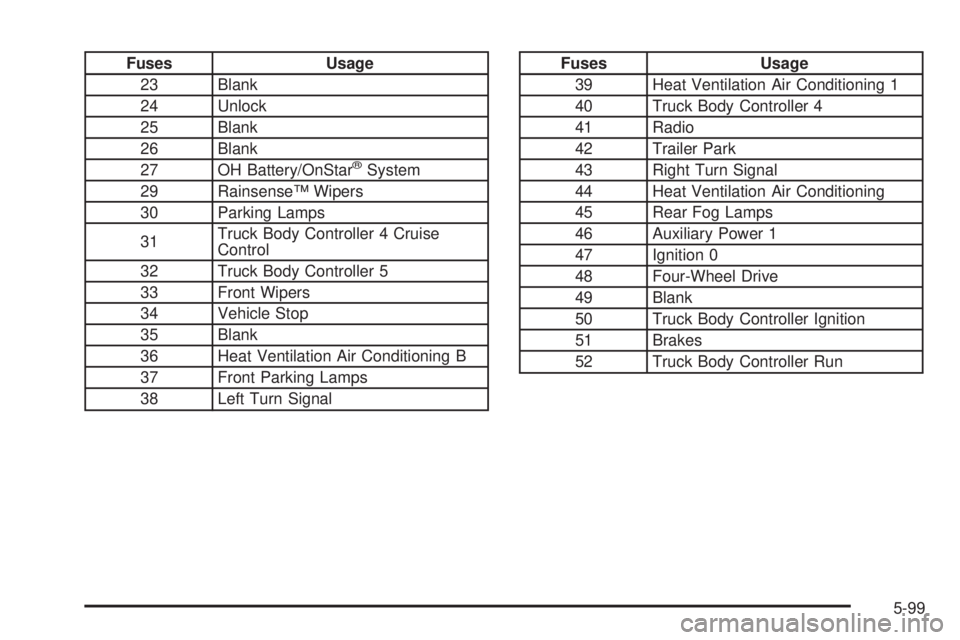
Fuses Usage
23 Blank
24 Unlock
25 Blank
26 Blank
27 OH Battery/OnStar
žSystem
29 RainsenseŸ Wipers
30 Parking Lamps
31Truck Body Controller 4 Cruise
Control
32 Truck Body Controller 5
33 Front Wipers
34 Vehicle Stop
35 Blank
36 Heat Ventilation Air Conditioning B
37 Front Parking Lamps
38 Left Turn Signal
Fuses Usage
39 Heat Ventilation Air Conditioning 1
40 Truck Body Controller 4
41 Radio
42 Trailer Park
43 Right Turn Signal
44 Heat Ventilation Air Conditioning
45 Rear Fog Lamps
46 Auxiliary Power 1
47 Ignition 0
48 Four-Wheel Drive
49 Blank
50 Truck Body Controller Ignition
51 Brakes
52 Truck Body Controller Run
5-99